Leaderboard




Popular Content
Showing content with the highest reputation on 01/14/2026 in Posts
-
I have a dump LISP called TakeADump, maybe I need this to go along with it!3 points
-
I relied on your pictures... ??? In your picture: I see for degrees: Deg/Min/Sec - Clockwise (on) - South 90d0' If not correct change ANGDIR, ANGBASE and AUNITS in: (mapcar 'setvar '("DIMZIN" "ANGDIR" "ANGBASE" "AUNITS" "AUPREC" "LUPREC" "LUNITS") (list 0 1 (* pi 1.5) 1 3 2 2))3 points
-
to update entmod you need to get familiar with dxf codes. This simple lisps will dump to the command line. All entities follow a pattern. ;;----------------------------------------------------------------------------;; ;; Dump all DXF Group Data (defun C:DumpIt (/ ent) (while (setq ent (car (entsel "\nSelect Entity to Dump"))) (mapcar 'print (entget ent '( "*"))) ) (princ) ) ;;----------------------------------------------------------------------------;; ;; Dump All Visual Lisp Methods and Properties for Selected Entity (defun C:VDumpIt (/ ent) (while (setq ent (car (entsel "\nSelect Entity to Dump"))) (vlax-Dump-Object (vlax-Ename->Vla-Object ent) t) ) (princ) ) entsel will return an entity name and point of seleciton. use that to see which endpoint your closest to. and use that to update with entmod and entupd. ;;----------------------------------------------------------------------------;; ;; Extend line to new point. ;; https://www.cadtutor.net/forum/topic/98936-change-a-length-of-line-by-feeding-a-new-end-point-to-the-association-list/ (defun c:EXTLINE ( / sel ent pick line sp ep newpt) (if (setq sel (entsel "\nSelect line near the end to extend: ")) (progn (setq ent (car sel) pt (cadr sel) line (entget ent) ) (if (= (cdr (assoc 0 line)) "LINE") (progn (setq sp (cdr (assoc 10 line))) (setq ep (cdr (assoc 11 line))) (if (< (distance pt sp) (distance pt ep)) (setq newpt (getpoint ep "\nSpecify new endpoint: ") line (subst (cons 10 newpt) (assoc 10 line) line) ) (setq newpt (getpoint sp "\nSpecify new endpoint: ") line (subst (cons 11 newpt) (assoc 11 line) line) ) ) (entmod line) (entupd ent) ) (prompt "\nSelected entity is not a LINE.") ) ) ) (princ) )1 point
-
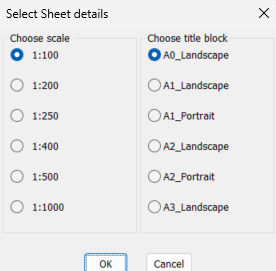
My first comment is when you hard print the pdf you have to pick a paper size so why would you not just pick a paper size to start with ? I do not understand the Custom scale size needed. In the world you are normally metric or imperial paper sizes. You can easily with a lisp etc plot a standard sheet size in a layout that has a Viewport at the correct scale. I think that is the step your not understanding, many example code does exist. For me a couple of choices make multiple layouts at scale walking along a pline, make multiple rectangs in Model at a scale matching viewports and title blocks in layouts. In this image select a title block and scale pick on Model and correct layout is made. A rectang is drawn in the model showing the result so you can accept or erase and run again. You can move and rotate the rectang before making the matching layout.
 1 point
 -
I don't really see the point of the dynamic mode in your function, especially if you want to snap to objects. This would seem to me to be sufficient and would resolve the osnap. (vl-load-com) (defun c:label_bearing ( / l_var AcDoc Space nw_style nw_obj pt1 pt alpha len_l m_pt val_txt) (setq l_var (mapcar 'getvar '("DIMZIN" "ANGDIR" "ANGBASE" "AUNITS" "AUPREC" "LUPREC" "LUNITS" "TEXTSIZE"))) (initget "Bearing Degrees") (if (eq (getkword "\nResult in [Bearing/Degrees]?<Bearing>: ") "Degrees") (mapcar 'setvar '("DIMZIN" "ANGDIR" "ANGBASE" "AUNITS" "AUPREC" "LUPREC" "LUNITS") (list 0 1 (* pi 1.5) 1 3 2 2)) (mapcar 'setvar '("DIMZIN" "ANGDIR" "ANGBASE" "AUNITS" "AUPREC" "LUPREC" "LUNITS") (list 0 0 0 4 3 2 2)) ) (setvar "TEXTSIZE" (* (getvar "VIEWSIZE") 0.015)) (setq AcDoc (vla-get-ActiveDocument (vlax-get-acad-object)) Space (if (= 1 (getvar "CVPORT")) (vla-get-PaperSpace AcDoc) (vla-get-ModelSpace AcDoc) ) ) (vla-startundomark AcDoc) (cond ((null (tblsearch "STYLE" "BEARING")) (setq nw_style (vla-add (vla-get-textstyles AcDoc) "BEARING")) (mapcar '(lambda (pr val) (vlax-put nw_style pr val) ) (list 'FontFile 'Height 'ObliqueAngle 'Width 'TextGenerationFlag) (list "romand.shx" 0.0 0.0 1.0 0.0) ) ) ) (setq nw_obj (vla-addMtext Space (vlax-3d-point '(0.0 0.0 0.0)) 0.0 "" ) ) (initget 1) (setq pt1 (getpoint "\nPick base point: ")) (initget 1) (setq pt (getpoint pt1 "\nPick other point: ")) (entmake (list (cons 0 "LINE") (cons 10 pt1) (cons 11 pt))) (setq alpha (angle pt1 pt) len_l (distance pt1 pt) m_pt (mapcar '* (mapcar '+ pt1 pt) '(0.5 0.5 0.5)) val_txt (vl-string-subst "%%d" "d" (strcat (angtos alpha) "\\P " (rtos len_l) " m")) ) (if (and (> alpha (* pi 0.5)) (<= alpha (* pi 1.5))) (setq alpha (+ alpha pi)) ) (mapcar '(lambda (pr val) (vlax-put nw_obj pr val) ) (list 'AttachmentPoint 'Height 'DrawingDirection 'InsertionPoint 'StyleName 'Layer 'Rotation 'TextString 'Color) (list 5 (getvar "TEXTSIZE") 5 m_pt "BEARING" (getvar "CLAYER") alpha val_txt 2) ) (vla-endundomark AcDoc) (mapcar 'setvar '("DIMZIN" "ANGDIR" "ANGBASE" "AUNITS" "AUPREC" "LUPREC" "LUNITS" "TEXTSIZE") l_var) (prin1) ) However, if you absolutely want the dynamic mode with the possibility of osnap, here is the redesigned function attached. ("osmode" must be defined beforehand, no possibility to force it when using the function) My management is succinct: only: "_end" "_mid" "_cen" "_nod" "_qua" "_int" "_ins" "_per" "_tan" "_nea" For a more elaborate management see perhaps the LeeMac function label_Bearing-vertex.lsp1 point
-
You should use the Plot Stamp to add the plotted/printed date, the date on the drawing should always remain the same, each revision gets a date as well and also should remain the same throughout the history of the drawing.1 point
-
Needs work, just an example from pyrx import Ap, Db, Ed, Ge, Gi import math print("command = yeehaw") class NavJig(Ed.DrawJig): def __init__(self, basepoint): Ed.DrawJig.__init__(self) self.ds = Ed.DragStatus.kNormal self.basepoint = basepoint self.curpoint = basepoint self.mt = Db.MText() self.mt.setDatabaseDefaults() self.mt.setAttachment(Db.MTextAttachmentPoint.kMiddleLeft) def get_vector_details(self, vector: Ge.Vector3d): v_length = vector.length() azimuth_rad = math.atan2(vector.x, vector.y) azimuth_deg = math.degrees(azimuth_rad) % 360 if 0 <= azimuth_deg <= 90: bearing = f"N {azimuth_deg:.2f} E" elif 90 < azimuth_deg <= 180: bearing = f"S {180 - azimuth_deg:.2f} E" elif 180 < azimuth_deg <= 270: bearing = f"S {azimuth_deg - 180:.2f} W" else: bearing = f"N {360 - azimuth_deg:.2f} W" return f"Length: {v_length:.4f}\\P" f"{azimuth_deg:.2f}%%d " f"{bearing}" def sampler(self): self.setUserInputControls(Ed.UserInputControls.kAccept3dCoordinates) self.ds, self.curpoint = self.acquirePoint() return self.ds def update(self): if self.ds == Ed.DragStatus.kNoChange: return False return True def worldDraw(self, wd: Gi.WorldDraw): if self.ds == Ed.DragStatus.kNoChange: return True try: geo = wd.geometry() v = self.curpoint - self.basepoint self.mt.setContents(self.get_vector_details(v)) self.mt.setLocation(self.basepoint + (v * 0.5)) self.mt.setDirection(v) geo.draw(self.mt) geo.polyline([self.basepoint, self.curpoint], Ge.Vector3d.kZAxis) return True except Exception as err: print(err) @Ap.Command() def yeehaw(): try: jig = NavJig(Ge.Point3d(0, 0, 0)) jig.setDispPrompt("\nPick point:\n") res = jig.drag() print("done", res) except Exception as err: print(err)
1 point
-
Have you looked into fields? When you edit a text object, you can type Ctrl-F to bring up the fields dialog. Pick a category, such as Date & Time, and pick the data you want to insert. To match your example, choose Date and a format. That field will be inserted into the text, like any other characters, but highlighted and with the corresponding data. There are many more pieces of data you can use. Once you put fields into your template, you may never have to change a title block again.1 point
-
Another, could do a pop enter value in a dcl box etc, rather than command line. It works to specified length. (defun C:test2 ( / p1 p2 dist d) (initget 1) (setq p1 (getpoint "\npick point 1")) (initget 1) (setq p2 (getpoint p1 "\npick point 2")) (setq dist (distance p1 p2)) (setq d (getreal (strcat "\nLine length is " (rtos dist 2 2) " Enter new length "))) (if (= d nil) (princ) (setq dist d) ) (setq p2 (polar p1 (angle p1 p2) dist)) (command "_.line""_non" p1 "_non" p2 "") (princ) ) (c:test2)1 point
-
Maybe it is possible to change the order of commands, at first "change", then "lengthen" ? (defun C:LineChLenDY ( / p1 p2 line1) (setq p1 (getpoint "Specify the first point: ")) (setq p2 (getpoint "Specify the second point: ")) (command "line" "non" p1 "non" p2 "") (setq line1 (entlast)) (command "change" line1 "" "P" "C" "1" "") (command "lengthen" "DYnamic") (princ) )1 point
-
I don't think I have used lengthen in a LISP, not used the command for a while, but a quick look at your code "non"p2) - add a couple of spaces for readbility, but in that line you haven't specified the line to lengthen and you might need to end with "": (command "_lengthen" "DYnamic" "non" p2 (entlast) "")1 point