Leaderboard




Popular Content
Showing content with the highest reputation on 05/14/2026 in Posts
-
This code is so helpful to convert texts or mtexts to mleader. In the attachments the lisp file and cad file that has the problem I tied to solve. The cad file contains a huge amounts of elevations as texts and leaders that are exploded for landscape work , therefore this lisp can help with case like this Regards TBC- JOIN TEXT AND POLYLINES AND CONVERT THEM TO MLEADER OR MAKE IT MANUALLY.lsp BR FIN LVLS-1.dwg2 points
-
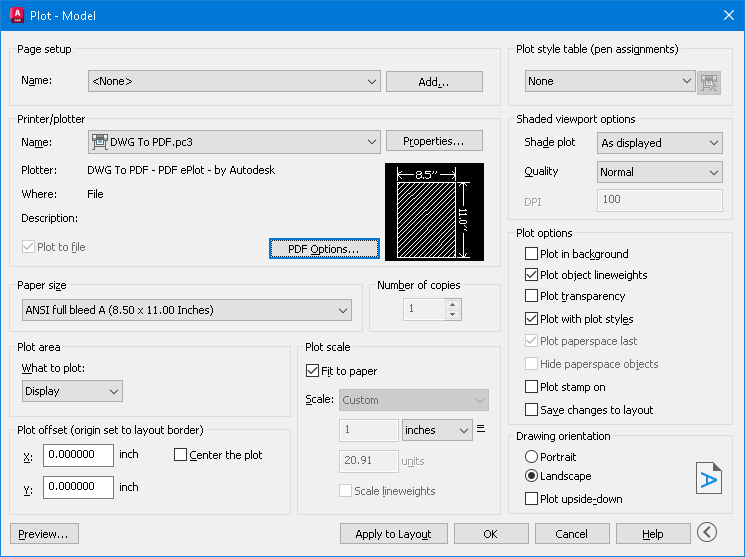
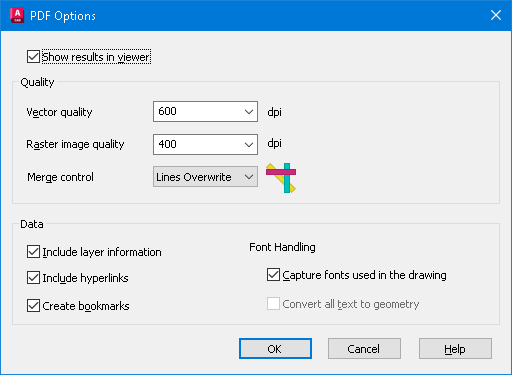
I meant to mention adding the (\U+200A). IIRC it's called a nonbreaking space. "Hairspace" sounds better IMO. I didn't try this, but one article mentioned to "Save As" or "Export to" PDF to kill the hyperlinks. My AutoCAD 2026 has the option to check Include Hyperlinks under PDF Options on the plot manager.
 2 points
 -
Is this text in a TTF font or SHX? AutoCAD exports SHX fonts to searchable comments. If you turn that off (set PDFSHX system variable to 0), maybe the links will turn off too. SLW seems to be on the right track with PDF Options, try that first.1 point
-
I'll try that shortly and see if that works. PDF options didn't do much - mostly I think it is a PDF viewer thing (got into a whole word of space names yesterday, EM-space, EN-space, half EM, quarter EM... and so on depends on the website, never knew there were so many 'spaces')1 point
-
Thanks SLW210 for looking for me, a font of all knowledge1 point
-
The project specifications are limiting us to Arial font, and a set format for the text strings. It isn't a CAD issue but a PDF reader issue - and we cannot control what others use to look at files. So not a lot we can actually do with the plotting to make it behave as it should unfortunately. So many texts that start with the format qwe.rty.uio..... are seen as hyperlinks in the PDF. Our work around - for anyone following this - is to use 'hairspace' after the '.' (\U+200A) which you can see is there if you know it is there else so far works.1 point