Leaderboard



Popular Content
Showing content with the highest reputation on 06/27/2026 in Posts
-
I think what you're saying makes a lot of sense, @Steven P I often identify locations in an AutoCAD drawing where there are questionable features that I need to verify on site. The idea is to use AutoCAD itself to navigate to each location, edit the drawing, and capture additional points if necessary, without having to export and import data through intermediate applications. I suppose this is something that many people have had in mind for quite some time.1 point
-
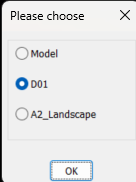
Back to your code, using OBDX you get the layout list like this. ; example code by AlanH June 2026 (setq fname (getfiled "Select dwt File" "D:\\alan" "dwt" 16)) (setq impdoc (vla-getinterfaceobject (vlax-get-acad-object) (strcat "ObjectDBX.AxDbDocument." (itoa (atoi (getvar 'acadver)))) ) ) (vl-catch-all-apply 'vla-open (list impdoc impdwg)) (setq layout (vlax-get-property impdoc 'layouts)) (setq lst '()) (vlax-for lname layout (setq lst (cons (vlax-get lname 'name) lst)) ) (if (not AH:Butts)(load "Multi Radio buttons.lsp")) (if (= but nil)(setq but 1)) (setq ans (ah:butts but "V" (cons "Please choose" lst))) (command "layout" "T" lname ans) You can then feed that lst to say a dcl and choose, this is using a library function that returns the layout name, save multi radio buttons in a support path or edit the (load to full path where saved. It will work for up to about 20 layout names, a screen limitation. Give it a try let me know how it works, Multi radio buttons.lsp
 1 point
 -
I wouldn't be too concerned about taking up AutoCAD processing, if you are out surveying then you probably aren't drawing? I'd do the LISP on demand though, say 'c:GNSS' whenever you want to plot the point, if you are wanting to use CAD while surveying - that way you are grabbing the point at the location you are at. LISP would probably work best by: Copy data file to say temp folder, read copied file, close copied file to avoid conflicts... so long as the receiver saves the data regularly and not just on closing the application. Might be the better option - can add in a DCL pop up to add data about the point recorded (what it is, and so on)1 point
-
Perhaps it's easier than it seems. If it is an integrated receiver and Windows is able to obtain location data from it, then you should be able to access that data through the 'Windows Location API'. In that case, it should be possible to write a script to be executed from PowerShell that creates a loop to poll the receiver and write the data to a file. That loop would run in parallel with AutoCAD, allowing Lisp to read the new data as it is written. This method would be "intrusive", since it would occupy AutoCAD's command stream for as long as the command is running. However, there is another, less intrusive option that could operate in the "background": write the data to a system variable ('USERS#') and create a reactor that responds to changes in that variable: 'vlr-sysvar-reactor'. If the script is executed in a background PowerShell instance, you would also need to write a Lisp command capable of closing that instance when necessary. Once the script has been debugged, it could be incorporated into the Lisp code itself, making the whole solution completely self-contained. I haven't had much free time lately, but I'll try to investigate all of this a bit further.1 point
-
What are you trying to accomplish with this code? First and foremost vla-CopyObjects doesn't support Layouts in the manner you are attempting, AFAIK. You need to use -LAYOUT command or pretty much need to use LeeMac's Steal or at least determine the method he uses for Layouts, which if I am looking at it correctly uses the Block Table record maybe more as I quickly glanced at it.1 point