Leaderboard



Popular Content
Showing content with the highest reputation on 07/23/2026 in Posts
-
Hi everyone, I'm Vico, an architectural designer. I've found this forum incredibly helpful over the years— so many of the LISP routines shared here have become the backbone of my daily workflow. But as my collection grew, one thing started driving me absolutely crazy: the APPLOAD dialog. The problem (I suspect I'm not alone) Managing dozens of .lsp, .fas, and .vlx files through that interface is clunky at best. You can't see what's loaded, what's conflicting, or even what half of them do without opening each file. And the Startup Suite? Let's just say it and I have a complicated relationship. Then there's the real nightmare: upgrading to a new PC. You spend half a day manually rebuilding your Startup Suite, redefining aliases in acad.pgp, and fixing broken Support paths — and you still forget something. My attempt at a solution Over the past few months I built a tool to solve this for myself, and I thought the community here might find it useful. It's part of a side-project I've been tinkering with called VedaCAD. The tool comes as a single compiled .vlx. By default it runs in Base mode — completely offline, no accounts, no network calls, nothing phoning home. It just sits quietly and manages your local scripts. What it does: Gives you a clean UI to see all your loaded scripts in one place — no more hunting through APPLOAD. Lets you assign custom command aliases directly from the interface, without manually editing acad.pgp or writing wrapper LISPs. Has a one-click "Export Config" that builds a lightweight JSON mapping of your entire environment. Take that file (plus your LISP folder) to a new machine, hit "Import Config", and everything comes back exactly as it was — script mappings, custom aliases, and paths, bypassing the native Startup Suite entirely. A couple of disclaimers It's written entirely in pure AutoLISP/Visual LISP and DCL, so it should be compatible all the way back to AutoCAD 2006 — none of that "requires .NET Framework X.x" nonsense. I've personally tested it on 2006, 2014, and 2024, and it runs smoothly right across that range. And again: fully air-gapped in Base mode. No telemetry, no registration nag, no "sign up to unlock." If you're paranoid about that sort of thing (I certainly am), you can verify with any network monitor like Wireshark. Why I'm posting I built this to scratch my own itch, and it's made my life genuinely easier. But I'm one person with one workflow — I'd be really curious to hear if this solves a real problem for anyone else, or if I've just been doing APPLOAD wrong all these years. If you'd like to give it a spin, the .vlx is attached. Happy to answer questions, and very open to feedback (including the critical kind). Cheers, Vico VedaCAD V1.0.VLX2 points
-
Hi everyone, I'm Vico, an architectural designer with about 12 years in the industry. I'm based in China and have mostly been active in local developer forums, but I've always respected the open-source spirit here. I wanted to share a quick tool I wrote and also get your feedback on an idea. Codebase Packer — a LISP for AI-assisted work Over the past months I've been building a web-based side-project for CAD. The frontend work forced me to lean heavily on AI assistants (Claude, ChatGPT). The biggest bottleneck was always the context window: opening and pasting 30+ files manually drove me crazy. So I solved it with a little LISP routine. Codebase Packer lets you point at a folder and aggregate every file inside into a single .txt, ready for an LLM prompt. ;;;;;;;;;;;;;;;;;;;;;;;;;;;;;;;;;;;;;;;;;;;;;;;;;;;;;;;;;;;;;;;;;;;;;;;;;;;;;;;; ;;; ;;; ;;; Command CPK (Codebase Packer) - Version 1.0 Release ;;; ;;; ;;; ;;; Features: ;;; ;;; Efficiently extracts the directory structure and file contents ;;; ;;; of a project. Features smart character encoding detection and ;;; ;;; automatically saves the packed file as UTF-8 alongside the ;;; ;;; project folder for AI-friendly integration. ;;; ;;; ;;; ;;; Author: Vico Wang ;;; ;;; Compatibility: AutoCAD 2006+ (Visual LISP / ActiveX) ;;; ;;; ;;; ;;;;;;;;;;;;;;;;;;;;;;;;;;;;;;;;;;;;;;;;;;;;;;;;;;;;;;;;;;;;;;;;;;;;;;;;;;;;;;;; (vl-load-com) (defun cpk:getdate ( / cd ) (setq cd (rtos (getvar 'cdate) 2 6)) (strcat (substr cd 1 4) (substr cd 5 2) (substr cd 7 2)) ) (defun cpk:read ( fn / ext charset stm text err ) (setq ext (strcase (vl-filename-extension fn) t) charset (if (member ext '(".lsp" ".dcl" ".mnl" ".bat" ".ini")) "GBK" "UTF-8") text "" ) (if (setq stm (vlax-create-object "adodb.stream")) (progn (setq err (vl-catch-all-apply '(lambda () (vlax-put-property stm 'type 2) (vlax-put-property stm 'mode 3) (vlax-put-property stm 'charset charset) (vlax-invoke stm 'open) (vlax-invoke stm 'loadfromfile fn) (if (> (vlax-get-property stm 'size) 0) (setq text (vlax-invoke stm 'readtext -1)) ) ) ) ) (if (= 'vla-object (type stm)) (progn (vl-catch-all-apply '(lambda () (vlax-invoke stm 'close))) (vlax-release-object stm) ) ) (if (vl-catch-all-error-p err) (strcat "// Note: Error reading file - " (vl-catch-all-error-message err)) (if (= "" text) "// Note: File is empty or extraction failed" text) ) ) "// Note: ADODB.Stream component missing" ) ) (defun cpk:traverse ( fso dir prefix islast root / fobj subdirs files items i cnt name rel ) (if (setq fobj (vl-catch-all-apply 'vlax-invoke (list fso 'getfolder dir))) (if (not (vl-catch-all-error-p fobj)) (progn (if (/= (strcase dir) (strcase root)) (setq name (vlax-get fobj 'name) rel (vl-string-translate "\\" "/" (substr dir (+ 2 (strlen root)))) out-tree (cons (strcat prefix (if islast "©¸©¤©¤ " "©À©¤©¤ ") name "/ # " rel) out-tree) ) ) (setq items nil) (vlax-for x (vlax-get fobj 'subfolders) (setq items (cons (cons x t) items))) (vlax-for x (vlax-get fobj 'files) (setq items (cons (cons x nil) items))) (setq items (reverse items) cnt (length items) i 0 ) (setq prefix (if (= (strcase dir) (strcase root)) "" (strcat prefix (if islast " " "©¦ ")))) (foreach item items (setq i (1+ i) name (vlax-get (car item) 'name) ) (if (cdr item) (cpk:traverse fso (vlax-get (car item) 'path) prefix (= i cnt) root) (progn (setq rel (vl-string-translate "\\" "/" (substr (vlax-get (car item) 'path) (+ 2 (strlen root))))) (setq out-tree (cons (strcat prefix (if (= i cnt) "©¸©¤©¤ " "©À©¤©¤ ") name " # maps to /" rel) out-tree)) (setq out-files (cons (list (vlax-get (car item) 'path) name rel) out-files)) ) ) ) (vlax-release-object fobj) ) ) ) ) (defun c:cpk ( / *error* old-cmd out-tree out-files fso shl fld root-dir root-name lst fn rel sv-dir sv-path stm cnt err ) (defun *error* ( msg ) (foreach obj (list fso shl fld stm) (if (and obj (= 'vla-object (type obj)) (not (vlax-object-released-p obj))) (vl-catch-all-apply 'vlax-release-object (list obj)) ) ) (if old-cmd (setvar 'cmdecho old-cmd)) (if (and msg (not (wcmatch (strcase msg t) "*break*,*cancel*,*exit*"))) (princ (strcat "\nCPK Error: " msg)) ) (princ) ) (setq old-cmd (getvar 'cmdecho)) (setvar 'cmdecho 0) (princ "\nSelect root folder to pack...") (if (setq shl (vlax-create-object "shell.application")) (progn (if (setq fld (vlax-invoke shl 'browseforfolder 0 "Select project root folder (Codebase Packer)" 0 0)) (setq root-dir (vlax-get (vlax-get fld 'self) 'path)) ) (vlax-release-object shl) ) ) (if root-dir (progn (setq fso (vlax-create-object "scripting.filesystemobject") root-name (vlax-get (vlax-invoke fso 'getfolder root-dir) 'name) out-tree (list (strcat root-name "/ # [Root Directory] " root-dir) "") ) ;; Automatically uses out-tree and out-files via LISP dynamic scoping (cpk:traverse fso root-dir "" t root-dir) (setq lst (list "Part A: Overall Folder and File Structure\n")) (foreach x (reverse out-tree) (setq lst (cons (strcat x "\n") lst)) ) (setq lst (cons "\n\nPart B: Specific File Contents\n" lst) out-files (reverse out-files) cnt (length out-files) ) (foreach x out-files (setq fn (car x) rel (caddr x) ) (setq lst (cons (strcat "\n------------------------------------------------------------\n" "File location: " rel "\n" "File name: " (cadr x) "\n" "------------------------------------------------------------\n\n" (cpk:read fn) "\n") lst) ) ) (setq lst (reverse lst)) (setq sv-dir (vl-catch-all-apply 'vlax-invoke (list fso 'getparentfoldername root-dir))) (if (or (vl-catch-all-error-p sv-dir) (= "" sv-dir)) (setq sv-dir root-dir) ) (if (/= "\\" (substr sv-dir (strlen sv-dir))) (setq sv-dir (strcat sv-dir "\\")) ) (if (setq sv-path (getfiled "Save Packed File" (strcat sv-dir root-name "-Packed-" (cpk:getdate) ".txt") "txt" 1)) (if (setq stm (vlax-create-object "adodb.stream")) (progn (setq err (vl-catch-all-apply '(lambda () (vlax-put-property stm 'type 2) (vlax-put-property stm 'mode 3) (vlax-put-property stm 'charset "utf-8") (vlax-invoke stm 'open) (foreach x lst (vlax-invoke stm 'writetext x)) (vlax-invoke stm 'savetofile sv-path 2) (vlax-invoke stm 'close) ) ) ) (vlax-release-object stm) (if (vl-catch-all-error-p err) (alert "\nUnable to write file. Please check permissions or file path.") (alert (strcat "Processing complete!\n\nProcessed " (itoa cnt) " files.\nFile saved (UTF-8) to:\n" sv-path)) ) ) ) ) (vlax-release-object fso) ) ) (*error* nil) (princ) ) (princ "\nCodebase Packer (Version 1.0 Release, Author: Vico Wang) loaded. Type CPK to start.") (princ) The story behind this tool That web frontend I mentioned? It turned into VedaCAD — an experiment in modernising how we manage CAD environments. We're all still copying .arg profiles and fixing broken Support paths like it's 1999. I wanted something simpler: wrap your scripts and configs into 6-character ShareCodes, Then type the ID in the VC panel and pull it down to use it directly. There is a fully free tier (BASE mode works offline, FREE tier allows sync up to 3MB per file). For creators, I'm experimenting with some tools like push-updates and a tip-jar (0% commission), but honestly the platform is still young and I'm here mostly to listen. If you'd like to try the Codebase Packer without copy-pasting, you can install it into AutoCAD using ShareCode 0FBGZB (whatever that means for you — no pressure). I'd genuinely appreciate any thoughts, especially from the veterans. Is "environment sync" a real pain point for you? Am I solving a problem that's just mine? Cheers, Vico2 points
-
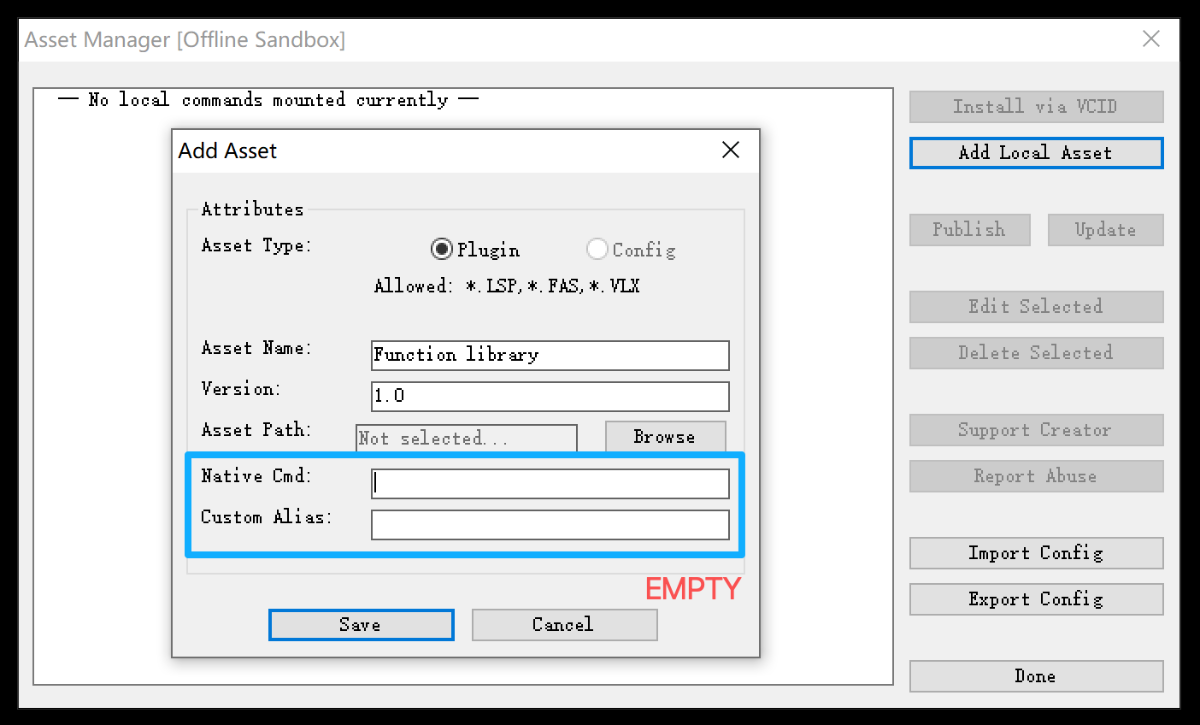
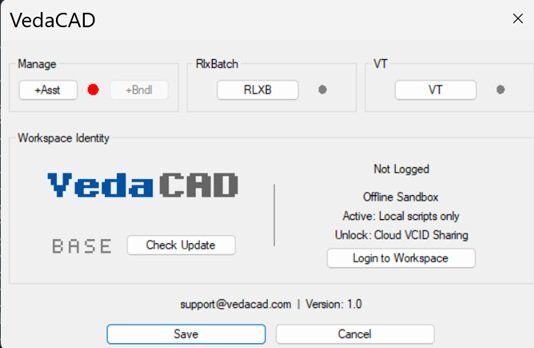
THX,By the way, I noticed RlxBatch in your screenshot. Assuming that's a subroutine library or a dependency file rather than a standard command, I thought I'd share a quick "hidden feature" built into the manager: If you are loading a core library that doesn't need a direct command alias to trigger it, you can leave BOTH the "Native Cmd" and "Custom Alias" fields completely blank when adding it. When you do this, VedaCAD flags it as a System Library: It hides it from the main DCL listbox, keeping your UI clean and focused only on actionable commands. It forces the file to load immediately upon AutoCAD startup. This actually ties into how VedaCAD handles performance. For standard commands (where you define an alias), the tool uses strict Demand Loading (similar to CAD's native autoload behavior, but managed internally). The actual LISP payload isn't evaluated into memory until the exact moment you type the alias. This means you can throw 100+ heavy routines into the manager without increasing your AutoCAD startup time or memory footprint. But for dependency files like RlxBatch, leaving the fields blank ensures those subroutines are pre-loaded into the namespace and ready for your other scripts to call.· Just thought that trick might be handy for your setup!
 1 point
 -
It looks great , you centainly know how to lisp like a pro, thanx! Not sure the image is getting through , ah , now it its , had to switch browser with a little less security...
1 point
-
Set bit 1 of the QAFLAGS system variable (storing the original value and resetting after the command); with bit 1 enabled, the EXPLODE command will accept selection sets when invoked from the LISP API. Alternatively, ensure that this bit is not set and only pass a single entity with no double quotes. The key point is that by controlling the bit, you can ensure consistent behaviour.1 point
-
AI , I like to call it Clippy , is here to stay but you are the architect , in the driver seat. Don't blame Clippy if something goes wrong, blame yourself when blindly believing everything it says. It's just a tool but you are responsible at all times. Like guns don't kill people , its people that kill people. Clippy is very good in finding facts and patterns , but it has no real understanding. When coding something big, give total control to Clippy and for sure you end up with lots of code you don't understand nor control anymore. Just do what you always do, create a block or flow diagram and feed it little bits and test everything. Like this weekend , have a portable airco for my sweat-room. Missed (misplaced) a part so I told Clippy and behold, oh you need this and there you find it, So ordered the part (and a day later I found it in a drawer) , but then Clippy said , oh you have simple (dum) airco , would you like to be able to control it with your phone?... sure, what's on your mind?... it gave me 3 options and I went for gold (of course). Paranoid dragon as I am , did some research (after I placed the order) on how IR boosters work and downloaded the manual and found out the IR booster I just ordered only works when airco has a remote with a display and mine only has buttons. So fortunately was able to cancel the order and found another , much cheaper and works with my machine. Now I can only blame myself, not Clippy. It means well , but it can't be trusted blindly. The better the info you feed it , the better result you can get back. At this moment the term AI is found everywhere , many times as a marketing slogan, designed by AI , controlled by AI , AI knows everything... well I can say for certain there is only one person on this whole planet who knows everything and I'm married to her. ok time to for me.1 point