Leaderboard




Popular Content
Showing content with the highest reputation on 08/03/2026 in Posts
-
Here is another for allowing explode... Solved: Re: Allow exploding outside the block editor - Autodesk Community Are these drawings from AutoCAD Civil 3D or some other CAD? (defun c:AllBlkYHtchN (/ ss i ent) (vl-load-com) ;;-------------------------------------------------- ;; Set Allow Exploding = Yes for all block definitions ;;-------------------------------------------------- (vlax-map-collection (vla-get-Blocks (vla-get-ActiveDocument (vlax-get-acad-object))) '(lambda (blk) (if (vlax-property-available-p blk 'Explodable) (vlax-put-property blk 'Explodable :vlax-true) ) ) ) ;;-------------------------------------------------- ;; Set all hatches Annotative = No ;;-------------------------------------------------- (if (setq ss (ssget "_X" '((0 . "HATCH")))) (progn (setq i 0) (repeat (sslength ss) (setq ent (ssname ss i)) (vl-catch-all-apply '(lambda () (setpropertyvalue ent "Annotative" 0) ) ) (setq i (1+ i)) ) ) ) (princ (strcat "\nUpdated " (itoa (if ss (sslength ss) 0)) " hatch(es). All explodable block definitions enabled." ) ) (princ) ) Do you need nested hatches and blocks, dynamic and/or anonymous blocks?2 points
-
Just a comment in Bricscad V25 the setpropertyvalue does not work, the get does work. One of those odd bugs2 points
-
in autocad you could change Annotative to "No" using setpropertyvalue. For example: (setpropertyvalue ent "Annotative" 0)1 point
-
@Danielm103 has updated the code and its running under Bricscad and is very impressive, I am sure the updated code will be posted here soon.1 point
-
Have a look at this1 point
-
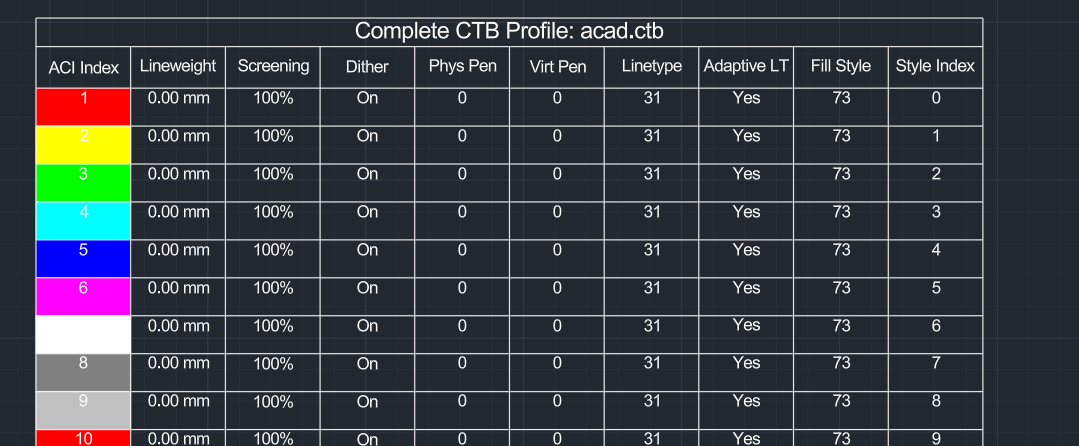
seems ezdxf has this feature, so we can just use it. import wx from ezdxf.addons import acadctb from pyrx import Ap, Db, Ed def browse_for_ctb(): """Opens a native wxPython file dialog to browse for a CTB file.""" parent = wx.GetApp().GetTopWindow() with wx.FileDialog( parent, "Select AutoCAD CTB File", wildcard="CTB files (*.ctb)|*.ctb", style=wx.FD_OPEN | wx.FD_FILE_MUST_EXIST, ) as fileDialog: if fileDialog.ShowModal() == wx.ID_CANCEL: return None return fileDialog.GetPath() @Ap.Command() def doit() -> None: ctb_path = browse_for_ctb() if not ctb_path: print("\nCommand cancelled.") return try: # 2. Parse the CTB using ezdxf ctb_data = acadctb.load(ctb_path) except Exception as e: print(f"\nFailed to parse CTB file: {str(e)}") return active_colors = [] for idx in range(1, 256): style = ctb_data[idx] # Keep the entry if it overrides lineweight or screening if style.lineweight >= 0 or style.screen < 100: # Store the index along with the full style object to access all 10 properties active_colors.append((idx, style)) if not active_colors: print("\nNo explicit pen styles overrides found in this CTB. Table skipped.") return db = Db.curDb() ps, insert_pt = Ed.Editor.getPoint("\nSpecify insertion point for the CTB table: ") if ps != Ed.PromptStatus.kNormal: return table = Db.Table() table.setDatabaseDefaults(db) # 10 headers corresponding to all the available style properties headers = [ "ACI Index", "Lineweight", "Screening", "Dither", "Phys Pen", "Virt Pen", "Linetype", "Adaptive LT", "Fill Style", "Style Index" ] total_rows = len(active_colors) + 2 # Title row + Header row + Data rows table.setSize(total_rows, len(headers)) table.setPosition(insert_pt) table.generateLayout() # Title Row Configurations table.setTextString(0, 0, f"Complete CTB Profile: {ctb_path.split('\\')[-1]}") # Header Row Configurations for col_idx, header_text in enumerate(headers): table.setTextString(1, col_idx, header_text) # Populate Data rows for row_idx, (idx, style) in enumerate(active_colors, start=2): lweight_str = f"{style.lineweight:.2f} mm" if style.lineweight >= 0 else "Use Object Value" table.setBackgroundColor(row_idx, 0, Db.Color(style.aci)) table.setContentColor(row_idx, 0, Db.Color(7)) table.setTextString(row_idx, 0, str(style.aci)) table.setTextString(row_idx, 1, lweight_str) table.setTextString(row_idx, 2, f"{style.screen}%") table.setTextString(row_idx, 3, "On" if style.dithering == 1 else "Off") table.setTextString(row_idx, 4, str(style.physical_pen_number)) table.setTextString(row_idx, 5, str(style.virtual_pen_number)) table.setTextString(row_idx, 6, str(style.linetype)) table.setTextString(row_idx, 7, "Yes" if style.adaptive_linetype == 1 else "No") table.setTextString(row_idx, 8, str(style.fill_style)) table.setTextString(row_idx, 9, str(style.index)) db.addToCurrentspace(table) print(f"\nSuccessfully generated a 10-column table with {len(active_colors)} CTB overrides.")
 1 point
 -
UPDATE: There has been a delay in the forum upgrade. I will make a further announcement in due course and let you know when it will be happening.1 point
-
Here is a quick find from Google for setting all blocks as explodable: ;; Set every block as explodable ;; http://forums.augi.com/showthread.php?33008-Allow-block-exploding&highlight=explodable&pp=10 ;; posted by whdjr (defun c:eb () (vl-load-com) (vlax-map-collection (vla-get-blocks (vla-get-activedocument (vlax-get-acad-object)) ) '(lambda (x) (and (vlax-property-available-p x 'explodable) (eq (vlax-get-property x 'explodable) :vlax-false) (not (vlax-put-property x 'explodable :vlax-true)) ) ) ) )1 point
-
Never have I needed Autosave. CTRL+S is just a habit now, even in non-AutoCAD programs. I also frequently Right-Click one of the Drawing Tabs and select Save All. I also know the difference between Qsave and Save and use both appropriately. (Note: they are the same in AutoCAD LT or used to be, I am not sure about newer LT versions) Saving your work is your job, not AutoCAD's. I wonder if a LISP with a reactor would be less troublesome for those that do not trust going without an Autosave? Or maybe this? A Better Autosave | AfraLISP Or... (command ".save") to Visual LISP - AutoLISP, Visual LISP & DCL - AutoCAD Forums Or... make a copy of current open drawing & place it into a predetermine folder - AutoLISP, Visual LISP & DCL - AutoCAD Forums And... LISP - Automatic Save that runs at set intervals1 point