Leaderboard




Popular Content
Showing content with the highest reputation on 09/24/2026 in Posts
-
This is something I hate to do, but sometimes I'm in a hurry. One title block may be different in some fundamental way. I can't just explode it, because I'll lose all the information in the attributes. There's not enough time to create an entire block for one sheet, and why bother when there's only one? So it's time to Burst a move (sorry).1 point
-
That sounds like a fake Norton Pop-Up, ISeeYou, used to be (is?) an older vulnerability for web cams, I guy was activating webcams without the activation light on and blackmailing women with photos, he was caught and arrested a while back. I'll look for the article. Here is the Wiki iSeeYou - Wikipedia This looks to be a good while back.1 point
-
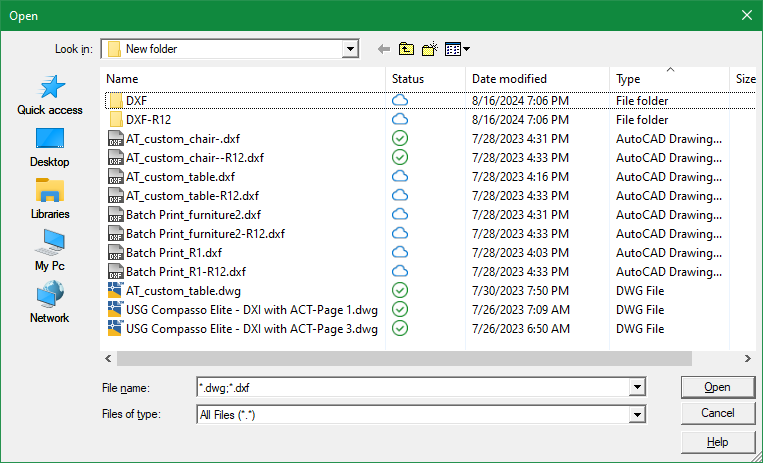
@dexusThis is pretty good too. Thanks for contributing. Though it does not check the AutoCAD window location and so the file selection window may open up on a different monitor, it does open really fast and remembers the monitor location where it last closed. I also like the different looking gui. Interestingly enough, I was able to get it to show multiple file types (*.dwg & *.dxf) by placing that in the filename argument instead of the extension argument: (filePicker (getvar"dwgprefix") "*.dwg;*.dxf" "")
 1 point
-
You can give this a try: (defun filePicker (directory filename extension / appHandle des pickedFile pickedFiles shell tmp tmpopen tmpoutput line) ;; Multi-file FilePicker using PowerShell OpenFileDialog ;; Returns a list of selected full file paths. ;; Returns nil if Cancel is pressed. (cond ;; Create temporary .BAT file ((and (setq tmp (vl-filename-mktemp nil nil ".bat")) (setq des (open tmp "w")) (write-line (strcat "<# : chooser.bat\n" ":: launches a File... Open sort of file chooser\n" "@echo off\n" "setlocal\n" "for /f \"delims=\" %%I in ('powershell -noprofile \"iex (${%~f0} | out-string)\"') do (\n" " echo %%~I\n" ")\n" "goto :EOF\n" ": end Batch portion / begin PowerShell hybrid chimera #>\n" "Add-Type -AssemblyName System.Windows.Forms\n" "$f = New-Object System.Windows.Forms.OpenFileDialog\n" "$f.InitialDirectory = \"" directory "\"\n" "$f.FileName = \"" filename "\"\n" "$f.Filter = \"" (cond ((= "dwg" (strcase extension t)) "AutoCAD Drawing (*.dwg)|*.dwg") ((= "dxf" (strcase extension t)) "AutoCAD DXF (*.dxf)|*.dxf") (t "All Files (*.*)|*.*") ) "\"\n" "$f.FilterIndex = 1\n" "$f.DefaultExt = \"" extension "\"\n" "$f.Multiselect = $true\n" "$f.ShowHelp = $true\n" "if ($f.ShowDialog() -eq [System.Windows.Forms.DialogResult]::OK) {\n" " $f.FileNames | ForEach-Object { $_ }\n" "}" ) des ) ) (not (close des)) (setq tmpoutput (vl-filename-mktemp nil nil ".txt")) (setq shell (vla-getinterfaceobject (vlax-get-acad-object) "WScript.shell")) (setq appHandle (vl-catch-all-apply 'vlax-invoke (list shell 'Run (strcat "cmd /c " tmp " > " tmpoutput) 0 :vlax-false))) (vlax-release-object shell) (not (vl-catch-all-error-p appHandle)) (setq tmpopen (open tmpoutput "r")) (while (setq line (read-line tmpopen)) (if (/= line "") (setq pickedFiles (append pickedFiles (list line)) ) ) ) (close tmpopen) (setq pickedFile pickedFiles) ) ((setq pickedFile (getfiled "" (strcat directory filename) extension 0)) (setq pickedFile (list pickedFile)) ) ) (if (and tmp (setq tmp (findfile tmp))) (vl-file-delete tmp) ) (if (and tmpoutput (setq tmpoutput (findfile tmpoutput))) (vl-file-delete tmpoutput) ) pickedFile )1 point
-
Agreed, the -DWGUNITS command is quite comprehensive, and particularly when receiving drawings from a non-team member. When I want to use it, I expand my commandline history to display 5 or 6 lines, in one go, all the better to display the numerous options.1 point