Leaderboard



Popular Content
Showing content with the highest reputation on 10/20/2026 in Posts
-
I think that the will to simplify the proccess of controling our environment (Ribbons,Menues,Varaibles,Lisps Etc.) can leed to more complications... and I also feel it loose it's original goal wich is to control our cad environment. It started with how to manage our lisp's, CUI (ribbon and menues) and varaibles setting and ended up with cloud-based app that (in my eyes...) only add complictions and I didn't fully understand its goal... to control the lisps - one autoload lisp file do it, and for organizations it can sit in a shared location. simple documantation file like excel or other formats can use to tell users what each lisp dose . organazations have system administrators for that. about settings: Bricscad have On_Doc_Load & on_start files, Autocad have its equivalents, and that is where varaibles can be set automatically. about the Ribbon and menues: CUI files can be deployed and loaded. there are other ways to progrematically do it like mentioned here through the registry and more, but I feel that some significant overshoot was displayed here. and do it through the cloud also raise some doubts for me.2 points
-
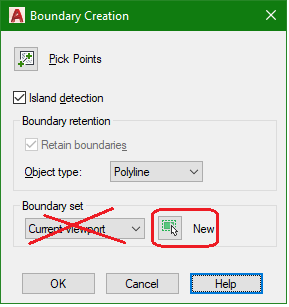
Just thought of another trick I've used in the past. I would let AutoCAD create a brand new outline of the area to be hatched for me with the Boundary command. But in the Boundary Creation window under Boundary set, do not use the default Current viewport setting. But instead click on the New button and then select only the objects that form the hatch area outline. This restricts AutoCAD to only consider those objects selected to generate the new boundary. Leave the Object type as Polyline and usually with this new Pline boundary generated, the Hatch creation completion success rate would increase just a tad more.
 1 point
-
When I run into a situation like this, the complexity or the effort can become too much, especially if there's a deadline. In that case I'll draw a polyline along the border and use that as the boundary for the hatch. Of course the polyline goes on a nonplotting layer.1 point