Leaderboard



Popular Content
Showing content with the highest reputation on 11/09/2026 in Posts
-
Great question! This is a classic challenge when working with meshes in AutoCAD. When you increase the smoothness level globally, it acts like a blanket smoothing filter and ruins hard edges. To keep sharp features intact, here are a few approaches depending on the model: Creasing Edges (MESHSMOOTHCREASE): Before increasing smoothness, you can apply creases to specific edges or vertices. This tells AutoCAD to hold those edges sharp even at higher subdivision levels. Selective Refinement: Instead of cranking up the global smoothness for the whole object, try refining only specific faces or sub-objects where smooth transitions are actually needed, leaving critical mechanical features alone. Hybrid Modeling: If precise dimensions and sharp intersections are critical (like for manufacturing components), I usually avoid heavy mesh editing and stick to solid modeling, or convert the final clean shape back to solids using CONVTOSOLID once the organic parts are done. How complex is the geometry you're working on? Are you dealing with mechanical parts or more of an architectural/organic shape?1 point
-
@PGia there are other ways to sort lists other than inbuilt Vl-sort. You can use a Lisp version of Bubble sort and other sort algorithms. I sort up to 5 items deep in a list and as far as I can tell none are lost. Yes have seen that with some lists using VL-sort. So you can sort on say X & Y. ; sorts on 1st two items (vl-sort lst '(lambda (a b) (cond ((< (car a) (car b))) ((= (car a) (car b)) (< (cadr a) (cadr b))) ) ) )1 point
-
sure : (alert "Press ok to start your 30hr day") anything else I can do for you?1 point
-
A couple of points to make: The need to create thousands of variables on-the-fly typically points to poor program design; in almost every case, a list is more suitable. Setting all such variables to nil at the end of the program does clear them from the document namespace, but consider that you are essentially creating & clearing global variables that are not local to the scope of your program, and as such, the variable names could potentially clash with identically named variables in the document namespace - this is generally considered bad practice.1 point
-
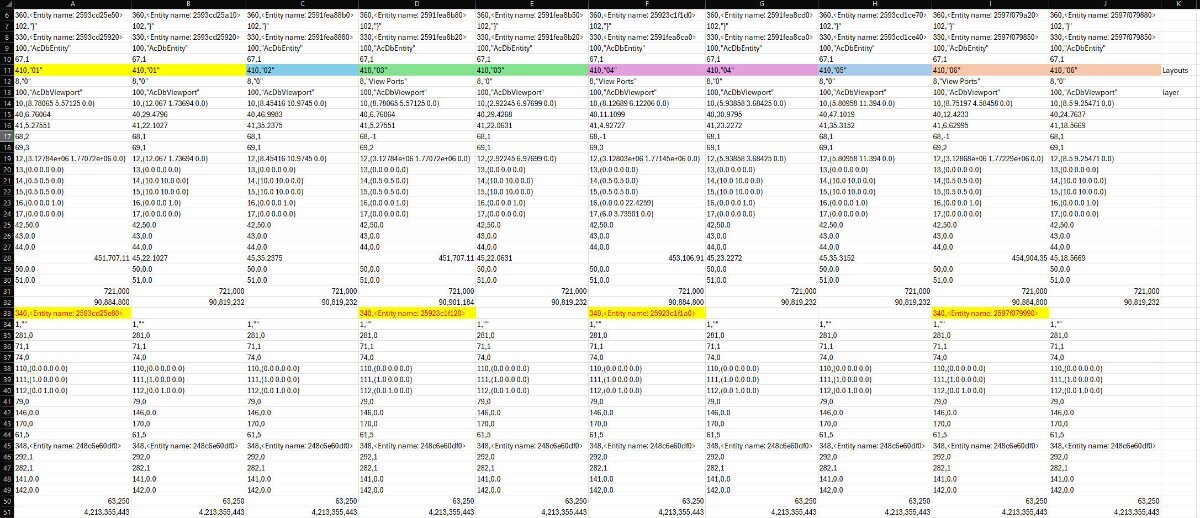
Here is how the codes line up between all the view ports:
 1 point
-
Just added this to the link from SLW210, below modified to select many dimensions. Note the entity to dimension to are lines just now, should work with other entities, just change that line, (defun c:reass ( / DimEnt MyDim Pta Ptb EndA EndB EndA_Lines EndB_Lines) (if (setq ss (ssget '((0 . "DIMENSION")) )) ; select dimensions (repeat (setq i (sslength ss)) ; loop through selection set (setq DimEnt (ssname ss (setq i (1- i)))) (command "_zoom" "O" DimEnt "") (setq MyDim (entget DimEnt)) (setq Pta (cdr (assoc 13 MyDim))) (setq Ptb (cdr (assoc 14 MyDim))) (setq EndA_Lines (ssget "_C" (mapcar '+ Pta (mapcar '/ Pta '(1000 1000 1000))) (mapcar '- Pta (mapcar '/ Pta '(1000 1000 1000))) '((0 . "LINE")) )) ; select entity close to end of dimension line (setq EndB_Lines (ssget "_C" (mapcar '+ Ptb (mapcar '/ Pta '(1000 1000 1000))) (mapcar '- Ptb (mapcar '/ Pta '(1000 1000 1000))) '((0 . "LINE")) )) ; select entity close to end of dimension line ; (command "dimreassociate" DimEnt "" "end" Pta "end" Ptb) (if EndA_Lines (command "dimreassociate" DimEnt "" "end" Pta "")) (if EndB_Lines (command "dimreassociate" DimEnt "" "end" "" "end" Ptb )) (command "_zoom" "previous") ) ; end repeat ) ; end if (princ) ; end quietly )1 point