All Activity
- Today
-

Having a dumb issue here that Im hoping someone can fix
TimC posted a topic in AutoCAD 3D Modelling & Rendering
I need to remove the holes in this plate. just like they were never there. I tried making a cylinder and filling it in and it didn't look right I tried a bunch of suggestions from AI and that was a waste of time. If you cant open the 3MF file I can possible get a different older version Mark Macey front plate.3mf -
 engerex joined the community
 -
Yes, I suppose that, as a last resort, it is always possible to select all the linear objects until the perimeter is closed. But this can be quite slow in many cases — especially when you have many boundaries to work with. It’s an important limitation. I’ll try to find out what can be done with regions. I’m not familiar with BricsCAD. But this may end up being yet another reason to give it a try.
-
Hi I am a retired architect with about 40 years professional practice, 30 of which have been focused on AutoCAD as a senior CAD technician and CAD manager in a large office and as a tertiary level teacher of architectural technology and building including a few years teaching AutoCAD at TAFE and QUT. I am wondering whether some of the work I have done developing CAD drawing strategies and support programs might be useful to help AutoCAD users both at beginner level and advanced 2D drafting. What I have to offer will be best explained on my website mycadhelper.com that I have recently been reviewing as a retirement hobby. There are several topics/pages that describe philosophies for the creation of command-aliases, reduction in command-entry-keystrokes, expanded command functionality, a practical automated layer-naming-standard-and-management system allowing coincident-overlay-drafting that focuses on production drawing work-zones. The most obvious aspect of MycadHELPER and its entry point is its clean-screen and keyboard-only input of commands and data supported by its custom carefully designed system of command aliases. I would be interested if anyone, after visiting my website, wishes to use some of my suggestions or even help in polishing it up. mycadhelper.com
-
A few i had laying around ;;----------------------------------------------------------------------------;; ;; ZOOM TO OBJECT AND OUT 5% (defun C:ZZ (/ SS) (if (setq SS (ssget)) (progn (vl-cmdf "_.Zoom" "OB" SS "") (vl-cmdf "_.Zoom" "0.95x") ) ) ) ;;----------------------------------------------------------------------------;; ;; ZOOM TO OBJECT THEN OUT 25% (defun C:ZX (/ SS) (if (setq SS (ssget)) (progn (vl-cmdf "_.Zoom" "OB" SS "") (vl-cmdf "_.Zoom" "0.75x") ) ) )
- Yesterday
-
 mieciucha joined the community
 -
Yes, I tend to zoom object then zoom out another 10%, catches most things
-
I'm not sure if zoom object will work in all cases. I tried several shapes including the OP's drawing and sometimes I was zoomed more than the zoom object showed, maybe zoom object and then zoom some more. I personally believe the better option would be to just use BricsCAD as it seems to handle these situations better. I would be curious to know the method they use for pick points for Boundary and Hatch in BricsCAD and if it works correctly in all cases. As discussed, select objects for hatch seems to be the best option for difficult geometry over pick points. It might be an easier code, though IIRC there should be some good codes out there for creating a closed polyline, then making regions so should be easier than working from scratch.
-
 tvha joined the community
 -

how to plot a folder of dwg's to pdf without opening AutoCAD
vudungcom replied to AutoMarcus's topic in AutoCAD Drawing Management & Output
Hello, You can try this app, by using accore so it supports Headless and multiple workers, it is faster than current software use active X. In setting pls use Acad not Brics. https://drive.google.com/drive/u/1/folders/1ds7cGhJ5FB9hYluPb1ej81CFOsqifPrl -
TurboPlot v1.1: Standalone, Multi-threaded Batch Plotter (Auto-detects Frames!)
vudungcom replied to vudungcom's topic in Application Beta Testing
Hello Bro, Please try version 1.3, which now supports BricsCAD. However, I should point out that BricsCAD does not provide a console application like AutoCAD's Core Console, so the processing speed is not as fast. The biggest advantage of this software is its multi-threading capability for AutoCAD users, which can significantly improve productivity. Nevertheless, adding BricsCAD support helps broaden the user base and provides more flexibility for users working in different CAD environments. https://drive.google.com/drive/u/1/folders/1ds7cGhJ5FB9hYluPb1ej81CFOsqifPrl - Last week
-

Automatically placing borehole tables with leaders without overlap
BIGAL replied to MSHR's topic in AutoLISP, Visual LISP & DCL
Oops fixed. Thanks. -
 ايمن سالم عطيه سالم joined the community
 -
 Jochen joined the community
 -
 SpecForgeBIM joined the community
 -
If it can be fixed with zooms then you can record the current zoom, zoom object, make the boundary and zoom back 'current' zoom - I think that method is online somewhere to copy / paste else can find it on Monday if needed.
-
 AutoCAD_Expert joined the community
 -
Just to add something more from me, as I did try to understand this problem as much as I could back then when I was working on my solution. Boundary command probably uses Pixel-Based Areas (Boundary Fill) method, that's why you have to see whole area on your screen. You can google what that is and how it works, but it makes sense to me considering there is a precision problem depending on "zoom" level. As for Hatch, it works the same for "pick points" method (boundary command + add hatch for that polyline), but if you choose "select objects" then it works as completely different method (just math without graphics part) and that's why its more accurate in this example. It all depends what you have as starting variables and what you need in the end. If you can, and its not a problem to select all lines, then CBoundray function from post above will work okay. This works like the Hatch by selecting objects... Of course clicking just one point inside area is simpler and faster, but can give wrong result because of its limitation. And I don't think its an issue with Autocad, its just a method that has its limitation. And it actually works really good otherwise, if you think about it, considering how much zoomed out you have to be and have a short segment to get the error. For example I work with topology, and have area centroids, and I needed to work some analysis with polylines for certain areas. In 99% cases boundary command was good, but with large areas with small boundary segments (like in OP example) I had this problem and needed to avoid it.
-
 parsa parto joined the community
 -

Automatically placing borehole tables with leaders without overlap
SLW210 replied to MSHR's topic in AutoLISP, Visual LISP & DCL
@PGia is not the OP. The OP is @MSHR. -

A CODE FOR DIVIDING OBJECTS WITH POINTS AS IN MEASURE AND DIVIDE COMMAND IN AUTOCAD BUT WAY MORE ADVANCED
darshjalal replied to darshjalal's topic in AutoLISP, Visual LISP & DCL
Your name of course will be there always. You too free to use any code I am posting here or modify it for the better ideas. Thank you so much. Regards. -
A CODE FOR DIVIDING OBJECTS WITH POINTS AS IN MEASURE AND DIVIDE COMMAND IN AUTOCAD BUT WAY MORE ADVANCED
darshjalal replied to darshjalal's topic in AutoLISP, Visual LISP & DCL
divcurve-lisp-all-option.mp4 -
 karl22 joined the community
 -
The issue of zoom in Acad and a lisp has been known since I think Acad existed, I know at times have had to use ZOOM C scale to get lisps to work, There may be a way around the problem perhaps using Boundingbox but I certainly have not tested.
-
Idk about that this is a super simple lisp that will allow you to select multiple entites. But if they aren't within the fuzz distance of each other they wont connect. ;;----------------------------------------------------------------------------;; ;; Copy Boundary Entities to join as a single polyline fuzz is 0.1 units ;; https://www.cadtutor.net/forum/topic/99146-boundary-command/ mhupp:06/04/26 (defun C:CBoundray (/ ss ss1 obj) (setq ss1 (ssadd)) (while (setq ss (ssget '((-4 . "<OR") (0 . "LINE") (0 . "ARC") (0 . "LWPOLYLINE") (-4 . "OR>")))) (foreach obj (mapcar 'vlax-ename->vla-object (vl-remove-if 'listp (mapcar 'cadr (ssnamex ss)))) (vla-copy obj) ) (command "_.PEDIT" "_M" ss "" "_J" "0.1" "W" "0" "") ) (princ) )
-
I had no idea about this issue. Many thanks to everyone for the information It really seems that this is AutoCAD’s ancient problem — known since the end of the previous millennium and still unresolved in this one. In any case, it doesn’t seem to be something easily approachable for Lisp programmers, since it is not easy to find published code aimed at solving this AutoCAD deficiency.
-
Automatically placing borehole tables with leaders without overlap
BIGAL replied to MSHR's topic in AutoLISP, Visual LISP & DCL
@MSHR its your turn now people waiting for sample dwg, there are prepared to help, like @CyberAngel I suggested can select boreholes and make a single table of those selected. Repeat as required. -
A CODE FOR DIVIDING OBJECTS WITH POINTS AS IN MEASURE AND DIVIDE COMMAND IN AUTOCAD BUT WAY MORE ADVANCED
BIGAL replied to darshjalal's topic in AutoLISP, Visual LISP & DCL
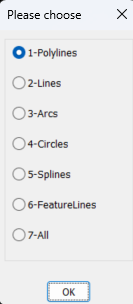
If your offering something a good idea is to provide images or a movie about what the program does, else the "Why bother" will occur. "(setq oldDynPrompt (getvar "DYNPROMPT")) Fails in Bricscad V25. Here is a freebie for you I dont uses initget. Multi radio buttons.lsp (if (not AH:Butts)(load "Multi radio buttons.lsp")) (setq ans (ah:butts but "V" '("Please choose" "1-Polylines" "2-Lines" "3-Arcs" "4-Circles" "5-Splines" "6-FeatureLines" "7-All"))) You ask for a distance only so it would make sense that it ask for intervals, we did road design and in an intersection kerb the curve was nearly always based on 4 points. maybe when asked for a distance enter a -ve value say -4 means break into 4 even spacing. Have added a couple of other make dcl on the fly for you just leave my name in the code but free to use. You can make a dcl then convert it to lsp code using write-line for the dcl code so dont need the MULTI's.Multi GETVALS.lspMulti toggles.lsp
-
 Brady joined the community
 -
It's supposed to use the HPGAPTOL as far as I know. This has been an issue for sometime, now that I looked back into from a few years ago, this problem also occurs with Hatch command. I just tried Boundary and Hatch on a closed polyline object at Zoom Extents and got ... And despite the first instruction, Zooming In resolved the issue. I normally resolve this with Hatch by using Select Object, maybe Hatch, Select Object, delete the Hatch and keep the Boundary could work for the OP. @lastknownuser's post brought it back to my memory. There is a thread around from a while back on this issue and needing to use Select Object option for Hatch.
-

Automatically placing borehole tables with leaders without overlap
CyberAngel replied to MSHR's topic in AutoLISP, Visual LISP & DCL
Off the top of my head, could you use polar coordinates to split the site into slices? With 60-degree increments, you have six slices. When you process a borehole, you use the distance from the center of the site to place the table at a proportional distance in the outer area. By setting the placement angle to a clamped fraction of the slice, you get a fixed number of places for the tables, so there's no chance of overlap. That way you don't have a lot of edge cases, and the tables correspond roughly to the boreholes. I'm probably not explaining this clearly. I can put together a diagram and maybe some code if you need them. -

A CODE FOR DIVIDING OBJECTS WITH POINTS AS IN MEASURE AND DIVIDE COMMAND IN AUTOCAD BUT WAY MORE ADVANCED
pkenewell replied to darshjalal's topic in AutoLISP, Visual LISP & DCL
@darshjalal OK - so you updated the first post - with the comments that could already be read in the file. What I asked for was: 1) what it is used for? 2) how it is useful? 3) how the features are helpful? That's all we were asking, rather than the extremely technical description. -
Was reading up on this too. apparently AutoCAD boundary command doesn't have a tolerance setting but BricsCAD does. That is why people opt to use hatching and then you can create the boundary from the hatch. and then delete the hatch. I'm confused since their isn't a gap/vertex at that location.
-
The only "solution" besides zooming in I could determine, was to copy the polylines in place and use region on them, which seems to be correct in the example drawing. That should be able to be done with a LISP? Boundary.dwg
-
Hi All I have changed this code to have more options, you can select ByLayer = Layer 0 + ByLayer color ByBlock = Layer 0 + ByBlock color") KeepAllLayers = Keep original layers and colors") you can also select a block or select everything hope someone finds it useful Burst Nested Blocks.lsp