All Activity
- Past hour
-
'Showtabs" does not exist in my AutoCAD 2027. Are these the variables you're after? FILETAB: Type this into the command line to instantly display the file tabs. FILETABCLOSE: Type this into the command line to hide the file tabs. FILETABSTATE: The system variable used to check or set their status (1 for on, 0 for off)
- Today
-
@masao_8 The Express tools must be installed with AutoCAD. If you mean just loading it, it's in my code above: (if acet-load-expresstools (acet-load-expresstools)) To make a grread loop work exactly like ssget. it's a huge ask. There is a ton of options to emulate. Could you explain EXACTLY what you want the function to do? What you're asking for has seemed to shift, or you weren't explaining it well enough. Below is an update to my code to add just the auto window and crossing selection: ;; Function to do a simple Select/Deselect using grread. ;; By PJK - 6/16/2026 ;; Updated 6/29/2026 to add window selection emulation (defun pjk-grread-Select (/ done en grl grc grv ss ss->elst sx wp1 wp2) (defun ss->elst (ss / i r) (if ss (repeat (setq i (sslength ss))(setq r (cons (ssname ss (setq i (1- i))) r))) ) ) (if acet-load-expresstools (acet-load-expresstools)) (setq ss (ssadd)) (princ "\nSelect to add objects or SHIFT+Select to remove from selection set: ") (while (not done) (setq grl (grread T 15 (if wp1 0 2)) grc (car grl) grv (cadr grl) ) (cond ((= grc 5) (redraw) (if wp1 (progn (grdraw wp1 (list (car grv) (cadr wp1) (caddr wp1)) -1 (if (< (car grv) (car wp1)) 1 0)) (grdraw wp1 (list (car wp1) (cadr grv) (caddr wp1)) -1 (if (< (car grv) (car wp1)) 1 0)) ) ) ) ((= grc 3) (if (acet-sys-shift-down) (if (setq en (car (nentselp grv))) (progn (if (ssmemb en ss)(ssdel en ss)) (redraw en 4) ) (if (not wp1) (progn (setq wp1 grv) (princ "\rSelect opp corner: ") ) (progn (redraw) (setq wp2 grv) (if (< (car wp2) (car wp1)) (mapcar '(lambda (a)(ssdel a ss)(redraw a 4)) (setq sx (ss->elst (ssget "C" wp1 wp2))) ) (mapcar '(lambda (a)(ssdel a ss)(redraw a 4)) (setq sx (ss->elst (ssget "W" wp1 wp2))) ) ) (princ (strcat "\n(" (itoa (length sx) ) ") Objects found and Removed from selection. " ) ) (setq wp1 nil wp2 nil) ) ) ) (if (setq en (car (nentselp grv))) (progn (ssadd en ss) (redraw en 3) ) (if (not wp1) (progn (setq wp1 grv) (princ "\rSelect opp corner: ") ) (progn (redraw) (setq wp2 grv) (if (< (car wp2) (car wp1)) (mapcar '(lambda (a)(ssadd a ss)(redraw a 3)) (setq sx (ss->elst (ssget "C" wp1 wp2))) ) (mapcar '(lambda (a)(ssadd a ss)(redraw a 3)) (setq sx (ss->elst (ssget "W" wp1 wp2))) ) ) (princ (strcat "\n(" (itoa (length sx)) ") Objects found and added to selection. " ) ) (setq wp1 nil wp2 nil) ) ) ) ) ) ((= grc 2) (setq done (if (vl-position kcode '(13 32)) T nil)) ) ((= grc 25)(setq done T)) ) ) (if (> (sslength ss) 0) (progn (foreach i (mapcar 'cadr (ssnamex ss))(redraw i 4)) ss ) nil ) )
-
If Express Tools isn't installed in AutoCAD, how can I load it while this code is running? I want to achieve a functionality similar to "ssget", but with shortcut key support. @Tsuky thanks you so much.
-

Change text color in AutoCAD Lt Tables Lisp request
MSHR replied to MSHR's topic in AutoLISP, Visual LISP & DCL
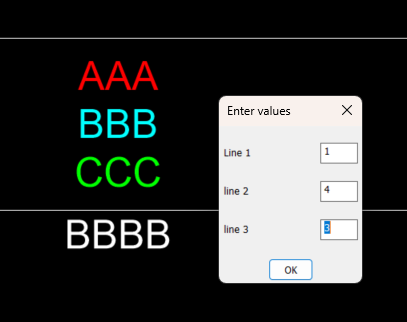
Hi, I extracted the results from PDF files, and it’s very tedious and time-consuming work. I have several lines in my cells, and each line should be a different color. Have you written a program for this before? -
Change text color in AutoCAD Lt Tables Lisp request
MSHR replied to MSHR's topic in AutoLISP, Visual LISP & DCL
I Have Autocad Lt, and office soft wares as well -

How to create field that shows text from a dimension
ColinPearson posted a topic in AutoCAD 2D Drafting, Object Properties & Interface
Greetings y'all. I've created a block that has a Linear Parameter in it so I can easily adjust the length. I've also put a Dimension into the block then turned off all the arrows/extension lines/etc. That way I have a quick visual check showing ho long the block is. I've also made plan/elev/end views that show up with Viz States. All good. My one problem is that when I pick the end view, the two dots that show where the Dimension attaches at are visible, and I've accidentally selected and deleted blocks when I drag a window that includes these dots. In the file attached, the 26'-6" text is from the Dimension and the 20' is from the Field/MText. I have some ideas of what I want I'm not sure how to make them work: 1) Turn these dots off. I don't think this is possible. 2) Insert a Field in an MText that is set to show the Measurement of the Dimension. I thought this would work but it doesn't update when I stretch the block out. 3) Some other idea anyone may have? 4) Give up and turn off the dimension in the end view. I'd prefer to keep it if possible, but it's only an issue in the end view b/c the dimension is as long as the visible portions in plan/side views so the dots aren't 'outside' of the block. Thanks y'all! Drawing2.dwg -
I don't know if I understood exactly what the need was, but here is my proposal. Moving the cursor over entities adds to the selection if the mode is active (left-click) and pressing + or - toggles to add or remove. (defun C:AutoSel ( / oldpcka key_mod ss tmp key_sel e_sel) (setq oldpcka (getvar "PICKADD") key_mod 'ssadd) (setvar "PICKADD" 2) (or (setq ss (ssget "_I")) (setq ss (ssget "_P")) ) (if ss (sssetfirst nil ss) (setq ss (ssadd))) (princ "\n[+/-]: AutoSelect ADD/REMOVE [Left-Click]: AutoSelect ON/OFF [Right-Click]: Quit AutoSelect ") (princ "\nAutoSelect <<OFF>>") (while (or (= 5 (car (setq tmp (grread t 5 2)))) (= 3 (car tmp)) (member tmp '((2 43) (2 45)))) (cond ((= 2 (car tmp)) (cond ((eq (cadr tmp) 43) (setq key_mod 'ssadd) (princ "\nMode add select") ) ((eq (cadr tmp) 45) (setq key_mod 'ssdel) (princ "\nMode remove select") ) ) ) ((= 3 (car tmp)) (if (null key_sel) (progn (setq key_sel T) (princ "\nAutoSelect <<ON>>") ) (progn (setq key_sel nil) (princ "\nAutoSelect <<OFF>>") ) ) ) ((= 5 (car tmp)) (cond ((and key_sel (setq e_sel (nentselp (cadr tmp)))) (cond ((eq 'ENAME (type (car (last e_sel)))) ((eval key_mod) (car (last e_sel)) ss) ) ((eq "VERTEX" (cdr (assoc 0 (entget (car e_sel))))) ((eval key_mod) (cdr (assoc 330 (entget (car e_sel)))) ss) ) (T ((eval key_mod) (car e_sel) ss)) ) (sssetfirst nil ss) ) (T nil) ) ) (T (princ "\nAbnormal command shutdown ")) ) ) (setvar "PICKADD" oldpcka) (princ "\nEnd of command. ") (prin1) )
-

Standard texts are hiding somehow can anyone please help??
SLW210 replied to Vijay's topic in AutoCAD 2D Drafting, Object Properties & Interface
I have moved your thread to the AutoCAD 2D Drafting, Object Properties & Interface Forum. Can you post a .dwg? Are you using AutoCAD 2015 as shown in your profile? What are your computer and graphics card specifications? What Operating System? -
- Yesterday
-
thanks all!! @pkenewell thanks you. this is good. but i want to use "ssget" has "quick iniget". use express tools can do it,but not express tools how to do it. (defun _redrawss (ss mode / i) (if (and ss (= (type ss) 'PICKSET) (> (sslength ss) 0)) (repeat (setq i (sslength ss)) (redraw (ssname ss (setq i (1- i))) mode) ) ) ) (defun _getwindowselection (msg p1 filter flag / gr p3 p2 p4 col winflag) (princ msg) (setq p3 nil) (while (/= 3 (car (setq gr (grread t 13 0)))) (if (= 5 (car gr)) (progn (redraw) (setq p3 (cadr gr)) (if (and p1 p3) (progn (setq p2 (list (car p3) (cadr p1) (caddr p3)) p4 (list (car p1) (cadr p3) (caddr p3)) col (if (or (eq flag "_C") (minusp (- (car p3) (car p1)))) -256 256) ) (grvecs (list col p1 p2 p1 p4 p2 p3 p3 p4)) ) ) ) ) ) (redraw) (if (and p1 p3) (progn (setq winflag (cond (flag) ((minusp (- (car p3) (car p1))) "_C") (t "_W") ) ) (if filter (ssget winflag p1 p3 (list filter)) (ssget winflag p1 p3) ) ) nil ) ) ;;BYLAYER (defun get-real-linetype (ed / lt lay layed) (setq lt (assoc 6 ed)) (if (or (null lt) (= (cdr lt) "BYLAYER")) (progn (setq lay (cdr (assoc 8 ed))) (if (setq layed (tblsearch "LAYER" lay)) (cdr (assoc 6 layed)) "CONTINUOUS" ) ) (cdr lt) ) ) ;;BYLAYER (defun get-real-color (ed / col lay layed) (setq col (assoc 62 ed)) (if (or (null col) (= (cdr (assoc 62 ed)) 256)) ; 256 = BYLAYER (progn (setq lay (cdr (assoc 8 ed))) (if (setq layed (tblsearch "LAYER" lay)) (cdr (assoc 62 layed)) 7 ) ) (cdr col) ) ) ;; (defun c:CDIA (/ base-ent base-ed base-ltype base-color ss express gr g1 g2 p1 pick filt i e) ;; select circle (princ "\n-> select circle...") (if (null (setq base-ent (entsel))) (progn (princ "\n-> not select。") (princ)) (progn (setq base-ed (entget (car base-ent))) (if (/= (cdr (assoc 0 base-ed)) "CIRCLE") (progn (princ "\n-> not circle。") (princ)) (progn (setq base-ltype (get-real-linetype base-ed)) (setq base-color (get-real-color base-ed)) (princ (strcat "\n->linetype: " base-ltype ",color: " (itoa base-color))) ;; Express Tools "SHIFT" (setq express (and (vl-position "acetutil.arx" (arx)) (not (vl-catch-all-error-p (vl-catch-all-apply 'acet-sys-shift-down nil))) ) ) ;; (setq ss (ssadd)) ;; (setq filt (list (cons 0 "CIRCLE") (cons 6 base-ltype) (cons 62 base-color) ) ) (princ "\nSelect objects: ") ;; (while (/= 2 (car (setq gr (grread t 13 2)))) (setq g1 (car gr) g2 (cadr gr)) (_redrawss ss 3) (cond ((= g1 5) nil) ; ((= g1 3) ; ;; click (if (setq pick (ssget g2 filt)) (progn (setq pick (ssname pick 0)) (cond ((and express (acet-sys-shift-down)) ; SHIFT remove (if (ssmemb pick ss) (progn (ssdel pick ss) (redraw pick 4)) ) ) (t (if (not (ssmemb pick ss)) (ssadd pick ss) ) ) ) ) ;; (if (setq pick (_getwindowselection "\nSpecify Opposite Corner: " g2 nil nil)) (cond ((and express (acet-sys-shift-down)) ; SHIFT + remove (repeat (setq i (sslength pick)) (setq e (ssname pick (setq i (1- i)))) (if (and (ssmemb e ss) (wcmatch (cdr (assoc 0 (entget e))) "CIRCLE")) (progn (ssdel e ss) (redraw e 4)) ) ) ) (t ; (repeat (setq i (sslength pick)) (setq e (ssname pick (setq i (1- i)))) (if (and (= (cdr (assoc 0 (entget e))) "CIRCLE") (= (get-real-linetype (entget e)) base-ltype) (= (get-real-color (entget e)) base-color) (not (ssmemb e ss)) ) (ssadd e ss) ) ) ) ) ) ) (princ "\nSelect objects: ") ) ) ) ;; (setq g2 (cadr gr)) (cond ((wcmatch (strcase (chr g2)) "W") (if (setq p1 (getpoint "\nSpecify First Corner for Window: ")) (if (setq pick (_getwindowselection "\nSpecify Opposite Corner: " p1 nil "_W")) (repeat (setq i (sslength pick)) (setq e (ssname pick (setq i (1- i)))) (if (and (= (cdr (assoc 0 (entget e))) "CIRCLE") (= (get-real-linetype (entget e)) base-ltype) (= (get-real-color (entget e)) base-color) (not (ssmemb e ss)) ) (ssadd e ss) ) ) ) ) ) ((wcmatch (strcase (chr g2)) "C") (if (setq p1 (getpoint "\nSpecify First Corner for Crossing: ")) (if (setq pick (_getwindowselection "\nSpecify Opposite Corner: " p1 nil "_C")) (repeat (setq i (sslength pick)) (setq e (ssname pick (setq i (1- i)))) (if (and (= (cdr (assoc 0 (entget e))) "CIRCLE") (= (get-real-linetype (entget e)) base-ltype) (= (get-real-color (entget e)) base-color) (not (ssmemb e ss)) ) (ssadd e ss) ) ) ) ) ) ((wcmatch (strcase (chr g2)) "B") (if (setq p1 (getpoint "\nSpecify First Corner for Box: ")) (if (setq pick (_getwindowselection "\nSpecify Opposite Corner: " p1 nil nil)) (repeat (setq i (sslength pick)) (setq e (ssname pick (setq i (1- i)))) (if (and (= (cdr (assoc 0 (entget e))) "CIRCLE") (= (get-real-linetype (entget e)) base-ltype) (= (get-real-color (entget e)) base-color) (not (ssmemb e ss)) ) (ssadd e ss) ) ) ) ) ) ) (_redrawss ss 4) ; ;; (if (> (sslength ss) 0) (progn (princ (strcat "\n->total " (itoa (sslength ss)) " circles,add textmark...")) (setq i 0) (while (< i (sslength ss)) (setq ent (ssname ss i)) (setq ed (entget ent)) (setq center (cdr (assoc 10 ed))) (setq radius (cdr (assoc 40 ed))) (entmake (list '(0 . "TEXT") (cons 8 (cdr (assoc 8 ed))) ; (cons 10 center) ; (cons 11 center) ; '(40 . 2.5) ; (cons 1 (strcat "%%C" (rtos (* radius 2) 2 2))) '(7 . "STANDARD") '(71 . 0) '(72 . 1) ; '(73 . 2) ; ) ) (setq i (1+ i)) ) (princ "\n-> Finish!") ) (princ "\n-> not circle。") ) ) ) ) ) (princ) ) ;; (princ "\n CDIA。") (princ)
-
 Sandro Dias joined the community
 -
Change text color in AutoCAD Lt Tables Lisp request
SLW210 replied to MSHR's topic in AutoLISP, Visual LISP & DCL
I have merged the 2 threads since they seem related. - Last week
-
Working on civil projects it was a daily task to set out points in the field. We would download the points into the gps receiver, and follow the arrow to the actual point. You may need a XYZ to lat long program, as the GPS will normally accept Latitude and Longitude values. You need a version of this conversion software that matches where you are in the world. I know with Google maps you can enter a lat long as a search point and it displays based on that point, AI hints can ask for directions. So if you make the correct point list even some fishing and hiking hand held gps may have ability to use a USB connection to upload points. They have arrows etc to show direction to travel in. Using the idea of a constant display in Acad you still need software that exports out the GNSS data, get that and I think the rest can be done. Else I think we are all going around in circles. Just a ps when you take a photo with your mobile phone it can store the lat long in the photo so you can insert the photo into your dwg at the correct location. Yes have code for that.
-
 darn_net joined the community
 -

Copying layouts with vla-CopyObjects breaks drawing
Tharwat replied to buntobaggins's topic in AutoLISP, Visual LISP & DCL
Search in my website for the program: Import Layouts. https://AutolispPrograms.wordpress.com -
I think what you're saying makes a lot of sense, @Steven P I often identify locations in an AutoCAD drawing where there are questionable features that I need to verify on site. The idea is to use AutoCAD itself to navigate to each location, edit the drawing, and capture additional points if necessary, without having to export and import data through intermediate applications. I suppose this is something that many people have had in mind for quite some time.
-
 Canip joined the community
 -
 NicoleCAD joined the community
 -
Block redefinde throught design center and layer colors
NicoleCAD replied to zwonko's topic in AutoCAD Drawing Management & Output
Hi, did you manage to get any resolve for this issue? I am running into the same problem all of a sudden. -

Change text color in AutoCAD Lt Tables Lisp request
BIGAL replied to MSHR's topic in AutoLISP, Visual LISP & DCL
Admin may want to merge the two posts about this task, questions asked on other post, information is missing that is needed to provide a solution. Where is table data source ? -
Change text color in AutoCAD Lt Tables Lisp request
BIGAL replied to MSHR's topic in AutoLISP, Visual LISP & DCL
Need some more clarification, you ask for multi line to be different colors, but you have table that are multi row, not Multi line cells. That is a big difference. So if you just want tables with a heading and one row to be red, then any others with header and rows greater than 2 will be heading Red line rest green 87 lines. That can be done. I think need to go back a step and work on the table creation in your other post as you pick boreholes there is no reason why the colors can not be set then. So will have a go at the other post, making single table for multiple boreholes much easier than trying to place individual tables for each borehole. Will post something for you to say yes that is ok. I did ask about the source data where is the say Excel or csv that has the values that are being used in your tables, you have supplied a half answer. -
Copying layouts with vla-CopyObjects breaks drawing
BIGAL replied to buntobaggins's topic in AutoLISP, Visual LISP & DCL
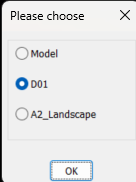
Back to your code, using OBDX you get the layout list like this. ; example code by AlanH June 2026 (setq fname (getfiled "Select dwt File" "D:\\alan" "dwt" 16)) (setq impdoc (vla-getinterfaceobject (vlax-get-acad-object) (strcat "ObjectDBX.AxDbDocument." (itoa (atoi (getvar 'acadver)))) ) ) (vl-catch-all-apply 'vla-open (list impdoc impdwg)) (setq layout (vlax-get-property impdoc 'layouts)) (setq lst '()) (vlax-for lname layout (setq lst (cons (vlax-get lname 'name) lst)) ) (if (not AH:Butts)(load "Multi Radio buttons.lsp")) (if (= but nil)(setq but 1)) (setq ans (ah:butts but "V" (cons "Please choose" lst))) (command "layout" "T" lname ans) You can then feed that lst to say a dcl and choose, this is using a library function that returns the layout name, save multi radio buttons in a support path or edit the (load to full path where saved. It will work for up to about 20 layout names, a screen limitation. Give it a try let me know how it works, Multi radio buttons.lsp
-
Change text color in AutoCAD Lt Tables Lisp request
BIGAL replied to MSHR's topic in AutoLISP, Visual LISP & DCL
As the cell is Mtext you can set each line a different color, using the mtext color control. This was done manually. So will see maybe later will have time to do something. Have an idea will find the cells with multi line split into multi text lines, display the line and what color it is now so you can change any or all lines. Looking at dwg it looks like you only want 2 colors 1 & 87 so will keep the multi color for later.
-
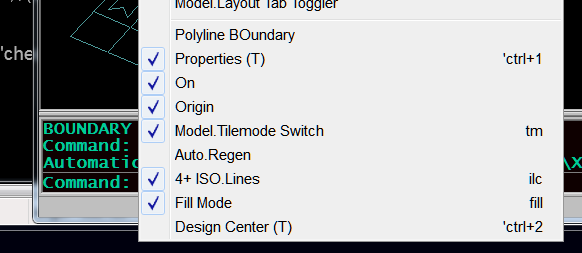
Really the concern is if system set/getenv can be used in a macro, and using it for visibility as with: ID_BouReg [$(if,$(and,$(getvar,hpbound),1),!.)Polyline BOundary ]$M=$(if,$(and,$(getvar,hpbound),1), setvar hpbound 0, setvar hpbound 1) regenall which is the switch (the $if..,!.) for poly/region of boundary which shows with a 'check when set to polyline.
-
AI suggestion not working - saved it to my menu ^C^C$M=$(if,$(==,$(getenv,ShowTabs),"0"),_setenv ShowTabs 1,_setenv ShowTabs 0) my acad replies: Command: setenv Unknown command "SETENV". Press F1 for help. Command: ShowTabs Unknown command "SHOWTABS". Press F1 for help. Command: 0 Unknown command "0". Press F1 for help.
-

Copying layouts with vla-CopyObjects breaks drawing
ronjonp replied to buntobaggins's topic in AutoLISP, Visual LISP & DCL
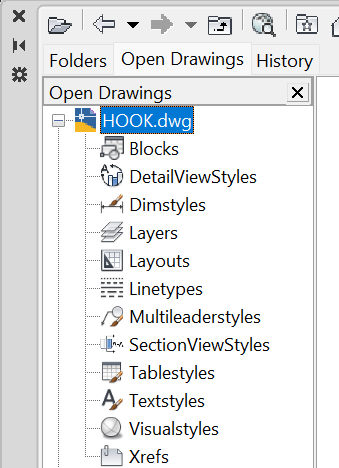
You can also use Design Center ( DC ) to copy layouts amongst other things between drawings.
-
I wouldn't be too concerned about taking up AutoCAD processing, if you are out surveying then you probably aren't drawing? I'd do the LISP on demand though, say 'c:GNSS' whenever you want to plot the point, if you are wanting to use CAD while surveying - that way you are grabbing the point at the location you are at. LISP would probably work best by: Copy data file to say temp folder, read copied file, close copied file to avoid conflicts... so long as the receiver saves the data regularly and not just on closing the application. Might be the better option - can add in a DCL pop up to add data about the point recorded (what it is, and so on)
-
Change text color in AutoCAD Lt Tables Lisp request
MSHR replied to MSHR's topic in AutoLISP, Visual LISP & DCL
I attached sample file. Sample.dwg