All Activity
- Past hour
-
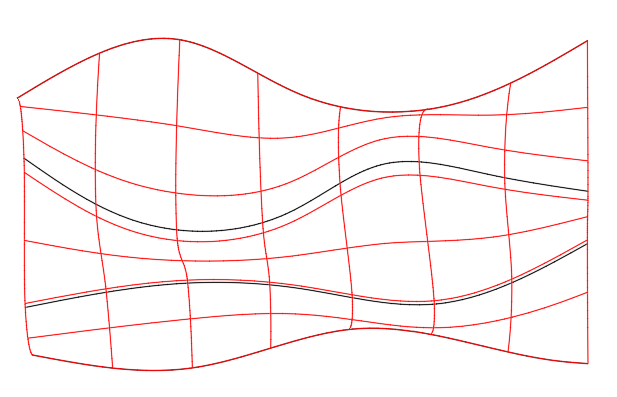
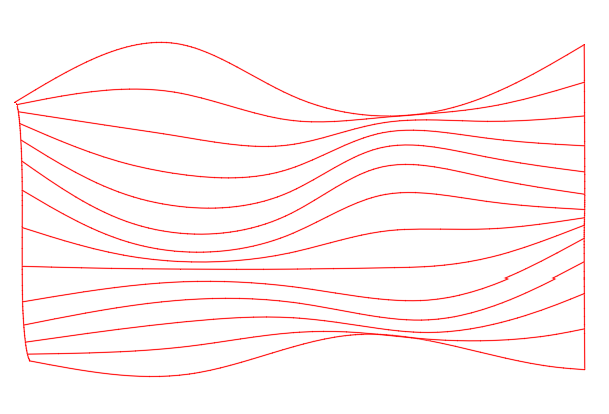
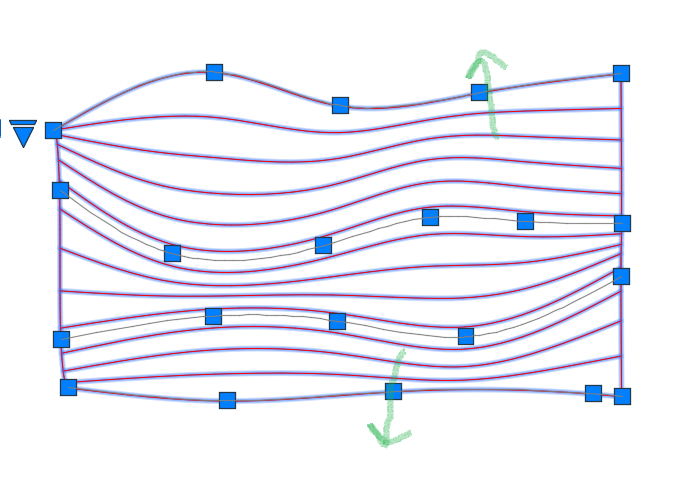
Create several splines on the XY plane then move each one in Z so that they have increasing Z values from one spline to the next. Use LOFT to create a surface from the splines (shown in red). From the Properties panel, change the U isoline property to a larger value (e.g.,12) and the V isoline value to 0. Select the surface and move the grips to localy adjust the spacing between isolines to meet your requirements. Note, the green arrows show grips that have been moved to increase spacing between adjacent isolines. Unfortunatly, if you need individual polylines or splines on the XY plane you will need to use SECTION to create them individually.

- Today
-
 treeawareness joined the community
 -
I thought about putting an array of parallel lines flat, then pinching/lofting resulting plane at random angles in Z, and then projecting the result onto XY plane ...
-

Dimensioning in paper space
ReMark replied to Discus84's topic in AutoCAD 2D Drafting, Object Properties & Interface
I have always dimensioned in paper space. Never have experienced any problems. No need to assign multiple scale factors. -
.thumb.jpg.615654602253be56b2fbd5d064834780.jpg)
5 CAD Commands That Can Save You More Time Than You Think
indiancad posted a topic in AutoCAD 2D Drafting, Object Properties & Interface
Some CAD commands are not used every day, but once you know them, they can make certain tasks much faster. SELECTSIMILAR – quickly selects objects with similar properties. LAYWALK – lets you check the objects on individual layers without changing the drawing. OVERKILL – finds and removes duplicate or overlapping geometry. BURST – converts an attributed block into separate objects while keeping the attribute values as text. MATCHPROP – quickly copies properties such as layer, color, line type, and text style from one object to another. These are simple commands, but they can save a lot of manual work in the right situation. is there another command you think more CAD users should know ? so that people using CAD can make a note of them. -

[LISP plugin] Smart Break-a tool for quickly breaking line objects
VicoWang replied to VicoWang's topic in AutoLISP, Visual LISP & DCL
Spot on, BIGAL. You're 100% right about the quantity takeoff (QTO) catch. In civil and structural workflows, physically severing a line or pipe geometry for cosmetic reasons creates absolute havoc when extracting true lengths and schedules later on. This quick routine was built purely for 2D drafting/detailing where visual layout takes precedence, but your point about true engineering lengths is a vital distinction that every drafter should keep in mind. To your second point: you're completely right. In the 40-year history of AutoCAD and AutoLISP, is there any daily drafting convenience routine that hasn't already been written a dozen times over? This tool actually came from a junior drafter on another forum who was struggling with basic break operations. For veterans who have spent decades in the forums, digging up a 15-year-old snippet or writing a quick defun is second nature. But for someone just starting out today, wading through thousands of fragmented legacy threads, dealing with APPLOAD, and fixing support paths is an intimidating barrier. And that’s honestly the whole philosophy behind what I’m building with VedaCAD. The goal isn't to claim that I've invented groundbreaking algorithms or brand-new geometry math. The code already exists in the collective wisdom of this community. The bottleneck has always been accessibility and distribution. Packaging even the simplest, most mundane utility into a 6-character VCID isn't about code prestige—it’s about bridging that gap so a beginner can get up and running in 2 seconds without the 30-year-old deployment friction. Really appreciate the engineering critique on the cut-out lengths—always learning from the veterans here! -

lsp Free LISP to clean up and shrink heavy DWG files (DWGCLEAN)
BIGAL replied to Engineer Atlas's topic in AutoLISP, Visual LISP & DCL
Just a comment if a dwg has been made by CIV3D the purge command will not remove objects even un used, you need to run PURGESTYLESANDSETTINGS it can make a big difference. After run normal Purge. Also in CIV3D surfaces are inside a dwg. But you may need CIV3D to run purges&s or remove surfaces. Similar for other CAD 3rd party add ons can have lots of proxy objects, you can use "ZOMBIE KILLER" to remove proxy objects, say in Bricscad the opening screen will show a message dwg has proxy objects. -
[LISP plugin] Smart Break-a tool for quickly breaking line objects
BIGAL replied to VicoWang's topic in AutoLISP, Visual LISP & DCL
Just a comment, in some instances, one bug with trimming ends as in the triangles is that it is a visual display thing, but for quantities need the true length including the cut out bit. Can be done using other methods. Did you do a google and look at Forums/autodesk pretty sure have seen that done before and code was provided. A google search revealed multiple pages re this subject. -
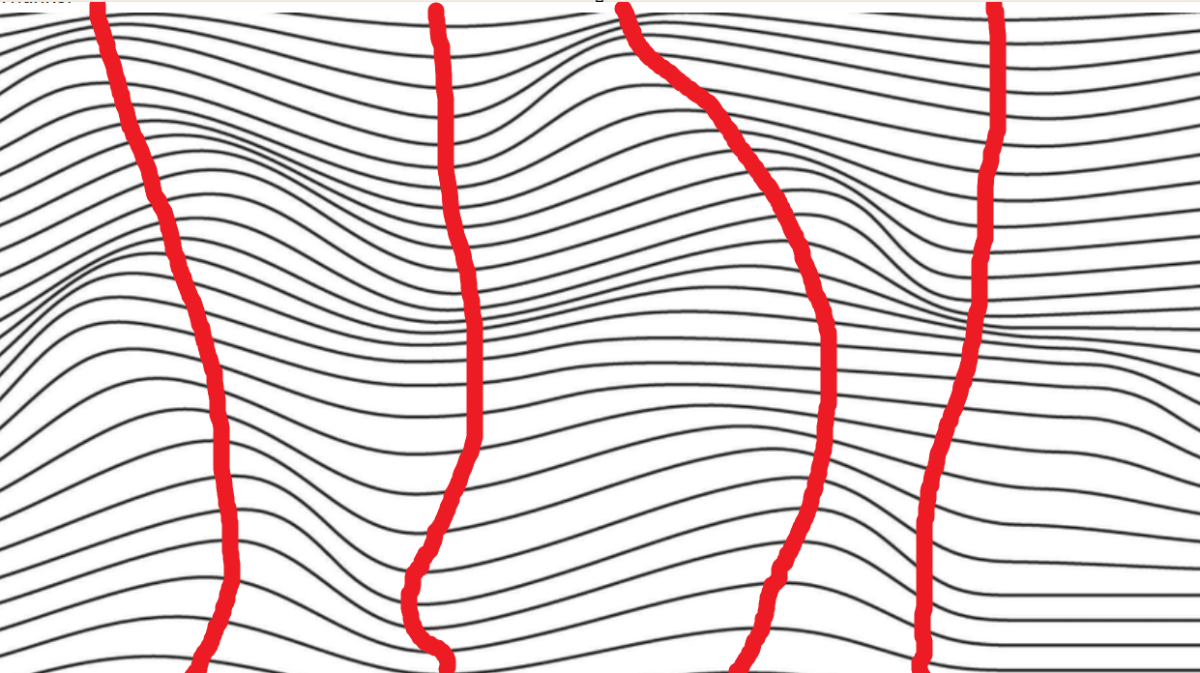
Just a side comment did a wave 3D Tin surface for a huge tract of land, but it was a single wave in one direction. think ocean waves, the site was like 2.5km by 2.5km. Had bridges, ponds, walkways, cut through the wave surface. Using a formula could do one wave but extrapolating that formula for multiple waves would need mathematical modelling, with subtle changes to the formula. Looking at the image the left and right edges are sort of fixed widths a slight variation. If you put up and down lines on the multi simple straight plines and reform them using again a wave formula. No idea where to even start.
-
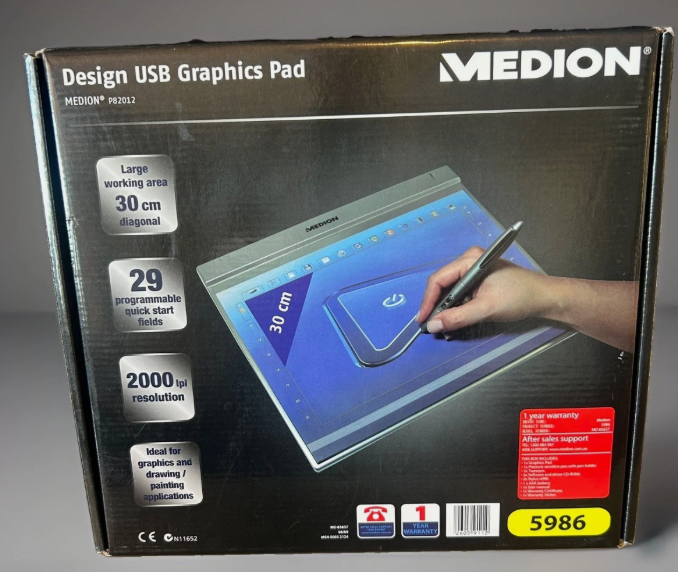
It may now look like a "Medion Design USB Graphics pad". Yes did get it to work with CAD but went back to a mouse, I dont do enough true drafting to really get into using it. Maybe Win 10.
-
dcl Share the most elegant interface design under DCL limitations
BIGAL replied to VicoWang's topic in AutoLISP, Visual LISP & DCL
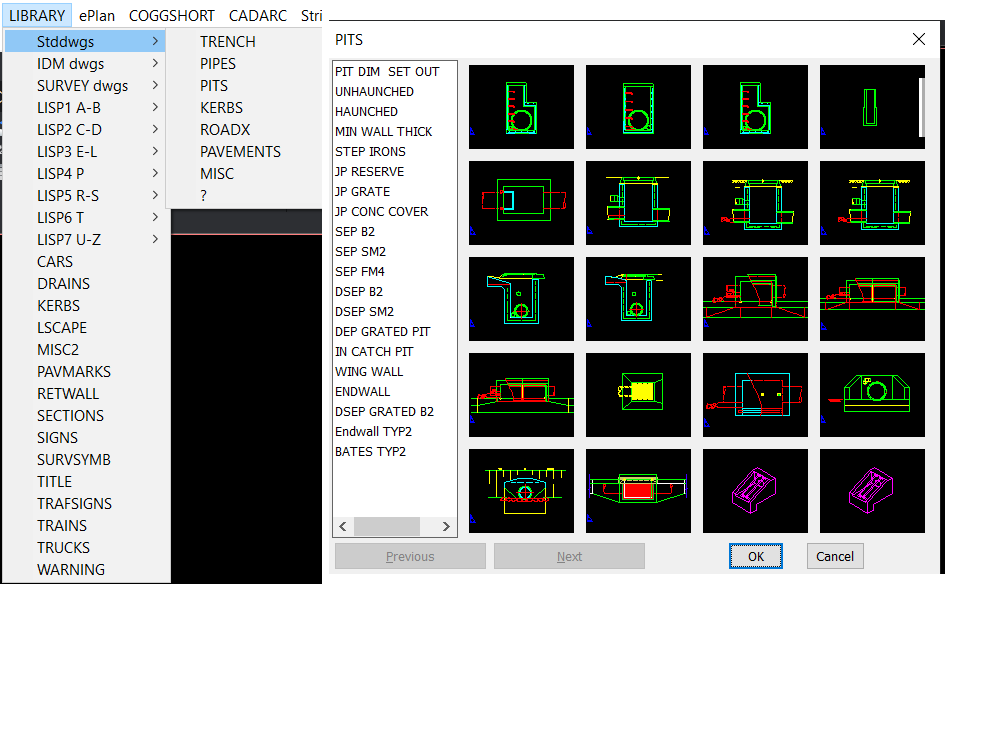
If you go old fashioned this is built into a pop menu. If you can use Notepad then you can make one. Note the Next and Previous inbuilt options. But I also have 2x2, 3x3, 4x4 and so on dcl's they are used when relevant to limited choices in code via an image pick.
-
For Excel direct the simplest is open a new Excel. You can open an existing excel by file name or even get current Excel Worksheet. You can then get say last row that contains something so that when you add more answers you know the row to start at. I would just make a simple lisp that has all the required defuns in it. Open a new Excel. Then write the row answers. with say a 1 row gap. As version 1. Yes version 2 Open new, use existing, open an existing file. The other defuns that could be added are stuff like color cell text and backgrounds. I called this little lisp "Alan open-read-write excel.lsp" ; Excel function using lisp ; By AlanH and inspiration from others ; Gilles ; JefferyPSanders.com ; Lee-mac ; MunteanStefan ; danielrodriguez ; code by the great FIXO no longer with us (defun Openexcel ( / ) (princ "\nOpening Excel...") ;; Try to get or create Excel instance (setq myxl (vl-catch-all-apply 'vlax-get-or-create-object '("Excel.Application"))) (if (vl-catch-all-error-p myxl) (progn (prompt "\nError: Could not start Excel.") (exit) ) ) (if (= (vlax-get-property (vlax-get-property myXL 'WorkBooks) 'count) 0) (vlax-invoke-method (vlax-get-property myXL 'WorkBooks) 'Add) ) (vla-put-visible myXL :vlax-true) (vlax-put-property myxl 'ScreenUpdating :vlax-true) (vlax-put-property myXL 'DisplayAlerts :vlax-true) (princ) ) ;; Thanks to fixo ;; ;; = Set Excel cell text = ;; (defun xlsetcelltext ( row column text) (setq cells (vlax-get-property (vlax-get-property myxl "ActiveSheet") "Cells")) (vl-catch-all-apply 'vlax-put-property (list cells 'Item row column (vlax-make-variant (vl-princ-to-string text) vlax-vbstring))) ) ;; Thanks to fixo ;; get value of a cell (defun getcell2 (row column / ) (setq cells (vlax-get-property (vlax-get-property myxl "ActiveSheet") "Cells")) (setq cell (vlax-get (vlax-variant-value (vlax-get-property cells "Item" row column)) 'value)) ) A sample sequence. You could put all the code in your program. Maybe later will post something with a Excel option. (if (not openexcel)(load "alan open-read-write.lsp")) (openexcel) (xlsetcelltext 4 4 "Alan") (getcell2 4 4) @SLW210 Happy to do the CSV, Excel or Libreoffice code. Post updated code and dcl etc.
- Yesterday
-
 jinseong joined the community
 -

Dimensioning in paper space
Paul Li replied to Discus84's topic in AutoCAD 2D Drafting, Object Properties & Interface
Perhaps consider annotative dimensions & hatches -
DIESEL of set/getenv not allowed?
Paul Li replied to ScottMC's topic in The CUI, Hatches, Linetypes, Scripts & Macros
1) Unlike setvar, setenv is not a command but a lisp function that's the reason AutoCAD is returning: setenv Unknown command "SETENV". Press F1 for help. So you would have to begin it with open parenthesis and end it with close parenthesis. An example would be: (setenv"MaxArray""200000") 2) There's no SHOWTABS environment variable unless this is set elsewhere. 3) For a list of AutoCAD environment variables open Windows Registry: Regedit and browse to: HKEY_CURRENT_USER\Software\Autodesk\AutoCAD\<Version>\<ProductID>\FixedProfile\General -

Dimensioning in paper space
Discus84 replied to Discus84's topic in AutoCAD 2D Drafting, Object Properties & Interface
The problem is scaling dimensions and hatches. I usually copy a detail into completely separate space to edit and dimension this detail in paper space. Unless I'm missing something here.. -
Dimensioning in paper space
Paul Li replied to Discus84's topic in AutoCAD 2D Drafting, Object Properties & Interface
I would like to add another advantage of plotting in paper space is the ability to have multiple vports looking at the same area in the model but using different scales. -
[LISP plugin] Wave Animator-a CAD plugin that doesn't know what it's for
VicoWang posted a topic in AutoLISP, Visual LISP & DCL
Installation method (upgradable in the future): [Wave Animator] VCID: 31E6TS @ VedaCAD Note: To install via VCID, you need to install VedaCAD in advance and log in to a free account (or PRO account). Tips: Welcome developers to publish their plugins on VedaCAD and obtain their plugin's VCID for plugin sharing (even free accounts can publish)
-

lsp Free LISP to clean up and shrink heavy DWG files (DWGCLEAN)
Steven P replied to Engineer Atlas's topic in AutoLISP, Visual LISP & DCL
You could also add these 2, purgezerolangth and purgezerotxt, they will remove some entities but not generally make a massive change to size. (defun PurgeZeroLengths ( / MySS Fuzz acount DelSS MyEnt EndA EndB) ;; for within blocks (setq MySS (ssget (list (cons 0 "LINE,SPLINE,LWPOLYLINE,POLYLINE,ARC,CIRCLE,ELLIPSE")))) (setq Fuzz 0.0001) ; Fuzz factor to delete very short entities (setq acount 0) (setq DelSS (ssadd)) (while (< acount (sslength MySS)) (setq MyEnt (ssname MySS acount)) (if (equal (vlax-curve-getDistAtParam MyEnt (vlax-curve-getEndParam MyEnt)) 0) (progn (setq DelSS (ssadd MyEnt DelSS)) ) ) ; end if ;;If less then a length (if (< (vlax-curve-getDistAtParam MyEnt (vlax-curve-getEndParam MyEnt)) Fuzz) (progn (setq DelSS (ssadd MyEnt DelSS)) ) ) ; end if (setq acount (+ acount 1)) ) ; end while (princ "\nDeleting ")(princ (sslength DelSS))(princ " lines") (command "erase" DelSS "") (princ) ) ;;;;;;;;;;;;;;;;;;;;;;;;;;;;;;;;;;;;;; ;;;;;;;;;;;;;;;;;;;;;;;;;;;;;;;;;;;;;; (defun c:PurgeZeroTexts ( / MySS acount DelSS MyEnt MyText) (setq MySS (ssget (list (cons 0 "*TEXT")(cons 1 "")))) (setq acount 0) (setq DelSS (ssadd)) (if MySS (progn (while (< acount (sslength MySS)) (setq MyEnt (ssname MySS acount)) (setq MyText (cdr (assoc 1 (entget MyEnt)))) (if (equal MyText "") (progn (setq DelSS (ssadd MyEnt DelSS)) ) ) ; end if (setq acount (+ acount 1)) ) ; end while (princ "\nDeleting ")(princ (sslength DelSS))(princ " lines") (command "erase" DelSS "") ) ; end progn (progn (princ "No zero content texts found") ) ) ; end if (princ) ) -
I have this almost finished, but currently have a separate DCL for it, looks to work very well for all units and recognizes the drawing units for Metric, Imperial by using Insertunits. I'll try to post next week, Tuesday or Wednesday if I get a chance to get it like I want it. I need to look into the option for MS Excel and LibreOffice Calc vs CSV I may or may not bother. So far... ;;; ============================================================ ;;; GetLen.lsp ;;; PROFILE / CENTERLINE LENGTH ;;; ;;; VERSION: 2026-09-03 ;;; ;;; Supports: ;;; LINE ;;; ARC ;;; CIRCLE ;;; LWPOLYLINE ;;; POLYLINE ;;; SPLINE ;;; ELLIPSE ;;; ;;; If PELLIPSE=1: ;;; Heavy Polyline (a.k.a. Old Style or 2D Polylines) made from bulged VERTEX records. ;;; These can be converted with CONVERTPOLY command, I chose to work with the Heavy Polylines. ;;; ;;; Supports: ;;; - Model Space ;;; - Paper Space ;;; - Blocks ;;; - Nested blocks ;;; - Anonymous/dynamic blocks (*U...) ;;; - Uniform block scaling ;;; - Single profile ;;; - Two-profile average / centerline ;;; - Batch (Sends output to CSV for perimeters of multiple selected entities.) ;;; - Screen output ;;; - CSV output ;;; - Multiple output unit formats ;;; * Metric - Millimeters ;;; * Metric - Meters ;;; * Architectural - Feet/Inches ;;; * Imperial - Fractional Inches ;;; * Imperial - Decimal Feet ;;; * Imperial - Decimal Inches ;;; - Automatic drawing-unit detection from INSUNITS ;;; - Endpoint tolerance ;;; - Optional gap measurement
-
I'm pretty sure that's something that AutoCAD cannot do out of the box. You posted this in the AutoCAD 3D Modelling & Rendering Forum, were intending to post in the AutoLISP, Visual LISP & DCL Forum?
-

lsp Free LISP to clean up and shrink heavy DWG files (DWGCLEAN)
SLW210 replied to Engineer Atlas's topic in AutoLISP, Visual LISP & DCL
Those methods only address a small portion of what can cause file bloat, it's a good start, but sometimes more needs to be done to truly clean up a drawing. In the other thread you posted in, there are other methods to clean drawings mentioned. As always, thanks for posting your version, I am sure many will find it useful. -
lsp Free LISP to clean up and shrink heavy DWG files (DWGCLEAN)
VicoWang replied to Engineer Atlas's topic in AutoLISP, Visual LISP & DCL
Welcome You can try distributing plugins using the VedaCAD method, which supports LSP, FAS, VLX, ARX, and DLL format plugins. There's no need to configure paths or copy code anymore; on the user side, a 6-digit VCID = a certain plugin function, and it is directly available. -
PDF Plot Shaded Visual Style = Sawtooth Edge
SLW210 replied to lamensterms's topic in AutoCAD Drawing Management & Output
What are the differences in the computers? Graphics Card and/or drivers? Are those images of the PDFs? AutoCAD 2014? Did you try the default DWGtoPDF? -
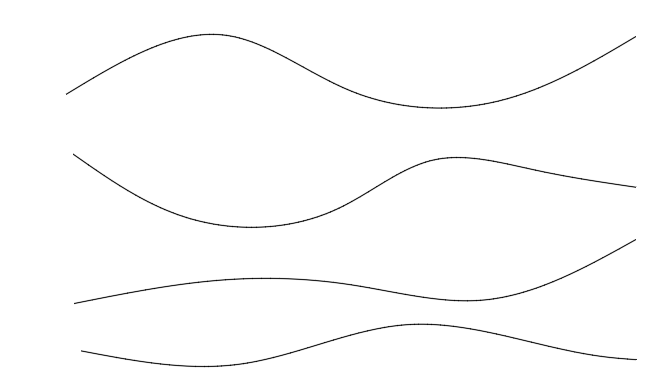
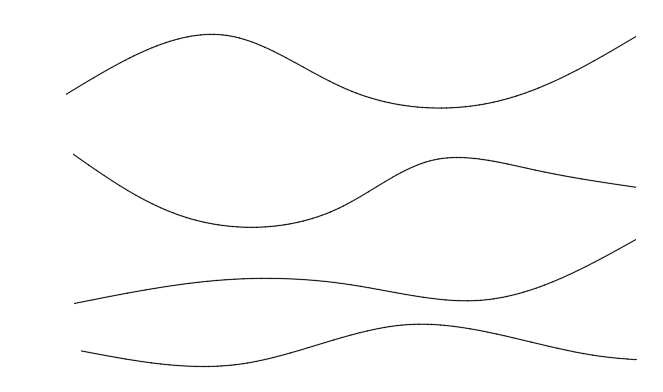
This will be a flat array which looks like a 3d. Essentially a number of lines/splines.
-
Are these 3D objects of some type? Splines? 3D Polylines?
-
lsp Free LISP to clean up and shrink heavy DWG files (DWGCLEAN)
SLW210 replied to Engineer Atlas's topic in AutoLISP, Visual LISP & DCL
I have moved your thread to the AutoLISP, Visual LISP & DCL Forum. Welcome to CADTutor!