All Activity
- Past hour
-

Automatically placing borehole tables with leaders without overlap
CyberAngel replied to MSHR's topic in AutoLISP, Visual LISP & DCL
Off the top of my head, could you use polar coordinates to split the site into slices? With 60-degree increments, you have six slices. When you process a borehole, you use the distance from the center of the site to place the table at a proportional distance in the outer area. By setting the placement angle to a clamped fraction of the slice, you get a fixed number of places for the tables, so there's no chance of overlap. That way you don't have a lot of edge cases, and the tables correspond roughly to the boreholes. I'm probably not explaining this clearly. I can put together a diagram and maybe some code if you need them. - Today
-

A CODE FOR DIVIDING OBJECTS WITH POINTS AS IN MEASURE AND DIVIDE COMMAND IN AUTOCAD BUT WAY MORE ADVANCED
pkenewell replied to darshjalal's topic in AutoLISP, Visual LISP & DCL
@darshjalal OK - so you updated the first post - with the comments that could already be read in the file. What I asked for was: 1) what it is used for? 2) how it is useful? 3) how the features are helpful? That's all we were asking, rather than the extremely technical description. -
 jjrozo joined the community
 -
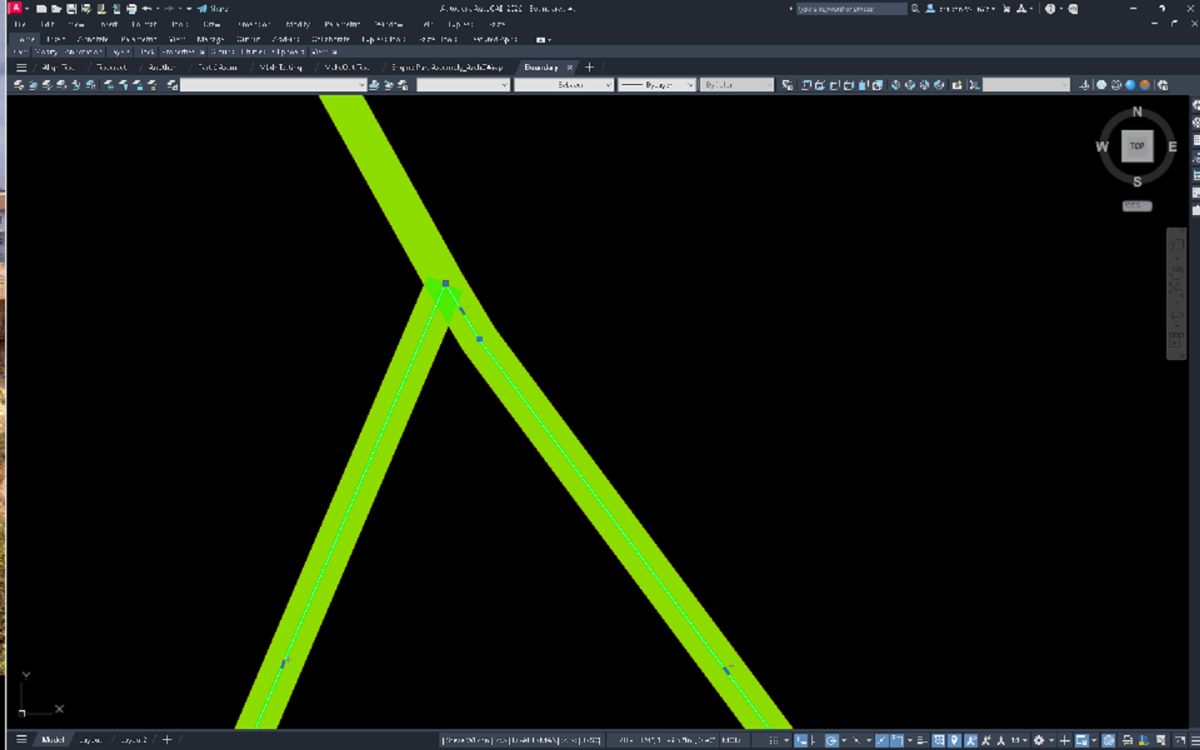
Was reading up on this too. apparently AutoCAD boundary command doesn't have a tolerance setting but BricsCAD does. That is why people opt to use hatching and then you can create the boundary from the hatch. and then delete the hatch. I'm confused since their isn't a gap/vertex at that location.
-
The only "solution" besides zooming in I could determine, was to copy the polylines in place and use region on them, which seems to be correct in the example drawing. That should be able to be done with a LISP? Boundary.dwg
-
 111111 joined the community
 -
 latifa joined the community
 -
 Sumon joined the community
 -
Hi All I have changed this code to have more options, you can select ByLayer = Layer 0 + ByLayer color ByBlock = Layer 0 + ByBlock color") KeepAllLayers = Keep original layers and colors") you can also select a block or select everything hope someone finds it useful Burst Nested Blocks.lsp
- Yesterday
-

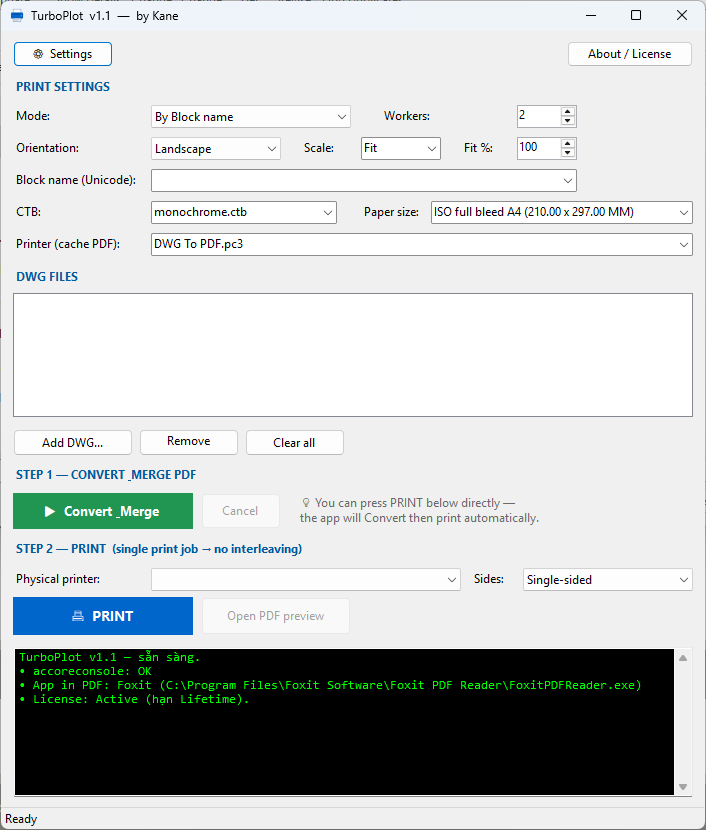
TurboPlot v1.1: Standalone, Multi-threaded Batch Plotter (Auto-detects Frames!)
BIGAL replied to vudungcom's topic in Application Beta Testing
A lot of us here are using Bricscad so the Acad Accoreconsole is not usable, have you looked at something similar for Bricscad ? Plus others using Gwstar and Intellicad to mention a couple more. -
Yes, 2000i fails when zoomed out as well.
-
 adfglksjdf joined the community
 -
There was a post a couple of years ago now, if it is a closed shape without crossing lines, hatching the area then recreate the boundary and delete the hatch leaves the boundary... as a last resort since it is long winded way to go. I haven't had time this week to look at this properly - you're in safe hands with the other posters though... (The post I am thinking about was using LISP to do something, click in the area to get boundary, might have been to measure area, perimeter or something but that was the idea behind it, LISP is ok if it is a bit long winded, fractions of a second longer process)
-
 agatanktn joined the community
 -

TurboPlot v1.1: Standalone, Multi-threaded Batch Plotter (Auto-detects Frames!)
vudungcom posted a topic in Application Beta Testing
Hi everyone, If you are dealing with hundreds of DWG files daily, you probably know the pain of traditional batch plotting tools: AutoCAD freezes up, memory leaks cause crashes, and worst of all—because it plots so slowly, other people's print jobs often get mixed into your batch on the shared office printer! I’ve developed a standalone software called TurboPlot (v1.1) to solve this exact nightmare, especially when you are on a tight deadline and need your drawings printed instantly. Unlike standard LISP or .NET add-ins that use the slow ActiveX/COM interface, TurboPlot runs completely independently outside of AutoCAD. It utilizes a highly optimized background engine with True Multi-threading, meaning it plots your drawings silently at blazing speeds while you continue working on other things. See it in action: I've recorded a short video demonstrating how it works. Check it out here: [Insert your YouTube Link here] Key Features & Problem Solvers: No More Interleaved Print Jobs: TurboPlot compiles all your drawings into one single merged PDF before sending it to your physical printer as ONE continuous print job. Your batch stays perfectly together—nobody else in the office can interrupt your print queue again! Built for Rush Jobs (True Multi-threading): When you need drawings urgently, you can't afford to watch AutoCAD slowly open and close each file. TurboPlot plots 4, 8, or 16 DWGs simultaneously in the background. It gets the job done in a fraction of the time with zero freezing. Smart Frame Auto-Detection (Game Changer!): You don't need to specify a block name anymore! Leave the name field blank, and TurboPlot will automatically scan the Model or Layout, calculate areas, and instantly find the Largest Frames (whether they are Blocks or closed Polylines) to plot. Multiple Plot Modes: By Block Name: Type your title block name(s) (supports multiple names separated by commas) with a history dropdown. By Layout: Auto-detects and plots all frames within your layouts. Model Extents. PDF Management: Automatically merges hundreds of plots into a single neat PDF, OR saves them as individual PDFs next to the original DWG (with _001, _002 suffixes). No NETLOAD Required: It’s a standalone Windows App. Just open it, drag and drop your DWGs, choose your CTB/Paper Size, and hit run. Multilingual UI: English, Spanish, Portuguese, Chinese, Japanese, Korean, and Vietnamese. Why is it faster & more stable? Because it processes your files in the background without loading the heavy AutoCAD GUI, Ribbons, or Workspaces. It silently grabs the exact Bounding Boxes of your frames and plots them flawlessly (with built-in edge-protection margins so your borders never get cut off). If you are interested in testing it out or saving hours of plotting time every week, let me know or drop a comment below! I'd love to hear feedback from the community. https://www.youtube.com/watch?v=O-ZZ53UuKFQ Download link https://drive.google.com/file/d/14Cn911glapa3nTSigD1srU7LKOHjarz5/view
-
Pretty positive I was zoomed out with the 2000i as well, but I'll retest zoomed out, maybe tonight if home time allows.
-
So I tried zoomed in on AutoCAD 2026 and looks to be correct. Boundary.dwg
-
This has been talked before if I understood the problem correctly: https://www.cadtutor.net/forum/topic/61468-boundary-precision/ To create a boundary you have to have the whole area visible in your model, everything needs to be visible in display area So it has to do something with your "viewing resolution" (zoom), that's how command works. What is the limit I don't know, I never did tests like they did in topic mentioned above. But I also had the same problems with large areas like you posted, when I have one short line, or polyline segment, one of the boundary vertices would be wrong (bad precision). The solution for me was to create lisp working with regions, then convert region to polyline. When creating regions you don't need to see the whole area on your screen, you select the lines and its just pure math from there
-
I use windows terminal winget upgrade. the publisher has to send them the file i think how it works.
-
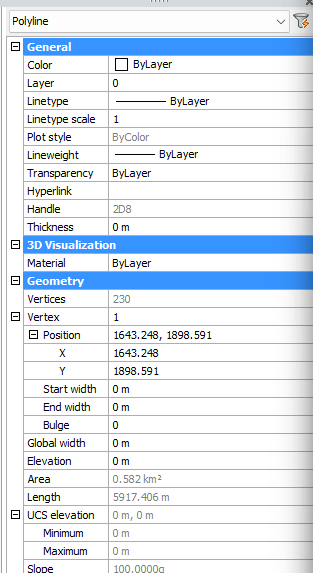
BricsCAD is showing 230 61+119+53 - 3overlapping points.
-
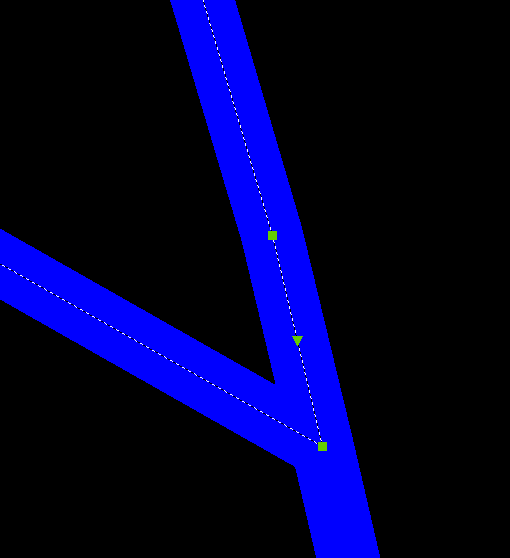
I reversed all the polylines see if that does anything. -Edit Might fix it on the bottom but then mess it up on the top. Rervers Boundary.dwg
-
I exploded the polylines into lines. I also reduced the lineweight to 0, but in both cases the result remains the same. A colleague who still has an old PC with Autodesk Map 5 (= AutoCAD 2002) also confirmed that the same error occurs. If I’m not mistaken, AutoCAD 2002 is basically the same as AutoCAD 2000, so @SLW210’s statement that the "boundary" command works correctly in that version intrigues me.
-
I just upgraded this morning lol! I had seen the warning on hacker news, pretty much using VS code for everything now
- Last week
-
@Danielm103, I'm on rev. 8.9.3 so does not apply to me. Thanks for the warning nonetheless. ymg
-
make sure you all have updated Notepad++, there was a security flaw, https://nvd.nist.gov/vuln/detail/CVE-2025-15556
-
Not sure, you can hit the current vertex and iterate backwards, mine showed 228
-
Multiple tags updated with the same value.
BIGAL replied to Jeff Kiper's topic in AutoCAD Drawing Management & Output
Welcome aboard, post a sample dwg with your block, then people can have a look at what you have done.- 1 reply
-
- 1
-

-
 MMSA25 joined the community
 -
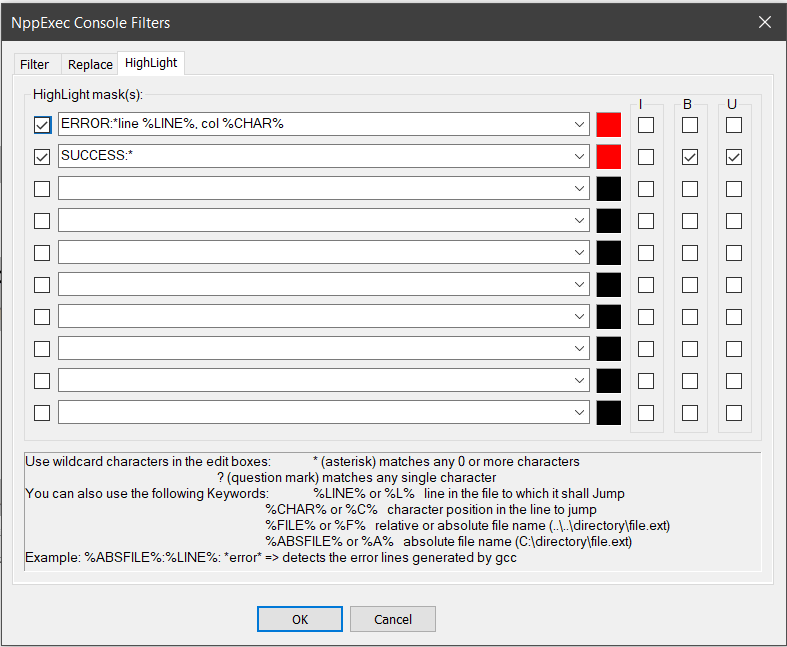
@BIGAL, I am quite sure you settled your issue in N++ a long time ago. I was facing the same situation so maybe the following will be of interest to you. I am using NppExec to Validate and Load a file to Autocad. The NPPexec either save either a Selection or the Whole active window of Notepad++ in a tempfile called "D:\Lisp\NppVal.lsp". This has to be a trusted Autocad Location. NppExec then transfer execution to a PowerShell script called ValidateAndLoad.ps1. This script is placed in directory "C:\Scripts\ValidateAndLoad.ps1" . The powershell validates the lisp and then if valid, Load it in Autocad. It then Activate the Autocad Window and brings it into view. All that need to be done is to start the command you just loaded. To Activate and bring in View, all the usual command were failing until I found a little utility called nircmd. So that is what the ps1 script uses. You will need to downlad it from https://www.nirsoft.net/utils/nircmd.html and place it in same directory "C:\Scripts" as the ps1 script. Following is the NppExec script: npp_console 1 env_set NPP_FILENAME = $(FILE_NAME) // Get selection info sci_sendmsg SCI_GETSELECTIONSTART set local pos_start = $(MSG_RESULT) sci_sendmsg SCI_GETSELECTIONEND set local pos_end = $(MSG_RESULT) sci_sendmsg SCI_LINEFROMPOSITION $(pos_start) set local start_line = $(MSG_RESULT) // Create temp file for current context if $(pos_start) == $(pos_end) then // No selection: Save whole file sci_sendmsg SCI_SELECTALL sel_saveto "D:\lisp\NppVal.lsp" sci_sendmsg SCI_SETEMPTYSELECTION $(pos_start) cmd /c powershell -NoProfile -ExecutionPolicy Bypass -File "C:\Scripts\ValidateAndLoad.ps1" -FilePath "D:\lisp\NppVal.lsp" -ScintillaLine 0 -IsSelection 0 else // Selection exists sel_saveto "D:\lisp\NppVal.lsp" cmd /c powershell -NoProfile -ExecutionPolicy Bypass -File "C:\Scripts\ValidateAndLoad.ps1" -FilePath "D:\lisp\NppVal.lsp" -ScintillaLine $(start_line) -IsSelection 1 endif env_unset NPP_FILENAME Note: NPP script does not save your file by design, when debugging I don't want to Save. Following is the ValidateAndLoad.ps1 param( [string]$FilePath, [int]$ScintillaLine = 0, [int]$IsSelection = 0 ) $ErrorActionPreference = 'Stop' $TargetDir = 'D:\lisp' $TargetFile = Join-Path $TargetDir 'NppVal.lsp' $NirCmdPath = 'C:\scripts\nircmd.exe' $MaxRetries = 10 $RetryDelayMs = 300 if (-not $FilePath) { Write-Output "ERROR: No file path provided." exit 1 } if (-not (Test-Path -LiteralPath $FilePath)) { Write-Output "ERROR: File not found: $FilePath" exit 1 } try { $enc = [System.Text.Encoding]::GetEncoding(1252) $Text = [System.IO.File]::ReadAllText($FilePath, $enc) } catch { Write-Output "ERROR: Failed to read file: $($_.Exception.Message)" exit 1 } $FileName = [System.Environment]::GetEnvironmentVariable("NPP_FILENAME") if (-not $FileName) { $FileName = "Unsaved Document" } Write-Output "VALIDATING: $FileName" $level = 0 $inString = $false $inComment = $false $inBlockComment = $false if ($IsSelection -eq 1) { $line = $ScintillaLine + 1 } else { $line = 1 } $col = 0 $bracketStack = [System.Collections.Generic.List[PSCustomObject]]::new() $expressionStack = @() $global:defunCount = 0 function New-ValidateExpression { param( [string]$ExprText, [int]$StartLine, [int]$StartCol, [boolean]$IsQuoted ) $cleanText = $ExprText -replace "\([^\(\)]*\)", " #EXPR " $cleanText = $cleanText.Replace("`r", " ").Replace("`n", " ").Trim() $tokens = $cleanText -split '\s+' | Where-Object { $_ -ne "" } if ($tokens.Count -eq 0) { return } $firstToken = ([string]$tokens).ToLower() if (-not $IsQuoted) { if ($firstToken -like '"*') { Write-Output "ERROR: First element in expression cannot be a string literal at line $StartLine, col $StartCol" exit 1 } if ($firstToken -match '^[+-]?[0-9]+(\.[0-9]+)?$') { Write-Output "ERROR: First element in expression cannot be a numeric literal at line $StartLine, col $StartCol" exit 1 } } if ($firstToken -eq "setq") { $argCount = $tokens.Count - 1 if ($argCount -eq 0) { Write-Output "ERROR: 'setq' requires at least one symbol-value pair at line $StartLine, col $StartCol" exit 1 } if ($argCount % 2 -ne 0) { Write-Output "ERROR: 'setq' has an odd number of arguments ($argCount) at line $StartLine, col $StartCol" exit 1 } } } for ($i = 0; $i -lt $Text.Length; $i++) { $c = $Text[$i] $col++ if ($c -eq "`n") { $line++ $col = 0 } if (-not $inString) { if ($inBlockComment) { if ($c -eq '|' -and $i + 1 -lt $Text.Length -and $Text[$i+1] -eq ';') { $inBlockComment = $false $i++ $col++ } continue } if ($inComment) { if ($c -eq "`n") { $inComment = $false } continue } if ($c -eq ';' -and $i + 1 -lt $Text.Length -and $Text[$i+1] -eq '|') { $inBlockComment = $true $i++ $col++ continue } if ($c -eq ';') { $inComment = $true continue } } if ($c -eq '"') { $isEscaped = $false if ($i -gt 0 -and $Text[$i-1] -eq '\') { $slashCount = 0 $k = $i - 1 while ($k -ge 0 -and $Text[$k] -eq '\') { $slashCount++ $k-- } if ($slashCount % 2 -ne 0) { $isEscaped = $true } } if ($isEscaped) { if ($expressionStack.Count -gt 0) { $expressionStack[-1] += $c } continue } $inString = -not $inString if ($expressionStack.Count -gt 0) { $expressionStack[-1] += $c } continue } if ($inString) { if ($expressionStack.Count -gt 0) { $expressionStack[-1] += $c } continue } if ($c -eq '(') { $level++ $isListQuoted = $false if ($i -gt 0 -and $Text[$i-1] -eq "'") { $isListQuoted = $true } elseif ($bracketStack.Count -gt 0) { $isListQuoted = $bracketStack[-1].IsQuoted } $bracketStack.Add([PSCustomObject]@{ Line = $line Col = $col IsQuoted = $isListQuoted }) $expressionStack += "" if (-not $isListQuoted -and $i + 10 -lt $Text.Length) { $lookAheadSlice = $Text.Substring($i + 1, 10).ToLower() if ($lookAheadSlice -match '^\s*defun(-q)?(\s|$)') { $global:defunCount++ } } if ($i + 1 -lt $Text.Length -and $Text[$i+1] -eq ')') { $isDefunArgs = $false if ($expressionStack.Count -gt 1) { $parentExpr = $expressionStack[-2].Trim().ToLower() if ($parentExpr -like "defun*" -or $parentExpr -match "(^|\s)defun(-q)?(\s|$)") { $isDefunArgs = $true } } $isQuotedList = $isListQuoted if ($i -gt 1 -and $Text[$i-1] -match '\s' -and $Text[$i-2] -eq "'") { $isQuotedList = $true } if (-not $isDefunArgs -and -not $isQuotedList) { Write-Output "ERROR: Empty parentheses () found outside of a function definition at line $line, col $col" exit 1 } } continue } if ($c -eq ')') { $level-- if ($level -lt 0) { Write-Output "ERROR: Unexpected closing parenthesis ')' at line $line, col $col" exit 1 } if ($bracketStack.Count -gt 0) { $finishedExpr = $expressionStack[-1] $lastIndex = $bracketStack.Count - 1 $currentBracket = $bracketStack[$lastIndex] $bLine = $currentBracket.Line $bCol = $currentBracket.Col $bQuoted = $currentBracket.IsQuoted New-ValidateExpression -ExprText $finishedExpr -StartLine $bLine -StartCol $bCol -IsQuoted $bQuoted $bracketStack.RemoveAt($lastIndex) if ($expressionStack.Count -gt 1) { $expressionStack = $expressionStack[0..($expressionStack.Count - 2)] $expressionStack[-1] += " #EXPR " } else { $expressionStack = @() } } continue } if ($expressionStack.Count -gt 0) { $expressionStack[-1] += $c } } if ($level -gt 0) { $lastOpen = $bracketStack[-1] Write-Output "ERROR: Unclosed parenthesis '(' starting at line $($lastOpen.Line), col $($lastOpen.Col)" exit 1 } Write-Output "SUCCESS: Validated $global:defunCount function(s) successfully." if (-not (Test-Path -LiteralPath $TargetDir)) { New-Item -ItemType Directory -Path $TargetDir -Force | Out-Null } try { $enc = [System.Text.Encoding]::GetEncoding(1252) [System.IO.File]::WriteAllText($TargetFile, $Text, $enc) } catch { Write-Output "ERROR: Failed to write $TargetFile : $($_.Exception.Message)" exit 2 } if (Test-Path -LiteralPath $NirCmdPath) { try { Start-Process -FilePath $NirCmdPath -ArgumentList 'win activate stitle AutoCAD' -WindowStyle Hidden | Out-Null Start-Sleep -Milliseconds 500 } catch { } } $acad = $null for ($i = 1; $i -le $MaxRetries; $i++) { try { $acad = [Runtime.InteropServices.Marshal]::GetActiveObject('AutoCAD.Application') if ($acad) { break } } catch { Start-Sleep -Milliseconds $RetryDelayMs } } if (-not $acad) { Write-Output "ERROR: Could not attach to a running AutoCAD instance." exit 4 } try { $safePath = $TargetFile.Replace('\', '\\') $acad.ActiveDocument.SendCommand("(load `"$safePath`")`n") Write-Output "SUCCESS: Loaded $TargetFile" exit 0 } catch { Write-Output "ERROR: Failed to send load command to AutoCAD: $($_.Exception.Message)" exit 5 } Notes: Autocad has to running and a drawing open in order to load. If validation fails you are dumprd back to N++ with the NppExec console showing you where it fails. If you double click on the error line you cursor in N++ will go to that line. Bear in mind that the error location is not perfect, but you are normally in the right function. Finally to get the error lines and Success lines to appear in red, you have to set the NppExec Console Filters as shown in the below image. Phew!! that was a long post. ymg
-

A CODE FOR DIVIDING OBJECTS WITH POINTS AS IN MEASURE AND DIVIDE COMMAND IN AUTOCAD BUT WAY MORE ADVANCED
mhupp replied to darshjalal's topic in AutoLISP, Visual LISP & DCL
if Nothing else it would show up in peoples searches. just posting a file even tho it has great documentation will not show up in searches. if you take all the time to write things up and share here make it so people can find your lisp files. or just copy all the ;; lines. someone in 6 months to a year will post looking for a divide lisp with points and I won't be able to find this post. -Edit like you did here -
A CODE FOR DIVIDING OBJECTS WITH POINTS AS IN MEASURE AND DIVIDE COMMAND IN AUTOCAD BUT WAY MORE ADVANCED
pkenewell replied to darshjalal's topic in AutoLISP, Visual LISP & DCL
@darshjalal Thanks for your program contribution. I don't want to take away for your obvious hard work, but I somewhat agree with @BIGAL. I have read the extensive comments that are very detailed and technical, but there is no summary of what it is used for, or how it is useful. For the casual LISP user, they would not understand the value in such a program. I think a simple paragraph would be help instead of blindly evaluating it. Your title does explain the purpose of the program, but it's too vague and some plain language on how the features are helpful would be nice - just a friendly critique -
@Danielm103 Why Properties palette doesn't show how many vertices does closed polyline have? That was always included AFAIK if I can recall correctly...