All Activity
- Past hour
-

DIESEL of set/getenv not allowed?
Paul Li replied to ScottMC's topic in The CUI, Hatches, Linetypes, Scripts & Macros
1) Unlike setvar, setenv is not a command but a lisp function that's the reason AutoCAD is returning: setenv Unknown command "SETENV". Press F1 for help. So you would have to begin it with open parenthesis and end it with close parenthesis. An example would be: (setenv"MaxArray""200000") 2) There's no SHOWTABS environment variable unless this is set elsewhere. 3) For a list of AutoCAD environment variables open Windows Registry: Regedit and browse to: HKEY_CURRENT_USER\Software\Autodesk\AutoCAD\<Version>\<ProductID>\FixedProfile\General -

Dimensioning in paper space
Discus84 replied to Discus84's topic in AutoCAD 2D Drafting, Object Properties & Interface
The problem is scaling dimensions and hatches. I usually copy a detail into completely separate space to edit and dimension this detail in paper space. Unless I'm missing something here.. -
Dimensioning in paper space
Paul Li replied to Discus84's topic in AutoCAD 2D Drafting, Object Properties & Interface
I would like to add another advantage of plotting in paper space is the ability to have multiple vports looking at the same area in the model but using different scales. - Today
-

[LISP plugin] Wave Animator-a CAD plugin that doesn't know what it's for
VicoWang posted a topic in AutoLISP, Visual LISP & DCL
RT Installation method (upgradable in the future): [Wave Animator] VCID: 31E6TS @ VedaCAD Note: To install via VCID, you need to install VedaCAD in advance and log in to a free account (or PRO account). Tips: Welcome developers to publish their plugins on VedaCAD and obtain their plugin's VCID for plugin sharing (even free accounts can publish)
-

lsp Free LISP to clean up and shrink heavy DWG files (DWGCLEAN)
Steven P replied to Engineer Atlas's topic in AutoLISP, Visual LISP & DCL
You could also add these 2, purgezerolangth and purgezerotxt, they will remove some entities but not generally make a massive change to size. (defun PurgeZeroLengths ( / MySS Fuzz acount DelSS MyEnt EndA EndB) ;; for within blocks (setq MySS (ssget (list (cons 0 "LINE,SPLINE,LWPOLYLINE,POLYLINE,ARC,CIRCLE,ELLIPSE")))) (setq Fuzz 0.0001) ; Fuzz factor to delete very short entities (setq acount 0) (setq DelSS (ssadd)) (while (< acount (sslength MySS)) (setq MyEnt (ssname MySS acount)) (if (equal (vlax-curve-getDistAtParam MyEnt (vlax-curve-getEndParam MyEnt)) 0) (progn (setq DelSS (ssadd MyEnt DelSS)) ) ) ; end if ;;If less then a length (if (< (vlax-curve-getDistAtParam MyEnt (vlax-curve-getEndParam MyEnt)) Fuzz) (progn (setq DelSS (ssadd MyEnt DelSS)) ) ) ; end if (setq acount (+ acount 1)) ) ; end while (princ "\nDeleting ")(princ (sslength DelSS))(princ " lines") (command "erase" DelSS "") (princ) ) ;;;;;;;;;;;;;;;;;;;;;;;;;;;;;;;;;;;;;; ;;;;;;;;;;;;;;;;;;;;;;;;;;;;;;;;;;;;;; (defun c:PurgeZeroTexts ( / MySS acount DelSS MyEnt MyText) (setq MySS (ssget (list (cons 0 "*TEXT")(cons 1 "")))) (setq acount 0) (setq DelSS (ssadd)) (if MySS (progn (while (< acount (sslength MySS)) (setq MyEnt (ssname MySS acount)) (setq MyText (cdr (assoc 1 (entget MyEnt)))) (if (equal MyText "") (progn (setq DelSS (ssadd MyEnt DelSS)) ) ) ; end if (setq acount (+ acount 1)) ) ; end while (princ "\nDeleting ")(princ (sslength DelSS))(princ " lines") (command "erase" DelSS "") ) ; end progn (progn (princ "No zero content texts found") ) ) ; end if (princ) ) -
I have this almost finished, but currently have a separate DCL for it, looks to work very well for all units and recognizes the drawing units for Metric, Imperial by using Insertunits. I'll try to post next week, Tuesday or Wednesday if I get a chance to get it like I want it. I need to look into the option for MS Excel and LibreOffice Calc vs CSV I may or may not bother. So far... ;;; ============================================================ ;;; GetLen.lsp ;;; PROFILE / CENTERLINE LENGTH ;;; ;;; VERSION: 2026-09-03 ;;; ;;; Supports: ;;; LINE ;;; ARC ;;; CIRCLE ;;; LWPOLYLINE ;;; POLYLINE ;;; SPLINE ;;; ELLIPSE ;;; ;;; If PELLIPSE=1: ;;; Heavy Polyline (a.k.a. Old Style or 2D Polylines) made from bulged VERTEX records. ;;; These can be converted with CONVERTPOLY command, I chose to work with the Heavy Polylines. ;;; ;;; Supports: ;;; - Model Space ;;; - Paper Space ;;; - Blocks ;;; - Nested blocks ;;; - Anonymous/dynamic blocks (*U...) ;;; - Uniform block scaling ;;; - Single profile ;;; - Two-profile average / centerline ;;; - Batch (Sends output to CSV for perimeters of multiple selected entities.) ;;; - Screen output ;;; - CSV output ;;; - Multiple output unit formats ;;; * Metric - Millimeters ;;; * Metric - Meters ;;; * Architectural - Feet/Inches ;;; * Imperial - Fractional Inches ;;; * Imperial - Decimal Feet ;;; * Imperial - Decimal Inches ;;; - Automatic drawing-unit detection from INSUNITS ;;; - Endpoint tolerance ;;; - Optional gap measurement
-
I'm pretty sure that's something that AutoCAD cannot do out of the box. You posted this in the AutoCAD 3D Modelling & Rendering Forum, were intending to post in the AutoLISP, Visual LISP & DCL Forum?
-

lsp Free LISP to clean up and shrink heavy DWG files (DWGCLEAN)
SLW210 replied to Engineer Atlas's topic in AutoLISP, Visual LISP & DCL
Those methods only address a small portion of what can cause file bloat, it's a good start, but sometimes more needs to be done to truly clean up a drawing. In the other thread you posted in, there are other methods to clean drawings mentioned. As always, thanks for posting your version, I am sure many will find it useful. -
lsp Free LISP to clean up and shrink heavy DWG files (DWGCLEAN)
VicoWang replied to Engineer Atlas's topic in AutoLISP, Visual LISP & DCL
Welcome You can try distributing plugins using the VedaCAD method, which supports LSP, FAS, VLX, ARX, and DLL format plugins. There's no need to configure paths or copy code anymore; on the user side, a 6-digit VCID = a certain plugin function, and it is directly available. -
PDF Plot Shaded Visual Style = Sawtooth Edge
SLW210 replied to lamensterms's topic in AutoCAD Drawing Management & Output
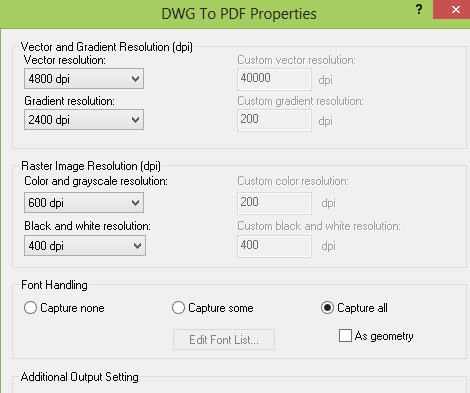
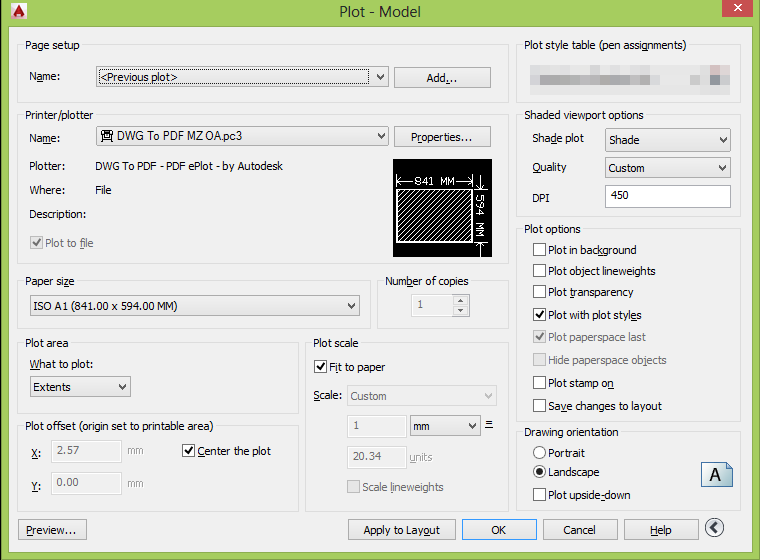
What are the differences in the computers? Graphics Card and/or drivers? Are those images of the PDFs? AutoCAD 2014? Did you try the default DWGtoPDF? -
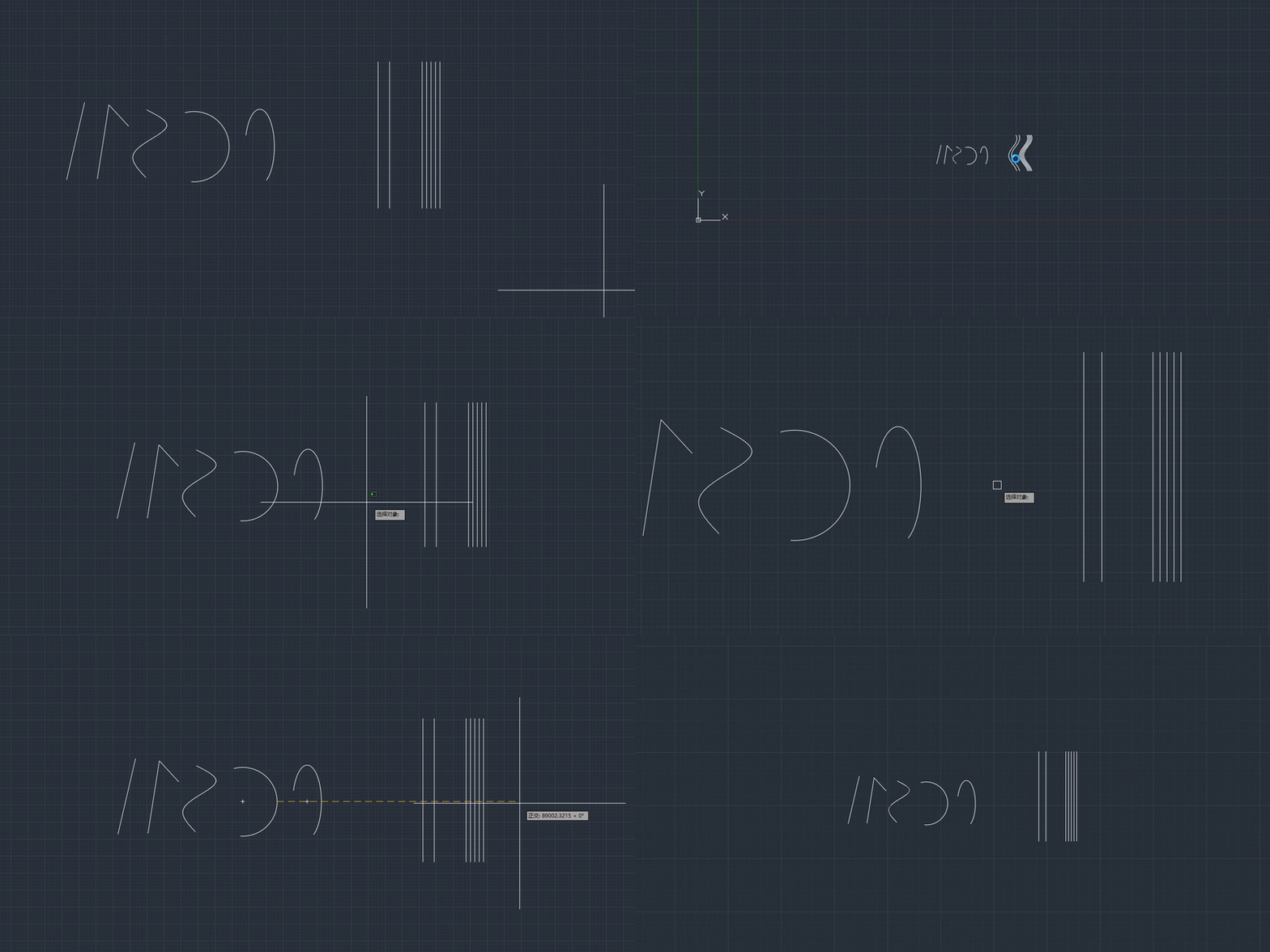
This will be a flat array which looks like a 3d. Essentially a number of lines/splines.
-
Are these 3D objects of some type? Splines? 3D Polylines?
-
lsp Free LISP to clean up and shrink heavy DWG files (DWGCLEAN)
SLW210 replied to Engineer Atlas's topic in AutoLISP, Visual LISP & DCL
I have moved your thread to the AutoLISP, Visual LISP & DCL Forum. Welcome to CADTutor! -
.thumb.jpg.615654602253be56b2fbd5d064834780.jpg)
Why does my 3D solid look correct but fail when I try to UNION it?
indiancad posted a topic in AutoCAD 3D Modelling & Rendering
Have you ever had two 3D solids that look connected, but UNION does not combine them? One common reason is that the solids are only touching at an edge or face, rather than overlapping. A simple check is to move one solid slightly and use INTERFERE to see whether the two solids actually occupy the same space. If they need to become one solid, make sure they have a proper intersection and then run UNION again. How many of you have faced this problem? What was stopping the solids from joining? -
Why does my block move to the wrong place when I insert it?
indiancad replied to indiancad's topic in AutoCAD 2D Drafting, Object Properties & Interface
That’s a fair point. A base point being far from the block isn’t always wrong; it depends on how the block is meant to be used. I was referring to cases where the base point was set incorrectly. Thanks for pointing that out. -

Cleaning up the file
Engineer Atlas replied to Discus84's topic in AutoCAD 2D Drafting, Object Properties & Interface
Hello I follow this workflow to reduce the size of dwg files. Type -PURGE, choose Regapps, enter * for all, No to "verify each" Type -PURGE, choose All, * , No. Run this 3 or 4 times so nested blocks and styles clear out Type AUDIT, answer Yes to fix any errors Type WBLOCK, select the entire drawing, and save it to a new file name. Open that new file and check it Hope this helps. Open for discussion You can also use OVERKILL after step 3 if you feel like, to delete duplicate lines. -
lsp Free LISP to clean up and shrink heavy DWG files (DWGCLEAN)
Engineer Atlas posted a topic in AutoLISP, Visual LISP & DCL
Hi all, I kept running into drawings that had ballooned to tens of MB, slow to open and painful to share. So I put together a small routine, DWGCLEAN, that runs the full cleanup in one command. Sharing it here in case it saves someone else the hassle. What it does, in order: Purges orphaned RegApp records (the hidden junk third-party and exported objects leave behind) Runs a full PURGE several times, to catch nested items that only become purgeable after their parent is gone Runs AUDIT with fix, to repair database errors WBLOCKs the whole drawing into a fresh file, which is the step that actually rebuilds and shrinks it It writes a new file with a _clean suffix and never touches your original. It also prints the before/after size and the percent saved when it finishes. Here is the code: (vl-load-com) ;; ---- helper: bytes -> whole-KB string ------------------------------------ (defun ea:kb (bytes) (itoa (fix (/ (float bytes) 1024.0)))) (defun c:DWGCLEAN ( / *error* old-cmdecho old-filedia old-expert src-dir src-name src-path base target n pass size-before size-after saved pct ) ;; ---- error handler: always restore system variables -------------------- (defun *error* (msg) (if old-cmdecho (setvar "CMDECHO" old-cmdecho)) (if old-filedia (setvar "FILEDIA" old-filedia)) (if old-expert (setvar "EXPERT" old-expert)) (if (and msg (not (member msg '("Function cancelled" "quit / exit abort")))) (princ (strcat "\nDWGCLEAN error: " msg))) (princ) ) ;; ---- make sure the drawing is saved to disk ---------------------------- (setq src-dir (getvar "DWGPREFIX") src-name (getvar "DWGNAME")) (setq src-path (strcat src-dir src-name)) (if (or (= src-dir "") (not (wcmatch (strcase src-name) "*.DWG")) (not (findfile src-path))) (progn (princ "\n*** Save the drawing to a folder first, then run DWGCLEAN again. ***") (exit)) ) (setq size-before (vl-file-size src-path)) ;; ---- save current sysvars, then set a clean automation state ----------- (setq old-cmdecho (getvar "CMDECHO") old-filedia (getvar "FILEDIA") old-expert (getvar "EXPERT")) (setvar "CMDECHO" 0) (setvar "FILEDIA" 0) (setvar "EXPERT" 5) ; suppress overwrite / confirmation prompts (princ "\n================ Engineer Atlas :: DWGCLEAN ================") ;; ---- STEP 1: remove RegApps ------------------------------------------- (princ "\n[1/4] Removing RegApps ...") (command "_.-PURGE" "_Regapps" "*" "_No") ;; ---- STEP 2: purge all unused, several passes for nested items -------- (princ "\n[2/4] Purging unused layers, blocks, linetypes, styles ...") (setq pass 0) (while (< pass 4) (command "_.-PURGE" "_All" "*" "_No") (setq pass (1+ pass))) ;; ---- STEP 3: audit and fix -------------------------------------------- (princ "\n[3/4] Auditing and fixing database errors ...") (command "_.AUDIT" "_Yes") ;; ---- STEP 4: WBLOCK the entire drawing into a fresh file --------------- (setq base (vl-filename-base src-path)) (setq target (strcat src-dir base "_clean.dwg")) (setq n 1) (while (findfile target) ; never overwrite an existing file (setq target (strcat src-dir base "_clean_" (itoa n) ".dwg")) (setq n (1+ n))) (princ (strcat "\n[4/4] Writing clean file: " (vl-filename-base target) ".dwg ...")) (command "_.-WBLOCK" target "*") ;; ---- restore sysvars --------------------------------------------------- (setvar "CMDECHO" old-cmdecho) (setvar "FILEDIA" old-filedia) (setvar "EXPERT" old-expert) ;; ---- report before / after -------------------------------------------- (setq size-after (if (findfile target) (vl-file-size target) nil)) (princ "\n-----------------------------------------------------------") (if (and size-before size-after (> size-before 0)) (progn (setq saved (- size-before size-after)) (setq pct (fix (* 100.0 (/ (float saved) size-before)))) (princ (strcat "\nOriginal : " (ea:kb size-before) " KB")) (princ (strcat "\nCleaned : " (ea:kb size-after) " KB")) (princ (strcat "\nSaved : " (ea:kb saved) " KB (" (itoa pct) "%)"))) (princ "\nClean file written.")) (princ (strcat "\nNew file : " target)) (princ "\nOpen the *_clean.dwg and verify it before replacing your original.") (princ) ) (princ "\nDWGCLEAN loaded. Type DWGCLEAN to reduce your DWG file size. (Engineer Atlas)") (princ) Load it with APPLOAD (or drag it into the drawing), then type DWGCLEAN. I have also attached the file if you would rather load the file directly, since forum copy-paste sometimes mangles the formatting. If you would rather do it by hand without the LISP, here is the same workflow manually: Type -PURGE, choose Regapps, enter * for all, No to "verify each" Type -PURGE, choose All, * , No. Run this 3 or 4 times so nested blocks and styles clear out Type AUDIT, answer Yes to fix any errors Type WBLOCK, select the entire drawing, and save it to a new file name. Open that new file and check it One safety note: always work on a copy of anything important, and open the _clean file to verify it before you replace the original. The routine is deliberately non-destructive (no OVERKILL, no xref detach, no exploding of objects), so it will not alter your geometry. Hope it is useful. Feedback welcome if anyone spots an edge case. DWGCLEAN.lsp -
Engineer Atlas joined the community
-
 RDU joined the community
 -
[LISP plugin] Smart Break-a tool for quickly breaking line objects
VicoWang posted a topic in AutoLISP, Visual LISP & DCL
A smarter break command for Line, Polyline, Circle, Arc, Ellipse, and Spline objects. Supports both single-point and two-point break operations. PS: This is a super simple feature requirement from a real beginner user, so it's also shared. Installation method (upgradable in the future): [Smart Break] VCID: D86938 @ VedaCAD Note: To install via VCID, you need to install VedaCAD in advance and log in to a free account (or PRO account). Tips: Welcome developers to publish their plugins on VedaCAD and obtain their plugin's VCID for plugin sharing (even free accounts can publish) Smart Break.mov -

PDF Plot Shaded Visual Style = Sawtooth Edge
lamensterms posted a topic in AutoCAD Drawing Management & Output
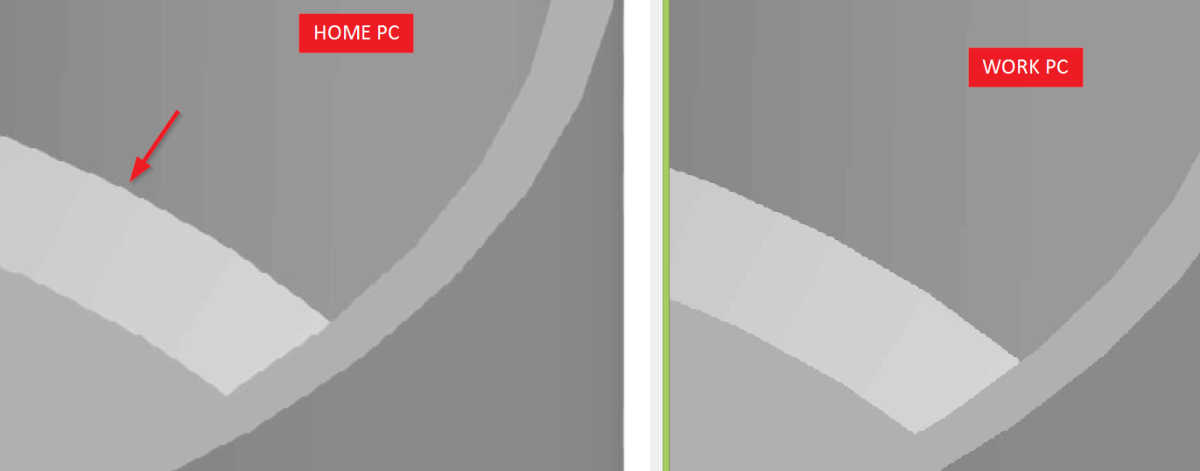
Hey Got a small issue with some PDFs I am plotting on one of my ACAD PCs. I am plotting PDFs with Shaded visual style and one machine plots OK and the other has some sawtooth effect on the edges. Just wondering if anyone knows what setting or variable I can adjust to improve. It's not FACETRES, I have tried that a few times and not much improvement. it's almost as if it's JPEG compression or something. You can see image below the WORK PC has slightly better results Plot settings are the same for both machines, PC3 settings are the same for both machines
-
Why does my block move to the wrong place when I insert it?
Paul Li replied to indiancad's topic in AutoCAD 2D Drafting, Object Properties & Interface
I would also like to add that users should first set UCS to World, then PLAN to World and then set BASE. -
Paul Li changed their profile photo
-
 birdpeace23 joined the community
 - Yesterday
-
Dimensioning in paper space
Discus84 replied to Discus84's topic in AutoCAD 2D Drafting, Object Properties & Interface
I used to only work in model space and I would never have switched possibly if not for the new office that uses paper space templates.. I see only one advantage of this : publishing automatically all selected pages at once vs plot windows from model space. -
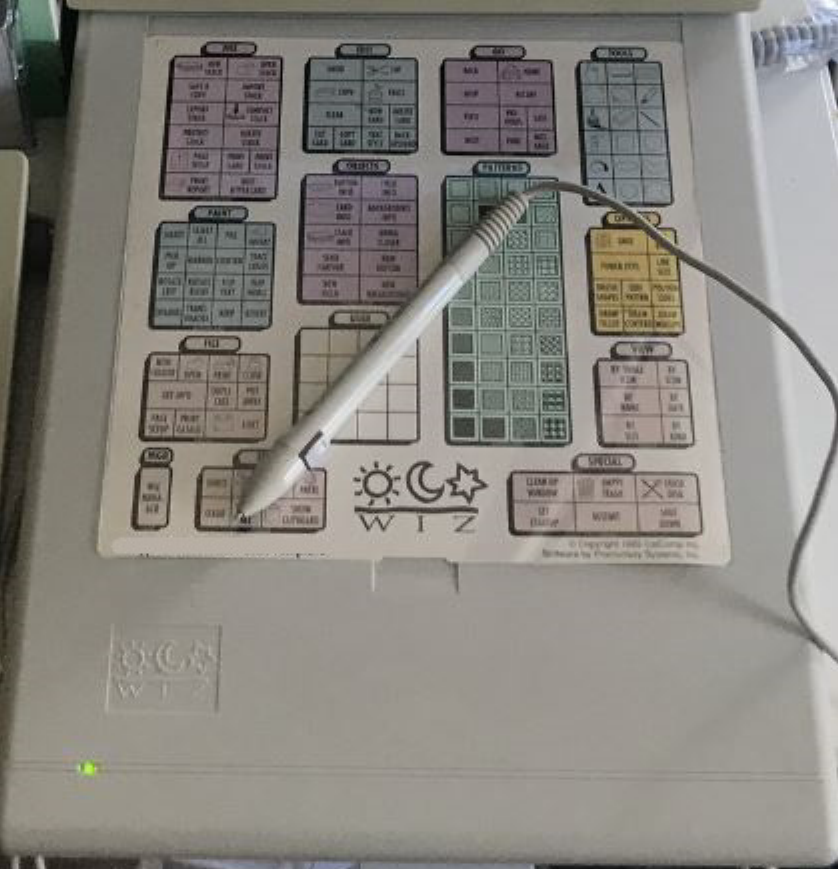
Back in the early 90s I had this letter size digitizer tablet by Calcomp called the WIZ. I was able to reduce the typical 12x12 AutoCAD digitizer tablet menu and map it on. Major advantages of this over the typical larger tablets being sold at the time was it's a lot smaller and light weight and cost less too. But after AutoCAD dropped support for DOS and went all out with running on Windows, Calcomp also dropped support for the WIZ and I had to give it up to go with a mouse. I actually wrote about this awhile back in an article I called "What Happened To The Digitizer?"
-
dcl Share the most elegant interface design under DCL limitations
Paul Li replied to VicoWang's topic in AutoLISP, Visual LISP & DCL
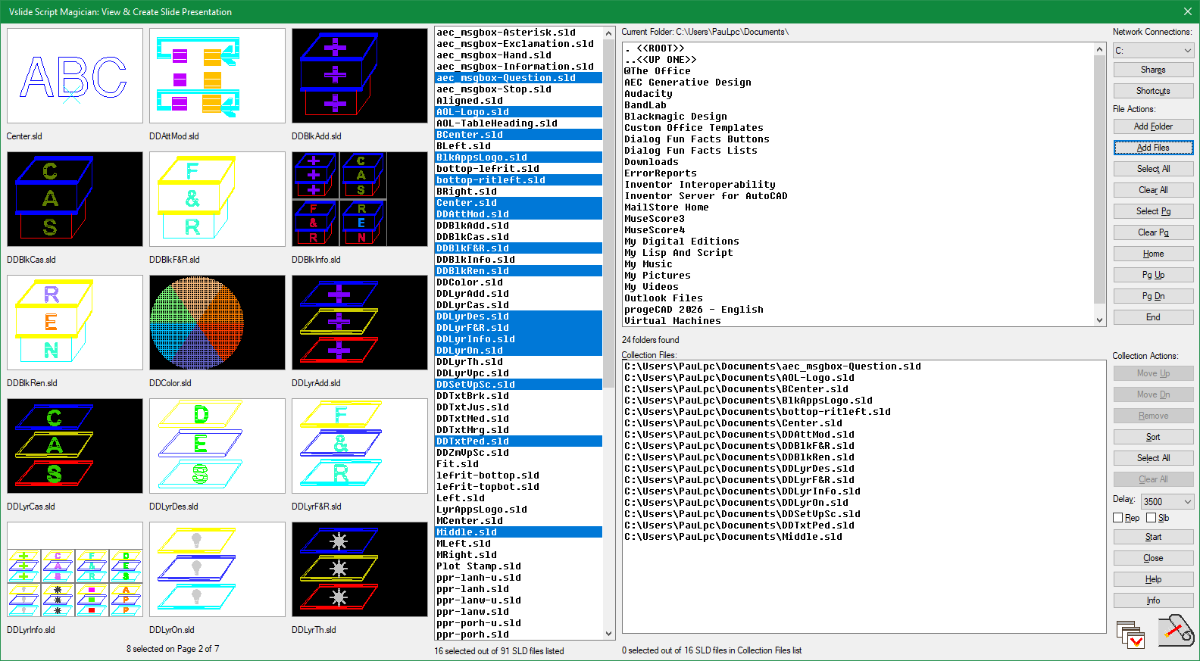
Not sure if this is considered elegant but sure takes advantage of the number of image tiles that can be spread onto a giant custom dialog to preview slide files. This is a screen capture of SMV (SMVslide) which is one of the commands included in my free Script Magician App:
- 1 reply
-
- 1
-

-
I wish Autodesk would add the following features to DCL: 1) Expand and Shrink the size of custom dialog boxes 2) Floating dialog while command line is active 3) Horizontal slide bar to list box 4) Edit box that supports multiple lines of Text 5) Image tile & image button tile to support not only sld but also typical raster file types like jpg, png, bmp, dwg 6) A select file dialog box that supports dwg/txt/jpg/png/bmp file thumbnail previews 7) A multiple file selection, window style looking getfiled dialog box (which currently can be done using PowerShell)
-

Dimensioning in paper space
CyberAngel replied to Discus84's topic in AutoCAD 2D Drafting, Object Properties & Interface
I've never dimensioned in paper space. Too many things to go wrong. Also dimensions are weird, it's like they wanted to please everybody but wound up disappointing everybody.