All Activity
- Today
-

Issues with MText in different colours
SLW210 replied to GGuzzler's topic in AutoCAD 2D Drafting, Object Properties & Interface
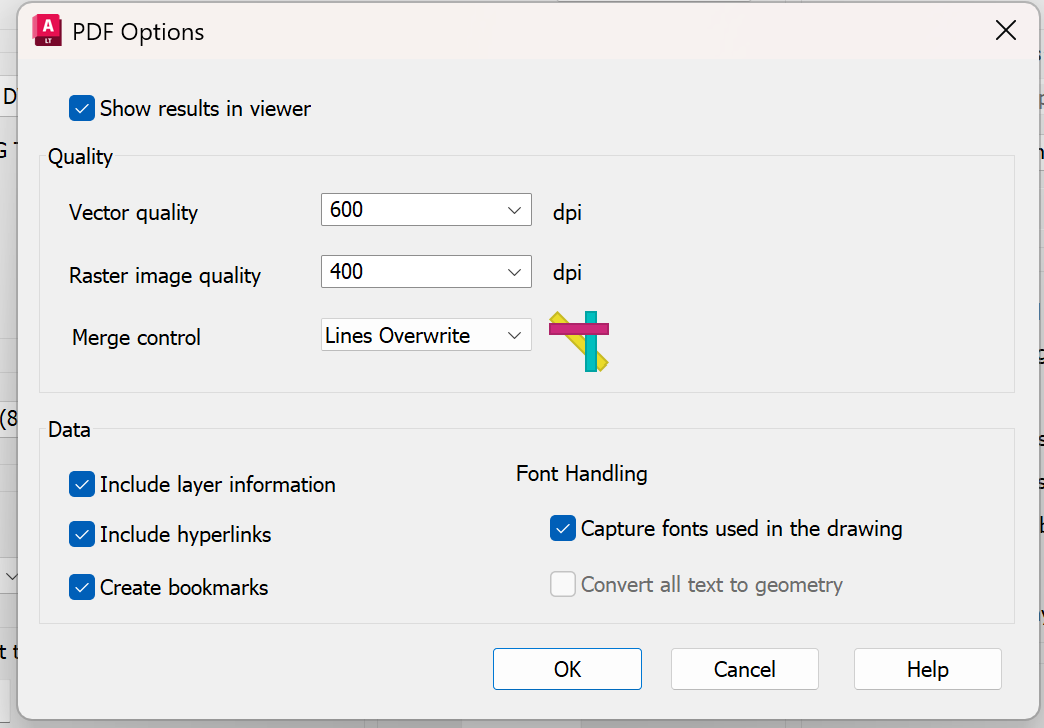
I doubt if this has anything to do with AutoCAD, usually if the print preview is correct it goes to something past AutoCAD. Autodesk site recommends changing the "Capture fonts used in the drawing" to "Convert all text to geometry" for PDF specific font issues, is this an option for you? Did you try some of the other PDF plotters, full AutoCAD has a few more, I would think LT does as well? Did this start after a Windows update or the AutoCAD update? -

Free Multi Plot Lisp – Fast Batch Printing for AutoCAD, BricsCAD & ZWCAD | Model/Layout, Zone Plotting & PDF Merge
CamDuy replied to CamDuy's topic in AutoLISP, Visual LISP & DCL
V2 update link: https://drive.google.com/drive/folders/16RZS69S2tzZZzFnYW0H6QNQ3klwxB2C6?usp=drive_link If anyone has used it, please share your feedback with me.
-

Issues with MText in different colours
Paul Li replied to GGuzzler's topic in AutoCAD 2D Drafting, Object Properties & Interface
Since you do have the latest updates installed, here are some additional questions: 1) Any difference if the text is in model? 2) Does the same problem occur if you created the text using Lato Regular in LT and not copied it from Word? 3) What happens when you change the pasted text to Arial ttf or to Romans shx? 4) Have you tried installing LT 2026 side by side without migrating settings from LT 2025 to see if the same problem still occurs? -
.thumb.jpg.615654602253be56b2fbd5d064834780.jpg)
Do you always start a complex 3D part as a solid?
indiancad posted a topic in AutoCAD 3D Modelling & Rendering
For simple mechanical parts, starting with a 3D solid is usually straightforward. But for parts with complex curved geometry, I sometimes find it cleaner to build the shape as surfaces first and then convert/thicken the result into a solid. The advantage is that the surface geometry can be controlled independently before committing to the final solid form. I’m curious how others approach this: For complex curved parts, do you prefer a solid-first or surface-first workflow—and why? -

Issues with MText in different colours
GGuzzler replied to GGuzzler's topic in AutoCAD 2D Drafting, Object Properties & Interface
-
Issues with MText in different colours
Paul Li replied to GGuzzler's topic in AutoCAD 2D Drafting, Object Properties & Interface
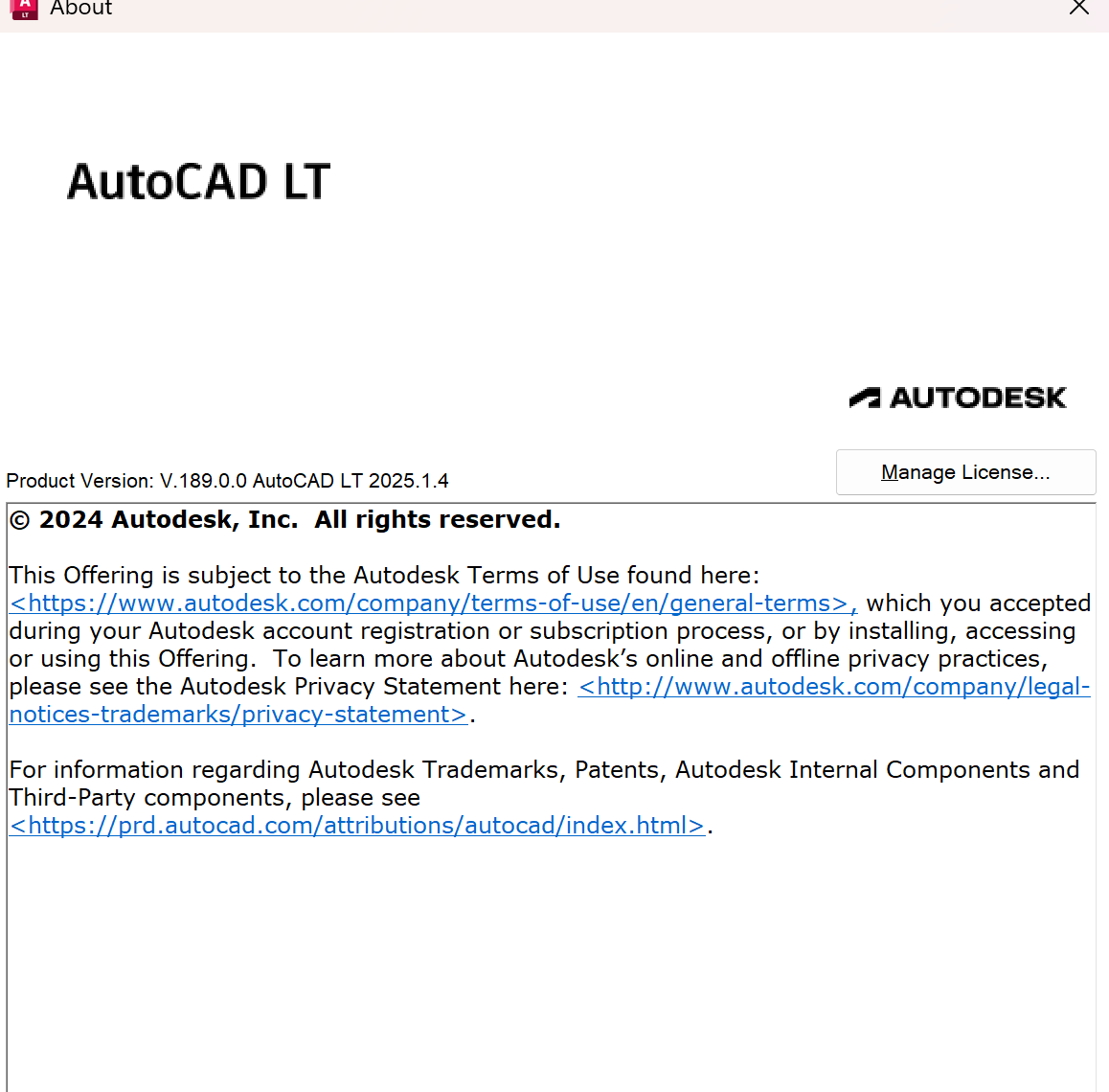
Do you have the latest LT 2025 updates installed? Enter About command, do a screenshot and share this here -
 Lily Chen joined the community
 -
Issues with MText in different colours
GGuzzler replied to GGuzzler's topic in AutoCAD 2D Drafting, Object Properties & Interface
Laptop is Lenovo Yoga Pro 7 14IRH8. -
 Arby joined the community
 -
Issues with MText in different colours
GGuzzler replied to GGuzzler's topic in AutoCAD 2D Drafting, Object Properties & Interface
PDF options: please see snapshot. Windows 11 Home - 10.0.26200 Nope, AutoCAD LT 2025.
-
Issues with MText in different colours
SLW210 replied to GGuzzler's topic in AutoCAD 2D Drafting, Object Properties & Interface
What do your PDF options look like? What do your plot settings look like? Windows version? Are you using AutoCAD LT 2014? -
 Yassine joined the community
 -
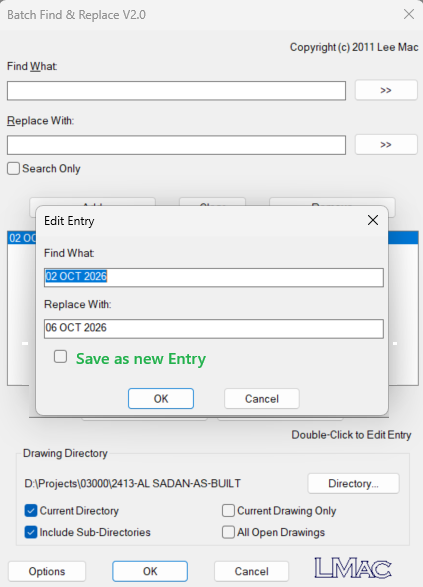
First of all, Thaks for your codes which helps in Bfind i can double click on entity for editing suggestion is" to add check box to save as a new entry
-
 Jgh joined the community
 - Yesterday
-
 kimtrson851 joined the community
 -
 karazay joined the community
 -
If that green line is the Y axis, it's not part of your drawing, it's part of the environment. Where and how it appears will depend on the local settings. That's probably why it looks different when you reopen the drawing. If you need that axis as part of your drawing, consider drawing a line there. At least then it will become part of the extents.
-
Getting a 2D section from a 3D model
indiancad replied to indiancad's topic in AutoCAD 3D Modelling & Rendering
I was mainly thinking of SECTIONPLANE as a quick way to inspect a 3D model interactively. I wasn't considering the other section workflows such as SECTION, SOLVIEW, and VIEWBASE. Thanks for pointing that out — there are clearly several ways to approach sections depending on the drawing workflow. -
Why does a 3D solid become difficult to edit after using UNION?
SLW210 replied to indiancad's topic in AutoCAD 3D Modelling & Rendering
I use SOLIDEDIT tools, they work well for what AutoCAD actually is to be used for. There are lots of 3D modelling software and 3D CAD that is better at handling 3D model changes, but they all have pretty good learning curves. -
A 3D model can look perfect on screen and still contain small errors that cause problems during manufacturing.
SLW210 replied to indiancad's topic in AutoCAD 3D Modelling & Rendering
If you create the proper 2D views and provide all of the pertinent dimensions, any issues should come to light at that point. I usually double check the 3D model with actual Dimensions as well, often set to 8 decimal places as I am modelling. Sometimes (MEA)SUREGEOM is quite handy. -
How do you handle very small details in a 3D model?
SLW210 replied to indiancad's topic in AutoCAD 3D Modelling & Rendering
It was meant more as a polite unofficial warning than a "point' or feedback. Pertaining to "point", that brings up the question, what is your point in these posts? Asking a lot of questions, then not responding to those who have engaged the issue is generally seen as disrespectful and discourteous. -

Why does FILLETEDGE fail on some 3D solid edges?
ReMark replied to indiancad's topic in AutoCAD 3D Modelling & Rendering
An image might help. -
Why does FILLETEDGE fail on some 3D solid edges?
SLW210 replied to indiancad's topic in AutoCAD 3D Modelling & Rendering
Can you provide such a case? FILLETEDGE and FILLET seem to act as expected as best I have noticed, barring a mistake by the user. CHAMFER seems to make weird corners at times, but with both, you just need a logical selection order and learn to use LOOP and CHAIN options. -
Just post the drawing and people can stop guessing.
-
Getting a 2D section from a 3D model
SLW210 replied to indiancad's topic in AutoCAD 3D Modelling & Rendering
Do you have actual statistics on whether beginners use this feature very often? I actually used it a lot more long ago when I had a different type of work load, these days I don't need it as much. You can create a hatched section for your detail with SOLVIEW and VIEWBASE, so I am not so sure too many are drawing these manually. There is also SECTION. -
One useful feature I don't see beginners using very often is SECTIONPLANE . Instead of manually drawing the internal edges of a 3D part, you can place a section plane through the model and use Live Section to inspect the inside. You can then generate a section block from the result for use in a drawing. I find this especially useful when checking what is actually inside a complicated 3D model before creating the final 2D documentation.
-
 FMA joined the community
 -
 Anindita joined the community
 - Last week
-

How do you handle very small details in a 3D model?
BIGAL replied to indiancad's topic in AutoCAD 3D Modelling & Rendering
@SLW210 yes lots of posts maybe need a "How do you" sub section. Maybe all posts should be in the "Autocad Beginners Area". -
Maybe this UCSORG set origin point to say a object point. UCSICON ON will display corner icon for current UCS.
-
Why does a 3D solid become difficult to edit after using UNION?
indiancad replied to indiancad's topic in AutoCAD 3D Modelling & Rendering
You're so welcome! It’s one of those things where having a few different workflows in your back pocket makes a huge difference, especially when a Boolean operation doesn't quite give you what you expected. -
Why does FILLETEDGE fail on some 3D solid edges?
indiancad replied to indiancad's topic in AutoCAD 3D Modelling & Rendering
Yeah ! but I was referring more to cases where the operation still fails despite adjusting the radius, particularly around complex geometry. I also see your point about using FILLET for regular edges. Thanks for the clarification. -
How do you handle very small details in a 3D model?
indiancad replied to indiancad's topic in AutoCAD 3D Modelling & Rendering
I understand your point. I can see that my posts have been repetitive in style, and I apologise for that. I'll take more care to contribute genuine experiences and useful technical information rather than creating similar discussions. Thank you for the feedback.