All Activity
- Past hour
-

Best Options for Affordable Bulk Headphones?
ReMark replied to oddssatisfy's topic in AutoCAD Beginners' Area
Please don't encourage the OP. -

Cleaning up the file
Steven P replied to Discus84's topic in AutoCAD 2D Drafting, Object Properties & Interface
A couple of LISPs, PurgeZeroLengths and PurgeZeroTexts: Note that purgezerolengths has a 'less than a length' for very short lines, here set at 0.01 - comment that out with ;; at the beginning of the line if not needed. These remove orphaned lines and texts. Copy and paste to a new drawing (top left -> bottom right seletion) or wblock does a lot. If not needed delete points - don't show up on the printed page, and if not needed get rid. Bit more effort but using blocks for repeated objects can remove some bloating. If you don't need them to be polylines, explode 2 vertex polylines into lines (2nd LISP box below). Explode heavy polylines into LW polylines of you can, both smaller file sizes One I have tucked away, join perpendicular lines back together - example convert from PDF, dashes are individual lines, this will go some way to recreating them as lines - run after 2 vertex poly to line (3rd LISP box, not perfect, only does H or V lines) (defun c:PurgeZeroLengths ( / MySS DelSS MyEnt EndA EndB) ;; for within blocks (setq MySS (ssget (list (cons 0 "LINE,SPLINE,LWPOLYLINE,POLYLINE,ARC,CIRCLE,ELLIPSE")))) (setq acount 0) (setq DelSS (ssadd)) (while (< acount (sslength MySS)) (setq MyEnt (ssname MySS acount)) (if (equal (vlax-curve-getDistAtParam MyEnt (vlax-curve-getEndParam MyEnt)) 0) (progn (setq DelSS (ssadd MyEnt DelSS)) ) ) ; end if ;;If less then a length (if (< (vlax-curve-getDistAtParam MyEnt (vlax-curve-getEndParam MyEnt)) 0.01) (progn (setq DelSS (ssadd MyEnt DelSS)) ) ) ; end if (setq acount (+ acount 1)) ) ; end while (princ "\nDeleting ")(princ (sslength DelSS))(princ " lines") (command "erase" DelSS "") (princ) ) (defun c:PurgeZeroTexts ( / MySS DelSS MyEnt MyText) ;; for within blocks (setq MySS (ssget (list (cons 0 "*TEXT")(cons 1 "")))) (setq acount 0) (setq DelSS (ssadd)) (if MySS (progn (while (< acount (sslength MySS)) (setq MyEnt (ssname MySS acount)) (setq MyText (cdr (assoc 1 (entget MyEnt)))) (if (equal MyText "") (progn (setq DelSS (ssadd MyEnt DelSS)) ) ) ; end if (setq acount (+ acount 1)) ) ; end while (princ "\nDeleting ")(princ (sslength DelSS))(princ " lines") (command "erase" DelSS "") ) ; end progn (progn (princ "No zero content texts found") ) ) ; end if (princ) ) (defun c:pdfDashed2PL ( / MyEnt MySS EndA EndB LEndA LEndB Orientation acount EndPoints LineLengths) ;; Selects by layer and colour (defun LoadLineType (doc LineTypeName FileName) ;;https://www.cadtutor.net/forum/topic/76557-load-linetypes-from-lisphelp/ (if (and (not (existLinetype doc LineTypeName)) (vl-catch-all-error-p (vl-catch-all-apply 'vla-load (list (vla-get-Linetypes doc) LineTypeName FileName) )) ; end vl-catch ) ; end and nil T ) ; end if ) ; end defun (defun existLinetype (doc LineTypeName / item loaded) (vlax-for item (vla-get-linetypes doc) (if (= (strcase (vla-get-name item)) (strcase LineTypeName)) (setq loaded T) ) ) ) (setq thisdrawing (vla-get-activedocument (vlax-get-acad-object))) (vla-startundomark thisdrawing) ;;Load Line Types (LoadLineType ThisDrawing "Dashed" "acad.lin") (LoadLineType ThisDrawing "Center" "acad.lin") ;;Select Reference Line (while (= MyEnt nil) (setq MyLine (car (entsel "\nSelect reference Line"))) (if (= MyLine nil) (princ "\nPity the fool, nothing selected. ") (setq MyEnt (entget MyLine)) ) ) ; end while ;;Work out 2 end points (if (= (cdr (assoc 0 MyEnt)) "LINE") (progn (setq EndA (cdr (assoc 10 MyEnt))) (setq EndB (cdr (assoc 11 MyEnt))) ) ; end progn (progn (setq EndA (cdr (assoc 10 MyEnt))) (setq EndB (cdr (assoc 10 (reverse MyEnt)))) ) ; end progn ) ; end if ;;Work out orientation (if (equal (car EndA) (car EndB) 0.0001) (progn (setq Orientation "V") ; Orientation (setq SSFilter "=,*,*") ; SSGET filter (setq EnFilter1 "caddr"); CAR / CADR Filter for entity (setq EnFilter2 "cadr") ; CAR / CADR Filter for entity ) ) (if (equal (cadr EndA)(cadr EndB) 0.0001) (progn (setq Orientation "H") (setq SSFilter "*,=,*") (setq EnFilter1 "cadr") (setq EnFilter2 "caddr") ) ) ;; Get Selection Set (if (= Orientation nil) (progn (princ "Selected line is not orthogonal") ) ; end progn no orientation (progn (princ "\nSelect Broken line: ") (if (assoc 62 MyEnt) (setq MySS (ssget (list (cons 0 "*LINE")(assoc 8 MyEnt)(assoc 62 MyEnt)(cons -4 SSFilter) (cons 10 EndA) ))) (setq MySS (ssget (list (cons 0 "*LINE")(assoc 8 MyEnt)(cons -4 SSFilter) (cons 10 EndA) ))) ) ;; Delete non ortho from SS (setq acount (sslength MySS)) (setq EndPoints (list)) (setq LineLengths (list)) (while ( > acount 0) (setq AnEnt (entget (ssname MySS (- acount 1)))) (setq LEndA (assoc 10 AnEnt)) (if (= (cdr (assoc 0 AnEnt)) "LWPOLYLINE") (progn (setq LEndB (assoc 10 (reverse AnEnt))) ) (progn (setq LEndB (assoc 11 AnEnt)) ) ) ; end if (if (and (equal ((eval (read EnFilter2)) LEndA) ((eval (read EnFilter2)) (assoc 10 MyEnt)) 0.0001) (equal ((eval (read EnFilter2)) LEndB) ((eval (read EnFilter2)) (assoc 10 MyEnt)) 0.0001) ) ; end and (progn ;;Lines to join in SS (setq EndPoints (cons ((eval (read EnFilter1)) LendA) EndPoints)) (setq EndPoints (cons ((eval (read EnFilter1)) LendB) EndPoints)) (setq LineLengths (cons (distance (cdr LendA) (cdr LendB)) LineLengths)) ) (progn ;; Remove lines from SS (setq MySS (ssdel (ssname MySS (- acount 1)) MySS)) ;; Remove line from selection set ) ; end progn ) ; end if (setq acount (- acount 1)) ) ; end while (setq EndPoints (vl-sort EndPoints '<)) ; order small to large ;;Modify Reference Line (if (< ((eval (read EnFilter1)) EndA)((eval (read EnFilter1)) EndB)) (progn (if (= (cdr (assoc 0 MyEnt)) "LINE") (if (= Orientation "H") (progn (setq MyEnt (subst (cons 11 (list (car EndPoints) (cadr EndA) (caddr EndA))) (assoc 11 MyEnt) MyEnt )) (setq MyEnt (subst (cons 10 (list (last EndPoints) (cadr EndB) (caddr EndB))) (assoc 10 MyEnt) MyEnt )) (entmod MyEnt) ) ; end progn (progn (setq MyEnt (subst (cons 11 (list (car EndA) (car EndPoints) (caddr EndA))) (assoc 11 MyEnt) MyEnt )) (setq MyEnt (subst (cons 10 (list (car EndA) (last EndPoints) (caddr EndB))) (assoc 10 MyEnt) MyEnt )) (entmod MyEnt) ) ; end progn ) ; end if (if (= Orientation "H") (progn (setq MyEnt (subst (cons 10 (list (car EndPoints) (cadr EndA))) (assoc 10 (reverse MyEnt)) MyEnt )) (setq MyEnt (subst (cons 10 (list (last EndPoints) (cadr EndB))) (assoc 10 MyEnt) MyEnt )) (entmod MyEnt) ) ; end progn (progn (setq MyEnt (subst (cons 10 (list (car EndA) (car EndPoints))) (assoc 10 MyEnt) MyEnt )) (setq MyEnt (subst (cons 10 (list (car EndA) (last EndPoints))) (assoc 10 (reverse MyEnt)) MyEnt )) (entmod MyEnt) ) ; end progn ) ; end if ) ; end if line ;; (princ "\nEnd A smaller") ) ;end progn (progn (if (= (cdr (assoc 0 MyEnt)) "LINE") (if (= Orientation "H") (progn (setq MyEnt (subst (cons 11 (list (car EndPoints) (cadr EndA) (caddr EndA))) (assoc 11 MyEnt) MyEnt )) (setq MyEnt (subst (cons 10 (list (last EndPoints) (cadr EndB) (caddr EndB))) (assoc 10 MyEnt) MyEnt )) (entmod MyEnt) ) (progn (setq MyEnt (subst (cons 11 (list (car EndA) (car EndPoints) (caddr EndA))) (assoc 11 MyEnt) MyEnt )) (setq MyEnt (subst (cons 10 (list (car EndA) (last EndPoints) (caddr EndB))) (assoc 10 MyEnt) MyEnt )) (entmod MyEnt) ) ) (if (= Orientation "H") (progn (setq MyEnt (subst (cons 10 (list (car EndPoints) (cadr EndA))) (assoc 10 MyEnt) MyEnt )) (setq MyEnt (subst (cons 10 (list (last EndPoints) (cadr EndB))) (assoc 10 (reverse MyEnt)) MyEnt )) (entmod MyEnt) ) (progn (setq MyEnt (subst (cons 10 (list (car EndA) (car EndPoints))) (assoc 10 (reverse MyEnt)) MyEnt )) (setq MyEnt (subst (cons 10 (list (car EndA) (last EndPoints))) (assoc 10 MyEnt) MyEnt )) (entmod MyEnt) ) ) ) ; end if line ;; (princ "\nEnd B smaller") ) ; end progn ) ; end if smaller ;; set MyEnt to line type - dashed / centre (setq LineLengths (vl-sort LineLengths '<)) ; order small to large (if (< (* 2 (cadr LineLengths))(cadr (reverse LineLengths))) ; 2nd longest line 2x longer than 2nd shorted line (vla-put-Linetype (vlax-ename->vla-object MyLine) "Center") (vla-put-Linetype (vlax-ename->vla-object MyLine) "Dashed") ) (setq MySS (ssDel MyLine MySS)) (command "erase" MySS "") ) ; end progn H or V ) ; end if Orientation H or V (vla-Endundomark thisdrawing) (princ) ) - Today
-
Best Options for Affordable Bulk Headphones?
Steven P replied to oddssatisfy's topic in AutoCAD Beginners' Area
I also reckon that a more specific forum exists for hardware. I can draw you some headphones if that would help, just let us know 2D or 3D - Christmas and it might amuse me. -
 bangason420 joined the community
 -
 Manojselvam joined the community
 - Yesterday
-
 Ary joined the community
 -
Best Options for Affordable Bulk Headphones?
ReMark replied to oddssatisfy's topic in AutoCAD Beginners' Area
Why do you continue to post off-topic questions in AutoCAD specific forums? STOP! You have already been advised to cease doing this, but you act like the rules do not apply to you. -

Best Options for Affordable Bulk Headphones?
oddssatisfy replied to oddssatisfy's topic in AutoCAD Beginners' Area
thanks in advance for any help -
Hi everyone, I’m looking to purchase headphones in large quantities for my team and am hoping to get some advice. I need something that balances durability, sound quality, and affordability. I’ve seen many options online, but it’s hard to tell which brands or models are worth it. Specifically, I’m interested in Bulk Headphones that are reliable for everyday use and won’t break easily. Are there any recommended suppliers or brands that consistently deliver good quality in bulk? Any personal experiences or tips would be greatly appreciated!
-
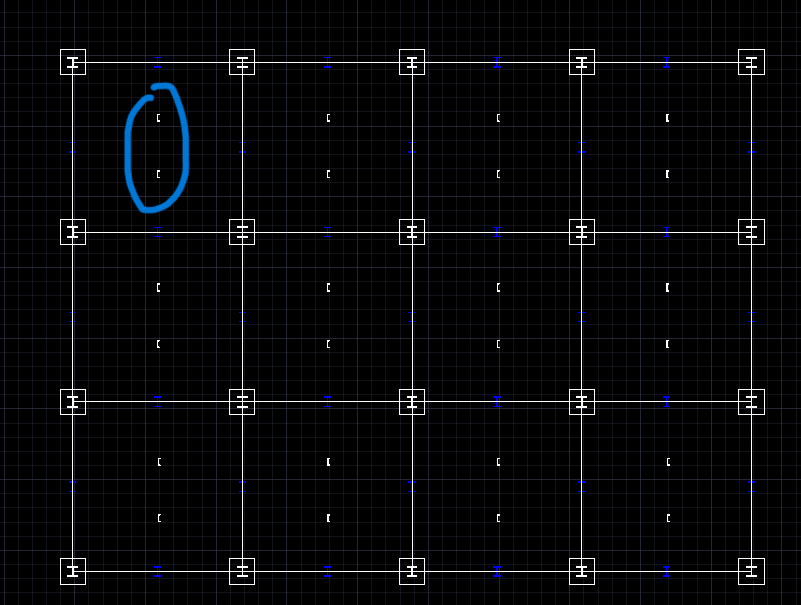
The easiest way to do it would be to add horizontal lines running between the W12x45's indicating the location of the C9x20's. Leave the profile of your channels just as they are.
-
Hello! I've moved on from being confused on the Oleson subdivision to being confused on the Structural Drafting project lol. So far I've made the W12x52 columns, the footers, and the girders. But I'm having trouble with placing the channels. (the C9x20 beams) So I drew them according to the AISC database, but how do I draw them as a beam running across the structure, versus how I have it in the photo circled in blue. I hope that's not a stupid question, but it's just not making sense in my head.

-
 b15063368 joined the community
 -
You received that error because without Map 3D you don't have any ADE functions like the ones that start with "mapexp-" in the posted lisp. With just AutoCAD there isn't anyway to use any of those functions. ArcGIS for AutoCAD is an option. In the United States anyone with a subscription to AutoCAD can install Map 3D for free. You would have to check to see if it works the same way in China. Map 3D is simply AutoCAD with added mapping tools and functions.
-
i don't have the MAP 3D on my computer , and don't known what software is MAP 3D , i never used it .I just try to use your code to export SHP from CAD2010,and load it on my arcmap, sorry , i am from China, and poor in Engish, i hope you known what i mean. thank you all the same.
- Last week
-
AutoCAD Map 3D To Export SHP Files: https://help.autodesk.com/view/MAP/2025/ENU/?guid=GUID-55FE7920-51ED-42AB-B52C-0AC25C198E46 You cannot export SHP files with or without lisp from AutoCAD without Map 3D which is a free install if you have AutoCAD.
-
 shamshod joined the community
 -
 offmean joined the community
 -
 aliyd joined the community
 -
Need more information. What exactly are you doing, step by step? Do you have MAP 3D?
-
 malintzin joined the community
 -
error: no function definition: ADE_ODGETTABLES
-
Based of this code by Lee Mac. I changed it to do what you ask for. - copy-paste this code to a file named select-text-as-block.lsp (or whatever, just make sure it has the .lsp extension), - Drag this file to your drawing - type command otbs, press enter, then follow the instructions. (select the objects; select the text object, select a point on screen) (I hope you don't need attributes; they seem to be somewhat of a problem with this code) ;; Objects to Block - Lee Mac ;; Converts a selection of objects to a block reference. ;; adapted by Emmanuel Delay : obj2blk separated from c:obj2blk (defun add_attdef ( / ip tag prmpt dfault) (entmake (list (cons 0 "ATTDEF") (cons 8 "0") (cons 10 '(0.3 4.3 0.0)) (cons 70 0) (cons 1 "") (cons 2 "NUM") (cons 3 "Number: ") (cons 40 2.0) ) ) ) ;; @params: s: selection, n: name, p: point (defun obj2blk (s n p / e i l s x ) (if (and s (progn (while (not (or (= "" n) (and (snvalid n) (null (tblsearch "BLOCK" n)) ) ) ) (princ "\nBlock name invalid or already exists.") ) (if (= "" n) (setq n "*U") ) p ) ) (progn (entmake (list '(0 . "BLOCK") (cons 10 (trans p 1 0)) (cons 02 n) (cons 70 (if (wcmatch n "`**") 1 0)) ) ) (repeat (setq i (sslength s)) (entmake (entget (setq e (ssname s (setq i (1- i)))))) (if (= 1 (cdr (assoc 66 (entget e)))) (progn (setq x (entnext e) l (entget x) ) (while (/= "SEQEND" (cdr (assoc 0 l))) (entmake l) (setq x (entnext x) l (entget x) ) ) (entmake l) ) ) (entdel e) ) ;;(add_attdef) (if (setq n (entmake '((0 . "ENDBLK")))) (entmake (list '(0 . "INSERT") (cons 02 n) (cons 10 (trans p 1 0)) ) ) ) ) ) (princ "\nBlock made: ") (princ n) ) (defun c:otb ( / s n p) (setq s (ssget "_:L" '((-4 . "<NOT") (0 . "ATTDEF,VIEWPORT") (-4 . "NOT>")))) ;;(setq s (ssget "_:L" '((-4 . "<NOT") (0 . "VIEWPORT") (-4 . "NOT>")))) (setq n (getstring t "\nSpecify Block Name <Anonymous>: ")) (setq p (getpoint "\nSpecify Base Point: ")) (obj2blk s n p) (princ) ) (defun c:otbs ( / s n p) (setq s (ssget "_:L" '((-4 . "<NOT") (0 . "ATTDEF,VIEWPORT") (-4 . "NOT>")))) ;;(setq s (ssget "_:L" '((-4 . "<NOT") (0 . "VIEWPORT") (-4 . "NOT>")))) ;;; (setq n (cdr (assoc 1 (entget (car (entsel "\nSelect a text object that holds the name of the block: ")))))) (setq p (getpoint "\nSpecify Base Point: ")) (obj2blk s n p) (princ) )
-
 Gian75 joined the community
 -
 Amdghedy joined the community
 -
It's a very interesting topic that has gone unresolved for far too long. At least I never found one. But that solution should also consider any piece of land in the middle of the water. In my opinion, the criterion for defining a centerline depends on the physical property that needs to be preserved. For a river, the property that seems most convenient to preserve is equidistance. However, in a wall, the properties to preserve are angular symmetry and structural direction. Therefore, I agree with GP_ and Dexus. But perhaps for this reason, the tools mentioned in this thread won't be able to correctly calculate the centerline of a wall.
-
You would probably need a LISP. Maybe this one... I have moved your thread to the AutoLISP, Visual LISP & DCL Forum.
-
I’m working on part nesting in AutoCAD and I need to save each part as a block named after the part. Is there a way to create a block and automatically use a selected text object as the block name, instead of typing the name manually?
-
Use the BATTMAN command to edit the MText color. After changing the color, click Sync and Apply. Only then will the updated MText color be applied to all instances of the block throughout the entire drawing.
-

paperspace/wireframe issue
CyberAngel replied to Alona's topic in AutoCAD Drawing Management & Output
What you'll probably need to do is set the proper coordinate system in your viewport. To make things simpler, you can create the proper view with UCS, give it a name, and save it. That way you can use it as many times as you need to. To prepare your plan, go to paper space, open the viewport, and "restore" the view. Once you have your linework at the right scale, angle, and location, lock the viewport. If your model is not supposed to look like a wireframe, check the properties for the Visual Style while in model space. If this doesn't help, please give us more information. -

Viewport Inset Generator
CivilTechSource replied to CivilTechSource's topic in AutoLISP, Visual LISP & DCL
Hi @troggarf, Lee Mac's VPOutline is a great start! I am having difficulty understanding your lisp. ssget "_:L" will prompt the user to select items using window selection? Could we pass a filter to only select the latest created VPOutlines and just select the Key Plan Viewport? My aspiration is to combine Lee Mac VPOutline with your suggestion. But some further tweaking might be required. -
No - the messages printed by the (ssget) function ignore NOMUTT; there are likely many other commands/functions which ignore NOMUTT - it depends on how they were implemented and whether NOMUTT/CMDECHO was considered when outputting messages.
-
No - as you cannot intercept the evaluation of the (ssget) function.
-

Searching multiple dwg files for text
EleenD03 replied to clowe-thcp's topic in AutoCAD Drawing Management & Output
I've been down this rabbit hole before. Relying on Windows Explorer is so hit-or-miss since AutoCAD started compressing the files—it usually only works if you're strictly using TrueType fonts. If you don't want to mess with LISPs or expensive software, sometimes the easiest workaround is to just extract the data/images to a more searchable format. I found a site called https://wordimageextractor.com/ recently when I needed to pull assets out of a project doc to cross-reference things—it’s actually a pretty smooth way to handle those 'how do I find what's inside this file' moments without having to open everything one by one. For the DWGs specifically, though, Lee Mac’s BFIND is definitely the gold standard if you're comfortable loading a LISP routine! -

cui panel image
tombu replied to mohammadreza's topic in The CUI, Hatches, Linetypes, Scripts & Macros
If you're going to share it having all the PNG files converted to transparent then add them to a custom DLL file. I'd recommend copying Acad.dll to the same name as your custom CUI file with the DLL extension instead as that's where the CUI file will look first for the icon. That way you can add all your PNG files into it for you new commands and still reference AutoCAD commands in your custom CUI file as well. Much easier to share a single DLL file than a folder full of PNG files. Changes to Using Resource DLLs with CUIx Files https://help.autodesk.com/view/OARX/2025/ENU/?guid=GUID-7103E61A-8317-4834-BB00-0FE23AEB020F If you're going to share any customization files it's best to make sure all those files are in both the proper Support and Trusted paths. That way all users can access them, and you never have to include paths to them in any of your customization files. That way if you had it installed both in your office and at home where your (Support and Trusted) file folders would have different paths everything would still work the same. Lots of free online tools for converting images to PNG files with transparent backgrounds like: https://www1.lunapic.com/editor/?action=transparent -
You're going to need a different layout for that. Most important thing to learn is creating layouts with templates you can import into other drawings. Once you have them you'll be able to drawings much faster since you shouldn't ever need to do it again. The link to AutoCAD Foundations in AutoCAD Help below is the best place to start. Organize and Output a Design with Layouts (AutoCAD Foundations) https://help.autodesk.com/view/ACD/2026/ENU/?guid=ACD_FOUNDATIONS_MAIN12 AutoCAD provides the best help of any software I know of but as it's hundreds of commands, settings and features that are added to every year you need to dedicate time every day to go through all the help and tutorials you can. Most of us that have spent decades using AutoCAD and it's verticals still don't claim to know it entirely, it's a journey that keeps gets more comfortable as you go along.