All Activity
- Past hour
-

Select all the lines that are vertical
Isaac26a replied to Isaac26a's topic in AutoLISP, Visual LISP & DCL
My apologies if I'm not clear in the things I want to be realized, sometimes I think is best that the images make it clear but I'll try to elaborate more on my following posts. thanks for your interest - Today
-
Select all the lines that are vertical
Isaac26a replied to Isaac26a's topic in AutoLISP, Visual LISP & DCL
Thank you Lee, you did what I was thinking about, you used the difference in 'x' with a fuzz, also used '(equal )' with the fuzz, thanks as all of your work in the most simple way and in few lines. Amazing all your work, thank you. -
Select all the lines that are vertical
Isaac26a replied to Isaac26a's topic in AutoLISP, Visual LISP & DCL
https://help.autodesk.com/view/ACAD_E/2026/ENU/?guid=GUID-7E85CB8F-B4DA-42F3-ABD3-89342A11EF9B Thank you, with this information is easy to understand how it works, in the information that I had of the command didn't had the fuzz use, guess I have to check on the online site more about the commands again, there might be some things I'm missing -

Select all the lines that are vertical
marko_ribar replied to Isaac26a's topic in AutoLISP, Visual LISP & DCL
It is unclear what should routine do with angled lines that are neither horizontal, nor vertical... Lee's example is removing from sel. set all horizontal lines and thus all angled and verticals are remained for (sssetfirst) deletion upon routine finish... -
 MBarjak joined the community
 -

Text temporarily disappearing
Rooster replied to Rooster's topic in AutoCAD 2D Drafting, Object Properties & Interface
Yes, even though I'm only using basic Arial font I did test with Simplex as well and still have the same problem. Example DWG attached, although I'm certain it's not a drawing-specific issue, as the problem now occurs on any old drawings that I open X.dwg -

Select all the lines that are vertical
Lee Mac replied to Isaac26a's topic in AutoLISP, Visual LISP & DCL
Another - (defun c:test ( / e i s x ) (if (setq s (ssget "_X" '((0 . "LINE")))) (repeat (setq i (sslength s)) (setq i (1- i) e (ssname s i) x (entget e) ) (if (not (equal (cadr (assoc 10 x)) (cadr (assoc 11 x)) 1e-8)) (ssdel e s) ) ) ) (sssetfirst nil s) (princ) ) -

Text temporarily disappearing
SLW210 replied to Rooster's topic in AutoCAD 2D Drafting, Object Properties & Interface
Did you try changing fonts? I think you need to post a .dwg. -

Select all the lines that are vertical
mhupp replied to Isaac26a's topic in AutoLISP, Visual LISP & DCL
Its using the fuzz option. looking for lines that have an angle that doesn't match 90° or 270° +/- the fuzz and removing them from the selection. So if you used 5 it would remove any line that outside of 85-95 and 265-275 You have to check both angles because of how the lines are drawn. https://help.autodesk.com/view/ACAD_E/2026/ENU/?guid=GUID-7E85CB8F-B4DA-42F3-ABD3-89342A11EF9B -
Text temporarily disappearing
Rooster replied to Rooster's topic in AutoCAD 2D Drafting, Object Properties & Interface
In case it helps, here's a demo of the issue... 001.mp4 -

Find the correct direction of picked two points.
dexus replied to Dayananda's topic in AutoLISP, Visual LISP & DCL
How about something like this, is that what you are looking for? (defun draw (pt1 pt2 len) (if (and pt1 pt2 len) (progn (entmakex (list '(0 . "LINE") (cons 10 pt1) (cons 11 (polar pt1 (angle pt1 pt2) len)) ) ) (entmakex (list '(0 . "LINE") (cons 10 (polar pt2 (angle pt2 pt1) len)) (cons 11 pt2) ) ) ) ) (princ) ) (draw (getpoint "\nFirst point: ") (getpoint "\nSecond point: ") (getdist "\nLine Length: ") )- 1 reply
-
- 1
-

-
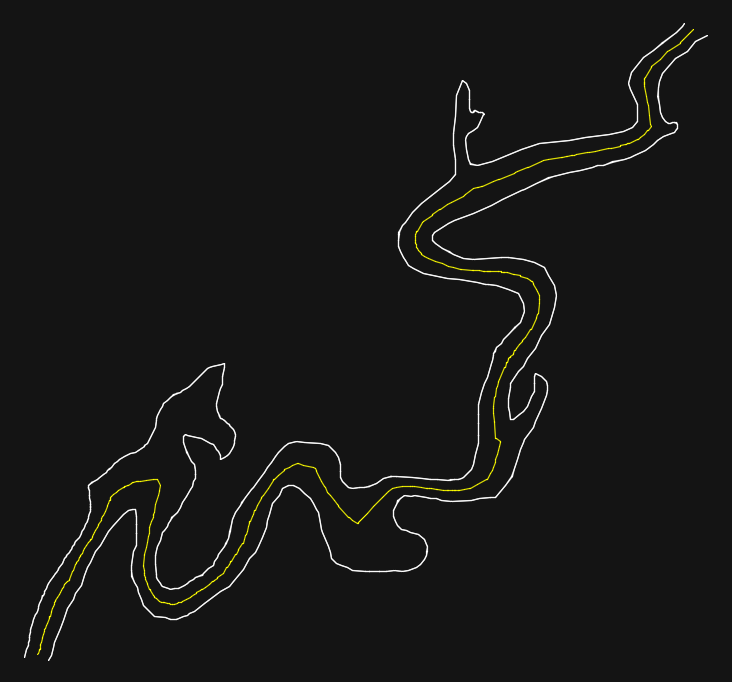
I'm interested in where this topic will be going with the different "side quests" like islands and inlets. In the mean time I kept going, trying to fix my version and after a lot of testing/debugging I changed to code again. Now it is working as expected on all of the examples I have found! ;| ; Calculate centerline between two polylines - dexus ; Function checks intersections of the offsets of two lines to create a middle/avarage line. ; https://www.cadtutor.net/forum/topic/98778-hybrid-parallel/page/7/#findComment-677877 ; Version / Date - Change ; 0.01 [19-11-2025] - Initial release ; 0.02 [27-11-2025] - Added corner support on negative side of crossing polylines ; 0.03 [28-11-2025] - Extra check using vertex to closest point as distance ; 0.04 [28-11-2025] - Added error function ; 0.05 [01-12-2025] - Improved distance check to prevent zigzag lines ; 0.06 [01-12-2025] - Check if offset can be used before adding points ; 0.07 [01-12-2025] - Improved side check on 3 points ; 0.08 [04-12-2025] - Don't compare startpoint to offset when eiter of the polylines is closed ; 0.09 [05-12-2025] - Add points for parallel end segments ; 0.10 [18-12-2025] - More checks for deleting lines and added dedicated function ; 0.11 [08-01-2026] - Support for multiple output lines of the offset function ; 0.12 [08-01-2026] - Bulges are transformed to lines to handle cocentric arcs ; 0.13 [08-01-2026] - Rewrote the _avarageAngle and _diffAngle function |; (defun c:cl (/ corners ent1 ent2 gap index loop maxlen offset offsetdistance org1 org2 parallel pts sides ss start te0 te1 te2 tmp1 tmp2 LM:ProjectPointToLine LM:intersections _addPoints _avarageAngle _checkOffset _checkSortDirection _copyPolyline _cornerOffset _deleteTmpLine _diffAngle _doOffset _getAnglesAtParam _polyline _side *error*) (defun *error* (st) (if (wcmatch (strcase st t) "*break,*cancel*,*exit*") (redraw) (princ (strcat "\nOops! Something went wrong: ") st) ) (mapcar '_deleteTmpLine (list ent1 ent2 te0 te1 te2)) (princ) ) ;| ; Deletes an object or list of objects ; @Param obj vla-object or list |; (defun _deleteTmpLine (obj) (cond ((null obj)) ((vl-catch-all-error-p obj)) ((= (type obj) 'list) (mapcar '_deleteTmpLine obj)) ((not (vlax-erased-p obj)) (vla-delete obj)) ) ) ;| ; Draw Polyline - dexus ; Draw a polyline from a list of points, but filter out colinear points ; @Param lst list of points ; @Returns ename of polyline |; (defun _polyline (lst closed / prev pts) (while lst (cond ( (and (cdr lst) prev (or (equal (cdr lst) prev 1e-8) ; Remove duplicate points (null (inters prev (car lst) prev (cadr lst))) ; Remove collineair points ) ) ) ((setq pts (cons (cons 10 (setq prev (car lst))) pts))) ) (setq lst (cdr lst)) ) (entmakex (append (list (cons 0 "LWPOLYLINE") (cons 100 "AcDbEntity") (cons 100 "AcDbPolyline") (cons 90 (length pts)) (cons 8 (getvar 'clayer)) (cons 70 (if closed 1 0)) ) (reverse pts) ) ) ) (defun _copyPolyline (ent maxlen closed rev / bul pts index curve steps size next) (setq ent (vlax-ename->vla-object ent) index 0) (repeat (1+ (fix (vlax-curve-getEndParam ent))) (cond ( (and (not (vl-catch-all-error-p (setq bul (vl-catch-all-apply 'vla-getbulge (list ent index))))) (not (equal bul 0.0 1e-8)) (setq next (vlax-curve-getDistAtParam ent (1+ index))) (not (zerop (setq steps (fix (* (/ (- next (vlax-curve-getDistAtParam ent index)) maxlen) 45))))) ) (setq size (/ 1.0 steps) curve index) (repeat steps (setq pts (cons (vlax-curve-getPointAtParam ent curve) pts) curve (+ curve size)) ) ) ((setq pts (cons (vlax-curve-getPointAtParam ent index) pts))) ) (setq index (1+ index)) ) (_polyline (if rev (reverse pts) pts) closed) ) (defun _side (pline pnt / cpt end target der) ; https://www.theswamp.org/index.php?topic=55685.msg610429#msg610429 (setq cpt (vlax-curve-getClosestPointTo pline pnt) end (vlax-curve-getEndParam pline) target (vlax-curve-getParamAtPoint pline cpt) der (if (and (equal target (fix target) 1e-8) (or (vlax-curve-isClosed pline) (and (not (equal (vlax-curve-getStartParam pline) target 1e-8)) (not (equal end target 1e-8))) ) ) (mapcar '- (polar cpt (angle '(0 0) (vlax-curve-getFirstDeriv pline (rem (+ target 1e-3) end))) 1.0) (polar cpt (angle (vlax-curve-getFirstDeriv pline (rem (+ (- target 1e-3) end) end)) '(0 0)) 1.0) ) (vlax-curve-getFirstDeriv pline target) ) ) (minusp (sin (- (angle cpt pnt) (angle '(0.0 0.0) der)))) ) ;; Intersections - Lee Mac ;; mod - [int] acextendoption enum of intersectwith method (defun LM:intersections ( ob1 ob2 mod / lst rtn ) (if (and (vlax-method-applicable-p ob1 'intersectwith) (vlax-method-applicable-p ob2 'intersectwith) (setq lst (vlax-invoke ob1 'intersectwith ob2 mod)) ) (repeat (/ (length lst) 3) (setq rtn (cons (list (car lst) (cadr lst) (caddr lst)) rtn) lst (cdddr lst)) ) ) (reverse rtn) ) (defun _doOffset (offset / lst rtn) ; Global vars: pts ent1 ent2 sides te1 te2 (setq rtn (cond ((equal offset 0.0 1e-8) (if (setq lst (LM:intersections ent1 ent2 acExtendNone)) (setq pts (_addPoints lst ent1 ent2 pts)) ) lst ) ( (or ; Make offset (setq te1 nil) (vl-catch-all-error-p (setq te1 (vl-catch-all-apply 'vlax-invoke (list ent1 'Offset (if (car sides) offset (- offset)))))) (not (setq tmp1 (vl-some (function (lambda (te) (_checkOffset ent1 te offset))) te1))) (vla-put-visible tmp1 :vlax-false) ; (vla-put-color tmp1 252) (setq te2 nil) (vl-catch-all-error-p (setq te2 (vl-catch-all-apply 'vlax-invoke (list ent2 'Offset (if (cadr sides) offset (- offset)))))) (not (setq tmp2 (vl-some (function (lambda (te) (_checkOffset ent2 te offset))) te2))) (vla-put-visible tmp2 :vlax-false) ; (vla-put-color tmp2 252) ) (princ (strcat "\nOffset of " (rtos offset 2 4) " failed. ")) nil ) ((setq lst (LM:intersections tmp1 tmp2 acExtendNone)) (if parallel ; Add points of parallel end segments (mapcar (function (lambda (ent1 ent2) (mapcar (function (lambda (pt) (if (equal pt (vlax-curve-getClosestPointTo ent2 pt) 1e-10) (setq lst (cons pt lst)) ) )) (list (vlax-curve-getStartPoint ent1) (vlax-curve-getEndPoint ent1) ) ) )) (list tmp1 tmp2) (list tmp2 tmp1) ) ) (setq pts (_addPoints lst tmp1 tmp2 pts)) lst ) ) ) (_deleteTmpLine te1) (_deleteTmpLine te2) rtn ) ;| ; Check if the offset starts and ends at the correct point or is closed |; (defun _checkOffset (ent1 ent2 offset) (if (or (vlax-curve-isclosed ent1) (vlax-curve-isclosed ent2) (and (equal (distance (vlax-curve-getStartPoint ent1) (vlax-curve-getStartPoint ent2)) offset 1e-4) (equal (distance (vlax-curve-getEndPoint ent1) (vlax-curve-getEndPoint ent2)) offset 1e-4) ) ) ent2 ) ) (defun _addPoints (lst ent1 ent2 pts / len1 len2) (setq len1 (vlax-curve-getDistAtParam ent1 (vlax-curve-getEndParam ent1)) len2 (vlax-curve-getDistAtParam ent2 (vlax-curve-getEndParam ent2)) lst (vl-remove nil (mapcar (function (lambda (pt / d1 d2) (if (and (setq d1 (vlax-curve-getDistAtPoint ent1 pt)) (setq d2 (vlax-curve-getDistAtPoint ent2 pt)) ) (list (cons ( (lambda (ang) (if (cadr ang) (_avarageAngle (car ang) (cadr ang)))) (mapcar (function (lambda (ent) ( (lambda (ang) (if (cadr ang) (_avarageAngle (car ang) (cadr ang)))) (_getAnglesAtParam ent (vlax-curve-getParamAtPoint ent (vlax-curve-getClosestPointTo ent pt))) ) )) (list ent1 ent2) ) ) (cond ((and (vlax-curve-isclosed ent1) (not (vlax-curve-isclosed ent2))) (list (/ d2 len2))) ((vlax-curve-isclosed ent2) (list (/ d1 len1))) ((list (/ d1 len1) (/ d2 len2))) ) ) pt ) ) )) lst ) )) (append lst pts) ) ;| ; Project Point onto Line - Lee Mac ; @Param pt point to project ; @Param p1 first point of line ; @Param p2 second point of line ; @Returns projected point |; (defun LM:ProjectPointToLine ( pt p1 p2 / nm ) (setq nm (mapcar '- p2 p1) p1 (trans p1 0 nm) pt (trans pt 0 nm)) (trans (list (car p1) (cadr p1) (caddr pt)) nm 0) ) (defun _getAnglesAtParam (ent pa / ang1 ang2) (if (and (vlax-curve-isClosed ent) (= pa 0)) ; Special case for closed Polyline (setq ang1 (vlax-curve-getFirstDeriv ent 1e-14) ang2 (vlax-curve-getFirstDeriv ent (- (fix (vlax-curve-getEndParam ent)) 1e-14))) (setq ang1 (vlax-curve-getFirstDeriv ent (+ pa 1e-14)) ang2 (vlax-curve-getFirstDeriv ent (- pa 1e-14))) ) (if (and ang1 ang2) (list (angle '(0 0 0) ang1) (angle '(0 0 0) ang2) ) ) ) ;| ; Avarage Angle - dexus ; Get angle of a line between two angles ; @Param ang1 real - Angle in radians ; @Param ang2 real - Angle in radians ; @Returns real - Angle in radians |; (defun _avarageAngle (ang1 ang2 / dif) (setq dif (- ang1 ang2)) (if (< pi (abs dif)) (+ ang1 (* (- (+ pi pi) (abs dif)) (if (minusp dif) -0.5 0.5) ) ) (+ ang2 (* dif 0.5)) ) ) ;| ; Difference between angles - dexus ; Retuns the angle between two angles ; @Param ang1 real ; @Param ang2 real ; @Returns real |; (defun _diffAngle (ang1 ang2) ( (lambda (ang) (if (> ang pi) (- (+ pi pi) ang) ang ) ) (abs (- ang2 ang1)) ) ) ;| ; Check which of two poits is closer to the expected angle of the line ; @Param a (list (list angle) point) ; @Param b (list (list angle distance1 distance2) point) ; @Returns true if a is after b |; (defun _checkSortDirection (a b) (and (caar a) (caar b) (< (abs (_diffAngle (angle (cadr a) (cadr b)) (caar a))) (abs (_diffAngle (angle (cadr b) (cadr a)) (caar b))) ) ) ) ;| ; Calculate exact offset distance on a corner - dexus ; pt1 - Point on corner ; pt2 - Point on other side ; pt3 - Center for bisector ; pt4 - Target for corner of the offset ; pt5 - Find perpendicular point for offset distance ; / ; / ; -------- pt1 pt5 ; \ / ; pt4 ; \ ; ---- pt3 ----- pt2 ----- ; ; @Param ent1 Line to check corners ; @Param ent2 Opposing line ; @Returns List of offset distances (pt1 -> pt5) to calculate |; (defun _cornerOffset (ent1 ent2 / ang1 ang1a ang2 ang3 index pt1 pt2 pt3 pt4 pt5 rtn) (setq index 0) (repeat (fix (vlax-curve-getEndParam ent1)) (and (setq pt1 (vlax-curve-getPointAtParam ent1 index)) ; Point on corner (setq ang1 (_getAnglesAtParam ent1 index)) ; Angles of pt1 (setq ang1a (_avarageAngle (car ang1) (cadr ang1))) (setq te0 (entmakex (list (cons 0 "line") (cons 10 pt1) (cons 11 (polar pt1 (- ang1a halfPi) 1))))) ; Temp line for finding the angle on the other side (foreach pt2 (LM:intersections (vlax-ename->vla-object te0) ent2 acExtendThisEntity) ; Point on other side (and (setq ang2 (_getAnglesAtParam ent2 (vlax-curve-getParamAtPoint ent2 pt2))) ; Angle of pt2 (if (equal (rem (car ang1) pi) (rem (car ang2) pi) 1e-8) ; Is parallel? (and (setq parallel (or parallel (< index 1) (<= (fix (vlax-curve-getEndParam ent1)) (1+ index)) t)) ; End of line is parallel (setq pt3 (mapcar (function (lambda (a b) (* (+ a b) 0.5))) pt1 pt2)) ; Midpoint (setq ang3 (car ang1)) ; Same angle als ang1 ) (and (setq pt3 (inters pt1 (polar pt1 (car ang1) 1) pt2 (polar pt2 (car ang2) 1) nil)) ; Find center for bisector (setq ang3 (_avarageAngle (angle pt1 pt3) (angle pt2 pt3))) ; Angle of bisector ) ) (setq pt4 (inters pt3 (polar pt3 ang3 1) pt1 (polar pt1 (+ ang1a halfPi) 1) nil)) ; Find target for corner of the offset (setq pt5 (LM:ProjectPointToLine pt4 pt1 (polar pt1 (+ (car ang1) halfPi) maxlen))) ; Find perpendicular point for offset distance (setq rtn (cons (distance pt1 pt5) rtn)) ; Return offset distance ) ) ) (if (and te0 (not (vlax-erased-p te0))) (entdel te0)) (setq index (1+ index)) ) rtn ) (if (and (not (while (cond ((not (setq ss (ssget '((0 . "LWPOLYLINE"))))) (princ "\nNothing selected. Try again...\n") nil ) ((/= (sslength ss) 2) (princ "\nSelect 2 polylines! Try again...\n") ) ((and (setq org1 (ssname ss 0)) (setq org2 (ssname ss 1))) nil ; Stop loop ) ) ) ) org1 org2 ) (progn (if (not (numberp halfPi)) (setq halfPi (* pi 0.5))) (setq maxlen (* 1.1 (max (vlax-curve-getDistAtParam org1 (vlax-curve-getEndParam org1)) (vlax-curve-getDistAtParam org2 (vlax-curve-getEndParam org2)) ( (lambda (ent1 ent2 / step de1 div p_step dis dmax) (setq step (/ (setq de1 (vlax-curve-getDistAtParam ent1 (vlax-curve-getEndParam ent1))) 500) div step dmax 0.0) (while (< div de1) (setq p_step (vlax-curve-getPointAtDist ent1 div) dis (distance p_step (vlax-curve-getClosestPointTo ent2 p_step))) (if (> dis dmax) (setq dmax dis)) (setq div (+ div step)) ) dmax ) org1 org2 ) ) ) ) ; Convert first line (setq ent1 (_copyPolyline org1 maxlen (vlax-curve-isClosed org1) nil)) (setq ent1 (vlax-ename->vla-object ent1)) (vla-put-visible ent1 :vlax-false) ; Convert second line (setq ent2 (_copyPolyline org2 maxlen (vlax-curve-isClosed org2) (< (distance (vlax-curve-getStartPoint org1) (vlax-curve-getEndPoint org2)) (distance (vlax-curve-getEndPoint org1) (vlax-curve-getEndPoint org2)) ) )) (setq ent2 (vlax-ename->vla-object ent2)) (vla-put-visible ent2 :vlax-false) ; Get offset direction (setq sides (mapcar (function (lambda (a b / s m e) (setq s (_side a (vlax-curve-getStartPoint b)) m (_side a (vlax-curve-getPointAtParam b (* 0.5 (vlax-curve-getEndParam b)))) e (_side a (vlax-curve-getEndPoint b))) (or (and s m) (and s e) (and m e)) )) (list ent1 ent2) (list ent2 ent1) ) ) (mapcar ; Add half distances from closest point to every vertex (function (lambda (ent1 ent2 / index pt) (setq index 0) (repeat (fix (vlax-curve-getEndParam ent1)) (setq pt (vlax-curve-getPointAtParam ent1 index) corners (cons (* (distance pt (vlax-curve-getClosestPointTo ent2 pt)) 0.5) corners) index (1+ index)) ) )) (list ent1 ent2) (list ent2 ent1) ) (setq corners (vl-sort (append corners (_cornerOffset ent1 ent2) (_cornerOffset ent2 ent1)) '<) offsetdistance (/ maxlen 256.0)) (if (LM:intersections ent1 ent2 acExtendNone) ; For crossing polylines, add negative values (setq offset (- maxlen) corners (append (mapcar '- (reverse corners)) corners)) (setq offset 0.0) ) (setq index 0) (setq gap (getvar 'offsetgaptype)) (setvar 'offsetgaptype 0) (while (progn (while (and corners (> offset (car corners))) ; Calculated offset values to check (_doOffset (car corners)) (setq index (1+ index)) (setq corners (cdr corners)) ) (setq loop ; Incremental check (cond ((> offset maxlen) nil) ((_doOffset offset) (setq index (1+ index)) (setq start t)) ((not start) t) (start nil) ) ) (setq offset (+ offset offsetdistance)) loop ) ) (setvar 'offsetgaptype gap) (if pts ; Draw polyline (_polyline (mapcar 'cadr (vl-sort pts (function (lambda (a b / ang) (if (and (caddar a) (caddar b)) (if (< (cadar a) (cadar b)) (or (< (caddar a) (caddar b)) (_checkSortDirection a b)) (and (< (caddar a) (caddar b)) (_checkSortDirection a b)) ) (< (cadar a) (cadar b)) ) )) ) ) (and (vlax-curve-isClosed ent1) (vlax-curve-isClosed ent2) ) ) ) (_deleteTmpLine ent1) (_deleteTmpLine ent2) (if (and ent2 (not (vlax-erased-p ent2))) (vla-delete ent2)) ) ) (princ) ) River result:

-

Find the correct direction of picked two points.
Dayananda posted a topic in AutoLISP, Visual LISP & DCL
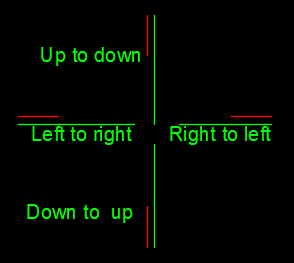
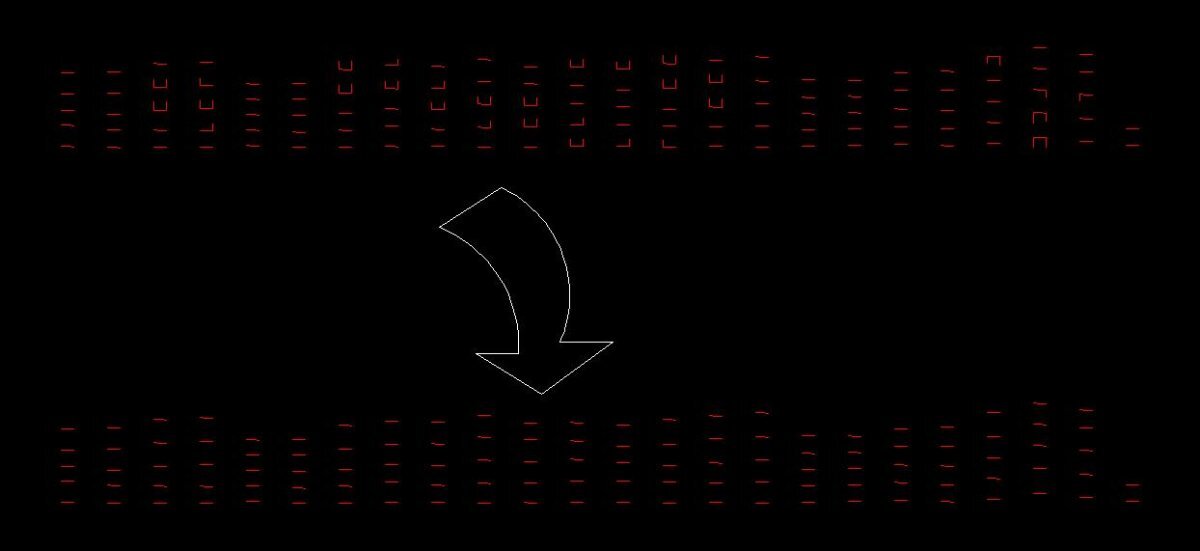
I am trying to draw Following type of figure attached. When I am picking 2 points up to down, Down to up Left to right or right to left the red line should be in the correct position. I have written the following lisp codes. But it does not function correctly. Please help me to do this task. (setq b_p1 (getpoint "\nPick on 1st beam cl")) (setq b_p2 (getpoint b_p1"\nPick 2nd beam cl " )) (command "line""non"b_p1 "non"b_p2 ""); line bottom part (setq line1(entlast)) (setq spane1 (distance b_p1 b_p2));;; 1st span (setq crnkL (* 0.3 spane1));; top line length (setq gap 200);; gap between top and bottom part of line (setq angle1 (angle b_p1 b_p2)); angle of line 1 in radiance (if(and(>= angle1 0 )(<= angle1 (/ pi 2 ))) (setq angle2 (+ angle1(/ pi 2)));; angle to point b_p1 from t_p1 ); if (if(and(>= angle1 (/ pi 2 ) )(<= angle1 pi)) (setq angle2 (+ angle1(/ pi 2)));; angle to point b_p1 from t_p1 ); if (setq t_p1 (polar b_p1 angle2 gap )) (setq t_p2 (polar t_p1 angle1 crnkL )) (command "line""non"t_p1 "non"t_p2 "")
-
 dane.coombs joined the community
 -
Select all the lines that are vertical
Isaac26a replied to Isaac26a's topic in AutoLISP, Visual LISP & DCL
Thank you Mhupp, it works like charm, I didn't know that '(equal )' would work like that, I thought that would return nil everytime, something new to learn, thank you again for your help. -
Select all the lines that are vertical
mhupp replied to Isaac26a's topic in AutoLISP, Visual LISP & DCL
ssget lines check endpoints to get angle tho not so vertical. vert.mp4 SVL.lsp -
Hello again, I had this task that I usually have from time to time and wondered if there is a way to select only the vertical lines that are in the drawing to delete them, some are slightly to one side left or right. I was wondering if something like select the lines and sort them by a difference of the x coordinate of the start point less the x coordinate of the end point plus a fuzz distance equals zero or maybe there is something much more simple to do, here is the image and the sample dwg file Thanks to all for your kind help. sample01.dwg
- Yesterday
-
I've rescaled it and it fits. Moving onto plate 2 now.
-
Text temporarily disappearing
Rooster replied to Rooster's topic in AutoCAD 2D Drafting, Object Properties & Interface
Thank you both... Audit - 0 errors found, 0 errors fixed Happens to text/mtext in both modelspace and paperspace Happens to new text/mtext in blank drawing also Happening to every piece of text (not just rotated) - moving or copying also results in this behaviour. When I move/copy/rotate the text vanishes, and all I see is a point at the insert point of the text Yes, Windows updates recently happened This doesn't seem to be a drawing-specific problem (as it's now happening in every drawing). Nor is there a problem with the text objects themselves, as the problem only occurs when working in the 2D Wireframe visual style (which is what I use 90% of the time). I can't think of anywhere in AutoCAD, though, where one would make changes to how the different visual styles display objects...??? -

Text temporarily disappearing
CyberAngel replied to Rooster's topic in AutoCAD 2D Drafting, Object Properties & Interface
Does it happen with every piece of text, or just sometimes? Could it be only the rotated text? I had that issue when I turned off the MTEXTFIXED setting. -
Text temporarily disappearing
SLW210 replied to Rooster's topic in AutoCAD 2D Drafting, Object Properties & Interface
Can you post a .dwg? Have you tried an Audit? Does this happen in a new drawing with just Text/MText? Paperspace and/or Modelspace? Any Windows updates recently? -
Hi Just stumbled on this request, but Try these Not sure wether it metric or imperial you're using Regards CallOut_Met.dwgCallOut_Imp.dwg
-

Need help reducing multiple oversized dimension text boxes at once
Reetie Lubana replied to 0misclose's topic in AutoCAD 2D Drafting, Object Properties & Interface
Based on what I can see (and something I’ve run into more than once), this usually happens when the dimension text has a fixed width set, so AutoCAD is reserving a larger text box than the actual text needs. When the dimensions are short or rotated, that oversized box forces the text to get pushed off with a leader. The good news is you don’t need to explode anything. Here’s what I’d check first: Check DIMTXTW (text width) Type DIMTXTW at the command line. If it’s set to anything other than 0, that’s likely your issue. Set it to 0 so the text box automatically fits the text length. You can also find this in: DIMSTYLE → Modify your dim style Text tab → make sure Width is set to 0 (not a fixed value) Update existing dimensions After fixing the dim style, run DIMUPDATE Select the affected dimensions so they inherit the corrected settings (Optional but helpful) Check DIMGAP isn’t set too large, as that can exaggerate the offset. Make sure “Text movement” is set to something sensible (I usually use Move text with leader). I’ve had drawings with dozens of rotated dimensions behaving exactly like this, and resetting the text width to 0 cleaned them all up in one go. Hopefully that saves you from having to tweak them one by one. -
Reetie Lubana joined the community
-
 Albertpulinario joined the community
 - Last week
-
Text temporarily disappearing
Rooster replied to Rooster's topic in AutoCAD 2D Drafting, Object Properties & Interface
One other piece of information - this only happens when working in 2D Wireframe mode. If i switch to any other view mode (Conceptual, Hidden etc) text doesn't vanish. Maybe that will help narrow down the issue...? -
Text temporarily disappearing
Rooster replied to Rooster's topic in AutoCAD 2D Drafting, Object Properties & Interface
Thanks for the reply. This happens to both Text & MText. Dragmode is currently set to Auto. I have turned off Hardware Acceleration and it made no difference. Fonts haven't changed from when it was working before (and I'm just using standard Arial font, nothing exotic)... I'm obviously reluctant to reset to default settings unless I really have to! -
I have found opening in Photoshop and/or Illustrator and enhancing the raster quality to help.
-
Text temporarily disappearing
SLW210 replied to Rooster's topic in AutoCAD 2D Drafting, Object Properties & Interface
Certain drawings or all of them? Try DRAGMODE = Auto Text, MText or both? Have you tried turning Hardware Acceleration OFF? It could be a font issue, template issue or maybe a graphics card/driver issue. Maybe a RESET to Defaults will fix it.