All Activity
- Past hour
-
I wish Autodesk would add the following features to DCL: 1) Expand and Shrink the size of custom dialog boxes 2) Floating dialog while command line is active 3) Horizontal slide bar to list box 4) Edit box that supports multiple lines of Text 5) Image tile & image button tile to support not only sld but also typical raster file types like jpg, png, bmp, dwg 6) A select file dialog box that supports dwg/txt/jpg/png/bmp file thumbnail previews 7) A multiple file selection, window style looking getfiled dialog box (which currently can be done using PowerShell)
- Today
-

Dimensioning in paper space
CyberAngel replied to Discus84's topic in AutoCAD 2D Drafting, Object Properties & Interface
I've never dimensioned in paper space. Too many things to go wrong. Also dimensions are weird, it's like they wanted to please everybody but wound up disappointing everybody. -
 LainiStudio3D joined the community
 -
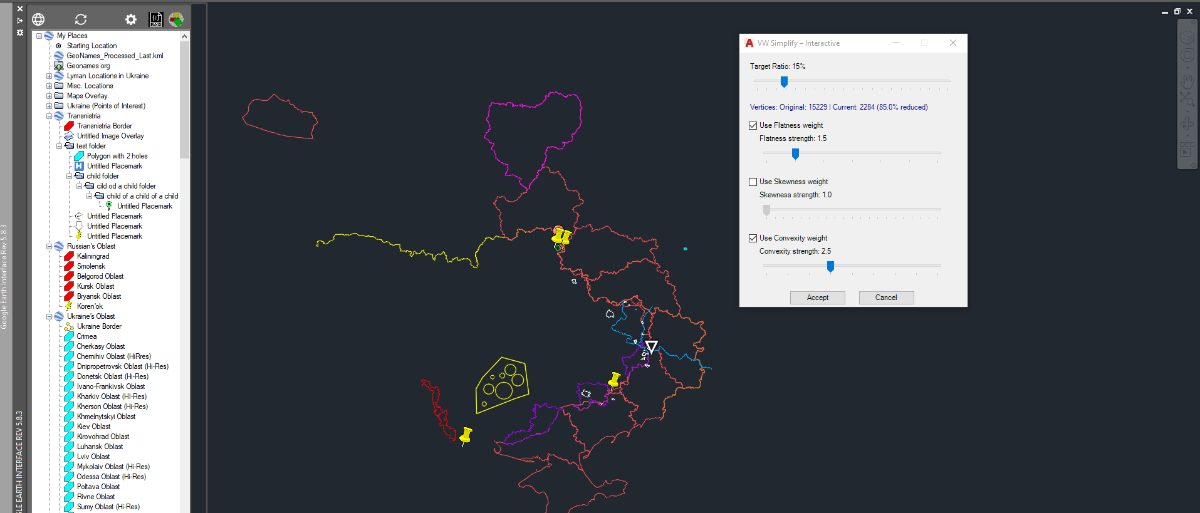
 Here's another Net app to facilitate the simplification of polyline with lots of segments. I am including the code and a bat file to compile it for Autocad 2017. Once you've compiled VWSimplifyInteractive.cs into VWSimplifyInteractive.dll, Netload it into autocad. New comand VWSimplifyInteractive will now be available to trhe command line or Autolisp. If you run the command you will be asked to select a polyline. The selected poly will be copied in Magenta,then a dialog box with 3 sliders will appear to let you vary the parameter of the simplification. The polyline is simplified in real-time and you can adjust the parameters until you Accept or Cancel. Note that your original polyline remains untouched and that the simplified one is place on layer "Simplified Poly" with color Green. once you press Accept. Here's the C# code: // VWSimplifyInteractive.cs // Interactive Visvalingam + Zhou-Jones for AutoCAD 2017 using System; using System.Collections.Generic; using System.Drawing; using System.Windows.Forms; using Autodesk.AutoCAD.ApplicationServices; using Autodesk.AutoCAD.DatabaseServices; using Autodesk.AutoCAD.EditorInput; using Autodesk.AutoCAD.Geometry; using Autodesk.AutoCAD.Runtime; using AcApp = Autodesk.AutoCAD.ApplicationServices.Application; [assembly: CommandClass(typeof(VWSimplify.InteractiveCommands))] namespace VWSimplify { public class InteractiveCommands { [CommandMethod("VWSimplifyInteractive", CommandFlags.Modal | CommandFlags.Session)] public void Run() { Document doc = AcApp.DocumentManager.MdiActiveDocument; if (doc == null) return; Editor ed = doc.Editor; PromptEntityOptions peo = new PromptEntityOptions("\nSelect polyline to simplify: "); peo.SetRejectMessage("\nOnly LWPOLYLINE allowed."); peo.AddAllowedClass(typeof(Polyline), true); PromptEntityResult per = ed.GetEntity(peo); if (per.Status != PromptStatus.OK) return; ObjectId srcId = per.ObjectId; // Create and show the modeless form var form = new SimplifyForm(srcId); AcApp.ShowModelessDialog(form); } } public class SimplifyForm : Form { private ObjectId _srcId; private ObjectId _previewId = ObjectId.Null; private TrackBar tbPercent; private CheckBox chkFlat, chkSkew, chkConv; private TrackBar tbFlat, tbSkew, tbConv; private Label lblPercent, lblVertices, lblFlat, lblSkew, lblConv; private Button btnAccept, btnCancel; // Current parameters private double _percent = 15.0; private bool _useFlat = true; private bool _useSkew = false; private bool _useConv = true; private double _flatStrength = 1.5; // reasonable start private double _skewStrength = 1.0; private double _convStrength = 2.5; // reasonable start public SimplifyForm(ObjectId srcId) { _srcId = srcId; InitializeComponent(); this.Shown += SimplifyForm_Shown; } private void SimplifyForm_Shown(object sender, EventArgs e) { UpdatePreview(); // First preview once form is displayed } private void InitializeComponent() { this.Text = "VW Simplify – Interactive"; this.Size = new Size(380, 445); this.FormBorderStyle = FormBorderStyle.FixedDialog; this.MaximizeBox = false; this.StartPosition = FormStartPosition.CenterScreen; int y = 15; // Percentage lblPercent = new Label() { Left = 15, Top = y, Width = 330, Text = "Target Ratio: 15%" }; tbPercent = new TrackBar() { Left = 15, Top = y + 20, Width = 330, Minimum = 1, Maximum = 100, Value = 15, TickFrequency = 5 }; tbPercent.ValueChanged += (s, e) => { _percent = tbPercent.Value; lblPercent.Text = "Target Ratio: " + _percent + "%"; UpdatePreview(); }; y += 65; // Vertex Counter Label lblVertices = new Label() { Left = 15, Top = y, Width = 330, Text = "Vertices: Original: - | Current: - (-%)", ForeColor = Color.DarkBlue }; y += 25; // Flatness chkFlat = new CheckBox() { Left = 15, Top = y, Text = "Use Flatness weight", Checked = true, Width = 200 }; chkFlat.CheckedChanged += (s, e) => { _useFlat = chkFlat.Checked; tbFlat.Enabled = _useFlat; UpdatePreview(); }; y += 25; lblFlat = new Label() { Left = 30, Top = y, Width = 300, Text = "Flatness strength: 1.5" }; tbFlat = new TrackBar() { Left = 30, Top = y + 20, Width = 300, Minimum = 10, Maximum = 40, Value = 15, // 1.0 – 4.0 TickFrequency = 5 }; tbFlat.ValueChanged += (s, e) => { _flatStrength = tbFlat.Value / 10.0; lblFlat.Text = "Flatness strength: " + _flatStrength.ToString("0.0"); UpdatePreview(); }; y += 65; // Skewness chkSkew = new CheckBox() { Left = 15, Top = y, Text = "Use Skewness weight", Checked = false, Width = 200 }; chkSkew.CheckedChanged += (s, e) => { _useSkew = chkSkew.Checked; tbSkew.Enabled = _useSkew; UpdatePreview(); }; y += 25; lblSkew = new Label() { Left = 30, Top = y, Width = 300, Text = "Skewness strength: 1.0" }; tbSkew = new TrackBar() { Left = 30, Top = y + 20, Width = 300, Minimum = 10, Maximum = 30, Value = 10, Enabled = false }; tbSkew.ValueChanged += (s, e) => { _skewStrength = tbSkew.Value / 10.0; lblSkew.Text = "Skewness strength: " + _skewStrength.ToString("0.0"); UpdatePreview(); }; y += 65; // Convexity chkConv = new CheckBox() { Left = 15, Top = y, Text = "Use Convexity weight", Checked = true, Width = 200 }; chkConv.CheckedChanged += (s, e) => { _useConv = chkConv.Checked; tbConv.Enabled = _useConv; UpdatePreview(); }; y += 25; lblConv = new Label() { Left = 30, Top = y, Width = 300, Text = "Convexity strength: 2.5" }; tbConv = new TrackBar() { Left = 30, Top = y + 20, Width = 300, Minimum = 10, Maximum = 50, Value = 25, // 1.0 – 5.0 TickFrequency = 5 }; tbConv.ValueChanged += (s, e) => { _convStrength = tbConv.Value / 10.0; lblConv.Text = "Convexity strength: " + _convStrength.ToString("0.0"); UpdatePreview(); }; y += 70; // Buttons btnAccept = new Button() { Text = "Accept", Left = 80, Top = y, Width = 90 }; btnCancel = new Button() { Text = "Cancel", Left = 190, Top = y, Width = 90 }; btnAccept.Click += BtnAccept_Click; btnCancel.Click += BtnCancel_Click; this.Controls.AddRange(new Control[] { lblPercent, tbPercent, lblVertices, chkFlat, lblFlat, tbFlat, chkSkew, lblSkew, tbSkew, chkConv, lblConv, tbConv, btnAccept, btnCancel }); this.FormClosing += (s, e) => CleanupPreview(false); } private void UpdatePreview() { Document doc = AcApp.DocumentManager.MdiActiveDocument; if (doc == null) return; int originalCount = 0; int simplifiedCount = 0; using (DocumentLock dl = doc.LockDocument()) using (Transaction tr = doc.TransactionManager.StartTransaction()) { Polyline src = tr.GetObject(_srcId, OpenMode.ForRead) as Polyline; if (src == null) { tr.Commit(); return; } originalCount = src.NumberOfVertices; List<Point2d> simplified = Simplify(src, _percent, _useFlat, _useSkew, _useConv, _flatStrength, _skewStrength, _convStrength); if (simplified == null || simplified.Count < 2) { tr.Commit(); return; } simplifiedCount = simplified.Count; BlockTableRecord btr = (BlockTableRecord)tr.GetObject(doc.Database.CurrentSpaceId, OpenMode.ForWrite); // Erase old preview polyline if it exists if (!_previewId.IsNull && !_previewId.IsErased) { DBObject oldObj = tr.GetObject(_previewId, OpenMode.ForWrite, false); if (oldObj != null) { oldObj.Erase(); } _previewId = ObjectId.Null; } // Construct new polyline Polyline preview = new Polyline(); for (int i = 0; i < simplified.Count; i++) { preview.AddVertexAt(i, simplified[i], 0, 0, 0); } preview.Closed = src.Closed && simplified.Count >= 3; preview.ColorIndex = 6; // Magenta preview.ConstantWidth = 0; btr.AppendEntity(preview); tr.AddNewlyCreatedDBObject(preview, true); _previewId = preview.ObjectId; tr.Commit(); } // Update UI vertex stats if (originalCount > 0) { double reduction = 100.0 * (1.0 - ((double)simplifiedCount / originalCount)); lblVertices.Text = string.Format("Vertices: Original: {0} | Current: {1} ({2:0.0}% reduced)", originalCount, simplifiedCount, reduction); } AcApp.DocumentManager.MdiActiveDocument.Editor.Regen(); } private void BtnAccept_Click(object sender, EventArgs e) { Document doc = AcApp.DocumentManager.MdiActiveDocument; if (doc == null) return; using (DocumentLock dl = doc.LockDocument()) using (Transaction tr = doc.TransactionManager.StartTransaction()) { if (!_previewId.IsNull && !_previewId.IsErased) { Polyline preview = tr.GetObject(_previewId, OpenMode.ForWrite) as Polyline; if (preview != null) { // Ensure layer exists LayerTable lt = (LayerTable)tr.GetObject(doc.Database.LayerTableId, OpenMode.ForRead); ObjectId layerId; if (!lt.Has("Simplified Poly")) { lt.UpgradeOpen(); LayerTableRecord ltr = new LayerTableRecord(); ltr.Name = "Simplified Poly"; ltr.Color = Autodesk.AutoCAD.Colors.Color.FromColorIndex( Autodesk.AutoCAD.Colors.ColorMethod.ByAci, 3); // green layerId = lt.Add(ltr); tr.AddNewlyCreatedDBObject(ltr, true); } else layerId = lt["Simplified Poly"]; preview.LayerId = layerId; preview.Color = Autodesk.AutoCAD.Colors.Color.FromColorIndex( Autodesk.AutoCAD.Colors.ColorMethod.ByLayer, 256); // Add XData with parameters AddXData(preview, tr, doc.Database); _previewId = ObjectId.Null; // prevent cleanup from erasing it } } tr.Commit(); } this.Close(); } private void BtnCancel_Click(object sender, EventArgs e) { CleanupPreview(true); this.Close(); } private void CleanupPreview(bool erase) { if (_previewId.IsNull || _previewId.IsErased) return; Document doc = AcApp.DocumentManager.MdiActiveDocument; if (doc == null) return; using (DocumentLock dl = doc.LockDocument()) using (Transaction tr = doc.TransactionManager.StartTransaction()) { if (erase) { DBObject obj = tr.GetObject(_previewId, OpenMode.ForWrite, false); if (obj != null) obj.Erase(); } tr.Commit(); } _previewId = ObjectId.Null; } private void AddXData(Polyline pl, Transaction tr, Database db) { RegAppTable rat = (RegAppTable)tr.GetObject(db.RegAppTableId, OpenMode.ForRead); if (!rat.Has("VW_SIMPLIFY")) { rat.UpgradeOpen(); RegAppTableRecord reg = new RegAppTableRecord(); reg.Name = "VW_SIMPLIFY"; rat.Add(reg); tr.AddNewlyCreatedDBObject(reg, true); } ResultBuffer rb = new ResultBuffer( new TypedValue(1001, "VW_SIMPLIFY"), new TypedValue(1000, "Visvalingam-ZhouJones"), new TypedValue(1040, _percent), new TypedValue(1071, _useFlat ? 1 : 0), new TypedValue(1040, _flatStrength), new TypedValue(1071, _useSkew ? 1 : 0), new TypedValue(1040, _skewStrength), new TypedValue(1071, _useConv ? 1 : 0), new TypedValue(1040, _convStrength) ); pl.XData = rb; } //-------------------------------------------------------------------- // Simplification core with Zhou-Jones weights //-------------------------------------------------------------------- private List<Point2d> Simplify(Polyline src, double percent, bool useFlat, bool useSkew, bool useConv, double flatStr, double skewStr, double convStr) { int n = src.NumberOfVertices; if (n < 3) return null; List<Point2d> pts = new List<Point2d>(n); for (int i = 0; i < n; i++) pts.Add(src.GetPoint2dAt(i)); bool closed = src.Closed; if (closed && !pts[0].IsEqualTo(pts[pts.Count - 1], new Tolerance(1e-10, 1e-10))) pts.Add(pts[0]); int target = (int)Math.Max(2, Math.Round(n * percent / 100.0)); if (closed) target = Math.Max(target, 3); return VisvalingamZhouJones(pts, target, useFlat, useSkew, useConv, flatStr, skewStr, convStr); } private List<Point2d> VisvalingamZhouJones(List<Point2d> pts, int target, bool useFlat, bool useSkew, bool useConv, double flatStr, double skewStr, double convStr) { int n = pts.Count; if (n <= target) return new List<Point2d>(pts); Point2d[] points = pts.ToArray(); double[] areas = new double[n]; bool[] alive = new bool[n]; int[] prev = new int[n]; int[] next = new int[n]; for (int i = 0; i < n; i++) { alive[i] = true; prev[i] = i - 1; next[i] = i + 1; areas[i] = double.MaxValue; } prev[0] = -1; next[n - 1] = -1; var heap = new SortedSet<HeapItem>(); for (int i = 1; i < n - 1; i++) { double a = WeightedArea(points, i, prev, next, useFlat, useSkew, useConv, flatStr, skewStr, convStr); areas[i] = a; heap.Add(new HeapItem(a, i)); } double lastArea = 0.0; int live = n; while (heap.Count > 0 && live > target) { HeapItem item = heap.Min; heap.Remove(item); int idx = item.Index; if (!alive[idx] || Math.Abs(item.Area - areas[idx]) > 1e-12) continue; double a = Math.Max(item.Area, lastArea); lastArea = a; areas[idx] = a; alive[idx] = false; live--; int p0 = prev[idx]; int p2 = next[idx]; if (p0 >= 0) next[p0] = p2; if (p2 >= 0) prev[p2] = p0; if (p0 >= 0 && alive[p0] && prev[p0] >= 0) { double na = WeightedArea(points, p0, prev, next, useFlat, useSkew, useConv, flatStr, skewStr, convStr); if (na < lastArea) na = lastArea; areas[p0] = na; heap.Add(new HeapItem(na, p0)); } if (p2 >= 0 && alive[p2] && next[p2] >= 0) { double na = WeightedArea(points, p2, prev, next, useFlat, useSkew, useConv, flatStr, skewStr, convStr); if (na < lastArea) na = lastArea; areas[p2] = na; heap.Add(new HeapItem(na, p2)); } } List<Point2d> res = new List<Point2d>(); for (int i = 0; i < n; i++) if (alive[i]) res.Add(points[i]); return res; } private double WeightedArea(Point2d[] pts, int i, int[] prev, int[] next, bool useFlat, bool useSkew, bool useConv, double flatStr, double skewStr, double convStr) { Point2d a = pts[prev[i]]; Point2d b = pts[i]; Point2d c = pts[next[i]]; double ea = TriangleArea(a, b, c); if (ea < 1e-20) return 0.0; double wFlat = 1.0, wSkew = 1.0, wConv = 1.0; // Base length and height double baseLen = a.GetDistanceTo(c); if (baseLen < 1e-12) return ea; // Height double area2 = Math.Abs((b.X - a.X) * (c.Y - a.Y) - (b.Y - a.Y) * (c.X - a.X)); double height = area2 / baseLen; // ---- Flatness ---- if (useFlat) { double ratio = height / baseLen; wFlat = Math.Pow(Math.Max(ratio, 1e-6), flatStr); } // ---- Skewness (prefer isosceles) ---- if (useSkew) { double d1 = a.GetDistanceTo(b); double d2 = b.GetDistanceTo(c); double maxd = Math.Max(d1, d2); double mind = Math.Min(d1, d2); double skewRatio = (maxd > 1e-12) ? mind / maxd : 1.0; wSkew = Math.Pow(skewRatio, skewStr); } // ---- Convexity ---- if (useConv) { // Cross product sign to determine turn direction double cross = (b.X - a.X) * (c.Y - a.Y) - (b.Y - a.Y) * (c.X - a.X); if (cross > 0) wConv = convStr; // boost convex else wConv = 1.0; // concave stays normal } return ea * wFlat * wSkew * wConv; } private double TriangleArea(Point2d a, Point2d b, Point2d c) { return 0.5 * Math.Abs(a.X * (b.Y - c.Y) + b.X * (c.Y - a.Y) + c.X * (a.Y - b.Y)); } private class HeapItem : IComparable<HeapItem> { public double Area; public int Index; public HeapItem(double area, int index) { Area = area; Index = index; } public int CompareTo(HeapItem other) { int cmp = Area.CompareTo(other.Area); return cmp != 0 ? cmp : Index.CompareTo(other.Index); } } } } Bat file to compile for Acad 2017, From a powershell prompt issue: .\Build VWSimplifyInteractive.cs @echo off if "%~1"=="" ( echo Error: No source file specified. echo Usage: build.bat SourceFileName exit /b 1 ) set CSC="C:\Windows\Microsoft.NET\Framework64\v4.0.30319\csc.exe" set ACAD=C:\Program Files\Autodesk\AutoCAD 2017 %CSC% /target:library /platform:x64 /out:"%~1.dll" "/r:%ACAD%\AcCoreMgd.dll" "/r:%ACAD%\AcDbMgd.dll" "/r:%ACAD%\AcMgd.dll" "%~1.cs" if %ERRORLEVEL% equ 0 ( echo. echo Successfully built %~1.dll ) else ( echo. echo Compilation failed. ) VWSimplifyInteractive.cs Build.bat
-

Dimensioning in paper space
Discus84 posted a topic in AutoCAD 2D Drafting, Object Properties & Interface
Hi, I always annotate in model space-it complicates changes to the model as there is more objects to encapsulate in stretch frames. What is more effective - model or paperspace dimesioning -keeping annotations away from the model.? -
.thumb.jpg.615654602253be56b2fbd5d064834780.jpg)
Why does a 3D object sometimes rotate in the wrong direction?
indiancad posted a topic in AutoCAD 3D Modelling & Rendering
Have you ever selected a 3D object, used 3DROTATE, and found that it rotates around an unexpected axis? This can happen when the UCS is not aligned with the object. In 3D work, the UCS controls the direction of the X, Y, and Z axes. A simple fix is to use UCS → Face and select the face you want to work on. You can then use 3DROTATE or other 3D commands with the correct orientation. I’ve found this much easier than trying to guess which axis to rotate around. How many of you have had a 3D object rotate in the wrong direction? What was your fix? -
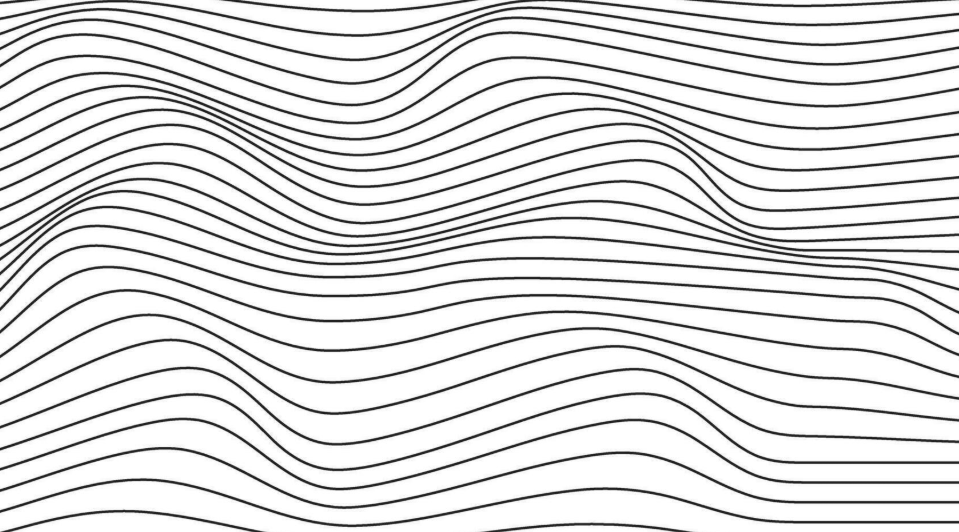
I'd like to be able to create this effect but specify min/max distance between lines. Any ideas appreciated. Thanks!
-
Why does my block move to the wrong place when I insert it?
CyberAngel replied to indiancad's topic in AutoCAD 2D Drafting, Object Properties & Interface
Not sure how it happens, but some blocks seem to have insertion points at the origin or just some random point. Something to do with the way they were defined, I suppose. One problem is, many of these blocks define a location. They are useless if the insertion point isn't at a specific coordinate, such as the nut on a fire hydrant, which is where you typically measure from. Another problem is, if you want to locate them properly, you may not be able to redefine them with the right point and then move them all at once. A block that's been rotated, for instance, will not go where you want it to. Once again, we see what happens when you come across a problem and don't fix it as soon as possible; it just causes more problems. -

Why does my block move to the wrong place when I insert it?
VicoWang replied to indiancad's topic in AutoCAD 2D Drafting, Object Properties & Interface
The origin point is set too far from the main subject, which is actually very uncomfortable. Using the Plan command to judge the entire drawing size and then going back to normal zoom can lead to confusion. The method I use to create a block is Shift+Ctrl+C, to set the origin point (usually on some object), and then use Shift+Ctrl+V to paste it as a block. I haven't encountered any problems. -

Why does my block move to the wrong place when I insert it?
SLW210 replied to indiancad's topic in AutoCAD 2D Drafting, Object Properties & Interface
Once again I hope this was done by a coworker. The prevention of that is to properly set the base point, etc. when creating the blocks. Sometimes having the BASE set far from the block could be the correct location, depends on the block, you could be inserting it incorrectly. -
 CharlieHiggs joined the community
 -

Why can’t I join two lines even when they look connected?
imagetocad replied to indiancad's topic in AutoCAD 2D Drafting, Object Properties & Interface
One additional thing worth checking is the join tolerance. Even when two endpoints appear connected on screen, there may still be a very small gap between them. For imported or automatically generated geometry, I normally use this cleanup sequence: Use FLATTEN to make sure all objects have the same Z value. Run OVERKILL to remove duplicate or overlapping segments. Use PEDIT → Multiple → Join, with a small fuzz distance. Check any remaining endpoints with DIST or the Properties panel. I would avoid using a large fuzz distance because it may join nearby objects that should remain separate. It is also worth checking whether some objects are splines or arcs rather than lines or polylines. With geometry converted from PDFs or raster images, duplicate short segments and tiny overlaps are often the real cause rather than a clearly visible gap. -
imagetocad joined the community
- Yesterday
-
Here is libreoffice code. Hopefully it is the correct one. Re display answers. The simplest is use Alert just add the "\n" in string for multi lines. Yes can do a dcl its made up of text paragraphs. And message boxes as last idea. (alert "This is line one\nline 2\nline 3") ;;;;;;;;;;;;;;;;;;;;; ; make text dcl from list ; By Alan H july 2026 (defun AHmakepara (lst / fo x dcl_id) (setq fo (open (setq fname (vl-filename-mktemp "" "" ".dcl")) "w")) (write-line "AHpara: dialog {" fo) (write-line (strcat " label = " (chr 34) "Current values" (chr 34) " ;") fo) (write-line " : column {" fo) (write-line " width =25;" fo) (write-line " : paragraph {" fo) (setq x 0) (repeat (length lst) (write-line " : text_part {" fo) (write-line (strcat "label = " (chr 34) (nth x lst) (chr 34) ";") fo) (setq x (1+ x)) (write-line " }" fo) ) (write-line " }" fo) (write-line "spacer_1 ;" fo) (write-line "ok_cancel ; }" fo) (write-line " }" fo) (close fo) (setq dcl_id (load_dialog fname)) (if (not (new_dialog "AHpara" dcl_id)) (exit) ) (action_tile "accept" "(setq ans 1)(done_dialog)") (action_tile "cancel" "(setq ans 2)(done_dialog)") (start_dialog) (unload_dialog dcl_id) (vl-file-delete fname) (princ ans) (princ) ) ; (if (not AHmakepara)(load "Multi para.lsp")) ; (setq lst (list "This is line 1 " "this is line 2" "line 3" "A big line 4 like this")) ; (AHmakepara lst) ;;;;;;;;;;;;;;;;;;;;;; ; this allows for a time so message closes. (defun MsgBox (title options message time / WshShell) (setq WshShell (vlax-create-object "WScript.Shell")) (vlax-invoke WshShell 'Run (strcat "mshta.exe vbscript:close(CreateObject(\"WScript.Shell\").Popup(\"" message "\"," (itoa time) ",\"" title "\"," (itoa options)"))" ) ) (vlax-release-object WshShell) ) (MsgBox "this is me" 0 "have a good day" 1) ; pretty sure can do multi line, using \n or \r ? libre2.lsp
-
Why does my block move to the wrong place when I insert it?
indiancad posted a topic in AutoCAD 2D Drafting, Object Properties & Interface
One common reason is the base point of the block. If the base point was created far from the actual objects, the block can appear in an unexpected location. You can check the block with BEDIT and use BASE to set the correct insertion point. After fixing the base point, insert the block again and it should come in at the correct location. How many of you have had this problem with blocks? What was the cause in your case? -
Post that, I was working on some of that from the thread a while back, but do not remember how far I went.
-
I have all of that from you and @rlx, thanks though, I have a DCL built for this already, I made it a little fancy with the options, I might go simpler though. I made some improvements to the Metric side. When I have time I'll get it cleaned up and on here. I was thinking about instead of the commandline having the results in a DCL on screen and put options to make the CSV, Excel, Print, etc., though that will be when I have time. I am not sure how many actually would have use of this, but I plan to get it finished hopefully this week, hopefully I can wrap up my CAD work and get back on this. My grandkids are in a small town 268 km (167 mi) NE of Melbourne just into New South Wales and a little ways west of Lake Hume and 457 km (284 mi) SW of Sydney. I hate the time difference, but not too bad, they wake up when I'm eating supper or going to bed, they are getting ready for bed when I am getting to work.
-
 SHa75 joined the community
 -
@Danielm103 Interesting, so many ways to skin a cat.
-
all you would need to do is edit the bat file to point at the target platform. AI says you can jut create a project file next to the .cs, then use “dotnet build -c Release” <Project Sdk="Microsoft.NET.Sdk"> <PropertyGroup> <!-- Use net48 for AutoCAD 2021-2024, or net8.0-windows for AutoCAD 2025+ --> <TargetFramework>net8.0-windows</TargetFramework> <ImplicitUsings>enable</ImplicitUsings> <Nullable>enable</Nullable> <Platforms>x64</Platforms> </PropertyGroup> <!-- Reference your AutoCAD libraries --> <ItemGroup> <Reference Include="AcCoreMgd"> <HintPath>C:\Program Files\Autodesk\AutoCAD 2017\AcCoreMgd.dll</HintPath> <Private>False</Private> <!-- Prevents copying AutoCAD DLLs to your output folder --> </Reference> <Reference Include="AcDbMgd"> <HintPath>C:\Program Files\Autodesk\AutoCAD 2017\AcDbMgd.dll</HintPath> <Private>False</Private> </Reference> <Reference Include="AcMgd"> <HintPath>C:\Program Files\Autodesk\AutoCAD 2017\AcMgd.dll</HintPath> <Private>False</Private> </Reference> </ItemGroup> </Project>
-
Nice! I used Nanoflann for the python wrappers, Ge.Point2dTree, Ge.Point3dTree https://github.com/jlblancoc/nanoflann it builds the tree multi-threaded. Nanoflann can be made dynamic in that it can add or remove points, though I didn’t add that in to the python wrappers. I also created a wrapper for AutoLISP here https://github.com/CEXT-Dan/ads_geo Wrappers are limited though, in C++ you can create a payload I.e. { Point Data } Otherwise, you have to create a hashmap to link the point with the payload. A professional C# version might use an interface for X,Y,Z, so you can expand the tree to allow any class or structure that has the proper interface
- Last week
-
I am kind of a Green Horn when it comes to compiling. I don't even have vstudio. So I still use the legacy csc compiler. On top of that i only have access to acad 2017, so I am not aware of what would be needed to compile it for more recent version of Autocad.
-
Whilst I probably won't use it, have you looked at compiling for Non Acad, say Bricscad a lot of users here.
-
Yes outputting results as both may be the simplest way. Re make a dcl, I use say multi radio buttons.lsp as it only needs 3 lines of code to work, you comment out the vla-deletefile, so the dcl code remains, I then use the RLX convert dcl to lisp so paste the converted code into my programs, using the multi just saves typing to make the source dcl. Just another comment, I have a make a radio button dcl from a dwg. RLX was looking into doing similar. I have code also for Libreoffice Calc reading and writing plus more. Happy to post. Opening is not as straight forward as Excel. Where are the grand kids ? I am north of Sydney. Convert dcl 2 lisp rlx.lsp
-
Been playing quite a bit with Gilles Chanteau's kdtree lisp app published at theSwamp kd-tree (AutoLISP). So decided to turn it into a dll to use from autolisp. I am attaching the C# code below and a bat file to compile it for Autocad 2017. The dll will create the following function for autolisp: KDtreeLisp.dll Reference & Command SyntaxIn AutoLISP documentation standards, optional parameters are enclosed in square brackets [optional]. (KD-BUILD pointList [dimensions] [customHandle]) Builds a KD-Tree spatial index from a list of points. Arguments: pointList: LIST — List of 2D or 3D point lists ((x y z) ...). dimensions (optional): INT — 2 for 2D $(X,Y)$ or 3 for 3D $(X,Y,Z)$. Default is 2. customHandle (optional): STR — Custom string handle identifier. Returns: STR handle (e.g., "<KD-TREE-1>" or "<KD-TREE-SURVEY>"), or nil on failure. (KD-NEAREST handle targetPoint [count] [maxRadius]) Finds the nearest n points to a target point. Arguments: handle: STR — KD-Tree handle string. targetPoint: LIST — Target point (x y z). count (optional): INT — Number of nearest points to retrieve. Default is 1. maxRadius (optional): REAL or INT — Maximum search radius limit. Points farther than this distance are ignored. Returns:If count = 1 (or omitted): A single point (x y z). If count > 1: A list of points ((x1 y1 z1) (x2 y2 z2) ...). (KD-NEAREST-INFO handle targetPoint [count] [maxRadius]) Finds nearest points with detailed metadata. Arguments: handle: STR — KD-Tree handle string. targetPoint: LIST — Target point (x y z). count (optional): INT — Number of points to retrieve. Default is 1. maxRadius (optional): REAL or INT — Maximum search radius limit. Returns: A list of detailed entries (((x y z) index distance) ...). (KD-RANGE handle centerPoint radius) Finds all points inside a fixed search radius without a count limit. Arguments: handle: STR — KD-Tree handle string. centerPoint: LIST — Center search coordinate (x y z). radius: REAL or INT — Search radius. Returns: A list of all enclosed points ((x1 y1 z1) (x2 y2 z2) ...) sorted by distance, or nil if none are found. (KD-FREE [handle]) Frees tree memory. Arguments: handle (optional): STR — Tree handle to free. If omitted, clears all active trees. Returns: INT — Number of trees removed. Once you've compiled the C#, kdtreelisp.dll will be created and ready to use in Autocad. using System; using System.Collections.Generic; using Autodesk.AutoCAD.DatabaseServices; using Autodesk.AutoCAD.Geometry; using Autodesk.AutoCAD.Runtime; namespace KdTreeLisp { // ========================================== // 1. DATA STRUCTURES & TREE ENGINE // ========================================== public class KdItem { public Point3d Point { get; set; } public int Id { get; set; } public KdItem(Point3d pt, int id) { Point = pt; Id = id; } } public class KdNode { public Point3d Point { get; set; } public int Id { get; set; } public KdNode Left { get; set; } public KdNode Right { get; set; } public KdNode(Point3d point, int id) { Point = point; Id = id; } } public class NeighborResult : IComparable<NeighborResult> { public KdNode Node { get; set; } public double DistanceSq { get; set; } public NeighborResult(KdNode node, double distSq) { Node = node; DistanceSq = distSq; } public int CompareTo(NeighborResult other) { return other.DistanceSq.CompareTo(this.DistanceSq); } } public class KdTree { public KdNode Root { get; private set; } public int ActiveDimensions { get; private set; } public void Build(List<KdItem> items, int activeDimensions) { ActiveDimensions = Math.Max(1, Math.Min(3, activeDimensions)); Root = BuildRecursive(items, 0); } private KdNode BuildRecursive(List<KdItem> items, int depth) { if (items == null || items.Count == 0) return null; int axis = depth % ActiveDimensions; items.Sort(delegate(KdItem a, KdItem b) { return GetAxisValue(a.Point, axis).CompareTo(GetAxisValue(b.Point, axis)); }); int medianIndex = items.Count / 2; KdNode node = new KdNode(items[medianIndex].Point, items[medianIndex].Id); node.Left = BuildRecursive(items.GetRange(0, medianIndex), depth + 1); node.Right = BuildRecursive(items.GetRange(medianIndex + 1, items.Count - (medianIndex + 1)), depth + 1); return node; } public double CalculateDistanceSq(Point3d p1, Point3d p2) { double dx = p1.X - p2.X; double dy = p1.Y - p2.Y; if (ActiveDimensions == 2) { return dx * dx + dy * dy; } double dz = p1.Z - p2.Z; return dx * dx + dy * dy + dz * dz; } // K-Nearest Neighbor Search with Optional Maximum Radius Limit public List<NeighborResult> FindNearest(Point3d target, int count, double maxRadius = double.MaxValue) { List<NeighborResult> heap = new List<NeighborResult>(); if (Root == null || count <= 0) return heap; double maxDistSq = (maxRadius == double.MaxValue) ? double.MaxValue : maxRadius * maxRadius; SearchNearest(Root, target, count, maxDistSq, heap, 0); // Sort ascending by distance before returning heap.Sort(delegate(NeighborResult a, NeighborResult b) { return a.DistanceSq.CompareTo(b.DistanceSq); }); return heap; } private void SearchNearest(KdNode current, Point3d target, int count, double maxDistSq, List<NeighborResult> heap, int depth) { if (current == null) return; double distSq = CalculateDistanceSq(current.Point, target); // Accept point only if inside maximum distance threshold if (distSq <= maxDistSq) { if (heap.Count < count) { heap.Add(new NeighborResult(current, distSq)); heap.Sort(); } else if (distSq < heap[0].DistanceSq) { heap[0] = new NeighborResult(current, distSq); heap.Sort(); } } int axis = depth % ActiveDimensions; double diff = GetAxisValue(target, axis) - GetAxisValue(current.Point, axis); KdNode primary = diff < 0 ? current.Left : current.Right; KdNode secondary = diff < 0 ? current.Right : current.Left; SearchNearest(primary, target, count, maxDistSq, heap, depth + 1); // Pruning condition: check if secondary subtree could contain points closer than current worst candidate double currentSearchRadiusSq = (heap.Count < count) ? maxDistSq : Math.Min(heap[0].DistanceSq, maxDistSq); if (diff * diff < currentSearchRadiusSq) { SearchNearest(secondary, target, count, maxDistSq, heap, depth + 1); } } // Range Search: Retrieves ALL points within radius public List<NeighborResult> RangeSearch(Point3d center, double radius) { List<NeighborResult> results = new List<NeighborResult>(); if (Root == null || radius < 0) return results; double radiusSq = radius * radius; SearchRangeRecursive(Root, center, radiusSq, results, 0); results.Sort(delegate(NeighborResult a, NeighborResult b) { return a.DistanceSq.CompareTo(b.DistanceSq); }); return results; } private void SearchRangeRecursive(KdNode current, Point3d center, double radiusSq, List<NeighborResult> results, int depth) { if (current == null) return; double distSq = CalculateDistanceSq(current.Point, center); if (distSq <= radiusSq) { results.Add(new NeighborResult(current, distSq)); } int axis = depth % ActiveDimensions; double diff = GetAxisValue(center, axis) - GetAxisValue(current.Point, axis); if (diff < 0) { SearchRangeRecursive(current.Left, center, radiusSq, results, depth + 1); if (diff * diff <= radiusSq) { SearchRangeRecursive(current.Right, center, radiusSq, results, depth + 1); } } else { SearchRangeRecursive(current.Right, center, radiusSq, results, depth + 1); if (diff * diff <= radiusSq) { SearchRangeRecursive(current.Left, center, radiusSq, results, depth + 1); } } } private double GetAxisValue(Point3d pt, int axis) { switch (axis) { case 0: return pt.X; case 1: return pt.Y; default: return pt.Z; } } } // ========================================== // 2. AUTOLISP INTERFACE BRIDGE // ========================================== public class LispBridge { private static readonly Dictionary<string, KdTree> _trees = new Dictionary<string, KdTree>(); private static int _treeCounter = 1; // Signature: (KD-BUILD pointList [dimensions] [customHandle]) [LispFunction("KD-BUILD")] public static TypedValue BuildTree(ResultBuffer args) { if (args == null) return new TypedValue((int)LispDataType.Nil); TypedValue[] arr = args.AsArray(); List<KdItem> items = new List<KdItem>(); int idCounter = 0; int requestedDimensions = 2; string customHandle = null; foreach (TypedValue tv in arr) { if (tv.TypeCode == (int)LispDataType.Point3d) { items.Add(new KdItem((Point3d)tv.Value, idCounter++)); } else if (tv.TypeCode == (int)LispDataType.Point2d) { Point2d pt2 = (Point2d)tv.Value; items.Add(new KdItem(new Point3d(pt2.X, pt2.Y, 0.0), idCounter++)); } else if (tv.TypeCode == (int)LispDataType.Int16 || tv.TypeCode == (int)LispDataType.Int32) { requestedDimensions = Convert.ToInt32(tv.Value); } else if (tv.TypeCode == (int)LispDataType.Text) { customHandle = Convert.ToString(tv.Value); } } if (items.Count == 0) return new TypedValue((int)LispDataType.Nil); KdTree tree = new KdTree(); tree.Build(items, requestedDimensions); string handle = string.IsNullOrEmpty(customHandle) ? string.Format("<KD-TREE-{0}>", _treeCounter++) : string.Format("<KD-TREE-{0}>", customHandle.ToUpper()); _trees[handle] = tree; return new TypedValue((int)LispDataType.Text, handle); } // Signature: (KD-NEAREST handle targetPoint [count] [maxRadius]) [LispFunction("KD-NEAREST")] public static ResultBuffer FindNearest(ResultBuffer args) { if (args == null) return null; List<TypedValue> values = ExtractValues(args); if (values.Count < 2) return null; if (values[0].TypeCode != (int)LispDataType.Text) return null; string handle = Convert.ToString(values[0].Value); if (!_trees.ContainsKey(handle)) return null; KdTree tree = _trees[handle]; if (tree.Root == null) return null; Point3d target; if (values[1].TypeCode == (int)LispDataType.Point3d) { target = (Point3d)values[1].Value; } else if (values[1].TypeCode == (int)LispDataType.Point2d) { Point2d p2 = (Point2d)values[1].Value; target = new Point3d(p2.X, p2.Y, 0.0); } else { return null; } int count = 1; if (values.Count > 2 && (values[2].TypeCode == (int)LispDataType.Int16 || values[2].TypeCode == (int)LispDataType.Int32)) { count = Convert.ToInt32(values[2].Value); } double maxRadius = double.MaxValue; if (values.Count > 3) { TypedValue v = values[3]; if (v.TypeCode == (int)LispDataType.Double || v.TypeCode == (int)LispDataType.Int16 || v.TypeCode == (int)LispDataType.Int32) { maxRadius = Convert.ToDouble(v.Value); } } List<NeighborResult> results = tree.FindNearest(target, count, maxRadius); if (results.Count == 0) return null; ResultBuffer res = new ResultBuffer(); if (count == 1) { res.Add(new TypedValue((int)LispDataType.Point3d, results[0].Node.Point)); } else { res.Add(new TypedValue((int)LispDataType.ListBegin)); foreach (NeighborResult item in results) { res.Add(new TypedValue((int)LispDataType.Point3d, item.Node.Point)); } res.Add(new TypedValue((int)LispDataType.ListEnd)); } return res; } // Signature: (KD-NEAREST-INFO handle targetPoint [count] [maxRadius]) [LispFunction("KD-NEAREST-INFO")] public static ResultBuffer FindNearestInfo(ResultBuffer args) { if (args == null) return null; List<TypedValue> values = ExtractValues(args); if (values.Count < 2) return null; if (values[0].TypeCode != (int)LispDataType.Text) return null; string handle = Convert.ToString(values[0].Value); if (!_trees.ContainsKey(handle)) return null; KdTree tree = _trees[handle]; Point3d target; if (values[1].TypeCode == (int)LispDataType.Point3d) target = (Point3d)values[1].Value; else if (values[1].TypeCode == (int)LispDataType.Point2d) target = new Point3d(((Point2d)values[1].Value).X, ((Point2d)values[1].Value).Y, 0.0); else return null; int count = 1; if (values.Count > 2 && (values[2].TypeCode == (int)LispDataType.Int16 || values[2].TypeCode == (int)LispDataType.Int32)) count = Convert.ToInt32(values[2].Value); double maxRadius = double.MaxValue; if (values.Count > 3) { TypedValue v = values[3]; if (v.TypeCode == (int)LispDataType.Double || v.TypeCode == (int)LispDataType.Int16 || v.TypeCode == (int)LispDataType.Int32) maxRadius = Convert.ToDouble(v.Value); } List<NeighborResult> results = tree.FindNearest(target, count, maxRadius); if (results.Count == 0) return null; ResultBuffer res = new ResultBuffer(); res.Add(new TypedValue((int)LispDataType.ListBegin)); foreach (NeighborResult item in results) { res.Add(new TypedValue((int)LispDataType.ListBegin)); res.Add(new TypedValue((int)LispDataType.Point3d, item.Node.Point)); res.Add(new TypedValue((int)LispDataType.Int32, item.Node.Id)); res.Add(new TypedValue((int)LispDataType.Double, Math.Sqrt(item.DistanceSq))); res.Add(new TypedValue((int)LispDataType.ListEnd)); } res.Add(new TypedValue((int)LispDataType.ListEnd)); return res; } // Signature: (KD-RANGE handle centerPoint radius) [LispFunction("KD-RANGE")] public static ResultBuffer RangeSearch(ResultBuffer args) { if (args == null) return null; List<TypedValue> values = ExtractValues(args); if (values.Count < 3) return null; if (values[0].TypeCode != (int)LispDataType.Text) return null; string handle = Convert.ToString(values[0].Value); if (!_trees.ContainsKey(handle)) return null; KdTree tree = _trees[handle]; Point3d center; if (values[1].TypeCode == (int)LispDataType.Point3d) center = (Point3d)values[1].Value; else if (values[1].TypeCode == (int)LispDataType.Point2d) center = new Point3d(((Point2d)values[1].Value).X, ((Point2d)values[1].Value).Y, 0.0); else return null; double radius = 0.0; TypedValue rVal = values[2]; if (rVal.TypeCode == (int)LispDataType.Double || rVal.TypeCode == (int)LispDataType.Int16 || rVal.TypeCode == (int)LispDataType.Int32) { radius = Convert.ToDouble(rVal.Value); } else { return null; } List<NeighborResult> results = tree.RangeSearch(center, radius); if (results.Count == 0) return null; ResultBuffer res = new ResultBuffer(); res.Add(new TypedValue((int)LispDataType.ListBegin)); foreach (NeighborResult item in results) { res.Add(new TypedValue((int)LispDataType.Point3d, item.Node.Point)); } res.Add(new TypedValue((int)LispDataType.ListEnd)); return res; } // Signature: (KD-FREE [handle]) [LispFunction("KD-FREE")] public static TypedValue FreeTree(ResultBuffer args) { if (args == null) { int count = _trees.Count; _trees.Clear(); return new TypedValue((int)LispDataType.Int32, count); } List<TypedValue> values = ExtractValues(args); if (values.Count == 0 || values[0].TypeCode != (int)LispDataType.Text) { int count = _trees.Count; _trees.Clear(); return new TypedValue((int)LispDataType.Int32, count); } string handle = Convert.ToString(values[0].Value); bool removed = _trees.Remove(handle); return new TypedValue((int)LispDataType.Int32, removed ? 1 : 0); } private static List<TypedValue> ExtractValues(ResultBuffer resbuf) { List<TypedValue> list = new List<TypedValue>(); foreach (TypedValue tv in resbuf.AsArray()) { if (tv.TypeCode != (int)LispDataType.ListBegin && tv.TypeCode != (int)LispDataType.ListEnd) { list.Add(tv); } } return list; } } } ymg KDtreeLisp.cs Build.bat
-
 luisparody joined the community
 -
I Had a lisp that adds radius to polylines ignoring larger radius then what you where setting. Used it to adjust for CNC permitter routing to avoid share edges.
-
 Rafs1303 joined the community
 -
The Hatch command has long been a core tool in AutoCAD for filling areas with patterns or solid fills. In fact, Hatch is likely the command that has evolved the most over the years. Over multiple releases, from those earlier versions and especially since AutoCAD 2025, the AutoCAD team has focused on three main areas for improvement: workflow, performance, and reliability. These recent updates make creating and managing hatches more flexible, faster in demanding drawings, and more stable across real-world files. <?xml encoding="utf-8" ?> Performance can vary with large, dense, or Xref-heavy drawings, and some drawing-specific edge cases remain. Still, the changes delivered so far address common pain points and give users clearer, more predictable results. Let’s take a closer look at those three categories. Workflow Improvements The biggest shift for everyday use is how you can start a hatch. Starting in AutoCAD 2025, a new creation workflow lets you generate a hatch or fill from an area, a path, or a shape. You no longer need predefined closed boundary geometry in every case. This reduces setup time and opens options when traditional boundary selection is awkward or time-consuming. A dedicated Path option was added so you can create a hatch by following an existing path. Interactive selection also behaves more consistently—repeated clicks in the same area are handled without wasted effort or confusion. If you cancel mid-command, AutoCAD returns control sooner instead of finishing unnecessary processing in the background. The Hatch Command’s Path Option AutoCAD 2025.1 brought additional usability refinements: clearer prompts, better error messaging for certain boundary-definition situations, and closer alignment between the ribbon/UI behavior and the command line. Altogether, these changes make hatch creation feel more flexible and less rigid. Performance Gains Performance work targeted the internal boundary engine, especially in larger or more complex drawings. Boundary detection for large sets of geometry was improved so the software organizes and searches objects more efficiently. This helps scaling when many potential boundary elements are present. Boundary picking and tracing steps were optimized to reduce the time spent identifying regions and tracing closed loops. The overall boundary-processing pipeline was streamlined for representative real-world cases, cutting unnecessary overhead. On the legacy path, retry logic was made more efficient so the system avoids redundant or costly retries when starting from a pick point. The result is more predictable timing. Xref-heavy drawings received specific attention. Hatching and boundary tracing when attached drawings are involved now avoid some of the longer waits that previously appeared in those workflows. Users working with larger files, complex boundaries, or external references should notice better responsiveness in many common scenarios. Reliability and Stability Stability work focused on crashes, hangs, and inconsistent results. AutoCAD 2026.1 addressed crashes that could occur when creating a hatch in drawings containing empty boundaries or island loops. Additional fixes reduced hangs in certain xref workflows so the command remains responsive. Legacy hatch paths received further hardening to lower the incidence of crashes and hangs in higher-impact situations. Boundary-handling reliability improved in AutoCAD 2025.1, including better handling of boundary-definition issues, clearer errors in some AEC cases, and more consistent closed-path behavior. Display and reporting problems were also corrected—draw order, custom hatch display, hatch origin placement. Looking further back, foundational work from 2015 through 2024 improved behavior around small gaps, non-continuous linetypes, and general stability. These earlier changes continue to support the later refinements. Overall Hatch Improvements Are a lot of these updates and improvements in the background? Absolutely. Other than some of the UI and creation options, these important changes will serve only to improve the user experience. These updates were made to make hatch creation more flexible, improve responsiveness in many larger or complex drawings, and reduce the frequency of failures. You should notice fewer wasted clicks, shorter waits in common scenarios, and greater dependability across a wider range of files. More Tuesday Tips Check out our whole Tuesday Tips series for ideas on how to make AutoCAD work for you. The post A Better Hatch Experience: Tuesday Tips With Frank appeared first on AutoCAD Blog. View the full article
-
 myrtillo joined the community
 -
Why does my hatch sometimes leave gaps or not fill the area?
SLW210 replied to indiancad's topic in AutoCAD 2D Drafting, Object Properties & Interface
There can be a lot more to it than that. "A closed boundary could not be determined" when creating a hatch in AutoCAD It actually says for one option- "Zoom out until all boundaries are visible. Then specify a new pick point", but I have actually had to zoom way in. "Valid hatch boundary not found." when adding Hatches in AutoCAD Products Also AutoCAD has an issue sometimes Select Object works, even though you should be able to use Pick points. This is about Boundary, but affects Hatches as well... Read the entire thread. Also, you can read this thread, though also boundary related. So basically the issue, besides the obvious gaps, elevations, et al, is summed up by @eldon- 1 reply
-
- 1
-

-
Somebody else can add the Multi, it works great for my job right now. I do not want direct to Excel as I plan to use LibreOffice when away from work, in the beginning of updating I had thoughts of making it an option, that is still on the table. I may remove the code and just paste the file, so at least a sign-in is required. As for a long code to copy, just double-click the first character then shift-click the end. As for the Architectural: 1500'-0", you didn't change the values in the code to convert to mm, I put them at the top. I need to do a few changes on that output when metric, I'll see if the next version was already doing that. That's the reason I posted this version, to see what I didn't think of before the final version. I think I started the next version to include a DCL to switch instead of commandline as well as the report, as well as multiple selections and more columns in CSV. Is there a big need for meters in something like this? I know in the USA sheet metal is normally Metric in mm and Imperial is inches, sometimes on certain things they use Meters and Architectural, but I have seldom seen that. I do need to add the inches option as well, so Meters should be an option I suppose. I need to do more gap and overlap testing, most of my actual job is actually ends touching, I just needed to get them through a Viewport and in an anonymous block (I used to need to change to a regular block, then go to block editor, etc.), SOLPROF is lines and arcs, etc. so a lot of work . I'll finish up my work work and see if I have time to work on this some more. Thanks for the Metric test and BricsCAD test. If any GstarCAD, NanoCAD, CMS IntelliCAD users could test, that would be nice. I go over their sites and see if I can see what users report working and not working, but that probably doesn't cover everything or account for those that just made an error using the code. For USA that use both Metric and Imperial, would reporting both be beneficial? That might yet again be more options needed. P.S. My 3 grandkids from near me in Florida are now in Australia until the End of October, so last night my time they Facetimed me, so I got very little done at home.