All Activity
- Today
-
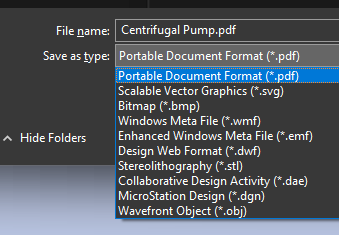
this is from the export command edit: I just realized I was playing with PE, and not PE-plus. I think the later has the 3d tools

-
I'll check it out. I'll still see what I can get from Map 3D if time permits.
-
Prices look good. What 3D outputs does it have?
-
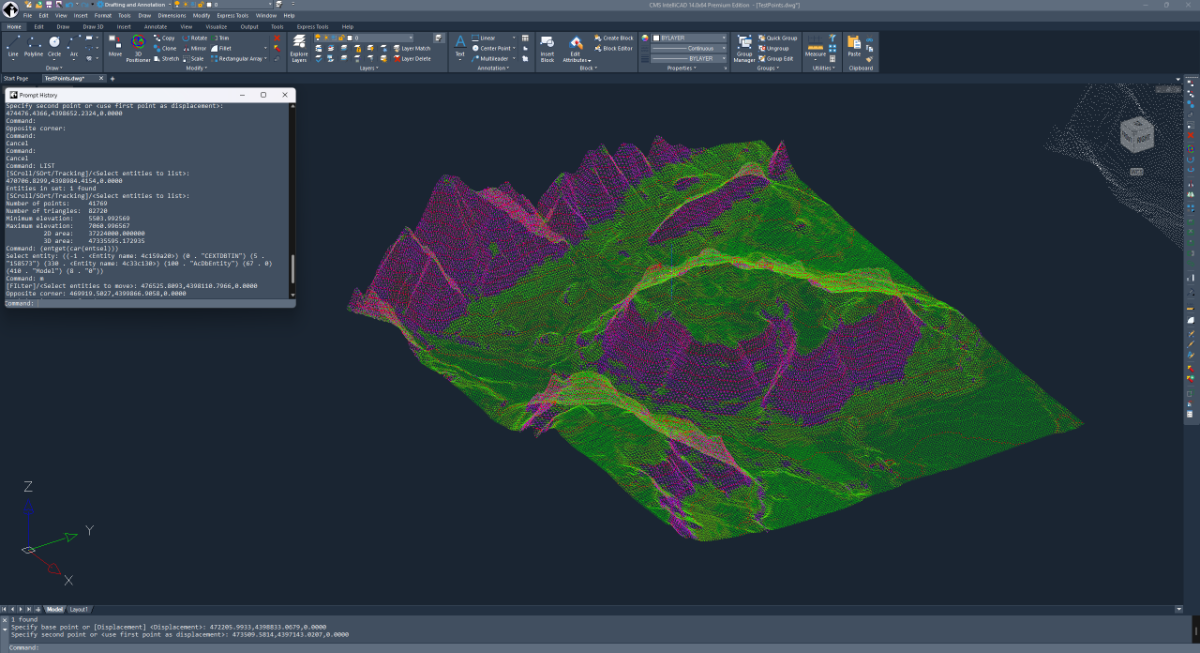
This is totally cool! This is a custom entity github.com/CEXT-Dan/ArxTin I’m very surprised this event worked! And it’s fast! There were three missing functions acedGetCurrentSelectionSet – missing acedSSLength – wrong type acdbSymUtil()->blockModelSpaceId(pDb) – returns null
-
 Blanka joined the community
 -
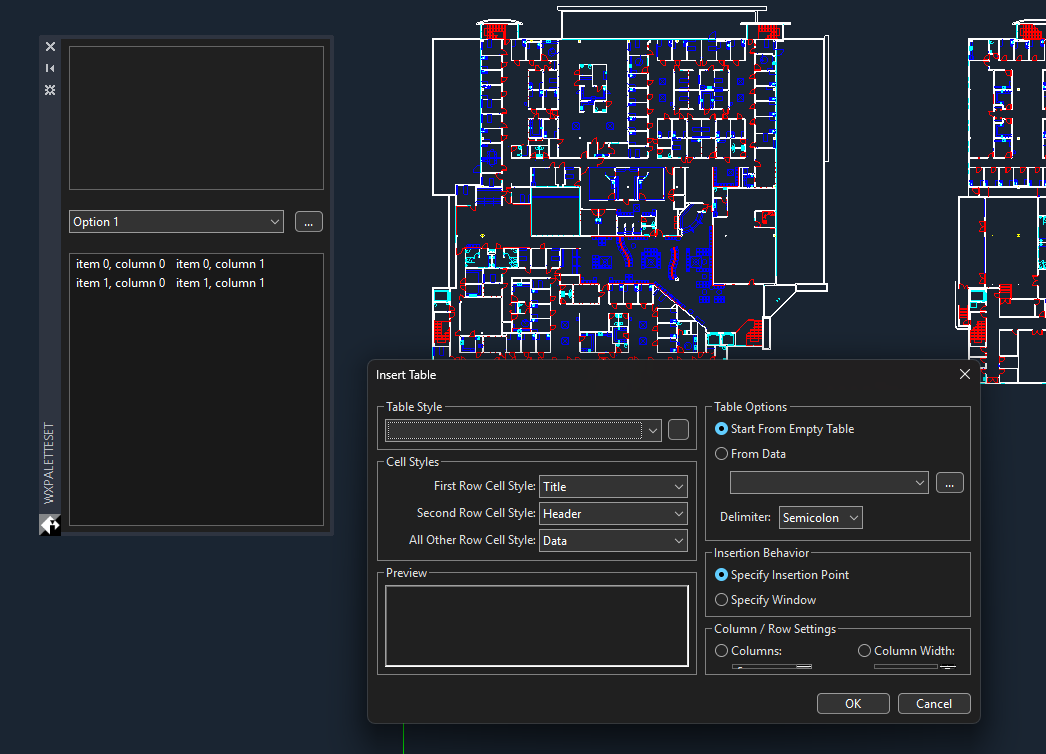
This is a test with wxArx, github.com/CEXT-Dan/WxArx Has a great looking palette, wxDialogs work fine.
-
Let’s setup IRX and see how it compares to ARX I setup an ENV path IRX14 that points to the SDK. I didn’t see any documentation on how to setup a project from scratch. But there is a wizard for visual studio. I’ve had done this before, basically, I brute force it. There is documentation for .NET and ODA stuff.
-
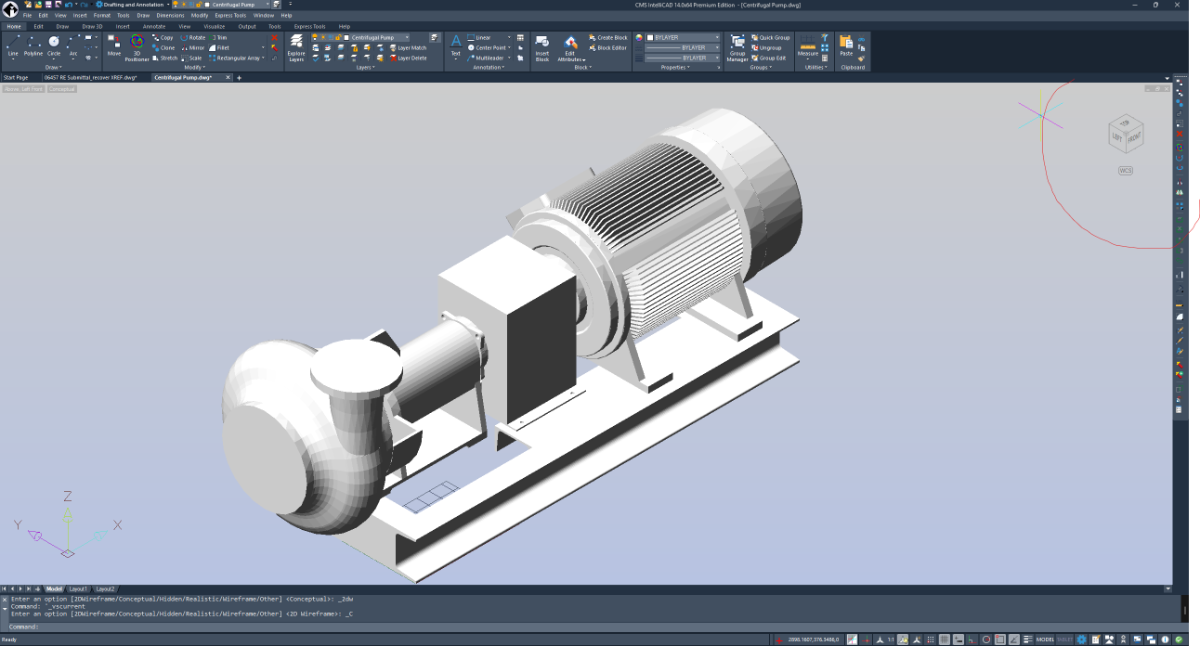
3d looks pretty good, I think the nav tool is pretty cool as its activated on mouse over, though it’s hard to see with some visual styles
-
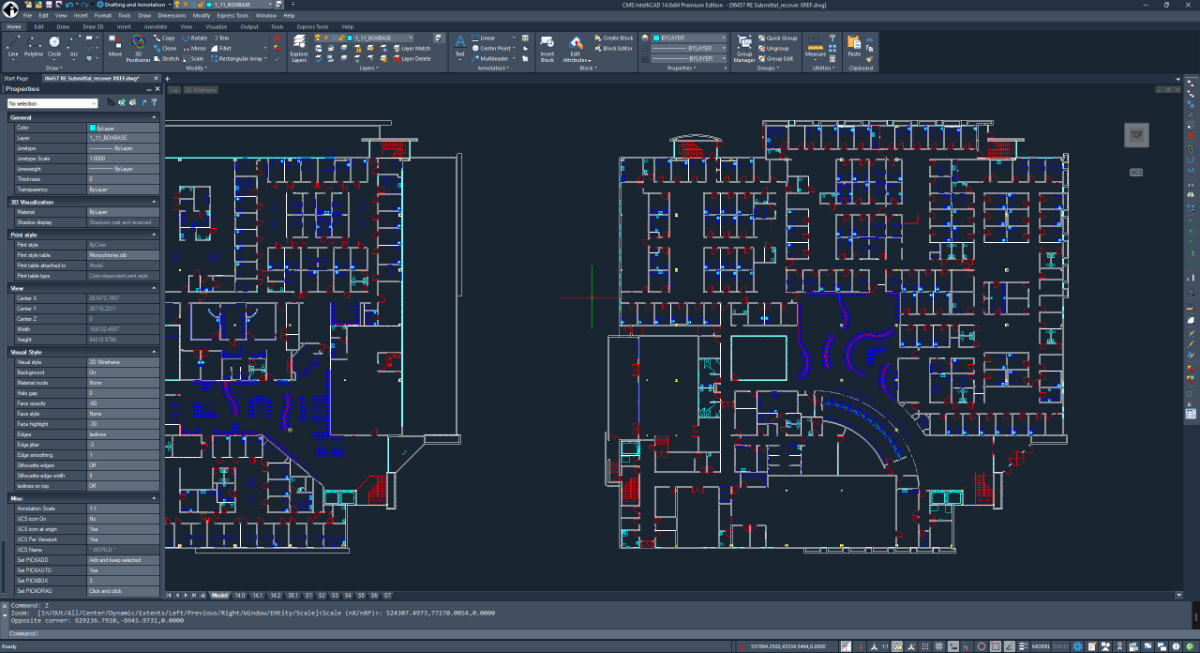
Always been a fan of CMS. I had meant to test out v14 back when it was released, I think I couldn’t find the SDK or something. Anyway, Let’s check it. Good looking interface, Ribbon, menu bar, and title bar. I don’t do drawings much, so I’m mainly going to test out the IRX API. I’ve opened a few good size drawings, it seems responsive, zooming and panning is plenty fast.
-
Nice test case @PGia, it did have some undesirable zigzags on those lines. I made some changes to the code to prevent this from happening. It should create a smooth line again!
-
@SLW210 This weekend i finished a LISP that does exactly what i need, since there doesnt seem te be a regular AutoCAD-Map3D function for this. This code collects all object data on a layer, creates a 'exportprofile' for this specific layer and export this to its own SHP File. Since all EPF files are created for an individual layer, each SHP only gets the assigned ObjectData instead of 'All' objectdata in the DWG. code is based on the Dutch NLCS Cad standard for layer detection versus points/lines/polygons. ;;; ------------------------------------------------------------ ;;; MAPEXP_OD_ALL.LSP ;;; Export each layer to its own SHP using -MAPEXPORT + per-layer EPF ;;; - One SHP per layer in a subfolder: ;;; <DWGNAME>_YYYYMMDD_HHMMSS under the DWG folder ;;; - Uses DWGTITLED: if DWG not saved, alert & abort ;;; - Geometry type controlled by layer name suffix: ;;; * -S -> Point ;;; * -G -> Line ;;; * -GV -> Polygon ;;; Layers without those suffixes fall back to first-entity detection. ;;; - Per-layer Object Data (OD) mapped via ExpressionFieldMappings ;;; - EPF filters by that layer (DoFilterByLayer=1 + LayerList) ;;; - Treats closed polylines as polygons ;;; - Temp EPF is deleted after export ;;; - If SHP already exists: Overwrite via default ENTER, Load Profile? = Y ;;; - SHP filename: all '.' in the *layer name* are changed to ',' in the output file ;;; ------------------------------------------------------------ (vl-load-com) ;;; Global export folder (set in c:MAPEXP_OD_ALL) (setq *mapexp-export-folder* nil) ;;; --- small helpers --- (defun mapexp-get-dwg-folder ( / p ) ;; Use DWGPREFIX; ensure it ends with a backslash (setq p (getvar "DWGPREFIX")) (if (and p (/= p "") (/= (substr p (strlen p) 1) "\\")) (setq p (strcat p "\\")) ) p ) (defun mapexp-pad2 (n) ;; Pad single digit to 2 chars (e.g. 7 -> "07") (if (< n 10) (strcat "0" (itoa n)) (itoa n)) ) (defun mapexp-get-datetime ( / s lst ) ;; Get current date/time using EDTIME (compatible across versions) ;; Returns list: (year month day hour minute second) ;; %Y = year, %m = month, %d = day, %H = hour, %M = minute, %S = second ;; EDTIME format here: "YYYY MM DD HH MM SS" (setq s (menucmd "M=$(edtime,$(getvar,DATE),YYYY MM DD HH MM SS)")) ;; s is like "2025 11 21 14 32 05" ;; Turn it into "(2025 11 21 14 32 05)" and READ it (setq lst (read (strcat "(" s ")"))) lst ) (defun mapexp-get-export-folder ( / base path dt year mon day hh mm ss folder ) ;; Create export folder: ;; <DWGNAME_without_ext>_YYYYMMDD_HHMMSS ;; in the same folder as the DWG (setq path (getvar "DWGPREFIX")) (setq base (vl-filename-base (getvar "DWGNAME"))) ;; Use EDTIME-based datetime function (setq dt (mapexp-get-datetime)) (setq year (itoa (nth 0 dt))) (setq mon (mapexp-pad2 (nth 1 dt))) (setq day (mapexp-pad2 (nth 2 dt))) (setq hh (mapexp-pad2 (nth 3 dt))) (setq mm (mapexp-pad2 (nth 4 dt))) (setq ss (mapexp-pad2 (nth 5 dt))) (setq folder (strcat path "SHP_OD_EXPORT_" base "_" year mon day "_" hh mm ss "\\") ) ;; Create folder if it doesn't exist yet (if (not (vl-file-directory-p folder)) (vl-mkdir folder) ) folder ) (defun mapexp-sanitize-filename ( name / bad i ch ) ;; Replace characters that are invalid in file names (setq bad (list 34 42 47 58 60 62 63 92 124)) ; " * / : < > ? \ | (setq i 0) (while (< i (strlen name)) (setq ch (ascii (substr name (1+ i) 1))) (if (member ch bad) (setq name (strcat (substr name 1 i) "_" (substr name (+ i 2)) ) ) (setq i (1+ i)) ) ) name ) ;;; For the OUTPUT FILE NAME ONLY: ;;; - change '.' to ',' in the layer name ;;; - then sanitize for filesystem (quotes, *, /, :, <, >, ?, \, |) (defun mapexp-make-output-name (lay / s) (setq s lay) ;; Replace all dots with commas (setq s (vl-string-subst "," "." s)) ;; Remove OS-invalid characters but keep spaces, dashes, commas, etc. (setq s (mapexp-sanitize-filename s)) s ) (defun mapexp-first-entity-on-layer ( lay / ss ent ) (setq ss (ssget "X" (list (cons 8 lay)))) (if (and ss (> (sslength ss) 0)) (ssname ss 0) nil ) ) ;;; Fallback geometry detection – if no suffix rule hit (defun mapexp-geometry-type-from-entity ( ent / ed typ flags ) ;; Returns one of "Point" "Line" "Polygon" or nil (setq ed (entget ent)) (setq typ (cdr (assoc 0 ed))) (cond ((member typ '("POINT" "MULTILEADER" "INSERT")) "Point") ((member typ '("LINE" "ARC" "CIRCLE")) "Line") ((member typ '("LWPOLYLINE" "POLYLINE")) (setq flags (cdr (assoc 70 ed))) (if (and flags (= (logand flags 1) 1)) "Polygon" "Line" ) ) ((member typ '("SPLINE")) "Line") ((member typ '("HATCH" "POLYGON")) "Polygon") (T nil) ) ) ;;; Geometry type forced by layer name suffix (defun mapexp-geomtype-from-layername ( lay / ) ;; rules: ;; * -GV -> Polygon ;; * -S -> Point ;; * -G -> Line (cond ((wcmatch lay "*-GV") "Polygon") ((wcmatch lay "*-S") "Point") ((wcmatch lay "*-G") "Line") (T nil) ) ) ;;; Sanitize a string to be a valid FDO property name: ;;; - Only A–Z, a–z, 0–9, _ ;;; - If first char is not a letter or _, prefix with "F_" (defun mapexp-sanitize-fdo-name (s / i ch result) (if (not s) (setq s "FDO_NAME")) (setq result "") (setq i 1) (while (<= i (strlen s)) (setq ch (substr s i 1)) (if (wcmatch ch "[A-Za-z0-9_]") (setq result (strcat result ch)) (setq result (strcat result "_")) ) (setq i (1+ i)) ) ;; make sure first char is letter or _ (if (or (= result "") (not (wcmatch (substr result 1 1) "[A-Za-z_]")) ) (setq result (strcat "F_" result)) ) result ) ;;; Get unique OD table names used on a given layer (defun mapexp-get-od-tables-on-layer (layname / ss i e odtabs tbls tabName) (setq tbls '()) (setq ss (ssget "X" (list (cons 8 layname)))) ; all ents on layer (if ss (progn (setq i 0) (while (< i (sslength ss)) (setq e (ssname ss i) odtabs (ade_odgettables e) ; Map 3D ADE function ) (foreach tabName odtabs (if (and tabName (not (member tabName tbls))) (setq tbls (cons tabName tbls)) ) ) (setq i (1+ i)) ) ) ) (reverse tbls) ) ;;; --- EPF writer: SHP + OD + layer filter --- (defun mapexp-write-epf-with-od ( epfpath geomType layName odTabs / file tabName def_tbl cols col colName colType dataType usedNames outName baseName idx ) ;; geomType must be "Point" "Line" or "Polygon" (setq file (open epfpath "W")) (if (null file) nil (progn ;; Header – based on working AdMapExportProfile structure for SHP (princ "<AdMapExportProfile version=\"2.1.3\">" file) (princ "<LoadedProfileName/>" file) (princ "<StorageOptions>" file) (princ "<StorageType>FileOneEntityType</StorageType>" file) (princ "<GeometryType>" file) (princ geomType file) (princ "</GeometryType><FilePrefix/></StorageOptions>" file) ;; Auto-selection; filter by layer below (princ "<SelectionOptions><UseSelectionSet>0</UseSelectionSet><UseAutoSelection>1</UseAutoSelection></SelectionOptions>" file) (princ "<TranslationOptions>" file) ;; treat closed polylines as polygons (princ "<TreatClosedPolylinesAsPolygons>1</TreatClosedPolylinesAsPolygons>" file) (princ "<ExplodeBlocks>1</ExplodeBlocks>" file) (princ "<LayersToLevels><MapLayersToLevels>0</MapLayersToLevels><LayerToLevelMapping/></LayersToLevels>" file) (princ "</TranslationOptions>" file) (princ "<TopologyOptions><GroupComplexPolygons>0</GroupComplexPolygons><TopologyName/></TopologyOptions>" file) ;; Filter by this layer only (princ "<LayerOptions>" file) (princ "<DoFilterByLayer>1</DoFilterByLayer>" file) (princ "<LayerList>" file) (princ layName file) (princ "</LayerList>" file) (princ "</LayerOptions>" file) (princ "<FeatureClassOptions><DoFilterByFeatureClass>0</DoFilterByFeatureClass><FeatureClassList/></FeatureClassOptions>" file) ;; TableDataType "None" – OD via ExpressionFieldMappings (princ "<TableDataOptions>" file) (princ "<TableDataType>None</TableDataType>" file) (princ "<Name/>" file) (princ "<SQLKeyOnly>0</SQLKeyOnly>" file) (princ "</TableDataOptions>" file) (princ "<CoordSysOptions><DoCoordinateConversion>0</DoCoordinateConversion><CoordSysName/></CoordSysOptions>" file) ;; SHP target (princ "<TargetNameOptions><FormatName>SHP</FormatName></TargetNameOptions>" file) (princ "<DriverOptions/>" file) (princ "<UseUniqueKeyField>0</UseUniqueKeyField><UseUniqueKeyFieldName>AdMapKey</UseUniqueKeyFieldName>" file) ;; ===== OD ExpressionFieldMappings ===== (princ "<ExpressionFieldMappings>" file) (setq usedNames '()) ; track used attribute names to avoid duplicates (foreach tabName odTabs (setq def_tbl (ade_odtabledefn tabName)) ;; ADE table definition ;; def_tbl: (("TableName" . "...") ("Description" . "...") ("Columns" . ( ... ))) (setq cols (cdr (assoc "Columns" def_tbl))) (foreach col cols (setq colName (cdr (assoc "ColName" col))) (setq colType (cdr (assoc "ColType" col))) (if colName (progn ;; Map OD type to EPF Datatype (setq dataType (cond ((and colType (wcmatch (strcase colType) "*INT*")) "IntegerDataType" ) ((and colType (wcmatch (strcase colType) "*REAL*,*DOUBLE*,*FLOAT*,*NUM*")) "DoubleDataType" ) (T "CharacterDataType") ) ) ;; Decide attribute (FDO property) name: ;; - sanitize to valid FDO name ;; - if duplicate, append 2,3,... (setq baseName (mapexp-sanitize-fdo-name colName)) (setq outName baseName idx 1 ) (while (member (strcase outName) usedNames) (setq idx (1+ idx)) (setq outName (strcat baseName (itoa idx))) ) (setq usedNames (cons (strcase outName) usedNames)) ;; <NameValuePair> mapping: ;; <Name>outName</Name> -> FDO-safe property name ;; <Value>:ColName@Table</Value> -> actual OD mapping ;; <Datatype>...</Datatype> (princ "<NameValuePair><Name>" file) (princ outName file) (princ "</Name><Value>:" file) (princ colName file) (princ "@" file) (princ tabName file) (princ "</Value><Datatype>" file) (princ dataType file) (princ "</Datatype></NameValuePair>" file) ) ) ) ) (princ "</ExpressionFieldMappings>" file) (princ "</AdMapExportProfile>" file) (close file) T ) ) ) ;;; --- main export per layer --- (defun mapexp-export-layer-to-shp ( lay / ent geomType dwgFolder shpName shpFull epfFull odTabs ok ) ;; Prefer explicit geometry from layer name; fall back to entity if not matched (setq geomType (mapexp-geomtype-from-layername lay)) (if (null geomType) (progn (setq ent (mapexp-first-entity-on-layer lay)) (if (null ent) (setq geomType nil) (setq geomType (mapexp-geometry-type-from-entity ent)) ) ) ) (if (null geomType) nil (progn ;; Use the global export folder instead of the DWG folder (setq dwgFolder *mapexp-export-folder*) ;; SHP base name: layer name, but '.' -> ',' and OS-invalid chars cleaned (setq shpName (mapexp-make-output-name lay)) (setq shpFull (strcat dwgFolder shpName ".shp")) (setq epfFull (strcat dwgFolder shpName "_temp_export.epf")) ;; OD tables used on this layer (setq odTabs (mapexp-get-od-tables-on-layer lay)) ;; EPF for this geometry type + layer OD + layer filter (setq ok (mapexp-write-epf-with-od epfFull geomType lay odTabs)) (if ok (progn ;; If SHP already exists, we expect Overwrite prompt: ;; This file already exists. Enter an option [Overwrite/Cancel] <Overwrite>: ;; -> we send "" (ENTER) to accept default Overwrite ;; Then: Load Profile? [Yes/No] <No>: -> we send "Y" (princ "\n") (if (findfile shpFull) (command "-MAPEXPORT" "SHP" shpFull "" ; Overwrite? -> ENTER = default Overwrite "Y" ; Load Profile? Yes epfFull "Proceed" ) (command "-MAPEXPORT" "SHP" shpFull "Y" ; Load Profile? Yes (no overwrite prompt) epfFull "Proceed" ) ) ;; Delete temp EPF (if (findfile epfFull) (vl-file-delete epfFull) ) T ) nil ) ) ) ) ;;; --- public command --- (defun c:MAPEXP_OD_ALL ( / lay rec ) (vl-load-com) ;; Check if drawing is saved (if (= (getvar "DWGTITLED") 0) (progn (alert "Deze tekening is nog niet opgeslagen.\n\nSla de DWG eerst op en start MAPEXP_OD_ALL daarna opnieuw." ) (princ) ) (progn (setvar "CMDECHO" 0) ;; Create export folder for this run (setq *mapexp-export-folder* (mapexp-get-export-folder)) (prompt (strcat "\nMAPEXP_OD_ALL – exportfolder: " *mapexp-export-folder* ) ) ;; loop through all layers in the table (setq rec (tblnext "LAYER" T)) (while rec (setq lay (cdr (assoc 2 rec))) ; layer name ;; skip xref layers (contain "|") (if (not (wcmatch lay "*|*")) (mapexp-export-layer-to-shp lay) ) (setq rec (tblnext "LAYER")) ) (setvar "CMDECHO" 1) (prompt "\nMAPEXP_OD_ALL – done.") (princ) ) ) )
-

Is There a Reliable WordPad Online Alternative for Quick Editing?
oddssatisfy replied to oddssatisfy's topic in Autodesk Software General
thanks in advance for any help -
Is There a Reliable WordPad Online Alternative for Quick Editing?
oddssatisfy posted a topic in Autodesk Software General
Hi everyone, I’m looking for recommendations on a good WordPad online option for quick, no-frills document editing. I often need something lightweight to open, write, and save simple text or RTF files without installing full office suites like Microsoft Word. Ideally, it should run directly in a browser, be free or low-cost, and support basic formatting features such as fonts, bold/italic, alignment, and simple file export. Cloud saving or download options would be a bonus. Has anyone found a trustworthy, easy-to-use tool that truly feels like a browser-based version of WordPad? I’d love to hear what you’re using and why you recommend it. - Yesterday
-

Publish as PDF,Purge all and save as dxf binary 2007
pyou posted a topic in AutoLISP, Visual LISP & DCL
Hi all Could someone help me with this lisp code, please. What I would like : 1) PUBLISH first as pdf ( with existing settings used) and Pause until PUBLISH finished. 2) Delete all Paper spaces and create Default Layout1 3) Purge drawing twice 3) Save as DXF Binary 2007 file. So far I am getting results i need to delete all paper spaces and create default layout1, Purge and saving as dxf Binary 2007 file automatically. Ideally I just want user friendly lisp code to publish pdf on desktop and save smallest file possible as dxf on desktop. (defun c:CleanAndSaveDXF ( / doc lays desktop dwgname fullpath Layout1Obj oldCmdecho ) ;; Save and turn off command echoing (setq oldCmdecho (getvar "CMDECHO")) (setvar "CMDECHO" 0) ;; 1) Keep/create exactly one "Layout1", delete everything else (setq doc (vla-get-ActiveDocument (vlax-get-acad-object)) lays (vla-get-Layouts doc) Layout1Obj nil) (vlax-for lay lays (cond ( (= (vla-get-Name lay) "Model") ) ( (= (strcase (vla-get-Name lay)) "LAYOUT1") (setq Layout1Obj lay) ) ( t (vl-catch-all-apply 'vla-Delete (list lay)) ) ) ) (or Layout1Obj (vla-Add lays "Layout1")) (vla-put-ActiveLayout doc (vla-Item lays "Model")) ;; 2) Ultra-purge (repeat 6 (command "-PURGE" "All" "*" "N")) (command "-PURGE" "Regapps" "*" "N") (command "-PURGE" "Z" "*" "N") (command "-PURGE" "E" "*" "N") ;; 3) Build exact filename (same base name, pure .dxf) (setq desktop (strcat (getenv "USERPROFILE") "\\Desktop\\")) (setq dwgname (vl-filename-base (getvar "DWGNAME"))) (if (or (null dwgname) (= dwgname "")) (setq dwgname "Drawing")) (setq fullpath (strcat desktop dwgname ".dxf")) ;; 4) Remove any existing file (including .dxf.dwg garbage) (foreach ext (list fullpath (strcat fullpath ".dwg")) (if (findfile ext) (vl-file-delete ext)) ) ;; 5) Export as BINARY 2007 DXF (command "._EXPORT" fullpath "2007" "B") ;; 6) One final purge (repeat 2 (command "-PURGE" "All" "*" "N")) ;; === NEW: Run the whole thing ONE MORE TIME automatically === (if (= (getvar "USERI1") 0) ; first run → marker = 0 (progn (setvar "USERI1" 1) ; mark that we are now on the second run (princ "\n--- Running second (final) pass for maximum cleanliness ---\n") (c:CleanAndSaveDXF) ; ← recursive call – runs again immediately (setvar "USERI1" 0) ; reset marker for next time you use the command ) ) ;; Restore original CMDECHO (only on the very last exit) (setvar "CMDECHO" oldCmdecho) (princ (strcat "\nClean BINARY DXF (2007) created → " fullpath "\n")) (princ) ) -
 pcg joined the community
 -
Yes, it's possible. I've been using Drafix CAD since before Windows, and have run it on every version of Windows that MS has released, except for NT, which I never used. I am currently running it on Windows 11 Pro OS build 26200.7171 (current update as of 11/30/2025). How to install and run Drafix CAD Pro on Windows 10. 1) Create a directory on C:\Program Files called Softdesk. 2) Copy all Drafix files (originally contained on four mini-floppy drives) to C:\Program Files\Softdek 3) Search for “windows features” 4) Check “Internet Information Services”, click OK and wait for IIS to install. 5) Search for “IIS”. 6) Select “Internet Information Services Manager”.S 7) In upper left see desktop name. Expand this (click on >) and click on “Application Pools”. Right click on DefaultAppPool 9) Select “Advanced Settings”. 10) Turn on “Enable 32 bit applications. 11) Click OK 12) Reboot How to run on Windows 11: If you didn't have it running on previous versions of Windows, then start from scratch and follow the directions for Windows 10 above. Some of the nomenclature may have changed?, but you should be able to get there. Once you have done that, then you may need to replace ctl3232.dll, which was removed by a Windows 11 update in the fall of 2025. I'm not sure if a later update put it back, but Drafix will tell you if the file is missing. You can find it on an older Windows computer or I can provide it if needed. Next, right click on DFX.EXE, then click on Properties and select the Compatibility tab. Then check the following two items: -Compatibility mode: Run this program in compatilbility mode for: Windows 8 -Settings: Run this program as administrator.
-
 le do joined the community
 - Last week
-
 MUN joined the community
 -
How did you go about creating the SHP? I don't have MAP at home so I'll have to try some things when I get back to work and double check. But, looking through the QGIS information, that should be the way to go. Exporting object classes to ESRI Shape file from AutoCAD® Map 3D In QGIS same as mentioned before, go to the Layer menu>Select Add Layer > Add Vector Layer. In the dialog, choose File and browse to your shapefile (.shp) location>Click Open to load the shapefile into QGIS. That should be the correct way according to the documentation. Also, I believe QGIS needs AutoCAD 2018 or older files, may be the same with the SHPs, your profile shows AutoCAD 2018, so is that the case here for the Map 3D?
-
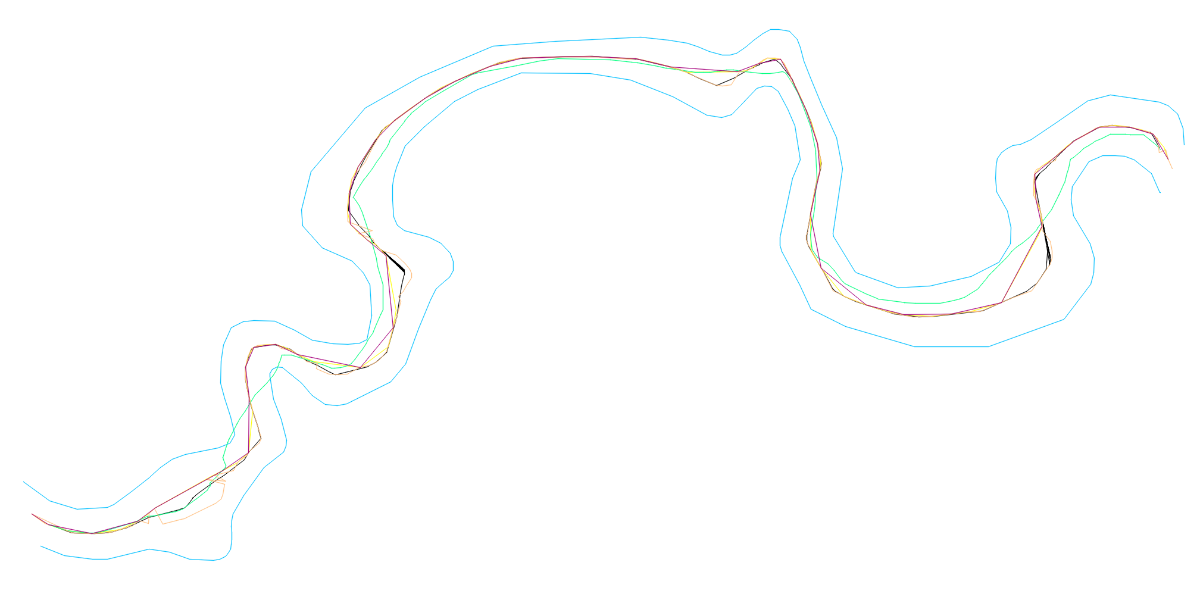
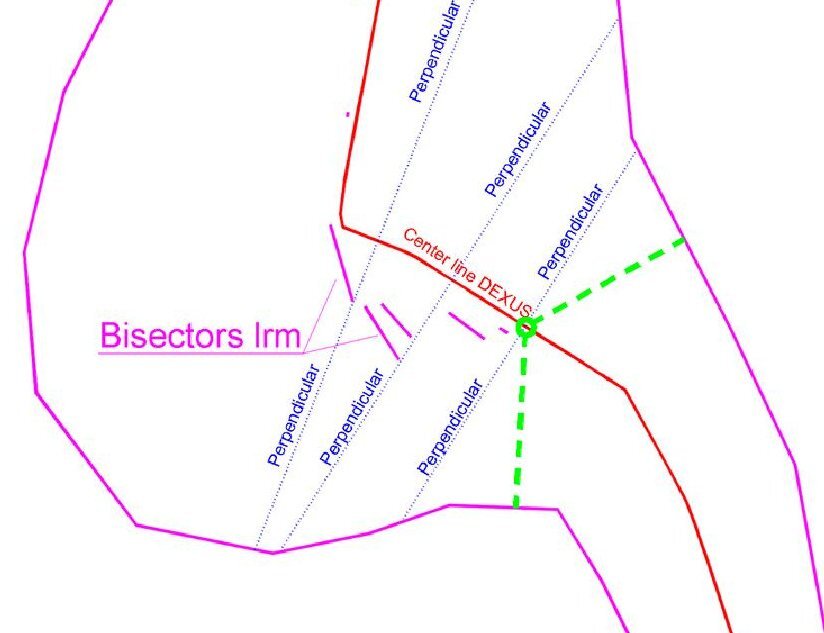
I’ve always thought that a centerline should keep the same distance to the left and right, in the direction of travel. But from a geometric standpoint, maybe it should be as you say.I won’t get into that controversy. Perhaps that approach does make it possible to obtain the centerline in more situations. Regarding @SLW210’s suggestion that I upload a drawing to put the proposed Lisp codes to the test, I think the most appropriate example is the bank of a small river. I trimmed a section and ran the codes by @dexus, @Lee Mac, @SLW210, @mhupp, and @GP_ on it. The geometry of the riverbanks seems to be quite stressful for all the codes, although Dexus’s code only loses control in a couple of areas. I’m attaching the file with all of this for anyone who wants to take a look. AxisExple2.dwg
-
I can no longer put the autocad bar back like the one in the image, how can I go? Thank you
oddssatisfy replied to Giovannino60's topic in Hardware & Operating Systems
Type RIBBON in the command line and press Enter to restore the toolbar. If that doesn’t work, type WORKSPACE and select “Drafting & Annotation.” If it’s still missing, close AutoCAD and use “Reset Settings to Default – AutoCAD 2021” from the Windows Start menu to fully restore all toolbars. -
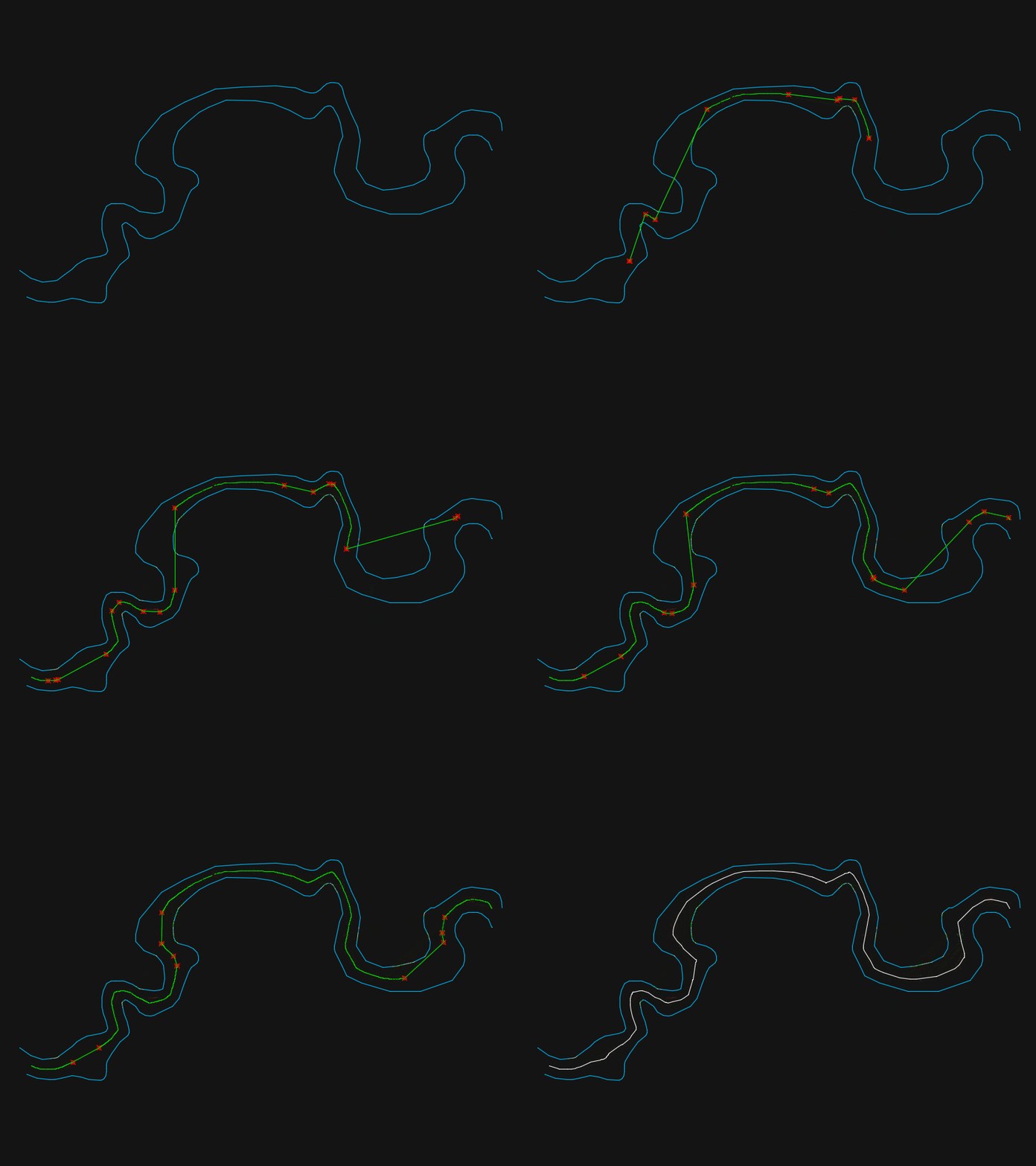
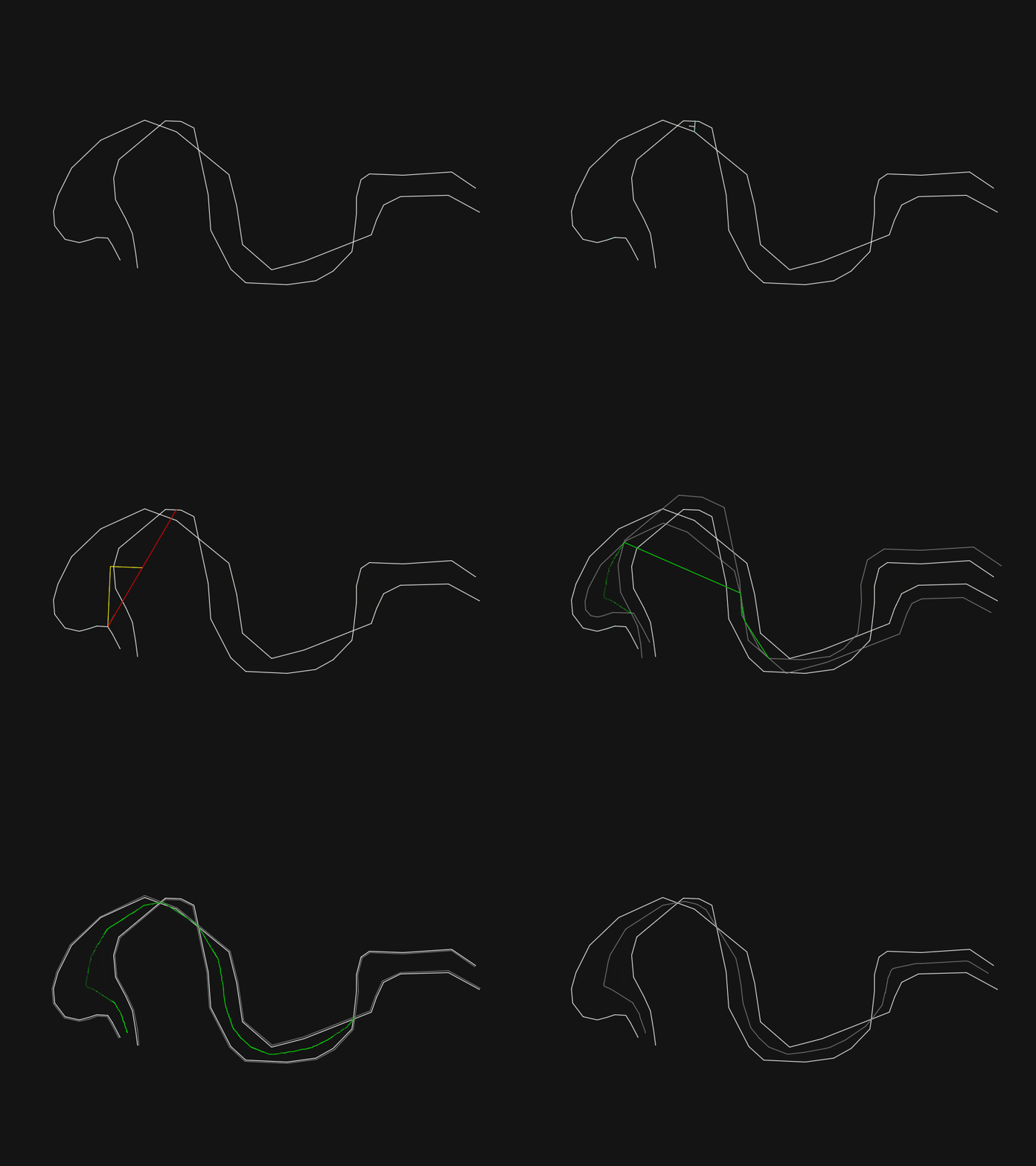
@PGia Thanks for the encouragement and checking the results. I measure from the vertices instead of the lines. Those are calculated and the lines are just to connect the points. So perpendicular to the middle of segments of the centerline will always be a bit off, but if you measure from the vertices it should be centered correctly. Just like @GP_ said. I kept going in the same direction and I have made some improvements and got rid of some bugginess: The centerline should be a little more accurate now because of extra measurements (blue line) Crossing polylines get sharp corners on negative side Corner checks are done on all intersections of temporary line now (red line) More error checking so it doesn't crash on some of the example lines I left all of the 'animation' code commented out so you can give it a try ;| ; Calculate centerline between two polylines - dexus ; Function checks intersections of the offsets of two lines to create a middle/avarage line. ; https://www.cadtutor.net/forum/topic/98778-hybrid-parallel/page/6/#findComment-677339 ; Version 0.1 - Initial release 19-11-2025 ; Version 0.2 - Added corner support on negative side of crossing polylines 27-11-2025 ; Version 0.3 - Extra check using distance between vertex and closest point 28-11-2025 ; Version 0.4 - Added error handler 28-11-2025 ; Version 0.5 - Improved distance check to prevent zigzag lines 01-12-2025 ; Version 0.6 - Check if offset can be used before adding points 01-12-2025 |; (defun c:cl (/ corners ent1 ent2 enx2 flipped loop maxlen offset offsetdistance pts s1 s2 ss start te0 te1 te2 LM:ProjectPointToLine LM:intersections _addPoints _avarageAngle _cornerOffset _doOffset _getAnglesAtParam _getLength _polyline _side _wait *error*) (defun *error* (st) (if (wcmatch (strcase st t) "*break,*cancel*,*exit*") (redraw) (progn (vl-bt) (princ (strcat "\nOops! Something went wrong: ") st) ) ) (if (not (vlax-erased-p te0)) (entdel te0)) (if (and te1 (not (vl-catch-all-error-p te1))) (mapcar 'vla-delete te1)) (if (and te2 (not (vl-catch-all-error-p te2))) (mapcar 'vla-delete te2)) (princ) ) ;| ; Draw Polyline - dexus ; Draw a polyline from a list of points, but filter out colinear points ; @Param lst list of points ; @Returns ename of polyline |; (defun _polyline (lst closed / prev pts) (while lst (cond ( (and (cdr lst) prev (or (equal (cdr lst) prev 1e-8) ; Remove duplicate points (null (inters prev (car lst) prev (cadr lst))) ; Remove collineair points ) ) ) ((setq pts (cons (cons 10 (setq prev (car lst))) pts))) ) (setq lst (cdr lst)) ) (entmakex (append (list (cons 0 "LWPOLYLINE") (cons 100 "AcDbEntity") (cons 100 "AcDbPolyline") (cons 90 (length pts)) (cons 8 (getvar 'clayer)) (cons 70 (if closed 1 0)) ) (reverse pts) ) ) ) (defun _side (pline pnt / cpt end target der) ; https://www.theswamp.org/index.php?topic=55685.msg610429#msg610429 (setq cpt (vlax-curve-getClosestPointTo pline pnt) end (vlax-curve-getEndParam pline) target (vlax-curve-getParamAtPoint pline cpt) der (if (and (equal target (fix target) 1e-8) (or (vlax-curve-isClosed pline) (and (not (equal (vlax-curve-getStartParam pline) target 1e-8)) (not (equal end target 1e-8))) ) ) (mapcar '- (polar cpt (angle '(0 0) (vlax-curve-getFirstDeriv pline (rem (+ target 1e-3) end))) 1.0) (polar cpt (angle (vlax-curve-getFirstDeriv pline (rem (+ (- target 1e-3) end) end)) '(0 0)) 1.0) ) (vlax-curve-getFirstDeriv pline target) ) ) (minusp (sin (- (angle cpt pnt) (angle '(0.0 0.0) der)))) ) ;; Intersections - Lee Mac ;; mod - [int] acextendoption enum of intersectwith method (defun LM:intersections ( ob1 ob2 mod / lst rtn ) (if (and (vlax-method-applicable-p ob1 'intersectwith) (vlax-method-applicable-p ob2 'intersectwith) (setq lst (vlax-invoke ob1 'intersectwith ob2 mod)) ) (repeat (/ (length lst) 3) (setq rtn (cons (list (car lst) (cadr lst) (caddr lst)) rtn) lst (cdddr lst)) ) ) (reverse rtn) ) (defun _getLength (ent) (- (vlax-curve-getDistAtParam ent (vlax-curve-getEndParam ent)) (vlax-curve-getDistAtParam ent (vlax-curve-getStartParam ent)) ) ) (defun _wait (msec) (not ( (lambda (start) (while (< (- (getvar 'millisecs) start) msec)) ) (getvar 'millisecs) ) ) ) (defun _addPoints (lst ent1 ent2 pts / len1 len2) (setq len1 (_getLength ent1) len2 (_getLength ent2) lst (vl-remove nil (mapcar (function (lambda (pt / d1 d2) (if (and (setq d1 (vlax-curve-getDistAtPoint ent1 pt)) (setq d2 (vlax-curve-getDistAtPoint ent2 pt)) ) (list (+ (/ d1 len1) (/ d2 len2)) pt) ) )) lst ) ) pts (append lst pts)) ; Animation ; (setq pts (vl-sort pts (function (lambda (a b) (< (car a) (car b)))))) ; (redraw) ; ( ; (lambda (lst) ; (while (cadr lst) ; (grdraw (cadar lst) (cadar (setq lst (cdr lst))) 3) ; ) ; ) ; pts ; ) ; (vla-update ent) ; (_wait 40) ; End animation pts ) (defun _checkOffset (ent1 ent2 offset) (and (equal (distance (vlax-curve-getStartPoint ent1) (vlax-curve-getStartPoint ent2)) offset 1e-4) (equal (distance (vlax-curve-getEndPoint ent1) (vlax-curve-getEndPoint ent2)) offset 1e-4) ) ) (defun _doOffset (offset / lst rtn) ; Global vars: pts ent1 ent2 s1 s2 te1 te2 (setq te1 nil) (setq te2 nil) (setq rtn (cond ((equal offset 0.0 1e-8) (if (setq lst (LM:intersections ent1 ent2 acExtendNone)) (setq pts (_addPoints lst ent1 ent2 pts)) ) lst ) ( (or ; Make offset (vl-catch-all-error-p (setq te1 (vl-catch-all-apply 'vlax-invoke (list ent1 'Offset (if s1 offset (- offset)))))) (cdr te1) (vl-catch-all-error-p (setq te2 (vl-catch-all-apply 'vlax-invoke (list ent2 'Offset (if s2 offset (- offset)))))) (cdr te2) (not (_checkOffset ent1 (car te1) offset)) (not (_checkOffset ent2 (car te2) offset)) ) (princ "\nOffset failed. ") nil ) ((setq lst (LM:intersections (car te1) (car te2) acExtendNone)) (setq pts (_addPoints lst (car te1) (car te2) pts)) lst ) ) ) (if (and te1 (not (vl-catch-all-error-p te1))) (mapcar 'vla-delete te1)) (if (and te2 (not (vl-catch-all-error-p te2))) (mapcar 'vla-delete te2)) rtn ) ;| ; Project Point onto Line - Lee Mac ; @Param pt point to project ; @Param p1 first point of line ; @Param p2 second point of line ; @Returns projected point |; (defun LM:ProjectPointToLine ( pt p1 p2 / nm ) (setq nm (mapcar '- p2 p1) p1 (trans p1 0 nm) pt (trans pt 0 nm)) (trans (list (car p1) (cadr p1) (caddr pt)) nm 0) ) (defun _getAnglesAtParam (ent pa / ang1 ang2) (if (and (vlax-curve-isClosed ent) (= pa 0)) ; Special case for closed Polyline (setq ang1 (vlax-curve-getFirstDeriv ent 1e-14) ang2 (vlax-curve-getFirstDeriv ent (- (fix (vlax-curve-getEndParam ent)) 1e-14))) (setq ang1 (vlax-curve-getFirstDeriv ent (+ pa 1e-14)) ang2 (vlax-curve-getFirstDeriv ent (- pa 1e-14))) ) (if (and ang1 ang2) (list (angle '(0 0 0) ang1) (angle '(0 0 0) ang2) ) ) ) ;| ; Avarage Angle - dexus ; Get angle of a line between two angles ; @Param ang1 real - Angle in radians ; @Param ang2 real - Angle in radians ; @Returns real - Angle in radians |; (defun _avarageAngle (ang1 ang2) (if (< (rem (+ ang1 pi) (+ pi pi)) (rem (+ ang2 pi) (+ pi pi)) ) (+ (* (- ang2 ang1) 0.5) ang1) (+ (* (- ang1 ang2) 0.5) ang2) ) ) ;| ; Calculate exact offset distance on a corner - dexus ; pt1 - Point on corner ; pt2 - Point on other side ; pt3 - Center for bisector ; pt4 - Target for corner of the offset ; pt5 - Find perpendicular point for offset distance ; / ; / ; -------- pt1 pt5 ; \ / ; pt4 ; \ ; ---- pt3 ----- pt2 ----- ; ; @Param ent1 Line to check corners ; @Param ent2 Opposing line ; @Returns List of offset distances (pt1 -> pt5) to calculate |; (defun _cornerOffset (ent1 ent2 / ang1 ang1a ang2 ang3 index pt1 pt2 pt3 pt4 pt5 rtn) (setq index 0) (repeat (fix (vlax-curve-getEndParam ent1)) (and (setq pt1 (vlax-curve-getPointAtParam ent1 index)) ; Point on corner (setq ang1 (_getAnglesAtParam ent1 index)) ; Angles of pt1 (setq ang1a (_avarageAngle (car ang1) (cadr ang1))) (setq te0 (entmakex (list (cons 0 "line") (cons 10 pt1) (cons 11 (polar pt1 (- ang1a halfPi) 1))))) ; Temp line for finding the angle on the other side (foreach pt2 (LM:intersections (vlax-ename->vla-object te0) ent2 acExtendThisEntity) ; Point on other side (and (setq ang2 (_getAnglesAtParam ent2 (vlax-curve-getParamAtPoint ent2 pt2))) ; Angle of pt2 (if (equal (rem (car ang1) pi) (rem (car ang2) pi) 1e-8) ; Is parallel? (and (setq pt3 (mapcar (function (lambda (a b) (* (+ a b) 0.5))) pt1 pt2)) ; Midpoint (setq ang3 (car ang1)) ; Same angle als ang1 ) (and (setq pt3 (inters pt1 (polar pt1 (car ang1) 1) pt2 (polar pt2 (car ang2) 1) nil)) ; Find center for bisector (setq ang3 (_avarageAngle (angle pt1 pt3) (angle pt2 pt3))) ; Angle of bisector ) ) (setq pt4 (inters pt3 (polar pt3 ang3 1) pt1 (polar pt1 (+ ang1a halfPi) 1) nil)) ; Find target for corner of the offset (setq pt5 (LM:ProjectPointToLine pt4 pt1 (polar pt1 (+ (car ang1) halfPi) maxlen))) ; Find perpendicular point for offset distance (setq rtn (cons (distance pt1 pt5) rtn)) ; Return offset distance ; Animation ; (progn ; (redraw) ; (grdraw pt1 pt2 1) ; (grdraw pt4 pt5 2) ; (grdraw pt1 pt5 2) ; (vla-update ent1) ; (_wait 120) ; ) ; End Animation ) ) ) (if (not (vlax-erased-p te0)) (entdel te0)) (setq index (1+ index)) ) rtn ) (defun _rlw (lw / x1 x2 x3 x4 x5 x6) (if (and lw (= (cdr (assoc 0 lw)) "LWPOLYLINE")) (progn (foreach a1 lw (cond ((= (car a1) 10) (setq x2 (cons a1 x2))) ((= (car a1) 40) (setq x4 (cons (cons 41 (cdr a1)) x4))) ((= (car a1) 41) (setq x3 (cons (cons 40 (cdr a1)) x3))) ((= (car a1) 42) (setq x5 (cons (cons 42 (- (cdr a1))) x5))) ((= (car a1) 210) (setq x6 (cons a1 x6))) (t (setq x1 (cons a1 x1))) ) ) (append (reverse x1) (append (apply (function append) (apply (function mapcar) (cons 'list (list x2 (cdr (reverse (cons (car x3) (reverse x3)))) (cdr (reverse (cons (car x4) (reverse x4)))) (cdr (reverse (cons (car x5) (reverse x5)))) )) )) x6) ) ) ) ) (if (and (not (while (cond ((not (setq ss (ssget '((0 . "LWPOLYLINE"))))) (princ "\nNothing selected. Try again...\n") ) ((/= (sslength ss) 2) (princ "\nSelect 2 polylines! Try again...\n") ) ((and (setq ent1 (ssname ss 0)) (setq ent2 (ssname ss 1)) (setq enx2 (entget ent2)) (setq ent1 (vlax-ename->vla-object ent1)) (setq ent2 (vlax-ename->vla-object ent2)) ) nil ; Stop loop ) ) ) ) ent1 ent2 ) (progn (and (< (distance (vlax-curve-getStartPoint ent1) (vlax-curve-getEndPoint ent2)) (distance (vlax-curve-getEndPoint ent1) (vlax-curve-getEndPoint ent2)) ) (setq flipped t) (entmod (_rlw enx2)) ) (setq s1 (_side ent1 (vlax-curve-getStartPoint ent2))) (setq s2 (_side ent2 (vlax-curve-getStartPoint ent1))) (if (not (numberp halfPi)) (setq halfPi (* pi 0.5))) (setq maxlen (* 1.1 (max (_getLength ent1) (_getLength ent2) ( (lambda (ent1 ent2 / step de1 div p_step dis dmax) (setq step (/ (setq de1 (vlax-curve-getDistAtParam ent1 (vlax-curve-getEndParam ent1))) 500) div step dmax 0.00) (while (< div de1) (setq p_step (vlax-curve-getPointAtDist ent1 div) dis (distance p_step (vlax-curve-getClosestPointTo ent2 p_step))) (if (> dis dmax) (setq dmax dis)) (setq div (+ div step)) ) dmax ) ent1 ent2 ) ) ) ) (mapcar ; Add half distances from closest point to every vertex (function (lambda (ent1 ent2 / index pt) (setq index 0) (repeat (fix (vlax-curve-getEndParam ent1)) (setq pt (vlax-curve-getPointAtParam ent1 index) corners (cons (* (distance pt (vlax-curve-getClosestPointTo ent2 pt)) 0.5) corners) index (1+ index)) ; Animation ; (redraw) ; (grdraw pt (vlax-curve-getClosestPointTo ent2 pt) 4) ; ( ; (lambda (mid) (grdraw mid (polar mid (+ (angle pt (vlax-curve-getClosestPointTo ent2 pt)) halfPi) (car corners)) 2)) ; (mapcar (function (lambda (a b) (* (+ a b) 0.5))) pt (vlax-curve-getClosestPointTo ent2 pt)) ; ) ; (vla-update ent1) ; (_wait 120) ; End animation ) )) (list ent1 ent2) (list ent2 ent1) ) (setq corners (vl-sort (append corners (_cornerOffset ent1 ent2) (_cornerOffset ent2 ent1)) '<) offsetdistance (/ maxlen 1024.0)) (if (LM:intersections ent1 ent2 acExtendNone) ; For crossing polylines, add negative values (setq offset (- maxlen) corners (append (mapcar '- (reverse corners)) corners)) (setq offset 0.0) ) (while (progn (while (and corners (> offset (car corners))) ; Calculated offset values to check (_doOffset (car corners)) (setq corners (cdr corners)) ) (setq loop ; Incremental check (cond ((> offset maxlen) nil) ((_doOffset offset) (setq start t)) ((not start) t) (start nil) ) ) (setq offset (+ offset offsetdistance)) loop ) ) (if flipped (entmod enx2)) (if pts ; Draw polyline (_polyline (mapcar 'cadr (vl-sort pts (function (lambda (a b) (< (car a) (car b)))))) (and (vlax-curve-isClosed ent1) (vlax-curve-isClosed ent2)) ) ) ) ) (redraw) (princ) ) And here is an animation of it working just because they are fun to look at :
-
I need this lisp "StationingPolyline.LSP" . I searched Google and couldn't find it. I'm looking for your help
-
 sondovan joined the community
 -
 alan helling joined the community
 -
 Keith Kaseke joined the community
 -
Use code tags when posing. The stuff you posted works for me have you upgraded recently? are the layers locked from an xref? maybe (vl-load-com) hasn't been called yet and you seeing any errors when the code runs? Or might just be a typo in your function name? (AlteraCaixaNomesLayers 0) FlagCaixa= 0 (abcde.....) FlagCaixa= anything else (ABCDE.....) renamed to use an a so its "Names" (defun AlteraCaixaNamesLayers (FlagCaixa / doc layers lay old new) (vl-load-com) (setq layers (vla-get-Layers (setq doc (vla-get-ActiveDocument (vlax-get-acad-object))))) (vla-startundomark doc) (vlax-for lay layers (setq old (vla-get-Name lay)) (if (not (member old '("0" "DEFPOINTS"))) (progn (if (= FlagCaixa 0) ;dont need progn if you only have two lines of code. (vla-put-name lay (strcase old)) ;if true run this line (vla-put-name lay (strcase old T)) ;if false run this line ) ) ) ) (vla-EndUndoMark doc) (princ) ) if you only want 0 or 1 as the only two options use cond. also allows you to have more options in the future if you want. (defun AlteraCaixaNamesLayers (FlagCaixa / doc layers lay old new) (vl-load-com) (setq layers (vla-get-Layers (setq doc (vla-get-ActiveDocument (vlax-get-acad-object))))) (vla-startundomark doc) (vlax-for lay layers (setq old (vla-get-Name lay)) (if (not (member old '("0" "DEFPOINTS"))) (cond ((= FlagCaixa 0) (vla-put-name lay (strcase old))) ((= FlagCaixa 1) (vla-put-name lay (strcase old T))) ) ) ) (vla-EndUndoMark doc) (princ) ) nice tutorial on cond here also cond's don't need (progn if they have multiple lines of code.
-
I think that the only way to do reliably is to look at every character in the string, so A-Z = 65-90 and a-z =97-122 so using (chr x) can rebuild string. ; https://www.cadtutor.net/forum/topic/98847-problem-renaming-layers/ ; Convert layers to upper or lower case-insensitive ; By AlanH Nov 2025 (defun AlteraCaixaNomesLayers ( FlagCaixa / CollLayDwg ObjVlaLay TxtNomLay char nchar str) (setq CollLayDwg (vla-get-Layers (vla-get-ActiveDocument (vlax-get-acad-object)))) (vlax-for ObjVlaLay CollLayDwg (setq TxtNomLay (vla-get-name ObjVlaLay)) (if (or (= TxtNomLay "0") (= TxtNomLay "Defpoints")) (princ) (progn (if (= FlagCaixa 1) (vla-put-name ObjVlaLay (strcase TxtNomLay)) (progn (setq x 1) (setq str "") (repeat (strlen TxtNomLay) (setq char (ascii (substr txtnomlay x 1))) (cond ((and (> char 64)(< char 91)) (progn (setq nchar (chr (+ char 32))) (setq str (strcat str nchar)) ) ) ((or (< char 65)(> char 90)) (progn (setq nchar (chr char)) (setq str (strcat str nchar)) ) ) ) (setq x (1+ x)) ) (vla-put-name ObjVlaLay str) ) ) ) ) ) (princ) ) (AlteraCaixaNomesLayers 0)
-
 BC_CAD joined the community
 -

CIVIL 3D - CONVERT POINT CLOUD INTO SURFACE
BIGAL replied to Carlo Point Cloud's topic in Civil 3D & LDD
Ok taking that you know about how make a surface and alignments as 1st step. You should be able to make contours 2nd step, this will give some idea of surface patterns at low intervals. Make multiple long sections along the road so can see ups and downs. Make Cross sections. If you answered don't know how to any of above you have a problem and we can not teach you from here. Back to point clouds, they can be very useful but have 2 problems, lack that human can see a problem, re Cracks, the other is the size of the TIN can be massive, If you do 1m grids v;'s say 300mm grids the smaller spacing will show way more up and downs. Just a comment we compared a LAS aerial survey of a road to a true survey instrument survey, we found around +-20mm on points compared, it showed that for concept design it would be useful, in very flat areas it would be a problem. Oh yeah las was flown by plane. I take it you used a drone a better result. -
Hello I created these functions, but neither of them can change the layer names to uppercase or lowercase. The strange thing is that this routine has been used for a long time. FlagCaixa= 0 (abcde.....) FlagCaixa= 1 (ABCDE.....) ;sample 01 (defun AlteraCaixaNomesLayers ( FlagCaixa / CollLayDwg ObjVlaLay TxtNomLay LstLayDwgNew ) (setq CollLayDwg (vla-get-Layers (vla-get-ActiveDocument (vlax-get-acad-object)))) (vlax-for ObjVlaLay CollLayDwg (setq TxtNomLay (vla-get-name ObjVlaLay)) (if (and (/= TxtNomLay "0") (/= TxtNomLay "Defpoints")) (progn (if (= FlagCaixa 0) (progn (vla-put-name ObjVlaLay (strcase TxtNomLay)) ) (progn (vla-put-name ObjVlaLay (strcase TxtNomLay T)) ) ) ) ) ) ) ;sample 02 (defun AlteraCaixaNomesLayers ( FlagCaixa / TxtNomLay LstLayDwgNew NomObjLayDwg LstNomObjLayDwg ) (setq LstNomLayersDwg (GeraListaNomeLayersDoDesenho)) (foreach TxtNomLay LstNomLayersDwg (if (= FlagCaixa 0) (progn (vl-cmdf "rename" "la" TxtNomLay (strcase TxtNomLay)) ) (progn (vl-cmdf "rename" "la" TxtNomLay (strcase TxtNomLay T)) ) ) ) (vl-cmdf "regen") ) (defun GeraListaNomeLayersDoDesenho ( / for-item LstNomeLayers Layer_name ) (vlax-for for-item (vla-get-Layers (vla-get-ActiveDocument (vlax-get-acad-object))) (if (and (vlax-property-available-p for-item 'Name) (/= (vla-get-Name for-item) "0") (vlax-property-available-p for-item 'Freeze) (= (vla-get-freeze for-item) :vlax-false) (vlax-property-available-p for-item 'LayerOn) (= (vla-get-layerOn for-item) :vlax-true) (vlax-property-available-p for-item 'Lock) (= (vla-get-lock for-item) :vlax-false) (not (member (setq Layer_name (vla-get-Name for-item)) LstNomeLayers)) ) (progn (setq LstNomeLayers (cons Layer_name LstNomeLayers)) ) ) ) (vl-sort LstNomeLayers '<) ) Thank you if anyone can help me.
-
The concept is incorrect. To be equidistant, every point on the centerline must be the same distance (perpendicular) from the two margins.
-

Need help reducing multiple oversized dimension text boxes at once
SanganakSakha replied to 0misclose's topic in AutoCAD 2D Drafting, Object Properties & Interface
I know its late by few months. May be, somebody in future will find it useful. I accidentally came across this post while browsing and found it interesting. So, I decided to have a go at it. After spending about 10 hours over 2 days (I am little out of touch with AutoCAD currently) exploring various options, I came out with following AutoLISP code that does the job. It assumes that every dimension embeds exactly one and and only one Mtext object. (defun c:DimMTextWidSetZero () ;;;;; Sets fixed width of MText (embedded in dimensions) in all dims to 0. No user interaction requred. ;;;;; Disclaimer: No error-checking or validation is included. (vl-load-com) (setq reqdObjName "MTEXT") (setq dims (ssget "X" '((0 . "DIMENSION")))) ;;;; Create a selection set of all dims in the drawing. (setq kounter 0) (while (< kounter (sslength dims)) (setq enameDim (ssname dims kounter)) ;;;; Process the dims one by one (setq nameBlkDin (cdr (assoc 2 (entget enameDim)))) (setq eNameBlkDim (tblobjname "Block" nameBlkDin)) (setq reqdEnt (entnext eNameBlkDim)) (setq objName (cdr (assoc 0 (entget reqdEnt)))) (while (/= objName reqdObjName) (setq reqdEnt (entnext reqdEnt)) (setq objName (cdr (assoc 0 (entget reqdEnt)))) ) (if (= objName reqdObjName) ;;;;; If it is mtext (progn (setq objMtxt (vlax-ename->vla-object reqdEnt)) (vlax-put-property objMtxt 'Width 0) (vla-Update objMtxt) (vla-Update (vlax-ename->vla-object enameDim)) ) ) (setq kounter (1+ kounter)) ) ) A couple of interesting points: 1. Nobody mentioned about DimStyle used - Dowels. If you insert a new dimension using the same dimstyle, there are no spaces. In fact there is no access manually to the 'Fixed Width' of MText embedded in a dimension. 2. I could not manually create a similar dimension, So it seems that the problem has been created by translation or the fixed width of the MText is modified using code AFTER dimensions have been inserted. 3. There does not seem to be reliable / consistent method to manually modify the fixed width of the MText. I have attached the drawing file generated after running the code. Enjoy! dim_test_file_OUT.dwg