All Activity
- Past hour
-
 outofdowntown joined the community
 - Today
-
It can be done, but it requires creating a custom object using ObjectARX (C++).
-
It is a pity that there is no creation of a true rectangle in autocad itself!
-
Just a wild guess, did you try using architectural units instead of engineering? That might explain why a 10" pipe is less than 1"; could it be .833", that is, smaller by a factor of 12? or maybe change the drawing units to inches?
-
 I’m trying to work with Dynamic Blocks in AutoLISP. Question: Is it possible to read a Dynamic Block’s properties/parameters (for example visibility states, dynamic distances, flips, etc.) and then copy or apply those values to another block reference using plain AutoLISP/VLISP? If this is possible, what functions or example code should I look at? Thanksss.
 -
@BIGAL From memory all it does is copy paste the coloring and range from the surface analysis and paste on the other surface. The file it exports it has ranges and colors. So I would imagine you should use the same surface style to make it work.
-
Ugh I think I watched your video too fast. I haven't had much time to do anything slowly lately I believe object reactors only survive the current drawing session. You must consider that the reactor was created relative to an object name, and object names change between drawing sessions.
-
 fehim joined the community
 -
Hi Nikon It seems your code is simply performing a scroll. You don't need Lisp to do that. Simply, select the grip and press the spacebar.
-

Help Appreciated: Force Existing Layer Names to UPPER CASE Not Working
Saxlle replied to Clint's topic in AutoLISP, Visual LISP & DCL
Yes, but as it for as Title name for the topic. The plot is different. So, you're code will certenatly accomplish the desired result. -

Help Appreciated: Force Existing Layer Names to UPPER CASE Not Working
devitg replied to Clint's topic in AutoLISP, Visual LISP & DCL
As @Clint ask for -

Import multipage PDF as AutoCAD Objects
SLW210 replied to SLW210's topic in AutoLISP, Visual LISP & DCL
RLX's doesn't change the color according to background. I use a black background and some objects are the color of the background. (This might be able to be adjusted in the PDFIMPORT options.) I tried some different PDF's and the original works fine in AutoCAD 2026 plus everything is white on black background, I need to try again with white background, but that also worked previously on the original, I might try 2025 later today if I get the time. IIRC, Adobe Acrobat, Bluebeam, and probably others have OCR options, but I usually don't bother converting text unless necessary, then I just manually use the one in AutoCAD, occasionally I have used the Acrobat OCR with mixed results. Of coarse, this would be much simpler if we just made the contractors give us the actual AutoCAD files instead of PDFs, me doing such a good job with the PDFs they don't seem to want to put forth the effort. I have had them send .dwg when they didn't convert well. Keeps me employed I guess. -
Glad it works! You're welcome
-
This solution worked perfectly Thank you so much
-
Inside the "initget" you use "Screening_50.ctb Fill_Patterns.ctb" with "_", and inside the "getkword" you use "Screening 50%.ctb/Fill Patterns.ctb", which is not equal as it in "initget". Everything must be equal. So, according from your's "initget", the "_" can't be in use, because it's in use for localization (for eg. "_RECTANG", "_LINE", etc.). From this link you can find this: Keyword Specifications The string argument is interpreted according to the following rules: 1. Each keyword is separated from the following keyword by one or more spaces. For example, "Width Height Depth" defines three keywords. 2. Each keyword can contain only letters, numbers, and hyphens (-). One of the possible solutions is to use this: (initget 1 "Monochrome.ctb acad.ctb Grayscale.ctb Screening50.ctb FillPatterns.ctb") (setq plotstyle (getkword "\nChoose plot style [Monochrome.ctb/acad.ctb/Grayscale.ctb/Screening50.ctb/FillPatterns.ctb] <Monochrome.ctb>:")) (cond ((equal plotstyle "Screening50.ctb") (setq plotstyle "Screening_50.ctb") ) ((equal plotstyle "FillPatterns.ctb") (setq plotstyle "Fill_Patterns.ctb") ) ) Best regards.
-
Hi every one. I want to use initget to get the plot style from the user. In the code, the styles after Screening_50.ctb are not known by the Autocad. the same thing happens when I add Fill_Patterns.ctb before Screening_50.ctb. how do I solve the problem? (initget 1 "Monochrome.ctb acad.ctb Grayscale.ctb Screening_50.ctb Fill_Patterns.ctb") (setq plotstyle (getkword "\nChoose plot style [Monochrome.ctb/acad.ctb/Grayscale.ctb/Screening 50%.ctb/Fill Patterns.ctb] <Monochrome.ctb>: "))
-

Need help reducing multiple oversized dimension text boxes at once
EleenD03 replied to 0misclose's topic in AutoCAD 2D Drafting, Object Properties & Interface
That AutoLISP code is an absolutely brilliant find! Dealing with those oversized dimension text boxes that throw off the text is such a pain, especially in legacy drawings. Seriously awesome work figuring out the MText width needed to be set to 0. This is going to save so much manual cleanup time for anyone else hitting this problem. -
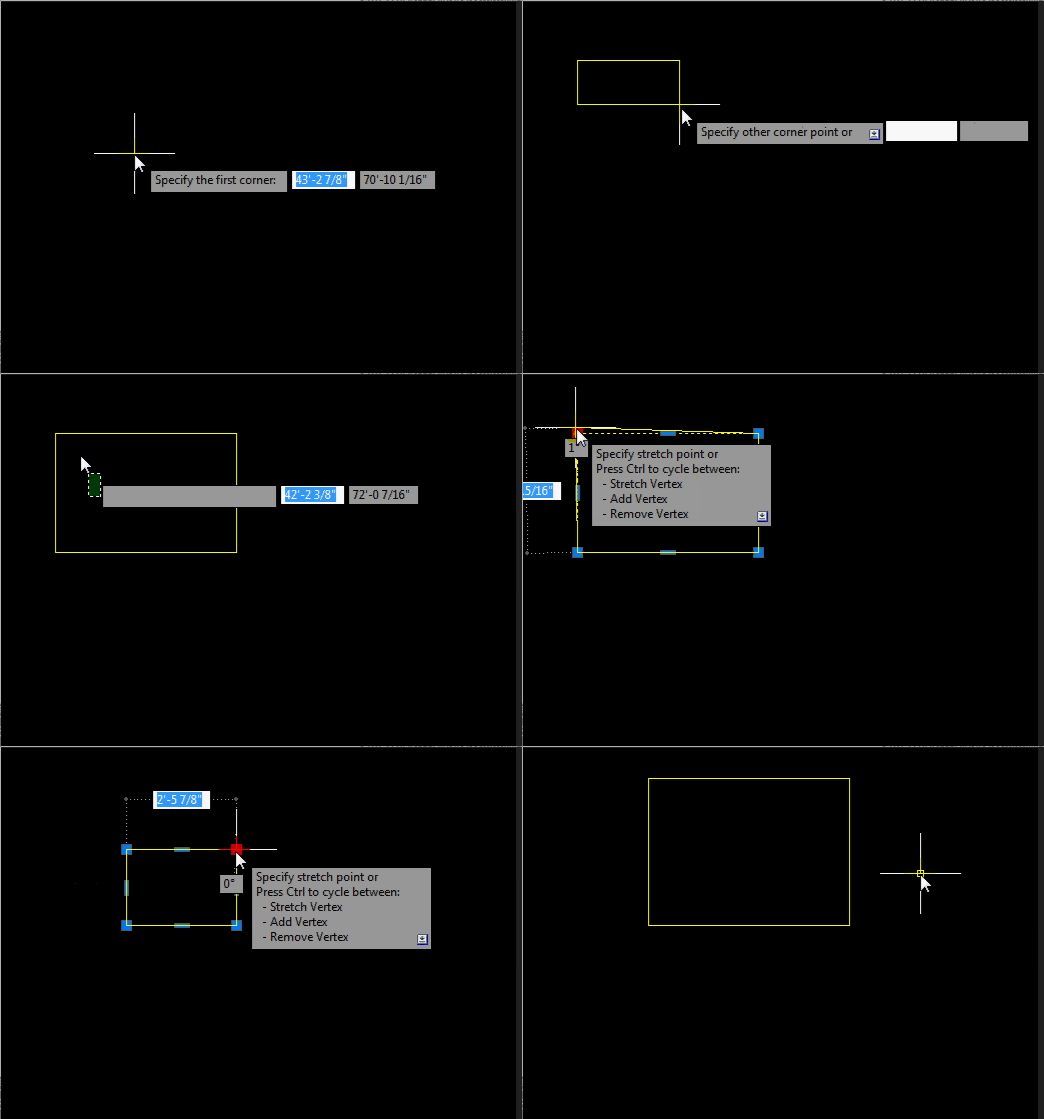
Good day everyone! I've discovered new (old?) the possibilities of a true rectangle. It is very convenient to work with him! The only drawback is that the rectangle is unstable. You can create it and work with it only in the current file. If you then close and open this file, the properties of the true rectangle are lost. Is it possible to make it stable so that its properties are preserved? https://autocadtips1.com/2011/11/20/autolisp-make-a-real-rectacgle/ AutoLISP: Make a Real Rectangle Posted on November 20, 2011 by AutoCAD Tips A long time ago, AutoCAD used to make Rectangles and polygons as their own entities. When you made a rectangle and then did a LIST <enter> on it, it would show as a rectangle. Nowadays, these objects are those objects in their geometry but are made of polyline entities. So modifying these objects is sometimes hard. that’s where this routine steps in to help. This routine lets you create a rectangle and even after you continue working elsewhere in your drawing, you can come back to that rectangle and modify that object and it acts like how rectangles used to act in AutoCAD. Here’s how: TREC <enter> to start “True RECtangle” Create a rectangle how you normally create one When needed, this routine will let you drag a single corner and the rest of the rectangle’s geometry will adjust accordingly to keep its geometry as a rectangle. TrueRect.lsp

-
Help Appreciated: Force Existing Layer Names to UPPER CASE Not Working
Saxlle replied to Clint's topic in AutoLISP, Visual LISP & DCL
Yes, this will substitued all layers into the UPPERCASE. -
Help Appreciated: Force Existing Layer Names to UPPER CASE Not Working
Saxlle replied to Clint's topic in AutoLISP, Visual LISP & DCL
If I getted correct, this can be accomplish, but you need to do a systematization in naming the layers. One of the approaches can be to make an .txt file in which you will store the systematizated layers (the proper order must be, for e.g. "Tropic,Train,Traffic" or "Tropic\n" "Train\n" "Traffic\n" etc. The \n means new line). Then, you will run the code from my post, get an list of layers inside the drawing, then select desired layers to matches with .txt file from which you want to get a proper names (for e.g. in .txt file you have the layer name "TrAffiC", after choosing the layer "Traffic" in the drawing with "TrAffiC", you can substitued with proper name). -
@odrcmn here it is Stationing polyline Also here Author website Stationing polyline
-
Help Appreciated: Force Existing Layer Names to UPPER CASE Not Working
devitg replied to Clint's topic in AutoLISP, Visual LISP & DCL
@Clint Please give it a try (defun c:lay-nam-to-capital (/ (ACAD-OBJ ADOC LAY-COLL)) (VL-LOAD-COM) (SETQ ACAD-OBJ (VLAX-GET-ACAD-OBJECT)) (SETQ ADOC (VLA-GET-ACTIVEDOCUMENT ACAD-OBJ)) (SETQ LAY-COLL (VLA-GET-LAYERS ADOC)) (vlax-for lay lay-coll (vla-put-name lay (strcase (vla-get-name lay))) ) ;_ end of vlax-for ) ;_ end of defun - Yesterday
-

Python Batch change layer name case
Danielm103 replied to Danielm103's topic in .NET, ObjectARX & VBA
The PIP is here ‘pip install cad-pyrx’ https://pypi.org/project/cad-pyrx/, the project is here https://github.com/CEXT-Dan/PyRx It’s an amalgamation of BRX and ActiveX APIs. There’s some stuff for BIM as well. -
I will investigate this excellent suggestion further! I have Python installed and am learning it now. Best regards, Clint Hill
-
Help Appreciated: Force Existing Layer Names to UPPER CASE Not Working
Danielm103 replied to Clint's topic in AutoLISP, Visual LISP & DCL
BricsCAD V26 can run PyRx Python, makes Batch processing a bit easier sometimes. If you’re interested -
Python, makes Batch processing a bit easier sometimes import traceback from pyrx import Ap, Db def capcaseLayers(db: Db.Database): lt = Db.LayerTable(db.layerTableId()) for name, id in lt.toDict().items(): l = Db.LayerTableRecord(id, Db.OpenMode.kForWrite) l.setName(name.upper()) def processDb(fpath: str): sdb = Db.Database(False, True) sdb.readDwgFile(fpath) sdb.closeInput(True) capcaseLayers(sdb) sdb.saveAs(fpath) #add new command @Ap.Command() def caplayers(): try: for fpath in Ap.Application.listFilesInPath("E:\\temp", ".dwg"): processDb(fpath) except Exception as err: traceback.print_exception(err)
-

Help Appreciated: Force Existing Layer Names to UPPER CASE Not Working
Clint replied to Clint's topic in AutoLISP, Visual LISP & DCL
Hi BIGAL, I appreciate your script lines example. Thankfully as part of the customization project, our developer created a BricsCAD-based batch scripting application that allows user selection of multiple files. So, I would simply save the script file to include the following lines: (load "updatelisp") (c:updatelisp) Best regards, Clint Hill