All Activity
- Past hour
-

Help Appreciated: Force Existing Layer Names to UPPER CASE Not Working
troggarf replied to Clint's topic in AutoLISP, Visual LISP & DCL
I use the below code to force all layers to uppercase. I don't remember who wrote it but it is most appreciated: ;Change All Layer Names to Uppercase (vl-load-com) (vlax-map-collection (vla-get-layers (vla-get-activedocument (vlax-get-acad-object) ) ) '(lambda (x) (vla-put-name x (strcase (vla-get-name x))) ) ) (defun lva (/ kw kval doc adoc lao cnt inc cvprt blk pw) ;Put this lisp to Appload StartUp Suite (vl-load-com) (setq kval :vlax-true) (setq doc (vlax-get-object "AutoCad.Application") adoc (vla-get-ActiveDocument doc) lao (vla-get-Layouts adoc) cnt (vla-get-Count lao) inc 0 ) (repeat cnt (setq cvprt (vla-Item lao inc) inc (+ inc 1) blk (vla-get-Block cvprt) ) (vlax-for itm blk (if (vlax-property-available-p itm 'DisplayLocked) (progn (vla-put-DisplayLocked itm kval) (vla-update itm) ) ) ) ) (princ) ) - Today
-

Help Appreciated: Force Existing Layer Names to UPPER CASE Not Working
ScottMC replied to Clint's topic in AutoLISP, Visual LISP & DCL
Excellent and encourages me all the more to learn more than lean so much.. Found a solution as when using a text with a space in front, it's automatically ignored.. Just slip this in after the: v (vla-get-TextString o) v (vl-string-left-trim " " v) ;; https://www.cadtutor.net/forum/topic/26510-remove-the-space-from-a-text/page/4/#findComment-324578 -
Most times anything can be done if you throw enough money at it. So what I am saying the solution may come at a cost. With no txt file to look at makes further comments difficult, what happens if you open the file in Excel ?
-
That is a classic Civil 3D export nightmare when you don't have the source file - the pain is real. Since re-generating the table is off the table for you, a smart LISP is definitely the most robust way to solve this. It's a tricky job because the routine needs to accurately parse the stationing text and map the Area MTEXT entities to the right Volume and Cumulative Volume fields based on their coordinates. I hope one of the LISP experts can jump in and help you get that final, streamlined routine working!
-
 juarezlandscapingservices joined the community
 -
 maksyo joined the community
 -

Lisp exportar todas las presentaciones
mikarts replied to mikarts's topic in AutoLISP, Visual LISP & DCL
Hola. Contesto desde el móvil y sin probarlo, pero si no me equivoco bastaría con introducir el guión modificando esta parte del código así: (command "_exportlayout" (strcat (getvar "dwgprefix") (vl-filename-base (getvar "dwgname")) "-" presentacion ) ;(getvar "ctab") ".dwg") @ivaj Ya nos dices si te va. -

Lisp exportar todas las presentaciones
devitg replied to mikarts's topic in AutoLISP, Visual LISP & DCL
@ivaj Please upload tomo.dwg - Yesterday
-
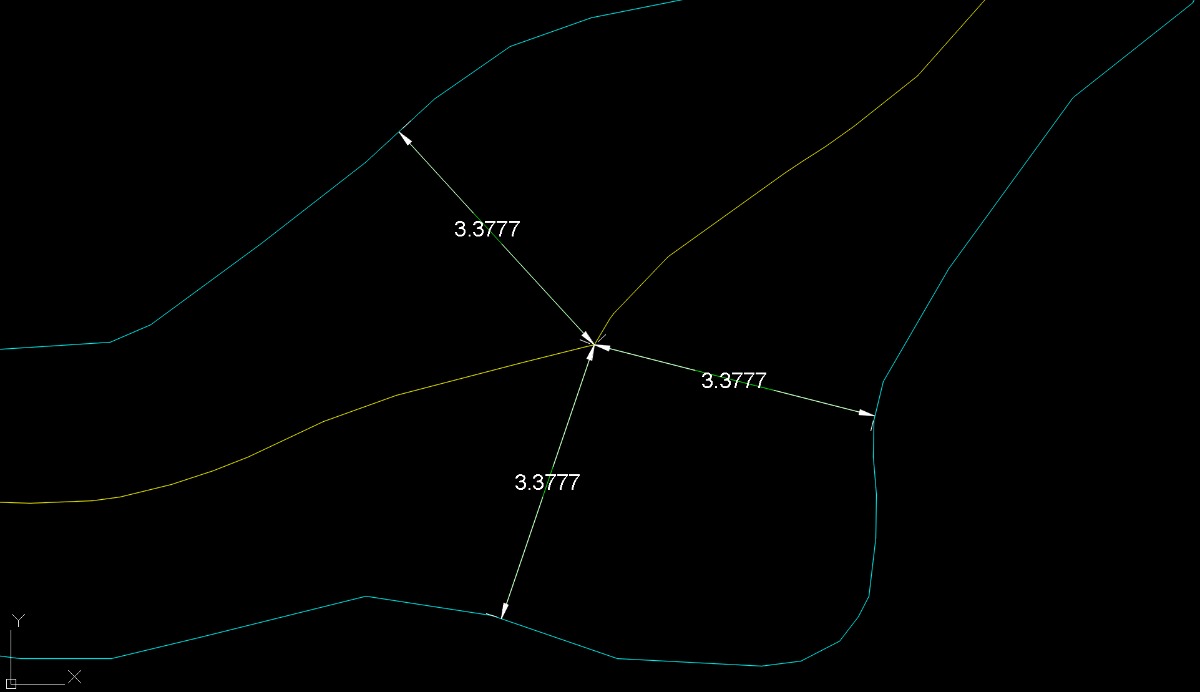
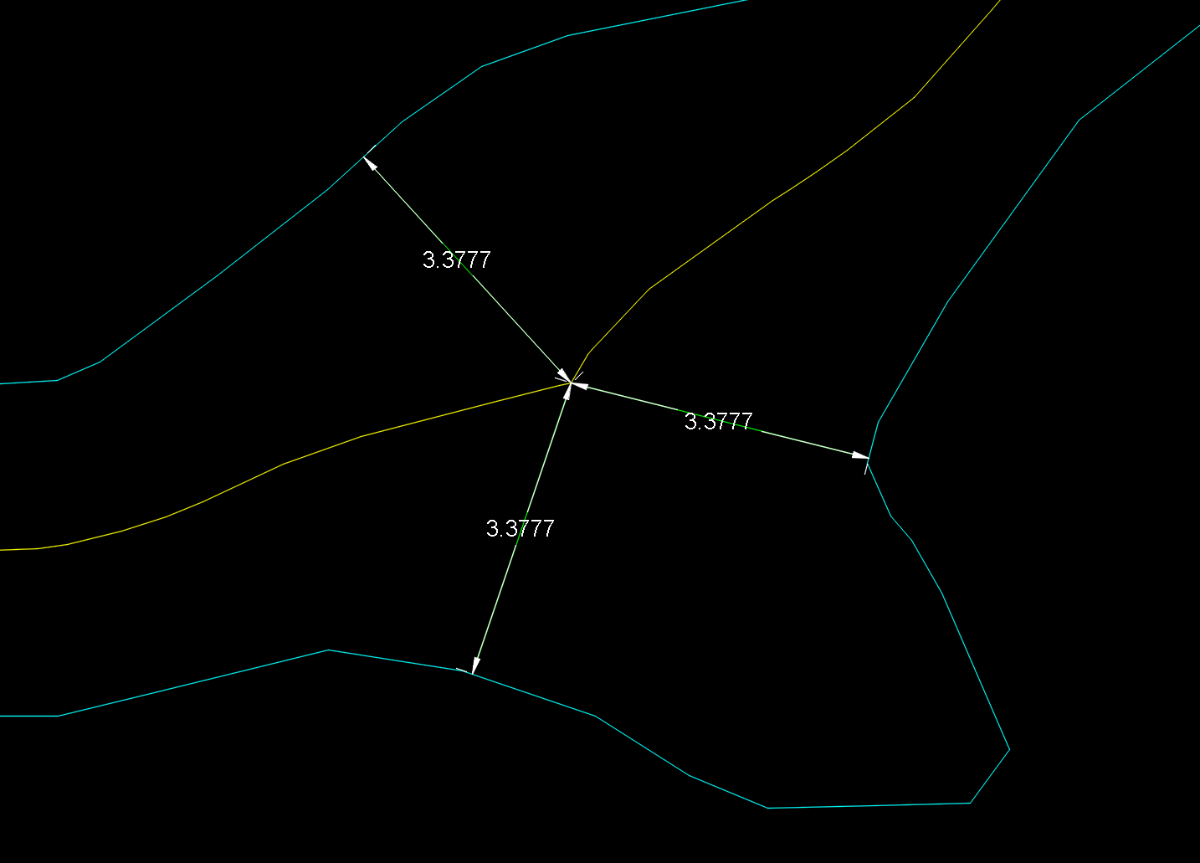
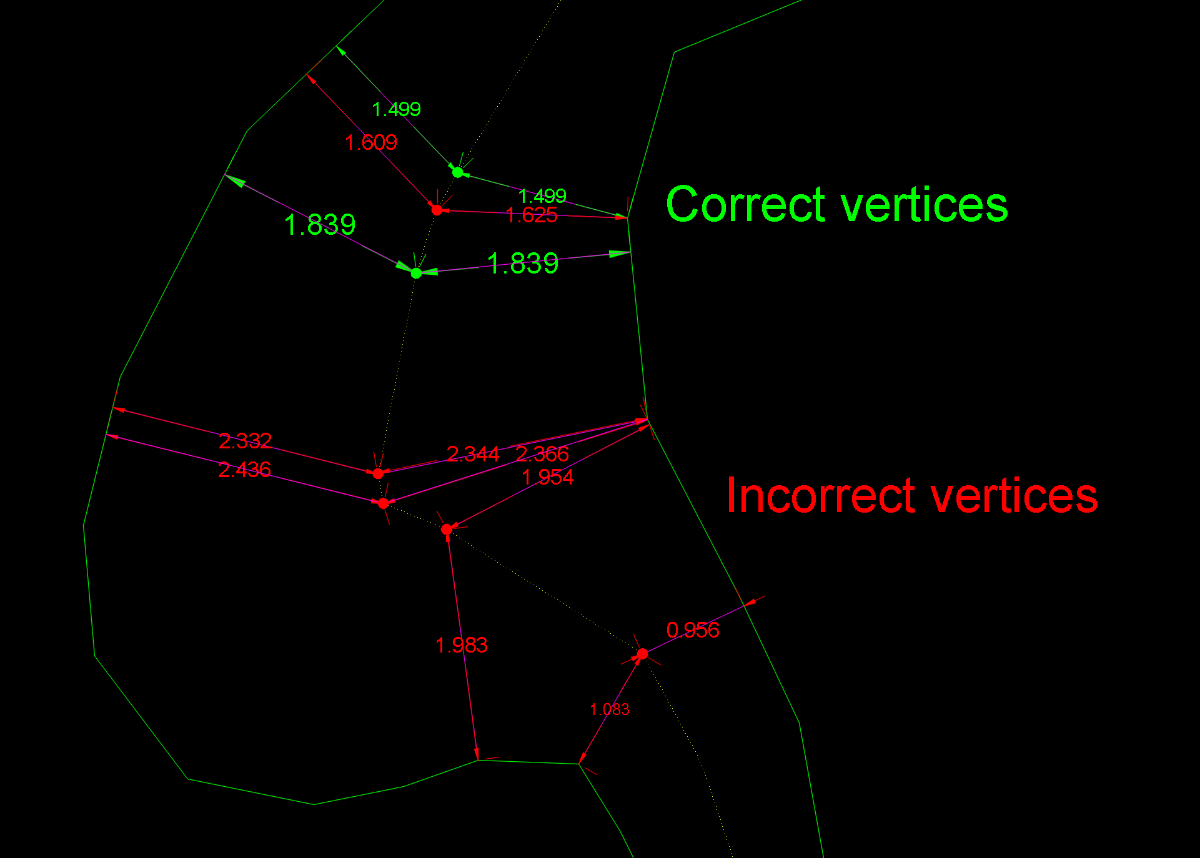
Obviously, this has now become something more than just the search for a solution to a single user’s problem. First of all, I should say that I myself was also reluctant to accept the concept of equidistance advocated by @GP_ and @dexus For the simple reason that applying this principle forced me to accept that the centerline should be the same in these two drawings. Equidistance requires ignoring those areas of the margins that do not geometrically affect the axis. This, which initially caused me some resistance, I eventually came to accept conceptually when I realized that it could serve as a criterion for defining what is a “recodo/inlet” and what is not. So I have abandoned my previous approach and adapted it to this new situation. Having made this clarification, I must say that this concept of equidistance makes the calculation of a centerline more feasible. I’ve been running some tests with Dexus’s latest code, which is the best so far. However, I’ve discovered some “holes” that I hadn’t noticed before. I’m attaching a few images showing this. In my view, these are conceptual errors rather than geometric limitations. And what can we consider “geometric limitations”? I believe that, in any case, every vertex of the centerline must be equidistant from both margins. If this is not the case, the result is not correct. However, the intermediate regions along each segment may be subject to geometric limitations depending on the desired precision. Therefore, in bends or turns, the points taken within the adjustment or “problematic” segments may deviate (within a tolerance) from strict equidistance. The goal, therefore (in my opinion), should be to achieve equidistance at every vertex and to remain within a tolerance in the intermediate zone of each segment. After everything written here so far, some might wonder: is it really possible to obtain a centerline that meets these requirements? As far as I’m concerned, I’m running some tests. GusanoAcad.mp4 I’ll post something over the weekend

-

Seeking the UNMI.LSP routine (original source unavailable)
p7q replied to p7q's topic in AutoLISP, Visual LISP & DCL
Sooo thanks.It hadn't occurred to me. -

Seeking the UNMI.LSP routine (original source unavailable)
SLW210 replied to p7q's topic in AutoLISP, Visual LISP & DCL
It unmirrors blocks. -
Display ERROR with the model space
SLW210 replied to Gabzie_20's topic in AutoCAD 2D Drafting, Object Properties & Interface
Hard to say with what little information you are giving. Is it just happening on the MacBook Pro? Can you post the .dwg? What are the computer specifications, graphics card, and driver? -
 ghares69600 joined the community
 -

Seeking the UNMI.LSP routine (original source unavailable)
Tsuky replied to p7q's topic in AutoLISP, Visual LISP & DCL
See on archive of the web: UNMI.LSP -
Seeking the UNMI.LSP routine (original source unavailable)
p7q posted a topic in AutoLISP, Visual LISP & DCL
I’m trying to obtain the UNMI.LSP AutoLISP routine previously hosted at: http://my.sterling.net/~bdeshawn/unmi.lsp The site has been offline for a long time, and I haven’t been able to reach the original author. If anyone here has the source code, has used this routine before, or can provide details about what the program exactly does, I would greatly appreciate any help or pointers. Thank you in advance to anyone who can share documentation, the LISP file, or a functional equivalent. -
 edenguzi joined the community
 -

Lisp exportar todas las presentaciones
ivaj replied to mikarts's topic in AutoLISP, Visual LISP & DCL
Buenos días Me parece muy interesante, se pudiera colocar un guion en el archivo de DWG. Ejemplo: el Archivo de llama Tomo.dwg y tengo varias presentaciones, 001,002, etc. ya la hora de crear el archivo independiente de cada una de las presentaciones me crea un fichero Tomo001.dwg, Tomo002.dwg, etc. y en mi caso me haría falta que saliera Tomo-001.dwg, Tomo-002.dwg, etc. -
ivaj joined the community
-
Great! it worked, thank you so much!
-
In general, we work with plans for projects of various kinds: engineering, cadastral mapping, and so on. Sometimes we submit proposals for public tenders, but so far without success. @dexus, the performance of your code looks different in that last drawing compared to what I’m seeing on my end. In any case, I think this topic has now entered the realm of a real challenge. @BIGAL: I agree. I think that’s the correct way to draw the centerline in the inlets.
- Last week
-
You need to search for convert Raster to Vector programs. You can use Raster Design on the image files, but still requires some work, it doesn't work on the PDFs though. If they refuse to properly create Vector PDFs or give you a .dwg, your only option is to do them in a separate Raster/Vector program, Raster Design or trace them in AutoCAD.
-

lisp, place block on geometric center of polyline
BIGAL replied to hanskes's topic in AutoLISP, Visual LISP & DCL
Welcome aboard. The use of "C:" in a defun name implies the command name, so in code above type "Test" after loading. I would also rename "test" to something that you would call it. (defun c:test ............. ........ ) ; end defun add this a last line and it will run on load ) ; end defun (c:test) -
Extracting data to excel from selected objects on different layers
BIGAL replied to Hsanon's topic in AutoLISP, Visual LISP & DCL
Ok the "add" is only needed if you start excel as it would normally ask to select a fiel including "Blank", if you have Excel already open it will find current workbook. I need to put the add in correct spot not sure why I did not do before. This should work just replace in code. ; Count will be 0 if no excel open but if no workbooks also may return same value. Nil names. ; So a double check count /=0 and wb not "" (princ "\nOpening Excel...") ;; Try to get or create Excel instance (setq myxl (vl-catch-all-apply 'vlax-get-or-create-object '("Excel.Application"))) (if (vl-catch-all-error-p myxl) (progn (prompt "\nError: Could not start Excel.") (exit) ) ) (if (= (vlax-get-property (vlax-get-property myXL 'WorkBooks) 'count) 0) (vlax-invoke-method (vlax-get-property myXL 'WorkBooks) 'Add) ) (vla-put-visible myXL :vlax-true) (vlax-put-property myxl 'ScreenUpdating :vlax-true) (vlax-put-property myXL 'DisplayAlerts :vlax-true) -
I do not have Revit or the original files. The PDFs were provided to me. I would LOVE the .dwg files but we may not be able to get them from a third party vendor.
-
 Gabzie_20 joined the community
 -
Display ERROR with the model space
Gabzie_20 posted a topic in AutoCAD 2D Drafting, Object Properties & Interface
I have trouble with the model space viewport - it's on 1/3 of the screen. I try to slide it to enlarge it but it just keeps returning to the initial state. I tried turning all the viewports on and off, command "WSCURRENT", every classical way to resolve the issue but nothing works. The problem occured on a AUTOCAD2024 for MacBook Pro. Thank you in advance. -
Not too hard to create, a real pain to maintain as it must be compiled every time Autodesk decides to break binary compatibility
-
 deneme joined the community
 -
Try this. ;;Changing the color of CrossHair (transparent command) (DEFUN C:CHCOL (/ c d l m n o p) (setq c (quote ("Black" "Red" "Yelow" "Green" "Cyan" "Blue" "Magenta" "White" "8" "9")) l (quote ( 0 255 65535 65280 16776960 16711680 16711935 16777215 8421504 12632256)) d (vla-get-display (vla-get-preferences (vlax-get-acad-object))) m l o (vlax-variant-value (vlax-variant-change-type (if (= (getvar "TILEMODE") 0) (vla-get-layoutcrosshaircolor d) (vla-get-modelcrosshaircolor d) ) vlax-vbLong ) ) n (member o l) ) (cond ;;Rearrange list l with the First item = Current color from the list l ( (and n (/= o 0)) (setq l (append n (vl-remove-if (function (lambda (x) (member x n))) l))) ;;(v1 v2 n v3 v4 v5 ...) -> (n v3 v4 v5 ... v1 v2) ) ;;Add current color to lists ( (not n) (setq l (cons o l) m l c (cons (strcat (itoa (lsh (lsh o 24) -24)) "," (itoa (lsh (lsh o 16) -24)) "," (itoa (lsh o -16))) c) ) ) (T nil) ) (princ (strcat "\nCurrent color: " (nth (vl-position (car l) m) c) ". [Right Mouse Button/Enter Key/Space Key] to accept or any key to cycle CrossHair colors." ) ) (while (and (not (vl-catch-all-error-p (setq p (vl-catch-all-apply (function grread))))) ;;<Esc> (not (equal p (quote (2 13)))) ;;<Enter> (not (equal p (quote (2 32)))) ;;<Space> (/= (car p) 25) ;;Right mouse button ) (setq l (append (cdr l) (list (car l)))) (if (= (getvar "TILEMODE") 0) (vla-put-layoutcrosshaircolor d (car l)) (vla-put-modelcrosshaircolor d (car l)) ) (princ (strcat "\nCrossHair Color: " (nth (vl-position (car l) m) c))) ) (princ) ) ;;CHCOL
-
You need to properly set up Revit. PDF is not fully vectorized after exporting it from Revit "Revit will use raster printing because this view uses..." while printing a sheet to PDF format in Revit And check the links at the bottom of those pages. You should be able to Export to a .dwg if that's what you want.
-
 arst joined the community
 -

Need help reducing multiple oversized dimension text boxes at once
EleenD03 replied to 0misclose's topic in AutoCAD 2D Drafting, Object Properties & Interface
Had the same issue before - the quickest fix for me was just updating the DIMSTYLE and then using DIMUPDATE on the whole selection. It forces all the oversized boxes to follow the current style settings instead of whatever weird scaling they picked up. Select all your dims → type DIMUPDATE → done. Usually cleans things up in one go. -
 davidjason joined the community
 -

lisp, place block on geometric center of polyline
AR.BG replied to hanskes's topic in AutoLISP, Visual LISP & DCL