Leaderboard




Popular Content
Showing content with the highest reputation since 09/24/2026 in Posts
-
So in keeping with posting some of my LISPs, I used this just the other day, and just was reminded with the recent resurrection of the Fillet 0 issue thread where the OP was doing 40,000, not sure what LISP they used. Per the latest resurrection, setting FILLETPOLYARC setting may or may not help depending on what you are trying to fillet. The few times I have seen Fillet 0 fail with the P option was when the fillet radii completed something like a half circle when adjacent corners are filleted (something like the ends of a slot). This can be handy dandy. There are others like this around. For my use this was better than a few of the ones I tried. You may need to change the FILLETPOLYARC=0 if you have issue using this with Radius=0. In those situations when I had an issue, the LISP just doesn't do anything to those fillets, so I just go back with a small radius and change them, then you should be able to Fillet=0 those. (defun c:MF () (c:MultiPolyFillet) ) (defun c:MultiPolyFillet (/ radius ss i ent) (setq radius (getdist "\nFillet radius: ")) (if radius (progn (setvar "FILLETRAD" radius) (setq ss (ssget '((0 . "LWPOLYLINE,POLYLINE")))) (if ss (progn (setq i 0) (while (< i (sslength ss)) (setq ent (ssname ss i)) (command "_.FILLET" "_P" ent) (setq i (1+ i)) ) ) ) ) ) (princ "MultiPolyFillet complete.") (princ) ) (princ "\nMultiPolyFillet loaded. Type MultiPolyFillet or MF to run." ) (princ)4 points
-
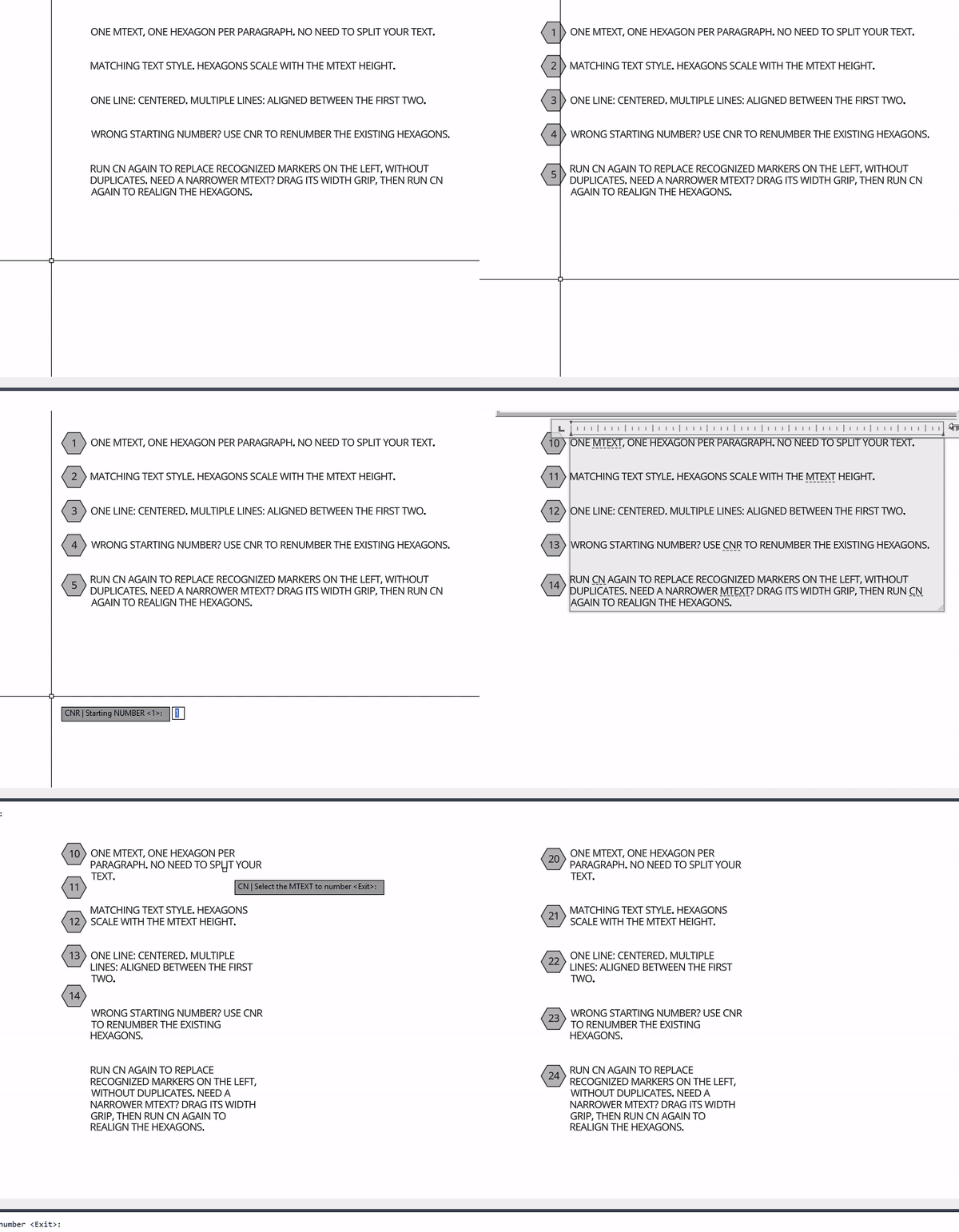
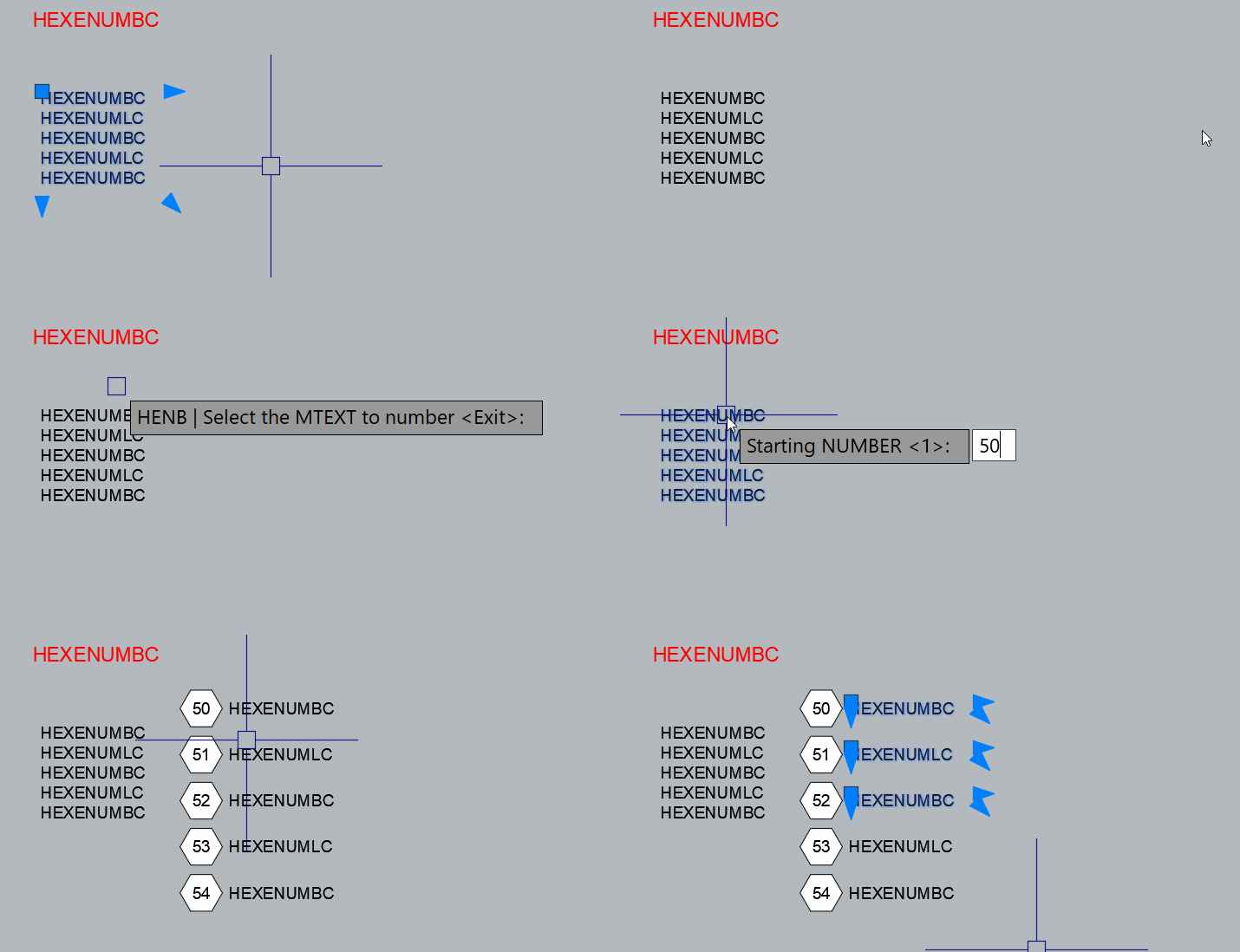
code: ;;; HEXENUM 1.5.1 | CN: markers beside unchanged MTEXT | CNC: relocated paragraphs. ;;; CNR: renumber existing markers; CN replaces recognized markers in the left column. ;;; Base block: side 0.1801, NUM height 0.10; insertion scale = MTEXT height / 0.10. ;;; Single line: centered. Wrapped paragraph: centered on its first two lines. ;;; Existing block definitions are never cleared/redefined. Compatible ones are reused. ;;; SOLID fill ACI 255. Uniform XYZ scale, non-explodable block. AutoCAD Windows. ;;; Single-column, non-annotative MTEXT on WCS XY; no fields or vertical writing. ;;; Complex mixed-height/stacked text needs visual verification of line placement. (vl-load-com) (defun R0:CN-Fail (msg) (setq cn-msg msg) (exit)) (defun R0:CN-Prefix (frames / result frame) (setq result "") (foreach frame (reverse frames) (setq result (strcat result "{" frame))) result) (defun R0:CN-Close (frames / result) (setq result "") (repeat (length frames) (setq result (strcat result "}"))) result) (defun R0:CN-Records (s / i n ch next token frames part visible result j brk start) (setq i 1 n (strlen s) frames (list "") part "{" visible nil) (while (<= i n) (setq start i ch (substr s i 1) next (substr s (1+ i) 1) brk nil) (cond ((or (= ch (chr 10)) (= ch (chr 13))) (setq brk T) (if (and (= ch (chr 13)) (= next (chr 10))) (setq i (1+ i))) (setq i (1+ i))) ((= ch "\\") (cond ((= next "P") (setq brk T i (+ i 2))) ((= next "N") (R0:CN-Fail "Column breaks found. Set the MTEXT to a single column.")) ((member next '("\\" "{" "}" "~")) (setq part (strcat part (substr s i 2)) i (+ i 2)) (if (/= next "~") (setq visible T))) ((member next '("A" "C" "c" "F" "f" "H" "Q" "T" "W" "p" "S")) (setq j (+ i 2)) (while (and (<= j n) (/= (substr s j 1) ";")) (setq j (1+ j))) (if (> j n) (R0:CN-Fail "Incomplete MTEXT formatting code.")) (setq token (substr s i (1+ (- j i))) part (strcat part token) i (1+ j)) (if (= next "S") (setq visible T) (setq frames (cons (strcat (car frames) token) (cdr frames))))) ((member next '("L" "l" "O" "o" "K" "k")) (setq token (substr s i 2) part (strcat part token) i (+ i 2) frames (cons (strcat (car frames) token) (cdr frames)))) ((and (= next "U") (= (substr s (+ i 2) 1) "+")) (setq part (strcat part (substr s i 7)) i (+ i 7) visible T)) (T (setq part (strcat part ch) i (1+ i) visible T)))) ((= ch "{") (setq frames (cons "" frames) part (strcat part ch) i (1+ i))) ((= ch "}") (if (null (cdr frames)) (R0:CN-Fail "Unbalanced formatting braces.")) (setq frames (cdr frames) part (strcat part ch) i (1+ i))) (T (setq part (strcat part ch) i (1+ i)) (if (not (member ch (list " " (chr 9)))) (setq visible T)))) (if brk (progn (if visible (setq result (cons (list (strcat part (R0:CN-Close frames)) (1- start) (R0:CN-Close frames)) result))) (setq part (R0:CN-Prefix frames) visible nil)))) (if (/= (length frames) 1) (R0:CN-Fail "Unbalanced formatting braces.")) (if visible (setq result (cons (list (strcat part (R0:CN-Close frames)) n (R0:CN-Close frames)) result))) (reverse result)) (defun R0:CN-Split (s) (mapcar 'car (R0:CN-Records s))) (defun R0:CN-Normalize (s) (while (vl-string-search (strcat (chr 13) (chr 10)) s) (setq s (vl-string-subst "\\P" (strcat (chr 13) (chr 10)) s))) (while (vl-string-search (chr 13) s) (setq s (vl-string-subst "\\P" (chr 13) s))) (while (vl-string-search (chr 10) s) (setq s (vl-string-subst "\\P" (chr 10) s))) s) (defun R0:CN-Register (obj) (setq cn-created (cons obj cn-created)) obj) (defun R0:CN-Box (obj / lo hi) (vla-Update obj) (vla-GetBoundingBox obj 'lo 'hi) (list (vlax-safearray->list lo) (vlax-safearray->list hi))) (defun R0:CN-Props (obj src) (vla-put-Layer obj (vla-get-Layer src)) (vla-put-TrueColor obj (vla-get-TrueColor src)) obj) (defun R0:CN-Text (space src content width h at attach / obj) (setq obj (R0:CN-Register (vla-AddMText space (vlax-3d-point at) width content))) (R0:CN-Props obj src) (vla-put-StyleName obj (vla-get-StyleName src)) (vla-put-Height obj h) (vla-put-Rotation obj 0.0) (vla-put-AttachmentPoint obj attach) (vla-put-InsertionPoint obj (vlax-3d-point at)) (vla-put-LineSpacingStyle obj (vla-get-LineSpacingStyle src)) (vla-put-LineSpacingFactor obj (vla-get-LineSpacingFactor src)) obj) (defun R0:CN-CenterY (obj box cy / mid) (setq mid (/ (+ (cadar box) (cadadr box)) 2.0)) (vla-Move obj (vlax-3d-point '(0.0 0.0 0.0)) (vlax-3d-point (list 0.0 (- cy mid) 0.0))) obj) (defun R0:CN-Discard (obj) (vla-Delete obj) (setq cn-created (vl-remove obj cn-created))) (defun R0:CN-Initial (/ s n valid) (while (not valid) (setq s (getstring (strcat "\n" cn-label " | Starting NUMBER <1>: "))) (if (= s "") (setq s "1")) (if (and (<= (strlen s) 9) (vl-every '(lambda (c) (and (>= c 48) (<= c 57))) (vl-string->list s))) (setq n (atoi s) valid T) (princ "\nEnter an integer from 0 to 999999999."))) n) (defun R0:CN-Annotative (ename / data) (setq data (assoc -3 (entget ename '("AcadAnnotative")))) (and data (member '(1070 . 1) (cdr (cadr data))))) (defun R0:CN-Select (/ pick en data layer done) (while (not done) (setvar "ERRNO" 0) (setq pick (entsel (strcat "\n" cn-label " | Select the MTEXT to number <Exit>: "))) (cond ((and (null pick) (= (getvar "ERRNO") 7)) (princ "\nNothing selected. Click the MTEXT again; Enter exits.")) ((null pick) (setq done T en nil)) (T (setq en (car pick) data (entget en) layer (if data (tblsearch "LAYER" (cdr (assoc 8 data))))) (cond ((null data) (princ "\nObject no longer available. Select another MTEXT.")) ((/= (cdr (assoc 0 data)) "MTEXT") (princ "\nSelect an MTEXT object, not single-line text or a block.")) ((null layer) (princ "\nCannot read the object layer. Select another MTEXT.")) ((/= 0 (logand 5 (cdr (assoc 70 layer)))) (princ "\nThe MTEXT layer is locked or frozen. Select another MTEXT or press Enter to exit.")) ((minusp (cdr (assoc 62 layer))) (princ "\nThe layer is turned off.")) (T (setq done T)))))) en) (defun R0:CN-Scale (height) (/ height 0.10)) (defun R0:CN-Side (height) (* 0.1801 (R0:CN-Scale height))) (defun R0:CN-Height (box) (- (cadadr box) (cadar box))) ;;; Safe prefix boundaries: never cut a formatting code, Unicode escape or stack. (defun R0:CN-Cuts (s / i n ch nx j depth visible cuts) (setq i 1 n (strlen s) depth 0) (while (<= i n) (setq ch (substr s i 1) nx (substr s (1+ i) 1) visible nil) (cond ((= ch "{") (setq depth (1+ depth) i (1+ i))) ((= ch "}") (setq depth (1- depth) i (1+ i))) ((= ch "\\") (cond ((member nx '("A" "C" "c" "F" "f" "H" "Q" "T" "W" "p" "S")) (setq j (+ i 2)) (while (and (<= j n) (/= (substr s j 1) ";")) (setq j (1+ j))) (if (> j n) (R0:CN-Fail "Incomplete paragraph formatting.")) (setq i (1+ j) visible (= nx "S"))) ((and (= nx "U") (= (substr s (+ i 2) 1) "+")) (setq i (+ i 7) visible T)) ((member nx '("L" "l" "O" "o" "K" "k")) (setq i (+ i 2))) (T (setq i (+ i 2) visible T)))) (T (setq i (1+ i) visible (not (member ch (list " " (chr 9))))))) (if visible (setq cuts (cons (list (1- i) depth) cuts)))) (reverse cuts)) (defun R0:CN-PrefixAt (s cut / out) (setq out (substr s 1 (car cut))) (repeat (cadr cut) (setq out (strcat out "}"))) out) ;;; Measure the first rendered wrap using balanced prefixes of the actual paragraph. ;;; Uses the source font, width and line spacing; no hard-coded interline distance. (defun R0:CN-AnchorOffset (probe paragraph fullHeight / cuts firstHeight threshold low high mid sample twoHeight) (setq cuts (R0:CN-Cuts paragraph)) (if (not cuts) (R0:CN-Fail "Cannot measure an empty paragraph.")) (vla-put-TextString probe (R0:CN-PrefixAt paragraph (car cuts))) (setq firstHeight (R0:CN-Height (R0:CN-Box probe)) threshold (+ firstHeight (* 0.20 firstHeight))) (if (<= firstHeight 1e-12) (R0:CN-Fail "Cannot measure the first line of text.")) (if (<= fullHeight threshold) (/ fullHeight 2.0) (progn (setq low 0 high (1- (length cuts))) (while (< low high) (setq mid (fix (/ (+ low high) 2))) (vla-put-TextString probe (R0:CN-PrefixAt paragraph (nth mid cuts))) (setq sample (R0:CN-Height (R0:CN-Box probe))) (if (> sample threshold) (setq high mid) (setq low (1+ mid)))) (vla-put-TextString probe (R0:CN-PrefixAt paragraph (nth low cuts))) (setq twoHeight (R0:CN-Height (R0:CN-Box probe))) (/ (min fullHeight twoHeight) 2.0)))) (defun R0:CN-BlockCompatible (blk / obj typ ok pl att hatch coords expected k a data) (setq ok (and (= (vla-get-Count blk) 3) (= (vla-get-Units blk) (getvar "INSUNITS")) (= (vla-get-BlockScaling blk) 1) (= (vla-get-Explodable blk) :vlax-false) (= (vla-get-IsXRef blk) :vlax-false) (equal (vlax-safearray->list (vlax-variant-value (vla-get-Origin blk))) '(0.0 0.0 0.0) 1e-9))) (vlax-for obj blk (setq typ (vla-get-ObjectName obj)) (cond ((= typ "AcDbPolyline") (if pl (setq ok nil)) (setq pl obj)) ((= typ "AcDbAttributeDefinition") (if att (setq ok nil)) (setq att obj)) ((= typ "AcDbHatch") (if hatch (setq ok nil)) (setq hatch obj)) (T (setq ok nil)))) (if (and ok pl att hatch) (progn (setq coords (vlax-safearray->list (vlax-variant-value (vla-get-Coordinates pl))) k 5) (repeat 6 (setq a (* pi (/ k 3.0)) expected (cons (* 0.1801 (cos a)) (cons (* 0.1801 (sin a)) expected)) k (1- k))) (setq ok (and (equal coords expected 1e-8) (= (vla-get-Closed pl) :vlax-true) (equal (vla-get-Elevation pl) 0.0 1e-9) (equal (vlax-safearray->list (vlax-variant-value (vla-get-Normal pl))) '(0.0 0.0 1.0) 1e-9) (= (strcase (vla-get-TagString att)) "NUM") (= (vla-get-Constant att) :vlax-false) (= (vla-get-Invisible att) :vlax-false) (equal (vla-get-Height att) 0.10 1e-8) (= (vla-get-Alignment att) 10) (equal (vlax-safearray->list (vlax-variant-value (vla-get-TextAlignmentPoint att))) '(0.0 0.0 0.0) 1e-8) (= (strcase (vla-get-PatternName hatch)) "SOLID") (= (vla-get-Color hatch) 255))) (setq k 0) (repeat 6 (if (not (equal (vla-GetBulge pl k) 0.0 1e-10)) (setq ok nil)) (setq k (1+ k))) (if (not (equal (vla-get-Area hatch) (* 1.5 (sqrt 3.0) 0.1801 0.1801) 1e-8)) (setq ok nil)) (if (not (equal (R0:CN-Box hatch) (list (list -0.1801 (- (* 0.1801 (/ (sqrt 3.0) 2.0))) 0.0) (list 0.1801 (* 0.1801 (/ (sqrt 3.0) 2.0)) 0.0)) 1e-8)) (setq ok nil))) (setq ok nil)) ok) (defun R0:CN-NewBlock (doc name / blk k a coords arr pl hatch loop att dict order) (setq blk (vla-Add (vla-get-Blocks doc) (vlax-3d-point '(0.0 0.0 0.0)) name) cn-newblock blk k 5) (vla-put-Units blk (getvar "INSUNITS")) (repeat 6 (setq a (* pi (/ k 3.0)) coords (cons (* 0.1801 (cos a)) (cons (* 0.1801 (sin a)) coords)) k (1- k))) (setq arr (vlax-make-safearray vlax-vbDouble '(0 . 11))) (vlax-safearray-fill arr coords) (setq pl (vla-AddLightWeightPolyline blk arr)) (vla-put-Closed pl :vlax-true) (vla-put-Layer pl "0") (vla-put-Color pl 0) (vla-put-ConstantWidth pl 0.0) (vla-put-Lineweight pl 0) (setq hatch (vla-AddHatch blk 0 "SOLID" :vlax-false 0) loop (vlax-make-safearray vlax-vbObject '(0 . 0))) (vlax-safearray-put-element loop 0 pl) (vla-AppendOuterLoop hatch loop) (vla-put-Layer hatch "0") (vla-put-Color hatch 255) (vla-put-EntityTransparency hatch "0") (vla-Evaluate hatch) (setq att (vla-AddAttribute blk 0.10 0 "Number" (vlax-3d-point '(0.0 0.0 0.0)) "NUM" "1")) (vla-put-Layer att "0") (vla-put-Color att 0) (vla-put-StyleName att "Standard") (vla-put-Height att 0.10) (vla-put-Alignment att 10) (vla-put-TextAlignmentPoint att (vlax-3d-point '(0.0 0.0 0.0))) (vla-put-BlockScaling blk 1) (vla-put-Explodable blk :vlax-false) (setq dict (vla-GetExtensionDictionary blk) order (vl-catch-all-apply 'vla-GetObject (list dict "ACAD_SORTENTS"))) (if (vl-catch-all-error-p order) (setq order (vla-AddObject dict "ACAD_SORTENTS" "AcDbSortentsTable"))) (vlax-safearray-put-element loop 0 hatch) (vla-MoveToBottom order loop) name) (defun R0:CN-BlockDef (doc / name i blocks blk compatible ready) (setq name "CN_HEX" i 0 blocks (vla-get-Blocks doc)) (while (not ready) (if (not (tblsearch "BLOCK" name)) (progn (R0:CN-NewBlock doc name) (setq ready T)) (progn (setq blk (vla-Item blocks name) compatible (vl-catch-all-apply 'R0:CN-BlockCompatible (list blk))) (if (and (not (vl-catch-all-error-p compatible)) compatible) (setq ready T) (progn (setq i (1+ i) name (strcat "CN_HEX_14_" (itoa i))) (if (> i 1000) (R0:CN-Fail "Too many conflicting marker block names."))))))) (if (> i 0) (princ (strcat "\nExisting block definitions preserved. Using " name "."))) name) (defun R0:CN-Marker (space src center number / obj scale side atts att found box w h factor) (setq scale (R0:CN-Scale (vla-get-Height src)) side (R0:CN-Side (vla-get-Height src)) obj (R0:CN-Register (vla-InsertBlock space (vlax-3d-point center) cn-blockname scale scale scale 0.0))) (R0:CN-Props obj src) (setq atts (vlax-safearray->list (vlax-variant-value (vla-GetAttributes obj)))) (foreach att atts (if (= (strcase (vla-get-TagString att)) "NUM") (progn (setq found T) (vla-put-TextString att (itoa number)) (vla-put-StyleName att (vla-get-StyleName src)) (vla-put-Height att (vla-get-Height src)) (vla-put-Alignment att 10) (vla-put-TextAlignmentPoint att (vlax-3d-point center)) (setq box (R0:CN-Box att) w (- (caadr box) (caar box)) h (R0:CN-Height box) factor (min 1.0 (/ (* side 1.45) (max w 1e-12)) (/ (* side 1.2) (max h 1e-12)))) (if (< factor 1.0) (vla-put-Height att (* (vla-get-Height att) factor))) (vla-put-TextAlignmentPoint att (vlax-3d-point center)) (vla-Update att) (if (/= (vla-get-TextString att) (itoa number)) (R0:CN-Fail "Could not verify the NUM attribute."))))) (if (not found) (R0:CN-Fail "Marker has no editable NUM attribute.")) obj) (defun R0:CN-InPlace (space src content records height width point initial / probe single lineProbe box top left side rec prefix total partHeight offset cy center number previous overlaps) (setq probe (R0:CN-Text space src content width height point (vla-get-AttachmentPoint src))) (vla-put-Visible probe :vlax-false) (setq box (R0:CN-Box probe) top (cadadr box) left (caar box) side (R0:CN-Side height) number initial overlaps 0) (vla-put-AttachmentPoint probe 1) (vla-put-InsertionPoint probe (vlax-3d-point point)) (setq single (R0:CN-Text space src "M" width height point 1) lineProbe (R0:CN-Text space src "M" width height point 1)) (vla-put-Visible single :vlax-false) (vla-put-Visible lineProbe :vlax-false) (foreach rec records (setq prefix (strcat "{" (substr content 1 (cadr rec)) (caddr rec))) (vla-put-TextString probe prefix) (setq total (R0:CN-Height (R0:CN-Box probe))) (vla-put-TextString single (car rec)) (setq partHeight (R0:CN-Height (R0:CN-Box single)) offset (R0:CN-AnchorOffset lineProbe (car rec) partHeight) cy (- (+ (- top total) partHeight) offset) center (list (- left side (* 0.7 height)) cy (caddr point))) (if (and previous (< (abs (- previous cy)) (* (sqrt 3.0) side))) (setq overlaps (1+ overlaps))) (R0:CN-Marker space src center number) (setq previous cy number (1+ number))) (R0:CN-Discard lineProbe) (R0:CN-Discard single) (R0:CN-Discard probe) (if (> overlaps 0) (princ (strcat "\n[!] " (itoa overlaps) " adjacent marker pairs may overlap." " Increase paragraph spacing or use CNC; original MTEXT was not moved."))) number) (defun R0:CN-Relocate (space src parts height width point initial / number side apothem para obj box realHeight offset upper lower cy bottom probe delta) (setq number initial side (R0:CN-Side height) apothem (* side (/ (sqrt 3.0) 2.0)) probe (R0:CN-Text space src "M" width height point 1)) (vla-put-Visible probe :vlax-false) (foreach para parts (setq obj (R0:CN-Text space src para width height (list (+ (car point) side (* 0.7 height)) (cadr point) (caddr point)) 1) box (R0:CN-Box obj) realHeight (R0:CN-Height box) offset (R0:CN-AnchorOffset probe para realHeight) upper (max apothem offset) lower (max apothem (- realHeight offset)) cy (if bottom (- bottom (* 0.8 height) upper) (cadr point)) delta (- (+ cy offset) (cadadr box))) (vla-Move obj (vlax-3d-point '(0.0 0.0 0.0)) (vlax-3d-point (list 0.0 delta 0.0))) (R0:CN-Marker space src (list (car point) cy (caddr point)) number) (setq bottom (- cy lower) number (1+ number))) (R0:CN-Discard probe) number) (defun R0:CN-Cleanup (rollback / obj result) (if rollback (progn (foreach obj cn-saved (vl-catch-all-apply 'vla-put-TextString (list (car obj) (cadr obj))) (vl-catch-all-apply 'vla-Update (list (car obj)))) (foreach obj cn-erased (if (not (entget obj)) (if (not (entdel obj)) (princ "\n[!] Could not restore an old marker; use UNDO.")))))) (if (and rollback cn-retiring cn-source (null (entget cn-source))) (if (not (entdel cn-source)) (princ "\n[!] Check whether the original MTEXT was restored."))) (if rollback (progn (foreach obj cn-created (if (not (vlax-erased-p obj)) (progn (setq result (vl-catch-all-apply 'vla-Delete (list obj))) (if (vl-catch-all-error-p result) (princ "\n[!] Could not remove an output object; use UNDO to review this run."))))) (if cn-newblock (vl-catch-all-apply 'vla-Delete (list cn-newblock))))) (if cn-highlight (vl-catch-all-apply 'redraw (list cn-source 4))) (if cn-undo (vl-catch-all-apply 'vla-EndUndoMark (list cn-doc))) (foreach obj cn-vars (vl-catch-all-apply 'setvar (list (car obj) (cdr obj)))) (princ)) (defun R0:CN-Run (relocate / *error* cn-msg cn-created cn-source cn-highlight cn-doc cn-undo cn-vars cn-retiring cn-newblock cn-blockname cn-label cn-erased cn-saved oldmarkers src data content records parts height width rotation normal style initial option point space number obj) (defun *error* (msg) (R0:CN-Cleanup T) (cond (cn-msg (princ (strcat "\n[!] " cn-label ": " cn-msg))) ((and msg (not (wcmatch (strcase msg) "*CANCEL*,*QUIT*,*BREAK*,*EXIT*"))) (princ (strcat "\n[!] " cn-label ": " msg))) (T (princ (strcat "\n" cn-label " canceled. Original preserved.")))) (princ)) (setq cn-label (if relocate "CNC" "CN") cn-doc (vla-get-ActiveDocument (vlax-get-acad-object)) cn-vars (list (cons "DYNMODE" (getvar "DYNMODE")) (cons "DYNPROMPT" (getvar "DYNPROMPT")) (cons "ERRNO" (getvar "ERRNO")))) (setvar "DYNMODE" 3) (setvar "DYNPROMPT" 1) (if (setq cn-source (R0:CN-Select)) (progn (setq src (vlax-ename->vla-object cn-source) data (entget cn-source) content (R0:CN-Normalize (vla-get-TextString src)) height (vla-get-Height src) width (vla-get-Width src) rotation (vla-get-Rotation src) normal (cdr (assoc 210 data)) style (tblobjname "STYLE" (vla-get-StyleName src))) (if (and normal (not (equal normal '(0.0 0.0 1.0) 1e-8))) (R0:CN-Fail "This version requires text on a plane parallel to WCS XY.")) (if (vl-string-search "%<" content) (R0:CN-Fail "MTEXT fields are not supported.")) (if (and (assoc 75 data) (/= 0 (cdr (assoc 75 data)))) (R0:CN-Fail "Disable MTEXT columns before numbering.")) (if (or (= (cdr (assoc 72 data)) 3) (/= 0 (logand 4 (cdr (assoc 70 (tblsearch "STYLE" (vla-get-StyleName src))))))) (R0:CN-Fail "Vertical text is not supported.")) (if (or (R0:CN-Annotative cn-source) (and style (R0:CN-Annotative style))) (R0:CN-Fail "Use non-annotative MTEXT and a non-annotative style.")) (if (<= height 0.0) (R0:CN-Fail "Invalid text height.")) (setq records (R0:CN-Records content) parts (mapcar 'car records)) (if (not parts) (R0:CN-Fail "No non-empty paragraphs found.")) (if (> (length parts) 10000) (R0:CN-Fail "The limit is 10000 paragraphs per run.")) (redraw cn-source 3) (setq cn-highlight T) (princ (strcat "\n" (itoa (length parts)) " paragraphs | Hexagon side: " (rtos (R0:CN-Side height) 2 5) " | Scale: " (rtos (R0:CN-Scale height) 2 4))) (if (or (vl-string-search "\\H" content) (vl-string-search "\\S" content)) (princ "\n[!] Height overrides/stacked text found; visually check the first-two-line alignment.")) (setq initial (R0:CN-Initial)) (if (> (+ initial (length parts) -1) 999999999) (R0:CN-Fail "The final number would exceed 999999999.")) (if relocate (progn (initget "Keep Delete") (setq option (getkword "\nCNC | ORIGINAL [Keep/Delete] <Keep>: ")) (initget 1) (setq point (trans (getpoint (strcat "\nCNC | Center of FIRST hexagon (" (itoa initial) "): ")) 1 0))) (setq option "Keep" point (vlax-safearray->list (vlax-variant-value (vla-get-InsertionPoint src))))) (setq space (vlax-ename->vla-object (cdr (assoc 330 (reverse data))))) (if (and (= 1 (logand 1 (getvar "UNDOCTL"))) (= 0 (logand 8 (getvar "UNDOCTL")))) (progn (vla-StartUndoMark cn-doc) (setq cn-undo T))) (if (not relocate) (progn (setq oldmarkers (R0:CN-FindMarkers src)) (foreach obj oldmarkers (if (not (R0:CN-Editable obj)) (R0:CN-Fail (strcat "Existing marker layer is locked, frozen or off: " (cdr (assoc 8 (entget obj))) ". No markers replaced.")))) (if oldmarkers (princ (strcat "\nCN | Replacing " (itoa (length oldmarkers)) " existing markers beside this MTEXT."))))) (setq cn-blockname (R0:CN-BlockDef cn-doc)) (setq number (if relocate (R0:CN-Relocate space src parts height width point initial) (R0:CN-InPlace space src content records height width point initial))) (foreach obj cn-created (if (not (equal rotation 0.0 1e-12)) (vla-Rotate obj (vlax-3d-point point) rotation)) (vla-Update obj) (if (not (entget (vlax-vla-object->ename obj))) (R0:CN-Fail "Could not verify the output."))) (if (/= (length cn-created) (* (if relocate 2 1) (length parts))) (R0:CN-Fail "The output is incomplete.")) (R0:CN-RetireMarkers oldmarkers) (vla-Regen cn-doc 0) (redraw cn-source 4) (setq cn-highlight nil) (if (= option "Delete") (progn (setq cn-retiring T) (if (not (entdel cn-source)) (R0:CN-Fail "Could not delete the original.")))) (setq cn-created nil cn-retiring nil cn-newblock nil cn-erased nil) (R0:CN-Cleanup nil) (princ (strcat "\n[OK] " (itoa (length parts)) " paragraphs | Numbers " (itoa initial) " to " (itoa (1- number)) " | " (if relocate (strcat "Original " (if (= option "Delete") "deleted." "preserved.")) "Original MTEXT unchanged.")))) (R0:CN-Cleanup nil)) (princ)) ;;; Recognize only this routine's marker families and an editable NUM attribute. (defun R0:CN-NumAttribute (obj / att found) (if (= (vla-get-HasAttributes obj) :vlax-true) (foreach att (vlax-safearray->list (vlax-variant-value (vla-GetAttributes obj))) (if (= (strcase (vla-get-TagString att)) "NUM") (setq found att)))) found) (defun R0:CN-IsMarker (en / obj name) (if (= (cdr (assoc 0 (entget en))) "INSERT") (progn (setq obj (vlax-ename->vla-object en) name (strcase (if (vlax-property-available-p obj 'EffectiveName) (vla-get-EffectiveName obj) (vla-get-Name obj)))) (and (or (= name "IR_HEX") (= name "CN_HEX") (wcmatch name "CN_HEX_14_#,CN_HEX_14_##,CN_HEX_14_###,CN_HEX_14_####")) (R0:CN-NumAttribute obj))))) (defun R0:CN-Owner (en) (cdr (assoc 330 (reverse (entget en))))) (defun R0:CN-Editable (en / layer) (setq layer (tblsearch "LAYER" (cdr (assoc 8 (entget en))))) (and layer (= 0 (logand 5 (cdr (assoc 70 layer)))) (> (cdr (assoc 62 layer)) 0))) (defun R0:CN-Unrotate (p origin angle / x y c s) (setq x (- (car p) (car origin)) y (- (cadr p) (cadr origin)) c (cos angle) s (sin angle)) (list (+ (car origin) (* x c) (* y s)) (+ (cadr origin) (- (* y c) (* x s))) (caddr p))) (defun R0:CN-InColumn (p box height) (and (>= (car p) (- (caar box) (* 4.0 height))) (<= (car p) (- (caar box) (* 0.5 height))) (>= (cadr p) (- (cadar box) (* 0.10 height))) (<= (cadr p) (+ (cadadr box) (* 0.10 height))) (equal (caddr p) (caddar box) (max 1e-8 (* height 1e-6))))) ;;; Legacy markers have no ownership metadata: use a narrow, text-local left column. ;;; Never search inside definitions or across model/paper-space owners. (defun R0:CN-FindMarkers (src / en owner space probe box point rotation height ss i candidate obj p found) (setq en (vlax-vla-object->ename src) owner (R0:CN-Owner en) space (vlax-ename->vla-object owner) point (vlax-safearray->list (vlax-variant-value (vla-get-InsertionPoint src))) rotation (vla-get-Rotation src) height (vla-get-Height src)) (if (not (R0:CN-Editable en)) (R0:CN-Fail "The selected text layer is locked, frozen or off.")) (if (and (assoc 210 (entget en)) (not (equal (cdr (assoc 210 (entget en))) '(0.0 0.0 1.0) 1e-8))) (R0:CN-Fail "Marker detection requires MTEXT parallel to WCS XY.")) (setq probe (R0:CN-Text space src (vla-get-TextString src) (vla-get-Width src) height point (vla-get-AttachmentPoint src))) (vla-put-Visible probe :vlax-false) (setq box (R0:CN-Box probe)) (R0:CN-Discard probe) (setq ss (ssget "_X" '((0 . "INSERT"))) i 0) (if ss (repeat (sslength ss) (setq candidate (ssname ss i) i (1+ i)) (if (and (equal owner (R0:CN-Owner candidate)) (R0:CN-IsMarker candidate)) (progn (setq obj (vlax-ename->vla-object candidate) p (R0:CN-Unrotate (vlax-safearray->list (vlax-variant-value (vla-get-InsertionPoint obj))) point rotation)) (if (R0:CN-InColumn p box height) (setq found (cons candidate found))))))) found) ;;; Defer removal until new output is verified; record every erased reference for rollback. (defun R0:CN-RetireMarkers (items / en) (foreach en items (if (not (R0:CN-Editable en)) (R0:CN-Fail (strcat "Existing marker layer is locked, frozen or off: " (cdr (assoc 8 (entget en))) ". No markers replaced.")))) (foreach en items (setq cn-erased (cons en cn-erased)) (if (not (entdel en)) (R0:CN-Fail "Could not replace an existing marker.")))) (defun R0:CN-SortMarkers (items angle / rows en obj p index) (setq index 0) (foreach en items (setq obj (vlax-ename->vla-object en) p (R0:CN-Unrotate (vlax-safearray->list (vlax-variant-value (vla-get-InsertionPoint obj))) '(0.0 0.0 0.0) angle) rows (cons (list en (car p) (cadr p) index) rows) index (1+ index))) (mapcar 'car (vl-sort rows '(lambda (a b) (cond ((/= (caddr a) (caddr b)) (> (caddr a) (caddr b))) ((/= (cadr a) (cadr b)) (< (cadr a) (cadr b))) (T (< (cadddr a) (cadddr b)))))))) (defun R0:CN-Renumber (/ *error* cn-msg cn-created cn-source cn-highlight cn-doc cn-undo cn-vars cn-retiring cn-newblock cn-erased cn-saved cn-label ss i en obj items found candidate angle initial number att) (defun *error* (msg) (R0:CN-Cleanup T) (cond (cn-msg (princ (strcat "\n[!] CNR: " cn-msg))) ((and msg (not (wcmatch (strcase msg) "*CANCEL*,*QUIT*,*BREAK*,*EXIT*"))) (princ (strcat "\n[!] CNR: " msg))) (T (princ "\nCNR canceled. Previous numbers restored."))) (princ)) (setq cn-label "CNR" cn-doc (vla-get-ActiveDocument (vlax-get-acad-object)) cn-vars (list (cons "DYNMODE" (getvar "DYNMODE")) (cons "DYNPROMPT" (getvar "DYNPROMPT")) (cons "ERRNO" (getvar "ERRNO")))) (setvar "DYNMODE" 3) (setvar "DYNPROMPT" 1) (princ "\nCNR | Select MTEXT to detect its markers, or select the hexagon blocks: ") (setq ss (ssget '((0 . "MTEXT,INSERT")))) (if ss (progn (if (and (= 1 (logand 1 (getvar "UNDOCTL"))) (= 0 (logand 8 (getvar "UNDOCTL")))) (progn (vla-StartUndoMark cn-doc) (setq cn-undo T))) (setq i 0) (repeat (sslength ss) (setq en (ssname ss i) i (1+ i) obj (vlax-ename->vla-object en)) (setq found (cond ((= (vla-get-ObjectName obj) "AcDbMText") (R0:CN-FindMarkers obj)) ((R0:CN-IsMarker en) (list en)))) (foreach candidate found (if (not (member candidate items)) (setq items (cons candidate items))))) (if (not items) (R0:CN-Fail "No recognized hexagons found. Select the marker blocks directly.")) (if (> (length items) 10000) (R0:CN-Fail "Select at most 10000 markers.")) (setq angle (vla-get-Rotation (vlax-ename->vla-object (car items)))) (foreach en items (setq obj (vlax-ename->vla-object en)) (if (not (R0:CN-Editable en)) (R0:CN-Fail (strcat "Marker layer is locked, frozen or off: " (cdr (assoc 8 (entget en))) ". No numbers changed."))) (if (not (equal (sin (/ (- (vla-get-Rotation obj) angle) 2.0)) 0.0 1e-6)) (R0:CN-Fail "Select one text orientation at a time."))) (setq items (R0:CN-SortMarkers items angle)) (princ (strcat "\nCNR | " (itoa (length items)) " markers | Top to bottom in text orientation.")) (setq initial (R0:CN-Initial) number initial) (if (> (+ initial (length items) -1) 999999999) (R0:CN-Fail "Final number exceeds 999999999.")) (foreach en items (setq att (R0:CN-NumAttribute (vlax-ename->vla-object en))) (setq cn-saved (cons (list att (vla-get-TextString att)) cn-saved)) (vla-put-TextString att (itoa number)) (vla-Update att) (if (/= (vla-get-TextString att) (itoa number)) (R0:CN-Fail "Could not verify a new number.")) (setq number (1+ number))) (vla-Regen cn-doc 0) (setq cn-saved nil) (princ (strcat "\n[OK] CNR | " (itoa (length items)) " markers | " (itoa initial) " to " (itoa (1- number)) " | Geometry and positions unchanged.")))) (R0:CN-Cleanup nil) (princ)) (defun c:CNR () (R0:CN-Renumber)) (defun c:CN () (R0:CN-Run nil)) (defun c:CNC () (R0:CN-Run T)) (princ "\nHEXENUM 1.5.1 | CN: number/replace | CNC: create elsewhere | CNR: renumber.") (princ) Hi @dber I’ve got the final version fully polished and working perfectly. Here is the updated code and a quick GIF showing it in action. All your requests are covered: Commands: Renamed to CN and CNC. Block Scaling & Style: The CN_HEX block now uses uniform scaling, matches your MTEXT text style and height perfectly, and won't distort or explode. Hexagon Positioning: Single and double lines are perfectly centered. For 3+ lines, the hexagon is now precisely aligned between the 1st and 2nd lines. Bonus features included: CNR Command: Use this to easily renumber existing hexagons if you ever need to change the starting number. Smart Replacement: If you run CN again, it automatically replaces the old markers without creating duplicates. Auto-Realignment: If you change the MTEXT width grip, just run CN again and it realigns everything instantly. Give it a try and let me know how it works for your project! Best, Romero
 4 points
 -
Inspired by SWL210 tonight... An update to this one.... it is a bit more complex then just grabbing an entity or entering a text value... Went down the grread route which gave the results I want. Command is (entortext "Message" '(List 1) '(List 2) ) Message: Text message such as "Enter a value, or select some text" '(List 1) - Control characters to end the selection process in ASCII codes: 13 = Enter, 32 = Space ('List 2) - Text Control for selections: "A" - Alphabetical characters only (a, A - z, Z) as text entry or any text entity selection "N" - Numerical Characters only (1-9 .) as text entry, or pure numerical text entity selection "P" - Punctuation characters (< > , . / ?.....) as "A" but text is only punctuation "M" - Mathematical modifiers (+ - / *.....) as "A" but text is only numerical modifiers (I should change this t be the same as "N") "E" - any entity is selectable. Without E is selection is text only List 2 can be joined eg '("A" "M" "N" "P") to select any text (also '("N" "P") works and enter any text Special option: If 'N' is used only numerical text is selectable, 'A' will allow any text entity to be selectable. Combined also works for selecting any text (but only entering A-Z, 1-9 here no punctuation) For example "Select an entity or 'O' for Options") '(79 111) '("E") Note: Distinguishes between cases.... Note here 'O' for options, for example, excludes that as part of a text string to be returned - selection is ended on 'O' There are examples, entorent, entorstring, entorvalue to look at in there. Returns: If text is entered: '("text", ASCII of enter method (13, 32..), nil) If Entity is selected: '(<entity name>, point selected, insert point of selection If Escape pressed: ("Lucky escape" 27 nil) - escape is captured and returned to the calling function - handy if selecting in a while loop If that makes sense, have a play. Oh, and an easter egg for you which might or might not work... ;;;;;;;;;;;;;;;;;;;;;;;;;;;;;;; (defun EntorCommand (/ *error* RunLispCommand RunNativeCommand MyCommand LispCheck Result ErrorMessage CommandStatus ) (defun *error* (Msg) (if (> (getvar "CMDACTIVE") 0) (command) ) ; ;; Cancel any native command still running. (cond ((null Msg) (princ "\nCommand ended with error.")) ((wcmatch (strcase Msg) "*BREAK*,*CANCEL*,*EXIT*" ) (princ "\nCommand cancelled.") ) (t (princ (strcat "\nCommand error: " Msg ))) ) ; End Cond (princ) ) ; End Defun *error* (defun RunLispCommand (LispFunction /) (apply LispFunction nil) ) ; End Defun RunLispCommand (defun RunNativeCommand (CommandName /) (command CommandName) (while (> (getvar "CMDACTIVE") 0) (command pause) ) ; End While ) ; End Defun RunNativeCommand (setq MyCommand (strcase (getstring "\nPausing Text Selection.\n(Command Line to) Enter Command: " ))) (setq LispCheck (vl-catch-all-apply 'eval (list (read (strcat "C:" MyCommand) )))) (if (and LispCheck (not (vl-catch-all-error-p LispCheck)) ) ; end and (progn ; LISP (setq Result (vl-catch-all-apply 'RunLispCommand (list (read (strcat "C:" MyCommand))))) (if (vl-catch-all-error-p Result) (progn ; LISP Error (setq ErrorMessage (vl-catch-all-error-message Result)) (if (wcmatch (strcase ErrorMessage) "*BREAK*,*CANCEL*,*EXIT*,*ABORT*" ) (princ (strcat "\nLISP command " MyCommand " cancelled: " ErrorMessage )) (princ (strcat "\nLISP Command " MyCommand " ended with an error: " ErrorMessage )) ) ; End If ) ; End Progn (progn ; LISP Completed (setq CommandStatus "completed") ) ; End Progn ) ; End If ) ; End Progn (progn ; Native AutoCAD Command (setq Result (vl-catch-all-apply 'RunNativeCommand (list MyCommand) )) (if (vl-catch-all-error-p Result) (progn ; Native Command Error (setq ErrorMessage (vl-catch-all-error-message Result)) (if (> (getvar "CMDACTIVE") 0) (command) ) ; Ends command if running (if (wcmatch (strcase ErrorMessage) "*BREAK*,*CANCEL*,*EXIT*,*ABORT*") (princ (strcat "\nCommand " MyCommand " cancelled: " ErrorMessage )) (princ (strcat "\nCommand " MyCommand " ended with an error: " ErrorMessage )) ) ; End If ) ; End Progn (progn ; Native Command Completed (setq CommandStatus "completed") ) ; End Progn ) ; End If ) ; End Progn ) ; End If (princ "\nEnded Command") (princ) ) ; End Defun ;;;;;;;;;;;;;;;;;;;;;;;;;;;;;;;;;;;;;;;;;;;;;;;;;;;;;;;;;;;; ;;;;;;;;;;;;;;;;;;;;;;;;;;;;;;;;;;;;;;;;;;;;;;;;;;;;;;;;;;;; ;;Ent Or Text options: ;;msg: Message to user ;;EndString: ASCII character code List '(13 32....) that will end the selection process. Note: add upper and lower cases ;;TextTypes: A list of letters to accept A: Alphabet, E: Entities, M: Mathematical symbols, N: Numbers, P: Punctuation symbols (defun EntOrEnt (msg EndString / TextTypes)(EntorText msg EndString '("E"))) ; entities only ; Equivalent to EntSel + Escape! (defun EntOrStr (msg EndString / TextTypes)(EntorText msg EndString '("N" "M" "A" "P" "E"))) (defun EntOrVal (msg EndString / TextTypes)(EntorText msg EndString '("N" "M" "E"))) (defun EntorText ( msg EndString TextTypes / MyTextType EndLoop grsel sela sel MyEnt MyValue MyCharacters MyCommand enta entb pt lw MyList MyTextString EscapeCode NestedSelection) (setq EscapeCode nil) (if (= (type EndString) 'LIST) (progn) (setq EndString (list 13 32)) ;; 13: Enter, 32: Space ('T' in getstring) ) ; End String (if (= (type msg) 'Str) (princ msg) (princ (setq msg "Select or enter text: ")) ) (if (= (type TextTypes) 'LIST) (progn) (setq TextTypes (list "A" "N" "P" "M")) ;; A: Alphabet, N: Numerical, P: Punctuation, M: Mathemtatical ) ; End String ;;Starting values (setq MyValue "") (setq MyEnt (list)) (setq EndLoop "No") (setq MyCommand 0) (setq MyTextType nil) (if (or (member "N" TextTypes)(member "n" TextTypes)) (setq MyTextType (strcat (if (= MyTextType nil) "" MyTextType) "1234567890.,"))) ; Numerical (if (or (member "A" TextTypes)(member "a" TextTypes)) (setq MyTextType (strcat (if (= MyTextType nil) "" MyTextType) "ABCDEFGHIJKLMNOPQRSTUVWXYZ"))) ; Alphabet (if (or (member "P" TextTypes)(member "p" TextTypes)) (setq MyTextType (strcat (if (= MyTextType nil) "" MyTextType) "`#`~`@\\|<`,>`.`?/¬``!\"£$%^&`*()`-_="))) ; Punctuation (if (or (member "M" TextTypes)(member "m" TextTypes)) (setq MyTextType (strcat (if (= MyTextType nil) "" MyTextType) "=/+-`*`.`,"))) ; Maths Functions (if (or (member "E" TextTypes)(member "e" TextTypes)) (setq MyTextType (strcat (if (= MyTextType nil) "" MyTextType) ""))) ; Entity (implied in code if not listed) (if (= MyTextType nil)(setq MyTextType "1234567890ABCDEFGHIJKLMNOPQRSTUVWXYZ")) ;;Loop for grread function (while (= EndLoop "No") (setq grsel (vl-catch-all-apply 'grread '(nil 13 2))) ; catch errors (escape key) (if (vl-catch-all-error-p grsel) ;; escape pressed, end loop (progn (setq EndLoop "Yes") (princ (strcat "\n" (setq MyValue "Lucky escape"))) (setq escapecode 27) (setq MyEnt nil) (if lw (redraw lw 4) ) ) ;end progn escape pressed (progn (setq sela (car grsel)) (if (= sela 5) ; Highlight on hover (progn (if lw (redraw lw 4) ) ;Remove any highlight (if (and (setq pt (cadr grsel) ) (setq lw (ssget pt)) (setq lw (ssname lw 0)) ) ; end and (redraw lw 3) ) ; end if ) ; end progn ) ; end if (if (or (= sela 2)(= sela 3) ) ; text entry or mouse click (progn (setq sel (nth 1 grsel)) (if (= (type sel) 'LIST) (progn (setq MyList '("TEXT" "MTEXT" "RTEXT" "ATTRIB" "ATTDEF" "DIMENSION" "INSERT")) ; list of entity types allowed to select (if (or (member "E" TextTypes)(member "e" TextTypes)) (setq MyList (append MyList (list "LINE" "POLYLINE" "3DPOLYLINE" "LWPOLYLINE" "MLINE" "SPLINE" "POLYGON" "MPOLYGON" "VIEWPORT" "WIPEOUT" "ELLIPSE" "CIRCLE" "ARC" "POINT" "HATCH" "SURFACE" "SOLID3D" "SHAPE" "FACE" "3DFACE" "SOLID" "3DSOLID" "TRACE" "RAY" "XLINE" "RASTER" "XREF" ))) ) ;;SP TO complete this list with: ;;ACAD_PROXY_ENTITY, BODY, HELIX, IMAGE, LEADER LIGHT, MULTILEADER, MLEADERSTYLE, ;;OLEFRAME, OLE2FRAME, REGION, SECTION, SEQEND, SHAPE, SUN, TABLE, TOLERANCE,UNDERLAY, VERTEX, (setq MyEnt (nentselp sel)) (cond ((or (= nil MyEnt) (= (member (cdr (assoc 0 (entget(car MyEnt)))) MyList) nil) ) ; Endor (progn (Princ "\nMissed! Try again.\n")(princ msg) ;; or add in here 'ssget' (setq MyEnt nil) ) ) ( T ;; Text selected (if (equal TextTypes '("E"))(princ ": Ahh, you selected a thing")(princ ": Fantastic selecting ability.")) ;;Check if numerical only selection (if (or (equal TextTypes '("N")) (equal TextTypes '("n")) ) ; endor (progn (setq entb (last (last (nentselp (last grsel))))); grsel point value (if (and (/= entb nil) (/= (type entb) 'real)) (if (wcmatch (cdr (assoc 0 (entget entb))) "ACAD_TABLE,*DIMENSION,*LEADER")(setq MyEnt (list entb (last grsel)))) (progn) ) (setq MyTextString (cdr (assoc 1 (entget (car MyEnt)))) ) (setq mytextString (LM:Unformat MytextString nil)) ; Unformat string (if (or (wcmatch (strcat MyTextString) "*[~1234567890`.`,]*") (and (vl-string-search "." MyTextString) (vl-string-search "." MyTextString (+ (vl-string-search "." MyTextString) 1)) ) ; end and ) ; endor (progn (princ (strcat " However, selection is not numerical,\n" Msg ", or [esc]: ")) (setq MyEnt nil) ) ; end progn (progn (setq EndLoop "Yes") ) ) ; end if number check ) ; end progn numerical (progn (setq EndLoop "Yes") ) ; end progn ) ; end if ) ; end cond T ) ; end conds (if lw (redraw lw 4)) ; remember to (redraw xyz 3) in originating code to keep highlight (setq sel nil) ) ; end progn ; selection is list (progn (setq MyCharacters (list 137)) ; list of single characters to accept (if (member 32 Endstring)(progn)(setq MyCharacters (cons 32 MyCharacters))) ; add [space] if 't' (if (or ;;limit characters able to able to be used ;; remove escape keys later (wcmatch MyTextType (strcat "*" (strcase (chr sel)) "*"));; Strcase to include caps (= sel 92) ; '\' character for commands (member sel MyCharacters) ) ; endor (progn (if (= sel 92) ;; If double '\\' enter commands - check if '\' entered (progn (setq MyCommand (+ MyCommand 1)) (if (= MyCommand 2) (progn (princ (chr 8)) ; remove last '\' from command line (setq MyValue (vl-string-right-trim (chr 92) MyValue)) ; remove '\' from result (EntorCommand) (setq MyCommand 0) (setq sel nil) (princ "\nResume Text Selection.\n")(princ MSG)(if MyValue (princ MyValue)) ) ; end progn command = 2 (progn (if (member sel EndString) ;; remove escape keys from MyValue (progn) (progn (princ (chr sel)) (setq MyValue (strcat MyValue (chr sel) )) ) ; end progn ) ; end if ) ; end progn ) ; end if ) ; end progn (progn (setq MyCommand 0) (if (member sel EndString) ;; remove escape keys from MyValue (progn) (progn (princ (chr sel)) (setq MyValue (strcat MyValue (chr sel) )) ) ; end progn ) ; end if ) ; end progn ) ; end if ) ) (if (member sel EndString) ; enter (progn (setq EndLoop "Yes") (setq EscapeCode sel) ) ; end progn (progn ) ) ; end if (if (= sel 8) ; backspace (progn (if (> (strlen MyValue) 0) (progn (setq MyValue (substr MyValue 1 (- (strlen MyValue) 1))) (princ (chr sel)) ) ; end progn ) ; end if ) ; end progn (progn ) ) ; end if ) ; end progn ) ; end if list ) ; end progn ) ; end if text / mouse entry ) ; end progn ) ; end if catch-all-error ) ; end while (if (or ( = (length MyEnt) 0)(= MyEnt nil)) ;; if no entity selected.. text entry (progn ;; If text is entered ) ; end progn (progn (setq enta (car MyEnt)) (setq pt (cdr (assoc 10 (entget enta))) ) (setq entb (last (last (nentselp pt)))) ;; use sel? ;; nested entities (if (and (/= entb nil) (/= (type entb) 'real) (wcmatch (cdr (assoc 0 (entget entb))) "ACAD_TABLE,*DIMENSION,*LEADER") ) ; end and (setq MyValue entb) ; If entity is DIM, Table, Leader (setq MyValue enta) ; ELse entity ) ; end if ) ; end progn ) ; end if ;;Result - '(MyValue Pt) ;;'Ended ##' : An escape character code if entered ;;'Lucky Escape' : Escape key pressed ;;<Entity name: ##> : The selected entity ;;Other character : Entered Characters ;;(cadr grsel) - mouse point ;;pt - entity insert point (assoc 10) (if EscapeCode (setq MyValue (list MyValue EscapeCode nil)) (setq MyValue (list MyValue (cadr grsel) pt)) ) MyValue ) Al Still thinks this is a native command "EntOrText" by the way...3 points
-
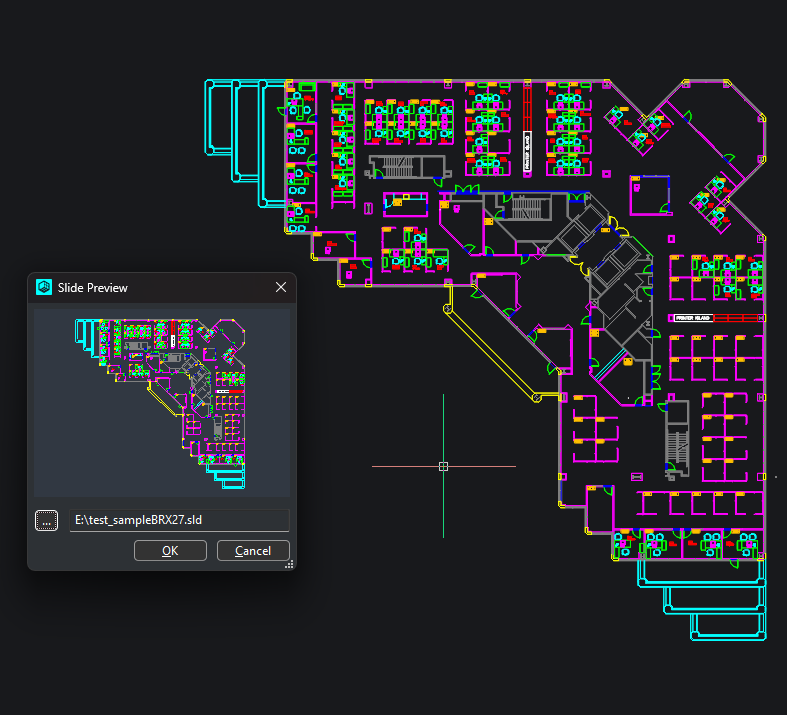
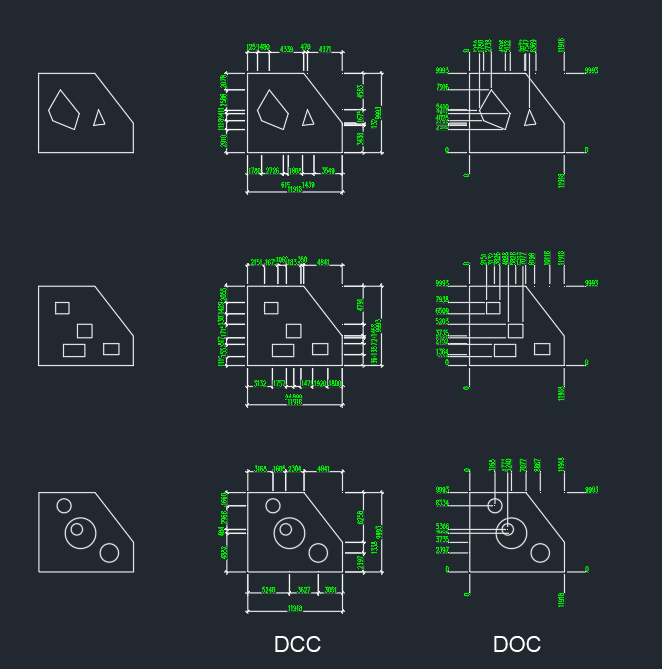
Python Slide(.SLD) to wxImage In the next release (3.1.16), I added a function, image: wx.Image = Gs.Core.slideToWxImage(test_slide_path, width, height, [R, G, B]) for people that are used to using slides in their dialogs.
3 points
-
Yes, I already mentioned that. Easy enough to place them manually, but replacing the dimrad/dimdia marks are not as easy as I was hoping, or I am going about it wrong. I set the Layer I create Centermark to Bylayer and the CENTERMARK layer on that with CENTERLTYPE to ByLayer and that issue is fixed. CENTERLTYPEFILE, I think I have a way to detect Metric and change that to acadiso.lin, so that's solved. I have to get it to find the object, since CENTERMARK works by getting the Circle or Arc object. I am thinking about just turning off the Dimrad/Dimdia Mark/Line and placing a CENTERMARK on all circles and arcs in current space or entire drawing, though that would have concentric objects with more than one, so I have to still sort for the largest for correct size. I have the original using lines working better and properly sizing automatically now, but still tweaking, I am leaving the crosshair lines option for older AutoCAD and CAD's that don't have CENTERMARK option.3 points
-
1. too many lisp to remember what each one dose. 2. how to bring all of those lisp's up to a new computer. I have 189 lisps at the moment. well, 1. I have a simple excel table of all my lisps, the file name, the command and what they do. every time I add a lisp I add it to the file to keep track and to know what they do if I didn't add description in lisp file at the top as a remark. 2. to load them I don't use appload for each one. I use lisp file with autoload line for each lisp and use appload only for that file,one line only in the appload command. 3. upgrade to a new computer/laptop? copy all the lisp files to the new computer including the autoload lisp, run appload to load that startup lisp, check the "AUTOLOAD" check box and you are done, again - one lisp to load all the others. and if you had dependencies between lisp on the old machine they should work on the new one as well. one side note: for me, When I see a compiled file here on the forum I tend to stay away from it. This forum is built on open source, and compiled code here, at least for me, is some what of a bad taste...3 points
-
@dber From your post, I understood that you want to number construction detail notes from an existing MTEXT object. I put together two versions so you can try both and choose whichever suits your workflow: - Loose geometry: separate hexagon outlines, solid fills and text numbers. - Block with attribute: each marker is a block with an editable number attribute. Both versions read manual paragraph breaks in the MTEXT. Wrapped lines remain part of the same numbered paragraph, and empty paragraphs are skipped. Each hexagon is sized proportionally to the text and centered vertically beside its paragraph. Commands: - HENL / HENB: add markers beside the existing MTEXT without moving or splitting it. - HENLC / HENBC: create separate numbered paragraphs at a location you pick, with the option to keep or delete the original. You can load both files together—their commands are different. These versions are intended for single-column, non-annotative MTEXT without fields. Give them a try and let me know how they work for your example. Code below. ;;; HEXENUM 1.2 - Loose geometry | AutoCAD Windows / Visual LISP ;;; HENL / HEXENUML: number the existing MTEXT in place. ;;; HENLC / HEXENUMLC: create separate paragraphs at a picked location. ;;; Hexagon side = 1.8 x nominal text height; SOLID fill = ACI 255. ;;; Both editions can be loaded together; command and helper names are isolated. (vl-load-com) (defun R0:HENL-Fail (msg) (setq henl-msg msg) (exit)) (defun R0:HENL-Prefix (frames / result frame) (setq result "") (foreach frame (reverse frames) (setq result (strcat result "{" frame))) result) (defun R0:HENL-Close (frames / result) (setq result "") (repeat (length frames) (setq result (strcat result "}"))) result) (defun R0:HENL-Records (s / i n ch next token frames part visible result j brk start) (setq i 1 n (strlen s) frames (list "") part "{" visible nil) (while (<= i n) (setq start i ch (substr s i 1) next (substr s (1+ i) 1) brk nil) (cond ((or (= ch (chr 10)) (= ch (chr 13))) (setq brk T) (if (and (= ch (chr 13)) (= next (chr 10))) (setq i (1+ i))) (setq i (1+ i))) ((= ch "\\") (cond ((= next "P") (setq brk T i (+ i 2))) ((= next "N") (R0:HENL-Fail "Column breaks found. Set the MTEXT to a single column.")) ((member next '("\\" "{" "}" "~")) (setq part (strcat part (substr s i 2)) i (+ i 2)) (if (/= next "~") (setq visible T))) ((member next '("A" "C" "c" "F" "f" "H" "Q" "T" "W" "p" "S")) (setq j (+ i 2)) (while (and (<= j n) (/= (substr s j 1) ";")) (setq j (1+ j))) (if (> j n) (R0:HENL-Fail "Incomplete MTEXT formatting code.")) (setq token (substr s i (1+ (- j i))) part (strcat part token) i (1+ j)) (if (= next "S") (setq visible T) (setq frames (cons (strcat (car frames) token) (cdr frames))))) ((member next '("L" "l" "O" "o" "K" "k")) (setq token (substr s i 2) part (strcat part token) i (+ i 2) frames (cons (strcat (car frames) token) (cdr frames)))) ((and (= next "U") (= (substr s (+ i 2) 1) "+")) (setq part (strcat part (substr s i 7)) i (+ i 7) visible T)) (T (setq part (strcat part ch) i (1+ i) visible T)))) ((= ch "{") (setq frames (cons "" frames) part (strcat part ch) i (1+ i))) ((= ch "}") (if (null (cdr frames)) (R0:HENL-Fail "Unbalanced formatting braces.")) (setq frames (cdr frames) part (strcat part ch) i (1+ i))) (T (setq part (strcat part ch) i (1+ i)) (if (not (member ch (list " " (chr 9)))) (setq visible T)))) (if brk (progn (if visible (setq result (cons (list (strcat part (R0:HENL-Close frames)) (1- start) (R0:HENL-Close frames)) result))) (setq part (R0:HENL-Prefix frames) visible nil)))) (if (/= (length frames) 1) (R0:HENL-Fail "Unbalanced formatting braces.")) (if visible (setq result (cons (list (strcat part (R0:HENL-Close frames)) n (R0:HENL-Close frames)) result))) (reverse result)) (defun R0:HENL-Split (s) (mapcar 'car (R0:HENL-Records s))) (defun R0:HENL-Normalize (s) (while (vl-string-search (strcat (chr 13) (chr 10)) s) (setq s (vl-string-subst "\\P" (strcat (chr 13) (chr 10)) s))) (while (vl-string-search (chr 13) s) (setq s (vl-string-subst "\\P" (chr 13) s))) (while (vl-string-search (chr 10) s) (setq s (vl-string-subst "\\P" (chr 10) s))) s) (defun R0:HENL-Register (obj) (setq henl-created (cons obj henl-created)) obj) (defun R0:HENL-Box (obj / lo hi) (vla-Update obj) (vla-GetBoundingBox obj 'lo 'hi) (list (vlax-safearray->list lo) (vlax-safearray->list hi))) (defun R0:HENL-Props (obj src) (vla-put-Layer obj (vla-get-Layer src)) (vla-put-TrueColor obj (vla-get-TrueColor src)) obj) (defun R0:HENL-Text (space src content width h at attach / obj) (setq obj (R0:HENL-Register (vla-AddMText space (vlax-3d-point at) width content))) (R0:HENL-Props obj src) (vla-put-StyleName obj (vla-get-StyleName src)) (vla-put-Height obj h) (vla-put-Rotation obj 0.0) (vla-put-AttachmentPoint obj attach) (vla-put-InsertionPoint obj (vlax-3d-point at)) (vla-put-LineSpacingStyle obj (vla-get-LineSpacingStyle src)) (vla-put-LineSpacingFactor obj (vla-get-LineSpacingFactor src)) obj) (defun R0:HENL-Hex (space src center side / coords k a arr obj) (setq k 5) (repeat 6 (setq a (* pi (/ k 3.0)) coords (cons (+ (car center) (* side (cos a))) (cons (+ (cadr center) (* side (sin a))) coords)) k (1- k))) (setq arr (vlax-make-safearray vlax-vbDouble '(0 . 11))) (vlax-safearray-fill arr coords) (setq obj (R0:HENL-Register (vla-AddLightWeightPolyline space arr))) (R0:HENL-Props obj src) (vla-put-Elevation obj (caddr center)) (vla-put-Closed obj :vlax-true) (vla-put-ConstantWidth obj 0.0) (vla-put-Lineweight obj 0) obj) (defun R0:HENL-Number (space src number center h side / obj box w ht factor p q) (setq obj (R0:HENL-Text space src (itoa number) 0.0 h center 5) box (R0:HENL-Box obj) p (car box) q (cadr box) w (- (car q) (car p)) ht (- (cadr q) (cadr p)) factor (min 1.0 (/ (* side 1.45) (max w 1e-12)) (/ (* side 1.2) (max ht 1e-12)))) (if (< factor 1.0) (vla-put-Height obj (* h factor))) (setq box (R0:HENL-Box obj) p (car box) q (cadr box)) (vla-Move obj (vlax-3d-point (mapcar '(lambda (a b) (/ (+ a b) 2.0)) p q)) (vlax-3d-point center)) obj) (defun R0:HENL-Fill (space src boundary / arr obj) (setq arr (vlax-make-safearray vlax-vbObject '(0 . 0))) (vlax-safearray-put-element arr 0 boundary) (setq obj (R0:HENL-Register (vla-AddHatch space 0 "SOLID" :vlax-false 0))) (vla-AppendOuterLoop obj arr) (vla-put-Elevation obj (vla-get-Elevation boundary)) (vla-put-Layer obj (vla-get-Layer src)) (vla-put-Color obj 255) (vla-put-EntityTransparency obj "0") (vla-Evaluate obj) (setq henl-fills (cons obj henl-fills)) obj) (defun R0:HENL-FillsBack (space / dict table arr) (if henl-fills (progn (setq dict (vla-GetExtensionDictionary space) table (vl-catch-all-apply 'vla-GetObject (list dict "ACAD_SORTENTS"))) (if (vl-catch-all-error-p table) (setq table (vla-AddObject dict "ACAD_SORTENTS" "AcDbSortentsTable"))) (setq arr (vlax-make-safearray vlax-vbObject (cons 0 (1- (length henl-fills))))) (vlax-safearray-fill arr henl-fills) (vla-MoveToBottom table arr)))) (defun R0:HENL-CenterY (obj box cy / mid) (setq mid (/ (+ (cadar box) (cadadr box)) 2.0)) (vla-Move obj (vlax-3d-point '(0.0 0.0 0.0)) (vlax-3d-point (list 0.0 (- cy mid) 0.0))) obj) (defun R0:HENL-Discard (obj) (vla-Delete obj) (setq henl-created (vl-remove obj henl-created))) (defun R0:HENL-InPlace (space src content records height width point initial / probe single box top left side rec prefix total partheight cy center boundary number previous overlaps) (setq probe (R0:HENL-Text space src content width height point (vla-get-AttachmentPoint src))) (vla-put-Visible probe :vlax-false) (setq box (R0:HENL-Box probe) top (cadadr box) left (caar box) side (* 1.8 height) number initial overlaps 0) (vla-put-AttachmentPoint probe 1) (vla-put-InsertionPoint probe (vlax-3d-point point)) (setq single (R0:HENL-Text space src "M" width height point 1)) (vla-put-Visible single :vlax-false) (foreach rec records (setq prefix (strcat "{" (substr content 1 (cadr rec)) (caddr rec))) (vla-put-TextString probe prefix) (setq box (R0:HENL-Box probe) total (- (cadadr box) (cadar box))) (vla-put-TextString single (car rec)) (setq box (R0:HENL-Box single) partheight (- (cadadr box) (cadar box)) cy (+ (- top total) (/ partheight 2.0)) center (list (- left side (* 0.7 height)) cy (caddr point))) (if (and previous (< (abs (- previous cy)) (* (sqrt 3.0) side))) (setq overlaps (1+ overlaps))) (setq boundary (R0:HENL-Hex space src center side)) (R0:HENL-Fill space src boundary) (R0:HENL-Number space src number center height side) (setq previous cy number (1+ number))) (R0:HENL-Discard single) (R0:HENL-Discard probe) (if (> overlaps 0) (princ (strcat "\n[!] " (itoa overlaps) " pairs of hexagons may overlap: insufficient paragraph spacing."))) number) (defun R0:HENL-Initial (/ s n valid) (while (not valid) (setq s (getstring "\nStarting NUMBER <1>: ")) (if (= s "") (setq s "1")) (if (and (<= (strlen s) 9) (vl-every '(lambda (c) (and (>= c 48) (<= c 57))) (vl-string->list s))) (setq n (atoi s) valid T) (princ "\nEnter an integer from 0 to 999999999."))) n) (defun R0:HENL-Annotative (ename / data) (setq data (assoc -3 (entget ename '("AcadAnnotative")))) (and data (member '(1070 . 1) (cdr (cadr data))))) (defun R0:HENL-Select (/ pick en data layer done) (while (not done) (setq pick (entsel "\nHENL | Select the MTEXT to number <Exit>: ")) (cond ((null pick) (setq done T en nil)) (T (setq en (car pick) data (entget en) layer (tblsearch "LAYER" (cdr (assoc 8 data)))) (cond ((/= (cdr (assoc 0 data)) "MTEXT") (princ "\nSelect an MTEXT object, not single-line text or a block.")) ((/= 0 (logand 5 (cdr (assoc 70 layer)))) (princ "\nThe layer is locked or frozen.")) ((minusp (cdr (assoc 62 layer))) (princ "\nThe layer is turned off.")) (T (setq done T)))))) en) (defun R0:HENL-Cleanup (rollback / obj result) (if (and rollback henl-retiring henl-source (null (entget henl-source))) (if (not (entdel henl-source)) (princ "\n[!] Check whether the original MTEXT was restored."))) (if rollback (foreach obj henl-created (setq result (vl-catch-all-apply 'vla-Delete (list obj))) (if (vl-catch-all-error-p result) (princ "\n[!] Could not remove an output object; check the drawing.")))) (if henl-highlight (vl-catch-all-apply 'redraw (list henl-source 4))) (if henl-undo (vl-catch-all-apply 'vla-EndUndoMark (list henl-doc))) (foreach obj henl-vars (vl-catch-all-apply 'setvar (list (car obj) (cdr obj)))) (princ)) (defun R0:HENL-Run (relocate / *error* henl-msg henl-created henl-source henl-highlight henl-doc henl-undo henl-vars henl-retiring henl-fills src data content parts height width angle normal space initial option point side cy center para textobj box realheight obj number style rowheight bottom boundary records) (defun *error* (msg) (R0:HENL-Cleanup T) (cond (henl-msg (princ (strcat "\n[!] HENL: " henl-msg))) ((and msg (not (wcmatch (strcase msg) "*CANCEL*,*QUIT*,*BREAK*,*EXIT*"))) (princ (strcat "\n[!] HENL: " msg))) (T (princ "\nHENL canceled. Original preserved."))) (princ)) (setq henl-doc (vla-get-ActiveDocument (vlax-get-acad-object)) henl-vars (list (cons "DYNMODE" (getvar "DYNMODE")) (cons "DYNPROMPT" (getvar "DYNPROMPT")))) (setvar "DYNMODE" 3) (setvar "DYNPROMPT" 1) (if (setq henl-source (R0:HENL-Select)) (progn (setq src (vlax-ename->vla-object henl-source) data (entget henl-source) content (R0:HENL-Normalize (vla-get-TextString src)) height (vla-get-Height src) width (vla-get-Width src) angle (vla-get-Rotation src) normal (cdr (assoc 210 data)) style (tblobjname "STYLE" (vla-get-StyleName src))) (if (and normal (not (equal normal '(0.0 0.0 1.0) 1e-8))) (R0:HENL-Fail "This version requires text on a plane parallel to WCS XY.")) (if (vl-string-search "%<" content) (R0:HENL-Fail "MTEXT fields are not supported; the original has been preserved.")) (if (and (assoc 75 data) (/= 0 (cdr (assoc 75 data)))) (R0:HENL-Fail "Disable MTEXT columns before numbering.")) (if (or (= (cdr (assoc 72 data)) 3) (/= 0 (logand 4 (cdr (assoc 70 (tblsearch "STYLE" (vla-get-StyleName src))))))) (R0:HENL-Fail "Vertical text is not supported in this version.")) (if (or (R0:HENL-Annotative henl-source) (and style (R0:HENL-Annotative style))) (R0:HENL-Fail "Use non-annotative MTEXT and a non-annotative text style.")) (if (<= height 0.0) (R0:HENL-Fail "Invalid text height.")) (setq records (R0:HENL-Records content) parts (mapcar 'car records)) (if (null parts) (R0:HENL-Fail "No non-empty paragraphs found.")) (if (> (length parts) 10000) (R0:HENL-Fail "The limit is 10000 paragraphs per run.")) (redraw henl-source 3) (setq henl-highlight T) (princ (strcat "\n" (itoa (length parts)) " paragraphs | Hexagon side length: " (rtos (* 1.8 height) 2 4))) (setq initial (R0:HENL-Initial)) (if relocate (progn (initget "Keep Delete") (setq option (getkword "\nORIGINAL [Keep/Delete] <Keep>: ")) (initget 1) (setq point (trans (getpoint (strcat "\nCenter of the FIRST hexagon (" (itoa initial) "): ")) 1 0))) (setq option "Keep" point (vlax-safearray->list (vlax-variant-value (vla-get-InsertionPoint src))))) (setq space (vlax-ename->vla-object (cdr (assoc 330 (reverse data))))) (if (and (= 1 (logand 1 (getvar "UNDOCTL"))) (= 0 (logand 8 (getvar "UNDOCTL")))) (progn (vla-StartUndoMark henl-doc) (setq henl-undo T))) (setq side (* 1.8 height) cy (cadr point) number initial) (if relocate (progn (foreach para parts (setq textobj (R0:HENL-Text space src para width height (list (+ (car point) side (* 0.7 height)) cy (caddr point)) 1) box (R0:HENL-Box textobj) realheight (- (cadadr box) (cadar box)) rowheight (max realheight (* (sqrt 3.0) side))) (if bottom (setq cy (- bottom (* 0.8 height) (/ rowheight 2.0)))) (R0:HENL-CenterY textobj box cy) (setq center (list (car point) cy (caddr point)) boundary (R0:HENL-Hex space src center side)) (R0:HENL-Fill space src boundary) (R0:HENL-Number space src number center height side) (setq bottom (- cy (/ rowheight 2.0)) number (1+ number)))) (setq number (R0:HENL-InPlace space src content records height width point initial))) (foreach obj henl-created (if (not (equal angle 0.0 1e-12)) (vla-Rotate obj (vlax-3d-point point) angle)) (vla-Update obj) (if (not (entget (vlax-vla-object->ename obj))) (R0:HENL-Fail "Could not verify the output."))) (if (/= (length henl-created) (* (if relocate 4 3) (length parts))) (R0:HENL-Fail "The output is incomplete.")) (R0:HENL-FillsBack space) (vla-Regen henl-doc 0) (redraw henl-source 4) (setq henl-highlight nil) (if (= option "Delete") (progn (setq henl-retiring T) (if (not (entdel henl-source)) (R0:HENL-Fail "Could not delete the original.")))) (setq henl-created nil henl-retiring nil) (R0:HENL-Cleanup nil) (princ (strcat "\n[OK] " (itoa (length parts)) " paragraphs | Numbers " (itoa initial) " to " (itoa (1- number)) " | " (if relocate (strcat "Original " (if (= option "Delete") "deleted." "preserved.")) "Original MTEXT unchanged.")))) (R0:HENL-Cleanup nil)) (princ)) (defun c:HEXENUML () (R0:HENL-Run nil)) (defun c:HENL () (R0:HENL-Run nil)) (defun c:HEXENUMLC () (R0:HENL-Run T)) (defun c:HENLC () (R0:HENL-Run T)) (princ "\nHEXENUM 1.2 (loose geometry) | HENL: number in place | HENLC: create at another point.") (princ) ;;; HEXENUM 1.3 - Block with NUM attribute | AutoCAD Windows / Visual LISP ;;; HENB / HEXENUMB: number the existing MTEXT in place. ;;; HENBC / HEXENUMBC: create separate paragraphs at a picked location. ;;; Hexagon side = 1.8 x nominal text height; SOLID fill = ACI 255. ;;; Both editions can be loaded together; command and helper names are isolated. (vl-load-com) (defun R0:HENB-Fail (msg) (setq henb-msg msg) (exit)) (defun R0:HENB-Prefix (frames / result frame) (setq result "") (foreach frame (reverse frames) (setq result (strcat result "{" frame))) result) (defun R0:HENB-Close (frames / result) (setq result "") (repeat (length frames) (setq result (strcat result "}"))) result) (defun R0:HENB-Records (s / i n ch next token frames part visible result j brk start) (setq i 1 n (strlen s) frames (list "") part "{" visible nil) (while (<= i n) (setq start i ch (substr s i 1) next (substr s (1+ i) 1) brk nil) (cond ((or (= ch (chr 10)) (= ch (chr 13))) (setq brk T) (if (and (= ch (chr 13)) (= next (chr 10))) (setq i (1+ i))) (setq i (1+ i))) ((= ch "\\") (cond ((= next "P") (setq brk T i (+ i 2))) ((= next "N") (R0:HENB-Fail "Column breaks found. Set the MTEXT to a single column.")) ((member next '("\\" "{" "}" "~")) (setq part (strcat part (substr s i 2)) i (+ i 2)) (if (/= next "~") (setq visible T))) ((member next '("A" "C" "c" "F" "f" "H" "Q" "T" "W" "p" "S")) (setq j (+ i 2)) (while (and (<= j n) (/= (substr s j 1) ";")) (setq j (1+ j))) (if (> j n) (R0:HENB-Fail "Incomplete MTEXT formatting code.")) (setq token (substr s i (1+ (- j i))) part (strcat part token) i (1+ j)) (if (= next "S") (setq visible T) (setq frames (cons (strcat (car frames) token) (cdr frames))))) ((member next '("L" "l" "O" "o" "K" "k")) (setq token (substr s i 2) part (strcat part token) i (+ i 2) frames (cons (strcat (car frames) token) (cdr frames)))) ((and (= next "U") (= (substr s (+ i 2) 1) "+")) (setq part (strcat part (substr s i 7)) i (+ i 7) visible T)) (T (setq part (strcat part ch) i (1+ i) visible T)))) ((= ch "{") (setq frames (cons "" frames) part (strcat part ch) i (1+ i))) ((= ch "}") (if (null (cdr frames)) (R0:HENB-Fail "Unbalanced formatting braces.")) (setq frames (cdr frames) part (strcat part ch) i (1+ i))) (T (setq part (strcat part ch) i (1+ i)) (if (not (member ch (list " " (chr 9)))) (setq visible T)))) (if brk (progn (if visible (setq result (cons (list (strcat part (R0:HENB-Close frames)) (1- start) (R0:HENB-Close frames)) result))) (setq part (R0:HENB-Prefix frames) visible nil)))) (if (/= (length frames) 1) (R0:HENB-Fail "Unbalanced formatting braces.")) (if visible (setq result (cons (list (strcat part (R0:HENB-Close frames)) n (R0:HENB-Close frames)) result))) (reverse result)) (defun R0:HENB-Split (s) (mapcar 'car (R0:HENB-Records s))) (defun R0:HENB-Normalize (s) (while (vl-string-search (strcat (chr 13) (chr 10)) s) (setq s (vl-string-subst "\\P" (strcat (chr 13) (chr 10)) s))) (while (vl-string-search (chr 13) s) (setq s (vl-string-subst "\\P" (chr 13) s))) (while (vl-string-search (chr 10) s) (setq s (vl-string-subst "\\P" (chr 10) s))) s) (defun R0:HENB-Register (obj) (setq henb-created (cons obj henb-created)) obj) (defun R0:HENB-Box (obj / lo hi) (vla-Update obj) (vla-GetBoundingBox obj 'lo 'hi) (list (vlax-safearray->list lo) (vlax-safearray->list hi))) (defun R0:HENB-Props (obj src) (vla-put-Layer obj (vla-get-Layer src)) (vla-put-TrueColor obj (vla-get-TrueColor src)) obj) (defun R0:HENB-Text (space src content width h at attach / obj) (setq obj (R0:HENB-Register (vla-AddMText space (vlax-3d-point at) width content))) (R0:HENB-Props obj src) (vla-put-StyleName obj (vla-get-StyleName src)) (vla-put-Height obj h) (vla-put-Rotation obj 0.0) (vla-put-AttachmentPoint obj attach) (vla-put-InsertionPoint obj (vlax-3d-point at)) (vla-put-LineSpacingStyle obj (vla-get-LineSpacingStyle src)) (vla-put-LineSpacingFactor obj (vla-get-LineSpacingFactor src)) obj) (defun R0:HENB-BlockDef (doc nom / blks blk coords k a arr pl hat lazo att) (if (not (vl-catch-all-error-p (vl-catch-all-apply 'vla-Item (list (vla-get-Blocks doc) nom)))) T (progn (setq blks (vla-get-Blocks doc) blk (vla-Add blks (vlax-3d-point '(0.0 0.0 0.0)) nom) k 5 coords nil) (repeat 6 (setq a (* pi (/ k 3.0)) coords (cons (cos a) (cons (sin a) coords)) k (1- k))) (setq arr (vlax-make-safearray vlax-vbDouble '(0 . 11))) (vlax-safearray-fill arr coords) (setq pl (vla-AddLightWeightPolyline blk arr)) (vla-put-Closed pl :vlax-true) (setq hat (vla-AddHatch blk 0 "SOLID" :vlax-false 0) lazo (vlax-make-safearray vlax-vbObject '(0 . 0))) (vlax-safearray-put-element lazo 0 pl) (vla-AppendOuterLoop hat lazo) (vla-put-Layer hat "0") (vla-put-Color hat 255) (vla-Evaluate hat) (vla-Delete pl) (setq pl (vla-AddLightWeightPolyline blk arr)) (vla-put-Closed pl :vlax-true) (vla-put-Layer pl "0") (vla-put-ConstantWidth pl 0.0) (setq att (vla-AddAttribute blk (/ 1.0 1.8) 0 "Number" (vlax-3d-point '(0.0 0.0 0.0)) "NUM" "1")) (vla-put-Layer att "0") (vla-put-Alignment att 10) (vla-put-TextAlignmentPoint att (vlax-3d-point '(0.0 0.0 0.0))) (not (vl-catch-all-error-p (vl-catch-all-apply 'vla-Item (list blks nom))))))) (defun R0:HENB-Marker (space src center side number / obj atts a box p q w ht factor) (setq obj (R0:HENB-Register (vla-InsertBlock space (vlax-3d-point center) "IR_HEX" side side side 0.0))) (vla-put-Layer obj (vla-get-Layer src)) (vla-put-TrueColor obj (vla-get-TrueColor src)) (setq atts (vl-catch-all-apply 'vla-GetAttributes (list obj))) (if (vl-catch-all-error-p atts) (R0:HENB-Fail "Could not read the marker attributes.") (foreach a (vlax-safearray->list (vlax-variant-value atts)) (vla-put-TextString a (itoa number)) (setq box (R0:HENB-Box a) p (car box) q (cadr box) w (- (car q) (car p)) ht (- (cadr q) (cadr p)) factor (min 1.0 (/ (* side 1.45) (max w 1e-12)) (/ (* side 1.2) (max ht 1e-12)))) (if (< factor 1.0) (vla-put-Height a (* (vla-get-Height a) factor))) (if (/= (itoa number) (vla-get-TextString a)) (R0:HENB-Fail (strcat "Marker " (itoa number) " has no number."))))) obj) (defun R0:HENB-CenterY (obj box cy / mid) (setq mid (/ (+ (cadar box) (cadadr box)) 2.0)) (vla-Move obj (vlax-3d-point '(0.0 0.0 0.0)) (vlax-3d-point (list 0.0 (- cy mid) 0.0))) obj) (defun R0:HENB-Discard (obj) (vla-Delete obj) (setq henb-created (vl-remove obj henb-created))) (defun R0:HENB-InPlace (space src content records height width point initial / probe single box top left side rec prefix total partheight cy center number previous overlaps) (setq probe (R0:HENB-Text space src content width height point (vla-get-AttachmentPoint src))) (vla-put-Visible probe :vlax-false) (setq box (R0:HENB-Box probe) top (cadadr box) left (caar box) side (* 1.8 height) number initial overlaps 0) (vla-put-AttachmentPoint probe 1) (vla-put-InsertionPoint probe (vlax-3d-point point)) (setq single (R0:HENB-Text space src "M" width height point 1)) (vla-put-Visible single :vlax-false) (foreach rec records (setq prefix (strcat "{" (substr content 1 (cadr rec)) (caddr rec))) (vla-put-TextString probe prefix) (setq box (R0:HENB-Box probe) total (- (cadadr box) (cadar box))) (vla-put-TextString single (car rec)) (setq box (R0:HENB-Box single) partheight (- (cadadr box) (cadar box)) cy (+ (- top total) (/ partheight 2.0)) center (list (- left side (* 0.7 height)) cy (caddr point))) (if (and previous (< (abs (- previous cy)) (* (sqrt 3.0) side))) (setq overlaps (1+ overlaps))) (R0:HENB-Marker space src center side number) (setq previous cy number (1+ number))) (R0:HENB-Discard single) (R0:HENB-Discard probe) (if (> overlaps 0) (princ (strcat "\n[!] " (itoa overlaps) " pairs of hexagons may overlap: insufficient paragraph spacing."))) number) (defun R0:HENB-Initial (/ s n valid) (while (not valid) (setq s (getstring "\nStarting NUMBER <1>: ")) (if (= s "") (setq s "1")) (if (and (<= (strlen s) 9) (vl-every '(lambda (c) (and (>= c 48) (<= c 57))) (vl-string->list s))) (setq n (atoi s) valid T) (princ "\nEnter an integer from 0 to 999999999."))) n) (defun R0:HENB-Annotative (ename / data) (setq data (assoc -3 (entget ename '("AcadAnnotative")))) (and data (member '(1070 . 1) (cdr (cadr data))))) (defun R0:HENB-Select (/ pick en data layer done) (while (not done) (setq pick (entsel "\nHENB | Select the MTEXT to number <Exit>: ")) (cond ((null pick) (setq done T en nil)) (T (setq en (car pick) data (entget en) layer (tblsearch "LAYER" (cdr (assoc 8 data)))) (cond ((/= (cdr (assoc 0 data)) "MTEXT") (princ "\nSelect an MTEXT object, not single-line text or a block.")) ((/= 0 (logand 5 (cdr (assoc 70 layer)))) (princ "\nThe layer is locked or frozen.")) ((minusp (cdr (assoc 62 layer))) (princ "\nThe layer is turned off.")) (T (setq done T)))))) en) (defun R0:HENB-Cleanup (rollback / obj result) (if (and rollback henb-retiring henb-source (null (entget henb-source))) (if (not (entdel henb-source)) (princ "\n[!] Check whether the original MTEXT was restored."))) (if rollback (foreach obj henb-created (setq result (vl-catch-all-apply 'vla-Delete (list obj))) (if (vl-catch-all-error-p result) (princ "\n[!] Could not remove an output object; check the drawing.")))) (if henb-highlight (vl-catch-all-apply 'redraw (list henb-source 4))) (if henb-undo (vl-catch-all-apply 'vla-EndUndoMark (list henb-doc))) (foreach obj henb-vars (vl-catch-all-apply 'setvar (list (car obj) (cdr obj)))) (princ)) (defun R0:HENB-Run (relocate / *error* henb-msg henb-created henb-source henb-highlight henb-doc henb-undo henb-vars henb-retiring src data content parts height width angRot normal space initial option point side cy center para textobj box realheight obj number style rowheight bottom records) (defun *error* (msg) (R0:HENB-Cleanup T) (cond (henb-msg (princ (strcat "\n[!] HENB: " henb-msg))) ((and msg (not (wcmatch (strcase msg) "*CANCEL*,*QUIT*,*BREAK*,*EXIT*"))) (princ (strcat "\n[!] HENB: " msg))) (T (princ "\nHENB canceled. Original preserved."))) (princ)) (setq henb-doc (vla-get-ActiveDocument (vlax-get-acad-object)) henb-vars (list (cons "DYNMODE" (getvar "DYNMODE")) (cons "DYNPROMPT" (getvar "DYNPROMPT")))) (setvar "DYNMODE" 3) (setvar "DYNPROMPT" 1) (if (setq henb-source (R0:HENB-Select)) (progn (setq src (vlax-ename->vla-object henb-source) data (entget henb-source) content (R0:HENB-Normalize (vla-get-TextString src)) height (vla-get-Height src) width (vla-get-Width src) angRot (vla-get-Rotation src) normal (cdr (assoc 210 data)) style (tblobjname "STYLE" (vla-get-StyleName src))) (if (and normal (not (equal normal '(0.0 0.0 1.0) 1e-8))) (R0:HENB-Fail "This version requires text on a plane parallel to WCS XY.")) (if (vl-string-search "%<" content) (R0:HENB-Fail "MTEXT fields are not supported; the original has been preserved.")) (if (and (assoc 75 data) (/= 0 (cdr (assoc 75 data)))) (R0:HENB-Fail "Disable MTEXT columns before numbering.")) (if (or (= (cdr (assoc 72 data)) 3) (/= 0 (logand 4 (cdr (assoc 70 (tblsearch "STYLE" (vla-get-StyleName src))))))) (R0:HENB-Fail "Vertical text is not supported in this version.")) (if (or (R0:HENB-Annotative henb-source) (and style (R0:HENB-Annotative style))) (R0:HENB-Fail "Use non-annotative MTEXT and a non-annotative text style.")) (if (<= height 0.0) (R0:HENB-Fail "Invalid text height.")) (setq records (R0:HENB-Records content) parts (mapcar 'car records)) (if (null parts) (R0:HENB-Fail "No non-empty paragraphs found.")) (if (> (length parts) 10000) (R0:HENB-Fail "The limit is 10000 paragraphs per run.")) (redraw henb-source 3) (setq henb-highlight T) (princ (strcat "\n" (itoa (length parts)) " paragraphs | Hexagon side length: " (rtos (* 1.8 height) 2 4))) (setq initial (R0:HENB-Initial)) (if relocate (progn (initget "Keep Delete") (setq option (getkword "\nORIGINAL [Keep/Delete] <Keep>: ")) (initget 1) (setq point (trans (getpoint (strcat "\nCenter of the FIRST hexagon (" (itoa initial) "): ")) 1 0))) (setq option "Keep" point (vlax-safearray->list (vlax-variant-value (vla-get-InsertionPoint src))))) (setq space (vlax-ename->vla-object (cdr (assoc 330 (reverse data))))) (if (and (= 1 (logand 1 (getvar "UNDOCTL"))) (= 0 (logand 8 (getvar "UNDOCTL")))) (progn (vla-StartUndoMark henb-doc) (setq henb-undo T))) (if (not (R0:HENB-BlockDef henb-doc "IR_HEX")) (R0:HENB-Fail "Could not create the IR_HEX block.")) (setq side (* 1.8 height) cy (cadr point) number initial) (if relocate (progn (foreach para parts (setq textobj (R0:HENB-Text space src para width height (list (+ (car point) side (* 0.7 height)) cy (caddr point)) 1) box (R0:HENB-Box textobj) realheight (- (cadadr box) (cadar box)) rowheight (max realheight (* (sqrt 3.0) side))) (if bottom (setq cy (- bottom (* 0.8 height) (/ rowheight 2.0)))) (R0:HENB-CenterY textobj box cy) (setq center (list (car point) cy (caddr point))) (R0:HENB-Marker space src center side number) (setq bottom (- cy (/ rowheight 2.0)) number (1+ number)))) (setq number (R0:HENB-InPlace space src content records height width point initial))) (foreach obj henb-created (if (not (equal angRot 0.0 1e-12)) (vla-Rotate obj (vlax-3d-point point) angRot)) (vla-Update obj) (if (not (entget (vlax-vla-object->ename obj))) (R0:HENB-Fail "Could not verify the output."))) (if (/= (length henb-created) (* (if relocate 2 1) (length parts))) (R0:HENB-Fail "The output is incomplete.")) (vla-Regen henb-doc 0) (redraw henb-source 4) (setq henb-highlight nil) (if (= option "Delete") (progn (setq henb-retiring T) (if (not (entdel henb-source)) (R0:HENB-Fail "Could not delete the original.")))) (setq henb-created nil henb-retiring nil) (R0:HENB-Cleanup nil) (princ (strcat "\n[OK] " (itoa (length parts)) " paragraphs | Numbers " (itoa initial) " to " (itoa (1- number)) " | " (if relocate (strcat "Original " (if (= option "Delete") "deleted." "preserved.")) "Original MTEXT unchanged.")))) (R0:HENB-Cleanup nil)) (princ)) (defun c:HEXENUMB () (R0:HENB-Run nil)) (defun c:HENB () (R0:HENB-Run nil)) (defun c:HEXENUMBC () (R0:HENB-Run T)) (defun c:HENBC () (R0:HENB-Run T)) (princ "\nHEXENUM 1.3 (block + attribute) | HENB: number in place | HENBC: create at another point.") (princ)3 points
-
I use this in visual studio to toggle between header and source. also since I'm a southpaw, I use home and end for copy paste autohotkey is the GOAT! #z::Run www.autohotkey.com ;ALT + XX ; home::send ^c ; end::send ^v ; #IfWinActive ahk_exe devenv.exe ;PgUp::SendRaw `,DS.ARGS() ;misc command ;PgDn::SendRaw `,DS.ARGS({"val:type"}) ;misc command Insert::send ^k^o ;toggle header/source Delete::send ^a^k^f{Esc} ;select all and format #IfWinActive3 points
-
Hello everyone! Today, I’d like to share with you an AutoLISP routine for STEEL PLATE FABRICATION. Download: https://drive.google.com/drive/folders/1aJmLA-P5mX8ykPFYp5ShD5DTIBxQkDKm?usp=sharing
2 points
-
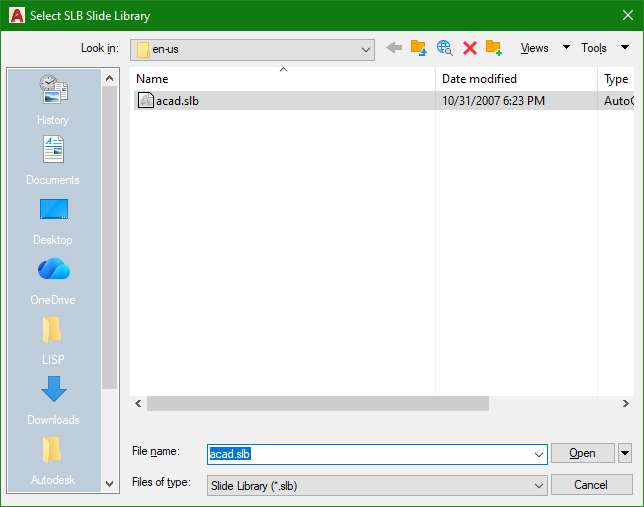
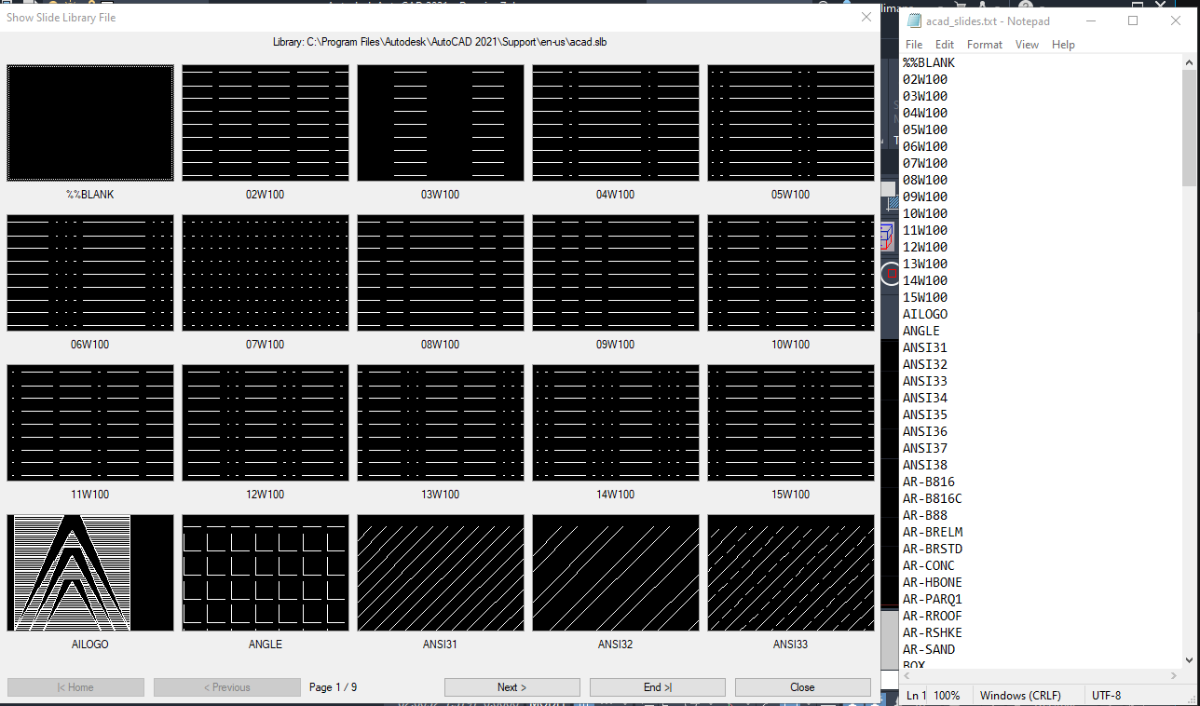
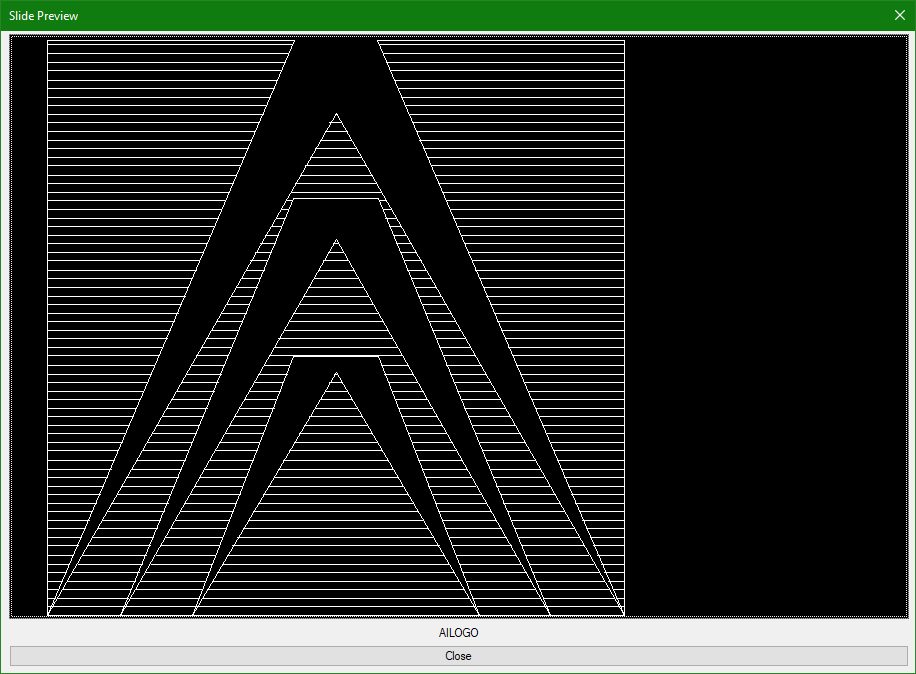
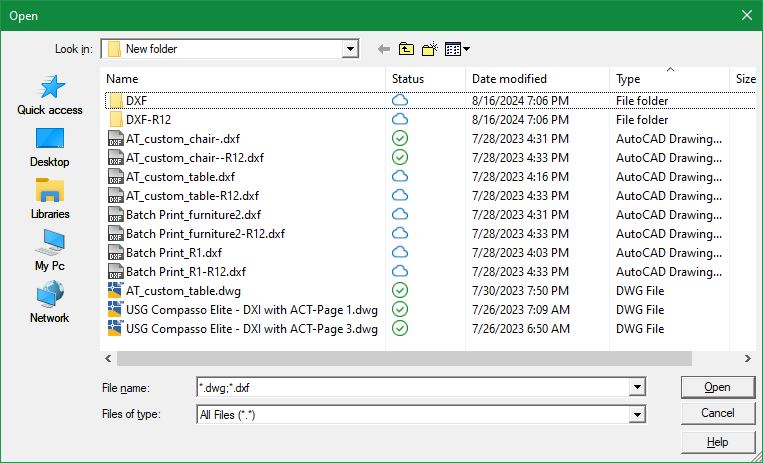
Attached is code SlbShow.lsp that ChatGpt help me generate which would run on AutoCAD on Windows OS. It'll first open a file window to select an existing slide library file like acad.slb Then run a vbscript to extract the names of the slides inside the selected slide library and place this into a text file. Next, the slides inside the selected slide library will be displayed in a custom dcl made up of a row of 4 x 5 column image buttons. Finally, when an Image button is clicked another window appears showing the slide in a larger image button view. I would like to know when vbscript or wscript is restricted does the code handle this and exit properly. Any other feedback is welcome. SlbShow.lsp
2 points
-
Just putting this up here as something I wanted for a while and had 10 minutes to think last night. I'd been wanting a routine "Select an entity or enter a value". Been doing it with initget which gives discrete values and not every possibility. So made up the following. All good so far, haven't found out where it is broken yet. Just to get your brains working then, trying to figure out how to change the mouse pointer as it hovers over an entity and not select it? Using grread and it's options you either get mouse pointer change and it selects automatically or no mouse pointer change and select with a mouse click as far as I can see. Any ideas? Thanks (defun c:EntOrValue ( / msg MyResult) (setq msg "\nSelect an Entity or enter a value: \n") (setq MyResult (EntorValue msg) ) ; end defun ;;;;;;;;;;;;;;;;;;;;;;;;;;;;;;;;;;;;;;;;;;;;;;;;;;;;;;;;;;;;;;;;; (defun EntorValue ( MSG / EndLoop sel MyEnt MyValue enta entb pt) (setq MyValue "") (setq MyEnt (list)) (setq EndLoop "No") (princ MSG) (while (= EndLoop "No") ; start loop (setq sel (nth 1 (grread nil 0 2))) ; read keyboard / mouse inputs. Ignore mouse position, only if clicked (if (= (type sel) 'LIST) (progn ; if sel is a LIST,... ie. a mouse click, a point returned (setq MyEnt (nentselp sel)) ; select entity from point (if (= nil MyEnt) (Princ "\nMissed! Try again. Select text or enter a value: ") ; entity not selected (setq EndLoop "Yes") ; entity selected, end while loop ) ; end if ) ; end progn (progn ; if sel is not a LIST, i.e. a single keyboard entry (if (or (and (> sel 47)(< sel 57))(= sel 46)) ; numbers only (progn (princ (chr sel)) (setq MyValue (strcat MyValue (chr sel) )) ) ) (if (= sel 45) ; -ve ; make negative number (progn (setq MyValue (strcat (chr sel) MyValue )) (princ " Making -ve\n")(princ MyValue) ) ; end progn ) ; end if (if (= sel 13) ; enter - end number input, end loop (progn (setq EndLoop "Yes") ) ; end progn ) ; end if ) ; end progn ) ; end if list ) ; end while (if ( = (length MyEnt) 0) ; if entity not selected (progn MyValue ; return number entered ) ; end progn (progn ;;GetEnt code (setq enta (car MyEnt)) (setq pt (cdr (assoc 10 (entget enta))) ) ;;fix for nenset or entsel requirements (setq entb (last (last (nentselp pt)))) ;; use sel? (if (and (/= entb nil) (/= (type entb) 'real) ) (progn (if (wcmatch (cdr (assoc 0 (entget entb))) "ACAD_TABLE,*DIMENSION,*LEADER")(setq enta entb)) ) ) (setq MyEnt enta) MyEnt ; return entity name, including nested say text from dimensions ) ; end progn ) ; end if )2 points
-
I think that the will to simplify the proccess of controling our environment (Ribbons,Menues,Varaibles,Lisps Etc.) can leed to more complications... and I also feel it loose it's original goal wich is to control our cad environment. It started with how to manage our lisp's, CUI (ribbon and menues) and varaibles setting and ended up with cloud-based app that (in my eyes...) only add complictions and I didn't fully understand its goal... to control the lisps - one autoload lisp file do it, and for organizations it can sit in a shared location. simple documantation file like excel or other formats can use to tell users what each lisp dose . organazations have system administrators for that. about settings: Bricscad have On_Doc_Load & on_start files, Autocad have its equivalents, and that is where varaibles can be set automatically. about the Ribbon and menues: CUI files can be deployed and loaded. there are other ways to progrematically do it like mentioned here through the registry and more, but I feel that some significant overshoot was displayed here. and do it through the cloud also raise some doubts for me.2 points
-
FYI, I used to run the LIST command quite a bit to give me information about the object(s) in question. But with the introduction of the Properties command in AutoCAD 2000, I slowly got used to leaving the Properties window opened/docked in the drawing area. Then as an object is selected, it's "properties" would automatically be filled out for me to inspect inside the Properties window. There's no need to run an extra command sequence like the LIST command which then would have to display the information on on a separate Text screen. In addition, the Properties window makes it possible for you to enter new values into those property items that can be modified.2 points
-
@SLW210 Note - There are several system variables (saved in the drawing) you can change to make the CENTERMARK command behave the way you want: CENTERLAYER = Default Layer CENTERLTYPE = Default LT (can be set to CONTINUOUS) CENTERLTSCALE = Centermark LT Scale CENTERLTYPEFILE = Center LT File used (like acad.lin) CENTERMARKEXE = Centermark Extensions ON/OFF CENTERCROSSGAP = Centermark Cross Gap value (can be relative or hard number) CENTERCROSSSIZE = Centermark Cross Size (can be relative or hard number) CENTEREXE = Centermark Extension Distance2 points
-
When I run into a situation like this, the complexity or the effort can become too much, especially if there's a deadline. In that case I'll draw a polyline along the border and use that as the boundary for the hatch. Of course the polyline goes on a nonplotting layer.2 points
-
Def going to use some coding from this. Thought id share a few different options that i came up with over the years. check error message agaist a list (if (not (member msg '("Console Break" "Function cancelled" "quit / exit abort"))) (princ (strcat "\nError: " msg)) ) using cond inside setq for default option. (initget "Select Current All") (setq mode (cond ((getkword "\nMode [<Select>/Current/All]: ")) ("Select") ) )2 points
-
Have you tried: https://www.lee-mac.com/associativecenterlines.html ?2 points
-
This looks amazing! Thank you so much! I did notice a couple random multi-line blocks were placed on the 1st line, but other than that this is amazing!
2 points
-
Made the notes in Word with a hexagon font. The indents are Character plus a period, that is why second hexagon appears, looking at setting Word style not "A." but "A" only. Can do numbers as well. Copied to Bricscad but the font is not supported in Bricscad to old a font, yes found that out. removed period from bullet style. If you open your notes in word should be able to reset the bullets and save then into MTEXT. In Bricscad with a bit of care you can highlite the bullet character and change it to another font, ie a hexagon font. Hopefully only need to do once. and save your notes, then you add or remove paragraphs. The one above is called HEX:gon Expanded. Above 9 get two hexagons. A-Z is ok tested on Word Doc.
2 points
-
That's g r e a t!
2 points
-
an AI translation (defun c:ldoit ( / ss i ent dxf x1 x2 rot normal dirVec vAxis projDist newX2 ) ;; 1. Select only DIMENSION objects (setq ss (ssget '((0 . "DIMENSION")))) (if ss (progn ;; Iterate backwards through the selection set (repeat (setq i (sslength ss)) (setq i (1- i)) (setq ent (ssname ss i)) (setq dxf (entget ent)) ;; Ensure it is specifically a Rotated/Linear dimension (if (member '(100 . "AcDbRotatedDimension") dxf) (progn ;; 2. Corrected DXF Codes: 13 maps to xLine1Point, 14 maps to xLine2Point (setq x1 (cdr (assoc 13 dxf))) ; xLine1Point (Defpoint 1) (setq x2 (cdr (assoc 14 dxf))) ; xLine2Point (Defpoint 2) (setq rot (cdr (assoc 50 dxf))) ; Rotation angle (in radians) (setq normal (cdr (assoc 210 dxf))) ; Normal Vector ;; 3. Compute direction vector based on rotation angle (setq dirVec (list (cos rot) (sin rot) 0.0)) ;; 4. Vector subtraction: vAxis = x2 - x1 (setq vAxis (mapcar '- x2 x1)) ;; 5. Dot Product: vAxis . dirVec (setq projDist (+ (* (car vAxis) (car dirVec)) (* (cadr vAxis) (cadr dirVec)) (* (caddr vAxis) (caddr dirVec)))) ;; 6. Calculate new X2 point: x1 + (dirVec * projDist) (setq newX2 (list (+ (car x1) (* (car dirVec) projDist)) (+ (cadr x1) (* (cadr dirVec) projDist)) (+ (caddr x1) (* (caddr dirVec) projDist)))) ;; 7. Replace the old DXF 14 (xLine2Point) with the calculated coordinates (setq dxf (subst (cons 14 newX2) (assoc 14 dxf) dxf)) ;; 8. Update and refresh the entity in the CAD database (entmod dxf) (entupd ent) ) ) ) ) ) (princ) )2 points
-
So the blocks are easy to make with an attribute for the number. Have the attribute with a default value such as '.' If you have one block entered with the attribute competed, this should allow you to increment the others - you need to select the first block attribute to get the value needed and then hit each other attribute in turn to add the next number. Try this LISP for incremental numbering - a part of something much larger so perhaps it isn't as nice as it could be but it works. This should also work for lettering (A -> B, and 1A ->1B, A1 ->A2) Then just have to split the mtext into parts I think - Lee Macs string to list can do part of this - just making a note in case I get time tomorrow to do that for you. Suspect you will need 2 LISPS, the one below to number the block attributes and one to split the text. (defun c:ctx+ ( / increment sel ) ;;Sub Functions (defun LM:roundm ( n m ) ;;http://www.lee-mac.com/round.html (* m (atoi (rtos (/ n (float m)) 2 0))) ) (defun uprev (base sel increments / ent entlst currentrevision revlength revisionprefix anumber ones leadingzero revcode revletter revnumber leadingzeros RL) ;;Sub routines (defun itsnotadate ( increments revlength entlst currentrevision base revisionprefix anumber / currentrevision revlength revisionprefix anumber ones leadingzero revcode revletter) (if (or (= (rtos (atof currentrevision)) currentrevision) (= (type currentrevision) 'INT) ) ; endor (progn (if (= (type currentrevision) 'STR) (setq revletter (+ (atof currentrevision) increments )) (setq revletter (+ currentrevision increments)) ) ; end if (setq revletter (rtos revletter)) ) ; end progn numbers only (progn (setq increments (LM:roundm increments 1 )) ;; set increments to integer, nearest nth (if (< 0 revlength) (progn (setq ones (substr currentrevision revlength)) (if (numberp (read ones))(setq anumber 1)) ) ) ;end if end progn (setq RL 0) ; length or numerical part (while (< RL revlength) (if (and (= RL anumber) (numberp (read (substr (substr currentrevision (- revlength RL) RL ) 1 1)))) (setq anumber (+ RL 1))) (setq RL (+ RL 1)) ) ; end while ;;work out numerical revision. (if (> anumber 0) (progn (setq revnumber (substr currentrevision (- revlength (- anumber 1)) anumber)) (setq revnumber (itoa (+ increments (read revnumber)))) ;;increase rev number by 1 (if (and (> revlength anumber)(/= revlength anumber)) (setq revisionprefix (substr currentrevision 1 (- revlength anumber))) ;;first characters of revision ) ; end if ;;fix leading zeros (setq leadingzeros (- anumber (strlen revnumber))) (setq leadingzero "") (repeat leadingzeros (setq leadingzero (strcat leadingzero "0")) ) ; end repeat (setq revletter (strcat revisionprefix leadingzero revnumber)) ) ; end progn ) ; end if anumber > 0 ;;Work out letters revisions (if (= anumber 0) (progn (setq revcode (+ increments (ascii ones))) ;;increase rev letter by 1 ;;set exceptions here ; (if (= 73 revcode)(setq revcode 74)) ;;I ;; if Rev Box, skip I ; (if (= 79 revcode)(setq revcode 80)) ;;O ;; If Rev Box, skip O ; (if (= 105 revcode)(setq revcode 106)) ;;i ; (if (= 111 revcode)(setq revcode 112)) ;;o.. its of to work we go. (if (= 91 revcode)(setq revcode 65)) ;;Z -> A. Won't increment 'tens' value (if (= 123 revcode)(setq revcode 97)) ;;z -> a Won't increment 'tens' value (setq revisionprefix (substr currentrevision 1 (- revlength 1))) ;;first characters of revision (setq revletter (strcat revisionprefix (chr revcode))) ) ; end progn ) ; end if ) ; end progn alpha-numeric ) ; end if number processing revletter ) ; end defun not date ;;;;;;;;;;;;;; (if (= (type sel) 'LIST) ; if selection is (<entname> (0 1 2)) or just <entname> (setq ent (car sel)) (setq ent sel) ) (setq entlst (entget ent)) ;;entity definiton (setq currentrevision base) ;;text string passed to function (setq revlength (strlen currentrevision)) ;;length of selected revision (setq revisionprefix "") ;;set prefix to blank (setq anumber 0) ;;a counter (setq revletter (itsnotadate increments revlength entlst currentrevision base revisionprefix anumber) ) (setq entlst (subst (cons 1 revletter) (assoc 1 entlst) entlst)) (entmod entlst) (entupd ent) revletter ) (if (= increments nil)(setq increments 1) ) ;; Checks if increments is a value (if (= (type increments) 'STR) (if (= nil (distof increments)) (setq increments 1) (setq increments (distof increments)) ) ) (setq increments (atoi (rtos increments))) (setq endloop "No") ; a marker (setq sel "1") ; Increment amount (while (= endloop "No") ; Select a text of enter a value loop (initget "4 3 2 1 0 -1 -2 -3 -4 Exit") ; increment amount accepted. Increase list if needed (setq sel (nentsel (strcat "\nSelect Text or Enter Text Increment (" (itoa increments) ") [3/2/1/0/-1/-2/-3/Exit]: ") ) ) (cond ( (null sel)(setq endloop "Yes") ) ( (= "Exit" sel)(princ)(exit) ) ((member sel '("-4" "-3" "-2" "-1" "0" "1" "2" "3" "4")) (setq increments (atoi sel)) ) ( (if (and (cdr (assoc 1 (entget (car sel))))(wcmatch (cdr (assoc 0 (entget (car sel)))) "TEXT,MTEXT,ATTRIB,*LEADER") ) (setq endloop "Yes")) ) ( (if (not (wcmatch (cdr (assoc 0 (entget (car sel)))) "TEXT,MTEXT,ATTRIB,*LEADER") ) (princ "\nThats not text...\n")) ) ) ) ;;end while (setq endloop "No") (setq ent (car sel)) (setq entlst (entget ent)) (setq base (cdr (assoc 1 entlst))) (setq base (vl-string-right-trim " " base)) ;; remove trailing spaces (princ ": ")(princ base) (if (= increment nil) (setq increment increments)) (while (while (= endloop "No") (setq sel (nentsel "\nSelect Text to Replace and Increment: ") ) (cond ( (null sel)(setq endloop "Yes") ) ( (= "Exit" sel)(princ)(exit) ) ( (if (and (cdr (assoc 1 (entget (car sel))))(wcmatch (cdr (assoc 0 (entget (car sel)))) "TEXT,MTEXT,ATTRIB,*LEADER") ) (setq endloop "Yes")) ) ( (if (not (wcmatch (cdr (assoc 0 (entget (car sel)))) "TEXT,MTEXT,ATTRIB,*LEADER") ) (princ "\nThats not text...\n")) ) ) ) ;;end while (princ (uprev base sel increment)) (setq endloop "No") (setq increment (+ increment increments)) );;end while (setvar "CMDECHO" 0) (command "regen") ;;in case of nested blocks (setvar "CMDECHO" 1) (princ) )2 points
-
;;; DIMFL - Shorten the extension lines of selected dimensions. ;;; ;;; Applies a per-dimension override of DIMFXLON / DIMFXL, so the extension line ;;; starts at a fixed distance from the dimension line instead of at the ;;; definition point. Fixes the dimensions you pick, not the whole style. ;;; ;;; NO MEASUREMENT CHANGES. Definition points are not moved; only how far the ;;; extension line is DRAWN. A 50 stays a 50. ;;; Reversible with the Restore option. One Ctrl+Z undoes the whole pass. ;;; ;;; WARNING: if a dimension looks wrong because its definition point MOVED, this ;;; fixes the look but not the value, and makes the error harder to spot. Check ;;; the numbers before shortening anything. (vl-load-com) (defun R0:DFL-Get (obj prop / r) (setq r (vl-catch-all-apply 'vlax-get (list obj prop))) (if (vl-catch-all-error-p r) nil r)) (defun R0:DFL-Put (obj prop val / r) (setq r (vl-catch-all-apply 'vlax-put (list obj prop val))) (not (vl-catch-all-error-p r))) ;; (logand 4 nil) throws, so a missing layer record answers "not locked". (defun R0:DFL-Bloqueada (en / cap) (setq cap (tblsearch "LAYER" (cdr (assoc 8 (entget en))))) (and cap (= 4 (logand 4 (cdr (assoc 70 cap)))))) ;; Default length = whatever the first picked dimension already carries. Whoever ;; set up the style usually chose a number that suits the drawing scale. (defun R0:DFL-Sugerido (ss / i en obj v) (setq i 0 v nil) (while (and (< i (sslength ss)) (null v)) (setq en (ssname ss i) i (1+ i) obj (vlax-ename->vla-object en) v (R0:DFL-Get obj 'ExtLineFixedLen)) (if (or (not (numberp v)) (<= v 1e-9)) (setq v nil))) (if v v 2.5)) (defun c:DIMFL ( / *error* ss i en obj largo sug modo hechos fallo bloq und doc) (defun *error* (msg) (if und (vl-catch-all-apply 'vla-EndUndoMark (list doc))) (if (and msg (not (wcmatch (strcase msg) "*CANCEL*,*QUIT*,*BREAK*,*EXIT*,*ABORT*"))) (princ (strcat "\n[X] DIMFL: " msg))) (princ)) (princ "\nDIMFL | Shorten extension lines (no measurement is changed).") (princ "\n Select dimensions: ") (if (null (setq ss (ssget '((0 . "DIMENSION"))))) (princ "\n[!] DIMFL: nothing selected.") (progn (princ "\n Shorten = fixed length extension lines") (princ "\n Restore = back to starting at the definition point (LONG again)") (initget "Shorten Restore") (setq modo (getkword "\n [Shorten/Restore] <Shorten>: ")) (if (null modo) (setq modo "Shorten")) (if (= modo "Shorten") (progn (setq sug (R0:DFL-Sugerido ss)) (initget 6) (setq largo (getdist (strcat "\n Extension line length <" (rtos sug 2 3) ">: "))) (if (null largo) (setq largo sug)))) (setq doc (vla-get-ActiveDocument (vlax-get-acad-object)) und T) (vla-StartUndoMark doc) (setq i 0 hechos 0 fallo 0 bloq 0) (while (< i (sslength ss)) (setq en (ssname ss i) i (1+ i)) (if (R0:DFL-Bloqueada en) (setq bloq (1+ bloq)) (progn (setq obj (vlax-ename->vla-object en)) ;; ExtLineFixedLen = DIMFXL, ExtLineFixedLenSuppress = DIMFXLON. ;; Despite the "Suppress" name the value follows DIMFXLON: 0 = off ;; (long lines), -1 = on (fixed length). Length first, switch second. (if (= modo "Shorten") (if (and (R0:DFL-Put obj 'ExtLineFixedLen largo) (R0:DFL-Put obj 'ExtLineFixedLenSuppress -1)) (setq hechos (1+ hechos)) (setq fallo (1+ fallo))) (if (R0:DFL-Put obj 'ExtLineFixedLenSuppress 0) (setq hechos (1+ hechos)) (setq fallo (1+ fallo)))) (vl-catch-all-apply 'vla-Update (list obj))))) (vla-EndUndoMark doc) (setq und nil) (princ (strcat "\n\n[OK] DIMFL: " (itoa hechos) " dimension(s) " (if (= modo "Shorten") (strcat "with a " (rtos largo 2 3) " extension line") "restored: their lines are LONG again"))) (if (> bloq 0) (princ (strcat "\n " (itoa bloq) " on locked layers: skipped."))) (if (> fallo 0) (princ (strcat "\n " (itoa fallo) " did not accept the change."))) (if (= modo "Shorten") (princ "\n No measurement changed. To revert: DIMFL, Restore option.") (princ "\n To shorten them again: DIMFL, Shorten option.")))) (princ)) (princ "\n[DIMFL] loaded. Type DIMFL to shorten extension lines.") (princ)2 points
-
At a fishing weigh in a 3 shoe long fish was photographed, submitted and then disqualified as its accurate length could not be established. Often when looking at outside projects would pace a length as a guide. Then use real length for design.2 points
-
@Dadgad Actually I even went as far as creating a lisp command so I can make the selections to dwgunits within a dcl gui instead of looking at the dull command line interface. https://marketplace.autodesk.com/apps/5190d5ec-0b6a-4b70-b089-2753abcb8e3a?priceId=bfbb3227-aa55-4923-b9e6-7fe3db0a0a5b
2 points
-
This is something I hate to do, but sometimes I'm in a hurry. One title block may be different in some fundamental way. I can't just explode it, because I'll lose all the information in the attributes. There's not enough time to create an entire block for one sheet, and why bother when there's only one? So it's time to Burst a move (sorry).2 points
-
That sounds like a fake Norton Pop-Up, ISeeYou, used to be (is?) an older vulnerability for web cams, I guy was activating webcams without the activation light on and blackmailing women with photos, he was caught and arrested a while back. I'll look for the article. Here is the Wiki iSeeYou - Wikipedia This looks to be a good while back.2 points
-
Thanks for the link, I am happy with this code for now: (defun EntorValue ( MSG / EndLoop sel MyEnt MyValue enta entb pt) (princ MSG) ; message (setq MyValue "") (setq MyEnt (list)) (setq EndLoop "No") (while (= EndLoop "No") (setq grsel (grread nil 4 2)) ; Read from mouse or keyboard entry (setq sela (car grsel)) ; type of entry (if (or (= sela 2)(= sela 3) ) ; text entry or mouse click (setq sel (nth 1 grsel)) ; what was entered, a point, or text ) (if (= (type sel) 'LIST) (progn (setq MyEnt (nentselp sel)) ; if mouse entry selected en entity (if (= nil MyEnt) (Princ "\nMissed! Try again: ") (setq EndLoop "Yes") ) ; end if ) ; end progn (progn (if (or (and (> sel 47)(< sel 57))(= sel 46)) ; if keyboard entry is a number (progn (princ (chr sel)) (setq MyValue (strcat MyValue (chr sel) )) ) ) (if (= sel 45) ; -ve ; if keyboead entry is '-' add '-' to beginning of string ;;Future check to be done if using A-Z keyboard entry, not just numbers ;;Future check in case number is allready -ve (progn (setq MyValue (strcat (chr sel) MyValue )) (princ " Making -ve\n")(princ MyValue) ) ; end progn ) ; end if (if (= sel 13) ; enter ; end keyboard entry. Note mouse selection cancels keyboard entry (progn (setq EndLoop "Yes") ) ; end progn ) ; end if ) ; end progn ) ; end if list ) ; end while (if ( = (length MyEnt) 0) (progn MyValue ; return MyValue ) ; end progn (progn ; entget for nested entities ; Also see Lee Mac CTX for alternative method ;;GetEnt code (setq enta (car MyEnt)) (setq pt (cdr (assoc 10 (entget enta))) ) ;;fix for nenset or entsel requirements (setq entb (last (last (nentselp pt)))) ;; use sel? (if (and (/= entb nil) (/= (type entb) 'real) ) (progn (if (wcmatch (cdr (assoc 0 (entget entb))) "ACAD_TABLE,*DIMENSION,*LEADER")(setq enta entb)) ) ) (setq MyEnt enta) MyEnt ; return entity name ) ; end progn ) ; end if )2 points
-
This old example may provide some food for thought2 points
-
If you use notepad+ as an editor for Autolisp, the CTRL+ALT+b leaves a lot to be desired when it comes to selecting between brackets. The VLIDE double-click is much more satisfying. So here is an AutoHotKey script that gives you this functionnality while preserving the normal Dbl-Click of notepad+: #Requires AutoHotkey v2.0 #SingleInstance Off ; 1. Set up a unique communication highway (MsgNumber 0x401) OnMessage(0x401, ReceiveCloseSignal) ReceiveCloseSignal(wParam, lParam, msg, hwnd) { ExitApp } ; 2. Find any running old instance (ignoring itself) and send it the "Self-Destruct" signal DetectHiddenWindows True if (oldScriptHwnd := WinExist(A_ScriptFullPath " ahk_class AutoHotkey")) { if (oldScriptHwnd != A_ScriptHwnd) { ; Ensure the script doesn't close itself! PostMessage(0x401, 0, 0, , "ahk_id " oldScriptHwnd) WinWaitClose("ahk_id " oldScriptHwnd, , 2) } } ; 3. Automatically relaunch the script using UI Access to bypass UAC entirely if !A_IsCompiled && !InStr(A_AhkPath, "_UIA.exe") { uiaPath := RegExReplace(A_AhkPath, "\.exe$", "_UIA.exe") if FileExist(uiaPath) { try { Run('"' uiaPath '" "' A_ScriptFullPath '"') ExitApp } } } ; 4. Your Application-Specific Hotkeys #HotIf WinActive("ahk_class Notepad++") ~LButton:: { static lastClick := 0 currentClick := A_TickCount if (currentClick - lastClick < DllCall("GetDoubleClickTime")) { KeyWait("LButton") Sleep(60) SendEvent("^!b") lastClick := 0 } else { lastClick := currentClick } } #HotIf Link to download AutoHotKey https://www.autohotkey.com also available on Microsoft app store (Free) NppBrackets.ahk1 point
-
Hard to compare without seeing the original. I have redone PDFs a good bit in the past, some go very quickly (vector and some raster) others are a mess from the start, different scales, fat lines, blurry lines and Text etc. What can AI do when you hand it a scribbled on wet napkin?1 point
-
Intriguing to use AI to draw it all for you - certainly could speed up things - I'd need to thoroughly check a few times to gain confidence in the process. My approach is slightly different generally. Recent PDFs done with CAD allow you to convert to lines, arc, and so on but the accuracy might be off. I'll scale the PDF, convert and then snap entities to a grid again - often 1.25 or 2.5mm - and that usually gets the right result... on a PDF that can be converted. A mix of both, yours and mine could get good results. Our biggest problem is historic records - scanned paper copies originally drawn in pen and ink - now that would be a good work out for AI !1 point
-
After installing the above bundle, everything works as expected. (To install these bundle, a free vedacad account is sufficient.) --- After nearly 40 emails of intense communication with @Paul Li, I saw the professionalism and rigor of the senior developer, and this real feedback after actual use has taken VedaCAD a big step forward. Thank you @Paul Li
1 point
-
here's 2 for h&v alignment:..DIM.Fix.Y.Leaders.lsp ..DIM.Fix.X.Leaders.lsp1 point
-
This was created using a pdf as the base and Cadarc architectural program over the top, internal doors to be added.
1 point
-
As @VicoWang mentioned I've been running some major tests implementing this new VedaCAD system of deploying 3rd party add-ons in my case specifically to AutoCAD users. @VicoWang has been really responsive with all my feedback. I'm fairly impressed with how this provides a software developer like myself another platform to push out my apps to end users to implement on their AutoCAD system. Along with AutoCAD users, I'm hoping AutoCAD LT 2024 and higher version users will also try installing and running these apps. Since currently the Autodesk App Store (now known as the Design & Make Marketplace) do not support AutoCAD LT, this VCID deployment method provides an excellent solution to have AutoLISP coded apps load & run on LT. The following is a list of my VCIDs: [DDCalc] VCID: B-NN9XC DDCalc is an on screen graphical calculator within Autodesk® AutoCAD® that supports feet, inch & fractional numeric entries. [DDList] VCID: B-NLR04 DDList is Autodesk® AutoCAD® basic list command but on steroids. [DwgSetup] VCID: B-4K6UL DwgSetup App offers two user friendly graphic user interface commands to make drawing setup changes: (1) DDSetup and (2) DDDwgunits [VpScale App] VCID: B-31VQK VpScale Apps offers two very useful Viewport Scaling Applications: DDZmVpSc & DDSetVpSc [VTN] VCID: B-0Z8Q6 Virtual Tablet Navigator (VTN) is an add-on AutoLISP application using DCL to bring Autodesk® AutoCAD® physical Tablet Menu commands virtually onto the graphics screen. [XOM] VCID: B-09NQD Xref Object Manager (XOM) is an AutoLISP application using a dynamic dialog box to present built-in & added operations to manage External Reference Objects displayed both in a Tree and a List view.
1 point
-
Never thought about that - I always still use ctrl+ V / C - means I have to let go of the mouse every now and then1 point
-
This is a port of BrxBlockMan to Python. should be a good sample of how to use a lot of the API, Palettes, Jigs, Cloning Etc. - select a drawing from the directory control - double click or drag a block from the List control to the current drawing - double click the main preview to insert the whole drawing - click the open folder button to add your favorite folder(s) - use the dropdown to navigate to a favorite folder - right click on a dwg to open it in Bricscad - right click on a folder to add it to favorites - right click on the dropdown ctrl to clear favorites https://github.com/CEXT-Dan/PyRx/tree/main/PySamples/wxPython/BlockMan Requires PyRx, BlockMan.py and BlockMan.xrc should be in the same folder
1 point
-
If it doesn't kill us, it makes us stronger...and older! Growing old beats the hell out of the only other option.1 point
-
Yes, you are correct. The AI bots do not declare themselves like search engine bots do, they remain anonymous, so it's not possible to target only AI bots. Blocking all bots effectively destroys a site's SEO and search indexing. So my approach (at the moment) is to ride out the storm and see if it eases in the future.1 point
-
Hello friends, I have noticed the same intermittent errors. As some have suggested, this seems to be to do with AI bot activity which floods available resources, making it difficult to serve pages to real users. I am hoping this will subside over time, once all models have gorged themselves on our content. Right now we have two choices. We can either add a Capture test that means you need to complete an action before getting access to the forum (this basically filters out the bots) or we just put up with random errors for now. Let me know what you think.1 point
-
LJade: Here is an example of what I mentioned in my previous post. Note that the channel supports the steel decking, and the decking supports the concrete. The rebar is embedded in the concrete. Note the flashing and canted drip edge in the example as well.
1 point
-
@Steven P not sure if this is what you mean, but I have pick attribute in say title block in a layout and it will copy that attribute value into the correct attribute in all blocks of that name, I think also a do multiple atts, handy when say you change a project description, updates all layouts etc.1 point
-
When it comes to keeping copies of various revisions completed, file naming and renaming could become really tricky especially if they're externally referenced to other dwgs. So to avoid having to repath dwgs that may be referenced elsewhere, what I've done in the past is to have the most current dwg always named the same and stored in the same location. A folder is created with the revision date as the name and the dwg is then copied into that folder. Now I have preserved copies of major milestone revisions saved in the project folder.1 point
-
@dexusThis is pretty good too. Thanks for contributing. Though it does not check the AutoCAD window location and so the file selection window may open up on a different monitor, it does open really fast and remembers the monitor location where it last closed. I also like the different looking gui. Interestingly enough, I was able to get it to show multiple file types (*.dwg & *.dxf) by placing that in the filename argument instead of the extension argument: (filePicker (getvar"dwgprefix") "*.dwg;*.dxf" "")
1 point
-
You can give this a try: (defun filePicker (directory filename extension / appHandle des pickedFile pickedFiles shell tmp tmpopen tmpoutput line) ;; Multi-file FilePicker using PowerShell OpenFileDialog ;; Returns a list of selected full file paths. ;; Returns nil if Cancel is pressed. (cond ;; Create temporary .BAT file ((and (setq tmp (vl-filename-mktemp nil nil ".bat")) (setq des (open tmp "w")) (write-line (strcat "<# : chooser.bat\n" ":: launches a File... Open sort of file chooser\n" "@echo off\n" "setlocal\n" "for /f \"delims=\" %%I in ('powershell -noprofile \"iex (${%~f0} | out-string)\"') do (\n" " echo %%~I\n" ")\n" "goto :EOF\n" ": end Batch portion / begin PowerShell hybrid chimera #>\n" "Add-Type -AssemblyName System.Windows.Forms\n" "$f = New-Object System.Windows.Forms.OpenFileDialog\n" "$f.InitialDirectory = \"" directory "\"\n" "$f.FileName = \"" filename "\"\n" "$f.Filter = \"" (cond ((= "dwg" (strcase extension t)) "AutoCAD Drawing (*.dwg)|*.dwg") ((= "dxf" (strcase extension t)) "AutoCAD DXF (*.dxf)|*.dxf") (t "All Files (*.*)|*.*") ) "\"\n" "$f.FilterIndex = 1\n" "$f.DefaultExt = \"" extension "\"\n" "$f.Multiselect = $true\n" "$f.ShowHelp = $true\n" "if ($f.ShowDialog() -eq [System.Windows.Forms.DialogResult]::OK) {\n" " $f.FileNames | ForEach-Object { $_ }\n" "}" ) des ) ) (not (close des)) (setq tmpoutput (vl-filename-mktemp nil nil ".txt")) (setq shell (vla-getinterfaceobject (vlax-get-acad-object) "WScript.shell")) (setq appHandle (vl-catch-all-apply 'vlax-invoke (list shell 'Run (strcat "cmd /c " tmp " > " tmpoutput) 0 :vlax-false))) (vlax-release-object shell) (not (vl-catch-all-error-p appHandle)) (setq tmpopen (open tmpoutput "r")) (while (setq line (read-line tmpopen)) (if (/= line "") (setq pickedFiles (append pickedFiles (list line)) ) ) ) (close tmpopen) (setq pickedFile pickedFiles) ) ((setq pickedFile (getfiled "" (strcat directory filename) extension 0)) (setq pickedFile (list pickedFile)) ) ) (if (and tmp (setq tmp (findfile tmp))) (vl-file-delete tmp) ) (if (and tmpoutput (setq tmpoutput (findfile tmpoutput))) (vl-file-delete tmpoutput) ) pickedFile )1 point
-
Agreed, the -DWGUNITS command is quite comprehensive, and particularly when receiving drawings from a non-team member. When I want to use it, I expand my commandline history to display 5 or 6 lines, in one go, all the better to display the numerous options.1 point
-
Likewise, we save a full copy of the as issued drawings, plus the PDF mark ups and check prints each in a separate folder. Unless specified otherwise all our files are suffixed with the revision code. Mark ups and check prints are in sequentially numbered and dated folders - so we can always go back. Typical folders: 1.0 Working Drawings 2.0 Check Prints - 2.1 Check Print 01-01-26 - 2.2 Check Print 15-03-26 3.0 Markups - 3.1 Markup 01-01-26 - 3.2 Markup 10 -03-26 4.0 Previous Versions And of course if there is a significant change between issues, I'll save the before and after away somewhere safe We usually issue PDFs during the project and if required the as-builts as dwgs right at the end I believe that the construction cloud saves each save as a new version whether it is a new revision or not1 point
-
Like others if a revision then a dwg was saved. We also saved a "AS Built" dwg, all our dwg's were recorded and could be looked up, we went back to 1999. They were saved as Tiffs later on as Pdf's. As we controlled the dwg's in regards to access by others, server locked, we made sure only the latest version was in the current working directory, we had a superseded directory. As part of document control a new project had specific directories premade.1 point
-
This is one of the knottiest issues in engineering work. What constitutes a full revision? When do you issue a partial revision, if you do at all? How do you track the changes? How do you roll them back if necessary? Worst of all, different shops use different criteria, and sometimes the same shop uses different criteria for different projects. It seems like common sense, since storage is so cheap these days, to save a new copy of the drawing for each revision, and append the revision number to the file name. That way the old revisions are still available if you need to refer to them or send them to someone. Even better, keep the revisions in a subfolder so they don't clutter up the main project folder. And this should go without saying--keep current backups! The current working file should have the project name (or whatever) with no revision number. Again, though, some shops will use different standards. For smaller projects, there's no need to keep old revisions, especially if you've sent them out all along. You can go back to those emails for attached copies of old drawings. As always, simpler is better. Make a plan and stick to it. Otherwise you're asking for trouble.1 point