Leaderboard



Popular Content
Showing content with the highest reputation since 09/18/2026 in Posts
-
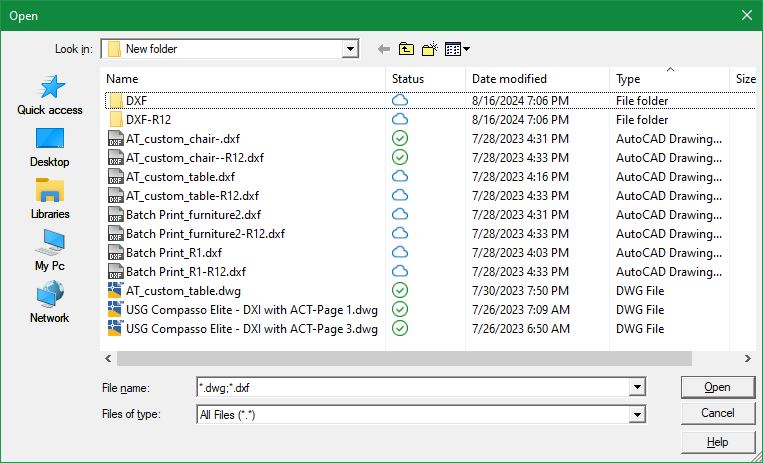
You can give this a try: (defun filePicker (directory filename extension / appHandle des pickedFile pickedFiles shell tmp tmpopen tmpoutput line) ;; Multi-file FilePicker using PowerShell OpenFileDialog ;; Returns a list of selected full file paths. ;; Returns nil if Cancel is pressed. (cond ;; Create temporary .BAT file ((and (setq tmp (vl-filename-mktemp nil nil ".bat")) (setq des (open tmp "w")) (write-line (strcat "<# : chooser.bat\n" ":: launches a File... Open sort of file chooser\n" "@echo off\n" "setlocal\n" "for /f \"delims=\" %%I in ('powershell -noprofile \"iex (${%~f0} | out-string)\"') do (\n" " echo %%~I\n" ")\n" "goto :EOF\n" ": end Batch portion / begin PowerShell hybrid chimera #>\n" "Add-Type -AssemblyName System.Windows.Forms\n" "$f = New-Object System.Windows.Forms.OpenFileDialog\n" "$f.InitialDirectory = \"" directory "\"\n" "$f.FileName = \"" filename "\"\n" "$f.Filter = \"" (cond ((= "dwg" (strcase extension t)) "AutoCAD Drawing (*.dwg)|*.dwg") ((= "dxf" (strcase extension t)) "AutoCAD DXF (*.dxf)|*.dxf") (t "All Files (*.*)|*.*") ) "\"\n" "$f.FilterIndex = 1\n" "$f.DefaultExt = \"" extension "\"\n" "$f.Multiselect = $true\n" "$f.ShowHelp = $true\n" "if ($f.ShowDialog() -eq [System.Windows.Forms.DialogResult]::OK) {\n" " $f.FileNames | ForEach-Object { $_ }\n" "}" ) des ) ) (not (close des)) (setq tmpoutput (vl-filename-mktemp nil nil ".txt")) (setq shell (vla-getinterfaceobject (vlax-get-acad-object) "WScript.shell")) (setq appHandle (vl-catch-all-apply 'vlax-invoke (list shell 'Run (strcat "cmd /c " tmp " > " tmpoutput) 0 :vlax-false))) (vlax-release-object shell) (not (vl-catch-all-error-p appHandle)) (setq tmpopen (open tmpoutput "r")) (while (setq line (read-line tmpopen)) (if (/= line "") (setq pickedFiles (append pickedFiles (list line)) ) ) ) (close tmpopen) (setq pickedFile pickedFiles) ) ((setq pickedFile (getfiled "" (strcat directory filename) extension 0)) (setq pickedFile (list pickedFile)) ) ) (if (and tmp (setq tmp (findfile tmp))) (vl-file-delete tmp) ) (if (and tmpoutput (setq tmpoutput (findfile tmpoutput))) (vl-file-delete tmpoutput) ) pickedFile )3 points
-
I put in to Claude Opus 5. Attached is the result. It took a couple of minutes or so, with one revision. LTCOUNT_1.lsp
 2 points
 -
I am curious to understand what the problem is. Right now, I am working 400 km away from home and only have access to an old PC running Windows 10 and AutoCAD 2002. I must say that this code actually works for me. I will try testing it soon on a more recent version of AutoCAD, and then perhaps I’ll add a further comment.2 points
-
I usually just keep it docked on the right side and use ctrl+1 to open it if needed. any of these will open properties (command "Properties") (command "PR") (command "CH") (command "MO")2 points
-
This is something I hate to do, but sometimes I'm in a hurry. One title block may be different in some fundamental way. I can't just explode it, because I'll lose all the information in the attributes. There's not enough time to create an entire block for one sheet, and why bother when there's only one? So it's time to Burst a move (sorry).1 point
-
That sounds like a fake Norton Pop-Up, ISeeYou, used to be (is?) an older vulnerability for web cams, I guy was activating webcams without the activation light on and blackmailing women with photos, he was caught and arrested a while back. I'll look for the article. Here is the Wiki iSeeYou - Wikipedia This looks to be a good while back.1 point
-
@dexusThis is pretty good too. Thanks for contributing. Though it does not check the AutoCAD window location and so the file selection window may open up on a different monitor, it does open really fast and remembers the monitor location where it last closed. I also like the different looking gui. Interestingly enough, I was able to get it to show multiple file types (*.dwg & *.dxf) by placing that in the filename argument instead of the extension argument: (filePicker (getvar"dwgprefix") "*.dwg;*.dxf" "")
1 point
-
I use a variation of the ssx.lsp to select objects in the drawing. In Bricscad v15 using (sssetfirst ss1 ss1) would both activate grips and activate the properties window to show info on those objects. For example select all blocks with same name, I could quickly edit the attribute value for all of them. I'm testing upgrade to v26 and the properties window no longer activates unless I manually toggle the property preview button. Is there a system variable to use the old behavior? Here is the simple code: (setq ss1 (ssget)) (sssetfirst ss1 ss1)1 point
-
A bit of googling check your version is past 26.2.07. can't check because i don't have V26 A regression in BricsCAD V26.2.5 caused the Properties window and other GUI components to stop updating during LISP execution, particularly when waiting for user input. This issue was identified as a regression and has been fixed in V26.2.07 (and subsequent builds). If you are experiencing this behavior: Update BricsCAD: Ensure you are running V26.2.07 or a newer version where the fix is included. Check System Variables: LISP scripts may inadvertently set FILEDIA or CMDDIA to zero, preventing dialog updates. Ensure your code resets these variables or uses an error handler to restore them upon cancellation. Alternative Property Access: For object properties not updating via COM, BricsCAD supports non-COM functions like (getpropertyvalue), (setpropertyvalue), (ispropertyreadonly), and (dumpallproperties) which work across Windows, Mac, and Linux.1 point
-
I never used dimbreak before so but can you use a lisp select all the dim and test which ones which have DimBreaks applied to the then just re-set them.? Test on a few drawings first (make sure run it on back version)... I did this with the help of ai... but it appears to work for me... (perhaps some can verify and improve on it) I'm on on Version 2027 Map but his worked for me. I have notice two things if the dimension are not on screen and the object it crosses are a layer that is off the break reset doesn't work. (So I added zoom extents and do both layer on and thaw for any layer that is printable. Then at the end I reset everything back. But it may be better to do that before you start... as I seen AutCAD behaving strange... Where some lisp functions run before the previous task is complete... (defun c:RefreshDimBreaks ( / layers oldecho i data name flags plot off frozen answer item viewctr viewsize) (setq oldecho (getvar "CMDECHO")) (setvar "CMDECHO" 0) (setq viewctr (getvar "VIEWCTR")) (setq viewsize (getvar "VIEWSIZE")) (setq layers '()) (if (tblnext "LAYER" T) (progn (while (setq data (tblnext "LAYER")) (setq name (cdr (assoc 2 data))) (setq flags (cdr (assoc 70 data))) (setq plot (cdr (assoc 290 data))) (setq off (< (cdr (assoc 62 data)) 0)) (setq frozen (= (logand flags 1) 1)) (if (and (= (if plot plot 1) 1) (or off frozen)) (setq layers (cons (list name off frozen) layers)) ) ) ) ) (if (> (length layers) 0) (progn (princ (strcat "\nFound " (itoa (length layers)) " printable layers that are off or frozen.")) (initget "Y N") (setq answer (getstring T "\nTurn these layers on and thaw them temporarily? [Y/N] <N>: ")) (if (or (= answer "") (= (strcase answer) "N")) (princ "\nNo changes made.") (if (= (strcase answer) "Y") (progn (foreach item layers (command "_.-LAYER" "_ON" (car item) "") (command "_.-LAYER" "_THAW" (car item) "") ) ) ) ) ) (princ "\nNo printable layers are off or frozen.") ) (RefreshDims) (foreach item layers (if (cadr item) (command "_.-LAYER" "_OFF" (car item) "") ) (if (caddr item) (command "_.-LAYER" "_FREEZE" (car item) "") ) ) (princ "\nOriginal layer states restored.") (command "_.ZOOM" "_C" viewctr viewsize) (command "_.REGEN") (setvar "CMDECHO" oldecho) (princ) ) (defun RefreshDims ( / ss ssBreak oldecho i ent dict 360type) (setq oldecho (getvar "CMDECHO")) (setvar "CMDECHO" 0) (command "_.ZOOM" "_E") (if (setq ss (ssget "_X" '((0 . "DIMENSION")))) (progn (setq ssBreak (ssadd)) (setq i 0) (while (< i (sslength ss)) (setq ent (ssname ss i)) (if (setq dict (cdr (assoc 360 (entget ent)))) (progn (setq 360type (cdr (assoc 0 (entget dict)))) (if (= 360type "DICTIONARY") (ssadd ent ssBreak) ) ) ) (setq i (+ i 1)) ) (if (> (sslength ssBreak) 0) (progn (princ (strcat "\nRefreshing " (itoa (sslength ssBreak)) " dimension breaks.")) (command "_.DIMBREAK" "_M" ssBreak "" "_R") (command "_.DIMBREAK" "_M" ssBreak "" "_A") ) (princ "\nNo dimensions with extension dictionaries found.") ) ) (princ "\nDrawing does not have any dimensions") ) (setvar "CMDECHO" oldecho) (princ) )1 point
-
No worries. I simply fed your description into Claude. With a few more prompts or a couple of revisions it would have done all that you asked. Its crazy powerful especially in the hands off someone like yourself with advanced lisp coding knowledge and experience. Claude and similar are such a high level above the likes of Co-Pilot.1 point
-
Fair enough, Steven! If your current company drive setup is humming along without friction for your team, there is genuinely zero reason to disrupt what already works for you. Just to clear up one quick technical misconception for anyone following along: VedaCAD isn't an online file store (it's purely an environment deployment manager), and there is no password fatigue here—the platform is completely passwordless (supporting modern Enterprise SSO, OAuth, and Magic Links). Different tools for different office architectures. Wishing you and your CAD team smooth drafting!1 point
-
Agreed, the -DWGUNITS command is quite comprehensive, and particularly when receiving drawings from a non-team member. When I want to use it, I expand my commandline history to display 5 or 6 lines, in one go, all the better to display the numerous options.1 point
-
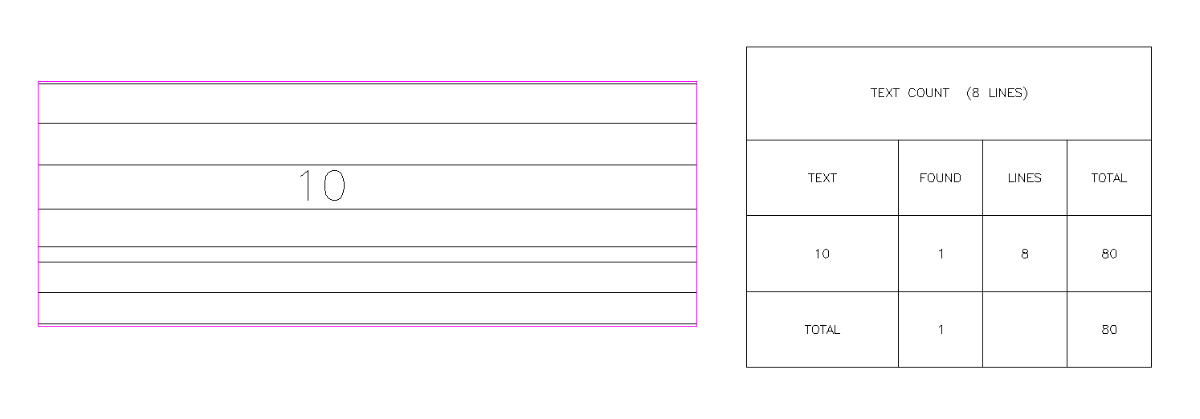
J2lstaples, I have been using AI a bit lately, When I code a bigger project even small ones I write numerous defuns the reason being they solve one task but a program may need 5 task defuns. Also I can test that defun and make sure its working correctly rather having one great big program and trying to find where it is not working. But sometimes the AI just does not work for a defun task so have to go back to searching old fashioned way. You can use AI but you have to know how to describe a task, knowing who some lisp functions like SSget work with filters. Not sure what AI would think of this, I will do old fashioned way. "Drag line over multiple parallel p/Lines get two out side linework, offset both outward further make a box, now ssget text on a layer within that box. Also get how many lines, Then sort and count the text multiplied by the number of lines and put results in a table." Yes it is a current post request, not here at Cadtutor. I am interested in what AI can do and how long it takes to make something that works.1 point
-
Though I would quite often check because I would need to change the PRECISION or make sure the INSUNITS are correctly set by using the UNITS command, I would seldom check the actual drawing units by using the -DWGUNITS command. I would say it's most important to make sure the current units are recognized by AutoCAD as mm or inches and etc than if it's Architectural/Engineering/Decimal.1 point
-
@GLAVCVSI just tried commenting out that line as you recommended but still no joy. The freezing up now also occurs on the Win 11 OS. Even after I unfreeze the Select Files window, I still cannot Cancel out but I must make a file selection to dismiss the window. The behavior just seems very unstable with a persistent powershell setup at least on the systems I tested at my end. But thanks for your feedback & code revisions. Perhaps others here can use this faster alternative if it's stable running the code this way on their systems.1 point
-
The last line of code (pl:getfiledps "Hola" "c:\\" "dwg" 1) is for testing purposes and should not be loaded at startup. Comment it out, save the changes, and open a new drawing to reload the code. Once the file has loaded, you can execute (pl:getfiledps "Hola" "c:\\" "dwg" 1). The reason for this is that PowerShell runs asynchronously, and `pl:getfiledps` might execute before the PowerShell instance is available.1 point
-
You can start a PowerShell instance from LISP and keep it running in the background, ready to receive instructions. I've played around with this idea a little and ended up with the following code. I haven't tested it thoroughly enough, so its robustness could probably be improved. But it may be useful. (defun PS-START (/ fp sh cmd n) (vl-load-com) ;| -------------------------------------------------------------- ; Si existe READY, suponemos de momento que ya está funcionando. ; Posteriormente podemos hacer PS-ALIVE más rigurosa. |; -------------------------------------------------------------- (setq *PS-SERVER* (strcat (getenv "TEMP") "\\PL_PS_Server.ps1") *PS-TCMD* (strcat (getenv "TEMP") "\\PL_PS_Command.tmp") *PS-CMD* (strcat (getenv "TEMP") "\\PL_PS_Command.txt") *PS-OUT* (strcat (getenv "TEMP") "\\PL_PS_Output.txt") *PS-READY* (strcat (getenv "TEMP") "\\PL_PS_Ready.txt") ) (if (and *PS* (findfile *PS-READY*)) T (progn ;|Clean previous files / Limpiar archivos anteriores|; (if (findfile *PS-CMD*) (vl-file-delete *PS-CMD*) ) (if (findfile *PS-OUT*) (vl-file-delete *PS-OUT*) ) ;|Create server script / Crear script servidor|; (setq fp (open *PS-SERVER* "w")) ;|Nombres de los archivos de comunicación|; (write-line "$cmd = $env:TEMP + '\\PL_PS_Command.txt'" fp) (write-line "$out = $env:TEMP + '\\PL_PS_Output.txt'" fp) (write-line "$ouTmp = $env:TEMP + '\\PL_PS_Output.tmp'" fp) (write-line "$ready = $env:TEMP + '\\PL_PS_Ready.txt'" fp) ;|Indicate Powershelll ready / Señalizar que PowerShell está preparado|; (write-line "Set-Content -Path $ready -Value $PID -Encoding Default" fp) ;|Main loop / Bucle principal Powershell remains here for entire session / PowerShell permanece aquí durante toda la sesión|; (write-line "while ($true) {" fp) ;|Is there any pending request? / ¿Hay una orden pendiente?|; (write-line " if (Test-Path $cmd) {" fp) ;|Read ALL code / Leer TODO el código. -Raw permite que PS-EXEC pueda mandar scripts de varias líneas, no solamente una instrucción |; (write-line " $code = Get-Content -Path $cmd -Raw -Encoding Default" fp) ;|Delete request inmediately / Borrar la petición inmediatamente. Esto indica que el servidor ya se ha hecho cargo de ella.|; (write-line " Remove-Item $cmd -Force" fp) ;|Orden para terminar el servidor|; (write-line " if ($code.Trim() -eq '__EXIT__') {" fp) (write-line " break" fp) (write-line " }" fp) ;|Execute code IN THIS POWERSHELL SESSION / Ejecutar código EN ESTA MISMA SESIÓN POWERSHELL|; (write-line " try {" fp) (write-line " $result = Invoke-Expression $code" fp) ;| OUT must always be created so that PS-EXEC knows the process has finished Hay que crear siempre OUT. Incluso si la expresión devuelve $null necesitamos crear el archivo para que PS-EXEC sepa que hemos terminado. |; (write-line " if ($null -eq $result) {" fp) (write-line " Set-Content -Path $ouTmp -Value '' -Encoding Default" fp) (write-line " }" fp) (write-line " else {" fp) (write-line " $result | Out-File -FilePath $ouTmp -Encoding Default" fp) (write-line " }" fp) (write-line " Move-Item $ouTmp $out -Force" fp);rename PL_PS_Output.tmp / renombramos PL_PS_Output.tmp ;|Capturar errores|; (write-line " }" fp) (write-line " catch {" fp) (write-line " ('__ERROR__ ' + $_.Exception.Message) | Out-File -FilePath $out -Encoding Default" fp) (write-line " }" fp) ; close / cerrar 'IF Test-Path' (write-line " }" fp) ;| Sleep / Demorar 10 ms. Prevents resident Powershell instance from continuously using a CPU core while it has nothing to do Evita que el PowerShell residente utilice continuamente un núcleo de CPU mientras no tiene nada que hacer |; (write-line " Start-Sleep -Milliseconds 10" fp) ; cerrar WHILE (write-line "}" fp) ;|PowerShell está terminando|; (write-line "Remove-Item $ready -Force -ErrorAction SilentlyContinue" fp) (close fp) ;|Arrancar PowerShell|; (if (not *PS*) (progn (setq cmd (strcat "powershell.exe " "-NoLogo " "-NoProfile " "-NonInteractive " "-STA " "-ExecutionPolicy Bypass " "-WindowStyle Hidden " "-File \"" *PS-SERVER* "\"" ) sh (vlax-create-object "WScript.Shell") ) (vlax-invoke-method sh 'Run cmd 0 :vlax-false) (vlax-release-object sh) ) ) ;| Esperar a que PowerShell cree READY Máximo: 5 segundos |; (setq n 0) (while (and (not (findfile *PS-READY*)) (< n 500) ) (repeat 10000 (getvar "MILLISECS")) (princ "\rEsperando...") (setq n (1+ n)) ) ;|Result / Resultado|; (if (findfile *PS-READY*) T nil ) ) ) ) (defun PS-EXEC (code / fp lin result t0) ;| Clears any previous result / Borrar posible resultado anterior|; (if (findfile *PS-OUT*) (vl-file-delete *PS-OUT*) ) ;| Write code that Powershell should executed / Escribir el código que debe ejecutar PowerShell|; (setq fp (open *PS-CMD* "w")) (write-line code fp) (close fp) ;|Waiting for a Powershell response / Esperar a que PowerShell responda|; (while (not (findfile *PS-OUT*));(not (findfile *PS-OUT*)) (setq t0 1000) (repeat 1000 (setq t0 (1+ t0))) ) ;|Reading response / Leer respuesta|; (setq fp (open *PS-OUT* "r"));(open *PS-OUT* "r")) (while (setq lin (read-line fp)) (setq result (cons lin result)) ) (close fp) ;| Delete result / Borrar resultado|; (vl-file-delete *PS-OUT*) (reverse result) ) (defun PL-FILEDIALOG-INIT (/ hwnd) ;; HWND de ESTA instancia concreta de AutoCAD (setq hwnd (vla-get-HWND (if (minusp (- (atoi (getvar "ACADVER")) 16)) (vla-get-activeDocument (vlax-get-acad-object)) (vlax-get-acad-object))) ) ;; Windows Forms + OpenFileDialog (PS-EXEC (strcat "Add-Type -AssemblyName System.Windows.Forms;" "$script:f=New-Object System.Windows.Forms.OpenFileDialog" ) ) ;|Small 'wrapper' to convert AutoCAD's HWND into a valid 'IWin32Window' for ShowDialog(owner) Pequeño 'wrapper' para convertir el HWND de AutoCAD en un 'IWin32Window' válido para 'ShowDialog (owner)' |; (PS-EXEC (strcat "Add-Type -TypeDefinition " "'using System;" "using System.Windows.Forms;" "public class WindowWrapper:IWin32Window{" "private IntPtr h;" "public WindowWrapper(IntPtr hwnd){h=hwnd;}" "public IntPtr Handle{get{return h;}}" "}' " "-ReferencedAssemblies System.Windows.Forms" ) ) ;|Locate AutoCAD and create owner Localizar AutoCAD y crear el 'owner' |; (PS-EXEC (strcat "$script:owner=New-Object WindowWrapper(" (itoa hwnd) ")" ) ) T ) (defun pl:getfiledps (title dir ext flg / psquote makefilter code) ;| Escape / Escapar ' PowerShell|; (defun psquote (s / p n) (setq n 0) (while (setq p (vl-string-search "'" s n)) (setq s (strcat (substr s 1 p) "''" (substr s (+ p 2))) n (+ p 2) ) ) s ) (defun makefilter (s / p r x) (setq r "") (while (setq p (vl-string-search ";" s)) (setq x (substr s 1 p) r (strcat r "*." x ";") s (substr s (+ p 2)) ) ) (strcat r "*." s) ) ;|Default values / Valores por defecto|; (if (/= (type title) 'STR) (setq title "Select Files") ) (if (not (and (= (type dir) 'STR) (vl-file-directory-p dir) ) ) (setq dir (getvar "DWGPREFIX")) ) (if (= (type ext) 'STR) (setq ext (makefilter ext)) (setq ext "*.dwg") ) ;| Build only the code needed for this call: Powershell, Forms, f and owner ALREADY EXISTS Construir únicamente el código necesario para ESTA llamada: PowerShell, Forms, f y owner YA EXISTEN |; (setq code (strcat "$script:f.FileName='';" "$script:f.Title='" (psquote title) "';" "$script:f.InitialDirectory='" (psquote dir) "';" "$script:f.Filter='Files (" ext ")|" ext "';" "$script:f.Multiselect=" (if (and (= (type flg) 'INT) (/= flg 0) ) "$true;" "$false;" ) "$r=$script:f.ShowDialog();" "if($r -eq " "[System.Windows.Forms.DialogResult]::OK)" "{$script:f.FileNames}" ) ) ;| Execute in the resident Powershell instance / Ejecutar en PowerShell residente |; (PS-EXEC code) ) ;|If Powershell is not already running, start a instance / SI POWERSHELL NO ESTÁ INSTANCIADO, SE CREA UNA INSTANCIA|; (if (or (not *PS*) (not (findfile *PS-READY*))) (progn (setq *PS* (PS-Start)) (PL-FILEDIALOG-INIT))) ;;;(startapp "notepad" *PS-OUT*) (setq *PS* nil) ;;;(pl:getfiledps "Hola" "c:\\" "dwg" 1) How does it work?... When the code is loaded, a PowerShell instance and a base script are created. After that, simply call the pl:getfiledps function whenever you need it.1 point
-
Honestly, I've been using AI to code in AutoLISP for the past year or so and I think it's more successful at it than I am. I'm not saying it's clean code, but I'm saying it's already useful. I had a sales engineer ask me info on a project that they're selling trying to verify if what they sold was feasible and with the tool the AI built, I could give them concrete details. If I had to finish that tool, it would have taken me months to write it. I had to test it a bunch of times in autocad and give feedback and it'll find the problem. I had to upgrade which models I used if it gets stuck or restart a new chat. I have a bunch of md files for it to remember how the codebase works but it's getting there. I would say the AI didn't code the whole thing, I still gave it most of the ideas to use, it just had to fill stuff in between for the implementation. At the end of the day, I just want it to work. I had it write a debug.txt which it can read after each test run. I had it create toy functions to measure what it did after the fact. There's a couple of good engineering practices still in place, it's just that I'm allowing myself to have 'fuzzy' details about the implementation.1 point
-
@GLAVCVS thanks for the feedback. I assume to use a single Powershell session you would have to run a batch file that launches Powershell first before starting autocad? Then when autocad closes or crashes out that session of Powershell also closes.1 point
-
I think AI is definitely part of the reason, but probably not the whole story. A lot of questions that used to become forum threads can now be answered quickly with ChatGPT or Copilot, especially when the problem is a small piece of code or a common error. The interesting part is exactly what you mentioned: when the AI-generated solution fails, people still need somewhere to ask a human who understands the bigger context. AI can produce working-looking code very quickly, but debugging someone else's real project is a different problem. I also think newer users are less attached to forums than they used to be. Many will try a search, ask an AI, or post in a Discord/Reddit community before they ever find a specialist forum. So the drop in posts doesn't necessarily mean people have stopped needing help; the questions may simply be going elsewhere.1 point
-
Here's a simple workaround. When you get a drawing from someone else, open a New drawing (from one of your templates). Xref their drawing into that one and Bind it as an insertion. That gives you a block, which you can edit to clean it up and then explode. If there's a scale problem, it will show up there. Voila! You have their drawing with all your settings applied.1 point
-
Yes, it's sad, but for some time now I've thought it would be a good idea to have an AutoCAD nostalgia forum. This is a place where we can collect images of legacy AutoCAD versions. I bet you throw away all your old AutoCAD stuff with each new version. Or maybe there are some hoarders out there who still have the box that their R10 came in. I have to admit that I still have my R12 box - makes a great magazine holder (pictures later). Anyway, let me know what you think of this idea and take a look at what's there already.1 point
-
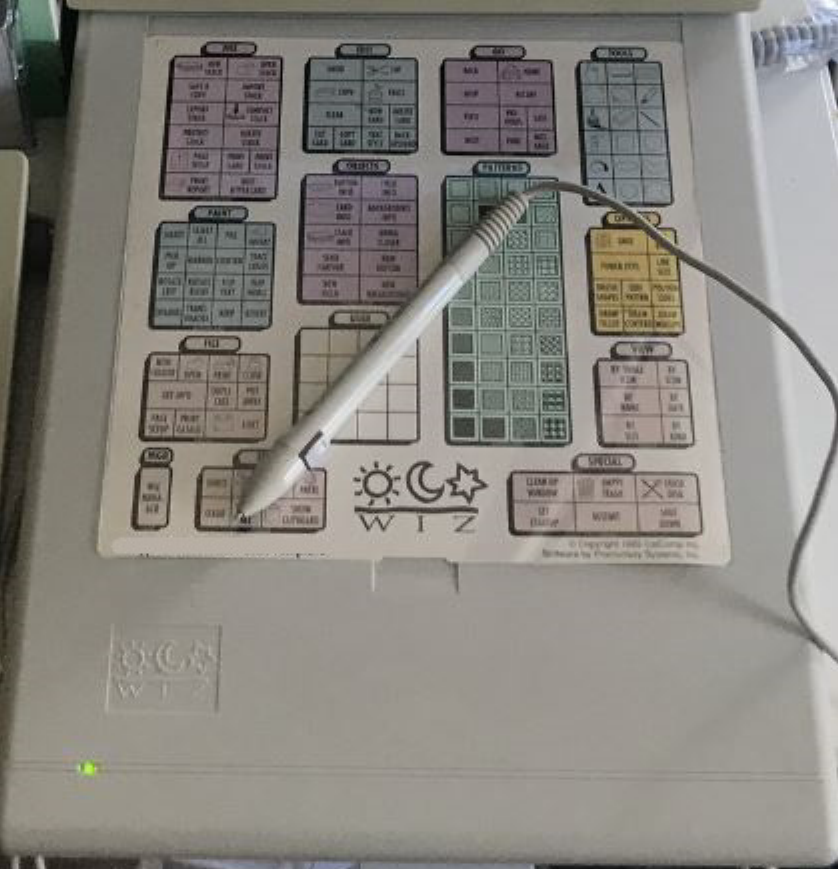
Back in the early 90s I had this letter size digitizer tablet by Calcomp called the WIZ. I was able to reduce the typical 12x12 AutoCAD digitizer tablet menu and map it on. Major advantages of this over the typical larger tablets being sold at the time was it's a lot smaller and light weight and cost less too. But after AutoCAD dropped support for DOS and went all out with running on Windows, Calcomp also dropped support for the WIZ and I had to give it up to go with a mouse. I actually wrote about this awhile back in an article I called "What Happened To The Digitizer?"
1 point
-
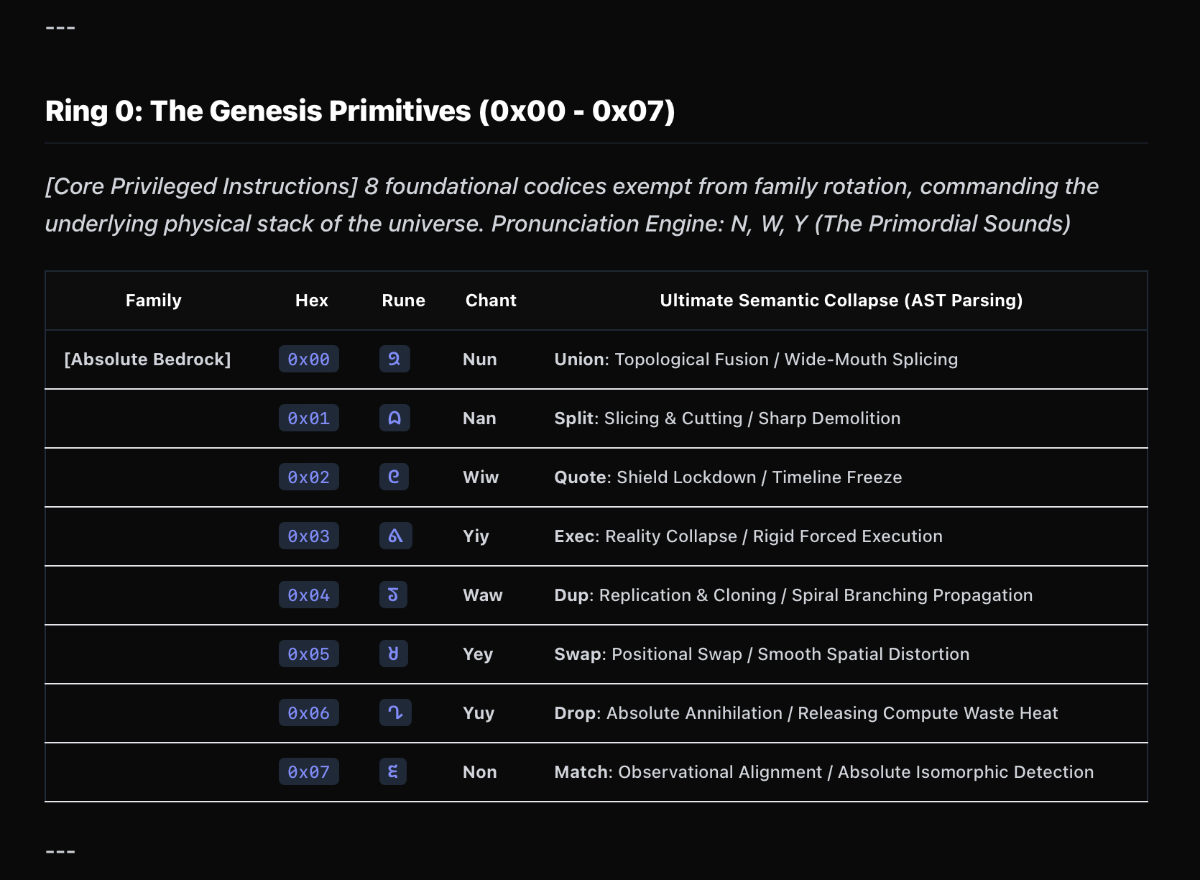
Watching this whole "AI taking over" debate unfold, I feel like I'm seeing people in our industry fall into three different camps: First, there’s the Spectator. They use AI to generate flashy concept art or write basic emails. It’s pure consumption—cool to look at, but they don't really know how the engine works. Then you have the Skeptical Co-Pilot. This is where I sit for my daily development. You let AI do the heavy lifting for specific, tedious tasks, but you absolutely do not trust it blindly. You sandbox its output and rigorously test it before ever putting it into your actual workflow. Finally, there’s the Blind Believer. This is the whole "AI Agent" crowd trying to run a one-man firm. They type a prompt and expect a flawless final product the next morning. The reality? You have no idea what kind of spaghetti code or geometric garbage is hidden inside that black box, and auditing it takes longer than just doing the work yourself. Speaking of that "skeptical co-pilot" approach, I actually went down a massive rabbit hole with it recently. I was trying to solve a very pragmatic problem: How do we get an LLM to generate hyper-precise CAD geometry without eating up a million tokens and spitting out hallucinated garbage? Natural language just doesn't cut it for drafting. So, I worked with an AI to invent a prototype "Universal Morphological Matrix" (I just call it V-Code). The idea was to strip away all the human linguistic fluff and reduce CAD commands down to an absolute, 256-token hex-based root system. It basically compresses professional CAD knowledge into a tiny "Cosmic Language", which a local interpreter can then unpack back into precise AutoCAD/LISP commands. I pushed the experiment so far that I jokingly asked the AI to use this highly compressed logic to solve the P vs NP math problem. It confidently spit out a bunch of hex codes and claimed it had solved it. Did I believe it? Absolutely not, because I couldn't read its alien derivation track at all, haha! At the end of the day, AI is an incredibly powerful engine. But if you take your hands off the steering wheel and just blindly trust the machine, you're going to crash. It remains a tool exclusively for people who already know exactly what they are doing.
1 point
-
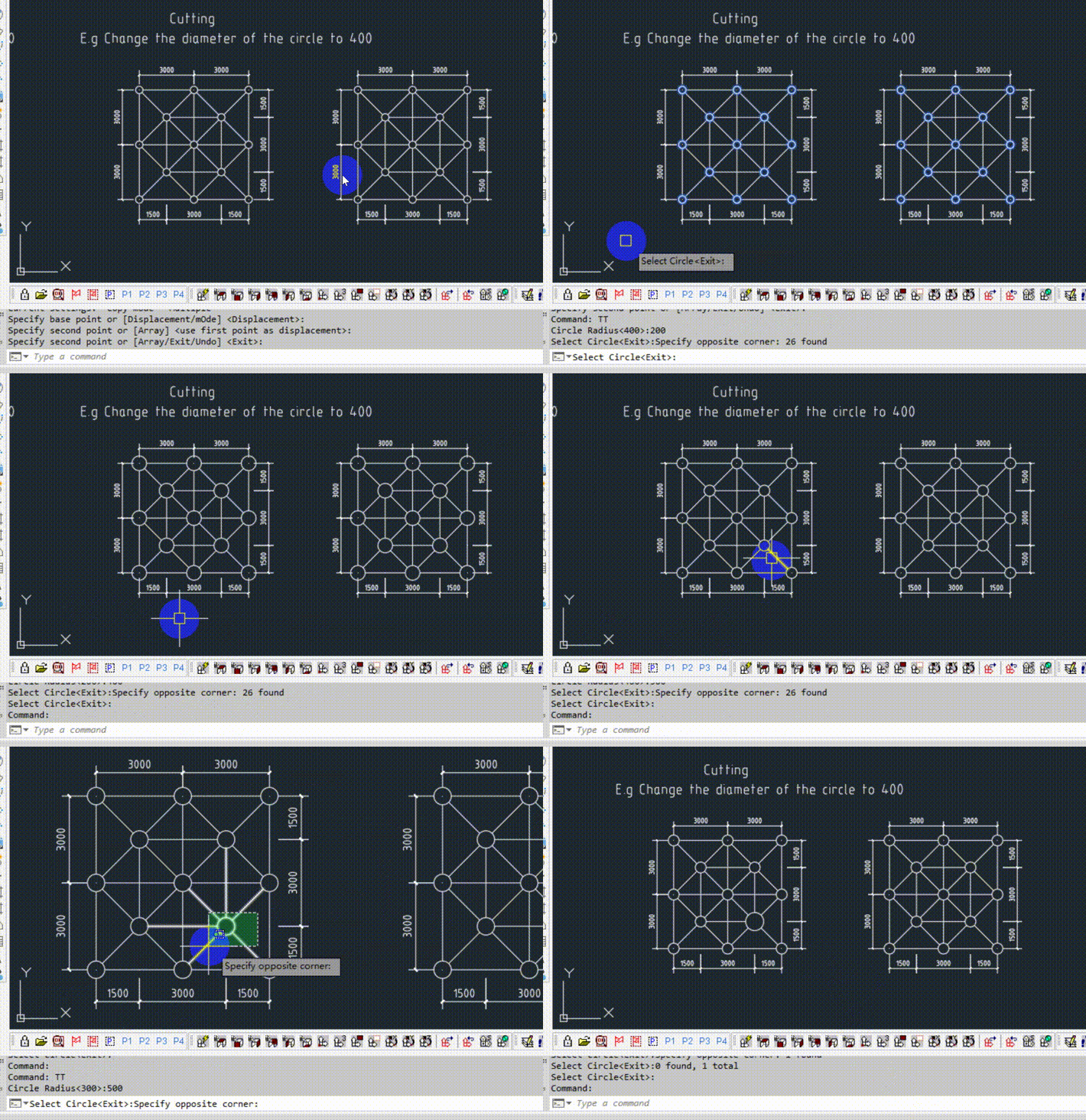
[XDrX-PlugIn(160)] extend or cut curve with circle (theswamp.org) https://www.theswamp.org/index.php?topic=59528.0 Implemented using moving grips(stretch point) (defun c:xdtb_cirextend (/ box clone ints nearpt pnt r ss ss1 strepnts x y z) (xd::doc:getdouble (xdrx-string-multilanguage "\n圆半径" "\nCircle Radius") "#mradius" 10.0 ) (if (setq ss (xdrx-ssget (xdrx-string-multilanguage "\n选择圆<退出>:" "\nSelect Circle<Exit>:") '((0 . "circle")) ) ) (progn (mapcar '(lambda (x) (setq r (xdrx-getpropertyvalue x "radius") box (xdrx-entity-box x) box (xd::pnts:close box) ) (setq clone (xdrx-object-clone x)) (xdrx-setpropertyvalue x "radius" #mradius) (if (setq ss1 (ssget "f" box '((0 . "*polyline,line")))) (progn (mapcar '(lambda (y) (setq strepnts (xdrx-entity-getstretchpoint y)) (if (setq pnt (vl-some '(lambda (z) (if (xdrx-point-ison z clone) z ) ) strepnts ) ) (progn (if (setq ints (xdrx-entity-intersectwith y x 1)) (progn (setq nearpt (xdrx-points-nearpt pnt ints)) (xdrx-entity-movestretchpointex y pnt (mapcar '- nearpt pnt ) ) ) ) ) ) ) (xdrx-ss->ents ss1) ) ) ) (xdrx-entity-delete clone) ) (xdrx-ss->ents ss) ) ) ) (princ) ) ===================================== The above code uses XDrx API, download link: https://github.com/xdcad/XDrx-API-zip https://sourceforge.net/projects/xdrx-api-zip/ Dual version link: https://github.com/xdcad
1 point
-
Sure. Replace this function. I didn't touch the rest ;; WAMP for Write Area in the Middle of Polyline (defun c:wamp ( / pline ss i hgt clay lay) ;; current layer (setq clay (getvar "CLAYER")) ;; User setting. Set to your liking (setq hgt 2.5) ;; user selects polylines (princ "\nSelect polylines: ") (setq ss (ssget (list (cons 0 "*POLYLINE")))) ;; loop of the elements (setq i 0) (repeat (sslength ss) (setq pline (ssname ss i)) ;; set layer of polyline to current (setvar "CLAYER" (setq lay (cdr (assoc 8 (entget pline)))) ) (wamp pline hgt) (setq i (+ i 1)) ) (setvar "CLAYER" clay) )1 point
-
I have this with field It work's with entities selection or boundarie (vl-load-com) (defun c:surf_curve-closed ( / AcDoc Space loop js pt_in new_pl area_obj nw_obj ename ent_text dxf_ent key) (setq AcDoc (vla-get-ActiveDocument (vlax-get-acad-object)) Space (if (= 1 (getvar "CVPORT")) (vla-get-PaperSpace AcDoc) (vla-get-ModelSpace AcDoc) ) loop T ) (princ "\nSelect a closed object or <Enter/Right-click> for a point in interior of area") (while loop (setq js (ssget "_+.:E:S" '( (-4 . "<OR") (-4 . "<AND") (0 . "*POLYLINE") (-4 . "<AND") (-4 . "<NOT") (-4 . "&") (70 . 120) (-4 . "NOT>") (-4 . "&") (70 . 1) (-4 . "AND>") (-4 . "AND>") (0 . "CIRCLE") (-4 . "<AND") (0 . "SPLINE") (-4 . "&") (70 . 1) (-4 . "AND>") (-4 . "<AND") (0 . "ELLIPSE") (41 . 0.0) (42 . 6.283185307179586) (-4 . "AND>") (-4 . "OR>") ) ) area_obj nil ) (cond ((null js) (setq pt_in (getpoint "\nGive interior point or <Enter/Right-click> for quit?: ") new_pl (bpoly pt_in nil '(0 0 1)) ) (if (eq (type new_pl) 'ENAME) (setq area_obj (vlax-get-property (setq ename (vlax-ename->vla-object new_pl)) "Area")) (setq loop nil) ) ) (T (setq area_obj (vlax-get-property (setq ename (vlax-ename->vla-object (ssname js 0))) "Area")) ) ) (cond (area_obj (if (zerop (getvar "USERR1")) (setvar "USERR1" (/ (getvar "VIEWSIZE") 75.0))) (setq nw_obj (vla-addMtext Space (vlax-3d-point (trans (getvar "VIEWCTR") 1 0)) 0.0 (strcat "{\\fArial|b0|i0|c0|p34;" "%<\\AcObjProp.16.2 Object(%<\\_ObjId " (itoa (vla-get-ObjectID ename)) ">%).Area \\f \"%lu2%pr3\">%" ) ) ) (mapcar '(lambda (pr val) (vlax-put nw_obj pr val) ) (list 'AttachmentPoint 'Height 'DrawingDirection 'StyleName 'Layer 'Rotation 'BackgroundFill 'Color) (list 1 (getvar "USERR1") 5 (getvar "TEXTSTYLE") (getvar "CLAYER") 0.0 -1 256) ) (setq ent_text (entlast) dxf_ent (entget ent_text) dxf_ent (subst (cons 90 1) (assoc 90 dxf_ent) dxf_ent) dxf_ent (subst (cons 63 255) (assoc 63 dxf_ent) dxf_ent) ) (entmod dxf_ent) (while (and (setq key (grread T 4 0)) (/= (car key) 3)) (cond ((eq (car key) 5) (setq dxf_ent (subst (cons 10 (trans (cadr key) 1 0)) (assoc 10 dxf_ent) dxf_ent)) (entmod dxf_ent) ) ) ) (vlax-put (vlax-ename->vla-object (entlast)) 'TextString (strcat "{\\fArial|b0|i0|c0|p34;" "%<\\AcObjProp.16.2 Object(%<\\_ObjId " (itoa (vla-get-ObjectID ename)) ">%).Area \\f \"%lu2%pr3\">%" ) ) ) (T (setq loop nil)) ) (princ "\nSelect a closed object or <Enter/Right-click> for a point in interior of area") ) (prin1) )1 point
-
I started from scratch. Is this how you want is? Bottom function: adapt the text height to your likings . Now: (setq hgt 2.5) ;;1. promt the user to select multiple polygons. ;;2. in a loop: ;; a. calculate each polygon area. ;; b. insert the area text in the geometric center of each polygon (vl-load-com) ;; Multiple assoc. Returns a list of all requested (assoc) with set key ; use like this (massoc 10 YourListOfData) (defun massoc (key alist / x nlist) (foreach x alist (if (eq key (car x)) (setq nlist (cons (cdr x) nlist)) ) ) (reverse nlist) ) ;;;;;;;;;;;;;;;;;;;;;;;;;;;;;;;;;;;;;;;;;; ;; https://www.cadtutor.net/forum/topic/18257-entmake-functions/ (defun drawText (pt hgt str) (entmakex (list (cons 0 "TEXT") (cons 10 pt) (cons 40 hgt) (cons 1 str)))) ;;;;;;;;;;;;;;;;;;;;;;;;;;;;;;;;;;;;;;;;;; ;; main function (defun wamp (pline hgt / area pt str vert_pts x y p) (setq area (vla-get-area (vlax-ename->vla-object pline) )) ;; get the vertex positions. (setq vert_pts (massoc 10 (entget pline))) (setq x 0.0) (setq y 0.0) ;; Then calculate the average. Sum of x and y values divided by the number of vertices (foreach p vert_pts (setq x (+ x (nth 0 p))) (setq y (+ y (nth 1 p))) ) (setq pt (list (/ x (length vert_pts)) (/ y (length vert_pts)) )) ;; make a string out of the area float. Here would be the place to add a prefix or postfix. Example: ;; (setq str (strcat "area: " (rtos area 2 3) )) (setq str (rtos area 2 3)) ;; that 3 means 3 decimals. Feel free to change this (drawText pt hgt str) (princ ) ) ;; WAMP for Write Area in the Middle of Polyline (defun c:wamp ( / pline ss i hgt) ;; User setting. Set to your liking (setq hgt 2.5) ;; user selects polylines (princ "\nSelect polylines: ") (setq ss (ssget (list (cons 0 "*POLYLINE")))) ;; loop of the elements (setq i 0) (repeat (sslength ss) (setq pline (ssname ss i)) (wamp pline hgt) (setq i (+ i 1)) ) )1 point