All Activity
- Past hour
-
 marianTGT joined the community
 - Today
-
Using commands to acomplish the conversion, especially batch ones, will be very slow while displaying the DXF graphics. Why not use ODBX? 1) Create a dbx doc 2) DXFIn the dxf file 3) Saveas the dbx as dwg _$ (vlax-dump-object dbx t) ; IAxDbDocument: nil ; Property values: ; Application (RO) = Exception occurred ; Blocks (RO) = #<VLA-OBJECT IAcadBlocks 000002520fe578b8> ; Database (RO) = #<VLA-OBJECT IAcadDatabase 0000025243645708> ; Dictionaries (RO) = #<VLA-OBJECT IAcadDictionaries 000002520fe56598> ; DimStyles (RO) = #<VLA-OBJECT IAcadDimStyles 000002520fe57678> ; ElevationModelSpace = 0.0 ; ElevationPaperSpace = 0.0 ; Groups (RO) = #<VLA-OBJECT IAcadGroups 000002520fe55db8> ; Layers (RO) = #<VLA-OBJECT IAcadLayers 000002520fe57558> ; Layouts (RO) = #<VLA-OBJECT IAcadLayouts 000002520fe561a8> ; Limits = (0.0 0.0 12.0 9.0) ; Linetypes (RO) = #<VLA-OBJECT IAcadLineTypes 000002520fe57798> ; Materials (RO) = #<VLA-OBJECT IAcadMaterials 000002520fe56ce8> ; ModelSpace (RO) = #<VLA-OBJECT IAcadModelSpace 0000025279adffc8> ; Name = "" ; PaperSpace (RO) = #<VLA-OBJECT IAcadPaperSpace 0000025279ae0068> ; PlotConfigurations (RO) = #<VLA-OBJECT IAcadPlotConfigurations 000002520fe567d8> ; Preferences (RO) = #<VLA-OBJECT IAcadDatabasePreferences 00000252436bc1a8> ; RegisteredApplications (RO) = #<VLA-OBJECT IAcadRegisteredApplications 000002520fe57948> ; SectionManager (RO) = Exception occurred ; SummaryInfo (RO) = #<VLA-OBJECT IAcadSummaryInfo 0000025243646068> ; TextStyles (RO) = #<VLA-OBJECT IAcadTextStyles 000002520fe579d8> ; UserCoordinateSystems (RO) = #<VLA-OBJECT IAcadUCSs 000002520fe56bc8> ; Viewports (RO) = #<VLA-OBJECT IAcadViewports 000002520fe56868> ; Views (RO) = #<VLA-OBJECT IAcadViews 000002520fe56e08> ; Methods supported: ; CopyObjects (3) ; DxfIn (2) ; DxfOut (3) ; HandleToObject (1) ; ObjectIdToObject (1) ; Open (2) ; Save () ; SaveAs (2) T
-
 suren476 joined the community
 - Yesterday
-

Having some issues converting to 3d
BIGAL replied to TimC's topic in AutoCAD 3D Modelling & Rendering
"Why Use TXTEXP? 3D Extrusion: Converts text into line/polyline paths that you can use the EXTRUDE command on." So to use extrude you must have closed shapes it can take a few minutes to properly close the exploded text. When using extrude you should set a height that you want.
-

MultiPLine (MPL) — polyline-based MLINE replacement with per-line layers, presets, and auto-sync [Free + Pro]
SkillAmplifier posted a topic in AutoLISP, Visual LISP & DCL
Hi all, I've been a lurker on CADTutor for years and learned a lot from this community, so I wanted to share something I built and get feedback from people who actually know LISP. Background: I'm a civil CAD drafter working on US land development projects — grading, drainage, easements, corridors. MLINE has always been the tool I wanted to use for drawing parallel offset lines but couldn't, mainly because the objects are locked, there's no lineweight control per component, and the .mln style management across a team is a nightmare. So I wrote a replacement. ────────────────────────────────── WHAT IT DOES ────────────────────────────────── Command MPL works like PLINE — you draw a centerline and it generates a set of configurable parallel LWPOLYLINEs around it. Every satellite line is a real polyline: fully grip-editable, trimmable, offsettable, joinable. No locked geometry, no exploding required. Each satellite line carries its own: - Offset distance (positive = left, negative = right) - Layer (Pro version) - Color, linetype, lineweight, linetype scale Configuration is handled through a DCL dialog (MPLEDIT). Settings save as user defaults and, in the Pro version, as named presets stored in %APPDATA%\MplineAuto\presets.dat. ────────────────────────────────── TWO VERSIONS ────────────────────────────────── Lite (free .lsp): - MPL, MPLEDIT, MPLSYNC - Manual sync after edits — run MPLSYNC, window-select the group, done - Groups are tracked via XDATA (app tag: MPLINE_PIPE) Pro (compiled .vlx, $29.49): - Everything in Lite plus: - Command reactor for auto-sync — watches masters before/after every command, diffs vertex lists, rebuilds only what changed - Named preset library with Save/Update/Delete from the dialog - Per-satellite layer assignment - MPLADD — promote existing LWPOLYLINEs or LINEs into MPL groups - MPLON / MPLOFF — toggle reactor at runtime - XDATA app tag: MPLINE_AUTO ────────────────────────────────── IMPLEMENTATION NOTES ────────────────────────────────── The interesting part was the Pro reactor. I went through a few approaches before landing on a global command reactor that snapshots the master cache before a command fires and diffs it after. This avoids object reactors entirely (which caused IDispatch arity issues in testing) and means the reactor doesn't interfere with Express Tools or COPY/MIRROR operations on non-MPL geometry. Groups copied with COPY or MIRROR produce new masters on the next MPLSYNC call — the reactor doesn't auto-register copies, which is intentional to avoid unexpected geometry multiplication. Happy to discuss the approach if anyone has thoughts or has solved similar problems differently. ────────────────────────────────── LINKS ────────────────────────────────── Video walkthrough: https://youtu.be/DXpyy1JWtXs Free Lite download: https://skillamplifier.gumroad.com/l/hgpujs Pro listing: https://skillamplifier.gumroad.com/l/nsidsv Blog post with full documentation and use cases: https://skillamplifier.wordpress.com/2026/05/16/multipline/ Full disclosure: I'm the developer. Posting here because I'd genuinely value feedback from experienced LISP users, and the Lite version is free so there's no risk trying it. Thanks for any thoughts. Zlatislav -
Alright folks I recently got a 3D printer and I want to make some custom number plates for my buddies and my boys 4 wheelers. I have a pretty good start but when I type TXTEXP to raise up the numbers and letters the numbers just go way off screen and get real big. Any ideas?
-

CONVERT TEXTS TO ATTRIBUTE BLOCK WORK FLOW USING TWO LISPS
darshjalal posted a topic in AutoLISP, Visual LISP & DCL
The work flow makes the copying of the texts to attribute block so quick> Regards CONVERT TEXTS TO ATTRIBUTE WORK FLOW-COMP.mp4 GTTB-BATCH-COPY ANY NUMBER OF TEXTS TO ATTRIB BLOCKS.LSP rec2txt-placing a specific object (like a .lsp H B2 FINISHS - ATT-2.dwg-
- 1
-

-
I often experience this but don't know what to do.
darshjalal replied to sd2006's topic in AutoLISP, Visual LISP & DCL
I found this code which is can calculated the area of the hatch even if its intersection itself. Try it , I think it will help. Regards HAE-SHOW THE AREA OF HATCH EVEN IS NOT SHOWING AREA IN PROPERTIES.LSP -
AutpLisp to Create X,Y Coordinates with Mleader
darshjalal replied to kathir's topic in AutoLISP, Visual LISP & DCL
MCC-WRITE XYZ COORDS WITH MLEADER - REV12.LSP Please try this code for writing the coordinates. Regards. -
 pheapkongsambath joined the community
 - Last week
-

Dynamic block pipes and fittings on existing line like revit
mhupp replied to M07's topic in AutoLISP, Visual LISP & DCL
Need a link https://autolispprograms.wordpress.com/water-supply-2/ -

REBAR QUANTITIES AND LENGTH CALCULATIONS WITH TABLE TO EXCEL
ramilheyderov replied to achila's topic in AutoLISP, Visual LISP & DCL
can not open -
ramilheyderov joined the community
-
 kocakyakup joined the community
 -
 classicrocker384 joined the community
 -

Dynamic block pipes and fittings on existing line like revit
nod684 replied to M07's topic in AutoLISP, Visual LISP & DCL
See if this program by @Tharwat is suitable for you... -
Dynamic block pipes and fittings on existing line like revit
BIGAL replied to M07's topic in AutoLISP, Visual LISP & DCL
Welcome aboard M07, did you do a google re this task ? I have seen posts in various forums for this task. There may also be something overt at the Autodesk Apps Store. Do you have access to Autodesk "Plant" that should do what you want. -

Automatically creates Hyperlink in PDF... please stop it!
SLW210 replied to Steven P's topic in AutoCAD 2D Drafting, Object Properties & Interface
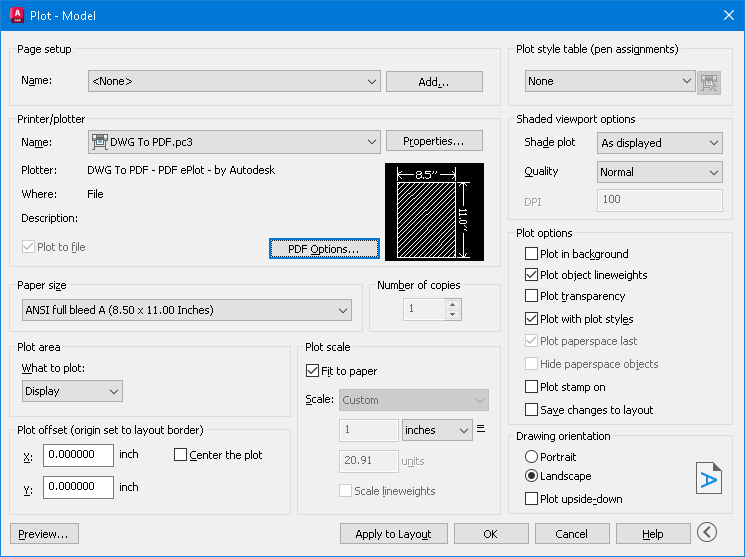
I can't get your examples to show as hyperlinks in Acrobat Pro or opening with MS Edge at work. If I create a hyperlink in AutoCAD, it shows as hyperlink in Adobe Pro and MS Edge, so not being blocked by Adobe Pro or AutoCAD. See if these show as hyperlinks on your reader. PDF_Hyperlink 3.pdf PDF_Hyperlink 2.pdf PDF_Hyperlink.pdf -
 mnorris5 joined the community
 -
 zyk joined the community
 -

Automatically creates Hyperlink in PDF... please stop it!
CyberAngel replied to Steven P's topic in AutoCAD 2D Drafting, Object Properties & Interface
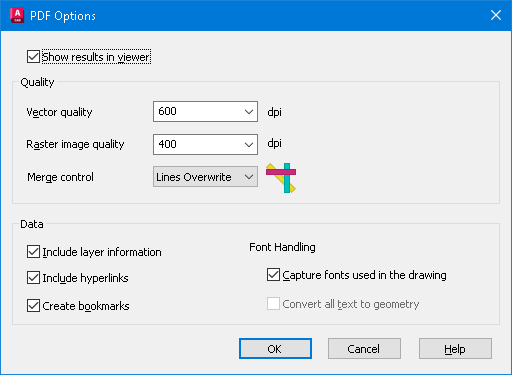
Is this text in a TTF font or SHX? AutoCAD exports SHX fonts to searchable comments. If you turn that off (set PDFSHX system variable to 0), maybe the links will turn off too. SLW seems to be on the right track with PDF Options, try that first. -
 Jordsts joined the community
 -

Automatically creates Hyperlink in PDF... please stop it!
Steven P replied to Steven P's topic in AutoCAD 2D Drafting, Object Properties & Interface
I'll try that shortly and see if that works. PDF options didn't do much - mostly I think it is a PDF viewer thing (got into a whole word of space names yesterday, EM-space, EN-space, half EM, quarter EM... and so on depends on the website, never knew there were so many 'spaces') -
Automatically creates Hyperlink in PDF... please stop it!
SLW210 replied to Steven P's topic in AutoCAD 2D Drafting, Object Properties & Interface
I meant to mention adding the (\U+200A). IIRC it's called a nonbreaking space. "Hairspace" sounds better IMO. I didn't try this, but one article mentioned to "Save As" or "Export to" PDF to kill the hyperlinks. My AutoCAD 2026 has the option to check Include Hyperlinks under PDF Options on the plot manager.
-
The OP mentioned the version they were inquiring about in the thread title and the first post as well as posted in the AutoCAD LT Forum. Some people may use more than one version.
-
Dynamic block pipes and fittings on existing line like revit
SLW210 replied to M07's topic in AutoLISP, Visual LISP & DCL
I have moved your thread to the AutoLISP, Visual LISP & DCL Forum, please post in the most appropriate forum. Please only post once for the same inquiry, I deleted your other threads. -
This code is so helpful to convert texts or mtexts to mleader. In the attachments the lisp file and cad file that has the problem I tied to solve. The cad file contains a huge amounts of elevations as texts and leaders that are exploded for landscape work , therefore this lisp can help with case like this Regards TBC- JOIN TEXT AND POLYLINES AND CONVERT THEM TO MLEADER OR MAKE IT MANUALLY.lsp BR FIN LVLS-1.dwg
-
- 2
-
-

-
Not sure why moderators missed this, which is the correct version your using, 2012 or 2026. A good idea is to update version if it's different to what is showing.
-
Table - Auto size height
BIGAL replied to sketch11's topic in AutoCAD 2D Drafting, Object Properties & Interface
The row height if using a lisp will auto adjust based on the row text height, I get around this problem by asking for text height as the control in the table I usually make a custom "Table Style" with the desired settings much easier than trying to fix an existing table. You can also define the margins around the text in the style. Yes do have something. -
Custom DCL List box and radio buttons loses focus and values.
BIGAL replied to BIGAL's topic in AutoLISP, Visual LISP & DCL
Thanks for the reply. I fixed the typo we all do it." ;ultiple_select=true;" It seems that using a defun for the (Action_tile lst1) seemed to work, the return is a string so added a convert to list at end so get ("0" "1") etc as answer the number in layout list as a string. I also removed the double cons so only get the actual answers as a list. As this is just a start code for updating title blocks in layouts the Anslstx variables will be localised. As I said about the added defun the anslst2 was working even when localised. Next step is adding some radio buttons to the dcl but hopefully that will not cause problems. So thanks again. -

Dynamic block pipes and fittings on existing line like revit
M07 posted a topic in AutoLISP, Visual LISP & DCL
Hello everyone, I need your help. I have a preset dynamic block for a pipe that I can stretch and adjust in size, along with several fittings like elbows, tees, reducers, etc. I want to know if there is a way, or a lisp, or any AutoCAD command, that I can use to automatically place these dynamic pipes and fittings on a previously drawn line or polyline routing, simply by selecting the routing so that AutoCAD can automatically position these fittings without me having to redraw them, matching and following the existing routing. -
Incredible: it seems that (GC) works! I think I last used this command on a 486! Thank you very much!
-

Custom DCL List box and radio buttons loses focus and values.
rlx replied to BIGAL's topic in AutoLISP, Visual LISP & DCL
you have no action_tile assigned to your edit_boxes key1 ... key4 also anslst1 anslts2 have been declared local in your defun so values are not exposed outside your defun ; For the original list box Listslect.lsp ; Modified by AlanH May 2026 to also have edit boxes (defun AH:xxxxxx1 ( / fo fn dcl_id key_lst keynum num x y) ;; anslst1 anslts2 ;(setq fo (open (setq fn "D:\\acadtemp\\xxxxxx.dcl") "W")) (setq fo (open (setq fn "C:\\temp\\xxxxxx.dcl") "W")) (foreach x (list "roslist_select : dialog {label=\"Layout choice\";" ": row { " " : column { " " : list_box {label=\"Please choose\";" " key=\"lst1\";allow_accept=false;height=15;width=25;ultiple_select=true;}" "}" " : boxed_column {" (strcat "label=" (chr 34) (nth 0 lst2) (chr 34) " ;") " width =25;" ) (write-line x fo) ) (setq num (/ (- (length lst2) 1) 4)) (setq x 0) (setq y 0) (repeat num (write-line "spacer_1 ;" fo) (write-line ": edit_box {" fo) (setq keynum (strcat "key" (rtos (setq y (+ Y 1)) 2 0))) (write-line (strcat " key = " (chr 34) keynum (chr 34) ";") fo) (write-line (strcat " label = " (chr 34) (nth (+ x 1) lst2) (chr 34) ";") fo) (write-line (strcat " edit_width = " (rtos (nth (+ x 2) lst2) 2 0) ";") fo) (write-line (strcat " edit_limit = " (rtos (nth (+ x 3) lst2) 2 0) ";") fo) (write-line " is_enabled = true ;" fo) (write-line " allow_accept=false ;" fo) (write-line " }" fo) (setq x (+ x 4)) ) (write-line "spacer ; " fo) (write-line "ok_cancel ;" fo) (write-line "}" fo) (write-line "}" fo) (write-line "}" fo) (close fo) (setq dcl_id (load_dialog fn)) (if (not (new_dialog "roslist_select" dcl_id))(exit)) (start_list "lst1") (mapcar (function add_list) lst1) (end_list) (set_tile "lst1" "0") (setq x 0) (setq y 0) (setq anslst2 '()) (repeat num (setq keynum (strcat "key" (rtos (setq y (+ Y 1)) 2 0))) (setq key_lst (cons keynum key_lst)) (set_tile keynum (nth (setq x (+ x 4)) lst2)) ) ; (mode_tile "key1" 2) ;(action_tile "accept" "(mapcar '(lambda (x) (setq anslst2 (cons (get_tile x) anslst2))) key_lst)(done_dialog)") (action_tile "accept" "(read_tiles key_lst)(done_dialog)") (action_tile "lst1" "(setq anslst1 $value)") (action_tile "cancel" "(done_dialog)") (start_dialog) (unload_dialog dcl_id) ; (if (setq fn (findfile fn)) (startapp "notepad" fn)) ; (vla-file-delete fn) (princ) ) ;;; end defun (defun read_tiles (key_lst) (foreach key key_lst (setq anslst2 (cons (cons key (get_tile key)) anslst2)))) ;;; hit & run (setq lst1 (cons "New layout" (layoutlist))) (setq lst2 (list "Enter values " "Date to add" 15 14 "" "Drawn by" 15 14 "" "Checked by" 15 14 "" "Approved by" 15 14 "")) (AH:xxxxxx1) (if (= anslst1 nil)(alert "anslst1 is nil")(princ anslst1)) (princ "\n") (princ anslst2) ; anslst1 holds lst1 select values ; anslst2 holds the getval values -
Automatically creates Hyperlink in PDF... please stop it!
Steven P replied to Steven P's topic in AutoCAD 2D Drafting, Object Properties & Interface
Thanks SLW210 for looking for me, a font of all knowledge