All Activity
- Past hour
-

AutoLISP routine not working in German AutCAD
mhupp replied to Vittorio's topic in AutoLISP, Visual LISP & DCL
in good programming you have to figure out where it will fail or do what you don't want. if your ok with turning off layers that end in -PT that its not suppose to. maybe add an output to see what its doing or the command might do that already cant test right now. and while command is slower than vla or entmake and has some other quarks its often times simpler/easier to use. as this for example two lines of code vers what i just posted. (defun c:foo ( / doc layers lay name laylist) (vl-load-com) (setq laylist '()) (vla-StartUndoMark (setq doc (vla-get-ActiveDocument (vlax-get-acad-object)))) (setq layers (vla-get-Layers doc)) (vlax-for lay layers (if (wcmatch (setq name (strcase (vla-get-Name lay))) "*-PT") (progn (setq laylist (cons name laylist)) ;build list of layer names (vla-put-Freeze lay :vlax-true) (vla-put-Off lay :vlax-true) ) ) ) (vla-EndUndoMark doc) (if laylist (progn (princ (strcat "\nLayers frozen and turned off (" (itoa (length laylist)) "):\n")) (foreach n (reverse laylist) (princ (strcat " " n "\n")) ) ) (princ "\nNo Layers Matching *-PT found.") ) (princ) ) You could probably combine those two functions into one using ldata as a toggle between on and off. ill post later tonight. - Today
-

AutoLISP routine not working in German AutCAD
Vittorio replied to Vittorio's topic in AutoLISP, Visual LISP & DCL
Oh dear, my mistake. I didn't think it through. It's obvious that objects cant be frozen or turned off so I rewrote and shortened my functions to this: ; Freeze and turn off layers with -PT suffix (defun c:zOff () (command-s "_-layer" "_freeze" "*-PT" "") (command-s "_-layer" "_off" "*-PT" "") (princ) ) ; Thaw and turn on layers with -PT suffix (defun c:zOn () (command-s "_-layer" "_thaw" "*-PT" "") (command-s "_-layer" "_on" "*-PT" "") (princ) ) Now they do exactly what I need them to, but is that foolproof? I tested the function in a drawing that contains at least one of the above mentioned layers and on a drawing that doesn't. No issues, only a message like "no matching layers found". That should be fine. I've read that VL(A(X))-functions are faster, but the code code would be bulky. Do you recommend something different from my code? Best regards -
 adry joined the community
 -
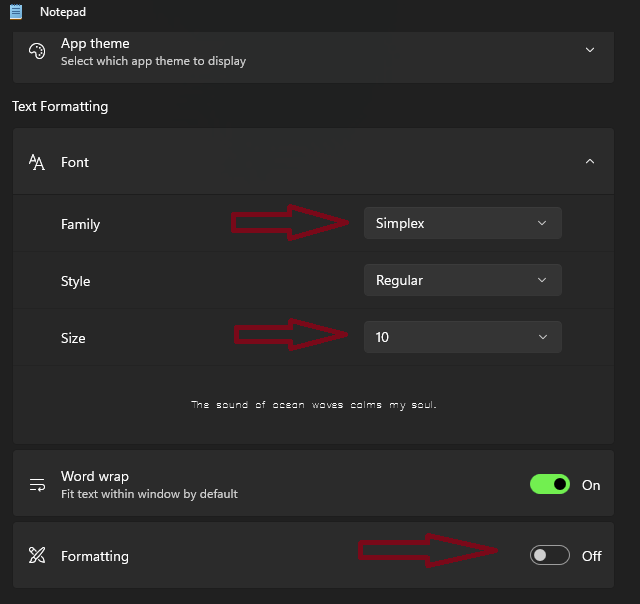
I'm assuming its the new Notepad and not the one from 1995. it defaults to copy text with formatting. You have three options. You can change the default font and size in notepad settings, disable formatting also in settings ,or use Ctrl + Shift + V to paste as plain text. there also might be a right click paste as plain text option.

-

Avoiding Copy and Paste to secure clipboard data progress!
ScottMC replied to ScottMC's topic in AutoLISP, Visual LISP & DCL
much easier to use the coords pastable.. I use them mid command with !pp <prev.point>... and needed to comment line '056' - Yesterday
-

Avoiding Copy and Paste to secure clipboard data progress!
Steven P replied to ScottMC's topic in AutoLISP, Visual LISP & DCL
A couple more comments: Collected the defuns together at the top of the routine - easier to spot them that way Used vl-princ-to-string for the coordinates to string, looses the ',' though but the reverse shouldn't need that Added a check that the layer exists before making it new (could be an error) Reset system variables to as they were (eg cmdecho_old) rather than specifying a value Just tidied up the indenting a touch - my ADHD - and added some annotations for closing brackets Do you need to use the selection set for anything else (ss) In the entmakex point, do you need to set 210 ? (defun c:4x (/ *error* pt1 ss ) (vl-load-com) (defun *error* ( msg ) (setvar 'cmdecho 0) (vla-endundomark (vla-get-activedocument (vlax-get-acad-object))) (if msg (prompt (strcat "\n" msg)) ) (setvar 'cursorsize Cursor_Old) ;; reset (setvar 'cmdecho CmdEcho_Old) ;; reset (princ) ) ; end *errror* (defun zPoint ( pt1 / exv) ;; 3d point mfg ;; added pt1, usually better to specify (setq pt1 (trans pt1 1 0)) (setq exv (trans (list 0 0 1) 1 0 T)) (entmakex (list (cons 0 "POINT") (cons 10 pt1) (cons 210 exv) ;; do you need to use 210? )) ; end entmakex, end list ) ; end zpoint (defun cdd ( pt1 / pp) (princ "\n") (setq pp (vl-princ-to-string pt1)) (princ pp) ; (princ ; (setq pp ; (strcat ; (rtos (car pt1) 2 4) "," ;; 'p' -- vertex from pgm /\ getpoint,... ; (rtos (cadr pt1) 2 4) "," ; (rtos (caddr pt1) 2 4) ; ) ; end strcat ; ) ; end setq ; ) ; end princ (princ " cucs ");; ; (entmakex (list (cons 0 "POINT") (cons 10 pt))) ;; clean point (setenv "pp" pp) ;; crash saved coords ) ; end defun cdd (vla-startundomark (vla-get-activedocument (vlax-get-acad-object))) ;; Start Undo (if (tblsearch "LAYER" "XLINE") (princ "\nLayer Exists") ;; Layer exist. Do nothing (entmakex '( (000 . "LAYER") (100 . "AcDbSymbolTableRecord") (100 . "AcDbLayerTableRecord") (002 . "XLINE") ;; Layer Name (070 . 0) ;; Layer Status (bit-coded) (006 . "Continuous") ;; Layer Linetype (must be loaded) (062 . 252) ;; Layer Colour (1-255) (290 . 0) ;; Non-Plot Flag (0=Plot, 1=NoPlot) (370 . -3) ;; Layer Lineweight (-3=Default) )) ; end list, end entmakex ) end if layer (princ (strcat "\n 45"(chr 186)"/135"(chr 186)" 3D.XLines <!pp>")) (setq Cursor_Old (getvar 'cursorsize)) (setvar 'cursorsize 1) ;; Get the initial placement point (setq CmdEcho_Old (getvar 'cmdecho)) (setvar 'cmdecho 0) (while (setq pt1 (getpoint "\nSpecify Point for XLines: ")) (progn ;; Create a new empty selection set (setq ss (ssadd)) ;; do you need this if it is a local variable - or is there more code later? ;; Create horizontal xline and add to selection set (command "_.xline" "_a" 45 pt1 "") (command "_.chprop" "_L" "" "_la" "XLINE" "") ;; make xline grey (ssadd (entlast) ss) ;; likewise, do you need this ;; Create vertical xline and add to selection set (command "_.xline" "_a" 135 pt1 "") (command "_.chprop" "_L" "" "_la" "XLINE" "") ;; make xline grey (ssadd (entlast) ss) ;; and this (cdd pt1) ;; post coords (zPoint pt1) ;; point at 'pick.point ) ; end progn ) ;; end of while ;;--reset variables--;; (setvar 'cmdecho CmdEcho_Old) (setvar 'cursorsize Cursor_Old) (vla-endundomark (vla-get-activedocument (vlax-get-acad-object))) ;; End Undo (princ) ; exit quietly ) -
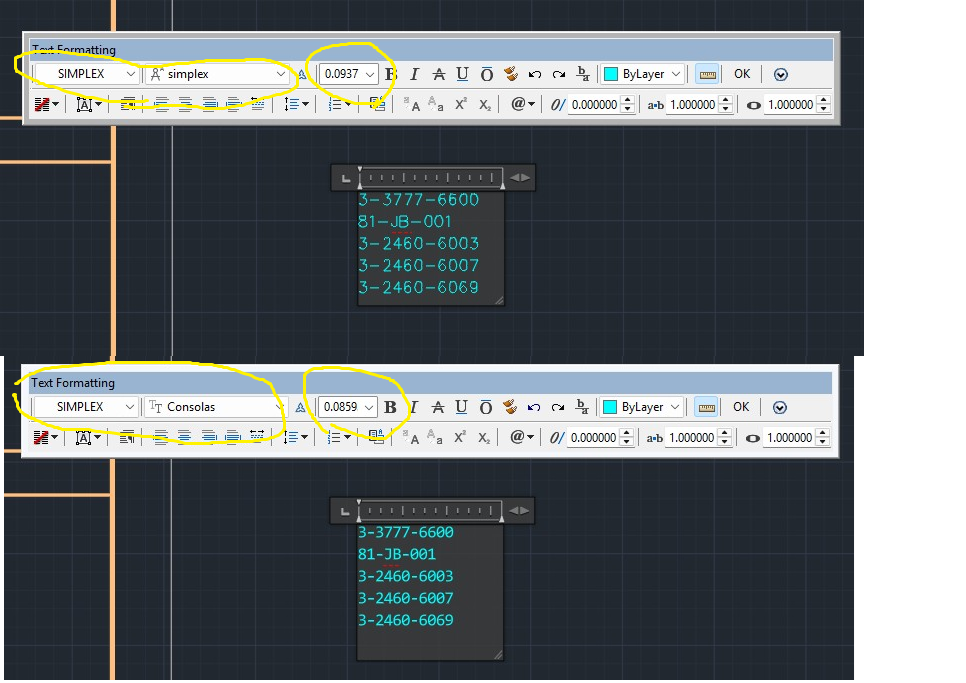
I call up an existing block of MTEXT. The style and font are both simplex. When I paste new text from a notepad file the editor changes the size and font. This is getting to be a big headache. Does anyone know how to fix this?
-
 BigDawg joined the community
 -
I was having an issue editing an alignment within 2026. I did not set up the file, or the alignment. I was trying to update the stationing but everything was locked/greyed out. I opened Geometry Editor, and unlocked the Parameter Constraints, no luck. I closed CAD, and even restarted my computer, still no luck. After selecting the alignment, it appeared to be data referenced into the file, when looking within my toolspace at data shortcuts, I did not see any such reference. With the alignment selected, I then selected Promote Data Reference under Modify within the menu, lo and behold, the alignment was editable! Maybe this is the case for you, maybe its not. Good luck!
-
https://www.zwsoft.com/support/zwcad-base-faq/517
-
Avoiding Copy and Paste to secure clipboard data progress!
ScottMC replied to ScottMC's topic in AutoLISP, Visual LISP & DCL
Suggestions received, posted and updated. As with the coords, the point is a reference entity. Thanks (defun c:4x (/ *error* pt1 pt2 ss ) (princ (strcat "\n 45"(chr 186)"/135"(chr 186)" 3D.XLines <!pp>")) ;; ai: https://www.google.com/search?q=saving+2+lines+selection%2C+autolisp&client=firefox-b-1-e&hs=AnK&sca_esv=3c4c5acec5573df9&biw=1198&bih=593&ei=JazVaZ2GN-3fp84P46_CyAM&ved=0ahUKEwjdrJWQit2TAxXt78kDHeOXEDkQ4dUDCBE&oq=saving+2+lines+selection%2C+autolisp&gs_lp=Egxnd3Mtd2l6LXNlcnAiInNhdmluZyAyIGxpbmVzIHNlbGVjdGlvbiwgYXV0b2xpc3AyBRAAGO8FMgUQABjvBTIFEAAY7wUyCBAAGKIEGIkFSKOCAVDmIlj5PHABeACQAQCYAakBoAHdCKoBAzEuN7gBDMgBAPgBAZgCCaACqAvCAg4QABiABBiwAxiGAxiKBcICCBAAGLADGO8FwgILEAAYsAMYogQYiQXCAgoQIRigARjDBBgKwgIIECEYoAEYwwSYAwCIBgGQBgqSBwUxLjYuMqAHwSSyBwUwLjYuMrgHzwrCBwczLTYuMi4xyAfBAYAIAA&sclient=gws-wiz-serp (vl-load-com) (defun *error* ( msg ) (setvar 'cmdecho 0) (vla-endundomark (vla-get-activedocument (vlax-get-acad-object))) (if msg (prompt (strcat "\n" msg))) (setvar 'cursorsize 100) ;; reset to my prefer (setvar 'cmdecho 1) (princ) ) (vla-startundomark (vla-get-activedocument (vlax-get-acad-object))) ;; (setvar 'cursorsize 1) (entmakex ;; <LM '( (000 . "LAYER") (100 . "AcDbSymbolTableRecord") (100 . "AcDbLayerTableRecord") (002 . "XLINE") ;; Layer Name (070 . 0) ;; Layer Status (bit-coded) (006 . "Continuous") ;; Layer Linetype (must be loaded) (062 . 252) ;; Layer Colour (1-255) (290 . 0) ;; Non-Plot Flag (0=Plot, 1=NoPlot) (370 . -3) ;; Layer Lineweight (-3=Default) ) ) (defun zPoint ( / exv) ;; 3d point at xline _mid (not on 'xline layer) (setq pt1 (trans pt1 1 0)) (setq exv (trans (list 0 0 1) 1 0 T)) (entmakex (list (cons 0 "POINT") (cons 10 pt1) (cons 210 exv))) ) (defun cdd () (princ "\n") (princ (setq pp ;; make/prints coords & paste usable (strcat (rtos (car pt1) 2 4) "," ;; 'p' -- vertex from \/ getpoint (rtos (cadr pt1) 2 4) "," (rtos (caddr pt1) 2 4) ) ) ) (princ " cucs ");; (setenv "pp" pp) ;; crash saved coords in reg ) ;;// ----------------------------------------------------------------------------------------------------------- ;; Get the initial placement point ;; (while (setq pt1 (getpoint "\nSpecify Point for XLines: ")) (setvar 'cmdecho 0) (progn ;; Create a new 'usable' empty selection set (setq ss (ssadd)) ;; Initialize an empty set: ;; Create horizontal xline and add to selection set (command "_.xline" "_a" 45 pt1 "") (command "_.chprop" "_L" "" "_la" "XLINE" "") ;; make xline grey (ssadd (entlast) ss) ;; adds 'xline to empty 'ss selection set ;; Create vertical xline and add to selection set (command "_.xline" "_a" 135 pt1 "") (command "_.chprop" "_L" "" "_la" "XLINE" "") ;; make xline grey (ssadd (entlast) ss) ;; adds another 'xline to 'ss selection set (cdd) ;; post coords of 'pick.point (zPoint) ;; point at 'pick.point ) (setvar 'cursorsize 100) ;; reset to my prefer (setvar 'cmdecho 1) ) ;; end of while (vla-endundomark (vla-get-activedocument (vlax-get-acad-object))) (*error* nil) (princ) ) -

Avoiding Copy and Paste to secure clipboard data progress!
pkenewell replied to ScottMC's topic in AutoLISP, Visual LISP & DCL
@ScottMC P.S. - I see now what the "zpoint" function intent is; for using (entmake) to create the points. I tried it out in a 3D drawing file, changing the current UCS, and it seems to work. fine. -
I didn't read the other responses, changing the value for LISPSYS worked. Thank you @mhupp @pkenewell
-
Oh yes - I forgot about that little detail
-
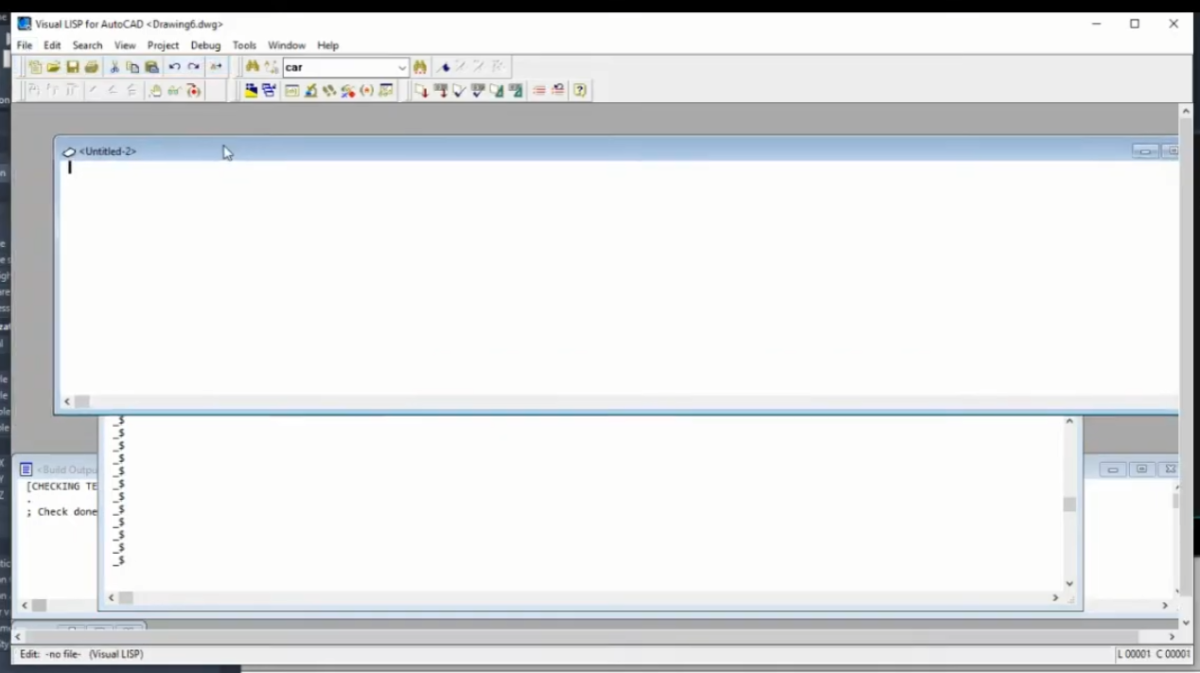
Ah that kinda sucks. Guess I'll have to learn the new environment. IDE had this button to inspect selection, does VS Code have something similar? Regardless, appreciate the prompt response @mhupp.
-
Ah looking it up you have to set the following https://help.autodesk.com/view/ACDLT/2026/ENU/?guid=GUID-1853092D-6E6D-4A06-8956-AD2C3DF203A3 (setvar 'LISPSYS 0)
-
@mhupp Correct it's no longer supported, but the "VLIDE" command and environment still works, at least as of my AutoCAD 2026.
-
AutoLISP routine not working in German AutCAD
pkenewell replied to Vittorio's topic in AutoLISP, Visual LISP & DCL
@Vittorio As @Nikon somewhat related, you should put an "_" (underscore) before all "option" selections within the command as well as the command name itself, to avoid localization problems. Example: (command "_.-layer" "_freeze" ss "") (command "_.-layer" "_off" ss "") Also as @mhupp related, you cannot free and turn off a selection, but only the whole layer. -
Autodesk no longer supports/updates VLIDE and i don't know if its even present in newer versions of autocad. They want you to use VS code. here is the setup process. https://help.autodesk.com/view/OARX/2023/ENU/?guid=GUID-7BE00235-5D40-4789-9E34-D57685E83875 to get vlide back you would have to roll back to something like 2020 or older.
-
Avoiding Copy and Paste to secure clipboard data progress!
pkenewell replied to ScottMC's topic in AutoLISP, Visual LISP & DCL
@ScottMC I don't see any functional problems with it, other than as Nikon said, you should use the "_." before commands, even though they are not strictly necessary. FYI - The "." (dot) ensures the actual AutoCAD command is used, in case it has been redefined, and the "_" (underscore) allows the command and any options within it to be used in any localized language version of AutoCAD. Example in your routine: (command "_.chprop" "_L" "" "_la" "XLINE" "") Additionally: 1) You should also reset your "cursorsize" variable at the end of the routine: (setvar 'cursorsize 100) 2) You are resetting an undo mark in your error routine, and you never included a starting undo mark, i.e. (vla-startundomark (vla-get-activedocument (vlax-get-acad-object))) at the beginning of the routine. 3) Your routine or file should have (vl-load-com) if you use the Visual LISP ActiveX functions in #2 above. 4) You don't need a (progn ...) statement within a (while) loop. (Added) That being said. I cannot properly test the purpose of the "zpoint" function without knowing in what context you are using it, i.e. a sample drawing situation to test with? Otherwise I don't really understand your purpose for it. -
Hello, I working in this environment not possible anymore? I'm on AutoCAD 2025. It seems like working only in VS Studio Code is possible now. I liked the dedicated UI better. Biggest function I'm missing is the "Load Selection" button. Any way I can do something similar in VS Studio Code? If I revert back to the older versions, would working in the Visual LISP environment be possible?
-

AutoLISP routine not working in German AutCAD
Nikon replied to Vittorio's topic in AutoLISP, Visual LISP & DCL
I probably you need to add (_) before "off" (Command "_.-Layer" "_off" lay "") ??? I don't have the "_FREEZE" command in Autocad 2021. (Unknown "_FREEZE" command). But there is a command "_.LAYFRZ". To test the command, type "_FREEZE" on the command line. -
AutoLISP routine not working in German AutCAD
mhupp replied to Vittorio's topic in AutoLISP, Visual LISP & DCL
You cant freeze\off only the points its either the whole layer or nothing. this makes a selection set and process it to find what layers they are on and turns feezes and turns off those layers. if their are other things on that layer they will also be frozen and off. (defun c:test01 ( / ss lay laylst) (vl-load-com) (setq doc (vla-get-ActiveDocument (vlax-get-acad-object))) (setq layers (vla-get-Layers doc)) (if (setq ss (ssget "_X" '((0 . "AECC_COGO_POINT") (8 . "*-PT")))) (foreach ent (vl-remove-if 'listp (mapcar 'cadr (ssnamex ss))) (setq lay (cdr (assoc 8 (entget ent)))) (if (not (member lay laylst)) (setq laylst (cons lay laylst)) ) ) (foreach lay laylst (setq layerObj (vla-Item layers lay)) (vla-put-Freeze layerObj :vlax-true) (vla-put-Off layerObj :vlax-true) ) (prompt "\nNo matching COGO points found.") ) (princ) ) -
AutoLISP routine not working in German AutCAD
Vittorio posted a topic in AutoLISP, Visual LISP & DCL
Hi everybody, I'm trying to perform a very simple task, but the LISP just won't work on my German AutoCAD (Civil 3D 2025 German). I have a LISP routine to get all COGO points on layers with "-PT" suffix and want them to be turned off and frozen. (defun c:test01 (/ ss) (vl-load-com) (setq ss (ssget "_X" '((-4 . "<AND")(0 . "AECC_COGO_POINT")(8 . "*-PT")(-4 . "AND>"))) ) (command "_-layer" "freeze" ss "") (command "_-layer" "off" ss "") (sslength ss) (setq ss nil) (princ) ) I get an error upon running the LISP. Something like "invalid option keyword" since the -LAYER option "freeze" is called "frieren" in German. I've tried various command* combinations, but all fail. *) _-COMMAND or _.-COMMAND I'm lost here, those non-localized prefixes should work and I can't figure out why. Any help appreciated -
 NANGELIFE joined the community
 -
Avoiding Copy and Paste to secure clipboard data progress!
Nikon replied to ScottMC's topic in AutoLISP, Visual LISP & DCL
The character (_) is missing in these lines. (command "_chprop" "_L" "" "_la" "XLINE" "") ;; make xline grey Maybe that's the problem. -
 edsel sydy joined the community
 -
Avoiding Copy and Paste to secure clipboard data progress!
ScottMC posted a topic in AutoLISP, Visual LISP & DCL
Need someone to get this tool to crash for a test and get me to find solution. Had this previously using no entmake or trans but seems to work now. (defun c:4x (/ *error* pt1 pt2 ss ) (princ (strcat "\n 45"(chr 186)"/135"(chr 186)" 3D.XLines <!pp>")) (defun *error* ( msg ) (setvar 'cmdecho 0) (vla-endundomark (vla-get-activedocument (vlax-get-acad-object))) (if msg (prompt (strcat "\n" msg))) (setvar 'cursorsize 100) ;; reset to my prefer (setvar 'cmdecho 1) (princ) ) (setvar 'cursorsize 1) (entmakex ;; <LM '( (000 . "LAYER") (100 . "AcDbSymbolTableRecord") (100 . "AcDbLayerTableRecord") (002 . "XLINE") ;; Layer Name (070 . 0) ;; Layer Status (bit-coded) (006 . "Continuous") ;; Layer Linetype (must be loaded) (062 . 252) ;; Layer Colour (1-255) (290 . 0) ;; Non-Plot Flag (0=Plot, 1=NoPlot) (370 . -3) ;; Layer Lineweight (-3=Default) ) ) (defun zPoint ( / exv) ;; 3d point mfg (setq pt1 (trans pt1 1 0)) (setq exv (trans (list 0 0 1) 1 0 T)) (entmakex (list (cons 0 "POINT") (cons 10 pt1) (cons 210 exv))) ) (defun cdd () (princ "\n") (princ (setq pp ;; make/prints coords & paste usable (strcat (rtos (car pt1) 2 4) "," ;; 'p' -- vertex from pgm /\ getpoint,... (rtos (cadr pt1) 2 4) "," (rtos (caddr pt1) 2 4) ) ) ) (princ " cucs ");; ; (entmakex (list (cons 0 "POINT") (cons 10 pt))) ;; clean point (setenv "pp" pp) ;; crash saved coords ) ;;// ----------------------------------------------------------------------------------------------------------- ;; Get the initial placement point (while (setq pt1 (getpoint "\nSpecify Point for XLines: ")) (setvar 'cmdecho 0) (progn ;; Create a new empty selection set (setq ss (ssadd)) ;; Create horizontal xline and add to selection set (command "_.xline" "_a" 45 pt1 "") (command "chprop" "_L" "" "la" "XLINE" "") ;; make xline grey (ssadd (entlast) ss) ;; Create vertical xline and add to selection set (command "_.xline" "_a" 135 pt1 "") (command "chprop" "_L" "" "la" "XLINE" "") ;; make xline grey (ssadd (entlast) ss) (cdd) ;; post coords (zPoint) ;; point at 'pick.point ) (setvar 'cmdecho 1) ) ;; end of while (princ) ) -
place align block through lisp going wrong
mhupp replied to pmadhwal7's topic in AutoLISP, Visual LISP & DCL
Was more to show pmadhwal7 an alternative code with less checks but same functionality so you get the wrong layout faster with less compute!