All Activity
- Past hour
-
Just a comment most files like this don't have a double line entry makes life a bit easier. Can remove double lines in a word processor and save as a txt file. x y z 21.0937p1 200.4997p1 0p1 22.0937p2 201.4997p2 0p2 23.0937p3 203.4997p3 0p3 23.0807p4 203.4797p4 0p4 Do you have more points ? It looks a bit too simple, what about lines next p1 p7 p8 p9, p3 p7 and so on, multiple lines. If from an Excel then post the Excel.
-

How can I write the code for a batch fillet plugin for images like this?
BIGAL replied to amook147's topic in AutoLISP, Visual LISP & DCL
Code what's that for ? Join Fillet R 0.4 P pickobject enter All done -
Creating a surface model in Civil 3D from existing 3D polylines, lines and points
BIGAL replied to 0misclose's topic in Civil 3D & LDD
"complex feature survey" one of the things not mentioned is the import from your total station data recorder, this way all line work is strung automatically, points set contourable or not, blocks inserted on those points and breaklines say by layer naming can be set. Do you have access to the field data, which total station ? There should be people here who can provide a CIV3D dwt set up for you to match your total station. Something I have and Autodesk did not do it is Import Description Keys, from Excel. You can export but not import. - Today
-
 Skultan joined the community
 -

help with extracting text from one dimension....
ronjonp replied to leonucadomi's topic in AutoLISP, Visual LISP & DCL
Glad to help : ) -
@GLAVCVSok ,l will manage it, thanks
-

help with extracting text from one dimension....
Nikon replied to leonucadomi's topic in AutoLISP, Visual LISP & DCL
@ronjonp Yes, thank you very much. It's perfect now! Sorry for explaining it wrong at the beginning. -
help with extracting text from one dimension....
ronjonp replied to leonucadomi's topic in AutoLISP, Visual LISP & DCL
Code updated above ... give it a try! -
@maahee I think you should copy the code again. I forgot to clean up the junk files before publishing it, and it might not be working properly because of that.
-
 Rhovium joined the community
 -
The separator character is " " (1 space) and is stored in <->. You will need to change it when necessary.
-
Try (defun c:crgPts (/ nmarch arch lin p p0) (defun damePts (tx m / c p l l1 i num nm nmdo damePts) (setq num "" nm "") (while (/= (setq c (substr tx (setq i (if i (1+ i) 1)) 1)) "") (if (= c m) (setq l (append l (list num)) l1 (if (not (member nm l1)) (append l1 (list nm)) l1) num "" nm "" nmdo nil) (cond ((and (not nmdo) (wcmatch c "#,[.]")) (setq num (strcat num c))) ((or nmdo (wcmatch c "@")) (setq nm (strcat nm c) nmdo T)) ) ) ) (cons (car l1) (if (/= num "") (append l (list num)) l)) ) (setq <-> " "); change if need (if (setq nmarch (getfiled "Load file" "" "txt" 2)) (if (setq arch (open nmarch "r")) (while (setq lin (read-line arch)) (setq p (damePts lin <->) p (list (atof (cadr p)) (atof (caddr p)) (if (cadddr p) (atof (cadddr p)) 0.0)) ) (if p0 (command "_line" p0 (setq p0 p) "") (setq p0 p) ) ) ) ) (princ) )
-
 蒸桑拿的企鹅 joined the community
 -
I did see a for-purchase program that used a raster image and maybe worked with QGIS, I'll see if I can find it again, the demo video looked pretty good and even split around islands, side branches, etc.. It had a lot of parameters to fill out in a window for what to grab, so still a good bit of work, IIRC.
-

How can I write the code for a batch fillet plugin for images like this?
SLW210 replied to amook147's topic in AutoLISP, Visual LISP & DCL
Are you looking for a LISP, Python, VBA, .NET, etc.? I moved your thread to the AutoLISP, Visual LISP & DCL Forum. -
x y z 21.0937p1 200.4997p1 0p1 22.0937p2 201.4997p2 0p2 23.0937p3 203.4997p3 0p3 23.0807p4 203.4797p4 0p4 The txt file should always be kept in the above uniform format and should have the prefix or suffix from the point point.txt
-
lisp to find convert all unexplodable blocks within a file to explodable blocks
Nikon replied to Elektrik's topic in AutoLISP, Visual LISP & DCL
Yes, rename the block first, then use the @ronjonp code. -
help with extracting text from one dimension....
Nikon replied to leonucadomi's topic in AutoLISP, Visual LISP & DCL
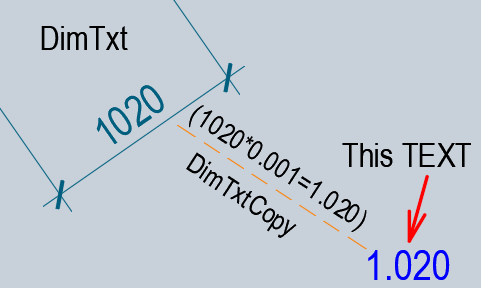
Probably, for my task, it will be easier to change the @mhupp code. ;; Copy dimension value to another location (x0.001) + text angle = 0 ;; DimCopy.lsp the original / creator mhupp ;; https://www.cadtutor.net/forum/topic/75587-help-with-extracting-text-from-one-dimension/#findComment-597630 ;; modification using AI (defun _DimCopy001:OnlyNum (s / lst out c) ;; we leave only numbers, minus sign, period/comma (setq lst (vl-string->list s) out "") (foreach c lst (if (member c (vl-string->list "0123456789-.,")) (setq out (strcat out (chr c))) ) ) ;; comma -> period (vl-string-subst "." "," out) ) (defun _DimCopy001:SetText (e / ed txt num new r50) (setq ed (entget e) txt (cdr (assoc 1 ed))) ;; change the text to *0.001 (if (and txt (/= txt "")) (progn (setq txt (_DimCopy001:OnlyNum txt)) (if (and txt (/= txt "")) (progn (setq num (atof txt)) (setq new (rtos (* num 0.001) 2 3)) ; for example 4250 -> 4.250 (setq ed (subst (cons 1 new) (assoc 1 ed) ed)) ) ) ) ) ;; ang 0 (DXF 50) (if (setq r50 (assoc 50 ed)) (setq ed (subst (cons 50 0.0) r50 ed)) (setq ed (append ed (list (cons 50 0.0)))) ) (entmod ed) (entupd e) ) (defun C:DimCopy001Txt (/ dim BP LastEnt en obj oldEcho) (vl-load-com) (setq oldEcho (getvar 'cmdecho)) (setvar 'cmdecho 0) (while (setq dim (car (entsel "\nSelect Dimension: "))) (setq obj (vlax-ename->vla-object dim)) (setq BP (vlax-get obj 'TextPosition)) (setq LastEnt (entlast)) (command "_.Copy" dim "" "_non" BP (getpoint BP "\nCopy to: ")) (command "_Explode" (entlast)) (if (setq en (entnext LastEnt)) (while en (cond ((= "MTEXT" (cdr (assoc 0 (entget en)))) (command "_Explode" en) ; convert mtext to text ) ((= "TEXT" (cdr (assoc 0 (entget en)))) (_DimCopy001:SetText en) ; <<< scale + angle 0 ) (t (entdel en) ) ) (setq en (entnext en)) ) ) ) (setvar 'cmdecho oldEcho) (princ) ) Perhaps this code can be made prettier and shorter... -

How can I write the code for a batch fillet plugin for images like this?
amook147 posted a topic in AutoLISP, Visual LISP & DCL
Drawing2.dwg As shown in the figure below: Select multiple graphics in batch and change the R value from 0.2 to another value?
-
amook147 joined the community
-
help with extracting text from one dimension....
Nikon replied to leonucadomi's topic in AutoLISP, Visual LISP & DCL
@ronjonp thanks. This code reduces the height of the text, but I need to reduce the dimension value (x 0.001) and insert the text (angle text 0, text height = height of the dimtext).
-

Creating a surface model in Civil 3D from existing 3D polylines, lines and points
tombu replied to 0misclose's topic in Civil 3D & LDD
- Yesterday
-

lisp to find convert all unexplodable blocks within a file to explodable blocks
Lee Mac replied to Elektrik's topic in AutoLISP, Visual LISP & DCL
You could use this to rename the reference in question so that it references a different (duplicate) block definition, which could then be marked as explodable. -
help with extracting text from one dimension....
ronjonp replied to leonucadomi's topic in AutoLISP, Visual LISP & DCL
Something like this? (defun c:foo (/ d e el m p1 p2) (cond ((and (setq e (car (entsel "\nPick dimension: "))) (vlax-property-available-p (vlax-ename->vla-object e) 'measurement) (setq d (vla-get-measurement (vlax-ename->vla-object e))) (progn (vlax-for a (vla-item (vla-get-blocks (vla-get-activedocument (vlax-get-acad-object))) (cdr (assoc 2 (entget e))) ) (and (= "AcDbMText" (vla-get-objectname a)) (setq m (vlax-vla-object->ename a))) ) m ) (setq p1 (cdr (assoc 10 (setq el (entget m))))) (setq p2 (getpoint p1 "\nSpecify second point: ")) ) (setq e (entmakex (append (vl-remove-if '(lambda (x) (= 330 (car x))) el) (list (cons 10 p2)))) ) (vla-put-textstring (setq e (vlax-ename->vla-object e)) (vl-princ-to-string (* 0.001 d))) (vla-put-rotation e 0.) ) ) (princ) ) -
lisp to find convert all unexplodable blocks within a file to explodable blocks
ronjonp replied to Elektrik's topic in AutoLISP, Visual LISP & DCL
This is not possible that I'm aware of. The code above could be modified to explode the blocks selected then make those block definitions un-explodable again. -
lisp to find convert all unexplodable blocks within a file to explodable blocks
BIGAL replied to Elektrik's topic in AutoLISP, Visual LISP & DCL
You may have to Wblock one block, open the wblock, change the explode to "Yes" then rename the block. You can now insert that block into your dwg say deleting the original block. But you will have 2 blocks. -
@SLW210 I like the idea of choices in layout name, the main issue is how each company names their layouts or sheet names etc. We used a simple year+projectnumber so a a 2026002-D01 was the name of a layout and single PDF when plotted. If a multi page pdf it would be just 2026002.pdf but we had revisions and a plot date on each sheet.
-
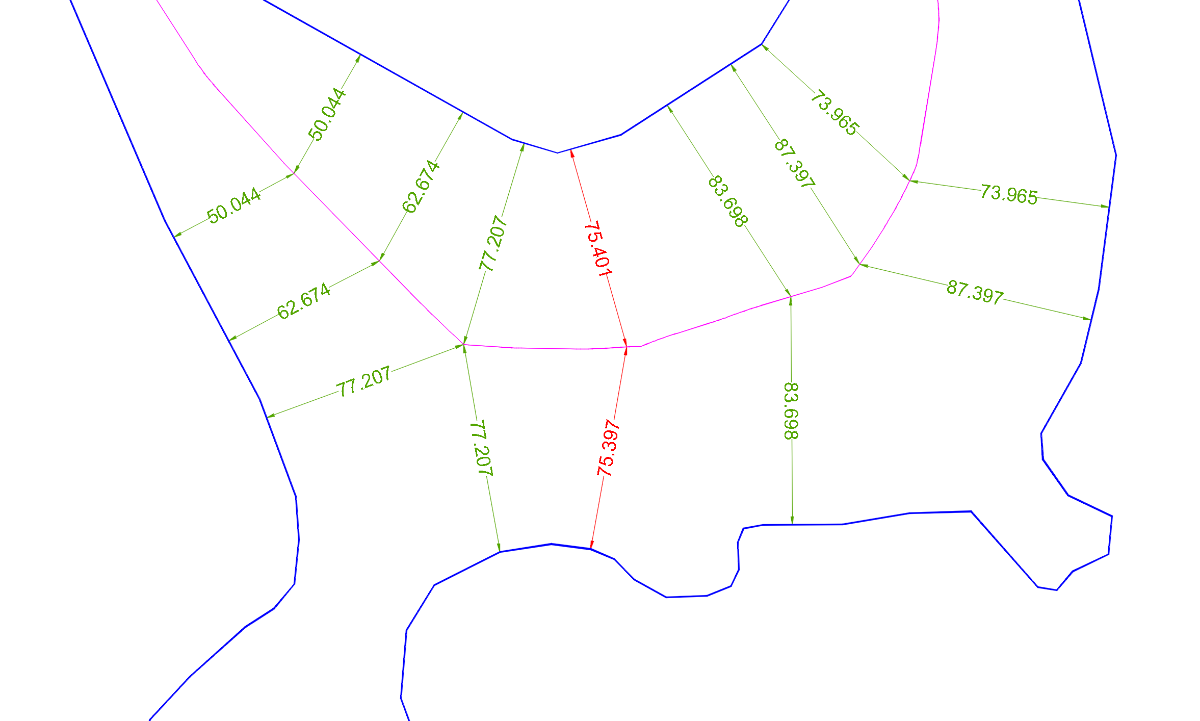
@GLAVCVS I’ve been testing your latest code. It’s truly impressive. I’m attaching an image of the most difficult area of the last drawing: it’s hard to find a spot where the centerline is not perfectly equidistant. And where it isn’t, it’s always below the tolerance — hats off to you. I’ve also been curious to try the code on embedded geometric figures. As you said, the code fails quite badly here. But when it does work, it returns results that are quite different from those of the @dexus or @GP_ codes, which are much simpler I wonder: why?
-
lisp to find convert all unexplodable blocks within a file to explodable blocks
Nikon replied to Elektrik's topic in AutoLISP, Visual LISP & DCL
I apologize for my English. I use a translator, but I'm not sure if it translates well enough. I have several blocks with the same name. I want to allow exploding for only one selected block. Convert one unexplodable block to explodable block (another translation). Is it possible to leave the other blocks of the same name unchanged?