All Activity
- Past hour
-
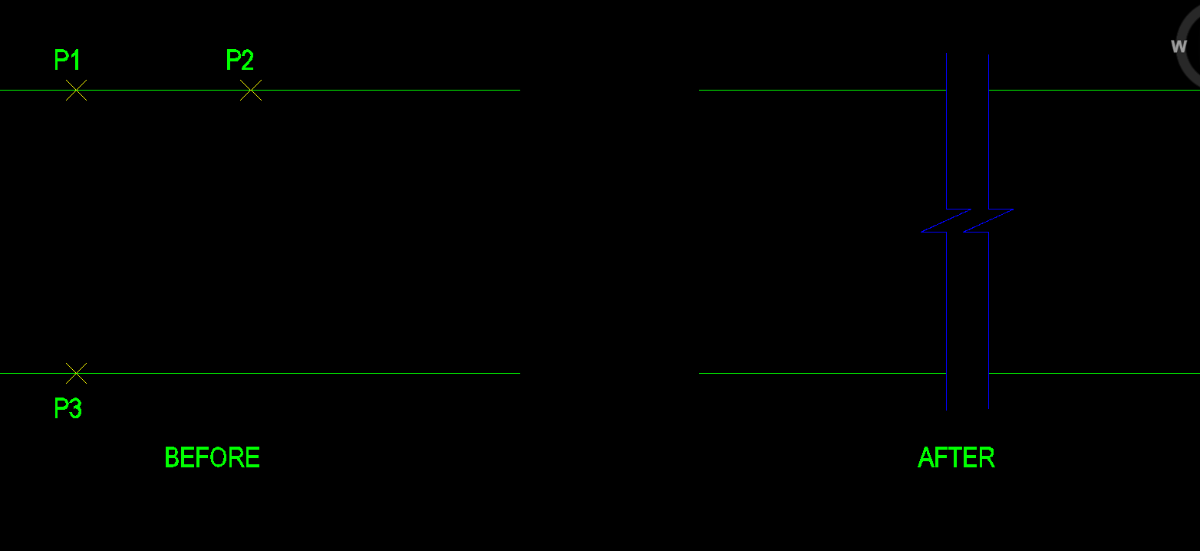
A small modification of the DZ code for convenience. The Break lines can be lengthen by the specified distance (Fixed) or proportionally (by 1/3) or None. [Fixed/Proportional/None] ;;; Lisp to draw Single or Double "Z" Break Lines ;;; © A.Henderson 2002 ;;; Modified By Charles Alan Butler 10/06/2004 ;;; To allow any angle and to trim lines that ;;; do not run through both break symbols ;;; Modified 12/02/26 ;;; The Break lines can be lengthen by the specified distance (Fixed) ;;; or proportionally (by 1/3) or None (defun c:dz-mod (/ oldlay oldotho oldosmode ztype dist ang extOpt extLen dist0 segLen e1 e2 p1 p2 p3 p4 p5 p6 p7 p8 p9 p10) ;; return vertex list by MP (defun cdrs (key lst / pair rtn) (while (setq pair (assoc key lst)) (setq rtn (cons (cdr pair) rtn) lst (cdr (member pair lst)) ) ) (reverse rtn) ) ; defun ;; set osnaps ON/OFF (defun setosnaps (value) ; value = "ON" or default to "OFF" (if value (setq value (strcase value)) ) (cond ((or (and (= value "ON") (>= (getvar "osmode") 16383)) (and (/= value "ON") (<= (getvar "osmode") 16383)) ) (setvar "osmode" (boole 6 (getvar "osmode") 16384)) ) ) ); defun ;; Start of routine ================================== ;; Save settings (setq oldlay (getvar "clayer") oldortho (getvar "orthomode") oldosmode (getvar "osmode") ) ;_ end of setq ;; I use current layer - CAB ;;(command "_.layer" "_make" "Z-Line" "_Colour" "41" "" "") (initget "S D") ;(setq ztype (getkword "\n Single or Double -^v-^v- ? (S or D) <S>")) (setq ztype (getkword "\n Single or Double -^v-^v- ? [S/D] <S>")) (setosnaps "ON") ; force on ;;=========================================== (if (and (setq p1 (getpoint "Starting point of break line : ")) (setq p6 (getpoint p1 "End point of break line : ")) ) (progn;=========================================== ;;; --- EXT --- calculate the base length/angle based on the selected points (setq dist0 (distance p1 p6)) ;;; --- EXT --- elongation mode (Fixed = 50 by default) (initget "F P N") (setq extOpt (getkword "\nExtend beyond picked points? [Fixed/Proportional/None] <Fixed>: ")) (cond ((or (not extOpt) (= extOpt "F")) (setq extLen (getdist "\nExtension length <50>: ")) (if (null extLen) (setq extLen 50.0)) ) ((= extOpt "P") ;; 1/3 of the straight section (straight section = 0.4167*dist for S, and 0.4167*(dist/2) for D) (setq segLen (* 0.4167 (if (= ztype "D") (/ dist0 2.0) dist0))) (setq extLen (/ segLen 3.0)) ) (T (setq extLen 0.0)) ) (setvar "plinewid" 0) (command "._undo" "_begin") (cond ((/= ztype "D") ; default to single (setq dist (distance p1 p6) ang (angle p1 p6) p2 (polar p1 ang (* 0.4167 dist)) p5 (polar p1 ang (* 0.5833 dist)) p3 (polar p2 (+ 1.25664 ang) (* 0.1667 dist)) p4 (polar p5 (+ 4.39824 ang) (* 0.1667 dist)) ) ;_ end of setq ;;; --- EXT --- we only lengthen the ends (the symbol remains at the base points) (setq p1 (polar p1 (+ ang pi) extLen) p6 (polar p6 ang extLen) ) (setosnaps "OFF") ; force off (command "_.pline" p1 p2 p3 p4 p5 p6 "") ; Draw the Z-Line ) ;_ end cond "S" ;;=========================================== ((= ztype "D") (setq p10 p6 dist (/ (distance p1 p6) 2.0) ang (angle p1 p6) p2 (polar p1 ang (* 0.4167 dist)) p5 (polar p1 ang (* 0.5833 dist)) p3 (polar p2 (+ 1.25664 ang) (* 0.1667 dist)) p4 (polar p5 (+ 4.39824 ang) (* 0.1667 dist)) p6 (polar p5 ang (* 0.8334 dist)) p9 (polar p6 ang (* 0.1661 dist)) p7 (polar p6 (+ 1.25664 ang) (* 0.1667 dist)) p8 (polar p9 (+ 4.39824 ang) (* 0.1667 dist)) ) ;_ end of setq ;;; --- EXT --- we extend the start and the very end (p10), we do not touch the inside (setq p1 (polar p1 (+ ang pi) extLen) p10 (polar p10 ang extLen) ) (setosnaps "OFF") ; force off (command "_.pline" p1 p2 p3 p4 p5 p6 p7 p8 p9 p10 "") ; Draw the Z-Line ) ;_ end cond ) ; end cond stmt ;; Position the second break line (setq e1 (entlast)) (command "_.pedit" e1 "_L" "_ON" "") (command "_.copy" e1 "" (getvar "lastpoint") pause) (setq e2 (entlast)) (setq plast (getvar "lastpoint")) ;; trim function (initget "Y N") (setq ans (getkword " Do you wish to trim the lines now ? [Y/N] <Y>")) (if (or (= ans "Y") (not ans)) (progn (setq lst '() dist (/ dist 140.0) ; trim distance ) ;; create trim lines (command "._offset" dist e1 plast "") (setq evl1 (cdrs 10 (entget (entlast)))) ; ent vertex list (entdel (entlast)) (command "._offset" dist e2 p1 "") (setq evl2 (cdrs 10 (entget (entlast)))) (entdel (entlast)) (setq lst (append evl1 (reverse evl2))) (setosnaps "OFF") ; force off (command "_.trim" e1 e2 "" "_F") (apply 'command lst) (command "" "") (command "_.trim" e1 e2 "" "_F") (apply 'command lst) (command "" "") ) ; progn ) ;_ endif (command "._undo" "_end") ) ; progn ) ; endif ;;================ ;; Exit sequence ;;================\ ;; Restore settings ;; I use current layer - CAB ;;(command "_.layer" "set" oldlay "") (setvar "orthomode" oldortho) (setvar "osmode" oldosmode) (princ) ) ;_ end of defun (prompt "\nDouble Break Symbol Creator loaded. Type DZ to run it." ) (princ)

-

Text disappears behind viewport
SLW210 replied to Samr1979's topic in AutoCAD 2D Drafting, Object Properties & Interface
I merged your 2 threads, no need to post twice, if you post in the wrong forum it can be moved, 2 threads becomes confusing. -

Copying a Value into the Clipboard without using Active-X so it can work on LT
Steven P replied to CivilTechSource's topic in AutoLISP, Visual LISP & DCL
Generally I save to the same folder as the CAD file - most of our projects however have a PDF folder... but the relative file paths to these are different depending which project manager sets up the folders... so save to the same as the CAD file is easiest and most logical really. Usually I have windows Explorer opened at that point anyway from opening the files to start with. (setq MyFilePath (getvar 'dwgprefix) ) ;; Example c:\\CADFolder\\TestFiles\\ (setq MyFileName (vl-filename-base (getvar 'dwgname)) ) ;; Example MyDrawing (setq MyFileNamePlusType (getvar 'dwgname) ) ;; Example MyDrawing.dwg (setq PDFFilePathandName (strcat MyFilePath MyFileName ".pdf") );; Example c:\\CADFolder\\TestFiles\\MyDrawing.pdf Noting the double \\ is generated automatically with these. Which might be applied to yours like this: (setq MyFilePath (getvar 'dwgprefix) ) (setq final (strcat Dwg_No "-" Dwg_Status "-" Dwg_Rev "_" Dwg_Name)) (setq PDFFilePathandName (strcat MyFilePath final ".pdf") ) As for comfortable with things, once you show them PDFs being made with 6 or 7 characters from the keyboard, command line, should win them over -
 hsec joined the community
 -
Also has some Breakline symbols here... http://www.theswamp.org/index.php?topic=37531 I seem to recall getting a similar LISP from Cadalyst years ago, but since CAB's works per OP, I am not planning to see if I can dig it up.
-

Copying a Value into the Clipboard without using Active-X so it can work on LT
CivilTechSource replied to CivilTechSource's topic in AutoLISP, Visual LISP & DCL
Hi @BIGAL I have tried the getpropertyvalue and it works in LT! Which is good news as that means the lisp can be reduced. @Saxlle that could be a solution, but the whole point is to automate it as much as possible. I had a think about it before and the most effective way for out team is to just type print me and then the drawing name gets generated and saved on the clipboard and then when they setup the plot settings they can paste the name in the dialogbox. So pausing to copy the name, will add extra steps which I am trying to reduce. @Steven P that would be the final step making sure that it is completely automated. But fearing some might not be comfortable with it yet, I just want to slowly introduce these little automations. With your suggestion, how does it work in terms of where to save the pdf file? -
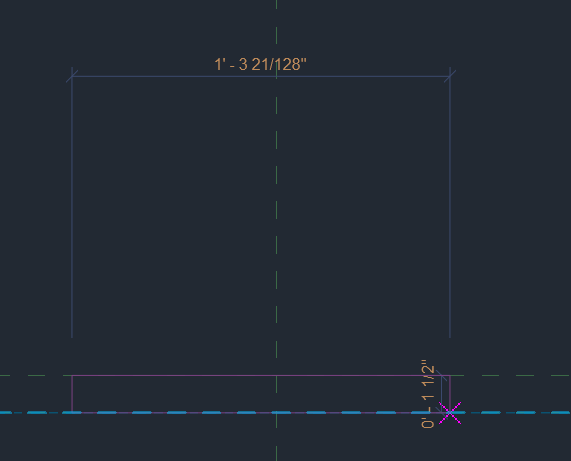
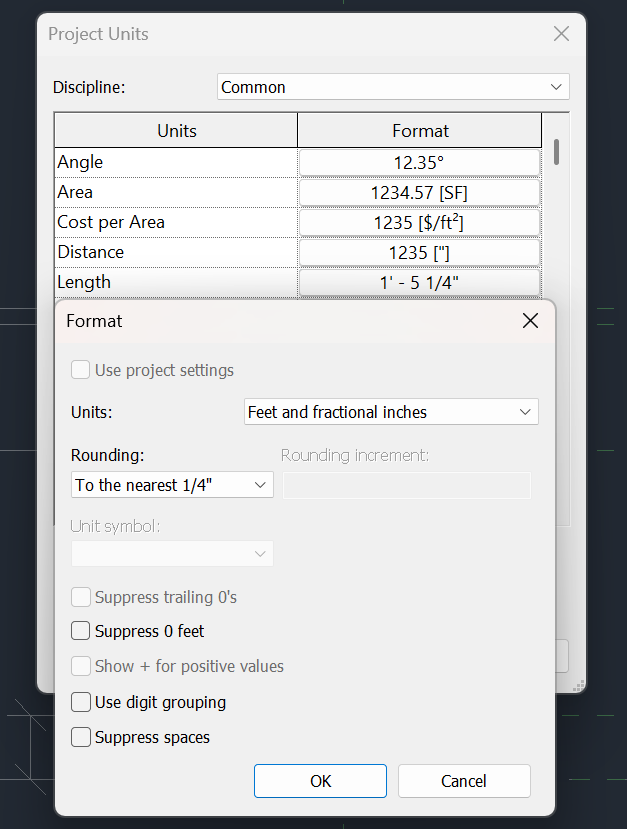
When I am making a new component and drag, the dimensions are in 128ths... My units are set to the nearest 1/4" (so I thought) Where do I set my units such that dragging constrains to the nearest 1/4"
-
SuperBoundary • The superior boundary creation tool
SLW210 commented on Debalance's file in Programs and Scripts
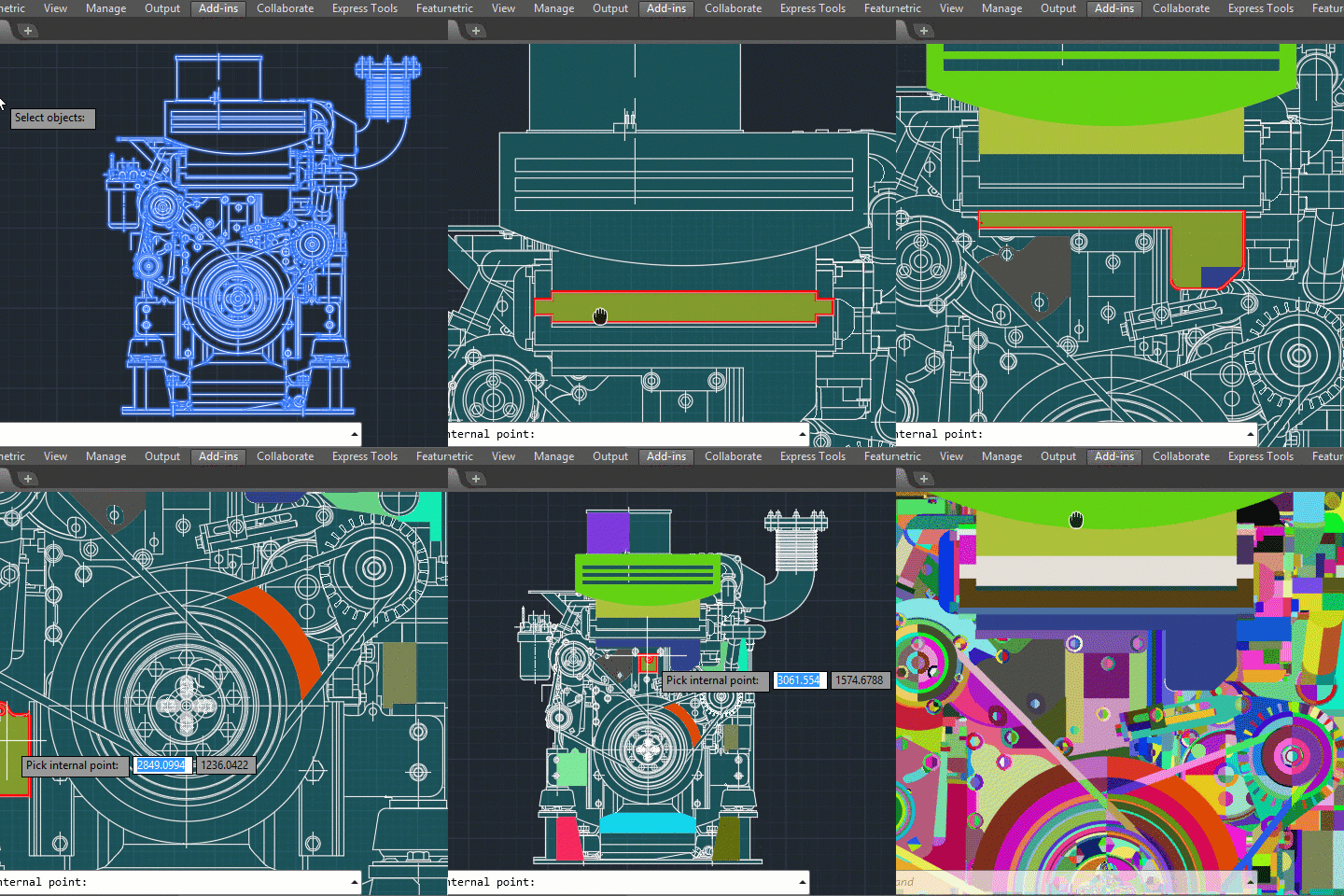 Looks like the certificate expired a month ago, that's why there is a warning. They haven't been around in nearly 2 years and appears to be gone from Autodesk APP Store. There is a YouTube Channel and Facebook page, but others have been trying to contact him since December 2024 with no luck AFAIK.
 -

Penn Foster AutoCAD Applications-Construction assistance (Residential House Project)
ReMark replied to TimC's topic in Student Project Questions
Try using a scale factor of 60. That equates to an architectural scale of 1"=50". - Today
-
Penn Foster AutoCAD Applications-Construction assistance (Residential House Project)
SLW210 replied to TimC's topic in Student Project Questions
Almost every project should be on here AFAIK. Student Project Questions - AutoCAD Forums Here is the Oleson Village... Penn Foster Student Suffering with Oleson Village Map!!! - Student Project Questions - AutoCAD Forums -
 OK folks, new guy here. So far in my research it sounds like Penn Foster should have their own dedicated forum. I was wondering if there was somewhere projects are posted so we can compare to be sure we've done stuff correctly? I submitted my "Oleson Housing Development" project and received a 15% because "the scale was off". Needless to say, I was less than impressed. I've sent weeks working on this project for the third semester between working overtime and sleep so I want to be sure I don't get a grade like that again. Thank you in advance for any help
 -
TimC joined the community
-
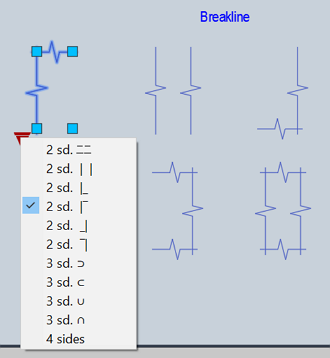
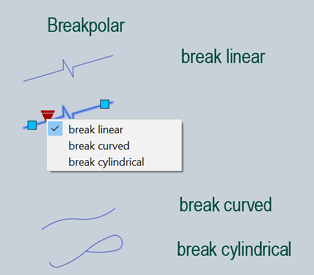
Alternative option. You can use a dynamic block with a selection of different states. You can change the block scale. Breakline.dwg
-

2 Step Command Alias in PGP File
Akash_SAK replied to EVGA Buzzer's topic in AutoCAD Beginners' Area
Thankyou Bigal for the information and may i know that where would be the autocad Lisp package file is available on PC ? -

Pathfinding in AutoCAD with the A-Star Algorithm (A*)
ymg3 replied to heschr's topic in AutoLISP, Visual LISP & DCL
@bigal, Reminds me of the days of HP9830, used to work on preliminay studies in the James Bay area. I would start calculating a long polygon in geodetic coordinates then go in the tent where we had a pool table and shoot two racks. Go back to the office tent still had to wait some. The hp9830 had but 8k core memory and a cassette tape. So the need for speed depends on the situation. For the basic A* it's all about it and the hack proposed by @GLAVCVS is totally worth it. The polygon making not so much, but I tend to be biased in favor of vanilla autolisp. -

SuperBoundary • The superior boundary creation tool
lowebowski commented on Debalance's file in Programs and Scripts
Does anyone know how to get a hold of the developer of this app? It does exactly what I want, but am unable to purchase a license through the app as the link no longer works and I have had no luck contacting the developer from their company page. Their company page at www.debalance.com also pops up a warning that it may not be safe upon opening, and is not a secure site. Do the mods at CADTutor have any way to contact the author? It seems he used to be quite active on the boards here. Anyways, great little plugin, it just seems too bad there is no way to buy a license! - Yesterday
-

Pathfinding in AutoCAD with the A-Star Algorithm (A*)
BIGAL replied to heschr's topic in AutoLISP, Visual LISP & DCL
We talk a lot about speed but does it matter, if it take seconds or a minute, a task I worked on could take up to 3 hours manually it takes 2 minutes now. I improved the speed 3 times by recoding. Yes if have thousands of lines go get a coffee. still faster than having a go manually. I guess what I am saying are we talking seconds, minutes or hours ? 13 seconds for 5000, I would call that fantastic. If worried about time add a progress bar it's a Acet function. The task above started at like 25 minutes to do, so 2 minutes as final version is considered acceptable by me. Yes talking thousands of changes. -
Like @Steven P my Autoload.lsp has around 35 defuns in it plus some setvar's and uses the Appload add to Startup suite, Acad or Bricscad works.
-
Here's an old one CAB wrote. dz.lsp
-
Copying a Value into the Clipboard without using Active-X so it can work on LT
BIGAL replied to CivilTechSource's topic in AutoLISP, Visual LISP & DCL
As @Steven P suggested you can have as many plot predefined settings as you want. Did you test the "getpropertyvalue" code in your LT as per my request above. I don't have LT so can not test.
-
hello: Does anyone have something that does this or something similar? Break the lines and draw those symbols Any comments are welcome, thank you.
-
Text disappears behind viewport
BIGAL replied to Samr1979's topic in AutoCAD 2D Drafting, Object Properties & Interface
When I plotted the layout to PDF the table came out Ok. Tried a couple of things like draworder etc but they had no effect. Ok a way around it, copy the table to clipboard and paste in MODEL, go back to layout make a new viewport in layout set UCS W PLAN zoom in on table etc and set a suitable scale, shrink the viewport close to the table move the viewport over the two other viewports. I am sure if I played more could work out viewport scale so correct text height. Ps set viewport outline to "No Plot".
-
Pathfinding in AutoCAD with the A-Star Algorithm (A*)
ymg3 replied to heschr's topic in AutoLISP, Visual LISP & DCL
I don't know but I used "Benchmark.lsp | © 2005 Michael Puckett " to do the testing. Logically yours has to be slower because you run through the list so many more time either with apply (function append plus a mapcar for each element of the list to to Float the coordinates. Bear in mind it will only matter if the path found has a lot of coordinates. ymg -

Pathfinding in AutoCAD with the A-Star Algorithm (A*)
GLAVCVS replied to heschr's topic in AutoLISP, Visual LISP & DCL
I use that code to create 3D polylines because it’s shorter, although I know that 'apply' slows it down a bit. However, I didn’t think it would be as much as you say. I was just about to reply with that. But at the last moment, I managed to find a bit of time — and curiosity — to run a test. And my results are somewhat different from what you describe. I should mention that my test was carried out in AutoCAD 2002, using a list of 93 points previously stored in the variable 'plst'. The code I used for this test is attached below. (defun Original_f3Dpol (pts / tmp f3Dpol) (defun f3Dpol (pts / ep ll la e) (setq ep (if (= 1 (getvar (quote cvport))) (vla-get-PaperSpace (vla-get-activedocument (vlax-get-acad-object))) (vla-get-modelSpace (vla-get-activedocument (vlax-get-acad-object)))) ll (apply (function append) pts) la (vlax-safearray-fill (vlax-make-safearray vlax-vbDouble (cons 0 (1- (length ll)))) (mapcar (function float) ll)) e (vla-Add3DPoly ep la) ) (vla-put-Color e 1) (vla-put-Layer e "0") (vla-put-Lineweight e 0.4) ) (setq tmp (car (_vl-times))) (repeat 5000 (f3Dpol plst) (entdel (entlast)) ) (prompt "\nOriginal \'f3Dpol\' Elapsed time (5000 iterations): ") (princ (rtos (/ (- (car (_vl-times)) tmp) 1000.0) 2 50)) (prompt " seconds.") (princ) ) (defun ymg_f3Dpol (plst / tmp f3Dpol) (defun f3Dpol (plst / sa i p element sa obj ) (setq sa (vlax-make-safearray vlax-vbDouble (cons 0 (1- (* (length plst) 3))))) (setq i 0) (foreach p plst (foreach element p (vlax-safearray-put-element sa i (float element)) (setq i (1+ i)) ) ) (setq obj (vla-Add3DPoly (vla-get-modelSpace (vla-get-activedocument (vlax-get-acad-object))) sa)) (vla-put-Color obj 1) (vla-put-lineweight obj 0.4) ) (setq tmp (car (_vl-times))) (repeat 5000 (Y3Dpol plst) (entdel (entlast)) ) (prompt "\nModified @ymg3 \'f3Dpol\' Elapsed time (5000 iterations): ") (princ (rtos (/ (- (car (_vl-times)) tmp) 1000.0) 2 50)) (prompt " seconds.") (princ) ) (defun ymg_mk_3dp (lst / tmp mk_3dp) (defun mk_3dp (lst / vtx) (if (and (> (length lst) 1)) (progn (entmakex (list '(0 . "POLYLINE") '(10 0. 0. 0.) (cons 8 "0") (cons 62 1) (cons 370 40) '(70 . 8) ) ) (foreach vtx lst (entmakex (list '(0 . "VERTEX") (cons 10 vtx) '(70 . 32) ) ) ) (cdr (assoc 330 (entget (entmakex '((0 . "SEQEND")))))) ) ) ) (setq tmp (car (_vl-times))) (repeat 5000 (mk_3dp plst) (entdel (entlast)) ) (prompt "\n\'nmk_3dp\' Elapsed time (5000 iterations) : ") (princ (rtos (/ (- (car (_vl-times)) tmp) 1000.0) 2 50)) (prompt " seconds.") (princ) ) The execution times for each version can be seen in the following image: Your modification of 'f3DPol' actually seems to be even slower. And 'mk_3dp' is only about 20% faster. What's going on?
-
Create a LISP file - a blank notepad file if you want, saved as "MyStartUpLisps.LSP" remembering to change the file type from *.txt to *.* (or whatever name you want). Save this in a 'Trusted location', or somewhere else - I tend to use my personal company space, won't change if AutoCAD changes where trusted Locations are or when my laptop is replaced. If using somewhere other than a trusted location go to AppLoad - StartUp Suit Contents and add the file to start up suit. There in the file anything you want to control at start up, these don't need to be contained in a function, just the commands and when the file loads they are read and applied Add: (setvar 'HPANNOTATIVE 1) I might also add in my preferred snaps and other variables, open a drawing and set snaps to on and ortho
-
Copying a Value into the Clipboard without using Active-X so it can work on LT
Steven P replied to CivilTechSource's topic in AutoLISP, Visual LISP & DCL
Generally if I am plotting it is much quicker to get a LISP to do all the 'hard' work going through the dialogue box - more so with PDFs where it wants you to select folders to plot to. If these are all standard 90% of the time like BigAl says, go straight to plot. Might be that the most efficient way would be 4 functions to plot to PDF: 'PlotPdf' 'PlotPdfTr' - Transparency 'PlotPdfLW' - Lineweight 'PlotPdfTrLw' - Transparency and lineweight, (or 5th one PlotPDFLwTr to cover it going the options entered in reverse) All call the same basic function passing the required data for example: (defun c:plotpdf ( / )(plotPDF (list 0 0))) ;; List: TR, LW (defun c:plotpdfTr ( / )(plotPDF (list 1 0))) ;; List: TR, LW (defun c:plotpdfLw ( / )(plotPDF (list 0 1))) ;; List: TR, LW (defun c:plotpdfTrLW ( / )(plotPDF (list 1 1))) ;; List: TR, LW (defun c:plotpdfLWTr ( / )(plotPDF (list 1 1))) ;; List: TR, LW (defun PlotPDF ( MyControls / .....) .... ... (if (= (nth 0 MyControls) 1) (setq DoTransparency "Yes")) ... (if (= (nth 1 MyControls) 1) (setq DoLineWeight "Yes")) .... ) I use a similar thing: PlotA0, PlotA1.... for different papersizes, plotpdfmsc (plot PDF Mono Save Close) as examples, easy to remember (can do the 'code' part of the functions backwards too, eg, PLotPDFCS - Close Shave) I tend to pass the controls as a list so that if you want to add more functions later you only need to change the main function and anything new afterwards, for example c:plotpdfPr where Pr might be 'show preview' and that list might be (plotPDF (list 0 0 1)) noting that shorter lists will just return a 'nil' in the if statements / conds so have no effect -
Ideas on how to set hpannotative to 1 at drawing opening? I have done multiple startups setting the variable to 1 in the acaddoc.lsp to no avail.