All Activity
- Past hour
-

Reduce file size.
SLW210 replied to Bandido's topic in AutoCAD 2D Drafting, Object Properties & Interface
Are any of your drawings coming from or being worked on in AutoCAD Verticals or other CAD programs? It seems as though there are a lot of excessive tag-alongs in your drawings even when visibly empty. You might also try a DXFOUT and DXFIN to a new drawing. -
Thank you. It's a very useful application. I'm also trying to improve something like this with artificial intelligence. @Nikon
- Today
-
 hyoun joined the community
 -
Wait, does the same thing happen in 2021 and 2021F? If the system has updated, maybe the plotters have too. Or you just need to configure them. If you're in a hurry, is there some other app that can import a file type that AutoCAD exports? Doesn't have to be DWG. Then the other app can print to PDF. Problem (temporarily) solved.
-
 srleone joined the community
 -
Creating a surface model in Civil 3D from existing 3D polylines, lines and points
srleone replied to 0misclose's topic in Civil 3D & LDD
What is CyberAngle? Thanks, Su Leone, PLS Raleigh NC -

Reduce file size.
Bandido replied to Bandido's topic in AutoCAD 2D Drafting, Object Properties & Interface
I tried something. Just import a word from the old design into these new ones and the weight immediately rises to the value of the originals! Thanks again. -

Reduce file size.
Dahzee replied to Bandido's topic in AutoCAD 2D Drafting, Object Properties & Interface
Hi Bandido, I have no idea if it is different as I don't have Autocad. But I'm glad it seemed to have worked for you. -
Reduce file size.
Bandido replied to Bandido's topic in AutoCAD 2D Drafting, Object Properties & Interface
Good morning. Everything looks fine to me. Is wblock in Briscad the same as Autocad? Thank you very much. -
Reduce file size.
Dahzee replied to Bandido's topic in AutoCAD 2D Drafting, Object Properties & Interface
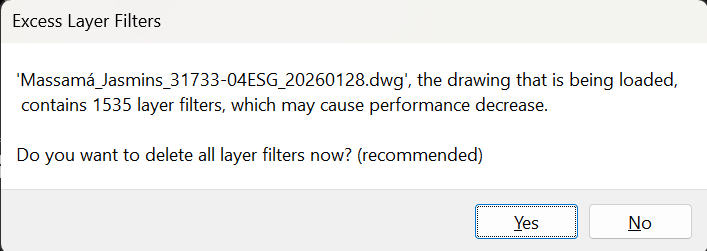
Trash5.dwgTrash4.dwgTrash3.dwgTrash2.dwgTrash1.dwg I opened your files in Bricscad and did WBLOCK on them, and they all reduced down in size dramatically. I haven't looked to see if anything is missing, so have a look and see if they are OK. The last file I Wblocked complained that there were over 1,500 layer filters. I don't use them myself, but it seems excessive to me (see screenshot file).
-
 amyvmakamure joined the community
 -
 Shane1220 joined the community
 -
Reduce file size.
Bandido replied to Bandido's topic in AutoCAD 2D Drafting, Object Properties & Interface
Good morning. I used the clean logo placed here by SLW210, but I still have a problem with the weight of the drawings. I've already tried wblock, purge, -purge, and overkill, but nothing works! What could be causing the weight in the drawings? Here is a link to five drawings that have the same problem. Thank you very much for your help. https://we.tl/t-3IquP6IBQ5 Thanks again. -
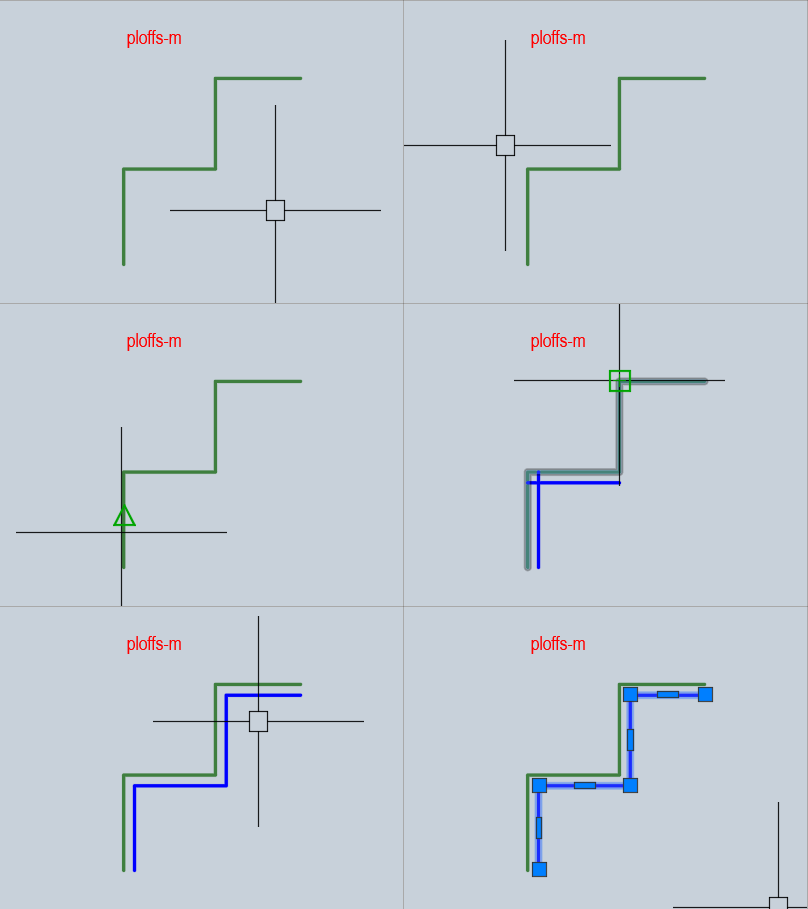
Are you using a localized version of AutoCAD? Try this option. ; By Alan H AUG 2019 / modification ; offset sides pline.lsp - original ; draw offsets from points for random shape object making pline ; https://www.cadtutor.net/forum/topic/98954-smart-offset-lisp/ ; Added characters (_) for localized versions of Autocad. ; You select the points sequentially, and the program draws the offsets. Right-right-down / Left-left-up ; Be sure to press Enter or rmb (right mouse button) to complete the selection of points, ; this way, the program will smooth out all the offset segments (i.e. combine them into a polyline). ; added memorization of the last offset distance selection ; Added backlight for selecting [Right/Left], [Swap sides] (defun c:ploffs-m (/ offdir offd x pt1 pt2 pt3 oldsnap ssp) (defun drawline (/ ang pt3 obj) (setq ang (angle pt1 pt2)) (if (= offdir "L") (setq pt3 (polar pt2 (+ ang (/ pi 2.0)) 10)) (setq pt3 (polar pt2 (- ang (/ pi 2.0)) 10)) ) (setvar 'osmode 0) (command "_.line" pt1 pt2 "") (setq obj (entlast)) (command "_.offset" offd obj pt3 "") (setq ssp (ssadd (entlast) ssp)) (command "_.erase" obj "") (setq pt1 pt2) ) (defun swapr-l (/) (if (= (strcase offdir) "L") (setq offdir "R") (setq offdir "L") ) (setvar 'osmode oldsnap) (setq pt1 (getpoint "\nPick next point")) (setq pt2 (getpoint "\nPick next point")) (drawline) ) ; add side pick (setq oldsnap (getvar 'osmode)) (setq ssp nil) (initget 6 "R L") ; (setq offdir (strcase (getstring "Right or Left"))) (setq offdir (strcase (getstring "[Right/Left]"))) ;; --- remember last offset distance --- (if (not (boundp '*lastOffD*)) (setq *lastOffD* (if (getenv "MY_LAST_OFFD") (atof (getenv "MY_LAST_OFFD")) 10.0 ; (offset distance By default) ) ) ) (setq offd (getreal (strcat "\nEnter offset distance <" (rtos *lastOffD* 2 4) ">: "))) (if (null offd) (setq offd *lastOffD*) (progn (setq *lastOffD* offd) (setenv "MY_LAST_OFFD" (rtos offd 2 8)) ) ) ;; --- /remember last offset distance --- (setq pt1 (getpoint "pick 1st point")) (setq ssp (ssadd)) (initget 6 "1 2 3 4 5 6 7 8 9 0 a b c d e f g h i j k l m n o p q r s t u v w x y z") (while (setq pt2 (getpoint "\nPick next point or [Swap sides]:<")) (cond ((= (type pt2) 'LIST) (drawline)) ((= (type pt2) 'str) (swapr-l)) ; also calls drawlines ((= pt2 nil) (quit)) ) (setvar 'osmode oldsnap) (initget 6 "Swap") ) (setq x 0) (repeat (- (sslength ssp) 1) (setvar 'filletrad 0) (command "_.fillet" (ssname ssp x) (ssname ssp (1+ x))) (setq x (1+ x)) ) (setq x 0) (command "_.pedit" (entlast) "_Y" "_J") ; if "Join" doesn't work, try the line below without the "_Y" ;(command "_.pedit" (entlast) "_J") (repeat (- (sslength ssp) 1) (command (ssname ssp x)) (setq x (1+ x)) ) (command "" "") (princ) )
-
Since you're on a Mac, you might want to double-check if you have the 'AutoCAD PDF' drivers available in your Plotter configuration. Sometimes after a macOS update, the system printers act up, but the built-in AutoCAD ones (like 'AutoCAD PDF (General Documentation).pc3') are more stable than using the 'Save to PDF' button at the bottom of the system dialog.
-
Thank you, but it didn't work in this form. @BÜYÜK
-

Pathfinding in AutoCAD with the A-Star Algorithm (A*)
ymg3 replied to heschr's topic in AutoLISP, Visual LISP & DCL
Looks OK to me, and a nice acceleration. ymg
-

Pathfinding in AutoCAD with the A-Star Algorithm (A*)
GLAVCVS replied to heschr's topic in AutoLISP, Visual LISP & DCL
I thought it was a given that all intersections necessarily divide the polylines. I must admit I didn't see your drawing until now. I apologize for that. I've attached modified code to fix this. ;; Pathfinding with the A* algorithm by ymg 22/07/2024 ; ;; ; ;; Revised a prog by HELMUT SCHRÖDER - heschr@gmx.de - 2014-09-14 ; ;; found at Cadtutor.net ; ;; ; ;; Kept the same format for edges list but added lines as valid choice ; ;; Format: (((x1 y1) (x2 y2)) (((x2 y2) (x3 y3))....(xn yn))) ; ;; ; ;; The user is asked to pick a start and an endpoint. ; ;; The program will find the shortest path in a network of connected ; ;; polylines and/or lines and draw a new polyline representing the result. ; ;; ; ;; Two lists of nodes openlst and closelst are created from the above ; ;; mentionned edges list. The format of a node list is: ; ;; (((Point) (Prev Point) Cumulated_Distance Estimated_Total_Distance)...) ; ;; ; ;; Main change from origina are: ; ;; - cons the list instead of append ; ;; - vl-sort the openlist instead of the quicksort ; ;; - Replaced and renamed some vars and subroutine. ; ;; - Added fuzz 1e-4 to all points comparison ; ;; - Change the get_path function ; ;; - Added line as possible edges ; ;; - Added an error handler ; ;; - Added a timer to the search portion of the program ; ;; ; ;; The above changes amounted to an acceleration of about 4x from the ; ;; original program. ; ;; : ;; If you compile this program to a .fas you'll get more than 10x faster. ; ;; ; ;| Added or modified code by GLAVCVS (january 2026) -All set are grouped into one -An associative sparse matrix cell->handles is created for faster cell querying (using new 'addToDict' and 'getCell' functions) -The "edges" list is replaced with the local search retourned by 'getCell' T E S T S ===== fas: 4-5 x faster than previous fas lsp: 7-8 x faster than previous lsp |; (defun c:A* (/ sspl i edges startp endp openlst closelst found acdoc Edgelay Pathlay Pathcol Pathlwt lstClvs ) (vl-load-com) ; Changes values of following 4 global variables to suit your need. ; (setq Edgelay "0" Pathlay "0" Pathcol 1 ; 1=Red 2=Yellow etc. ; Pathlwt 70 ; lineweight for path 0.7mm ; ) (or acdoc (setq acdoc (vla-get-activedocument (vlax-get-acad-object))) ) (set_errhandler '("CLAYER" "OSMODE" "CMDECHO")) (setvar 'CMDECHO 0) (setvar 'OSMODE 1) ;;; (if (setq ;;; ssp (ssget '"X" (list (cons 0 "LWPOLYLINE") (cons 8 Edgelay))) ;;; ) ;;; (foreach en (mapcar (function cadr) (ssnamex ssp)) ;;; (addToDict en) ;;; (setq edges (append edges (mk_edge (listpol2d en)))) ;;; ) ;;; nil ;;; ) ;;; ;;; (if (setq ssl (ssget '"X" (list (cons 0 "LINE") (cons 8 Edgelay)))) ;;; (foreach en (mapcar (function cadr) (ssnamex ssl)) ;;; (setq edges (cons (list (butlast (vlax-curve-getstartpoint en)) ;;; (butlast (vlax-curve-getendpoint en)) ;;; ) ;;; edges ;;; ) ;;; ) ;;; ) ;;; ) ;;;;;;;;;;;;;;;;;;;;;;;;;;;;;;;;;;;;;;;;;;;;;;;;;;;;;;;;;;;;;;;;;;;;;;;;;;;;;;;;;;;;;; ;;;ADDED by GLAVCVS (if (setq sspl (ssget "X" (list '(0 . "*LINE") (cons 8 EdgeLay)))) (foreach en (mapcar (function cadr) (ssnamex sspl)) (addToDict en) ) ) ;;;;;;;;;;;;;;;;;;;;;;;;;;;;;;;;;;;;;;;;;;;;;;;;;;;;;;;;;;;;;;;;;;;;;;;;;;;;;;;;;;;;;;; (setq startp (butlast (getpoint "\nPick Start Point: ")) ; Startpoint - reduced to 2D ; endp (butlast (getpoint "\nPick End Point: ")) ; Endpoint - reduced to 2D ; openlst (list (list startp '(0 0) 0.0 (distance startp endp))) ; Add starting node to openlst ; ) (vla-startundomark acdoc) (setq ti (getvar 'MILLISECS)) (while (and openlst (not found)) (setq node (car openlst)); coge el primero (el que más progresa) (if (equal (car node) endp 1e-4) (setq found T closelst (cons node closelst) ) (setq closelst (cons node closelst) openlst (upd_openlst edges node endp (cdr openlst) closelst) ) ) ) (if found (mk_lwp (get_path closelst)) (alert "No path was found") ) (princ (strcat "\nExecution time:" (itoa (- (getvar 'MILLISECS) ti)) " milliseconds." ) ) (*error* nil) (princ) ) ;;;;;;;;;;;;;;;;;;;;;;;;;;;;;;;;;;;;;;;;;;;;;;;;;;;;;;;;;;;;;;;;;;;;;;;;;;;;;;;;;;;;;;;;;;;;;;;;;;;;;;;;;;;;;;;;; ;;;ADDED by GLAVCVS ;;;Create dictionary ;;*** Modified to consider all segments within any polyline *** (defun addToDict (en / p1 p2 id clv i) (setq i -1 id (cdr (assoc 5 (entget en)))) (while (setq p (vlax-curve-getPointAtParam en (setq i (1+ i)))) (if (setq val (assoc (setq clv (strcat (itoa (fix (car p))) "-" (itoa (fix (cadr p))))) lstClvs)) (setq lstClvs (subst (append val (list (cons id i))) val lstClvs)) (setq lstClvs (cons (list clv (cons id i)) lstClvs)) ) ) ) ;;;return list cell ;;*** Modified to access the new dictionary format *** (defun getCell (pt / clv v lr id p pr par) (if (setq val (assoc (setq clv (strcat (itoa (fix (car pt))) "-" (itoa (fix (cadr pt))))) lstClvs)) (foreach par (cdr val) (setq e (handent (car par))) (if (zerop (setq pr (cdr par))) (setq lr (cons (list (butlast (vlax-curve-getPointAtParam e pr)) (butlast (vlax-curve-getPointAtParam e (1+ pr)))) lr)) (setq lr (cons (list (butlast (vlax-curve-getPointAtParam e (1- pr))) (butlast (vlax-curve-getPointAtParam e pr))) lr) lr (if (setq p (vlax-curve-getPointAtParam e (1+ pr))) (cons (list (butlast (vlax-curve-getPointAtParam e pr)) (butlast p)) lr) lr) ) ) ) ) ) ;;;;;;;;;;;;;;;;;;;;;;;;;;;;;;;;;;;;;;;;;;;;;;;;;;;;;;;;;;;;;;;;;;;;;;;;;;;;;;;;;;;;;;;;;;;;;;;;;;;;;;;;;;;;;;;;; ;; ; ;; upd_openlst ; ;; ; ;; Each node of the openlst is passed to this sub and we scan the edges list ; ;; to find the corresponding edges. Then both points of the edges are tested ; ;; for equality to the nodes. The fixed cost (distance) is updated and so is ; ;; the estimated total distance. Updates are first put in a temporary node. ; ;; ; ;; We then proceed to test if the temp variable is already in the closelst ; ;; and proceed to the next edge. ; ;; ; ;; If temp is true and temp is not in closelst we go to the recursive sub ; ;; in_openlst which adjust the values and return the updated openlst : ;; ; ;; Upon return we sort the openlst on smallest estimated distance ; ;; and return the openlst to the main routine ; ;; ; (defun upd_openlst (edges node endp openlst closelst / lEdges edge pt fcost p1 p2 d temp) (setq pt (car node) fcost (caddr node) ) ;;;;;;;;;;;;;;;;;;;;;;;;;;;;;;;;;;;;;;;;;;;;;;;;;;;;;;;;;;;;;;;;;;;;;;;;;;;;;;;;;;;;;;;;;;;;;;;;;;;;;;;;;;;;;;;;; ;;;added By GLAVCVS (setq lEdges (getCell pt)) (foreach edge lEdges (setq p1 (car edge) p2 (cadr edge) d (distance p1 p2) temp nil ) ;;;;;;;;;;;;;;;;;;;;;;;;;;;;;;;;;;;;;;;;;;;;;;;;;;;;;;;;;;;;;;;;;;;;;;;;;;;;;;;;;;;;;;;;;;;;;;;;;;;;;;;;;;;;;;;;;; ;;; (while edges ;;; (setq p1 (caar edges) ;;; p2 (cadar edges) ;;; edges (cdr edges) ;;; d (distance p1 p2) ;;; temp nil ;;; ) ;Testing both points of an edge and building a temporary node ; (cond ((equal pt p1 1e-4) (setq temp (list p2 p1 (+ fcost d) (+ fcost d (distance p2 endp)))) ; p p0 distAcum (distAcum + distRestante) ) ((equal pt p2 1e-4) (setq temp (list p1 p2 (+ fcost d) (+ fcost d (distance p1 endp))) ) ) ) (if (and temp (not (memberfuzz (car temp) closelst))); si el punto en avance candidato no está ya en 'closelst' (setq openlst (in_openlst temp openlst)) ) ) ; Keep openlist sorted on smallest Estimated Total Cost ; (vl-sort openlst (function (lambda (a b) (< (cadddr a) (cadddr b)))) ;ordena los coincidentes por orden de progresión hacia destino ) ) ;in_lst Replaced by memberfuzz ; ;(defun in_lst (pt lst) ; (cond ; ((not lst) nil) ; ((equal pt (caar lst) 1e-4) lst) ; (T (in_lst pt (cdr lst))) ; ) ;) ; returns a new openlst with a double exchanged if cost is lower ; ;; ; (defun in_openlst (node lst) (cond ((not lst) (list node)) ((equal (car node) (caar lst) 1e-4); si el primer elemento de 'node' (punto) es igual que el primero del primer elemento de 'lst' (if (< (cadddr node) (cadddr (car lst))); si (distancia acumulada + restante) es menor en 'node' que en '(car lst)' (cons node (cdr lst)) lst ) ) (T (cons (car lst) (in_openlst node (cdr lst)))) ) ) (defun in_openlst2 (node lst / s c) (setq s (splitat (caar node) lst) c (cadddr node) ) (cond ((not lst) (list node)) ((not (car s)) (cons node (cadr s))) ((not (cadr s)) (cons node (car s))) (T (if (< (cadddr node) (cadddr (cadr s))) (append (car s) (cons node (cdr s))) lst ) ) ;(T (c ns node lst)) ) ) ;; ; ;; listpol2D by ymg (Simplified a Routine by Gile Chanteau ; ;; ; ;; Parameter: en, Entity Name or Object Name of Any Type of Polyline ; ;; ; ;; Returns: List of Points in 2D WCS ; ;; ; ;; Notes: Requires butlast function for 2d points. ; ;; ; (defun listpol2d (en / i lst) (repeat (setq i (fix (1+ (vlax-curve-getEndParam en)))) (setq lst (cons (butlast (vlax-curve-getPointAtParam en (setq i (1- i)))) lst ) ) ) ) ;; ; ;; mk_edge ; ;; ; ;; From a list of consecutives points as supplied by listpol2D, ; ;; Returns a list of edges (((x1 y1)(x2 y2)) ((x2 y2)(x3 y3))...) ; ;; ; (defun mk_edge (lst) (mapcar (function (lambda (a b) (list a b))) lst (cdr lst)) ) ;; ; ;; butlast ; ;; ; ;; Returns a list without the last item ; ;; Used here mainly to change points to 2D ; ;; ; (defun butlast (lst) (reverse (cdr (reverse lst)))) ;; ; ;; get_path ; ;; ; ;; Returns The list of points of shortest path found from closelst. ; ;; ; (defun get_path (lst / path) (setq path (list (caar lst)) prev (cadar lst) lst (cdr lst) ) (while (setq lst (memberfuzz prev lst)) (setq prev (cadar lst) path (cons (caar lst) path) ) ) path ) ;; ; ;; memberfuzz by Gile Chanteau ; ;; ; ;; Modified to work with nodes list ; ;; ; (defun memberfuzz (p lst) (while (and lst (not (equal p (caar lst) 1e-4))) (setq lst (cdr lst)) ) lst ) (defun splitat (p lst / tr) (while (and lst (not (equal p (caar lst) 1e-4))) (setq tr (cons (car lst) tr) lst (cdr lst) ) ) (list (reverse tr) lst) ) (defun truncfuzz (p lst) (if (and lst (not (equal p (caar lst) 1e-4))) (cons (car lst) (truncfuzz p (cdr lst))) ) ) (defun posfuzz (p lst) (- (length lst) (length (memberfuzz p lst))) ) (defun rotleft (lst) (append (cdr lst) (list (car lst)))) (defun rotright (lst) (cons (last lst) (butlast lst))) ;; ; ;; mk_lwp ; ;; ; ;; Draw an lwpolyline given a point list ; ;; ; ;; Will be drawn on layer with color and lineweight defined by Variables ; ;; at beginnung of program. ; ;; ; (defun mk_lwp (pl) (entmakex (append (list (cons 0 "LWPOLYLINE") (cons 100 "AcDbEntity") (cons 100 "AcDbPolyline") (cons 8 Pathlay) (cons 62 Pathcol) (cons 90 (length pl)) (cons 70 0) (cons 370 Pathlwt) ) (mapcar (function (lambda (a) (cons 10 a))) pl) ) ) ) ;; Error Handler by Elpanov Evgenyi ; (defun set_errhandler (l) (setq varl (mapcar (function (lambda (a) (list 'setvar a (getvar a)))) l ) ) ) (defun *error* (msg) (mapcar 'eval varl) (if (and msg (not (wcmatch (strcase msg) "*BREAK*,*CANCEL*,*EXIT*")) ) (princ (strcat "\nError: " msg)) ) (vla-endundomark acdoc) (princ) ) - Yesterday
-

lisp to find convert all unexplodable blocks within a file to explodable blocks
ronjonp replied to Elektrik's topic in AutoLISP, Visual LISP & DCL
@nolex Give this quick modification a try: (defun c:foo (/ n nms s) ;; RJP » 2026-01-27 (cond ((setq s (ssget '((0 . "INSERT")))) (foreach b (vl-remove-if 'listp (mapcar 'cadr (ssnamex s))) (or (vl-position (setq n (vla-get-effectivename (vlax-ename->vla-object b))) nms) (setq nms (cons n nms)) ) ) (vlax-for b (vla-get-blocks (vla-get-activedocument (vlax-get-acad-object))) (and (vl-position (vla-get-name b) nms) (= 0 (vlax-get b 'islayout) (vlax-get b 'isxref)) (vlax-put b 'explodable -1) ) ) ) ) (princ) ) -

lisp to find convert all unexplodable blocks within a file to explodable blocks
nolex replied to Elektrik's topic in AutoLISP, Visual LISP & DCL
This is very useful. Is there a version of this where I can only select some blocks and not all of them? -

generate 3 viewports and align UCS
BIGAL replied to leonucadom's topic in AutoLISP, Visual LISP & DCL
Ok its simple to use vpoint to set your view angles, code is part of a view choice lisp. (if (= look "R")(command-s "-vpoint" "1,0,0")) (if (= look "L")(command-s "-vpoint" "-1,0,0")) (if (= look "F")(command-s "-vpoint" "0,-1,0")) (if (= look "B")(command-s "-vpoint" "0,1,0")) (if (= look "P")(command-s "-vpoint" "0,0,1")) (if (= look "3")(command "_.vpoint" "-1,-1,1")) If you want auto 3 viewports then you need to ask what scale and pick say a point in model so the views can be based around that point. I would use a layout with a title block.- 1 reply
-
- 1
-

-

VS Code AutoCAD Lisp Snippets
mhupp replied to CivilTechSource's topic in AutoLISP, Visual LISP & DCL
I like using foreach to step thought a selection set or if you need the vla-object (foreach ent (vl-remove-if 'listp (mapcar 'cadr (ssnamex SS))) ) (foreach obj (mapcar 'vlax-ename->vla-object (vl-remove-if 'listp (mapcar 'cadr (ssnamex ss)))) ) -
Pathfinding in AutoCAD with the A-Star Algorithm (A*)
ymg3 replied to heschr's topic in AutoLISP, Visual LISP & DCL
Also you must realize that if two polylines crosses the intersection point is not necessarily a node. ymg -
Pathfinding in AutoCAD with the A-Star Algorithm (A*)
ymg3 replied to heschr's topic in AutoLISP, Visual LISP & DCL
The original drawing is attached with my post as AStar Test.dwg. Start point is upper left. ymg astar test.dwg -
Pathfinding in AutoCAD with the A-Star Algorithm (A*)
GLAVCVS replied to heschr's topic in AutoLISP, Visual LISP & DCL
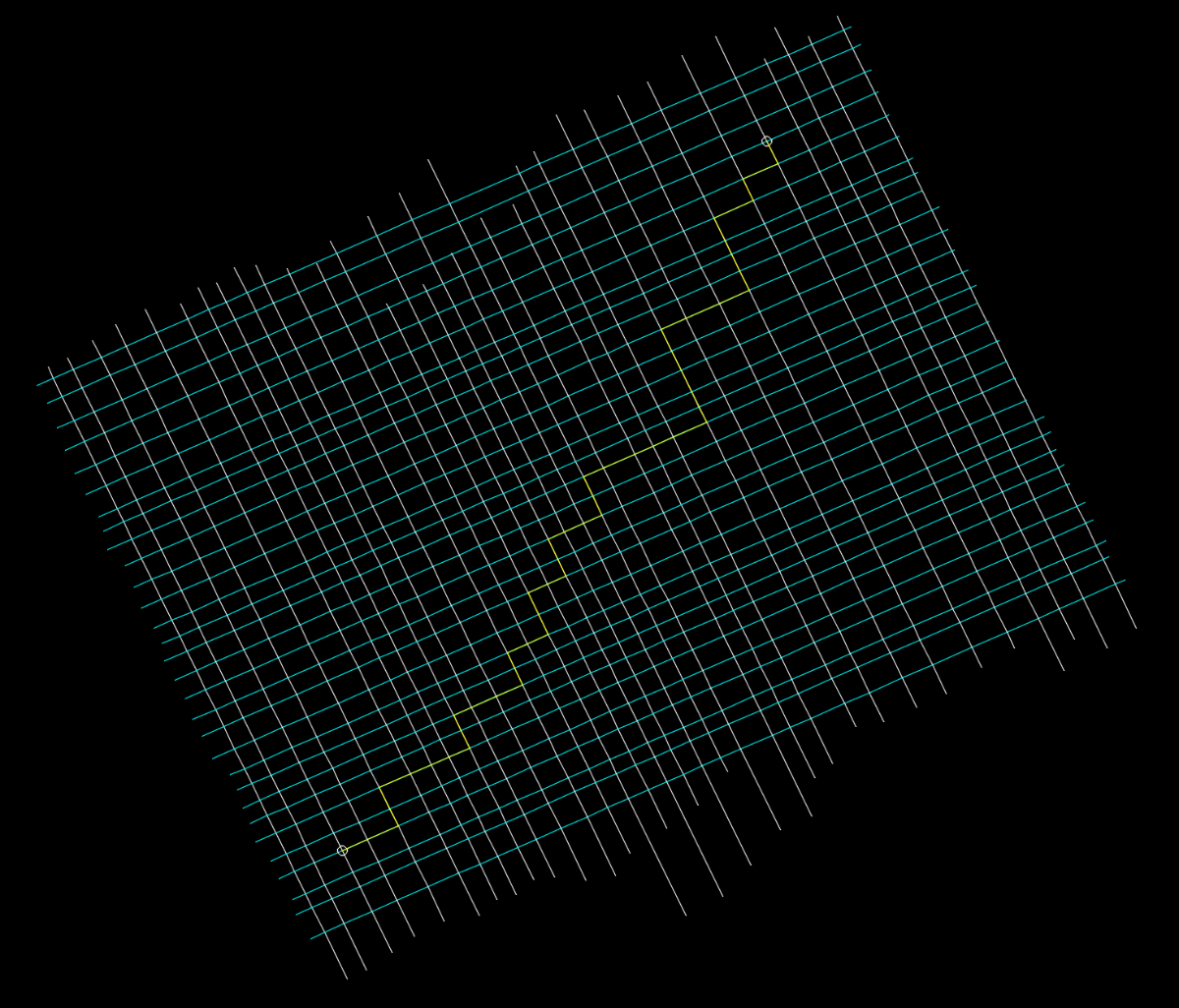
It's difficult to know what's happening there without the original drawing and without knowing the starting and ending points. I reproduced that drawing from your image and ran the code without any problems. But perhaps I'm wrong. PS: Anyway, try your code on this drawing (mine will return the same result because it only speeds up the process). YMG3.dwg I've left a yellow line on a different layer from the rest so that it's outside the selection set, and the start and end points are marked with little circles.
-
Pathfinding in AutoCAD with the A-Star Algorithm (A*)
ymg3 replied to heschr's topic in AutoLISP, Visual LISP & DCL
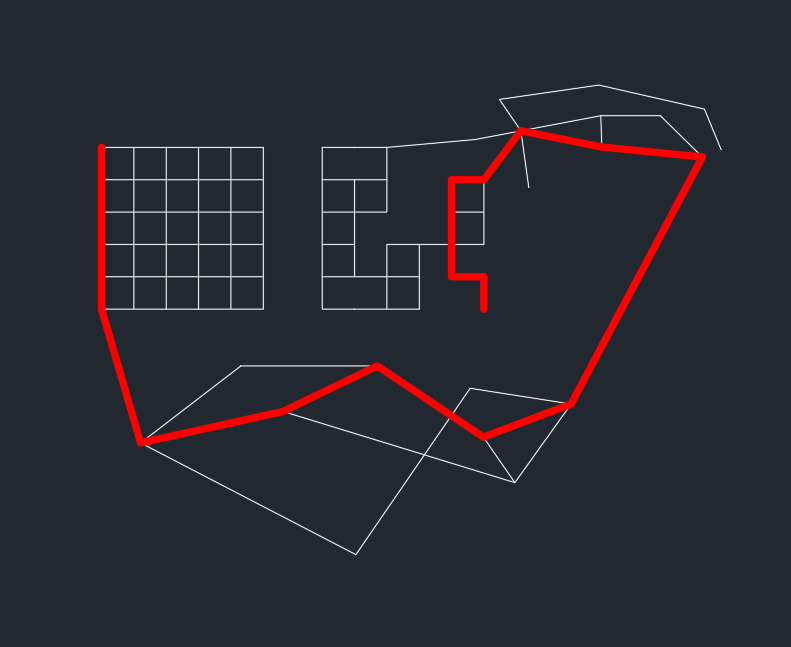
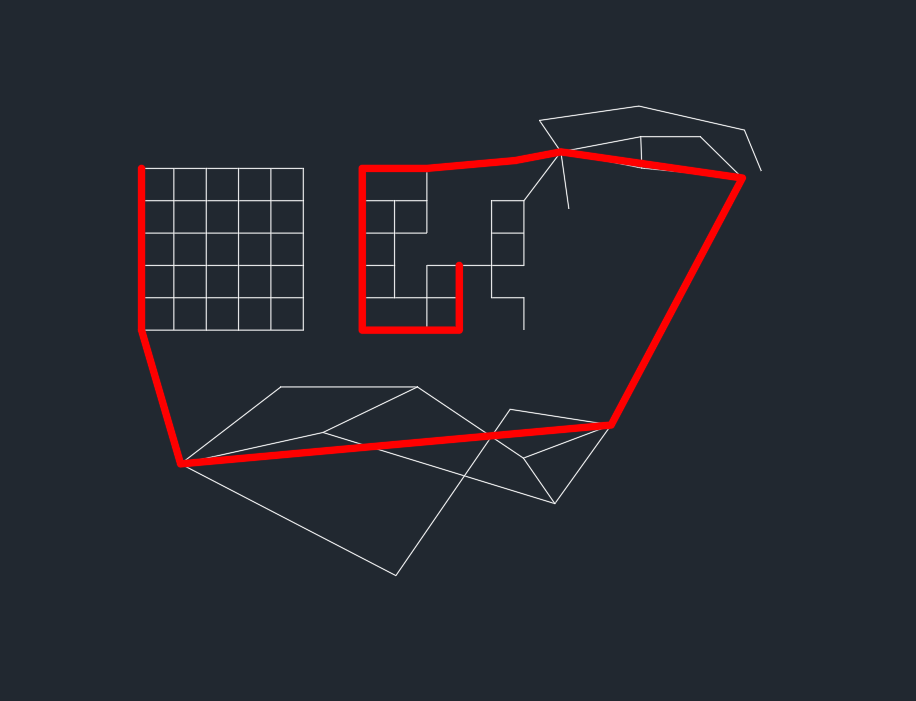
Never tried the dict trick to accelerate the retrieval but it seems a good idea. However as of your last edited code the path found is erroneous. See the attached image.
-
 tamam joined the community
 -

Stayin’ Alive with Selection Preview in AutoCAD: Tuesday Tips With Frank
The AutoCAD Blog posted a topic in AutoCAD Blogs
In the 1970s, disco music became a cultural and fashion phenomenon with clubs, disco balls, and John Travolta’s iconic dance moves in Saturday Night Fever. What does this have to do with AutoCAD you may ask? Well, have you ever dragged your mouse across a drawing, and the objects below it lit up like you’re in a disco? Rolling over text, hatches, tables, and groups may light up like it’s to a dance beat, too. Perhaps you’re a bit like me, and while you can appreciate the visual stimulus, you’d rather just get to the point. Today, our feature is called Selection Preview, and, like many AutoCAD features, you can control how it works. Selection Preview Settings The first step, of course, is getting there. It starts with the Options dialog. Get there in your favorite manner – mine is to right-click anywhere in the drawing editor (with no objects selected) and select Options from the pop-up dialog. Then, in the Options dialog, click on the Select tab as shown in the image above. Finally, you’ll want to focus on the Preview settings in the bottom right. Now that you’re where you need to be, let’s see what some of our options are. The first two are directly responsible for our rollover scenario, and one is part of the things I always change when I get an upgrade. We can immediately stop the disco lights when rolling over things with no command active. Uncheck the second entry. That alone will be a big change for you. Personally, I like to have only selection preview enabled when I have a command active. You can also control what kinds of objects are lit up like a disco dance floor when they are previewed. Click on the Visual Effect Settings… button, and you’ll get the following dialog. We want to focus our attention on the right side. This is one of the more unusual dialogs in AutoCAD, as you are selecting an object type to exclude, instead of one to include. Of course, those unchecked are included, but I think you get my meaning. By default, objects on locked layers and Xrefs are excluded from preview. If you’d prefer to see them previewed, uncheck them here. Back to our scenario, this is where you can tell AutoCAD not to preview Tables, Groups, Mtext, or Hatches. Again, you’re excluding things here, so, for example, if you never want to see Hatches preview, whether you’re in a command or not, check it here. Click OK to save and exit, and do the same for the main Options dialog. Moving Forward One of my favorite non-disco bands of that era led a song with the lyrics “Don’t look now, but here come the 80’s.” Not exactly a good way to make a song timeless, but hey, at least I remember it 45 years later. By that time, though, the disco age was coming to a close, culminating in a 1979 “Disco Demolition Night” event at a Chicago White Sox home double-header, which quickly devolved into a riot of fans burning disco records. The good news for you is that you can keep AutoCAD from looking like a disco dance floor and more like a streamlined, fast CAD program. It’s just a matter of knowing where to go and what to adjust. When you do, those polyester suits, gold chains, and slicked back hair will stay in the disco era where they belong. More Tuesday Tips Check out our whole Tuesday Tips series for ideas on how to make AutoCAD work for you. The post Stayin’ Alive with Selection Preview in AutoCAD: Tuesday Tips With Frank appeared first on AutoCAD Blog. View the full article -

LISP for Dimensioning from Multiple Points to Line
Kumar1 replied to comet712's topic in AutoLISP, Visual LISP & DCL
Thank you. -
 shahin reza joined the community
 -
 AHMETSEN joined the community
 -
 alchoholic joined the community
 - Last week
-
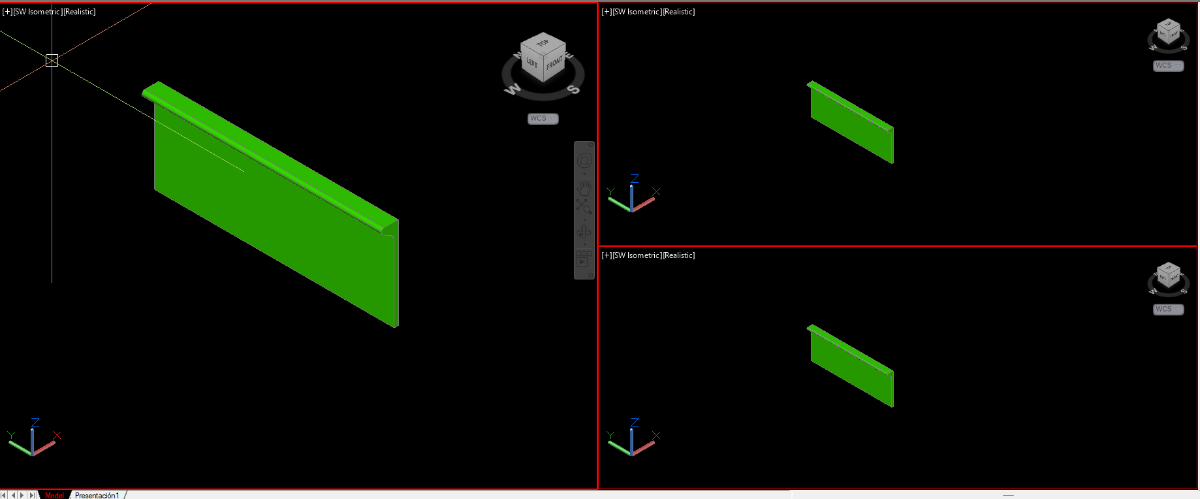
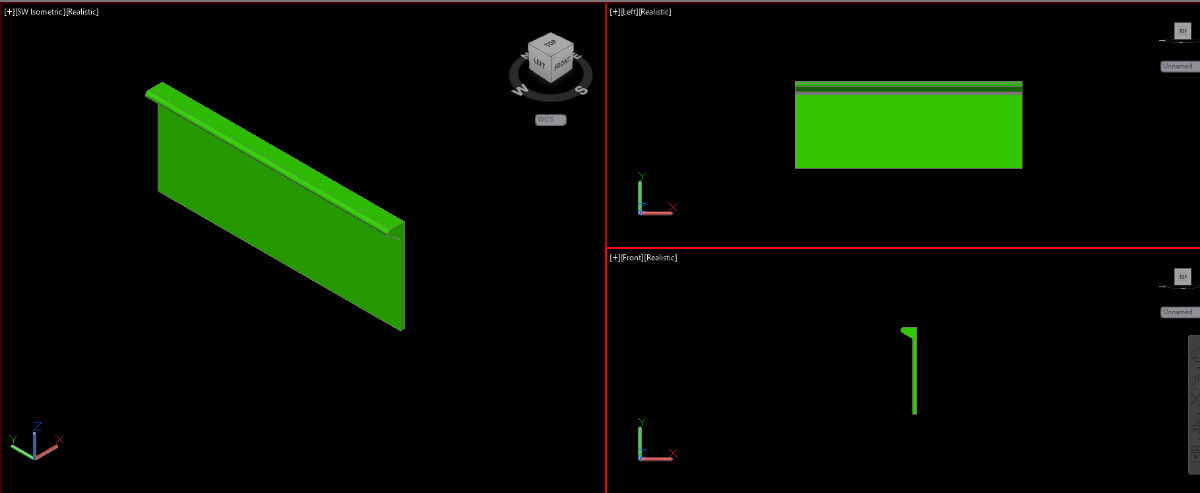
Hello all: I use a code that generates 3 viewports I would like the chain to be able to generate them in this way that the second viewport is a side view and the third viewport, front view but that in the second and third viewport the UCS is aligned to the view as in the second image If there's any way, I'd appreciate your advice or comments here my code (DEFUN C:V3 () (command "_MODEL" "_-vports" "3" "l" "'_.zoom" "_e" "_-VIEW" "_SWISO")) thanks