All Activity
- Past hour
-

Penn Foster Drafting With AutoCAD Structural Drafting Project Sheets 1-7
ReMark replied to CADLEARNER1234's topic in Student Project Questions
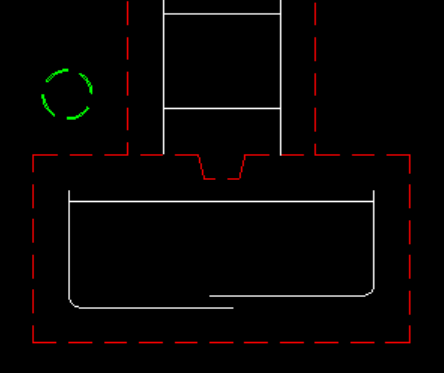
There is only one drainage pipe and it should be round because you are looking at it head on. It is located above and to the left of the first footing on the left. See attached image.
- Today
-

Penn Foster Drafting With AutoCAD Structural Drafting Project Sheets 1-7
CADLEARNER1234 replied to CADLEARNER1234's topic in Student Project Questions
I think ive seen most of the images, although i might have missed some. The most complete one i saw was blurry so I couldn't make out the details. The main issue im having (as ive seen so many others have had as well so far) is that the instructions are very vague. Would you be able to give me some feedback on my drawing? I think the one thing im missing is the drainage pipe, I know it should have these parameters: (A 4″ drain is set around the outside of the building, with 3″ clear above the footings to the drain and 3″ clear from the piers to the drain.) but im unsure of how it should look. Should it just be a straight rectangle? Parellel to the columns? On each side? or just on the side with the details? should it have a bend towards the bottom like most drains do in real life? Any feedback is welcome, thank you for taking the time to help me out on this Currently working on this course and hope i can find future employment as a CAD drafter and maybe BIM modeller in the future. -
Hi. It is strange that your Solidworks Toolbox Settings window does not show all the possible fasteners. Maybe there is an issue with the installation or your licence. With setting up the toolbox this might help: I learned to set up the toolbox properly first will save you the hassle of wrong sized fasteners later. I use the “create parts” way of work instead of the "configurations" approach. For more info and download, see the link below. It was set up for 2023, but you can update it to newer versions in case you or your company is using a newer version. You Will need a minimum of one “Professional” or “Premium” license. With that system you could theoretically create all the different variant of sizes to be used by other systems with a “Standard” licence. Download fully configured Solidworks 2023 Toolbox here: https://kemnatdv.gumroad.com/l/czlsz
-
I had this happen recently! If clearing the cache doesn't work, try right-clicking your AutoCAD desktop shortcut, go to Properties > Open File Location, and find the AcSignApply.exe file. If you disable the digital signature verification there, it can stop AutoCAD from hanging while it tries to verify certificates through a firewall. It's a weird fix, but it's a lifesaver for older versions.
-
 KemnaTDV joined the community
 -
 foer joined the community
 -
 thej joined the community
 -

How can I write the code for a batch fillet plugin for images like this?
BIGAL replied to amook147's topic in AutoLISP, Visual LISP & DCL
The large arc is like the base radius for all the teeth, so changing that may need a complete redraw. behind the shape must be some form of formula, or design rules. Sounds like a custom gear.lsp is needed. -
 amndhnr25 joined the community
 -

How can I write the code for a batch fillet plugin for images like this?
mhupp replied to amook147's topic in AutoLISP, Visual LISP & DCL
Have to fillet the 3 long arcs segments before joining. But yes no lisp needed for simple task.
-
 aed4 joined the community
 - Yesterday
-
Just a comment most files like this don't have a double line entry makes life a bit easier. Can remove double lines in a word processor and save as a txt file. x y z 21.0937p1 200.4997p1 0p1 22.0937p2 201.4997p2 0p2 23.0937p3 203.4997p3 0p3 23.0807p4 203.4797p4 0p4 Do you have more points ? It looks a bit too simple, what about lines next p1 p7 p8 p9, p3 p7 and so on, multiple lines. If from an Excel then post the Excel.
-
How can I write the code for a batch fillet plugin for images like this?
BIGAL replied to amook147's topic in AutoLISP, Visual LISP & DCL
Code what's that for ? Join Fillet R 0.4 P pickobject enter All done -
Creating a surface model in Civil 3D from existing 3D polylines, lines and points
BIGAL replied to 0misclose's topic in Civil 3D & LDD
"complex feature survey" one of the things not mentioned is the import from your total station data recorder, this way all line work is strung automatically, points set contourable or not, blocks inserted on those points and breaklines say by layer naming can be set. Do you have access to the field data, which total station ? There should be people here who can provide a CIV3D dwt set up for you to match your total station. Something I have and Autodesk did not do it is Import Description Keys, from Excel. You can export but not import.- 6 replies
-
- 1
-

-
- surface modelling
- civil 3d
- (and 2 more)
-
 Skultan joined the community
 -

help with extracting text from one dimension....
ronjonp replied to leonucadomi's topic in AutoLISP, Visual LISP & DCL
Glad to help : ) -
@GLAVCVSok ,l will manage it, thanks
-

help with extracting text from one dimension....
Nikon replied to leonucadomi's topic in AutoLISP, Visual LISP & DCL
@ronjonp Yes, thank you very much. It's perfect now! Sorry for explaining it wrong at the beginning. -
help with extracting text from one dimension....
ronjonp replied to leonucadomi's topic in AutoLISP, Visual LISP & DCL
Code updated above ... give it a try! -
@maahee I think you should copy the code again. I forgot to clean up the junk files before publishing it, and it might not be working properly because of that.
-
I'm an engineer and work with a lot of different clients etc and receive often dwg files by email and store them in Google Drive. The flow of always having to download it import it in your software of choice is always so tedious that i've decided to build a quick app to solve this issue. I would love to get feedback from the community etc. The task was actually so difficult that I've even wrote a blog post about it here (on why dwg is a hostile format) I also made a quick demo video here as well
-
 Rhovium joined the community
 -
The separator character is " " (1 space) and is stored in <->. You will need to change it when necessary.
-
Try (defun c:crgPts (/ nmarch arch lin p p0) (defun damePts (tx m / c p l l1 i num nm nmdo damePts) (setq num "" nm "") (while (/= (setq c (substr tx (setq i (if i (1+ i) 1)) 1)) "") (if (= c m) (setq l (append l (list num)) l1 (if (not (member nm l1)) (append l1 (list nm)) l1) num "" nm "" nmdo nil) (cond ((and (not nmdo) (wcmatch c "#,[.]")) (setq num (strcat num c))) ((or nmdo (wcmatch c "@")) (setq nm (strcat nm c) nmdo T)) ) ) ) (cons (car l1) (if (/= num "") (append l (list num)) l)) ) (setq <-> " "); change if need (if (setq nmarch (getfiled "Load file" "" "txt" 2)) (if (setq arch (open nmarch "r")) (while (setq lin (read-line arch)) (setq p (damePts lin <->) p (list (atof (cadr p)) (atof (caddr p)) (if (cadddr p) (atof (cadddr p)) 0.0)) ) (if p0 (command "_line" p0 (setq p0 p) "") (setq p0 p) ) ) ) ) (princ) )
-
 蒸桑拿的企鹅 joined the community
 -
I did see a for-purchase program that used a raster image and maybe worked with QGIS, I'll see if I can find it again, the demo video looked pretty good and even split around islands, side branches, etc.. It had a lot of parameters to fill out in a window for what to grab, so still a good bit of work, IIRC.
-

How can I write the code for a batch fillet plugin for images like this?
SLW210 replied to amook147's topic in AutoLISP, Visual LISP & DCL
Are you looking for a LISP, Python, VBA, .NET, etc.? I moved your thread to the AutoLISP, Visual LISP & DCL Forum. -
x y z 21.0937p1 200.4997p1 0p1 22.0937p2 201.4997p2 0p2 23.0937p3 203.4997p3 0p3 23.0807p4 203.4797p4 0p4 The txt file should always be kept in the above uniform format and should have the prefix or suffix from the point point.txt
-
lisp to find convert all unexplodable blocks within a file to explodable blocks
Nikon replied to Elektrik's topic in AutoLISP, Visual LISP & DCL
Yes, rename the block first, then use the @ronjonp code. -
help with extracting text from one dimension....
Nikon replied to leonucadomi's topic in AutoLISP, Visual LISP & DCL
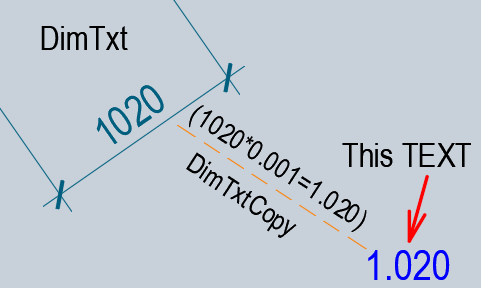
Probably, for my task, it will be easier to change the @mhupp code. ;; Copy dimension value to another location (x0.001) + text angle = 0 ;; DimCopy.lsp the original / creator mhupp ;; https://www.cadtutor.net/forum/topic/75587-help-with-extracting-text-from-one-dimension/#findComment-597630 ;; modification using AI (defun _DimCopy001:OnlyNum (s / lst out c) ;; we leave only numbers, minus sign, period/comma (setq lst (vl-string->list s) out "") (foreach c lst (if (member c (vl-string->list "0123456789-.,")) (setq out (strcat out (chr c))) ) ) ;; comma -> period (vl-string-subst "." "," out) ) (defun _DimCopy001:SetText (e / ed txt num new r50) (setq ed (entget e) txt (cdr (assoc 1 ed))) ;; change the text to *0.001 (if (and txt (/= txt "")) (progn (setq txt (_DimCopy001:OnlyNum txt)) (if (and txt (/= txt "")) (progn (setq num (atof txt)) (setq new (rtos (* num 0.001) 2 3)) ; for example 4250 -> 4.250 (setq ed (subst (cons 1 new) (assoc 1 ed) ed)) ) ) ) ) ;; ang 0 (DXF 50) (if (setq r50 (assoc 50 ed)) (setq ed (subst (cons 50 0.0) r50 ed)) (setq ed (append ed (list (cons 50 0.0)))) ) (entmod ed) (entupd e) ) (defun C:DimCopy001Txt (/ dim BP LastEnt en obj oldEcho) (vl-load-com) (setq oldEcho (getvar 'cmdecho)) (setvar 'cmdecho 0) (while (setq dim (car (entsel "\nSelect Dimension: "))) (setq obj (vlax-ename->vla-object dim)) (setq BP (vlax-get obj 'TextPosition)) (setq LastEnt (entlast)) (command "_.Copy" dim "" "_non" BP (getpoint BP "\nCopy to: ")) (command "_Explode" (entlast)) (if (setq en (entnext LastEnt)) (while en (cond ((= "MTEXT" (cdr (assoc 0 (entget en)))) (command "_Explode" en) ; convert mtext to text ) ((= "TEXT" (cdr (assoc 0 (entget en)))) (_DimCopy001:SetText en) ; <<< scale + angle 0 ) (t (entdel en) ) ) (setq en (entnext en)) ) ) ) (setvar 'cmdecho oldEcho) (princ) ) Perhaps this code can be made prettier and shorter... -

How can I write the code for a batch fillet plugin for images like this?
amook147 posted a topic in AutoLISP, Visual LISP & DCL
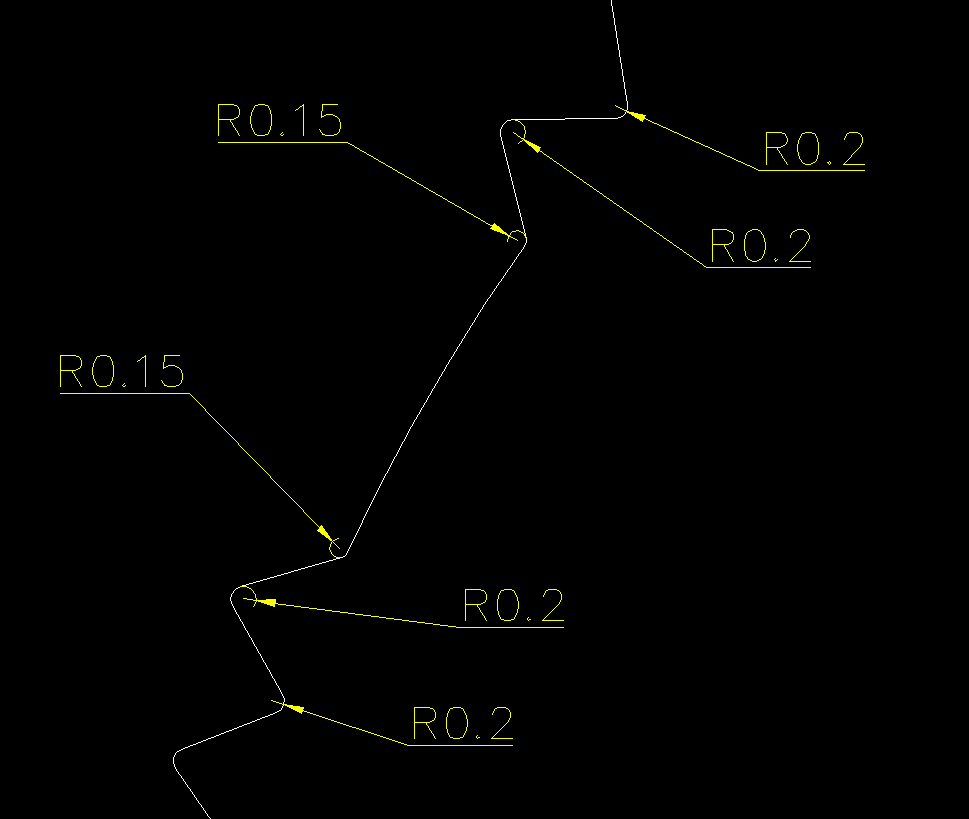
Drawing2.dwg As shown in the figure below: Select multiple graphics in batch and change the R value from 0.2 to another value?
-
amook147 joined the community
-
help with extracting text from one dimension....
Nikon replied to leonucadomi's topic in AutoLISP, Visual LISP & DCL
@ronjonp thanks. This code reduces the height of the text, but I need to reduce the dimension value (x 0.001) and insert the text (angle text 0, text height = height of the dimtext).
-

Creating a surface model in Civil 3D from existing 3D polylines, lines and points
tombu replied to 0misclose's topic in Civil 3D & LDD