All Activity
- Today
-
I forgot all about this thread, meant to get back to it. My apologies. Elmer FEM – open source multiphysical simulation software CALCULIX: A Three-Dimensional Structural Finite Elemente Program use with PrePoMax Structural Analysis & Steel Design Software | AutoCalcs Free Online 3D Structural Finite Element Analysis Software There are some more open-source and free programs out there. These have a free trial. Finite Element Analysis (FEA) Software | Autodesk Download Inventor | Inventor Free Trial | Autodesk FEA Simulation Basics | Autodesk Inventor 2023
-

Civil drafting school project help
EmeraldSynth replied to Autocadstudent's topic in Student Project Questions
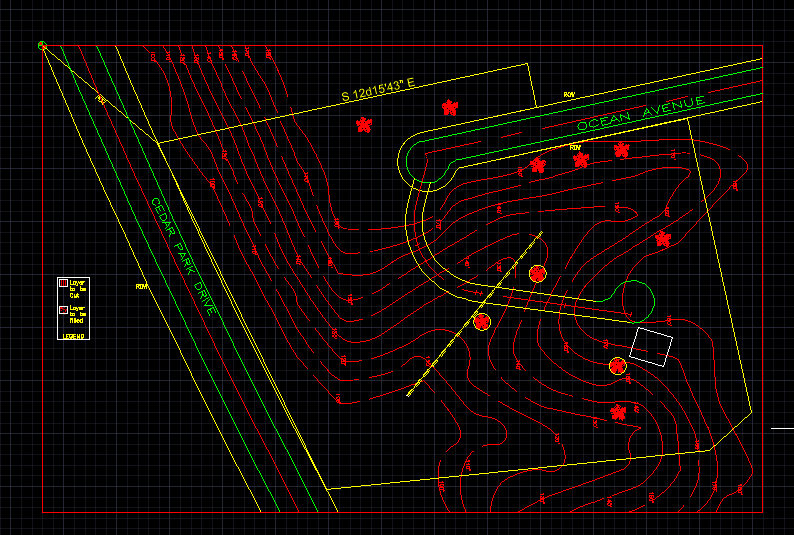
Hello all. Now I'm struggling with the same issues as everyone one else. So I've gotten to the cut and fill portion, and I'm stuck trying to figure out how to show this part of the instructions. Ms. Capitano decides to keep the driveway and the house level at elevation 180. Her surveying company recommends an angle of repose of 1.5:1. Draw the driveway layout cut and fill in the lower-left corner of your drawing. Use the information listed here to show the new contours on both sides of the driveway. How am I supposed to start off this, and how does the "angle of repose" factor in? Don't remember reading about that... Here's what my drawing looks like so far. Thanks!
-
From what I can tell, you don't need to specify a particular update of Civil 3D to get the right application code. For instance, "AeccXuiLand.AeccApplication.13.1" will work for any flavor of Civil 3D 2019. Then just add a 1 for each successive year. Civil 3D 2019: 13.0 Civil 3D 2020: 13.2 Civil 3D 2021: 13.3 Civil 3D 2022: 13.4 Civil 3D 2023: 13.5 Civil 3D 2024: 13.6 Civil 3D 2025: 13.7 Corrections/suggestions welcome. Of course, they'll break the sequence as soon as it becomes widely known and useful.
-
 zhorzh joined the community
 -
 inlajaus joined the community
 -
 as072260 joined the community
 -

MultiPLine (MPL) — polyline-based MLINE replacement with per-line layers, presets, and auto-sync [Free + Pro]
BIGAL replied to SkillAmplifier's topic in AutoLISP, Visual LISP & DCL
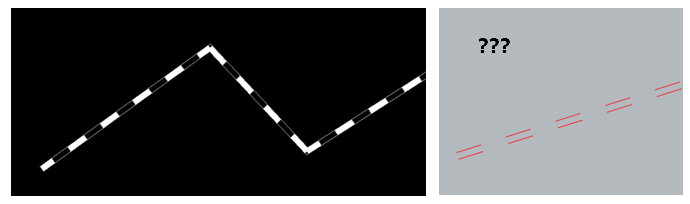
The equal linetype as supplied is just a dashed linetype that has a length of one unit and a gap of one unit. By setting its LTSCALE to the length of a pipe you can get an idea of the number of pipes involved. I have somewhere also convert an existing line to two lines as per right hand image, The GIS used to dump out a single line on a size layer so we wanted 2 dashed lines to imply existing drainage. Will try to find I think that is what you want. -

A toolkit is designed to streamline the conversion of raw survey texts ,and markers into professional MLeaders
Emmanuel Delay replied to darshjalal's topic in AutoLISP, Visual LISP & DCL
Hey, that's useful. I'm keeping this one- 1 reply
-
- 1
-

- Yesterday
-
 L_1szt joined the community
 -
 rcarson joined the community
 -
 Barneyy joined the community
 -

MultiPLine (MPL) — polyline-based MLINE replacement with per-line layers, presets, and auto-sync [Free + Pro]
Nikon replied to SkillAmplifier's topic in AutoLISP, Visual LISP & DCL
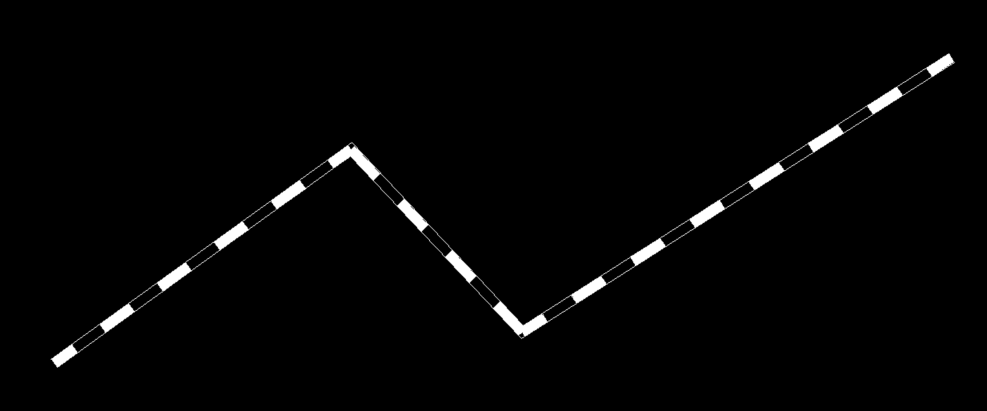
What should be the type of line to make a line like in the picture? If you use the EQUAL line type, you get just two dashed lines. The line type "Divide" is set in the code? (setq lt "Divide")
-
 tarek joined the community
 -

Having some issues converting to 3d
SLW210 replied to TimC's topic in AutoCAD 3D Modelling & Rendering
What 3D printer do you have? I just recalled, there used to be an APP at the Autodesk APP store, but no longer there, works on older AutoCAD, but it is also posted here at CADTutor and the Swamp. I use Bambu Labs and it comes with Bambu Studio which has a 3D Text that is very easy, I can do a custom name plate with text directly on the machine. -
 vinay thakur joined the community
 -

MultiPLine (MPL) — polyline-based MLINE replacement with per-line layers, presets, and auto-sync [Free + Pro]
SkillAmplifier replied to SkillAmplifier's topic in AutoLISP, Visual LISP & DCL
@BIGAL — the Pipe offsets approach is practical — hardcoded OD values per size as named commands (P300, P450 etc) is exactly the kind of thing that saves time on repetitive civil work. Applies the offset and switches to Divide linetype in one shot. Clean for a site-specific workflow. The Fillet offset circle reactor is a nice trick — using :vlr-unknowncommand to intercept custom prefixed strings like F100 or O234 is a different approach than what I went with. Avoids the willstart/ended pair entirely by hooking into unrecognised input instead. Here's the core VLR setup from the Pro version for comparison: (vlr-command-reactor nil '((:vlr-commandWillStart . mpla-on-cmd-willstart) (:vlr-commandEnded . mpla-on-cmd-ended) (:vlr-commandCancelled . mpla-on-cmd-cancel) (:vlr-commandFailed . mpla-on-cmd-cancel)) ) The willstart handler snapshots vertex lists and widths of all MPL masters into a global cache (*mpla-master-cache*). The ended handler diffs and rebuilds only the groups that changed. Went this route to watch standard commands passively without requiring any special input syntax. Happy to share more if useful. -
Good to know about "Gstarcad 2023" some of the other CAD programs do have little hidden issues that pop up now and then. But to Cadtutor's credit it is not a one platform forum.
-
MultiPLine (MPL) — polyline-based MLINE replacement with per-line layers, presets, and auto-sync [Free + Pro]
BIGAL replied to SkillAmplifier's topic in AutoLISP, Visual LISP & DCL
Taking your example video this is convert a p/line to a drainage pipe written for civil road works, with most common AUS sizes. Needs linetype Equal the length of dashed is set to 2.4 which is a length of a concrete pipe. Handy for civil works. It is not dynamic. *EQUAL,_ _ _ _ _ _ _ _ _ _ _ _ _ _ _ _ _ _ _ _ _ _ _ _ _ _ _ _ _ _ _ _ _ A,1.0,-1.0 Pipe offsets.lsp If you post here a VLR function can test. Fillet offset circle.lsp Have a look at "Fillet offset circle" uses reactors.
- Last week
-
 kmmwlton32 joined the community
 -
 hilotc joined the community
 -
I doubt if IT would allow that either, I have it at home so might see how that would work out. I believe Ghostscript's txtwrite is improved and should be capable as well, as noted an OCR is needed for images, Tesseract OCR — The World's Best Open Source OCR Engine. There may still be errors in the conversions. I know Adobe Acrobat has issues at times, I haven't used it in a few months though.
-
You have multiple locations using a redundant entget. (vlax-ename->vla-object (cdr (car (entget e1))) == (vlax-ename->vla-object e1)
-
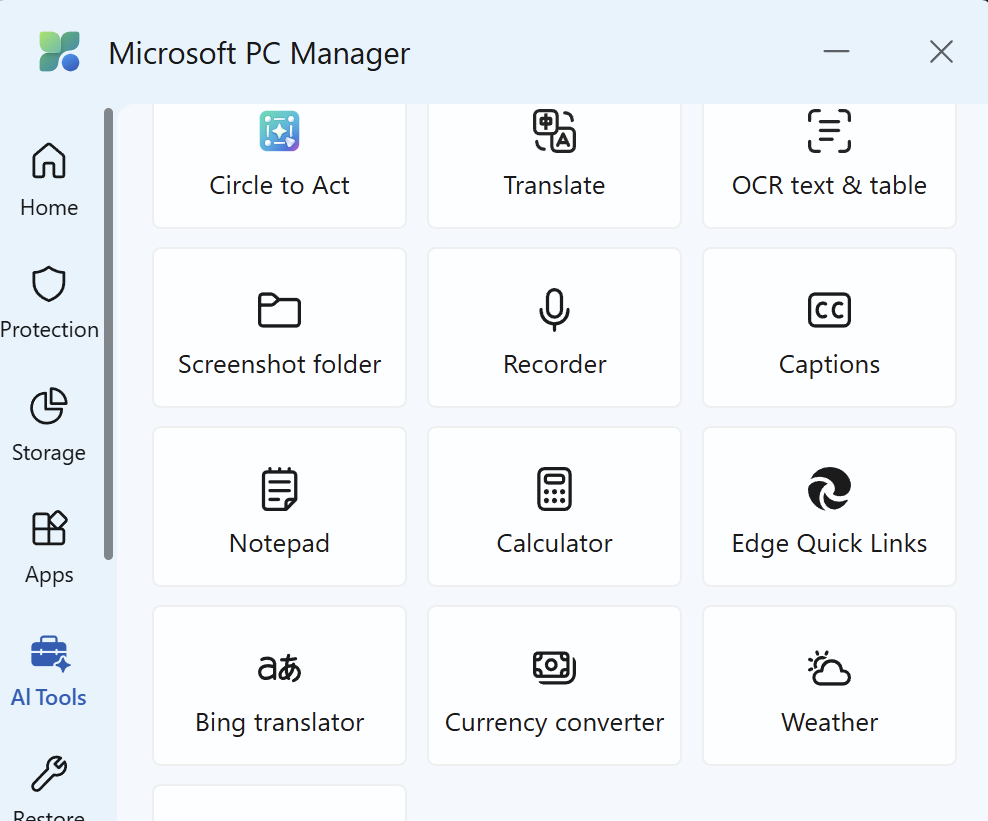
Another way to get the text from a pdf is the AI option 'OCR text & table from Microsoft PC manager, normally just available in the US store. But if you have VPN or are a really good singer (Queen : Oh...yes , I'm the great pretender lalala.. applause , oh thank you , you're so kind) you should be able to get it. Open pdf , use button et voila... but its still manual labor
-
In fact, I haven't updated my profile: I no longer use the 2012 version but I use Gstarcad 2023 and sometimes Autocad LT 2026 (subject of the question). I apologize to all of you for not having read the new posts anymore.
-
Tried this out some yesterday, this will be useful for sure! The things we have to do to bypass security features that don't work. I remember in high school a few teachers would tell the kids that didn't make passing grades that the world needs ditch diggers, too. Now they probably say the world needs IT techs. Some of the things they do defy any sort of normal thought processes. I received a call last week, one of the main people that use my drawings called and stated they couldn't open drawings after IT installed a new computer. You guessed it, no AutoCAD. A normal person should see what was on the old computer that was necessary and needs to move to the new computer. At least they installed the software for the waterjet, plasma cutter, etc.
-
This may help you set up for checking your LISPs Graebert LISP Extension[FLISP] - ARES Commander Partner Documentation - Confluence
-
MultiPLine (MPL) — polyline-based MLINE replacement with per-line layers, presets, and auto-sync [Free + Pro]
SkillAmplifier replied to SkillAmplifier's topic in AutoLISP, Visual LISP & DCL
Thanks both for the honest feedback — exactly what I was hoping for. @pkenewell — appreciate the link, I'm aware of Lee Mac's MPLine and have a lot of respect for his work. His implementation is elegant and handles the core offset drawing well. MultiPLine goes in a different direction: DCL-based configuration dialog, per-line layer assignment, named presets that persist across drawings, and the Pro version adds a command reactor for auto-sync. Different scope rather than a direct replacement for what he built. Worth knowing about either way so thanks for flagging it. @BIGAL — fair points across the board. BricsCAD: honestly didn't design for it and can't make promises there. The reactor implementation in Pro leans on AutoCAD-specific VLR functions. Lite might load fine in BricsCAD but I haven't tested it — if any BricsCAD users try it I'd be curious to hear the result. On the "why pay" question: fair challenge. The free Lite version covers the core workflow for most users. The Pro is aimed at teams and daily-driver users who want auto-sync and a preset library they can share across a team. Whether that's worth $29 is genuinely up to the buyer — I'm not trying to oversell it. The package suggestion is actually something I've been thinking about. MultiPLine is my first commercial release but I have other tools in progress. A bundle makes more sense as a value proposition and I'll keep that in mind for when there's more to package together. One more thing — I've added the full .lsp source to the Lite download on Gumroad. Free to inspect, modify for personal use, and learn from. Thanks again for taking the time — this kind of feedback from experienced users is more useful than any marketing. Zlatislav -
I know where your coming from where I worked last some 1000 pc's, we were lucky and had a good relationship with IT and could explain why we wanted something and most times they would go away and think about it, but approve and install, they would come to me to do the CAD installs, with the IT guy with me for user permissions. Each new PC was a "Hope it works" as they came preinstalled with corporate software.
-
MultiPLine (MPL) — polyline-based MLINE replacement with per-line layers, presets, and auto-sync [Free + Pro]
BIGAL replied to SkillAmplifier's topic in AutoLISP, Visual LISP & DCL
Just a couple of comments have this, type 2,4,-3,-4 and so on, draws multiple plines, as many as you type in one go.. Have a drag line over existing multi offsets and get all offsets and layers, so can make another pline without user input. Also what about Bricscad users ? Plenty of us here as well as other software. Oh yeah look at this image you draw a "WALL" that is multiple lines and on correct layers, predefined layers that are named in a txt file, so match what a user wants without editing code, won't go into how we made that work other than variable = layer name. Not sure that the task really warrants a VLX and a cost when there is software out there for the task and its free. I know from experience trying to sell software is extremely hard, as per draw house program some 130 lisps. Do you have something similar to the attached DOCX, showing what you have as say a package, most programs are free and open source some have a cost as need to be customised for clients. There is more scope for users to buy a package rather than just one program. Lisp files DEC 2025.docx
-
I try to use foreach when possessing list. (if (setq s (ssget (list '(0 . "INSERT")))) (progn (command "-VIEW" "S" tempViewName) (setq chk T i 0 n (sslength s)) (while (< i n) (setq e (ssname s i) x (cdr (assoc 2 (entget e))) i (1+ i) ) ... (command "_zoom" "_object" (cdr (car (entget e))) "") (setq 1P (car (LM:boundingbox (vlax-ename->vla-object (cdr (car (entget e))))))) (setq 2P (nth 2 (LM:boundingbox (vlax-ename->vla-object (cdr (car (entget e))))))) turns into (if (setq s (ssget (list '(0 . "INSERT")))) (foreach ent (vl-remove-if 'listp (mapcar 'cadr (ssnamex SS))) (command "-VIEW" "S" tempViewName) (setq Name (cdr (assoc 2 (entget ent))) chk T ) (command "_zoom" "_object" ent "") (vla-getboundingbox (vlax-ename->vla-object ent) 'minpt 'maxpt) (setq 1P (vlax-safearray->list minpt) 2P (vlax-safearray->list maxpt)) repeat foreach for s1 with point list Should be (cadr 1P) not (car (cdr 1P))
-
As SWL says, what is the error? Where does it fail? That would help identify a problem.
-
Nice job!
-

MultiPLine (MPL) — polyline-based MLINE replacement with per-line layers, presets, and auto-sync [Free + Pro]
pkenewell replied to SkillAmplifier's topic in AutoLISP, Visual LISP & DCL
https://www.lee-mac.com/mpline.html FYI - not to detract from your work, which I'm sure was extensive. -
Before I used this : (defun GetFolder ( m / f s) (if (and (setq s (vlax-create-object "Shell.Application")) (setq f (vlax-invoke s 'browseforfolder 0 m 65536 "")))(setq f (vlax-get-property (vlax-get-property f 'self) 'path)) (setq f nil))(vl-catch-all-apply 'vlax-release-object (list s)) f) (defun wait (sec / stop)(setq stop (+ (getvar "DATE") (/ sec 86400.0)))(while (> stop (getvar "DATE")))) (defun findstring ( / a b c d e) (setq a (GetFolder "Select folder for string search")) (setq b (getstring "\nEnter string to search for : " T)) (setq c (getstring "\nFile extension (lsp) : ")) (if (eq c "") (setq c "lsp")) (setq d (strcat a "\\result.txt")) (setq e (strcat "findstr /i /s \"" b "\" " a "\\*." c " > " d)) (command "shell" e) (gc)(gc) ;;; natural delay for system to clear cache and write file to disk (alert "search completed") (startapp "notepad" d) (princ) ) (defun c:dfs ()(findstring)) (defun c:t1 ()(findstring)(princ)) This code only works for text based files. Have updated code in my first post with Excel support. Valid extensions are now lsp , txt , dwg , xls and xlsx I have a license for able2extract on my home computer and also written something that uses pdfattach and import for readable pdf's. Though I can take that route, it's not like shoot & forget , often more than one step is needed. But it is what it is... most pdf's I get are pretty poor quality , some by accident and some not because a 3rd party wants you as a returning client if you know what I mean.
-
If the text is Searchable in the PDF. Windows Explorer will work. if the PDF is just an image then it wont work and have to use Adobe's OCR to convert them to be searchable. -Edit Tho not 100% some stuff come in weird like fractions or text between white space and pictures.