All Activity
- Past hour
-

Do you check the drawing units before starting work on a DWG?
BIGAL replied to indiancad's topic in AutoCAD Drawing Management & Output
We basically used our DWT so would insert an external dwg then way more than units were correct. The only disclaimer is that most of our dwg's started off with "Model" only no layouts. Our design process created those. -

[Part 1/6] The CAD Manager's Playbook: How to Elegantly Manage 100+ Custom Plugins
VicoWang replied to VicoWang's topic in CAD Management
Haha, oh no, BIGAL—I see where the confusion came from! Let me completely clear that up: A VCID is NOT a command alias, and it is definitely NOT a shortcut you type to draw! Nobody is typing arbitrary 6-character codes like "123, 456" to draw walls or doors. I would hate that software too! Here is how the architecture actually works: VCID is just an Asset Identifier: It is purely a package tracking code used once to fetch and sandbox the file (or pushed silently by the CAD Manager from the cloud). Instant, Lossless Alias Customization: Once on the machine, the draftsperson draws using their normal human aliases (e.g., W for wall, D for door). But here is the real game-changer: VedaCAD allows users and CAD managers to reassign any custom alias on the fly via our GUI, without ever editing acad.pgp, without writing wrapper LISP routines (defun c:...), and without modifying a single line of third-party source code. And regarding that conditional loading pattern you shared: (if (not ahbutts) (load "Multi radio buttons")) Using (if (not <func>) (load ...)) as a local load-guard has been a time-honored AutoLISP idiom since the 1990s. But as we touched upon in our previous discussion regarding Install.lspand AUTOLOAD, that pattern hits severe architectural limits in an enterprise environment: Search Path Fragility: (load "filename") strictly assumes the file is already sitting somewhere in AutoCAD’s native Support File Search Path. Furthermore, without a fallback argument, if the path breaks or an engineer takes a laptop to a disconnected job site, that one-liner crashes with a fatal ; error: LOAD failed. Zero Path Dependency in VedaCAD: VedaCAD completely bypasses AutoCAD's Support Paths. We engineered an independent, version-controlled Mapping Database. It binds custom aliases directly to the physical binaries vaulted inside an isolated local sandbox. The command executes natively without touching, polluting, or relying on AutoCAD's fragile support search paths at all. This series is specifically focused on solving deployment and governance nightmares for CAD Managers running enterprise fleets across dozens of workstations—where relying on manual path configurations and individual workstation edits simply doesn't scale. Hopefully that clears up the distinction between our backend mapping database and the actual drafting aliases! -
I am using V25 had properties window open, ran code by @mhupp and it worked properties window displays and objects are highlited.
-
J2lstaples, I have been using AI a bit lately, When I code a bigger project even small ones I write numerous defuns the reason being they solve one task but a program may need 5 task defuns. Also I can test that defun and make sure its working correctly rather having one great big program and trying to find where it is not working. But sometimes the AI just does not work for a defun task so have to go back to searching old fashioned way. You can use AI but you have to know how to describe a task, knowing who some lisp functions like SSget work with filters. Not sure what AI would think of this, I will do old fashioned way. "Drag line over multiple parallel p/Lines get two out side linework, offset both outward further make a box, now ssget text on a layer within that box. Also get how many lines, Then sort and count the text multiplied by the number of lines and put results in a table." Yes it is a current post request, not here at Cadtutor. I am interested in what AI can do and how long it takes to make something that works.
-
[Part 1/6] The CAD Manager's Playbook: How to Elegantly Manage 100+ Custom Plugins
BIGAL replied to VicoWang's topic in CAD Management
It only takes one line to check is a program already loaded if not then demand losd. if (not ahbutts)(load "Multi radio buttons")) In the majority of programs to draw objects walls doors windows etc plus much much more are all demandloaded from a POP menu. It really comse down to how your going to present your programs to an end user, POP, Ribbon and toolbars can be used, yes your token method can be used also. I know of some software that pushed hard remember the option number to run a program, so a discussion would be use 123 pick objects then 456 and finish with 789. I had no idea what they were talking about.
- Today
-

Do you check the drawing units before starting work on a DWG?
Paul Li replied to indiancad's topic in AutoCAD Drawing Management & Output
Though I would quite often check because I would need to change the PRECISION or make sure the INSUNITS are correctly set by using the UNITS command, I would seldom check the actual drawing units by using the -DWGUNITS command. I would say it's most important to make sure the current units are recognized by AutoCAD as mm or inches and etc than if it's Architectural/Engineering/Decimal. - Yesterday
-

How can I make the following program support Chinese input?
xcn replied to xcn's topic in AutoCAD 2D Drafting, Object Properties & Interface
@SLW210 I’m using a Microsoft Pinyin to input Chinese. As you can see in the picture.
-

Free Browser-Based STEP/STP Viewer for Quick CAD Inspection
cadprops replied to cadprops's topic in AutoCAD 3D Modelling & Rendering
Thanks again for the feedback! We’ve already updated the section view so the cut faces are now properly closed, which should make the result much more intuitive. If you find CADProps useful, we’d really appreciate it if you could share it with colleagues or others who might benefit from it. And of course, any further feedback is always welcome! -
Free Browser-Based STEP/STP Viewer for Quick CAD Inspection
cadprops replied to cadprops's topic in AutoCAD 3D Modelling & Rendering
Yes, it’s currently completely free to use. If you think it could be useful to the CADTutor community, we’d really appreciate it if you could share it with other members or include it in any relevant CAD resources/tools section. We’re also happy to keep improving it based on feedback from the community. - Last week
-

multiple file selection dialog box using lisp & powershell
GLAVCVS replied to Paul Li's topic in AutoLISP, Visual LISP & DCL
I am curious to understand what the problem is. Right now, I am working 400 km away from home and only have access to an old PC running Windows 10 and AutoCAD 2002. I must say that this code actually works for me. I will try testing it soon on a more recent version of AutoCAD, and then perhaps I’ll add a further comment. -
multiple file selection dialog box using lisp & powershell
Paul Li replied to Paul Li's topic in AutoLISP, Visual LISP & DCL
@GLAVCVSI just tried commenting out that line as you recommended but still no joy. The freezing up now also occurs on the Win 11 OS. Even after I unfreeze the Select Files window, I still cannot Cancel out but I must make a file selection to dismiss the window. The behavior just seems very unstable with a persistent powershell setup at least on the systems I tested at my end. But thanks for your feedback & code revisions. Perhaps others here can use this faster alternative if it's stable running the code this way on their systems. -
multiple file selection dialog box using lisp & powershell
GLAVCVS replied to Paul Li's topic in AutoLISP, Visual LISP & DCL
The last line of code (pl:getfiledps "Hola" "c:\\" "dwg" 1) is for testing purposes and should not be loaded at startup. Comment it out, save the changes, and open a new drawing to reload the code. Once the file has loaded, you can execute (pl:getfiledps "Hola" "c:\\" "dwg" 1). The reason for this is that PowerShell runs asynchronously, and `pl:getfiledps` might execute before the PowerShell instance is available. -
multiple file selection dialog box using lisp & powershell
Paul Li replied to Paul Li's topic in AutoLISP, Visual LISP & DCL
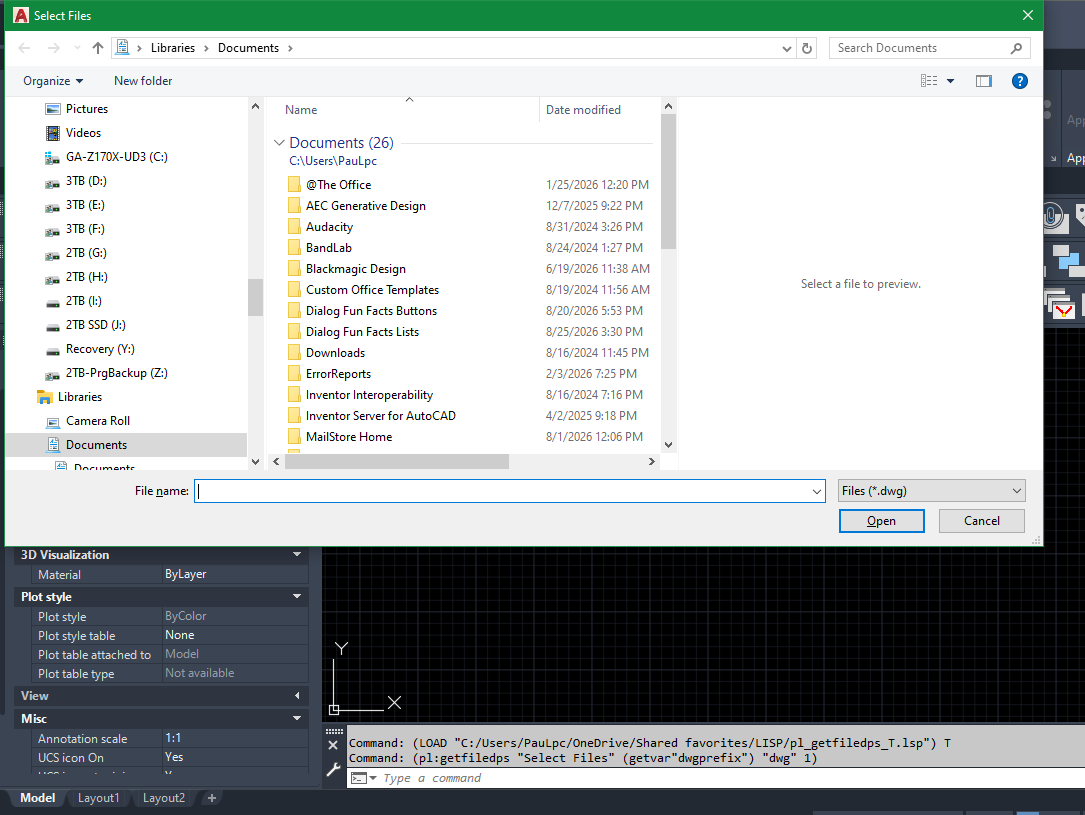
@GLAVCVS Thanks for updating the code. Unfortunately, it still freezes up on me with AutoCAD on Win 10. I'll have to use the method to make either Edge on one computer or Outlook on another computer current to unfreeze the Select Files window. But on both Win 10 & Win 11, I'll encounter another problem. After loading the code on the current dwg and then I open another dwg and run the code there I would encounter problems. The error would read: Command: (pl:getfiledps "Hola" "c:\\" "dwg" 1) ("__ERROR__ The property 'FileName' cannot be found on this object. Verify that the property exists and can be set.") -
multiple file selection dialog box using lisp & powershell
GLAVCVS replied to Paul Li's topic in AutoLISP, Visual LISP & DCL
I've edited the code again, and it seems to have worked this time. -
Version 1.1
4 downloads
Note: To install via VCID, you need to install VedaCAD in advance and log in to a free account (or PRO account). Tips: Welcome developers to publish their plugins on VedaCAD and obtain their plugin's VCID for plugin sharing (even free accounts can publish). The following methods can be used to test the installation and deployment of the VedaCAD plugin via the VCID test: [Quick Annotator] VCID: 7JAU18 @ VedaCAD [Codebase Packer] VCID: 0FBGZB @ VedaCAD [VAgent Demo] VCID: PLG96B @ VedaCAD [Gomoku CadCade] VCID: 1G8VY1 @ VedaCAD [Omni Wheel] VCID: US87Y8 @ VedaCAD [Side DIM] VCID: 5EDNWJ @ VedaCAD [Smart Break] VCID: D86938 @ VedaCAD [Wave Animator] VCID: 31E6TS @ VedaCAD -
 rdpk7 joined the community
 -
.thumb.jpg.615654602253be56b2fbd5d064834780.jpg)
Why does a 3D model sometimes look faceted instead of smooth?
indiancad posted a topic in AutoCAD 3D Modelling & Rendering
Have you ever created a curved 3D model that looked smooth while working on it, but the edges appeared faceted or rough? The geometry may be correct. The display can be affected by the visual style and object smoothness settings. For curved solids, I first check the visual style and use SMOOTHMESHCONVERT or the appropriate smoothness tools when working with mesh-based geometry. For solid models, changing the display quality can also make a noticeable difference without changing the actual model. This is one of those cases where the model isn't necessarily wrong—the way it is displayed can make it look wrong. Have you ever mistaken a display issue for a modelling problem? What did you check first? -
For anyone finding this older thread with the same problem: check the SLDPRT version first, and ask the sender for STEP or Parasolid if you need geometry that can be imported and edited in another CAD system. A viewer only confirms what is in the file; it does not restore the SolidWorks feature tree or drawing tolerances. I work on CADProps. Its browser SolidWorks viewer can inspect SLDPRT/SLDASM files, show converted geometry and bounding dimensions, and export STEP when the file parses: https://www.cadprops.com/tools/solidworks-viewer/ . The current guest limit is 10 MiB and files are temporarily processed server-side, so confidential models should only be uploaded if that workflow is acceptable.
-
multiple file selection dialog box using lisp & powershell
GLAVCVS replied to Paul Li's topic in AutoLISP, Visual LISP & DCL
It seems that Cadtutor refused to accept my modification. Basically, I changed *TOUT* to *OUT* and '(if (findfile *PS-READY*)' to '(if (and *PS* (findfile *PS-READY*))' -
multiple file selection dialog box using lisp & powershell
Paul Li replied to Paul Li's topic in AutoLISP, Visual LISP & DCL
@GLAVCVS BTW: I didn't see any changes to your original code. For example I still see the lines using *PS-TOUT* I've tried it on a couple of Windows 10 Pro OS computers running AutoCAD 2021, 2023 & 2027 one at a time and not multiple sessions. Upon further testing the Select Files window can be unstuck by toggling to the Edge browser making that active and then toggling back to AutoCAD. The problem still occurs even when the Edge browser is not running. But as long as I launch the Edge browser (when it's not already running) then the Select Files window would free up to function as designed. This problem does not occur on the single Windows 11 OS computer I tested this on. -
multiple file selection dialog box using lisp & powershell
GLAVCVS replied to Paul Li's topic in AutoLISP, Visual LISP & DCL
You were right I forgot to clean *PS-TOUT* from my test code I've also tweaked something else in the code. Try it again -
multiple file selection dialog box using lisp & powershell
GLAVCVS replied to Paul Li's topic in AutoLISP, Visual LISP & DCL
Which version of AutoCAD are you using? Do you have multiple AutoCAD sessions open? -
multiple file selection dialog box using lisp & powershell
Paul Li replied to Paul Li's topic in AutoLISP, Visual LISP & DCL
@GLAVCVS Thanks for the modified code. But I'm encountering the following errors after attempting to load it: ; error: bad argument type: stringp nil The error is caused by the following lines of code under the PS-EXEC function: ;|Waiting for a Powershell response / Esperar a que PowerShell responda|; (while (not (findfile *PS-TOUT*));(not (findfile *PS-OUT*)) (setq t0 1000) (repeat 1000 (setq t0 (1+ t0))) ) ;|Reading response / Leer respuesta|; (setq fp (open *PS-TOUT* "r"));(open *PS-OUT* "r")) (while (setq lin (read-line fp)) (setq result (cons lin result)) ) (close fp) When I change the following lines of code referencing *PS-TOUT* to what you had commented out using *PS-OUT* then at least it'll load successfully: ;|Waiting for a Powershell response / Esperar a que PowerShell responda|; (while (not (findfile *PS-OUT*));(not (findfile *PS-OUT*)) (setq t0 1000) (repeat 1000 (setq t0 (1+ t0))) ) ;|Reading response / Leer respuesta|; (setq fp (open *PS-OUT* "r"));(open *PS-OUT* "r")) (while (setq lin (read-line fp)) (setq result (cons lin result)) ) (close fp) But after this when I call the pl:getfiledps function using the following line of code: (pl:getfiledps "Select Files" (getvar"dwgprefix") "dwg" 1) The Select Files window would appear on top of my AutoCAD session and then just hang there. I'm unable to select any files from this window or move the window out of the way: I would have to terminate the AutoCAD app from Task Manager But the Select Files window remains. Now the window is freed up for me to select files and drag the window around. Any thoughts as to why this is occurring on my end?
-
multiple file selection dialog box using lisp & powershell
GLAVCVS replied to Paul Li's topic in AutoLISP, Visual LISP & DCL
You can start a PowerShell instance from LISP and keep it running in the background, ready to receive instructions. I've played around with this idea a little and ended up with the following code. I haven't tested it thoroughly enough, so its robustness could probably be improved. But it may be useful. (defun PS-START (/ fp sh cmd n) (vl-load-com) ;| -------------------------------------------------------------- ; Si existe READY, suponemos de momento que ya está funcionando. ; Posteriormente podemos hacer PS-ALIVE más rigurosa. |; -------------------------------------------------------------- (setq *PS-SERVER* (strcat (getenv "TEMP") "\\PL_PS_Server.ps1") *PS-TCMD* (strcat (getenv "TEMP") "\\PL_PS_Command.tmp") *PS-CMD* (strcat (getenv "TEMP") "\\PL_PS_Command.txt") *PS-OUT* (strcat (getenv "TEMP") "\\PL_PS_Output.txt") *PS-READY* (strcat (getenv "TEMP") "\\PL_PS_Ready.txt") ) (if (and *PS* (findfile *PS-READY*)) T (progn ;|Clean previous files / Limpiar archivos anteriores|; (if (findfile *PS-CMD*) (vl-file-delete *PS-CMD*) ) (if (findfile *PS-OUT*) (vl-file-delete *PS-OUT*) ) ;|Create server script / Crear script servidor|; (setq fp (open *PS-SERVER* "w")) ;|Nombres de los archivos de comunicación|; (write-line "$cmd = $env:TEMP + '\\PL_PS_Command.txt'" fp) (write-line "$out = $env:TEMP + '\\PL_PS_Output.txt'" fp) (write-line "$ouTmp = $env:TEMP + '\\PL_PS_Output.tmp'" fp) (write-line "$ready = $env:TEMP + '\\PL_PS_Ready.txt'" fp) ;|Indicate Powershelll ready / Señalizar que PowerShell está preparado|; (write-line "Set-Content -Path $ready -Value $PID -Encoding Default" fp) ;|Main loop / Bucle principal Powershell remains here for entire session / PowerShell permanece aquí durante toda la sesión|; (write-line "while ($true) {" fp) ;|Is there any pending request? / ¿Hay una orden pendiente?|; (write-line " if (Test-Path $cmd) {" fp) ;|Read ALL code / Leer TODO el código. -Raw permite que PS-EXEC pueda mandar scripts de varias líneas, no solamente una instrucción |; (write-line " $code = Get-Content -Path $cmd -Raw -Encoding Default" fp) ;|Delete request inmediately / Borrar la petición inmediatamente. Esto indica que el servidor ya se ha hecho cargo de ella.|; (write-line " Remove-Item $cmd -Force" fp) ;|Orden para terminar el servidor|; (write-line " if ($code.Trim() -eq '__EXIT__') {" fp) (write-line " break" fp) (write-line " }" fp) ;|Execute code IN THIS POWERSHELL SESSION / Ejecutar código EN ESTA MISMA SESIÓN POWERSHELL|; (write-line " try {" fp) (write-line " $result = Invoke-Expression $code" fp) ;| OUT must always be created so that PS-EXEC knows the process has finished Hay que crear siempre OUT. Incluso si la expresión devuelve $null necesitamos crear el archivo para que PS-EXEC sepa que hemos terminado. |; (write-line " if ($null -eq $result) {" fp) (write-line " Set-Content -Path $ouTmp -Value '' -Encoding Default" fp) (write-line " }" fp) (write-line " else {" fp) (write-line " $result | Out-File -FilePath $ouTmp -Encoding Default" fp) (write-line " }" fp) (write-line " Move-Item $ouTmp $out -Force" fp);rename PL_PS_Output.tmp / renombramos PL_PS_Output.tmp ;|Capturar errores|; (write-line " }" fp) (write-line " catch {" fp) (write-line " ('__ERROR__ ' + $_.Exception.Message) | Out-File -FilePath $out -Encoding Default" fp) (write-line " }" fp) ; close / cerrar 'IF Test-Path' (write-line " }" fp) ;| Sleep / Demorar 10 ms. Prevents resident Powershell instance from continuously using a CPU core while it has nothing to do Evita que el PowerShell residente utilice continuamente un núcleo de CPU mientras no tiene nada que hacer |; (write-line " Start-Sleep -Milliseconds 10" fp) ; cerrar WHILE (write-line "}" fp) ;|PowerShell está terminando|; (write-line "Remove-Item $ready -Force -ErrorAction SilentlyContinue" fp) (close fp) ;|Arrancar PowerShell|; (if (not *PS*) (progn (setq cmd (strcat "powershell.exe " "-NoLogo " "-NoProfile " "-NonInteractive " "-STA " "-ExecutionPolicy Bypass " "-WindowStyle Hidden " "-File \"" *PS-SERVER* "\"" ) sh (vlax-create-object "WScript.Shell") ) (vlax-invoke-method sh 'Run cmd 0 :vlax-false) (vlax-release-object sh) ) ) ;| Esperar a que PowerShell cree READY Máximo: 5 segundos |; (setq n 0) (while (and (not (findfile *PS-READY*)) (< n 500) ) (repeat 10000 (getvar "MILLISECS")) (princ "\rEsperando...") (setq n (1+ n)) ) ;|Result / Resultado|; (if (findfile *PS-READY*) T nil ) ) ) ) (defun PS-EXEC (code / fp lin result t0) ;| Clears any previous result / Borrar posible resultado anterior|; (if (findfile *PS-OUT*) (vl-file-delete *PS-OUT*) ) ;| Write code that Powershell should executed / Escribir el código que debe ejecutar PowerShell|; (setq fp (open *PS-CMD* "w")) (write-line code fp) (close fp) ;|Waiting for a Powershell response / Esperar a que PowerShell responda|; (while (not (findfile *PS-OUT*));(not (findfile *PS-OUT*)) (setq t0 1000) (repeat 1000 (setq t0 (1+ t0))) ) ;|Reading response / Leer respuesta|; (setq fp (open *PS-OUT* "r"));(open *PS-OUT* "r")) (while (setq lin (read-line fp)) (setq result (cons lin result)) ) (close fp) ;| Delete result / Borrar resultado|; (vl-file-delete *PS-OUT*) (reverse result) ) (defun PL-FILEDIALOG-INIT (/ hwnd) ;; HWND de ESTA instancia concreta de AutoCAD (setq hwnd (vla-get-HWND (if (minusp (- (atoi (getvar "ACADVER")) 16)) (vla-get-activeDocument (vlax-get-acad-object)) (vlax-get-acad-object))) ) ;; Windows Forms + OpenFileDialog (PS-EXEC (strcat "Add-Type -AssemblyName System.Windows.Forms;" "$script:f=New-Object System.Windows.Forms.OpenFileDialog" ) ) ;|Small 'wrapper' to convert AutoCAD's HWND into a valid 'IWin32Window' for ShowDialog(owner) Pequeño 'wrapper' para convertir el HWND de AutoCAD en un 'IWin32Window' válido para 'ShowDialog (owner)' |; (PS-EXEC (strcat "Add-Type -TypeDefinition " "'using System;" "using System.Windows.Forms;" "public class WindowWrapper:IWin32Window{" "private IntPtr h;" "public WindowWrapper(IntPtr hwnd){h=hwnd;}" "public IntPtr Handle{get{return h;}}" "}' " "-ReferencedAssemblies System.Windows.Forms" ) ) ;|Locate AutoCAD and create owner Localizar AutoCAD y crear el 'owner' |; (PS-EXEC (strcat "$script:owner=New-Object WindowWrapper(" (itoa hwnd) ")" ) ) T ) (defun pl:getfiledps (title dir ext flg / psquote makefilter code) ;| Escape / Escapar ' PowerShell|; (defun psquote (s / p n) (setq n 0) (while (setq p (vl-string-search "'" s n)) (setq s (strcat (substr s 1 p) "''" (substr s (+ p 2))) n (+ p 2) ) ) s ) (defun makefilter (s / p r x) (setq r "") (while (setq p (vl-string-search ";" s)) (setq x (substr s 1 p) r (strcat r "*." x ";") s (substr s (+ p 2)) ) ) (strcat r "*." s) ) ;|Default values / Valores por defecto|; (if (/= (type title) 'STR) (setq title "Select Files") ) (if (not (and (= (type dir) 'STR) (vl-file-directory-p dir) ) ) (setq dir (getvar "DWGPREFIX")) ) (if (= (type ext) 'STR) (setq ext (makefilter ext)) (setq ext "*.dwg") ) ;| Build only the code needed for this call: Powershell, Forms, f and owner ALREADY EXISTS Construir únicamente el código necesario para ESTA llamada: PowerShell, Forms, f y owner YA EXISTEN |; (setq code (strcat "$script:f.FileName='';" "$script:f.Title='" (psquote title) "';" "$script:f.InitialDirectory='" (psquote dir) "';" "$script:f.Filter='Files (" ext ")|" ext "';" "$script:f.Multiselect=" (if (and (= (type flg) 'INT) (/= flg 0) ) "$true;" "$false;" ) "$r=$script:f.ShowDialog($script:owner);" "if($r -eq " "[System.Windows.Forms.DialogResult]::OK)" "{$script:f.FileNames}" ) ) ;| Execute in the resident Powershell instance / Ejecutar en PowerShell residente |; (PS-EXEC code) ) ;|If Powershell is not already running, start a instance / SI POWERSHELL NO ESTÁ INSTANCIADO, SE CREA UNA INSTANCIA|; (if (not *PS*) (progn (setq *PS* (PS-Start)) (PL-FILEDIALOG-INIT))) ;;;(startapp "notepad" *PS-OUT*) (setq *PS* nil) ;;;(pl:getfiledps "Hola" "c:\\" "dwg" 1) How does it work?... When the code is loaded, a PowerShell instance and a base script are created. After that, simply call the pl:getfiledps function whenever you need it. -
You're right, but it doesn't change the properties window behavior. I wonder if this is a Bricscad bug related to the PropertyPreviewDelay setting. For the sssetfirst syntax, I can't be bothered to look up the correct format so I always use the variable in both locations, since the help file says the first argument is ignored.
-
looked at your code closer the first argument needs to be nil in sssetfirst left over from legacy code. https://help.autodesk.com/view/OARX/2023/ENU/?guid=GUID-4076CD9D-1C66-4C73-ACC0-3A6CD0B0D2D8 '(sssetfirst gripset[pickset]) 'gripset 'AutoCAD no longer supports grips on unselected objects, so this argument is ignored. However, if gripset is nil and no pickset is specified, sssetfirst turns off the grip handles and selections it previously turned on. 'pickset 'A selection set to be selected. (setq ss1 (ssget)) (sssetfirst nil ss1)