Leaderboard




Popular Content
Showing content with the highest reputation since 04/15/2026 in all areas
-
Indeed, if the block has attributes, (entmod) becomes more complicated: it requires going through transformation matrices and applying them to the attributes. The move command would be simpler... Here is the mhupp code adapted for proper operation: Merits to Mhupp for his code ;;----------------------------------------------------------------------------;; ;; Modify Text or Blocks to align Horozontal or Vertical ;; https://www.cadtutor.net/forum/topic/99091-i-need-a-lisp-to-align-blocks-and-texts-vertically/ (defun C:ATB () (C:AlignTextBlock)) (defun C:AlignTextBlock (/ vars vals pt1 pt2 vector mode ent ed pt newpt) (vl-load-com) (setq vars '(OSMODE ORTHOMODE) vals (mapcar 'getvar vars) ) (mapcar 'setvar vars '(0 1)) (setq pt1 (getpoint "\nAlignment Point: ")) (setq pt2 (getpoint pt1 "\nSelect Horozontal or Vertical:")) (setq vector (mapcar '- pt2 pt1)) (if (eq (car Vector) 0.0) (setq mode 'V) (setq mode 'H)) (while (setq ss (ssget '((0 . "TEXT,INSERT")))) (foreach ent (vl-remove-if 'listp (mapcar 'cadr (ssnamex SS))) (setq ed (entget ent) pt (cdr (assoc 10 ed)) newpt (if (eq mode 'V) (list (car pt1) (cadr pt) (caddr pt)) (list (car pt) (cadr pt1) (caddr pt))) ) (vla-Move (vlax-ename->vla-object ent) (vlax-3d-point pt) (vlax-3d-point newpt)) ; (if (or (not (assoc 11 ed)) (eq (cdr (assoc 11 ed)) '(0.0 0.0 0.0))) ;test if 11 doesnt exist or is 0,0,0 ; (setq ed (subst (cons 10 newpt) (assoc 10 ed) ed)) ; (setq ed (subst (cons 11 newpt) (assoc 11 ed) ed)) ; ) ; (entmod ed) ) ) (mapcar 'setvar vars vals) (princ) ) (princ "\nAlignTextBlock Lisp Loaded") (princ "\nType ATB or AlignTextBlock to run command")4 points
-
Very quickly try these changes: (setq alpty (cadr alpt)) ---> (setq alptx (car alpt)) (setq newpt (list inptx alpty)) --> (setq newpt (list alptx inpty))3 points
-
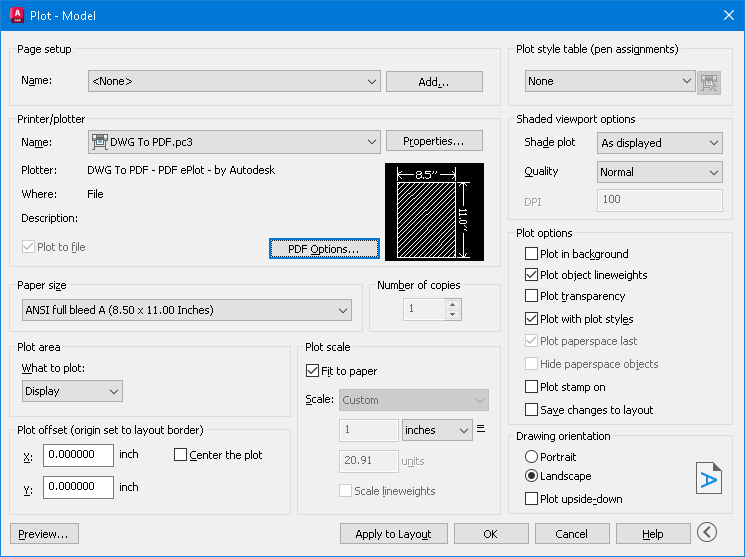
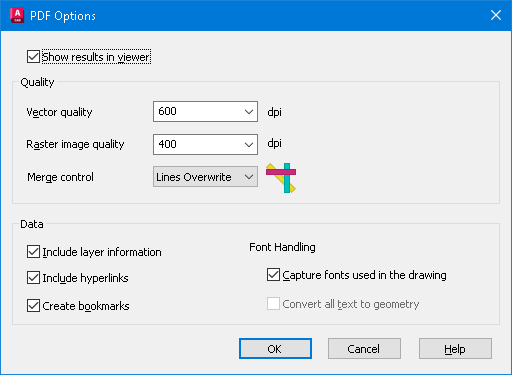
I meant to mention adding the (\U+200A). IIRC it's called a nonbreaking space. "Hairspace" sounds better IMO. I didn't try this, but one article mentioned to "Save As" or "Export to" PDF to kill the hyperlinks. My AutoCAD 2026 has the option to check Include Hyperlinks under PDF Options on the plot manager.
 2 points
 -
This code is so helpful to convert texts or mtexts to mleader. In the attachments the lisp file and cad file that has the problem I tied to solve. The cad file contains a huge amounts of elevations as texts and leaders that are exploded for landscape work , therefore this lisp can help with case like this Regards TBC- JOIN TEXT AND POLYLINES AND CONVERT THEM TO MLEADER OR MAKE IT MANUALLY.lsp BR FIN LVLS-1.dwg2 points
-
ah yes. https://www.cadtutor.net/forum/topic/98598-just-a-funny-basic-toolbar/2 points
-
Try this also. Seemed to work and makes a vector list code of objects. VECTORIZE.lsp2 points
-
That would be The Dragon, RLX maybe? He had a menu but not sure if that is the one you're thinking off? (I was impressed but been too busy this year to get into using it)2 points
-
Didn't someone have a lisp that created a menu system in model space ? on the right side of the current view.2 points
-
Still starting from the mhupp code, I think this corresponds to your request: align all the blocks to the position of a block. Same for text or mtext. (defun C:ABC ( / vars vals ss ssref pt_ref pt2 vector mode ent ed pt newpt) (vl-load-com) (setq vars '(OSMODE ORTHOMODE) vals (mapcar 'getvar vars) ) (mapcar 'setvar vars '(0 1)) (princ "\nSelect Block or Texte.") (while (null (setq ss (ssget '((0 . "*TEXT,INSERT")))))) (princ "\nSelect ONE texte or block to align selection") (while (null (setq ssref (ssget "_+.:E:S" '((0 . "*TEXT,INSERT")))))) (setq pt_ref (cdr (assoc 10 (entget (ssname ssref 0))))) (setq pt2 (getpoint pt_ref "\nSelect Horozontal or Vertical:")) (setq vector (mapcar '- pt2 pt_ref)) (if (eq (car Vector) 0.0) (setq mode 'V) (setq mode 'H)) (foreach ent (vl-remove-if 'listp (mapcar 'cadr (ssnamex SS))) (setq ed (entget ent) pt (cdr (assoc 10 ed)) newpt (if (eq mode 'V) (list (car pt_ref) (cadr pt) (caddr pt)) (list (car pt) (cadr pt_ref) (caddr pt))) ) (vla-Move (vlax-ename->vla-object ent) (vlax-3d-point pt) (vlax-3d-point newpt)) ) (mapcar 'setvar vars vals) (princ) )2 points
-
I Just try to avoid using command. apparently their is a bug in autocad 2026 and newer that balloons lisp to 276 seconds when it only took .24 second in older versions. just figured everything contained in the block id would move when updating. cant test right but does adding the 66 . 0 exclude single text outside of blocks? vla-move works for me keep it simple.2 points
-
@mhupp If you want to keep (entmod) in your code and make it efficient, you can refine your filter (ssget) to exclude blocks with attributes. (setq ss (ssget '((0 . "TEXT,INSERT") (66 . 0))))2 points
-
notice your lisp name is MoveLayerAllLayouts that mean other tabs other than model? ssget "_X" wont pick up things on other tabs if they are on that layer. So if your moving everything might assume your deleting the old layer. if that's the case just rename it. no need to mess with ssget and will pick up everything. (vl-cmdf "_.-Rename" "LA" old new)2 points
-
Using @BIGAL suggestion for ssget to only pick up text and blocks set in a while loop so you can align multiple things to the same axis. also added a visual to choose between horizontal or vertical alignment. AlignT&B.lsp2 points
-
After quickly looking into this... Unchecking the box is equal to no limit. Had a little time at work so... quickly tested. ;;; Uncheck the Max leader points in the Multileader Style dialog box. (or set a value). | ;;; | ;;; https://www.cadtutor.net/forum/topic/99083-looking-for-lisp-to-uncheck-max-leader-points-for-all-mleader-styles/#findComment-678964 | ;;; | ;;; By SLW210 (a.k.a. Steve Wilson) | ;;; | ;;;*************************************************************************************************************************************| ;;;*************************************************************************************************************************************| (defun c:UnchkMLdrPnts (/ acApp doc dict obj) (vl-load-com) (setq acApp (vlax-get-acad-object)) (setq doc (vla-get-ActiveDocument acApp)) (setq dict (vla-Item (vla-get-Dictionaries doc) "ACAD_MLEADERSTYLE")) (vlax-for obj dict (if (vlax-property-available-p obj 'MaxLeaderSegmentsPoints) (vla-put-MaxLeaderSegmentsPoints obj 0) ;; 0 = unlimited ) ) (princ "\nMax leader points box is unchecked.") (princ) )2 points
-
Hi thanks for you replies. Eventually I realized that it must have been an issue with having too many layers at once. I just selected and exported 1 layer at a time and it worked well2 points
-
Besides what @mhupp stated, try turning off antivirus, anti-malware, etc. Could be simply having portions of the install blocked. You might look and make sure you are installing as admin, make sure you do a "COMPLETE UNINSTALL" (AutoCAD has a procedure for this, not sure about BricsCAD), then reinstall as admin with antivirus, etc turned off.2 points
-
A snippet here, this appears to set clipboard text to plain text - removes formatting (fonts etc). (defun c:TXTCBNF ( / htmlfile result ) ; TXT: text, CB: Clip Board, NF: No Format ;; Set clipboard text to no format (setq result (vlax-invoke (vlax-get (vlax-get (setq htmlfile (vlax-create-object "htmlfile")) 'ParentWindow) 'ClipBoardData) 'getData "Text")) (vlax-release-object htmlfile) ;; Put no format text into clipboard (vlax-invoke (vlax-get (vlax-get (setq htmlfile (vlax-create-object "htmlfile")) 'ParentWindow) 'ClipBoardData) 'setData "Text" result) (vlax-release-object htmlfile) (princ) ) Always many ways to do the same thing! If you are OK to do LISPs else just ask (A part of a larger LISP of mine, so think this works... but it might not - my one puts in some thoughts between grabbing the clip board text and resetting it such as mm2 goes to 'squared', some company texts to upper case if not and so on)2 points
-
Is this text in a TTF font or SHX? AutoCAD exports SHX fonts to searchable comments. If you turn that off (set PDFSHX system variable to 0), maybe the links will turn off too. SLW seems to be on the right track with PDF Options, try that first.1 point
-
I'll try that shortly and see if that works. PDF options didn't do much - mostly I think it is a PDF viewer thing (got into a whole word of space names yesterday, EM-space, EN-space, half EM, quarter EM... and so on depends on the website, never knew there were so many 'spaces')1 point
-
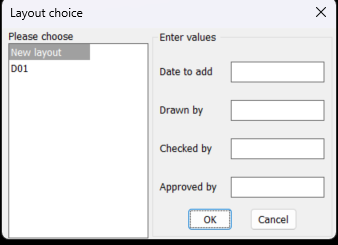
I have coded a dcl as per image but I can not get the list box answer I get the radio buttons as a list which is what I want. If ran as source code the listbox lsp works fine returning the items selected as a list. I am sure it is something very simple I am doing wrong. It will also help with a possible other post to know the answer. ; Big thanks to Alan J. Thompson, 09.23.08 / 05.17.10 (rewrite) ; For the original list box Listslect.lsp ; Modified by AlanH May 2026 to also have edit boxes (defun AH:xxxxxx1 ( / anslst1 anslts2 dcl_id key_lst keynum num x y) (setq fo (open (setq fn "D:\\acadtemp\\xxxxxx.dcl") "W")) (foreach x (list "roslist_select : dialog { " "label = \"Layout choice\" ; " ": row { " ": column { " ": list_box { " "label = \"Please choose\" ;" "key = \"lst1\" ;" "allow_accept = false ; " "height = 15 ; " "width = 25 ; " "multiple_select = true ; }" "}" " : boxed_column {" (strcat " label =" (chr 34) (nth 0 lst2) (chr 34) " ;") " width =25 ;" ) (write-line x fo) ) (setq num (/ (- (length lst2) 1) 4)) (setq x 0) (setq y 0) (repeat num (write-line "spacer_1 ;" fo) (write-line ": edit_box {" fo) (setq keynum (strcat "key" (rtos (setq y (+ Y 1)) 2 0))) (write-line (strcat " key = " (chr 34) keynum (chr 34) ";") fo) (write-line (strcat " label = " (chr 34) (nth (+ x 1) lst2) (chr 34) ";") fo) (write-line (strcat " edit_width = " (rtos (nth (+ x 2) lst2) 2 0) ";") fo) (write-line (strcat " edit_limit = " (rtos (nth (+ x 3) lst2) 2 0) ";") fo) (write-line " is_enabled = true ;" fo) (write-line " allow_accept=false ;" fo) (write-line " }" fo) (setq x (+ x 4)) ) (write-line "spacer ; " fo) (write-line "ok_cancel ;" fo) (write-line "}" fo) (write-line "}" fo) (write-line "}" fo) (close fo) (setq dcl_id (load_dialog fn)) (if (not (new_dialog "roslist_select" dcl_id)) (exit) ) (start_list "lst1") (mapcar (function add_list) lst1) (end_list) (set_tile "lst1" "0") (setq x 0) (setq y 0) (setq anslst2 '()) (repeat num (setq keynum (strcat "key" (rtos (setq y (+ Y 1)) 2 0))) (setq key_lst (cons keynum key_lst)) (set_tile keynum (nth (setq x (+ x 4)) lst2)) ) ; (mode_tile "key1" 2) (action_tile "accept" "(mapcar '(lambda (x) (setq anslst2 (cons (get_tile x) anslst2))) key_lst)(done_dialog)") (action_tile "lst1" "(setq anslst1 $value)") (action_tile "cancel" "(done_dialog)") (start_dialog) (unload_dialog dcl_id) ; (vla-file-delete fn) ) (setq lst1 (cons "New layout" (layoutlist))) (setq lst2 (list "Enter values " "Date to add" 15 14 "" "Drawn by" 15 14 "" "Checked by" 15 14 "" "Approved by" 15 14 "")) (AH:xxxxxx1) (if (= anslst1 nil)(alert "anslst1 is nil")(princ anslst1)) (princ "\n") (princ anslst2) ; anslst1 holds lst1 select values ; anslst2 holds the getval values
1 point
-
you have no action_tile assigned to your edit_boxes key1 ... key4 also anslst1 anslts2 have been declared local in your defun so values are not exposed outside your defun ; For the original list box Listslect.lsp ; Modified by AlanH May 2026 to also have edit boxes (defun AH:xxxxxx1 ( / fo fn dcl_id key_lst keynum num x y) ;; anslst1 anslts2 ;(setq fo (open (setq fn "D:\\acadtemp\\xxxxxx.dcl") "W")) (setq fo (open (setq fn "C:\\temp\\xxxxxx.dcl") "W")) (foreach x (list "roslist_select : dialog {label=\"Layout choice\";" ": row { " " : column { " " : list_box {label=\"Please choose\";" " key=\"lst1\";allow_accept=false;height=15;width=25;ultiple_select=true;}" "}" " : boxed_column {" (strcat "label=" (chr 34) (nth 0 lst2) (chr 34) " ;") " width =25;" ) (write-line x fo) ) (setq num (/ (- (length lst2) 1) 4)) (setq x 0) (setq y 0) (repeat num (write-line "spacer_1 ;" fo) (write-line ": edit_box {" fo) (setq keynum (strcat "key" (rtos (setq y (+ Y 1)) 2 0))) (write-line (strcat " key = " (chr 34) keynum (chr 34) ";") fo) (write-line (strcat " label = " (chr 34) (nth (+ x 1) lst2) (chr 34) ";") fo) (write-line (strcat " edit_width = " (rtos (nth (+ x 2) lst2) 2 0) ";") fo) (write-line (strcat " edit_limit = " (rtos (nth (+ x 3) lst2) 2 0) ";") fo) (write-line " is_enabled = true ;" fo) (write-line " allow_accept=false ;" fo) (write-line " }" fo) (setq x (+ x 4)) ) (write-line "spacer ; " fo) (write-line "ok_cancel ;" fo) (write-line "}" fo) (write-line "}" fo) (write-line "}" fo) (close fo) (setq dcl_id (load_dialog fn)) (if (not (new_dialog "roslist_select" dcl_id))(exit)) (start_list "lst1") (mapcar (function add_list) lst1) (end_list) (set_tile "lst1" "0") (setq x 0) (setq y 0) (setq anslst2 '()) (repeat num (setq keynum (strcat "key" (rtos (setq y (+ Y 1)) 2 0))) (setq key_lst (cons keynum key_lst)) (set_tile keynum (nth (setq x (+ x 4)) lst2)) ) ; (mode_tile "key1" 2) ;(action_tile "accept" "(mapcar '(lambda (x) (setq anslst2 (cons (get_tile x) anslst2))) key_lst)(done_dialog)") (action_tile "accept" "(read_tiles key_lst)(done_dialog)") (action_tile "lst1" "(setq anslst1 $value)") (action_tile "cancel" "(done_dialog)") (start_dialog) (unload_dialog dcl_id) ; (if (setq fn (findfile fn)) (startapp "notepad" fn)) ; (vla-file-delete fn) (princ) ) ;;; end defun (defun read_tiles (key_lst) (foreach key key_lst (setq anslst2 (cons (cons key (get_tile key)) anslst2)))) ;;; hit & run (setq lst1 (cons "New layout" (layoutlist))) (setq lst2 (list "Enter values " "Date to add" 15 14 "" "Drawn by" 15 14 "" "Checked by" 15 14 "" "Approved by" 15 14 "")) (AH:xxxxxx1) (if (= anslst1 nil)(alert "anslst1 is nil")(princ anslst1)) (princ "\n") (princ anslst2) ; anslst1 holds lst1 select values ; anslst2 holds the getval values1 point
-
Thanks SLW210 for looking for me, a font of all knowledge1 point
-
The project specifications are limiting us to Arial font, and a set format for the text strings. It isn't a CAD issue but a PDF reader issue - and we cannot control what others use to look at files. So not a lot we can actually do with the plotting to make it behave as it should unfortunately. So many texts that start with the format qwe.rty.uio..... are seen as hyperlinks in the PDF. Our work around - for anyone following this - is to use 'hairspace' after the '.' (\U+200A) which you can see is there if you know it is there else so far works.1 point
-
What reader do you use? Should be an option to turn off automatic link detection. Post a sample PDF and DWG. You may need to use brackets, parenthesis, different font, etc. for the file names, I do believe that is the way it works with the "." in the word. P.S. I just checked Adobe sight, supposedly certain fonts should make them work. Monospaced Fonts? Which ones have you tried?1 point
-
Good day I would like to share this lisp for anyone need it Regards extcoord-extract_coords of anything -REV20.lsp1 point
-
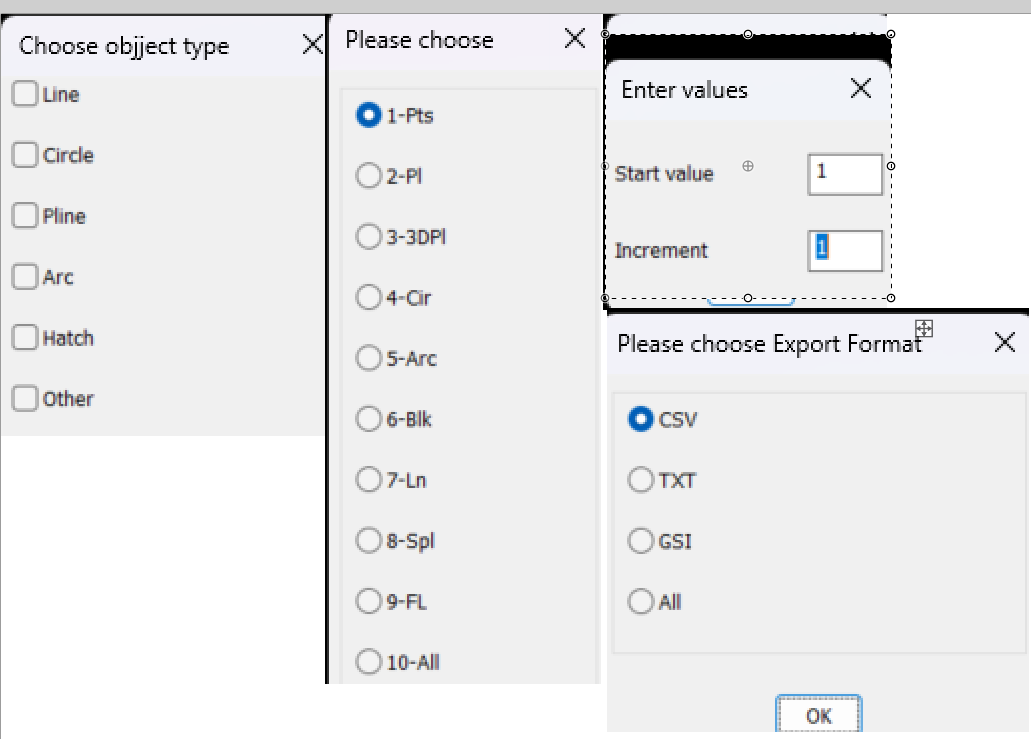
Yes Ai is being used more, but sometimes does not work, that's when you need lisp experience to work out what is wrong. But paste that you wrote it using AI still put your name to it. I would build a big DCL. Oops should have been 4 columns but you get the idea. Yes can use the list box instead of toggle buttons. Just pasted each option into one image as a guide to how it should look. Oh yeah if your using object point numbers then should include a function that finds the last object number used if your selecting single objects at a time.
1 point
-
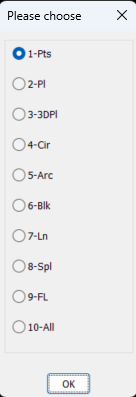
A few comments. You have not put your name and date to code, say add at that start. You can write direct to Excel rather than opening a csv. Can help with that. You can replace the Initget with the attached. Multi radio buttons.lsp Other methods available also. Same with the "point markers" Multi toggles.lsp Also for input values strings or numbers Multi GETVALS.lsp if (not AH:Butts)(load "Multi radio buttons.lsp")) ; loads the program if not loaded already (if (= but nil)(setq but 1)) ; this is needed to set default button (setq lst (list "Please choose" "1-Pts" "2-Pl" "3-3DPl" "4-Cir" "5-Arc" "6-Blk" "7-Ln" "8-Spl" "9-FL" "10-All")) (setq ans (ah:butts but "V" lst)) All 3 options can be made into a single DCL.
1 point
-
From HERE. Also mentioned in that post was Terry Millers GetVectors, but he has a new site now. AutoLISP Code1 point
-
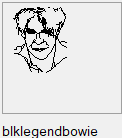
You could try these, the first one, test, will return lists for each line with the 4 values for the 2 end points (x1, y1, x2, y2). You need to also select a reference point to measure these points to. I tend to draw the thumbnail in a 75x75 square, reference point is top left corner and all the thumbnail entities are lines - nothing else - function name test The second one I haven't adjusted, copied straight from my library, blockthumbrecord, select the lines, select the reference point and it will return some results in a new notepad window... so not been adjusted you might need to add a function in there (LM: functions from Lee Macs website). Also the notepad will add in other stuff that is handy for me - a good learning exercise to look at the code and adjust it so it works for you. Both will give you sets of points for each line in a selection which you can copy and paste for your needs. Note that the vector graphics cannot do fractions, so maybe best set your snaps and grid to '1' and to get a smooth curve, a few short lines and make sure that the ends all touch. (defun c:test ( / ) (defun LM:round ( n ) (fix (+ n (if (minusp n) -0.5 0.5))) ) (princ "\nSelect LINES for thumbnail: ") ;;Get entities (setq ss (ssget '((0 . "LINE")))) (if (not ss) ;check for nil selection set (progn (princ "Nothing selected.") (exit) ) ;end progn ) ;end if ;;get list of entities (setq LinesList (list)) (setq acount 0) (setq BasePoint (getpoint "\Select Top Left Corner of Tumbnail (75x75 square)")) (setq BasePoint (reverse (cdr (reverse BasePoint)))) (while (< acount (sslength ss)) ;loop for every entity in the set (setq en (ssname ss acount)) ;get entity name (setq ed (entget en)) ;get entity definition (setq pt1 (reverse (cdr (reverse (cdr (assoc 10 ed)))))) ;; X and Y only (setq pt1 (mapcar '- BasePoint pt1)) ;; Shift by basepoint (setq pt1 (mapcar 'LM:round (mapcar 'abs pt1))) ;; Absolute value rounded to nearest 1 (setq pt1 (list (rtos (car pt1) 2 0) (rtos (cadr pt1) 2 0) )) ;; List items to strings (setq pt2 (reverse (cdr (reverse (cdr (assoc 11 ed)))))) ;; X and y Only (setq pt2 (mapcar '- BasePoint pt2)) ;; Shift by basepoint (setq pt2 (mapcar 'LM:round (mapcar 'abs pt2))) ;; Absolute value rounded to nearest 1 (setq pt2 (list (rtos (car pt2) 2 0) (rtos (cadr pt2) 2 0) )) ;; List items to strings (setq pt1 (append pt1 pt2)) ;; Create thumbnail definition line (setq LinesList (append LinesList (list pt1)) ) ;; Add definition line to thumb. definition (setq acount (+ acount 1)) ) ;;end while LinesList ) (defun c:blockThumbrecord ( / ss LinesList acount en ed pt1 pt2 tempblock f ) ;;Opens notepad wth lines coordinates (defun LM:lst->str ( lst del / str ) (setq str (car lst)) (foreach itm (cdr lst) (setq str (strcat str del itm))) str ) ;;Get entities (setq ss (ssget '((0 . "LINE")))) (if (not ss) ;check for nil selection set (progn (princ "Nothing selected.") (exit) ) ;end progn ) ;end if ;;get list of entities (setq LinesList (list)) (setq acount 0) (while (< acount (sslength ss)) ;loop for every entity in the set (setq en (ssname ss acount)) ;get entity name (setq ed (entget en)) ;get entity definition (setq pt1 (cdr (assoc 10 ed))) (setq pt1 (list "list" (rtos (abs (car pt1)) 2 0) (rtos (abs (cadr pt1)) 2 0) )) (setq pt2 (cdr (assoc 11 ed))) (setq pt1 (append pt1 (list (rtos (abs (car pt2)) 2 0) (rtos (abs (cadr pt2)) 2 0) "TxCol"))) (setq LinesList (append LinesList (list pt1)) ) (setq acount (+ acount 1)) ) ;;end while ;;write to a temp file (if (strcat (getvar "TEMPPREFIX") "Thumbnail.txt")(vl-file-delete (strcat (getvar "TEMPPREFIX") "Thumbnail.txt"))) (setq tempblock (strcat (getvar "TEMPPREFIX") "Thumbnail.txt")) ;;add check if this exists (setq f (open tempblock "w")) ;;open file (write-line " (Defun Sel--**FUNCTIONNAME**-- ( origin BgCol TxCol ImgTile Control / BlkList return) " f) (write-line " (if (= Control \"Vector\") " f) (write-line " (progn " f) (write-line " (start_image ImgTile) " f) (write-line " (fill_image (- origin 0) 0 (+ origin 85) 85 BgCol) " f) (write-line " (setq BlkList (list " f) (setq acount 0) (while (< acount (length LinesList)) (write-line (strcat "(" (LM:lst->str (nth acount LinesList) " ") ")" ) f) (setq acount (+ acount 1)) ) (write-line " )) ; end setq end list" f) (write-line " (setq Xoff 0)(setq YOff 0)" f) (write-line " (CreateVector BlkList XOff YOff TxCol)" f) (write-line " (end_image)" f) (write-line " ); end progn" f) (write-line " (setq Return \"--**FUNCTION NAME TO INSERT BLOCK**--\")" f) (write-line " ) ; end if" f) (write-line " )" f) (write-line "" f) (write-line "; -OK- ;" f) (close f) ;;open notepad & file ;; (startapp "c:/windows/notepad.exe" tempblock) (vl-catch-all-apply (function (lambda () (setq obj (vlax-get-or-create-object "WScript.Shell")) (vlax-invoke obj 'Run (strcat "c:/windows/notepad.exe \"" tempblock "\"")) ;; or notepad++ if that is used. (setvar 'cmdecho 0) (vlax-invoke obj 'AppActivate "Notepad") ; Title bar name of application. ++ for notepad++ but still works? ) ) ) (if obj (vlax-release-object obj)) (princ) ) These should make it possible to easily get the coordinates to make something like this as a thumbnail: (The Engineers keep asking me to add a legend.... so I do) The second LISP makes up the code I need for my block selection routine, thumbnail graphic, saved in the code, see the image I like, click and paste
1 point
-
As far as I remember the numbers are pairs of points, in your '(' 18 ad 17, 16 and 15..... with the X coordinate to the left and Y to the TOP (unlike usual CAD where Y is counted from the bottom) So your code has an odd number of numbers - I think they need an even number. CAD is off for the evening now, but that might help. You could also post the link to Lees code - usually there is an explanation in there, and also perhaps a screen shot of what you are getting or any errors.1 point
-
@Tsuky works as well, not sure what @sd2006 is struggling with. The one I posted works the same as the OP's in first post for horizontal align, I just added the vertical align and some error checking. Home today, so also tested in AutoCAD 2000i.1 point
-
Copy what @SLW210 posted in the other thread into a text file save it as .lsp and load that instead of abc.lsp. The command to type to run SLW210's Lisp is "AlignXY"1 point
-
You have a topic on this lisp already. please take the time to read it. Bạn đã có một chủ đề về Lisp này rồi. Xin hãy dành chút thời gian để đọc nó.1 point
-
Nice code SLW210. I did get the error that "acad" is a protected symbol, so its better to use a different name for that one. The code worked fine regardless. We can also do the same thing with entmod: (defun c:unlimitedmleaders (/ e enx) (foreach e (vl-remove-if-not (function (lambda (a) (= (car a) 350))) (dictsearch (namedobjdict) "ACAD_MLEADERSTYLE") ) (setq enx (entget (cdr e))) (entmod (subst '(90 . 0) (assoc 90 enx) enx)) ) (princ) )1 point
-
@mhupp's LISP works for me, but I took a stab at it anyway. I just tweaked the original abc.lsp, I would prefer if you would post a link to the original so I can properly credit the author. For more information, Kent Cooper has quite a few LISPs for aligning blocks for certain and probably (M)Text, etc. (as well as sorting spacing etc.) on the Autodesk Forums, they should be easy to locate. This worked on your provided drawing as well as one I made for test with Polylines, Lines, Blocks, Mtext, Text and Attributes. ;;; Align selected objects in X or Y direction with reference object. | ;;; | ;;; https://www.cadtutor.net/forum/topic/99091-i-need-a-lisp-to-align-blocks-and-texts-vertically/ | ;;; | ;;; Modified from the provided abc.lsp (author unknown) by SLW210 (a.k.a. Steve Wilson) | ;;; | ;;; Was horizontal only, added vertical align option, error and undo. | ;;; | ;;; *****************************************************************************************************| (defun c:AlignXY (/ *error* OS mode ss albl alpt alptx alpty ctr ename inpt inptx inpty newpt olderr ) ;; Error handler (setq olderr *error*) (defun *error* (msg) (if (/= msg "Function cancelled") (princ (strcat "\nError: " msg)) ) (if OS (setvar "OSMODE" OS) ) (command "_.UNDO" "_End") (setq *error* olderr) (princ) ) ;; Save and set system vars (setq OS (getvar "OSMODE")) (setvar "OSMODE" 0) ;; Start UNDO group (command "_.UNDO" "_Begin") ;; Ask user for alignment direction (initget "Horizontal Vertical") (setq mode (getkword "\nAlign [Horizontal/Vertical] <Horizontal>: ")) (if (null mode) (setq mode "Horizontal") ) ;; Select objects (princ "\nSelect blocks or text to align evenly: ") (if (not (setq ss (ssget))) (progn (princ "\nNothing selected.") (*error* "Function cancelled") (exit) ) ) ;; Select reference object (if (not (setq albl (entsel "\nSelect reference text or block: ")) ) (progn (princ "\nNo reference selected.") (*error* "Function cancelled") (exit) ) ) (setq albl (car albl)) (setq alpt (cdr (assoc 10 (entget albl)))) (if (not alpt) (progn (princ "\nInvalid reference object.") (*error* "Function cancelled") (exit) ) ) (setq alptx (car alpt)) (setq alpty (cadr alpt)) ;; Loop through selection (setq ctr 0) (while (setq ename (ssname ss ctr)) (setq inpt (cdr (assoc 10 (entget ename)))) (if inpt (progn (setq inptx (car inpt)) (setq inpty (cadr inpt)) ;; Decide new point (cond ((= mode "Horizontal") (setq newpt (list inptx alpty)) ) ((= mode "Vertical") (setq newpt (list alptx inpty)) ) ) (command "move" ename "" inpt newpt) ) ) (setq ctr (+ ctr 1)) ) ;; End UNDO group cleanly (command "_.UNDO" "_End") ;; Restore vars and error handler (setvar "OSMODE" OS) (setq *error* olderr) (prompt "\nAlignment complete.") (princ) )1 point
-
Perhaps this would help after you determine the primary dimensions of desired ellipsoid.1 point
-
Use my above lisp AlignTextBlock that has @Tsuky fix. align.mp41 point
-
added a "*" to ssget to pick up mtext or text. updated the foreach to pull the vla-objects name from the selection set. ;;----------------------------------------------------------------------------;; ;; Modify Text or Blocks to align Horozontal or Vertical ;; https://www.cadtutor.net/forum/topic/99091-i-need-a-lisp-to-align-blocks-and-texts-vertically/ (defun C:ATB () (C:AlignTextBlock)) (defun C:AlignTextBlock (/ vars vals pt1 pt2 vector mode ent ed pt newpt) (vl-load-com) (setq vars '(OSMODE ORTHOMODE) vals (mapcar 'getvar vars) ) (mapcar 'setvar vars '(0 1)) (setq pt1 (getpoint "\nAlignment Point: ")) (setq pt2 (getpoint pt1 "\nSelect Horozontal or Vertical:")) (setq vector (mapcar '- pt2 pt1)) (if (eq (car Vector) 0.0) (setq mode 'V) (setq mode 'H)) (while (setq ss (ssget '((0 . "*TEXT,INSERT")))) (foreach obj (mapcar 'vlax-ename->vla-object (vl-remove-if 'listp (mapcar 'cadr (ssnamex SS)))) (setq pt (vlax-safearray->list (vlax-variant-value (vla-get-InsertionPoint obj))) newpt (if (eq mode 'V) (list (car pt1) (cadr pt) (caddr pt)) (list (car pt) (cadr pt1) (caddr pt))) ) (vla-Move obj (vlax-3d-point pt) (vlax-3d-point newpt)) ) ) (mapcar 'setvar vars vals) (princ) ) (princ "\nAlignTextBlock Lisp Loaded") (princ "\nType ATB or AlignTextBlock to run command")1 point
-
Thank you so much. This has been annoying me for decades. Pity I only found out how to fix it right on my retirement.1 point
-
@bustr Autodesk in there wisdom introduced lisp in LT2024 as so many other CAD programs have it, so competition was knocking. But and a big but they did not include everything as pointed out by @Steven P there is some documentation about what is missing, mainly in the VL commands. For me "get-application" is a real big one as stops you talking to Excel directly. I use Bricscad and as far as I can tell has a full implementation. May need to check their "Lite" version but have not heard of anything missing.1 point
-
From my experience it's 100% compatible with the DWG format. It has both the Overkill and bpoly commands. (I don't have extensive experience using these in it BricsCAD but from what I see it appears to work very similar). For the average CAD user I would say AutoCAD and BricsCAD are fairly equal. I use AutoCADMAP which has tools that the Base AutoCAD doesn't... and in my case MAP is slightly superior to both AutoCAD and BricsCAD for what I need. I'm not sure what Import/Export features the Base AutoCAD has. I'm guessing it basic compared to AutoCADMAP. Example for shape files BricsCAD import/exporting is very basic... however you can purchase plugins that can fill that gap. BC imports(dxf,dwg,skp,wmf,emf,...,dae,dgn,obj,3md), Exports(fbx,stl,dwg,dxf,3dm,svg,dgn....) and a few others GC GISImport(shp), GISExport(shp) Attach: (dwg,pdf,image,point cloud) AutoCAD Reliability : AutoCAD has DWG ,BAK, $ac (files). Including auto save scheduling, file Audit, file recovery. This should tell you something how reliable AutoCAD is. Very often the only thing that saves us is daily backups. I been using AutoCAD since version 11 and reliability of files is not something AutoCAD has going for it... but you learn to backup, backup and backup. They have a 30day trial... install and give a shot: Most commands are the same, some tools may have a different name so you may need to search the web, check help or check in the BC forum to figure it out. https://www.bricsys.com/bricscad-download1 point
-
I find working in BricsCAD very similar to AutoCAD. For the dynamic blocks would just replaced them with the BricsCAD version or just stick to standard blocks. In terms of clarity I don't see any differences.. The AutoCAD UI is a bit nicer, it AutoCAD Map offers some features BricsCAD doesn't if you don't user them it wont make a difference for you. It feels 100% natural… very similar to using AutoCAD. Common commands they are nearly identical … you also have the ability to define the alias just like in AutoCAD(pgp file). Load custom menus /toolbars (mns). Load Custom Lintypes(lin).. I would research more about what tools you depend on? What Commands? importing, exporting tools? Cleanup tools? And cross check to ensure BricsCAD covers that adequately.1 point
-
Quick update on this issue: It turned out to be related to a recent Windows security update affecting graphics applications. I reached out to BricsCAD support and got confirmation that update KB5074109 was causing issues, and a newer cumulative update (KB5078127) includes fixes for it. Reply from BricsCAD:- Hi Aniruddha, We found that there has been a Windows Security Update - KB5074109 - which affects graphic applications. The new update KB5078127 is cumulative and includes security fixes and improvements from the January 13, 2026, security update (KB5074109) and the out-of-band update (KB5077744) from January 17, 2026. See more info here: https://support.microsoft.com/en-us/topic/january-24-2026-kb5078127-os-builds-26200-7628-and-26100-7628-out-of-band-cf5777f6-bb4e-4adb-b9cd-2b64df577491 Please check if you have that update on your computer. Kind regards, Cosmina. After checking and updating the system accordingly, the issue seems to be resolved and BricsCAD is no longer freezing on startup. Sharing this here in case anyone else runs into a similar problem. Thanks everyone for the suggestions and help.1 point
-
I has most the the features AutoCAD has (including most of the express tools)... we have use both AutoCAD MAP and BricsCAD for a couple of years now and we had majorissues so far. User find it works very similar to to AutoCAD the biggest difference is on the setup UI's. Personally while using it don't really see any major differences going between the two. Lisp/fas/VLX: From my experience most lisp will run out the box but some will need workarounds... so don't so don't expect to download something from the net and expect to work without making any changes (some lisps that use vla, vlax functions may needed tweaks). AutoCAD fas and VLX tools will NOT run so you will need have access to the source code for these lisp. Dynamic blocks are NOT fully supported, while you are able to use them you may not be able to redefine them (Meaning you may not be able to open them in block editor and make changes). Best bet for Dynamic blocks is replace them win BricsCAD parametric blocks (their own take on these). The major issue that kept us form converting all users to BricsCAD us was the lack of mapping tools... and although BricsCAD has tools that look similar they are not as advance and in some cases lacking on functionality. Under the surface BricsCAD is very limited here in terms of mapping tools. But I'm still impressed how good it its for the $$. If you don't need Mapping tools I think BricsCAD is a great choice considering it's more affordable. "I’m not sure how well it handles property changes like color or linetype." I don't see any major differences here.1 point
-
AutoCAD has PDFSHXTEXT to convert the vector lines/arcs that once were SHX texts back to texts. Post the converted PDF file from ZWCAD. Sounds like you need to use something better than ZWCAD if it isn't capable of doing what you need. This still goes back to you need to use TTFs.1 point
-
A version also for closed polylines. Minimally tested... centerPline_v2.LSP
1 point
-
Thanks Tharwat for the comment. Maybe this is better, you can erase some texts . If adding, just do the TSUM again with all the element texts. (vl-load-com) (defun getsum (b) (rtos (apply '+ (mapcar '(lambda(x) (if (vlax-erased-p x) 0 (atof (vla-get-TextString x)))) b)) 2 0) ) (defun modifyObj (notifier-object obj_reactor parameter-list / ) (vla-put-TextString (car (vlr-data obj_reactor)) (getsum (vlr-owners obj_reactor))) ) (defun eraseObj (notifier-object obj_reactor parameter-list / ) (vlr-owner-remove obj_reactor notifier-object) ) (defun c:TSum (/ ss rst lst data lreac reac) (prompt "\nChoose element texts:") (setq ss (vl-remove-if 'listp (mapcar 'cadr (ssnamex (ssget '((0 . "*TEXT")))))) rst (vlax-ename->vla-object (car (entsel "\nChoose result text:"))) lst (mapcar 'vlax-ename->vla-object ss)) (if (assoc rst (setq data (mapcar 'vlr-data (setq lreac (cdar (vlr-reactors :vlr-object-reactor)))))) (foreach item lst (if (not (member item (vlr-owners (setq reac (nth (vl-position (list rst) data) lreac))))) (vlr-owner-add reac item))) (setq obj_reactor (vlr-pers (vlr-object-reactor lst (list rst) '((:vlr-objectClosed . modifyObj) (:vlr-erased . eraseObj))))) ) (vla-put-TextString rst (getsum lst)) (princ) )1 point
-
;list select dialog ;create a temp DCL multi-select list dialog from provided list ;value is returned in list form, DCL file is deleted when finished ;example: (setq the_list (AT:listselect "This is my list title" "Select items to make a list" "25" "30" "true" (list "object 1" "object 2" "object 3")) ;if mytitle is longer than defined width, the width will be ignored and it will fit to title string ;if mylabel is longer than defined width, mylabel will be truncated ;myheight and mywidth must be strings, not numbers ;mymultiselect must either be "true" or "false" (true for multi, false for single) ;created by: alan thompson, 9.23.08 ;some coding borrowed from http://www.jefferypsanders.com (thanks for the DCL examples) (defun AT:ListSelect ( mytitle ;title for dialog box mylabel ;label right above list box myheight ;height of dialog box !!*MUST BE STRING*!! mywidth ;width of dialog box !!*MUST BE STRING*!! mymultiselect ;"true" for multiselect, "false" for single select mylist ;list to display in list box / retlist readlist count item savevars fn fo valuestr dcl_id ) (defun saveVars(/ readlist count item) (setq retList(list)) (setq readlist(get_tile "mylist")) (setq count 1) (while (setq item (read readlist)) (setq retlist(append retList (list (nth item myList)))) (while (and (/= " " (substr readlist count 1)) (/= "" (substr readlist count 1)) ) (setq count (1+ count)) ) (setq readlist (substr readlist count)) ) );defun (setq fn (vl-filename-mktemp "" "" ".dcl")) (setq fo (open fn "w")) (setq valuestr (strcat "value = \"" mytitle "\";")) (write-line (strcat "list_select : dialog { label = \"" mytitle "\";") fo) (write-line (strcat " : column { : row { : boxed_column { : list_box { label =\"" mylabel "\"; key = \"mylist\"; allow_accept = true; height = " myheight "; width = " mywidth "; multiple_select = " mymultiselect "; fixed_width_font = false; value = \"0\"; } } } : row { : boxed_row { : button { key = \"accept\"; label = \" Okay \"; is_default = true; } : button { key = \"cancel\"; label = \" Cancel \"; is_default = false; is_cancel = true; } } } } }") fo) (close fo) (setq dcl_id (load_dialog fn)) (new_dialog "list_select" dcl_id) (start_list "mylist" 3) (mapcar 'add_list myList) (end_list) (action_tile "cancel" "(setq ddiag 1)(done_dialog)") (action_tile "accept" "(setq ddiag 2)(saveVars)(done_dialog)") (start_dialog) (if (= ddiag 1) (setq retlist nil) ) (unload_dialog dcl_id) (vl-file-delete fn) retlist );defun1 point
-
Thanks, will check that out later.1 point