Leaderboard




Popular Content
Showing content with the highest reputation on 12/05/2025 in all areas
-
I don't believe I posted my Import multiple PDF pages as AutoCAD objects LISP. It does most of what I need, so I doubt if I'll spend any more time on it. ;;; Imports indicated page(s), converts to DWG entities, then arranges them spaced along +X. | ;;;-----------------------------------------------------------------------------------------------| ;;; ImPDF.lsp | ;;; | ;;; By SLW210 (a.k.a. Steve Wilson) | ;;; | ;;; Requires: AutoCAD 2024 + | ;;;-----------------------------------------------------------------------------------------------| (defun c:ImPDF (/ pdfPath pgStart pgEnd pg insPt gap doc ms layerColor bgColor layerName blk ) (vl-load-com) ;; Detect background color (setq bgColor (getvar "BACKGROUNDCOLOR")) ; 0=black, 7=white (setq layerColor (if (= bgColor 0) 7 0 ) ) ; white on black, black on white ;; Select PDF file (setq pdfPath (getfiled "Select PDF file to import" "" "pdf" 8)) (if (not pdfPath) (exit) ) ;; Page range (setq pgStart (getint "\nStart page <1>: ")) (if (not pgStart) (setq pgStart 1) ) (setq pgEnd (getint "\nEnd page <same>: ")) (if (not pgEnd) (setq pgEnd pgStart) ) ;; Starting insertion point (setq insPt (getpoint "\nInsertion point: ")) (if (not insPt) (setq insPt '(0 0 0)) ) ;; Gap between pages (setq gap (getreal "\nGap between pages <5.0>: ")) (if (not gap) (setq gap 5.0) ) ;; Get AutoCAD document (setq doc (vla-get-ActiveDocument (vlax-get-acad-object))) ;; Set all entities inside block definition to layer + color (defun set-block-contents-color (blkRef layer color / blkDef) (setq blkDef (vla-item (vla-get-Blocks doc) (vla-get-Name blkRef))) (vlax-for ent blkDef (vl-catch-all-apply 'vla-put-layer (list ent layer)) (vl-catch-all-apply 'vla-put-color (list ent color)) ) ) ;; Loop through pages (setq pg pgStart) (while (<= pg pgEnd) (princ (strcat "\nImporting page " (itoa pg) "...")) ;; Attach PDF underlay (command "_-PDFATTACH" pdfPath (itoa pg) insPt 1.0 0.0) (setq u (entlast)) ;; underlay reference ;; Import to geometry (All, then detach) (command "_PDFIMPORT" u "All" "D") ;; The imported block reference is the last entity (setq blk (entlast)) (if blk (progn ;; Create layer for this page (setq layerName (strcat "PDF_Page_" (itoa pg))) (if (not (tblsearch "layer" layerName)) (vl-catch-all-apply 'vla-Add (list (vla-get-Layers doc) layerName) ) ) ;; Move block reference to layer (vl-catch-all-apply 'vla-put-layer (list (vlax-ename->vla-object blk) layerName) ) ;; Set nested geometry inside block (set-block-contents-color (vlax-ename->vla-object blk) layerName layerColor ) ;; Compute block width for next insertion point (setq minX 1e20 maxX -1e20 ) (vl-catch-all-apply 'vla-getboundingbox (list (vlax-ename->vla-object blk) 'pmin 'pmax) ) (setq pmin (vlax-safearray->list pmin)) (setq pmax (vlax-safearray->list pmax)) (setq width (- (car pmax) (car pmin))) (if (<= width 0.0) (setq width 100.0) ) ;; Update insertion point for next page (setq insPt (list (+ (car insPt) width gap) (cadr insPt) 0)) ) ) ;; Next page (setq pg (1+ pg)) ) (command "_ZOOM" "_E") (princ "\nAll pages imported successfully." ) (princ) ) With RLX's revision. ;;; Imports indicated page(s), converts to DWG entities, then arranges them spaced along +X. | ;;;-----------------------------------------------------------------------------------------------| ;;; ImPDF_0.2-RLX.lsp | ;;; | ;;; By SLW210 (a.k.a. Steve Wilson) | ;;; | ;;; Requires: AutoCAD 2017 + (for PDFIMPORT) | ;;; ;;; Revision by RLX ;;; ;;;-----------------------------------------------------------------------------------------------| (defun c:ImPDF (/ pdfPath pgStart pgEnd pg insPt gap doc ms layerColor bgColor layerName blk ) (vl-load-com) ;; Detect background color (setq bgColor (getvar "BACKGROUNDCOLOR")) ; 0=black, 7=white (setq layerColor (if (= bgColor 0) 7 0 ) ) ; white on black, black on white ;; Select PDF file (setq pdfPath (getfiled "Select PDF file to import" "" "pdf" 8)) (if (not pdfPath) (exit) ) ;; Page range (setq pgStart (getint "\nStart page <1>: ")) (if (not pgStart) (setq pgStart 1) ) (setq pgEnd (getint "\nEnd page <same>: ")) (if (not pgEnd) (setq pgEnd pgStart) ) ;; Starting insertion point (setq insPt (getpoint "\nInsertion point: ")) (if (not insPt) (setq insPt '(0 0 0)) ) ;; Gap between pages (setq gap (getreal "\nGap between pages <5.0>: ")) (if (not gap) (setq gap 5.0) ) ;; Get AutoCAD document (setq doc (vla-get-ActiveDocument (vlax-get-acad-object))) ;; Set all entities inside block definition to layer + color (defun set-block-contents-color (blkRef layer color / blkDef) (if (and blkRef (vlax-method-applicable-p blkRef 'Name)) (progn (setq blkDef (vla-item (vla-get-Blocks doc) (vla-get-Name blkRef))) (vlax-for ent blkDef (vl-catch-all-apply 'vla-put-layer (list ent layer)) (vl-catch-all-apply 'vla-put-color (list ent color)) ) ) ) ) ;; Loop through pages (setq pg pgStart) (while (<= pg pgEnd) (princ (strcat "\nImporting page " (itoa pg) "...")) ;; Attach PDF underlay (command "_-PDFATTACH" pdfPath (itoa pg) insPt 1.0 0.0) (setq u (entlast)) ;; underlay reference ;; Import to geometry (All, then detach) (command "_PDFIMPORT" u "All" "D") ;; The imported block reference is the last entity (setq blk (entlast)) (if blk (progn ;; Create layer for this page (setq layerName (strcat "PDF_Page_" (itoa pg))) (if (not (tblsearch "layer" layerName)) (vl-catch-all-apply 'vla-Add (list (vla-get-Layers doc) layerName) ) ) ;; Move block reference to layer (vl-catch-all-apply 'vla-put-layer (list (vlax-ename->vla-object blk) layerName) ) ;; Set nested geometry inside block (set-block-contents-color (vlax-ename->vla-object blk) layerName layerColor ) ;; Compute block width for next insertion point (setq minX 1e20 maxX -1e20 ) (vl-catch-all-apply 'vla-getboundingbox (list (vlax-ename->vla-object blk) 'pmin 'pmax) ) (setq pmin (vlax-safearray->list pmin)) (setq pmax (vlax-safearray->list pmax)) (setq width (- (car pmax) (car pmin))) (if (<= width 0.0) (setq width 100.0) ) ;; Update insertion point for next page (setq insPt (list (+ (car insPt) width gap) (cadr insPt) 0)) ) ) ;; Next page (setq pg (1+ pg)) ) (command "_ZOOM" "_E") (princ "\nAll pages imported successfully." ) (princ) )3 points
-
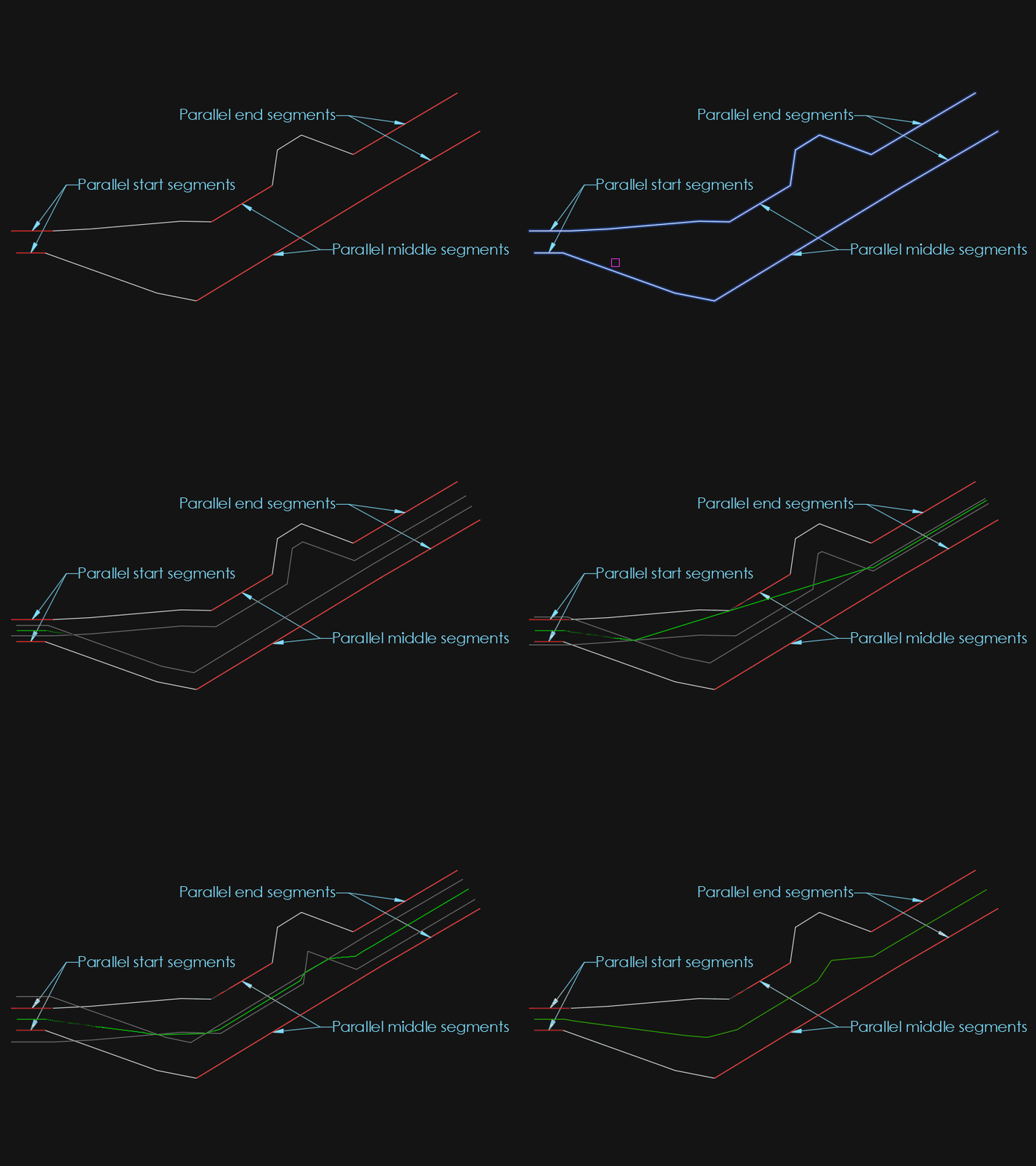
I did some more tests today and found that when the end segments were parallel, they didn't get added to the line. So I added support for that. This one was easy because the _cornerOffset function already checks for parallel segments and I just had to add a flag to inform the offset loop. And I found another example which it has a hard time on with concentric arcs, attached below. But that will be for another day since I have no more time for that this week. AxisExple3.dxf
 3 points
 -
Hi everyone, I’ve been working on a small production tool in AutoLISP/VLISP for AutoCAD / Civil 3D and thought it might be useful to share here for anyone doing a lot of section or profile sheets. ## What problem it solves On corridor / section jobs we often end up with several paper-space viewports that all need to: - Use the same scale and twist - Stay aligned to a centerline / path (alignment, guide polyline, etc.) - Be re-centered after design changes The usual manual workflow for us was: 1. Set up one “master” viewport with the correct scale, twist, layers, etc. 2. Copy that viewport across the layout for each station/section. 3. Manually PAN/ZOOM/DVIEW in each viewport to center the correct station along the path. 4. Repeat that pan/zoom step any time the design or alignment changed. It works, but it’s tedious and easy to make mistakes when you have a lot of sheets. ## What SectionSync LITE does SectionSync LITE is a compiled VLX that: - Lets you pick a polyline path (e.g. alignment, section chain, etc.) - Associates multiple paper-space viewports with positions along that path - Updates the view center of each viewport so it “follows” the path - Preserves the existing viewport scale and twist - Can be re-run after design changes so you don’t have to manually re-pan everything It was written mainly with Civil 3D section/profile sheets in mind, but it’s just working with standard AutoCAD viewports and a polyline. ## Technical notes - Written in AutoLISP/Visual LISP and compiled to VLX for distribution. - Uses vla/vlax functions to read and set viewport center, width/height, and twist. - Path positions are based on cumulative distance along the selected polyline. - No reactors or custom objects – it just runs on demand and updates existing VPs. ## Demo + download Short demo video: https://youtu.be/l1JRbz4_owQ Download / more details (there’s a built-in 5-run / 7-day trial so you can test it on a real project): https://autolispwizard.gumroad.com/l/civabs If anyone is interested in the implementation details (polyline parameterization, handling UCS and VP twist, etc.) I’m happy to discuss approaches or share pseudo-code for the core parts.1 point
-
mhupp, I want AutoLISP code to do that.1 point
-
Great! Thanx! It did gave me an error after the first page so I changed one of your subs a little. added this line : (and blkRef (vlax-method-applicable-p blkRef 'Name)) (defun set-block-contents-color (blkRef layer color / blkDef) (if (and blkRef (vlax-method-applicable-p blkRef 'Name)) (progn (setq blkDef (vla-item (vla-get-Blocks doc) (vla-get-Name blkRef))) (vlax-for ent blkDef (vl-catch-all-apply 'vla-put-layer (list ent layer)) (vl-catch-all-apply 'vla-put-color (list ent color)) ) ) ) )1 point
-
AutoCAD is very bad at running a LISP in one file to read another file, it is not something I have looked at with xrefs, however this might give you a starter, listing any xrefs in the current file - I was looking at this to do something different and is in the folder "finish this one day"... so the code might not be 100%. ;;https://forums.autodesk.com/t5/visual-lisp-autolisp-and-general/grab-all-xref-names-and-paths/td-p/1661552 ;;(defun filepfil ( / Doc LayoutCol EndList) ;; Returns a list of list of all the Xrefs and Images with their paths within a drawing. (defun c:xreffilepaths ( / ) (defun xreftype ( str / ) ;; (setq lst (list "abcd.dwg" "1234.dwg" "sample drawing with space in file name.dwg" "5566.dwg") ) ;; (mapcar '(lambda (x) ;; (substr x 1 (- (strlen x) 4)) ;; ) ;; lst ;; ) (setq MyLen (strlen str)) (setq MyType (substr str (- MyLen 3) )) ) (setq Doc (vla-get-ActiveDocument (vlax-get-Acad-Object))) (setq LayoutCol (vla-get-Layouts Doc)) (vlax-for i LayoutCol (vlax-for Obj (vla-get-Block i) (cond ((= (vla-get-ObjectName Obj) "AcDbRasterImage") (if (not (assoc (vla-get-Name Obj) EndList)) (setq EndList (cons (cons (vla-get-Name Obj) (vla-get-ImageFile Obj)) EndList)) ) ) ((and (= (vla-get-ObjectName Obj) "AcDbBlockReference") (vlax-property-available-p Obj 'Path)) (if (not (assoc (vla-get-Name Obj) EndList)) (setq EndList (cons (cons (vla-get-Name Obj) (vla-get-Path Obj)) EndList)) ) ) ) ) ) EndList (princ "\nContains Xrefs: ") (princ EndList) (foreach n EndList (if (findfile (cdr n)) () (progn (princ "\nMissing XREF: ") (princ (car n)) ;; (princ n) ) ; end progn ) ; end if ) ; end foreach (setq MyPath (cdr (nth 0 EndList)) ) (setq MyFileType (xreftype (cdr (nth 0 EndList)) )) (setq MyFile (strcat (car (nth 0 EndList)) MyFileType) ) (setq NewPath (strcat (getvar "dwgprefix") (vl-string-trim ".\\\\" MyPath ) )) (if (findfile NewPath) ; find file : if file exists (progn (setq MyPath (vl-string-right-trim MyFile MyPath )) ; take off file from file path (setq NewPath (vl-string-right-trim MyFile NewPath )) ; take off file from file path ) ; end progn (progn ) ; end progn ) ; end if ) Not sure if this is something you can use? https://www.autodesk.com/support/technical/article/caas/sfdcarticles/sfdcarticles/Determining-whether-a-drawing-is-referenced-as-an-xref-in-other-drawings.html1 point
-
Use CLASSICXREF will display a window for you to look thought. for the ones that you suspect to be circular switch to overlay.1 point
-
Using Bricscad dwg has a solid, finds trace. Or do you mean (setq ss (ssget "_X" (list (cons -4 "<NOT") (cons 0 "3DSOLID,TRACE") (cons -4 "NOT>")(cons 410 (getvar 'ctab)))))
1 point
-
@mhupp this may be useful, it captures command errors so after loading your lisp. You type say p2-3 on command line. Can do say p1-2, Pr3-2, prec1-0 and so on. ; test trap a command used as variable input ; BY Alan H 2019 ; now 2025 ( (lambda nil (vl-load-com) (foreach obj (cdar (vlr-reactors :vlr-command-reactor)) (if (= "fillet-reactor" (vlr-data obj)) (vlr-remove obj) ) ) (vlr-command-reactor "fillet-reactor" '((:vlr-unknowncommand . fillet-reactor-callback))) ) ) (defun fillet-reactor-callback ( obj com ) (setq com (car com)) (alert com) ; do the split com into ; (Change_Prec X X)) ) ; defun (or fillet-reactor-acdoc (setq fillet-reactor-acdoc (vla-get-activedocument (vlax-get-acad-object))) ) Thinking more maybe only check p12, prec101 point
-
K updated my code as well. tho this seems to not work well with BricsCAD. moved the vlax-put to only update when the if statment is true. change_prec_fields_update.lsp1 point
-
I've modified my latest code to introduce current precision and search in the Mtext1 point
-
@Saxlle just a comment a bit hard to see what is going on in video maybe use a screen area rather than full screen. Win 11, Shit+Window+R allows screen area record. Drag window area then start / stop. This may be useful rather than a list box can tick one or all choices, add an All option so one click. Examples in code. Multi toggles.lsp1 point
-
(ssget "_X" (list (cons 0 "~3DSOLID")))1 point
-
And with this syntax? (sssetfirst nil (ssget "_X" '((0 . "*") (-4 . "<NOT") (0 . "3DSOLID") (-4 . "NOT>"))))1 point
-
Nice test @PGia, thanks! For some reason I didnt consider closed polylines in the _checkOffset function, so I added an extra check there. Should work as expected now: Not sure about the short corner. The lines are so narrow the centerline is pushed back out of the point. Seems to be logical to me but it does feel intuitive. Narrow indents don't get much love from the centerline. So "inlets" don't have enough influence on the shape of the line. What would the expected result be? Below makes sense since there is not enough space to go into the indent. Or are you maybe something like this where the line splits and goes into the hole:
1 point
-
Maybe this kind of solution can be interesting (to use a multiple selection, use Shift+Left mouse click, to use a single selection, use CTRL+Left mouse click): ; ************************************************************************** ; Functions : CHRENLAYERS ; Description : Select Layers To Change It To UPPERCASE Or LOWERCASE ; Author : SAXLLE ; Date : December 04, 2025 ; ************************************************************************** (prompt "\nSelect Layers To Change It To UPPERCASE Or LOWERCASE!\nTo run a LISP type: CHRENLAYERS") (princ) (defun c:CHRENLAYERS ( / old_echo dcl_id fname fn laylist lay items rval acad name) (vl-load-com) (setq old_echo (getvar 'cmdecho)) (setvar 'cmdecho 0) (create_dialog) (collect_layers) (setq dcl_id (load_dialog fname)) (if (not (new_dialog "Laylist" dcl_id)) (exit) ) (action_tile "cancel" "(cancel)") (start_list "ls") (mapcar 'add_list laylist) (end_list) (action_tile "ps1" "(read_items) (to_uppercase)") (action_tile "ps2" "(read_items) (to_lowercase)") (start_dialog) (unload_dialog dcl_id) (vl-file-delete fname) (gc) (princ) ) (defun cancel () (done_dialog 0) (terpri) (prompt "Application running were finished...") (princ) ) (defun collect_layers () (setq laylist (list) lay (tblnext "LAYER" T) ) (while lay (if (not (equal (cdr (assoc 2 lay)) "0")) (setq laylist (cons (cdr (assoc 2 lay)) laylist) lay (tblnext "LAYER") ) (setq lay (tblnext "LAYER")) ) ) (setq laylist (vl-sort laylist '<)) ) (defun read_items () (setq acad (vla-get-activedocument (vlax-get-acad-object))) (setq items (get_tile "ls") rval (mapcar '(lambda (x) (nth x laylist)) (read (strcat "(" items ")"))) ) ) (defun to_uppercase () (foreach item rval (setq name (strcase item)) (vla-SendCommand acad (strcat "-RENAME LA " item (chr 13) name (chr 13))) (prompt (strcat "\nThe layer " item " were changed into the UPPERCASE!")) (setvar 'cmdecho old_echo) (princ) ) (done_dialog 1) ) (defun to_lowercase () (foreach item rval (setq name (strcase item T)) (vla-SendCommand acad (strcat "-RENAME LA " item (chr 13) name (chr 13))) (prompt (strcat "\nThe layer " item " were changed into the LOWERCASE!")) (setvar 'cmdecho old_echo) (princ) ) (done_dialog 1) ) (defun create_dialog () (setq fname (vl-filename-mktemp "Laylist.dcl") fn (open fname "w") ) (write-line "Laylist :dialog { label = \"Select layers to change it to UPPERCASE or LOWERCASE!\"; :list_box { key = \"ls\"; multiple_select = true; height = 10; width = 50; } :row { :button { label = \"Change to UPPERCASE >>\"; key = \"ps1\"; fixed_width = true; } :button { label = \"Change to LOWERCASE >>\"; key = \"ps2\"; fixed_width = true; } :button { label = \"Cancel\"; key = \"cancel\"; mnemonic = \"C\"; alignment = centered; fixed_width = true; is_cancel=true; } } }" fn) (close fn) ) Also, you can see the short video example of how it works. CHRENLAYERS.mp4 Best regards.1 point
-
Have a look at (setq lays (layoutlist)) there is no Model in the list created saves a few if and buts. Can use also (setvar 'ctab "Model") so no Doc required.1 point