Leaderboard


Popular Content
Showing content with the highest reputation on 12/07/2025 in all areas
-
If using a script and running it over multiple dwgs then yes can load a lisp and then run it. The lisp can be very extensive a few lines or even hundreds. Open dwg1 (load "updatelisp") (c:updatelisp) close Y Open dwg2 (load "updatelisp") (c:updatelisp) close Y Open dwg3 (load "updatelisp") (c:updatelisp) close Y1 point
-
maybe its just a matter of name vs effective block name issue , haven't tested that. But I like the routine and maybe gonna extend it a little with above suggestions if I run into a project that could benefit from this. Did find a program , I think it's called able2extact or something , that also has OCR built in but it will set you back around two hundred dollars , lifte time subscription.1 point
-
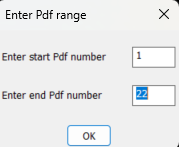
@SLW210 have a look at this by Lee-mac may be useful. I did have problems may be my Bricscad or pdf I am using. https://www.theswamp.org/index.php?PHPSESSID=a86a2d2e880b6079f1d3aee842f41d9d&topic=39001.msg441632#msg441632 This may also be useful once you know count. (if (not AH:getvalsm)(load "Multi Getvals.lsp")) (setq vals (AH:getvalsm (list "Enter Pdf range" "Enter start Pdf number" 6 4 "1" "Enter end Pdf number" 6 4 (RTOS COUNT 2 0)))) ("1" "22")
 1 point
 -
Hi everyone, I’ve been working on a small production tool in AutoLISP/VLISP for AutoCAD / Civil 3D and thought it might be useful to share here for anyone doing a lot of section or profile sheets. ## What problem it solves On corridor / section jobs we often end up with several paper-space viewports that all need to: - Use the same scale and twist - Stay aligned to a centerline / path (alignment, guide polyline, etc.) - Be re-centered after design changes The usual manual workflow for us was: 1. Set up one “master” viewport with the correct scale, twist, layers, etc. 2. Copy that viewport across the layout for each station/section. 3. Manually PAN/ZOOM/DVIEW in each viewport to center the correct station along the path. 4. Repeat that pan/zoom step any time the design or alignment changed. It works, but it’s tedious and easy to make mistakes when you have a lot of sheets. ## What SectionSync LITE does SectionSync LITE is a compiled VLX that: - Lets you pick a polyline path (e.g. alignment, section chain, etc.) - Associates multiple paper-space viewports with positions along that path - Updates the view center of each viewport so it “follows” the path - Preserves the existing viewport scale and twist - Can be re-run after design changes so you don’t have to manually re-pan everything It was written mainly with Civil 3D section/profile sheets in mind, but it’s just working with standard AutoCAD viewports and a polyline. ## Technical notes - Written in AutoLISP/Visual LISP and compiled to VLX for distribution. - Uses vla/vlax functions to read and set viewport center, width/height, and twist. - Path positions are based on cumulative distance along the selected polyline. - No reactors or custom objects – it just runs on demand and updates existing VPs. ## Demo + download Short demo video: https://youtu.be/l1JRbz4_owQ Download / more details (there’s a built-in 5-run / 7-day trial so you can test it on a real project): https://autolispwizard.gumroad.com/l/civabs If anyone is interested in the implementation details (polyline parameterization, handling UCS and VP twist, etc.) I’m happy to discuss approaches or share pseudo-code for the core parts.1 point
-
First of all , welcome to Cadtutor AutoLisp Wizard! My kind of work is 99% electrical & instrument loop diagrams so I don't often have to work with viewports and when I do its just for simple cabinet views and some instrument layouts. But I do appreciate users who contribute and share their hard work with other users , so although I'm not gonna use it my self , thank you for your contribution.1 point
-
Great! Thanx! It did gave me an error after the first page so I changed one of your subs a little. added this line : (and blkRef (vlax-method-applicable-p blkRef 'Name)) (defun set-block-contents-color (blkRef layer color / blkDef) (if (and blkRef (vlax-method-applicable-p blkRef 'Name)) (progn (setq blkDef (vla-item (vla-get-Blocks doc) (vla-get-Name blkRef))) (vlax-for ent blkDef (vl-catch-all-apply 'vla-put-layer (list ent layer)) (vl-catch-all-apply 'vla-put-color (list ent color)) ) ) ) )1 point
-
Thank you @marko_ribar much simpler. Added look in current Layout or Model. In Civ3D may find surfaces also that are not displayed. (ssget "_X" (list (cons 0 "~3DSOLID")(cons 410 (getvar 'ctab))))1 point