Leaderboard



Popular Content
Showing content with the highest reputation on 02/24/2026 in all areas
-
Can you post a sample drawing with a block example of before & after? Add explanatory notes to the drawing so that we understand. From what I can understand of your goal I think Lee's code will work without modification.1 point
-
Took the day yesterday to work through the examples, youtube and so on, a bit of trial and error and kid of got it working. Just need to practice more - it wasn't as bad as it looked at first Driving however is another thing. Still crashing into things.1 point
-
@Jgrand3371 I just loaded the app onto my BrisCAD Pro V26 and it appears to work. I just tested a few of the many options, certainly not an extensive test. This program is great! @gtwatson Thank you for sharing.1 point
-
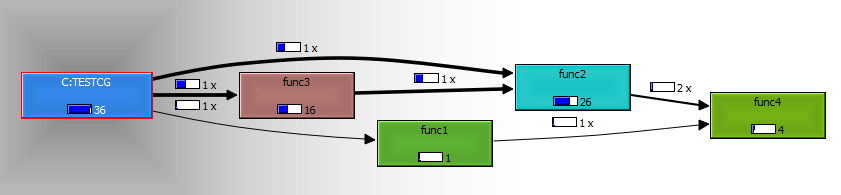
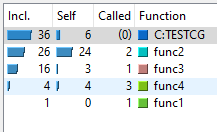
Call Grind for Lisp (CG) is a Lisp application aimed to help profiling of lisp programs running on IntelliCAD, AutoCAD, BricsCAD and alikes. If you are in need of determining the bottle-necks, the time consumed for specified functions , visualize call diagram of your lisp application you may find CG useful. CG collects data (time consumed by each function and call stack) at runtime (dynamic analysis) and creates “call grind” type output to be used by CacheGrind system (credit goes to authors). Requirement: Download and install qcachegrind software recompiled for Windows version of KCacheGrind. Refer to header of the lisp code attached for instructions. Limitation: May fail in consecutive functions forming loop. License: Copy Left Enhanced the code, found a bug? Just let me know. Suha cg.lsp
 1 point
 -
Updated Version for the night, South_Elevation Model 5.pdf everything done except for dimensioning & the roofing from what I can tell (plotted in monochrome for easier viewing). For anyone that needs a better look at what is called for, assuming its all "PF correct". If anyone notices something off let me know!1 point