Leaderboard



Popular Content
Showing content with the highest reputation on 04/20/2026 in all areas
-
You posted this in the AutoCAD LT Forum, are you using AutoCAD LT? Can you post the notepad .txt file and the .dwg?1 point
-
I have found if you do a support request Bricscad are very good and do respond. I am running Bricacad V25 with Win 11, I7, 16gb, NVIDIA GEOFORCE GTX and works fine, yes have locked up on occasions but task manager always allows me to close BRICSCAD, normally a programming problem, infinite loop etc. Did have a fatal error opening a DWG sent via Email, which I think corrupted the large dwg. Have downloaded and installed multi versions over time and had no problems.1 point
-
Besides what @mhupp stated, try turning off antivirus, anti-malware, etc. Could be simply having portions of the install blocked. You might look and make sure you are installing as admin, make sure you do a "COMPLETE UNINSTALL" (AutoCAD has a procedure for this, not sure about BricsCAD), then reinstall as admin with antivirus, etc turned off.1 point
-
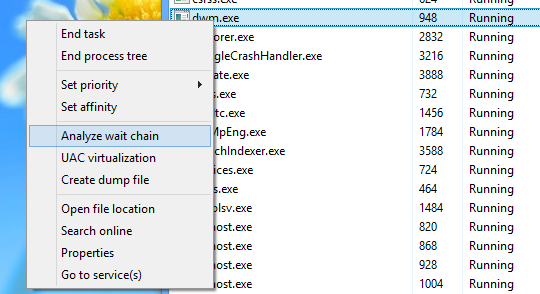
Posting on their official forums would get this more att. System wide freeze/crash is pretty serious. hopefully just stuck in a loop or something and not a virus. Try booting in safe mode or disconnected from the internet. remove any software or add-ins that were installed recently. Check if windows needs to update. before the whole os freezes you need to look at the wait chain for the process. Go into task manger > Details right click analyze wait chain for BricsCAD process might have some answers on why its freezing. One of our software didn't like onedrive running before itself and would freeze until it was closed. had to remove onedrive from the startup process and start it later.
 1 point
 -
Can you provide your computer, OS and graphics card/driver specifications? Are there any error messages? OS crash logs?1 point