Leaderboard


Popular Content
Showing content with the highest reputation on 05/01/2026 in all areas
-
I Just try to avoid using command. apparently their is a bug in autocad 2026 and newer that balloons lisp to 276 seconds when it only took .24 second in older versions. just figured everything contained in the block id would move when updating. cant test right but does adding the 66 . 0 exclude single text outside of blocks? vla-move works for me keep it simple.2 points
-
@mhupp If you want to keep (entmod) in your code and make it efficient, you can refine your filter (ssget) to exclude blocks with attributes. (setq ss (ssget '((0 . "TEXT,INSERT") (66 . 0))))2 points
-
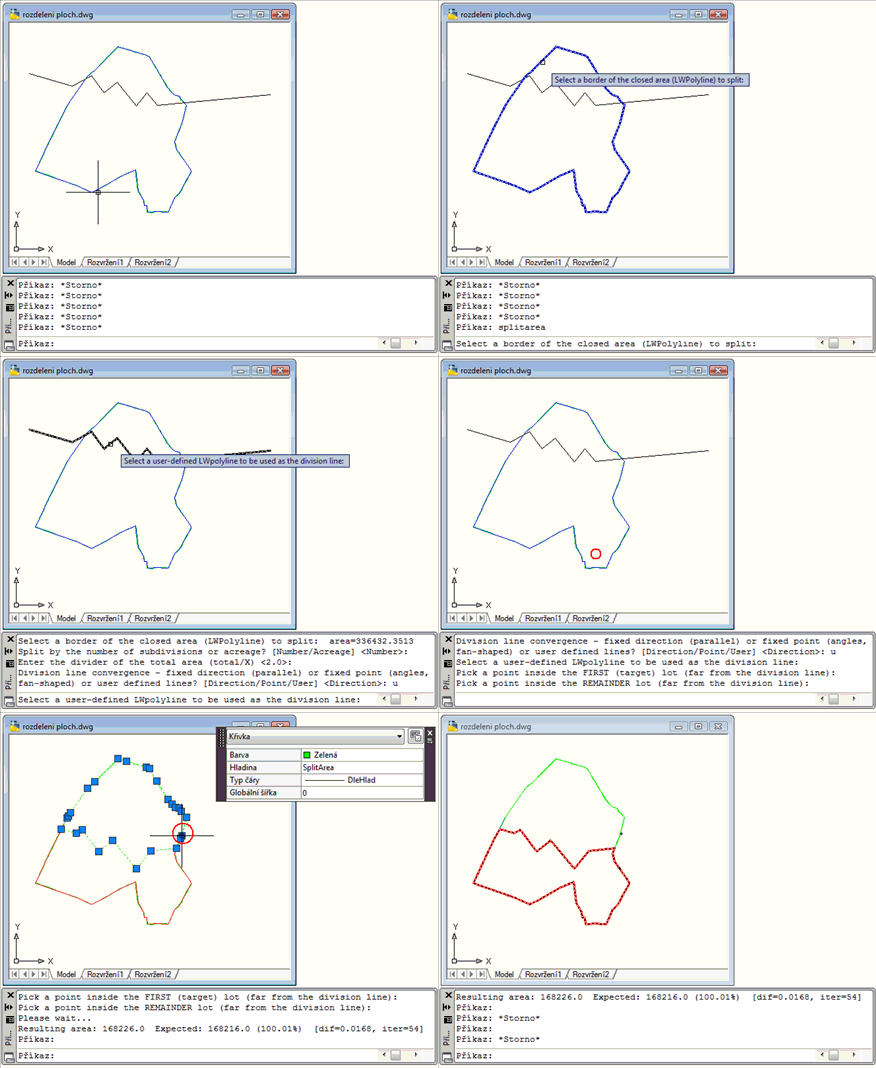
i try to write an extra function to split the area from a polyline like the image but i can not understand how he do this (defun userpt ( / pl vlist pts ptb p1 p2 dir len perp tval korak min-korak iter max-iterations big pA pB vertsA vertsB v i areaA target) (setq pl (car (entsel "\nSelect Polyline: "))) (if (not pl) (progn (princ "\nNo selection.") (exit)) ) (setq vlist (getver_lwpoly pl)) (if (< (length vlist) 3) (progn (princ "\nInvalid polygon.") (exit)) ) (setq p1 (nth 0 vlist)) (setq p2 (nth 1 vlist)) (setq dir (mapcar '- p2 p1)) (setq len (distance p1 p2)) (setq dir (mapcar '(lambda (x) (/ x len)) dir)) (setq perp (list (- (cadr dir)) (car dir) 0.0)) (setq pts (getpoint "\nFirst point: ")) (setq ptb (getpoint "\nSecond point: ")) (command "_area" "e" pl) (setq target (/ (getvar "area") 2.0)) (setq tval 0.0) (setq korak 1.0) (setq min-korak 0.0001) (setq max-iterations 60) (setq iter 0) (setq big 100000.0) (princ "\nSolving...") (while (< iter max-iterations) (setq pA (mapcar '+ pts (mapcar '(lambda (x) (* x big)) dir))) (setq pB (mapcar '- pts (mapcar '(lambda (x) (* x big)) dir))) (setq pA (mapcar '+ pA (mapcar '(lambda (x) (* x tval)) perp))) (setq pB (mapcar '+ pB (mapcar '(lambda (x) (* x tval)) perp))) (setq vertsA '()) (setq vertsB '()) (foreach v vlist (setq i v) (if (> (+ (* (- (car i) (car pA)) (- (cadr pB) (cadr pA))) (* (- (cadr i) (cadr pA)) (- (car pA) (car pB)))) 0) (setq vertsA (cons i vertsA)) (setq vertsB (cons i vertsB)) ) ) (setq areaA 0.0) (foreach v vertsA (setq areaA (+ areaA (car v))) ) (if (< areaA target) (setq tval (+ tval korak)) (setq tval (- tval korak)) ) (setq korak (/ korak 1.2)) (if (< korak min-korak) (setq korak min-korak) ) (setq iter (1+ iter)) ) (princ "\nCreating polygons...") ;; polygon A (entmakex (append (list (cons 0 "LWPOLYLINE") (cons 100 "AcDbEntity") (cons 100 "AcDbPolyline") (cons 90 (length vertsA)) (cons 70 1) ) (mapcar '(lambda (p) (cons 10 p)) vertsA) ) ) ;; polygon B (entmakex (append (list (cons 0 "LWPOLYLINE") (cons 100 "AcDbEntity") (cons 100 "AcDbPolyline") (cons 90 (length vertsB)) (cons 70 1) ) (mapcar '(lambda (p) (cons 10 p)) vertsB) ) ) (princ "\nDone .") (princ) ) Can any one help ? Thanks
 1 point
 -
I used to use JTB Align Plus - JTB World. I need IT to reinstall, haven't needed it recently, so I'll probably wait until I need, but pretty sure it will do everything the OP wants and more. I have a LISP, but IIRC it may need a lot of tweaking for the OPs usage.1 point
-
I ran into something similar with batch DXF → DWG. One thing to watch is SAVE vs SAVEAS — in batch, SAVE doesn’t always behave as expected, especially if the drawing has no proper name yet. Also, FILEDIA needs to be set to 0 or the process can stop on dialogs. For small batches, the LISP solutions above should work fine. For larger batches, I found using accoreconsole with a simple script more reliable.1 point
-
notice your lisp name is MoveLayerAllLayouts that mean other tabs other than model? ssget "_X" wont pick up things on other tabs if they are on that layer. So if your moving everything might assume your deleting the old layer. if that's the case just rename it. no need to mess with ssget and will pick up everything. (vl-cmdf "_.-Rename" "LA" old new)1 point
-
(setq oldLayer (getstring T "\nEnter the name of the layer to move FROM: ")) ;; Prompt for target layer (setq newLayer (getstring T "\nEnter the name of the layer to move TO: "))1 point
-
The block att misaligned text.1 point