Leaderboard


Popular Content
Showing content with the highest reputation on 07/01/2026 in all areas
-
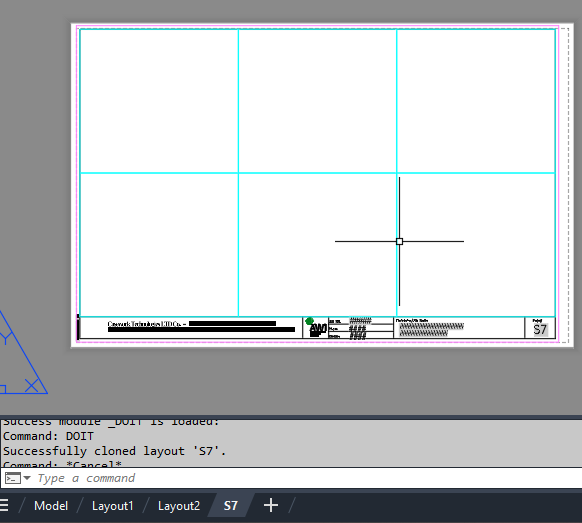
import traceback from pyrx import Ap, Db, Ed, Ge def validate_layout(source_db: Db.Database, target_db: Db.Database, layout_name: str): """Validates if the layout exists in source and is safe to write to target.""" source_layout_dict = Db.Dictionary(source_db.layoutDictionaryId()) if not source_layout_dict.has(layout_name): print(f"Layout '{layout_name}' not found in source drawing.") return False target_layout_dict = Db.Dictionary(target_db.layoutDictionaryId()) if target_layout_dict.has(layout_name): print(f"Layout '{layout_name}' already exists in target drawing.") return False return True def clone_layout_from_db(source_db: Db.Database, target_db: Db.Database, layout_name: str): """Clones a specified layout from a source database to a target database layout dictionary.""" if not validate_layout(source_db, target_db, layout_name): return False try: source_layout_dict = Db.Dictionary(source_db.layoutDictionaryId()) source_layout_id = source_layout_dict.getAt(layout_name) id_map = Db.IdMapping() id_map.setDestDb(target_db) source_db.wblockCloneObjects( [source_layout_id], target_db.layoutDictionaryId(), id_map, Db.DuplicateRecordCloning.kDrcIgnore, ) return True except Exception as e: print(f"Error encountered during cloning: {e}") traceback.print_exc() return False @Ap.Command() def doit(): layout_name = "S7" source_path = r"E:\Batch\06457 RE Submittal.dwg" target_db = Db.curDb() try: source_db = Db.Database.createFromDWG(source_path) if clone_layout_from_db(source_db, target_db, layout_name): print(f"Successfully cloned layout '{layout_name}'.") manager = Ap.LayoutManager() manager.updateLayoutTabs() except Exception as err: print(f"Failed to load or process source drawing: {err}")
 1 point
 -
Here's a simple Lisp routine for obtaining data from an integrated GNSS receiver. It works by sending a small script to PowerShell, which writes the data to a file named 'pos.txt' saved in the Documents folder. I've only tested it on a single device, but it should work on any device equipped with an integrated GNSS receiver. The data is stored in latitude/longitude format, so each user will need to transform those coordinates into the desired coordinate reference system. To stop logging the data, simply close the PowerShell window This is just a starting point for anyone who wants to adapt it to their own needs. ;************************ G L A V C V S ************************* ;************************** F E C I T *************************** ;;;THIS CODE STARTS GNSS RECEIVER AND WRITES DATA TO A FILE CALLED 'pos.txt' IN THE My Docments FOLDER (defun startGNSS (/ cmd sh dir cad ur) (setq dir (VL-REGISTRY-READ "HKEY_CURRENT_USER\\Software\\Microsoft\\Windows\\CurrentVersion\\Explorer\\Shell Folders" "Personal" ) ) (if (setq sh (vlax-create-object "WScript.Shell")) (progn (if (and (or (setq ur (getint "\nUpdate rate (milliseconds) <1000>/2000/3000/5000 : ")) (not ur)) (member ur '(nil 1000 2000 3000 5000))) (progn (setq cad (strcat "Add-Type -AssemblyName System.Device" (chr 13) (chr 10) "# 1) Conectar con AutoCAD abierto" (chr 13) (chr 10) "$outFile = \'" dir "\\pos.txt\'" (chr 13) (chr 10) "try {" (chr 13) (chr 10) " $acad = [Runtime.InteropServices.Marshal]::GetActiveObject(\'AutoCAD.Application." (itoa (atoi (getvar "ACADVER"))) "\')" (chr 13) (chr 10) "}" (chr 13) (chr 10) "catch {" (chr 13) (chr 10) " Add-Type -AssemblyName System.Windows.Forms" (chr 13) (chr 10) " [System.Windows.Forms.MessageBox]::Show(" (chr 13) (chr 10) " \'Por alguna razón no se pudo conectar con AutoCAD mediante COM.\' + [Environment]::NewLine + $_.Exception.Message," (chr 13) (chr 10) " \'GNSS-}AutoCAD: Error de conexión\'," (chr 13) (chr 10) " [System.Windows.Forms.MessageBoxButtons]::OK," (chr 13) (chr 10) " [System.Windows.Forms.MessageBoxIcon]::Error" (chr 13) (chr 10) " )" (chr 13) (chr 10) " exit" (chr 13) (chr 10) "}" (chr 13) (chr 10) "# 2) Crear y arrancar receptor de ubicación Windows/GNSS" (chr 13) (chr 10) "$w = New-Object System.Device.Location.GeoCoordinateWatcher" (chr 13) (chr 10) "$w.Start()" (chr 13) (chr 10) "# 3) Bucle continuo: comprobar estado, obtener posición y escribir en USERS5" (chr 13) (chr 10) "while ($true) {" (chr 13) (chr 10) " $doc = $acad.ActiveDocument" (chr 13) (chr 10) " $status = $w.Status" (chr 13) (chr 10) " $p = $w.Position.Location" (chr 13) (chr 10) " $time = Get-Date -Format \'dd-MM-yyyy HH:mm:ss\'" (chr 13) (chr 10) " if ($status -eq \'Disabled\') {" (chr 13) (chr 10) " $line = \'*** GNSS ERROR: GNSS disabled ***\';;;;;;\"" (chr 13) (chr 10) " }" (chr 13) (chr 10) " elseif ($status -eq \'Initializing\') {" (chr 13) (chr 10) " $line = \'*** GNSS ERROR: Searching... ***\';;;;;;\"" (chr 13) (chr 10) " }" (chr 13) (chr 10) " elseif ($status -eq \'NoData\') {" (chr 13) (chr 10) " $line = \'*** GNSS ERROR: Without data ***\';;;;;;\"" (chr 13) (chr 10) " }" (chr 13) (chr 10) " elseif ($p.IsUnknown) {" (chr 13) (chr 10) " $line = \'*** ERROR GNSS: Unknown position ***\';;;;;;\"" (chr 13) (chr 10) " }" " else {" (chr 13) (chr 10) " $line = $p.Latitude + ';' + $p.Longitude + ';' + $p.Altitude + ';' + $p.HorizontalAccuracy + ';' + $p.VerticalAccuracy" (chr 13) (chr 10) " }" (chr 13) (chr 10) " try {" (chr 13) (chr 10) " Set-Content -Path $outFile -Value $line" (chr 13) (chr 10) " }" (chr 13) (chr 10) ;;; " catch {" ;;; (chr 13) ;;; (chr 10) ;;; " Write-Host 'ERROR escribiendo...: $($_.Exception.Message)'" ;;; (chr 13) ;;; (chr 10) ;;; " }" (chr 13) (chr 10) (strcat " Start-Sleep -Milliseconds " (if ur (itoa ur) "1000")) (chr 13) (chr 10) "}" ) cmd (strcat "powershell.exe -NoProfile -ExecutionPolicy Bypass -NoExit -Command \"" cad "\"" ) ) (vlax-invoke-method sh 'Run cmd 1 :vlax-false) (grtext -1 "*** GNSS writing file \'pos.txt\' ***") ) (alert "ERROR: \nUpdate rate should be 1000, 2000, 3000 or 5000\n\nExiting...") ) (vlax-release-object sh) ) ) )1 point