Leaderboard




Popular Content
Showing content with the highest reputation on 08/05/2026 in all areas
-
I thought I might write some samples to help guide lisp users that are interested in trying out Python. Long time lisp users will feel right at home using result buffers (DXF Lists). In PyRx, it’s wrappers around the old school C ADS functions, I.e. ads_entget, yay, like driving an F-150 with a toilet bowl plunger as the gear shift. In Python, most of these old functions reside in Db.Core The resbuf* linked lists are wrapped into a list of tuples.. does this output look familiar? from pyrx import Ap, Db, Ed, Ge @Ap.Command() def doit0() -> None: #entsel with a filter ps, id, _ = Ed.Editor.entSel("\nPick it: ", Db.Line.desc()) if ps != Ed.PromptStatus.eOk: raise RuntimeError("oof {}:".format(ps)) #get the result buffer rb = Db.Core.entGet(id) print(rb) # [ # (-1, PyDb.ObjectId(1de8bf954d0)), # (0, 'LINE'), # (330, PyDb.ObjectId(1de8bf9a1f0)), # (5, '265'), # (100, 'AcDbEntity'), # (67, 0), # (410, 'Model'), # (8, '0'), # (100, 'AcDbLine'), # (10, PyGe.Point3d(0.00000000000000,0.00000000000000,0.00000000000000)), # (11, PyGe.Point3d(100.00000000000000,100.00000000000000,0.00000000000000)), # (210, PyGe.Point3d(0.00000000000000,0.00000000000000,1.00000000000000)) # ]2 points
-
There is also PyInstaller to create an executable. PyInstaller Manual — PyInstaller 6.21.0 documentation pip install -U pyinstaller pyinstaller your_program.py2 points
-
The Ax Space. Ax is the wrapper for ActiveX as described here https://help.autodesk.com/view/OARX/2025/ENU/?guid=GUID-A809CD71-4655-44E2-B674-1FE200B9FE30 It’s going to look familiar if you’ve done any VBA or Visual Lisp. The big difference is that all Points, Vectors, Matrices, use AcGe classes instead of variants. from pyrx import Ap, Ax, Db, Ed, Ge, Rx @Ap.Command() def doitx1(): # get the application, document, and modelspace using ActiveX automation axApp = Ap.Application.acadApplication() axDoc = axApp.activeDocument() axModel = axDoc.modelSpace() # add a lines to modelspace, then access it properties # use Ge.Point3d class instead of a variant axLine1 = axModel.addLine(Ge.Point3d(0, 0, 0), Ge.Point3d(100, 100, 0)) axLine2 = axModel.addLine(Ge.Point3d(0, 100, 0), Ge.Point3d(100, 0, 0)) interdata = axLine1.intersectWith(axLine2, Ax.AcExtendOption.acExtendNone) if len(interdata) == 0: print("\nDoes not intersect:") return axCircle = axModel.addCircle(interdata[0], 10) axCircle.setColor(Ax.AcColor.acCyan) #scale and rotate xform = Ge.Matrix3d.scaling(2,axCircle.center()) xform *= Ge.Matrix3d.rotation(0.7854, Ge.Vector3d.kZAxis, axCircle.center()) axLine1.transformBy(xform) axLine2.transformBy(xform)2 points
-
Casting objects. Every database object has a static cast method, it is your responsibility to check the type from pyrx import Ap, Ax, Db, Ed, Ge, Rx import traceback @Ap.Command() def doitx3(): try: # Get ActiveX application instance axApp = Ap.Application.acadApplication() axDoc = axApp.activeDocument() axUtil = axDoc.utility() # Prompt user to pick an entity axEnt, pnt = axUtil.getEntity("\nPick a line") # Verify that the picked entity is a LINE if axEnt.objectName() != "AcDbLine": raise RuntimeError("oops!: ") # Cast to AcadLine axLine = Ax.AcadLine.cast(axEnt) # change color to green (RGB: 0, 255, 0) axLine.setTrueColor(Ax.AcadAcCmColor(0, 255, 0)) # Print information about the selected entity print(axEnt.objectName(), pnt) except Exception as err: traceback.print_exception(err)2 points
-
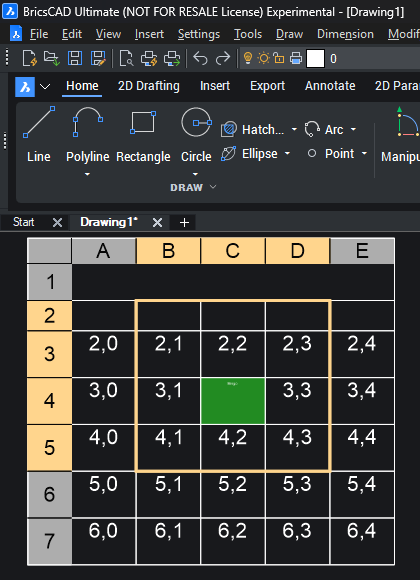
here's an example of creating a table and selecting a sub region from pyrx import Ap, Ax, Db, Ed, Ge, Rx import traceback @Ap.Command() def doitx2(): try: axApp = Ap.Application.acadApplication() axDoc = axApp.activeDocument() axModel = axDoc.modelSpace() ps , point = Ed.Editor.getPoint("\nPick table location: ") if ps != Ed.PromptStatus.eOk: raise RuntimeError("oof {}:".format(ps)) # Creates a table with 7 rows and 5 columns axTable = axModel.addTable(point, 7, 5, 1, 5) #fill up the table for col in range(axTable.columns()): for row in range(2, axTable.rows()): axTable.setText(row, col, "{},{}".format(row, col)) #get the cell extents, is a list of 3d points cex11 = axTable.cellExtents(1, 1, False) cex43 = axTable.cellExtents(4, 3, False) # Create a selection region using ActiveX selection methods sssub = axTable.selectSubRegion( cex11[0], cex43[3], Ge.Vector3d.kZAxis, Ge.Vector3d.kXAxis, Ax.AcSelectType.acTableSelectCrossing, False, ) # Apply the selection to the table using ActiveX selection methods axTable.setSubSelection(*sssub) # Perform hit testing and geometric calculations using ActiveX services # Ge space makes it easier to do math pnt = cex11[0] + (cex43[3] - cex11[0]) * 0.5 bhit, row, col = axTable.hitTest(pnt, Ge.Vector3d.kZAxis) if(bhit): # Modify cell properties using ActiveX methods axTable.setCellTextHeight(row, col, 0.8) axTable.setText(row, col, "Bingo") # since were open source we can add stuff like suppost html colors axTable.setCellBackgroundColor(row, col, Ax.AcadAcCmColor("#228B22")) except Exception: print(traceback.format_exc())
 2 points
 -
Start here https://github.com/CEXT-Dan/PyRx#python-for-autocad 1, watch the short YouTube video and download Python 3.14 from the link provided 2, download in install VS Code, install python extension pack 3, try out some of the samples, https://github.com/CEXT-Dan/PyRx/tree/main/PySamples2 points
-
@troggarf yep took the plunge and installed Python, the install is easy With @Danielm103 help also installed a couple of extra modules that where needed for his code. Then it's simple like lisp using Pyload instead of Appload. Or you can load python scripts using a lisp call. ; lisp start python (setq python "C:/Users/xxxxxx/AppData/Local/Python/Python-3.14-64/python.exe" pyscript "D:\\alan\\lisp\\ctb table.py" ) (startapp python pyscript)
2 points
-
There are some items in the database, where the only option is to use entGet, I.e. ACAD_FIELDLIST is not exposed to ARX See: https://www.cadtutor.net/forum/topic/99220-python-change-precision-of-all-fields-in-a-drawing/2 points
-
And top it off with entMake from pyrx import Ap, Db, Ed, Ge @Ap.Command() def doit5() -> None: Db.Core.entMake([(0 , "LINE"),(10, Ge.Point3d(0, 0, 0)),(11, Ge.Point3d(100, 100, 0))])2 points
-
This might be better example, maybe similar to the COND expression? from pyrx import Ap, Db, Ed, Ge @Ap.Command() def doit4() -> None: ps, id, _ = Ed.Editor.entSel("\nPick it: ", Db.Line.desc()) if ps != Ed.PromptStatus.eOk: raise RuntimeError("oof {}:".format(ps)) #get the result buffer rb = Db.Core.entGet(id) # Process the result buffer using structural pattern matching updated_rb = [] for item in rb: match item: case (10, _): updated_rb.append((10, Ge.Point3d(0, 0, 0))) case (11, _): updated_rb.append((11, Ge.Point3d(100, 100, 0))) case _: updated_rb.append(item) # Apply changes back to the AutoCAD database Db.Core.entMod(updated_rb)2 points
-
In Python, tuples are immutable, so if we want to modify the list, you have to replace it. In this sample we modify the start and end of a line from pyrx import Ap, Db, Ed, Ge @Ap.Command() def doit3() -> None: #entsel with a filter ps, id, _ = Ed.Editor.entSel("\nPick it: ", Db.Line.desc()) if ps != Ed.PromptStatus.eOk: raise RuntimeError("oof {}:".format(ps)) #get the result buffer rb = Db.Core.entGet(id) # Loop through the result buffer list and modify matching DXF codes for i, item in enumerate(rb): dxf_code = item[0] if dxf_code == 10: rb[i] = (10, Ge.Point3d(0, 0, 0)) elif dxf_code == 11: rb[i] = (11, Ge.Point3d(100, 100, 0)) # Apply changes back to the AutoCAD database Db.Core.entMod(rb)2 points
-
In Python, there isn’t an assoc function, we can iterate through and search for a DXF code from pyrx import Ap, Db, Ed, Ge @Ap.Command() def doit1() -> None: # entsel with a filter ps, id, _ = Ed.Editor.entSel("\nPick it: ", Db.Line.desc()) if ps != Ed.PromptStatus.eOk: raise RuntimeError("oof {}:".format(ps)) # get the result buffer rb = Db.Core.entGet(id) # 1. Analog to Lisp: (assoc 8 rb) -> Returns the full pair (8, "LayerName") dxf_code, value = next((item for item in rb if item[0] == 8), None) # 2. Extract just the value safely if dxf_code: print(f"The layer is: {value}")2 points
-
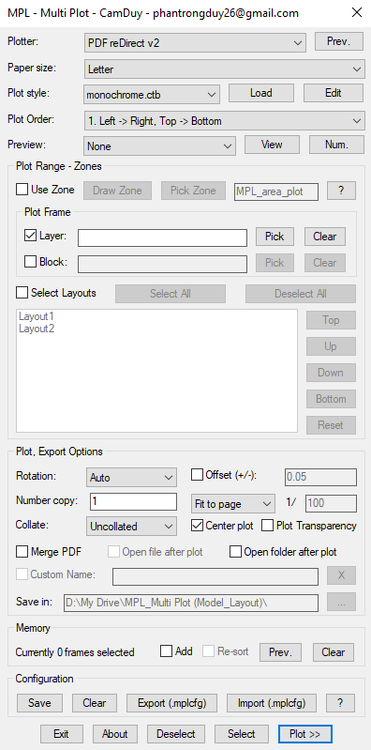
Hello everyone, I've just finished developing MPL (Multi Plot Layout/Model), a free AutoLISP tool that helps you batch print drawings in AutoCAD. Main Features MPL includes all the essential functions found in other batch plotting LISP tools, plus several improvements: Smart and intuitive DCL interface Merge all plots into a single PDF (no additional software or virtual PDF printer required) Automatically open the output file or folder after plotting, with customizable file name and save location Zone-based plotting – organize messy drawings and print them in the correct order based on defined zones Batch plot multiple layouts – rearrange the printing order of layout tabs without dragging the tabs at the bottom of AutoCAD Print Preview mode Add Selection feature – easily add more drawings to the current print list without starting over Export/Import plot configuration for quick reuse Download and user guide: https://drive.google.com/drive/folders/1WwmkXVgHFWTy8zIhARJYCH_G2OC2A_3D?usp=sharing Feel free to download it, give it a try, and let me know your feedback. Your suggestions will help improve MPL even further!
1 point
-
yes, same in acad. "Fehler: ActiveX-Server gab folgenden Fehler zurück: unbekannter Name: Annotative" There is no such property wich is why i would use setpropertyvalue for acad. As for Bricscad idk how one would do that1 point
-
https://www.cadviet.com/forum/index.php?app=forums&module=forums&controller=topic&id=2133131 point
-
Following on from EnM4st3r Code. I have added a function to create the "%pr" if none exists. I had this happen when the Field is created using "Current Precision" as the string does not contain the required %pr by default. (defun c:ChangePrec (/ *error* acdoc undo-mark ss target index ename obj att field-string revised-string) (defun *error* (msg) (if undo-mark (progn (vl-catch-all-apply 'vla-EndUndoMark (list acdoc)) (setq undo-mark nil) ) ) (if (and msg (not (wcmatch (strcase msg) "*BREAK*,*CANCEL*,*EXIT*")) ) (princ (strcat "\nError: " msg)) ) (princ) ) (setq acdoc (vla-get-ActiveDocument (vlax-get-acad-object))) (prompt "\nSelect text, MText, or Attributed Blocks: ") (while (null (setq ss (ssget '((0 . "TEXT,MTEXT,INSERT"))))) (prompt "\nNo valid text, MText, or blocks selected.") ) (initget 1 "0 1 2 3 4 5 6 7 Current") (setq target (getkword "\nTarget precision [0/1/2/3/4/5/6/7/Current]: ")) (vla-StartUndoMark acdoc) (setq undo-mark T) (repeat (setq index (sslength ss)) (setq index (1- index) ename (ssname ss index) obj (vlax-ename->vla-object ename) ) (cond ;; Text or MText ((wcmatch (vla-get-ObjectName obj) "AcDbText,AcDbMText") (setq field-string (vla-FieldCode obj)) (if (and field-string (setq revised-string (replacePrecision field-string target)) ) (vla-put-TextString obj revised-string) ) ) ;; Block reference with editable attributes ((vlax-method-applicable-p obj 'GetAttributes) (foreach att (vlax-invoke obj 'GetAttributes) (setq field-string (LM:fieldcode (vlax-vla-object->ename att))) (if (and field-string (setq revised-string (replacePrecision field-string target)) ) (vla-put-TextString att revised-string) ) ) ) ) ) (vla-EndUndoMark acdoc) (setq undo-mark nil) (vla-Regen acdoc acActiveViewport) (princ) ) (defun replacePrecision (fieldStr target / nbs tmp_nbs prec return fmtStart fmtEnd fmtString newPrec) (setq newPrec (strcat "%pr" (if (= target "Current") (itoa (getvar "LUPREC")) target ) ) ) ;; Existing precision -> replace it (if (setq nbs (vl-string-search "%pr" fieldStr)) (progn (while nbs (setq tmp_nbs nbs prec (itoa (atoi (substr fieldStr (+ nbs 4) 2))) fieldStr (vl-string-subst newPrec (strcat "%pr" prec) fieldStr tmp_nbs ) nbs (vl-string-search "%pr" fieldStr (+ tmp_nbs (strlen newPrec))) ) ) (setq return fieldStr) ) ;; No %pr found (progn ;; Existing format string? (if (setq fmtStart (vl-string-search "\\f \"" fieldStr)) ;; Append %pr to existing format string (progn (setq fmtStart (+ fmtStart 4) fmtEnd (vl-string-search "\"" fieldStr fmtStart) fmtString (substr fieldStr (1+ fmtStart) (- fmtEnd fmtStart)) ) (setq return (strcat (substr fieldStr 1 fmtStart) fmtString newPrec (substr fieldStr (1+ fmtEnd)) ) ) ) ;; No format string at all -> create one (if (setq fmtEnd (vl-string-search ">%" fieldStr)) (setq return (strcat (substr fieldStr 1 (1- fmtEnd)) " \\f \"" newPrec "\">%" ) ) ) ) ) ) return ) ;; Field Code - Lee Mac ;; Returns the field expression associated with an entity (defun LM:fieldcode ( ent / replacefield replaceobject fieldstring enx ) (defun replacefield ( str enx / ent fld pos ) (if (setq pos (vl-string-search "\\_FldIdx" (setq str (replaceobject str enx)))) (progn (setq ent (assoc 360 enx) fld (entget (cdr ent)) ) (strcat (substr str 1 pos) (replacefield (fieldstring fld) fld) (replacefield (substr str (1+ (vl-string-search ">%" str pos))) (cdr (member ent enx))) ) ) str ) ) (defun replaceobject ( str enx / ent pos ) (if (setq pos (vl-string-search "ObjIdx" str)) (strcat (substr str 1 (+ pos 5)) " " (LM:ObjectID (vlax-ename->vla-object (cdr (setq ent (assoc 331 enx))))) (replaceobject (substr str (1+ (vl-string-search ">%" str pos))) (cdr (member ent enx))) ) str ) ) (defun fieldstring ( enx / itm ) (if (setq itm (assoc 3 enx)) (strcat (cdr itm) (fieldstring (cdr (member itm enx)))) (cond ((cdr (assoc 2 enx))) ("")) ) ) (if (and (wcmatch (cdr (assoc 0 (setq enx (entget ent)))) "TEXT,MTEXT,ATTRIB,MULTILEADER,*DIMENSION") (setq enx (cdr (assoc 360 enx))) (setq enx (dictsearch enx "ACAD_FIELD")) (setq enx (dictsearch (cdr (assoc -1 enx)) "TEXT")) ) (replacefield (fieldstring enx) enx) ) ) ;; ObjectID - Lee Mac ;; Returns a string containing the ObjectID of a supplied VLA-Object ;; Compatible with 32-bit & 64-bit systems (defun LM:ObjectID ( obj ) (eval (list 'defun 'LM:ObjectID '( obj ) (if (and (vl-string-search "64" (getenv "PROCESSOR_ARCHITECTURE")) (vlax-method-applicable-p (vla-get-utility (LM:acdoc)) 'getobjectidstring) ) (list 'vla-getobjectidstring (vla-get-utility (LM:acdoc)) 'obj ':vlax-false) '(itoa (vla-get-objectid obj)) ) ) ) (LM:ObjectID obj) ) ;; Active Document - Lee Mac ;; Returns the VLA Active Document Object (defun LM:acdoc nil (eval (list 'defun 'LM:acdoc 'nil (vla-get-activedocument (vlax-get-acad-object)))) (LM:acdoc) )1 point
-
I dont know if its my Bricscad V25 but this is what you get using; (vla-put-Annotative hobj :vlax-false) ; error : Automation Error. Property [ANNOTATIVE] not available Would appreciate to know if same in Acad etc.1 point
-
What we have already just cleans up an incoming CAD file like unlocking all layers, color to ByLayer, Audit, PU, -PU(regapps), and changing the units. We use AutoCAD LT and I don't think we need to change nested hatches because the hatches I want to code are usually on the surface and include pavement, sidewalk, etc., and not in another block. I would want to include dynamic blocks to be able to be exploded as well since alot of utility symbols are dynamic blocks. I've never heard of anonymous blocks... (defun C:CLEANUP ( / allobjects hatchss i hobj hcount) (command "-layer" "unlock" "*" "") ; Unlocks all layers to make them editable (setq allobjects (ssget "_X" )) (command "_.CHPROP" allobjects "" "_color" "ByLAyer" "") ; Sets the color of all objects to ByLayer (command "_AUDIT" "Yes") (command "_PURGE" "Regapps" "*" "No") (command "_PURGE" "All" "*" "No") (setvar "lunits" 2) ; Set linear units to decimal (setvar "aunits" 0) ; Set angular units to decimal (command "_INSUNITS" "0") ; Specifies the drawing units as unitless ;; Turn off Annotative property on all hatch objects (vl-load-com) (setq hcount 0) (if (setq hatchss (ssget "_X" '((0 . "HATCH")))) (progn (setq i 0) (while (< i (sslength hatchss)) (setq hobj (vlax-ename->vla-object (ssname hatchss i))) (if (vlax-property-available-p hobj "Annotative") (progn (vla-put-Annotative hobj :vlax-false) (setq hcount (1+ hcount)) ) ) (setq i (1+ i)) ) ) ) (princ (strcat "\n" (itoa hcount) " hatch(es) set to non-annotative.")) (princ "\n\nFile has been cleaned.") ) (princ)1 point
-
those are attribute references of a block. Since vla-fieldcode only works on Text and mtext i used Lee Macs fieldcode instead https://www.lee-mac.com/fieldcode.html It should work on Blocks Attributereferences as well now. (defun c:change_prec (/ *error* acdoc undo-mark ss target index ename obj att field-string revised-string) (defun *error* (msg) (if undo-mark (progn (vl-catch-all-apply 'vla-EndUndoMark (list acdoc)) (setq undo-mark nil) ) ) (if (and msg (not (wcmatch (strcase msg) "*BREAK*,*CANCEL*,*EXIT*")) ) (princ (strcat "\nError: " msg)) ) (princ) ) (setq acdoc (vla-get-ActiveDocument (vlax-get-acad-object))) (prompt "\nSelect text, MText, or attributed blocks: ") (while (null (setq ss (ssget '((0 . "TEXT,MTEXT,INSERT"))))) (prompt "\nNo valid text, MText, or blocks selected.") ) (initget 1 "0 1 2 3 4 5 6 7 8 9 10 11 12 13 14 15 16 Current") (setq target (getkword "\nTarget precision [0/1/2/3/4/5/6/7/8/9/10/11/12/13/14/15/16/Current]: ")) (vla-StartUndoMark acdoc) (setq undo-mark T) (repeat (setq index (sslength ss)) (setq index (1- index) ename (ssname ss index) obj (vlax-ename->vla-object ename) ) (cond ;; Text or MText ((wcmatch (vla-get-ObjectName obj) "AcDbText,AcDbMText") (setq field-string (vla-FieldCode obj)) (if (and field-string (setq revised-string (replacePrecision field-string target)) ) (vla-put-TextString obj revised-string) ) ) ;; Block reference with editable attributes ((vlax-method-applicable-p obj 'GetAttributes) (foreach att (vlax-invoke obj 'GetAttributes) (setq field-string (LM:fieldcode (vlax-vla-object->ename att))) (if (and field-string (setq revised-string (replacePrecision field-string target)) ) (vla-put-TextString att revised-string) ) ) ) ) ) (vla-EndUndoMark acdoc) (setq undo-mark nil) (vla-Regen acdoc acActiveViewport) (princ) ) (defun replacePrecision (fieldStr target / nbs prec_source return) (setq nbs 0) (cond ((vl-string-search "%<\\" fieldStr nbs) (while nbs (if (setq nbs (vl-string-search "%pr" fieldStr (setq tmp_nbs nbs))) (setq prec_source (itoa (atoi (substr fieldStr (+ nbs 4) 2))) fieldStr (vl-string-subst (if (eq target "Current") (strcat "%pr" (itoa (getvar "LUPREC"))) (strcat "%pr" target) ) (strcat "%pr" prec_source) fieldStr tmp_nbs ) nbs (1+ nbs) ) ) ) (setq return fieldStr) ) ) return ) ;; Field Code - Lee Mac ;; Returns the field expression associated with an entity (defun LM:fieldcode ( ent / replacefield replaceobject fieldstring enx ) (defun replacefield ( str enx / ent fld pos ) (if (setq pos (vl-string-search "\\_FldIdx" (setq str (replaceobject str enx)))) (progn (setq ent (assoc 360 enx) fld (entget (cdr ent)) ) (strcat (substr str 1 pos) (replacefield (fieldstring fld) fld) (replacefield (substr str (1+ (vl-string-search ">%" str pos))) (cdr (member ent enx))) ) ) str ) ) (defun replaceobject ( str enx / ent pos ) (if (setq pos (vl-string-search "ObjIdx" str)) (strcat (substr str 1 (+ pos 5)) " " (LM:ObjectID (vlax-ename->vla-object (cdr (setq ent (assoc 331 enx))))) (replaceobject (substr str (1+ (vl-string-search ">%" str pos))) (cdr (member ent enx))) ) str ) ) (defun fieldstring ( enx / itm ) (if (setq itm (assoc 3 enx)) (strcat (cdr itm) (fieldstring (cdr (member itm enx)))) (cond ((cdr (assoc 2 enx))) ("")) ) ) (if (and (wcmatch (cdr (assoc 0 (setq enx (entget ent)))) "TEXT,MTEXT,ATTRIB,MULTILEADER,*DIMENSION") (setq enx (cdr (assoc 360 enx))) (setq enx (dictsearch enx "ACAD_FIELD")) (setq enx (dictsearch (cdr (assoc -1 enx)) "TEXT")) ) (replacefield (fieldstring enx) enx) ) ) ;; ObjectID - Lee Mac ;; Returns a string containing the ObjectID of a supplied VLA-Object ;; Compatible with 32-bit & 64-bit systems (defun LM:ObjectID ( obj ) (eval (list 'defun 'LM:ObjectID '( obj ) (if (and (vl-string-search "64" (getenv "PROCESSOR_ARCHITECTURE")) (vlax-method-applicable-p (vla-get-utility (LM:acdoc)) 'getobjectidstring) ) (list 'vla-getobjectidstring (vla-get-utility (LM:acdoc)) 'obj ':vlax-false) '(itoa (vla-get-objectid obj)) ) ) ) (LM:ObjectID obj) ) ;; Active Document - Lee Mac ;; Returns the VLA Active Document Object (defun LM:acdoc nil (eval (list 'defun 'LM:acdoc 'nil (vla-get-activedocument (vlax-get-acad-object)))) (LM:acdoc) )1 point
-
I have not played in python and I will give it a whirl.1 point
-
Ahhh, I didn't see the link, I'll check it out later. Thanks, I'm sure it will help.1 point
-
I have been testing the python code by @Danielm103 and it works really well, the only hiccup is that you need to install Python on your pc plus load a couple of extra python modules. It is very straight forward to install. A more advanced version could produce what you have as a result. It's a simple task to remove columns from the outputted table.1 point
-
Welcome to CadTutor CamDuy and thank you for sharing your program, looks like you put a lot of effort in this. The world (and this site) needs more people like you1 point
-
here's a dump from the BRep sample I posted here brep.txt1 point
-
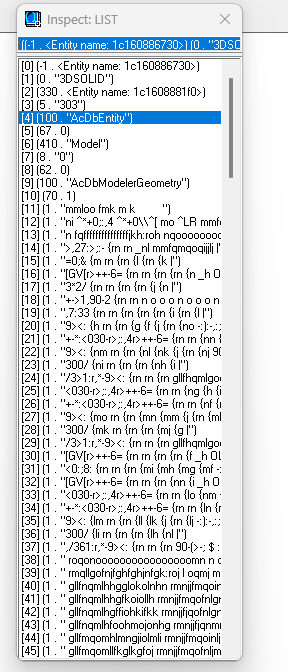
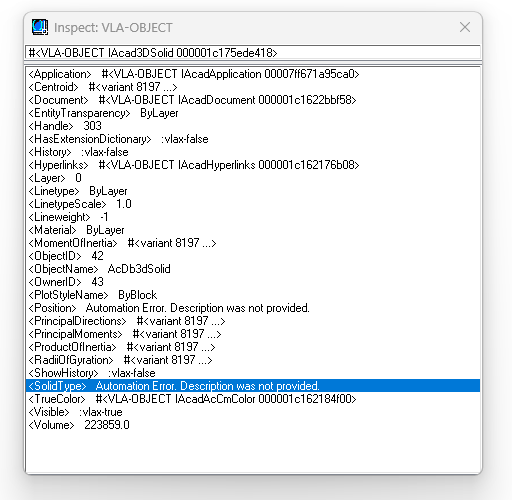
3D Solid.dwg I’ve attached a sample DWG. When I run: (setq SOLID (ssget '((0 . "3DSOLID")))) (setq data (entget (ssname SOLID 0))) I get this result: When I run: (setq data (vlax-ename->vla-object (ssname SOLID 0))) I get this result instead:
1 point