Leaderboard




Popular Content
Showing content with the highest reputation on 09/22/2026 in all areas
-
Yes, it's sad, but for some time now I've thought it would be a good idea to have an AutoCAD nostalgia forum. This is a place where we can collect images of legacy AutoCAD versions. I bet you throw away all your old AutoCAD stuff with each new version. Or maybe there are some hoarders out there who still have the box that their R10 came in. I have to admit that I still have my R12 box - makes a great magazine holder (pictures later). Anyway, let me know what you think of this idea and take a look at what's there already.1 point
-
A bit of googling check your version is past 26.2.07. can't check because i don't have V26 A regression in BricsCAD V26.2.5 caused the Properties window and other GUI components to stop updating during LISP execution, particularly when waiting for user input. This issue was identified as a regression and has been fixed in V26.2.07 (and subsequent builds). If you are experiencing this behavior: Update BricsCAD: Ensure you are running V26.2.07 or a newer version where the fix is included. Check System Variables: LISP scripts may inadvertently set FILEDIA or CMDDIA to zero, preventing dialog updates. Ensure your code resets these variables or uses an error handler to restore them upon cancellation. Alternative Property Access: For object properties not updating via COM, BricsCAD supports non-COM functions like (getpropertyvalue), (setpropertyvalue), (ispropertyreadonly), and (dumpallproperties) which work across Windows, Mac, and Linux.1 point
-
I never used dimbreak before so but can you use a lisp select all the dim and test which ones which have DimBreaks applied to the then just re-set them.? Test on a few drawings first (make sure run it on back version)... I did this with the help of ai... but it appears to work for me... (perhaps some can verify and improve on it) I'm on on Version 2027 Map but his worked for me. I have notice two things if the dimension are not on screen and the object it crosses are a layer that is off the break reset doesn't work. (So I added zoom extents and do both layer on and thaw for any layer that is printable. Then at the end I reset everything back. But it may be better to do that before you start... as I seen AutCAD behaving strange... Where some lisp functions run before the previous task is complete... (defun c:RefreshDimBreaks ( / layers oldecho i data name flags plot off frozen answer item viewctr viewsize) (setq oldecho (getvar "CMDECHO")) (setvar "CMDECHO" 0) (setq viewctr (getvar "VIEWCTR")) (setq viewsize (getvar "VIEWSIZE")) (setq layers '()) (if (tblnext "LAYER" T) (progn (while (setq data (tblnext "LAYER")) (setq name (cdr (assoc 2 data))) (setq flags (cdr (assoc 70 data))) (setq plot (cdr (assoc 290 data))) (setq off (< (cdr (assoc 62 data)) 0)) (setq frozen (= (logand flags 1) 1)) (if (and (= (if plot plot 1) 1) (or off frozen)) (setq layers (cons (list name off frozen) layers)) ) ) ) ) (if (> (length layers) 0) (progn (princ (strcat "\nFound " (itoa (length layers)) " printable layers that are off or frozen.")) (initget "Y N") (setq answer (getstring T "\nTurn these layers on and thaw them temporarily? [Y/N] <N>: ")) (if (or (= answer "") (= (strcase answer) "N")) (princ "\nNo changes made.") (if (= (strcase answer) "Y") (progn (foreach item layers (command "_.-LAYER" "_ON" (car item) "") (command "_.-LAYER" "_THAW" (car item) "") ) ) ) ) ) (princ "\nNo printable layers are off or frozen.") ) (RefreshDims) (foreach item layers (if (cadr item) (command "_.-LAYER" "_OFF" (car item) "") ) (if (caddr item) (command "_.-LAYER" "_FREEZE" (car item) "") ) ) (princ "\nOriginal layer states restored.") (command "_.ZOOM" "_C" viewctr viewsize) (command "_.REGEN") (setvar "CMDECHO" oldecho) (princ) ) (defun RefreshDims ( / ss ssBreak oldecho i ent dict 360type) (setq oldecho (getvar "CMDECHO")) (setvar "CMDECHO" 0) (command "_.ZOOM" "_E") (if (setq ss (ssget "_X" '((0 . "DIMENSION")))) (progn (setq ssBreak (ssadd)) (setq i 0) (while (< i (sslength ss)) (setq ent (ssname ss i)) (if (setq dict (cdr (assoc 360 (entget ent)))) (progn (setq 360type (cdr (assoc 0 (entget dict)))) (if (= 360type "DICTIONARY") (ssadd ent ssBreak) ) ) ) (setq i (+ i 1)) ) (if (> (sslength ssBreak) 0) (progn (princ (strcat "\nRefreshing " (itoa (sslength ssBreak)) " dimension breaks.")) (command "_.DIMBREAK" "_M" ssBreak "" "_R") (command "_.DIMBREAK" "_M" ssBreak "" "_A") ) (princ "\nNo dimensions with extension dictionaries found.") ) ) (princ "\nDrawing does not have any dimensions") ) (setvar "CMDECHO" oldecho) (princ) )1 point
-
Fair enough, Steven! If your current company drive setup is humming along without friction for your team, there is genuinely zero reason to disrupt what already works for you. Just to clear up one quick technical misconception for anyone following along: VedaCAD isn't an online file store (it's purely an environment deployment manager), and there is no password fatigue here—the platform is completely passwordless (supporting modern Enterprise SSO, OAuth, and Magic Links). Different tools for different office architectures. Wishing you and your CAD team smooth drafting!1 point
-
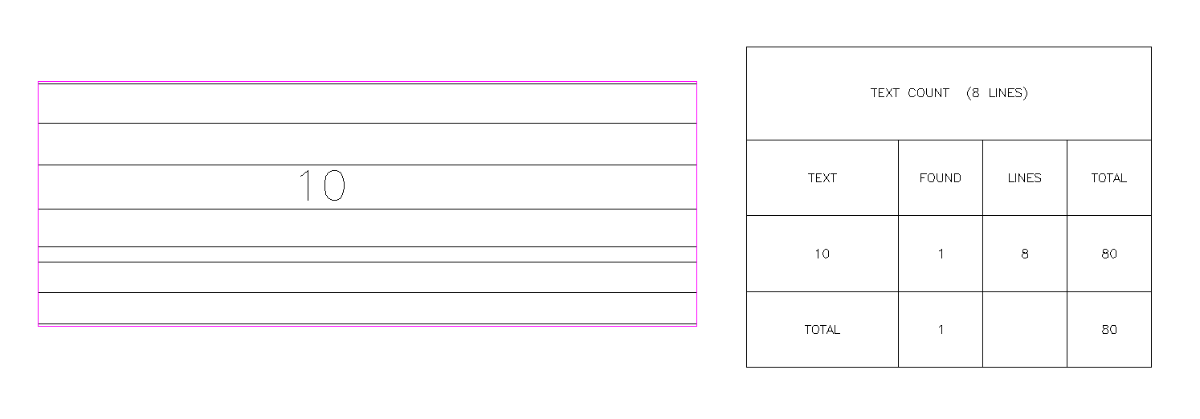
I put in to Claude Opus 5. Attached is the result. It took a couple of minutes or so, with one revision. LTCOUNT_1.lsp
 1 point
-
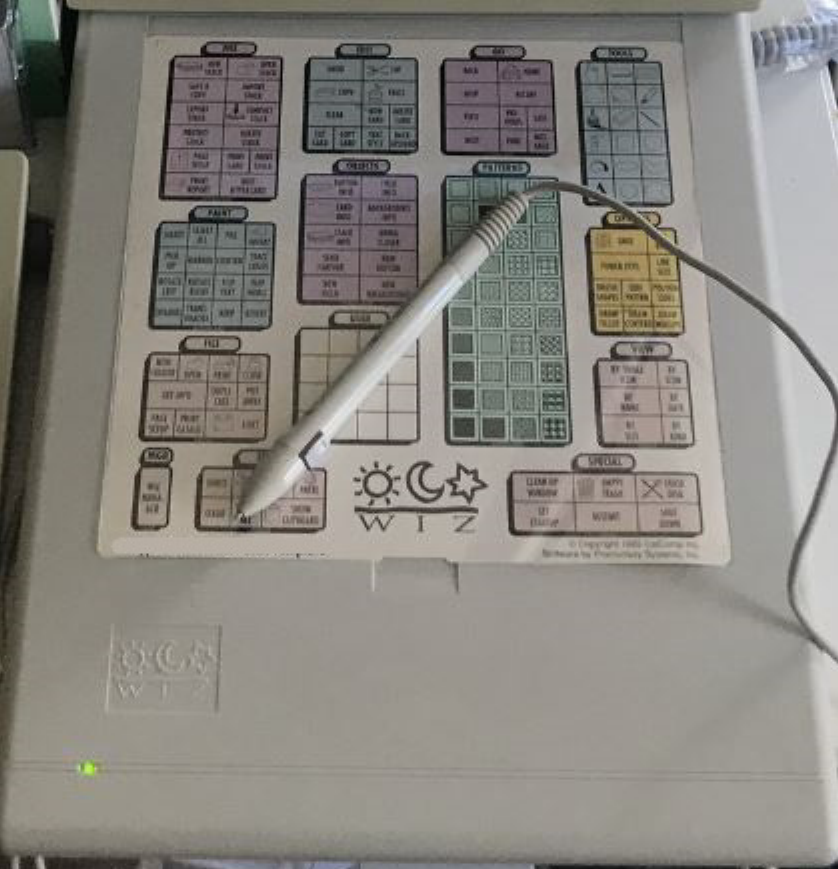
Back in the early 90s I had this letter size digitizer tablet by Calcomp called the WIZ. I was able to reduce the typical 12x12 AutoCAD digitizer tablet menu and map it on. Major advantages of this over the typical larger tablets being sold at the time was it's a lot smaller and light weight and cost less too. But after AutoCAD dropped support for DOS and went all out with running on Windows, Calcomp also dropped support for the WIZ and I had to give it up to go with a mouse. I actually wrote about this awhile back in an article I called "What Happened To The Digitizer?"
1 point