All Activity
- Past hour
-
 Salsadude joined the community
 - Today
-
Hi everyone, I've been thinking about the "AI taking over" discussion. Personally, I sit in the "Skeptical Co-Pilot" camp. I use LLMs, but natural language is too loose for CAD. I was trying to solve a very pragmatic problem: How do we get an LLM to generate hyper-precise CAD geometry without eating up a million tokens and spitting out hallucinated garbage? Natural language just doesn't cut it for drafting. So, I worked with an AI to invent a prototype "Universal Morphological Matrix" (I just call it V-Code). The idea was to reduce CAD commands down to an absolute, 256-token hex-based root system utilizing Reverse Polish Notation (RPN). (Full disclosure: I'm an architect, not a compiler engineer—I actually had to get the AI to explain what an RPN stack machine even was during our brainstorming sessions). For example, to draw a 10x10x10 box, place a radius 6 sphere at its center, and subtract it, the LLM only needs to output exactly 7 tokens: 10,10,10 ᖴ ᙶ 6 ᖴ ᙺ ᗣ (The ᖴ rune takes a comma-separated stream like 10,10,10 and unpacks it into 3 scalars on the stack. No syntax to hallucinate.) To show how this executes without needing API keys, I wrote an interactive, 3-step DCL sandbox in pure AutoLISP. It walks through the prompt, the V-Code payload, the RPN stack trace, and actually draws the CSG solid. (Runs on 2007+). ;;;----------------------------------------------------------------------------;;; V-Agent Interactive Sandbox v1.0(张量流解码版);;; 架构:使用SIMD进行LLM优化的形态RPN解析;;;兼容性:AutoCAD 2007+(原生Unicode渲染);;; 作者:Vico;;;----------------------------------------------------------------------------(vl-load-com);; --- 核心实用工具 ---(defun VA:分裂(str del / pos)(如果(setq pos(vl-string-search del str))(缺点(substr str 1 pos)(VA:分裂(substr str(+ pos 1(strlen del)))del))(列表str)));; --- 虚拟机和CSG引擎 ---(defun VA:RunVCode(code_str / doc ms stack push pop-val tkns tkn h w l r pt o1 o2 obj raw sub-tkns st)(setq doc(vla-get-ActiveDocument(vlax-get-acad-object))女士(vla-get-ModelSpace文档)堆积零)(defun推(val)(setq stack(cons val stack)))(defun pop-val(/ v)(if stack(progn(setq v(car stack)stack(cdr stack)v)nil)(setq tkns(VA:Split code_str " "))(foreach tkn tkns(如果(/= tkn“”)(控制;; \U+15B4 [Bqb] : 文本流解标(弹出张量字符串->解包->推送标量)((wcmatch tkn "*\U+15B4*")(setq raw(pop-val))(如果原始的(progn;; SIMD解压缩:用逗号分割维度向量(setq sub-tkns(VA:Split(vl-princ-to-string raw)“,”))(foreach st sub-tkns(推(atof st))))));; \U+1676 [Tot] : BOX (Pop H, W, L)((wcmatch tkn "*\U+1676*")(setq h(pop-val)w(pop-val)l(pop-val)pt(vlax-3d-point 0 0 0))(如果(不是(vl-catch-all-error-p(setq obj(vl-catch-all-apply 'vla-addbox(list ms pt l w h))))))(推 obj));; \U+167A [Kok] : 球(流行半径)((wcmatch tkn "*\U+167A*")(setq r(pop-val)pt(vlax-3d-point 0 0 0))(如果(不是(vl-catch-all-error-p(setq obj(vl-catch-all-apply 'vla-addsphere(list ms pt r)))))(推送obj)));; \U+15E3 [Nan] : 减法(Pop Obj2,Obj1 -> Obj1 - Obj2)((wcmatch tkn "*\U+15E3*")(setq o2(pop-val)o1(pop-val))(如果(和o1 o2)(vl-catch-all-apply 'vla-boolean(列表o1 2 o2)));2 = ac减法(推o1));; 默认:将原始令牌推送为未经验证的字符串(脏数据状态)(t(推tkn)))));;视觉反馈:回退到_G(Gouraud)以获得广泛的兼容性(vl-catch-all-apply 'vla-put-Direction(列表(vla-get-ActiveViewport doc)(vlax-3d-point 1 -1 1)))(vla-ZoomExtents(vlax-get-acad-object))(vl-catch-all-apply 'vl-cmdf(列表“_。阴影模式" "_G")));; --- 互动向导 ---(defun c:VAgent (/ dcl_tmp f dcl_id step res task v_l v_w v_h v_r prompt_data vcode_raw log_l log_r update-prompt build-stack)(setq dcl_tmp(vl-filename-mktemp“va_wizard.dcl”)f(打开dcl_tmp“w”));; 第1步用户界面(写行“va_step1:对话框{标签=\"V-Code形态矩阵模拟器\";宽度=85;"f)(写行“:文本{键=\"step_title\";字体=\"粗体\";对齐=居中;标签=\"步骤1:自然语言的模糊性\";}" f)(写线“:间隔{高度=0.5;}:boxed_radio_row {label=\"目标几何生成\";key=\"task\";" f)(写线“:无线电按钮{标签=\"实心盒\”;密钥=\"rb_盒子\";值=\"1\";}:无线电按钮{标签=\"实心球体\";键=\"rb_sph\";}:无线电按钮{标签=\"空心盒(布尔)\";键=\"rb_hol\";} }" f)(写线“:boxed_row { label=\"空间参数(可定制)\";" f)(写行“:编辑_框{标签=\"长度:\";键=\"v_l\";编辑_宽度=8;}:编辑_框{标签=\"宽度:\";键=\"v_w\";编辑_宽度=8;}" f)(写行“:编辑_框{标签=\"高度:\";密钥=\"v_h\";编辑_宽度=8;}:编辑_框{标签=\"半径:\";密钥=\"v_r\";编辑_宽度=8;是_启用=假;}}" f)(写字行“:boxed_column { label=\"Simulated LLM Prompt (Natural Language Payload)\"; : list_box { key=\"prompt_view\"; height=9; width=81; fixed_width=true; } }" f)(写行“:间隔{高度=0.2;}:行{间隔;:按钮{键=\"next\";标签=\"翻译成V-Code>\";is_default=true;宽度=24;}:按钮{键=\"取消\";标签=\"取消\";是_取消=真;宽度=14;} } }" f);; 第2步用户界面(写行“va_step2:对话框{标签=\“V-代码形态矩阵模拟器\”;宽度=75;”f)(写行“:文本{字体=\"粗体\";对齐=居中;标签=\"第2步:尺寸折叠(V-代码矩阵)\";}:间隔{高度=0.5;}" f)(写行“:boxed_column { label=\"宇宙语言(形态有效载荷)\”;:间隔{高度=1;}:文本{键=\"vcode_视图\";对齐=居中;字体=\"粗体\";}:间隔{高度=1;}}" f)(写线“:boxed_column { label=\"压缩指标\"; : text { label=\"> 需要程序自动LISP:~180个令牌\"; color=8; } : text { key=\"token_met\"; label=\"\"; } : text { label=\"> 空间幻觉风险:0%(严格类型铸造)\"; } }" f)(写线“:垫片{高度=0.2;}:行{:按钮{键=\"返回\";标签=\"<返回\";宽度=12;}间隔;:按钮{键=\"下一个\";标签=\"解析AST引擎>\";is_默认=true;宽度=24;}:按钮{键=\"取消\";标签=\"取消\";是_取消=真;宽度=12;} }}" f);; 第3步用户界面(写一行“va_step3 : dialog { label=\"V-Code形态矩阵模拟器\"; width=125;" f)(写行“:文本{字体=\"粗体\";对齐=居中;标签=\"第3步:基于堆栈的虚拟机执行\";}:间隔{高度=0.5;}" f)(写行“:行{:boxed_column{label=\"V-Code Stream\"; : list_box { key=\"log_l\"; height=12; width=28; fixed_width=true; } }" f)(写入行“:boxed_column { label=\"本地CAD引擎执行堆栈(反向抛光符号)\"; : list_box { key=\"log_r\"; height=12; width=88; fixed_width=true; } } }" f)(写线“:间隔{高度=0.2;}:行{:按钮{键=\"返回\";标签=\"<返回\";宽度=12;}间隔;:按钮{键=\"下一步\";标签=\"在CAD中执行几何\";is_默认=true;宽度=30;}:按钮{键=\"取消\";标签=\"取消\";is_取消=真;宽度=12;} }}" f)(关闭f);; 状态 Init(setq任务“rb_box”v_l“10”v_w“10”v_h“10”v_r“6”步骤1)(defun更新提示()(setq v_l(get_tile "v_l”) v_w(get_tile "v_w") v_h (get_tile "v_h") v_r (get_tile "v_r") 任务 (get_tile "task"))(控制((=任务“rb_box”)(mode_tile "v_l" 0) (mode_tile "v_w" 0) (mode_tile "v_h" 0) (mode_tile "v_r" 1)(setq prompt_data(列表“系统:钩入LLM上下文...”(strcat > 提示:\“创建一个实心框,测量“v_l”由“v_w”由“v_h”。\"") "" "> 操作:注入V-Code 256-Rune词典...”"> 注意:数字流必须通过解码符文\U+15B4解压缩。”">命令:将人类请求转换为形态矩阵。"))(setq vcode_raw(strcat v_l "," v_w "," v_h " \U+15B4 \U+1676")))((= 任务 "rb_sph")(mode_tile "v_l" 1) (mode_tile "v_w" 1) (mode_tile "v_h" 1) (mode_tile "v_r" 0)(setq prompt_data(列表“系统:连接到LLM上下文...”(strcat > 提示:\“创建一个半径为“v_r”的实体球体。\"") "" "> 操作:注入V-Code 256-Rune词典...”"> 注意:数字流必须通过解码符文\U+15B4解压缩。"))(setq vcode_raw(strcat v_r " \U+15B4 \U+167A”)))((=任务"rb_hol")(mode_tile "v_l" 0) (mode_tile "v_w" 0) (mode_tile "v_h" 0) (mode_tile "v_r" 0)(setq prompt_data(列表“系统:钩入LLM上下文...”(strcat >提示:\“创建一个“v_l“x”v_w“x”v_h“框,创建一个半径“v_r“球体,”)”并从框中减去球体。\" " "" "> 操作:注入V-Code词典...”"> 注意:原始文本流必须通过 \U+15B4 解码。"))(setq vcode_raw (strcat v_l "," v_w "," v_h " \U+15B4 \U+1676 " v_r " \U+15B4 \U+167A \U+15E3")))))(start_list“prompt_view”)(mapcar 'add_list prompt_data)(end_list))(defun构建堆栈()(控制((=任务“rb_box”)(setq log_l(列表(strcat v_l ",” v_w "," v_h) "\U+15B4" "\U+1676")log_r(列表(strcat "-> PUSH: \"" v_l "," v_w ", v_h "\" (Raw Stream)") "-> EVAL: \U+15B4 | Unpack Stream -> PUSH(3 Scalars)" "-> EVAL: \U+1676 (Rune 'Tot' / 3D BOX)" " | POP(3), Evaluate vla-addbox, PUSH(Ptr_Solid_A)”))))((= 任务 "rb_sph")(setq log_l(列表v_r "\U+15B4" "\U+167A")log_r (list (strcat "-> PUSH: \"" v_r "\" (Raw Stream)") "-> EVAL: \U+15B4 | Unpack Stream -> PUSH(1 Scalar)" "-> EVAL: \U+167A (Rune 'Kok' / SPHERE)" " | POP(1), Evaluate vla-addsphere, PUSH(Ptr_Solid_A)”))))((=任务"rb_hol")(setq log_l(列表(strcat v_l "," v_w "," v_h) "\U+15B4" "\U+1676" v_r "\U+15B4" "\U+167A" "\U+15E3")log_r (list (strcat "-> PUSH: \"" v_l ",," v_w ", v_h "\" (Raw Stream)") "-> EVAL: \U+15B4 | 解压缩流 -> PUSH(3 Scalars)" "-> EVAL: \U+1676 | Draw BOX -> PUSH(Ptr_Solid_A)") (strcat "-> PUSH: \"" v_r "(原始流)") "-> EVAL: \U+15B4 | 解压缩流 -> PUSH(1 Scalar)" "-> EVAL: \U+167A | Draw SPHERE -> PUSH(Ptr_Solid_B)"""-> EVAL: \U+15E3 | 减法 (A-B) -> PUSH(Ptr_Final)))))));;主事件循环(如果(>=(setq dcl_id(load_dialog dcl_tmp))0)(progn(而(和(>步骤0)(<=步骤3))(如果(new_dialog(strcat“va_step”(itoa step))dcl_id)(progn(控制((=第1步)(set_tile任务“1”)(set_tile“v_l”v_l)(set_tile“v_w”v_w)(set_tile“v_h”v_h)(set_tile“v_r”v_r)(更新提示)(action_tile“任务”“(更新提示)”)(action_tile "v_l" "(update-prompt)”) (action_tile "v_w" "(update-prompt)”)(action_tile "v_h" "(更新提示)”) (action_tile "v_r" "(更新提示)”)(action_tile“next”“(done_dialog 2)”))((=第2步)(set_tile“vcode_view”(strcat“[VCODE]“vcode_raw”[/VCODE]”))(set_tile "token_met" (strcat "> V-Code Matrix consumed: " (itoa (length (VA:Split vcode_raw " "))) " 令牌 (压缩:97.4%)))(action_tile“back”“(done_dialog 1)”)(action_tile“next”“(done_dialog 3)”))((=步骤3)(构建堆栈)(start_list“log_l”)(mapcar 'add_list log_l)(end_list)(start_list“log_r”)(mapcar“add_list log_r)(end_list)(action_tile“back”“(done_dialog 2)”)(action_tile“next”“(done_dialog 4)”)))(action_tile“取消”“(done_dialog 0)”)(setq res(start_dialog))(setq步骤(如果(>= res 0)res 0)))(setq步骤0)))(卸载_对话框dcl_id)))(vl-file-delete dcl_tmp)(如果(=步骤4)(progn(princ(strcat“\n[V-Code]接收到的原生有效负载:“vcode_raw))(princ “\n[V-Code] AST 崩溃到物理现实...”)(VA:RunVCode vcode_raw)(princ“\n[成功]空间执行完成。”)))(王子))(princ "\n[VedaCAD/v-code]沙盒已加载。输入VAGENT来启动模拟器。”)(王子) The above code can also be installed and used through VedaCAD developed by me via VCID: PLG96B (Support to receive version updates) The full 256 token V-Code is open-sourced on GitHub: https://github.com/VedaCAD/v-code Would love to hear your thoughts. Enjoy the sandbox! Note: English is not my native language. I use Google AI to translate and polish my posts to ensure clarity and respect for the community's technical depth.
-
Thank you. Sorry it took me awhile to respond. I got something to sink my teeth into. I worked on it before I recieved your reply. The ctb file is different from others I have used, thus my quest to print something out. I have attached the dwg file, see the layout tabs. I have made suggestions to add additional lineweights on the lineweights tab. We'll see if this falls flat or not. Don't look at all the layers they may frighten you.... quite a few repeats. general kip ctb.dwg
-
.thumb.png.1349c06d2f343c6615edf3c2d91bde2c.png) ACTCAD changed their profile photo
ACTCAD changed their profile photo -

Make it stop! autosaving in the middle of a command
SLW210 replied to MikeP's topic in AutoCAD General
Never have I needed Autosave. CTRL+S is just a habit now, even in non-AutoCAD programs. I also frequently Right-Click one of the Drawing Tabs and select Save All. I also know the difference between Qsave and Save and use both appropriately. (Note: they are the same in AutoCAD LT or used to be, I am not sure about newer LT versions) Saving your work is your job, not AutoCAD's. I wonder if a LISP with a reactor would be less troublesome for those that do not trust going without an Autosave? Or maybe this? A Better Autosave | AfraLISP Or... (command ".save") to Visual LISP - AutoLISP, Visual LISP & DCL - AutoCAD Forums Or... make a copy of current open drawing & place it into a predetermine folder - AutoLISP, Visual LISP & DCL - AutoCAD Forums And... LISP - Automatic Save that runs at set intervals -

Dynamic blocks with Dynamic text and count
ketxu replied to Shri95's topic in AutoCAD Drawing Management & Output
You have to make two Field, once for Distance of Block, then Once for Arrray Object (item or column * row). Cause an Array Object now is include all block, all Field of length in per Array is fixed -
 tanmay.lakhan joined the community
 -

Python, Change precision of all fields in a drawing
Danielm103 posted a topic in .NET, ObjectARX & VBA
from pyrx import Ap, Ax, Db, Ed, Ge, Br def getAllFieldsIds(db: Db.Database): ids: list[Db.ObjectId] = [] nod = Db.Dictionary(db.namedObjectsDictionaryId()) fieldListId = nod.getAt("ACAD_FIELDLIST") fieldList = Db.Core.entGet(fieldListId) for fieldItem in fieldList: if fieldItem[0] == 330 and fieldItem[1].isDerivedFrom(Db.Field.desc()): ids.append(fieldItem[1]) return set(ids) @Ap.Command() def doit() -> None: db = Db.curDb() field_ids = getAllFieldsIds(db) for id in field_ids: field = Db.Field(id, Db.OpenMode.kForRead) fmt = field.getFormat() if 'pr3' in fmt: field.upgradeOpen() new_fmt = fmt.replace('pr3', 'pr4') field.setFormat(new_fmt) field.evaluate(Db.FieldEvalContext.kDemand, db) print(f"Updated field format from {fmt} to {new_fmt}")-
- 1
-

-
 alankst101 joined the community
 -
@CamDuy gave it a try it appears to only look for a text object the OP wants an attribute in a block also to be updated.
- Yesterday
-
 Ms. Brittany joined the community
 -

Make it stop! autosaving in the middle of a command
rkmcswain replied to MikeP's topic in AutoCAD General
Agreed. I am 100% on the side of [turn Autosave OFF] and use one of the many ways to save your data file every time you do something you don't want to lose. -
Make it stop! autosaving in the middle of a command
rkmcswain replied to MikeP's topic in AutoCAD General
@RobDraw - or 8 more years later ? -
Try it! CFP_ChangeFieldPrecision.lsp
-

Insert a copy of the block at the specified point. CopyRenameBlockV1-5.lsp /Lee Mac/
Nikon replied to Nikon's topic in AutoLISP, Visual LISP & DCL
Wow! It's super! Thanks!!! @CamDuy -
 PollyannaDraws joined the community
 -
Make it stop! autosaving in the middle of a command
PollyannaDraws replied to MikeP's topic in AutoCAD General
So did you ever figure out how to do it, OP? I don't know how someone doesn't manually save like every 5 min. I can tell now that this is not a natural reaction for everyone. I am a millennial and it's been metaphorically beaten in my head throughout my all school years to save often. I save after every small bit of changes that I make. Hope you found a way that works for you, though!! -
 tusupbek joined the community
 -

Beyond APPLOAD: A local script manager for those of us with too many LISPs
VicoWang replied to VicoWang's topic in AutoLISP, Visual LISP & DCL
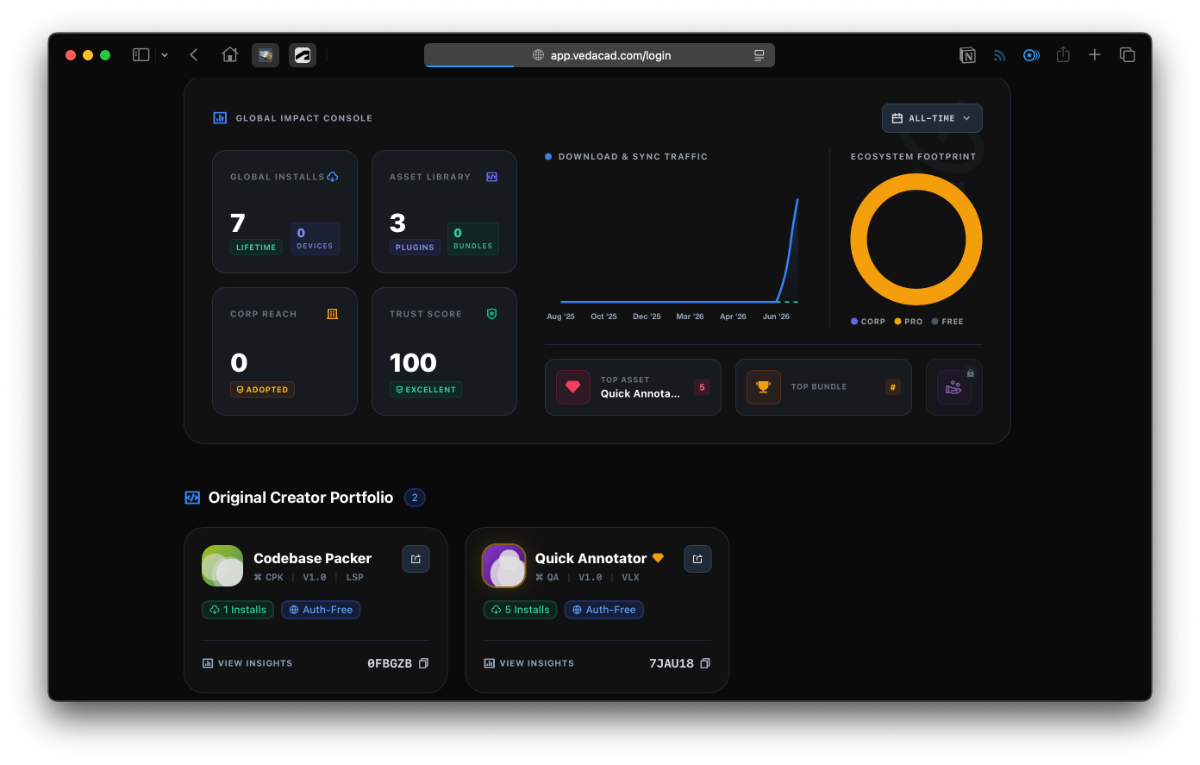
This is a simple ranking list, showing how many plugins or bundles you have released as a creator or curator, and how many times these plugins or bundles have been downloaded in total. -
 ceejayy joined the community
 -
 zeluyvenca joined the community
 -

Free Multi Plot Lisp – Fast Batch Printing for AutoCAD, BricsCAD & ZWCAD | Model/Layout, Zone Plotting & PDF Merge
BIGAL replied to CamDuy's topic in AutoLISP, Visual LISP & DCL
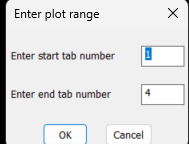
Just a comment one option I did not see is a plot range I have a simple plot lisp it asks for start layout and end layout handy to plot one or more. Perhaps even 1-2,7-8,12 plots multiple layouts as suggested. Also what about Bricscad version it has BRX not ARX.
-
Yet another block manager for BricsCAD
BIGAL replied to Danielm103's topic in Application Beta Testing
My Bricscad after appload, yes brx and xrc are in a support path. I moved that path to top of support path list. Then appload. Version V25.2.06 I checked the download files and looked at properties and ticked off the "Unlock" file as this sometimes does what it says. I have tried unloading and that fails not sure why. Sent you a pm with my email.
- Last week
-
Beyond APPLOAD: A local script manager for those of us with too many LISPs
VicoWang replied to VicoWang's topic in AutoLISP, Visual LISP & DCL
I checked and indeed there are some similarities, but the overall logic may be different. Thank you for the information. -

Beyond APPLOAD: A local script manager for those of us with too many LISPs
CivilTechSource replied to VicoWang's topic in AutoLISP, Visual LISP & DCL
That is cool! But didn't AutoCAD 2027 released something tiny bit similar (project workspace?) -
Beyond APPLOAD: A local script manager for those of us with too many LISPs
VicoWang replied to VicoWang's topic in AutoLISP, Visual LISP & DCL
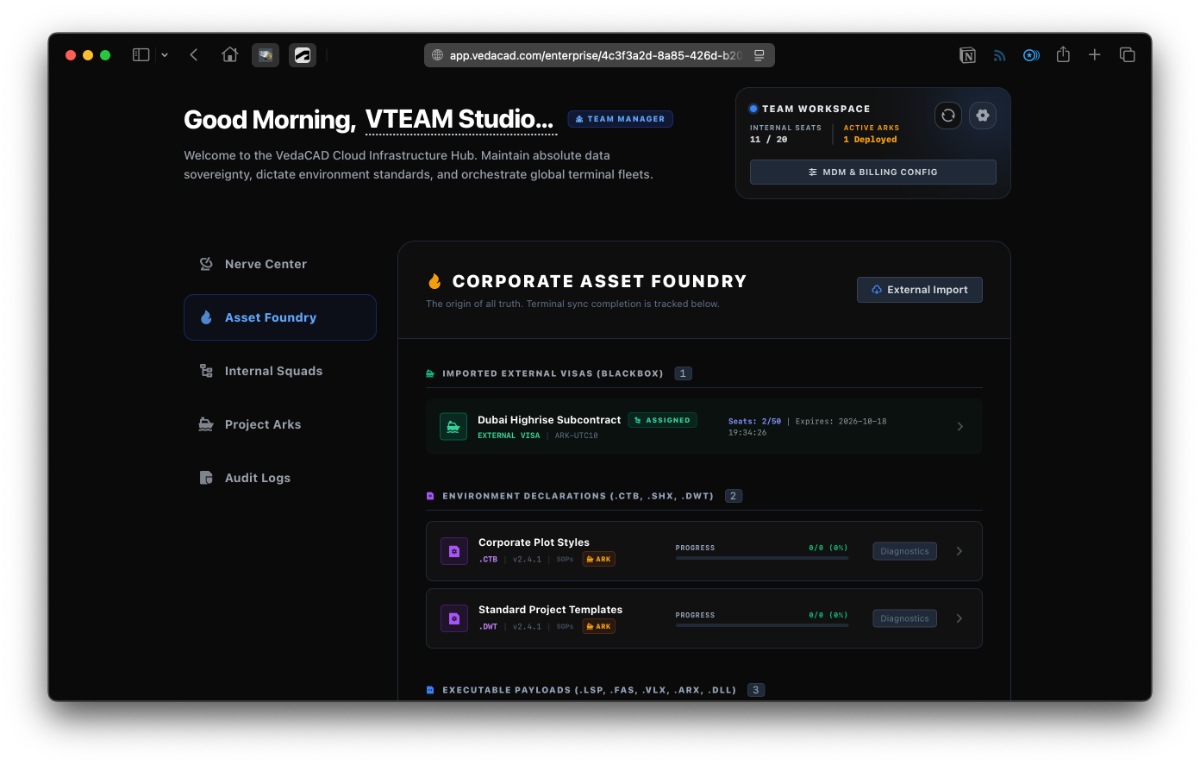
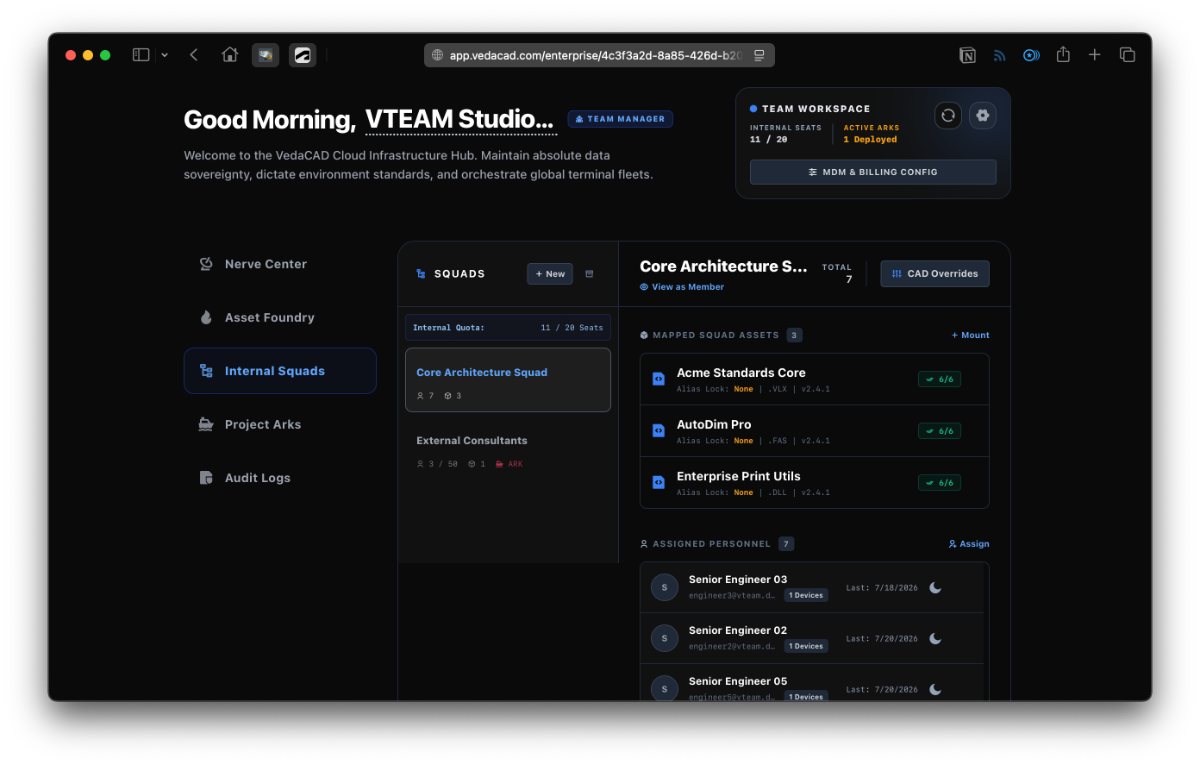
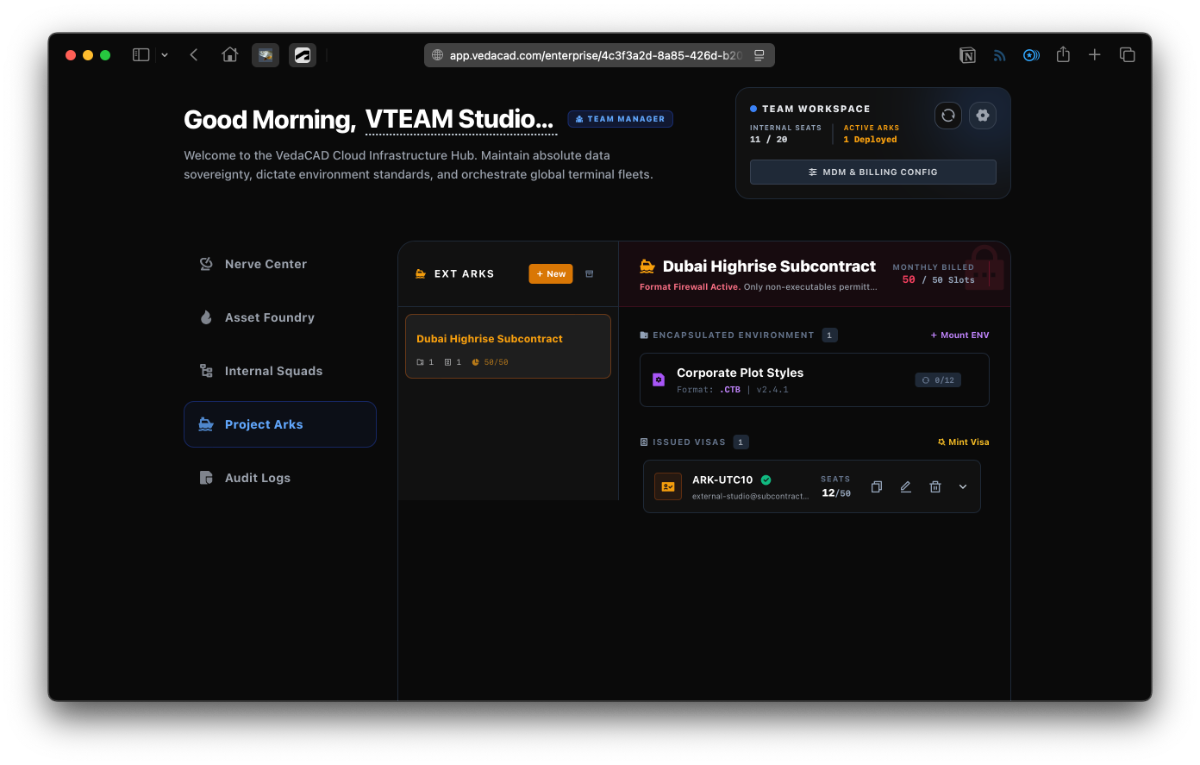
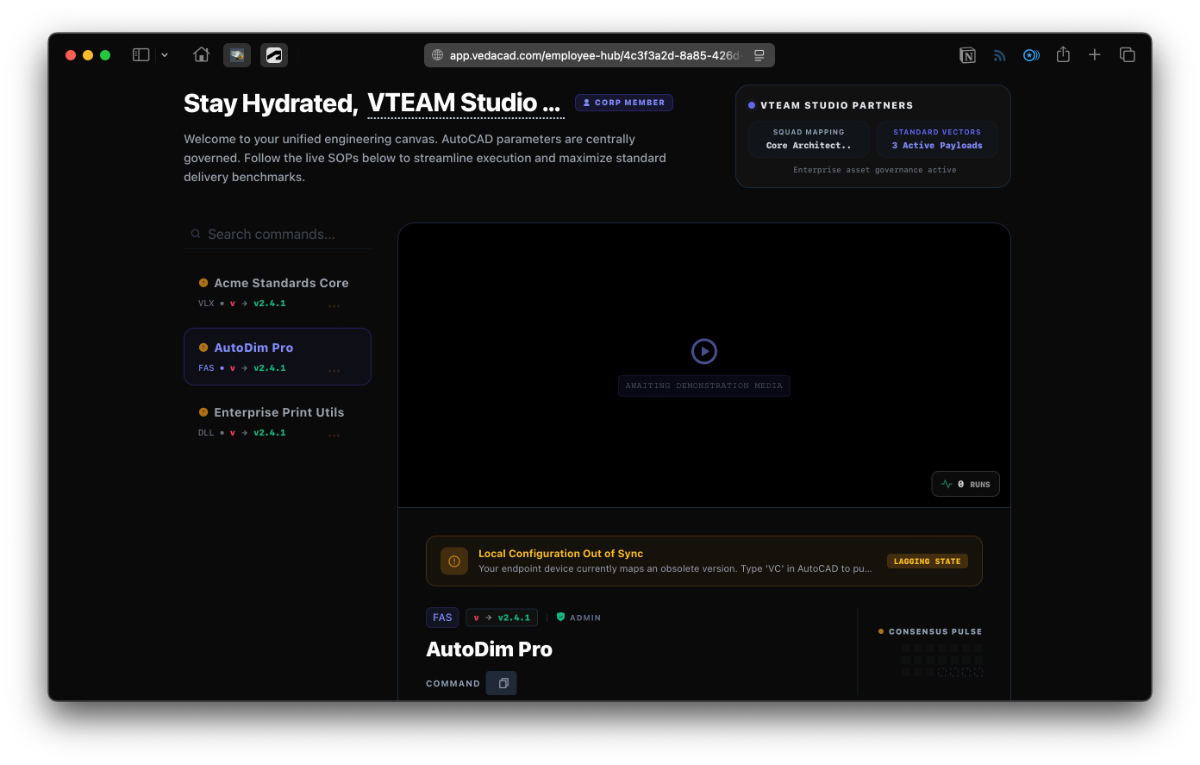
VedaCAD is still a relatively new platform and client. Thank you to everyone who has been testing the offline Base Mode of our client—your suggestions and bug reports are highly welcome. Under offline BASE Mode, the client will never actively connect to the internet, making it convenient for those who need a purely local, long-term tool without network dependencies. I'd really love to introduce the "Online" side of our platform today. Our user tiers are generally divided into 6 levels: BASE, FREE, PRO, TEAM, CORP, and CORP (DED). They are all unified within a single client (the .vlx file shared above). Apart from the BASE mode, the other 5 tiers require periodic internet connectivity. Before diving into the tiers, I want to mention our online account system. There are no passwords in our system, We primarily support four login methods: OAuth Login: Currently supporting Google, Microsoft, and Autodesk platforms. Magic Links: Enter any email address to receive a real-time, secure login link. OIDC (SSO): Supported exclusively for the two CORP tiers (e.g., Auth0, Microsoft Entra ID). Client Reverse-Login: Once logged into the CAD client, your machine acts as a hardware identity token. Anytime you click the Manage or SOPs (for enterprise employees) button in the client, it securely bypasses passwords and logs you straight into your Web Portal. BASE Tier: As you have seen, you can mount local LSP, FAS, and VLX plugins. The maximum size per asset is capped at 1MB (which is more than enough for pure LISP scripts), and the client acts as a proxy loader. We guarantee that the BASE mode will never actively initiate network requests., and there are absolutely no quantitative limits for local use (no limit on mounted assets, no limit on config imports/exports). FREE Tier: This is our community edition for individuals and students. You just need to register a free account. It supports the same LSP, FAS, and VLX formats (local or via VCID), but the single asset limit is raised to 3MB. This tier is free forever. Besides managing local assets, FREE users can publish assets to generate and share VCIDs. You can also combine your published assets with downloaded plugins to create a bundle, generating a B- prefix VCID. You or anyone with this Bundle VCID can input it via "Install via VCID" to batch-pull the entire toolkit. (Note: If a FREE user pulls a bundle created by a PRO user that contains ARX or DLL files, the system will actively drop those advanced formats).For example, the following two real testable plugins: [Codebase Packer] VCID: 0FBGZB @ VedaCAD [Quick Annotator] VCID: 7JAU18 @ VedaCAD In addition to format and size limits, FREE users have a generous cap of publishing up to 50 assets per day. What happens if you delete your account? This is something you need to know, and I’ll try to explain it clearly. We will execute compliant data anonymization. If an asset you published was only ever used by you, it will be destroyed from our system. If your asset was downloaded at least once by someone else (especially if an enterprise incorporated it into their asset pool), the physical plugin will remain in the system, but the author will be fully anonymized. This ensures the stability of the entire CAD ecosystem so someone else's workflow doesn't suddenly break because a plugin vanished. PRO Tier: This is designed for professionals. Besides the features in the FREE tier, the main differences are: Single asset size limit is increased to 15MB to accommodate ARX and DLL plugins. Asset format support is aligned with the Enterprise matrix. Plugins include: LSP, FAS, VLX, ARX, DLL. Environment configs include: CTB, STB, DWT, SHX, PAT, LIN, TXT, XML, JSON, INI, PGP, SCR, CUIX, DWS, PC3, PMP, ATC. (Note: All environment config files can only be published as private assets requiring authentication. Essentially, they are for your own use—even if someone knows your VCID, their download will be blocked). Tip-Jar Linking: If a PRO user configures a sponsor link, a tip button will appear in these locations: upon first download, via a dedicated toast popup when the command finishes executing 24 hours after installation, when the asset is selected in the manager, during bundle pulling, and on the user's public profile (if visible, e.g., vedacad.com/@vico). You can also connect Webhooks (Discord, Slack) to receive real-time tipping intent notifications. Can accept and mount ARK- Project Ark Visas issued by General Contractors to sync environmental standards. Push Updates: You can push updates to your plugins (e.g., patching to v1.1 with a new file) without changing the distributed VCID. On the user's end, the update will execute manually or automatically based on their workspace policy. Personal Cloud Config Sync: You can PUSH your entire local state to the cloud and PULL it on a new PC for a sub-second full environment restoration. What you need to know about cloud sync: even absolute local paths (e.g., D:/CADTools/abc.lsp) are mapped and synced. As long as the new PC has that file in the same D-drive path, the migration is complete. (Note: Ark Visas are strictly isolated and are never synced via cloud config). Syncing is a manual action to avoid overriding correct setups. We provide three strategies: push local to cloud, pull cloud to local, and smart merge. If unsubscribed, you naturally downgrade to the FREE tier. Account deletion follows the FREE tier rules. TEAM, CORP, CORP (DED) Tiers: These are our Enterprise tiers. Note that when a TEAM+ tier expires, the workspace is physically frozen (Archived), not downgraded to FREE, because enterprise data structures are fundamentally different. Here is the general enterprise logic flow: The Foundry (Enterprise Asset Pool): When an admin adds and publishes an asset in the client, it is pushed to the web-based Enterprise Foundry. Admins can also mount external VCIDs (from independent devs) or Ark Visas into this pool. This is a centralized, pending-allocation list. Admins can attach SOPs (Standard Operating Procedures) to environment files and plugins (including external ones). Our system supports GIF + Markdown for SOPs. Internal Squads: Admins create groups (e.g., Architecture Squad) and assign employees and assets to them. An employee might belong to multiple squads simultaneously; our algorithm deduplicates their assets. When the employee logs into the CAD client, the unified asset list is silently deployed to their local sandbox. On the next heartbeat or manual sync, the client checks for missing files or updates and executes silent replacements. The SOPs button in the employee's panel links directly to the online SOPs of their assigned assets. Admins can also monitor the "Out of Sync" status of any specific plugin for any employee via the dashboard. Project Arks: Arks are decoupled from the main enterprise seats. You might have a 20-seat Enterprise plan but purchase 100 Ark slots because Arks manage external sub-contractors. Arks are strictly limited to environment config files (no executable plugins allowed). GCs issue Visas to external PRO users or sub-contracting firms. Arks have expiration dates and a unique Paid Archive Status: For a retainer fee (monthly/yearly), the Ark version is frozen (e.g., snapshotted on July 30, 2026), and includes 2 maintenance slots. If modifications are needed in 2028, the GC issues the 2 slots, and the sub-contractors will pull the exact environment state from that archived day (even if the active config has iterated to v2.0 since then). Employee Onboarding: TEAM relies on Magic Links. CORP allows direct OIDC (SSO) login, but employees enter a buffer pool awaiting admin approval before consuming a paid seat. Domain Hegemony: Our system anchors enterprise ownership to the corporate email domain. If an employee previously registered a personal FREE or PRO account using their corporate email, when the Enterprise workspace is created, their next login will trigger a forced choice: DESTROY their personal space to join the enterprise, or SPLIT (transfer) their PRO assets and billing to a personal email (like Gmail), leaving the corporate email clean for enterprise approval. This ensures absolute domain sovereignty. Tier Differences: TEAM includes SOPs, Magic Links, and on-demand Arks. CORP includes all TEAM features plus SSO, BYOS (S3) (add-ons) storage mounting, and EDR(add-ons) sandbox threat interception. CORP (DED) is identical to CORP but operates on an isolated, dedicated physical database tenant (requires manual admin deployment). If you are interested in the enterprise features, you can check out our Enterprise Dashboard Demo by clicking the Get Demo button next to the TEAM or ENTERPRISE cards at vedacad.com/pricing.
-

Insert a copy of the block at the specified point. CopyRenameBlockV1-5.lsp /Lee Mac/
CamDuy replied to Nikon's topic in AutoLISP, Visual LISP & DCL
CopyRenameBlockV1-5_byCamDuy.lsp Try using this file. @Nikon -
Free Multi Plot Lisp – Fast Batch Printing for AutoCAD, BricsCAD & ZWCAD | Model/Layout, Zone Plotting & PDF Merge
CamDuy replied to CamDuy's topic in AutoLISP, Visual LISP & DCL
Thank you for your feedback. I will update the version for 2014 and earlier. -
Free Multi Plot Lisp – Fast Batch Printing for AutoCAD, BricsCAD & ZWCAD | Model/Layout, Zone Plotting & PDF Merge
VicoWang replied to CamDuy's topic in AutoLISP, Visual LISP & DCL
When I develop vedacad, it is different. My main coding and compilation are done on 2006, avoiding the use of advanced features and ensuring that vedacad can punch through all versions of 2026 from 2006. However, it is true that most people have already done their daily work on the higher version. My test environment is 2006,2014 and 2022. -
Free Multi Plot Lisp – Fast Batch Printing for AutoCAD, BricsCAD & ZWCAD | Model/Layout, Zone Plotting & PDF Merge
CamDuy replied to CamDuy's topic in AutoLISP, Visual LISP & DCL
Drop me an email "phantrongduybn@gmail.com" I'll send it to you. -
Free Multi Plot Lisp – Fast Batch Printing for AutoCAD, BricsCAD & ZWCAD | Model/Layout, Zone Plotting & PDF Merge
CamDuy replied to CamDuy's topic in AutoLISP, Visual LISP & DCL
I think AutoCAD 2014 is too old; versions from 2015 onwards work just fine. because it was built on a higher version. -
Free Multi Plot Lisp – Fast Batch Printing for AutoCAD, BricsCAD & ZWCAD | Model/Layout, Zone Plotting & PDF Merge
Nikon replied to CamDuy's topic in AutoLISP, Visual LISP & DCL
The link doesn't work for me, could you please attach the archive? -
Free Multi Plot Lisp – Fast Batch Printing for AutoCAD, BricsCAD & ZWCAD | Model/Layout, Zone Plotting & PDF Merge
VicoWang replied to CamDuy's topic in AutoLISP, Visual LISP & DCL
I tried using it with VedaCAD, and it didn't work in 2014 but ran perfectly in 2022. I thought it was a problem with the VedaCAD proxy, so I loaded the VLX file from the cache separately, and it still didn't work in 2014 but could run in 2022. Does this plugin have a minimum version requirement? -
 povilasltu joined the community
 -
Yet another block manager for BricsCAD
Danielm103 replied to Danielm103's topic in Application Beta Testing
Also, make sure the xrc file is in the same folder, if you moved the BRX