All Activity
- Today
-
 DIYORBEK DUSHANOV joined the community
 -

How do you modify a 3D solid without rebuilding it?
SLW210 replied to indiancad's topic in AutoCAD 3D Modelling & Rendering
That really depends on the situation. If pretty simple to begin with it may be quicker to redo from the beginning. If not simple to redo, face editing can be quick and accurate and many options there, though just creating a new solid and using Subtract and/or Union could be the better option. Like I stated it really depends on the model and the change required. -

GitHub vs APPLOAD: Why is our global impact invisible?
VicoWang replied to VicoWang's topic in AutoLISP, Visual LISP & DCL
Especially welcome and invite developers, especially those in retirement status, to share and update the tools (plugins) you have created through VedaCAD, so that more people can benefit from your creations. These repositories for VCID's results will no longer fade away with time; they will enable those in need to obtain and use them. Especially, VedaCAD is now able to handle the release of plugins at the MSI level (official store). For any VedaCAD usage issues and suggestions, please feel free to contact me directly: vico@vedacad.com
- Yesterday
-
STEP vs SAT: Which one preserves editable 3D geometry more reliably?
SLW210 replied to indiancad's topic in AutoCAD 3D Modelling & Rendering
Why would that be interesting? STEP is very common and maintains information and accuracy. So if unknown usage why wouldn't that be the choice? I usually work with AutoCAD, so ACIS or .dwg is my first choice, then STEP if I need information retained for other programs, for 3D Printing simple objects, I sometimes will just do the .stl export. My 3D Printer slicing software can handle STEP files, I have yet to test some more intricate models, but, it eventually creates .stl and then a .3mf g-code file for the printing. It's very tedious painting multicolor parts in the slicer software, so I'll need to see how pre-coloring in AutoCAD>STEP works and which is better. That's just in reference to what AutoCAD can do (Mechanical for STEP), there are other options for different programs. -
 Praveen joined the community
 -
 LM_B joined the community
 -

Xref hatches plot solid black and fonts change on my machine only
xurshid_viewport replied to xurshid_viewport's topic in AutoCAD Beginners' Area
Thanks, SLW210. The plot preview shows the same thing as the PDF: the hatches are black there too, so it is not something that only happens at the plotter. On paper I haven't tried yet, I only printed to PDF. I'll check what XREFOVERRIDE and VISRETAIN are set to in my file tomorrow at the bureau and report back. I also want to see whether the hatch layer in his drawing has a plot style assigned that doesn't exist in my CTB. I'll read through the page you linked in the meantime. -
 allen24 joined the community
 -

Beyond APPLOAD: A local script manager for those of us with too many LISPs
Paul Li replied to VicoWang's topic in AutoLISP, Visual LISP & DCL
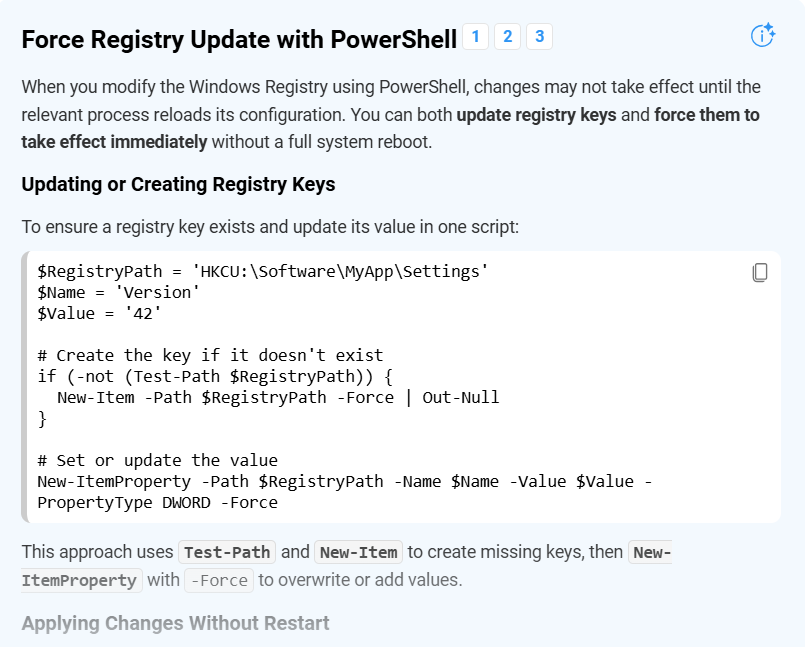
@BIGAL I think using powershell method would be similar. User launches AutoCAD then runs lisp that would write the registry key (that designates the current profile) into powershell script along with item to add to Startup. But after running the powershell script, user is prompted to exit AutoCAD (without launching Appload) in order for the added item in the registry to be read on the relaunch of AutoCAD. -

Beyond APPLOAD: A local script manager for those of us with too many LISPs
BIGAL replied to VicoWang's topic in AutoLISP, Visual LISP & DCL
Maybe like this and use a bat file that last line calls Autocad or Bricscad after editing the registry, note adding extra programs see second image.
-
VedaCAD - Technical Support, Updates & Community VCIDs
VicoWang replied to VicoWang's topic in AutoLISP, Visual LISP & DCL
For CAD manager, Developer, and Users accustomed to communicating via email, feel free to contact me anytime: vico@vedacad.com - Last week
-
I continue to monitor the situation and although we're still seeing the error message, the stats for this month indicate that bot activity is going down from a peak in September. Fingers crossed it continues to fall.
-
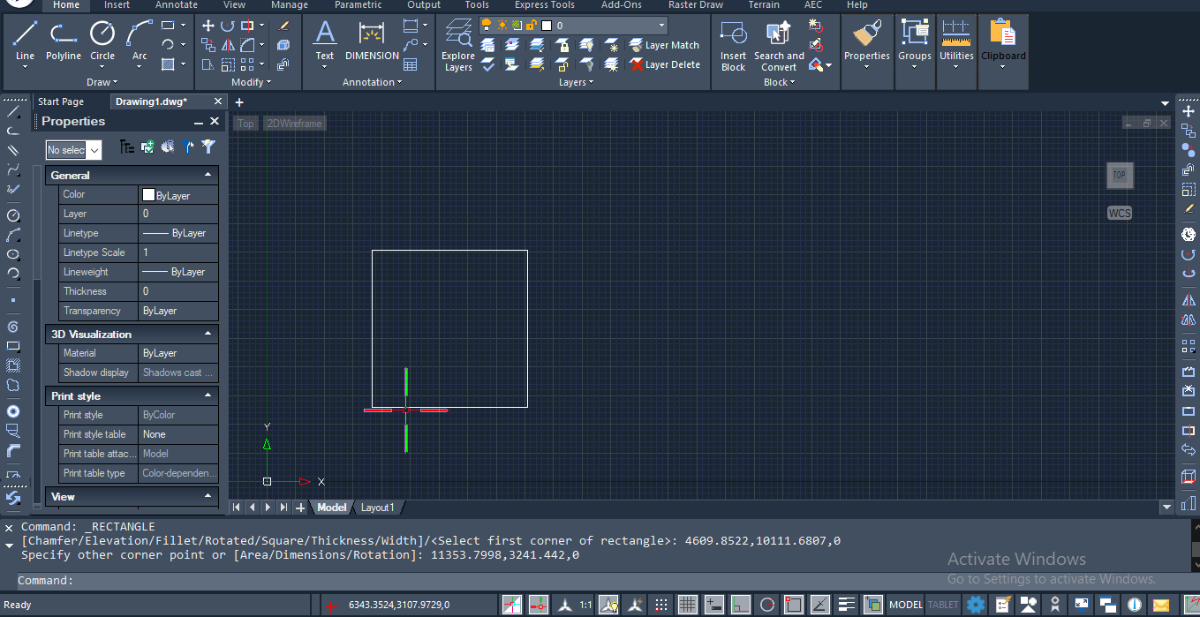
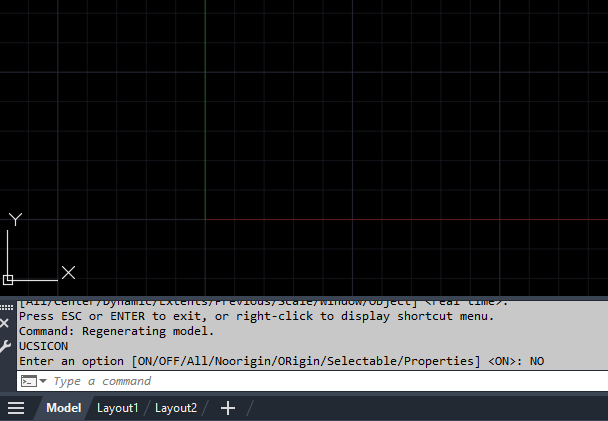
@LIU very simple. If UCSICON is set to OR (origin) and 0,0,0 of the current UCS is near to the left border of the graphics window boundary, or below the boundary, or not within the viewing window then the UCS ICON will move to be near the bottom left of the window and will not be postioned at 0,0. Note, the little square that you see on the icon indicates that you the WCS is active.
-
.thumb.jpg.615654602253be56b2fbd5d064834780.jpg)
STEP vs SAT: Which one preserves editable 3D geometry more reliably?
indiancad replied to indiancad's topic in AutoCAD 3D Modelling & Rendering
That's great ! Choosing the format based on the receiving application and the intended use seems like the most practical approach. I also find your point about using STEP when the end use is unknown interesting. -
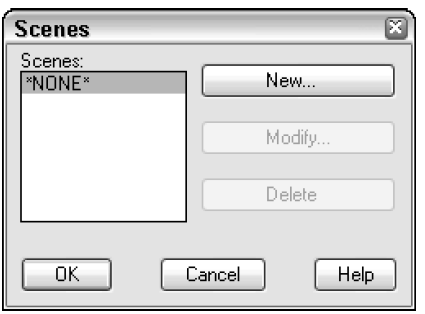
I used to use AutoCAD's LIGHTS(Point & Distant), CAMERA, ACTION(SCENE) commands to setup visual renderings in AutoCAD. But starting with AutoCAD 2007 when the entire rendering engine was changed and the SCENE command was dropped and never replaced, what does everyone use now to replicate the SCENE command? Or does anyone setup scenes at all which used to offer the end user the option to assign different light sources to a particular view.
-
Using Arraypath function via scripting, duplicating lines are created in opposite direction of curve path
SLW210 replied to harshil's topic in AutoCAD LT
I can move the geometry a good bit away and it works fine. The original LISP works, the exact location seems an issue and something is messing up the direction. Are there other examples of where it fails? I added prompts for Layer, Path and number. AUTOHPA_SLW.lsp -
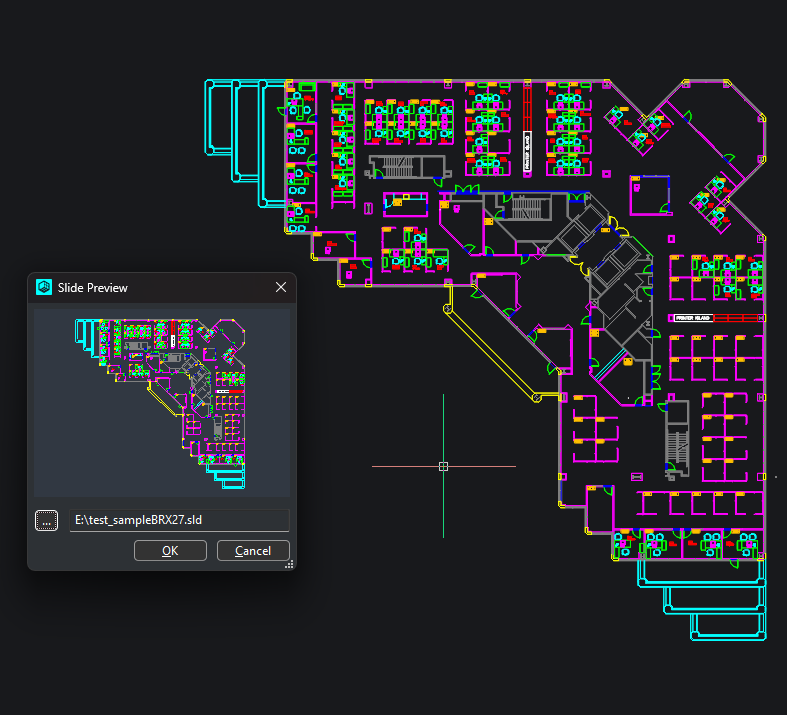
Python Slide(.SLD) to wxImage In the next release (3.1.16), I added a function, image: wx.Image = Gs.Core.slideToWxImage(test_slide_path, width, height, [R, G, B]) for people that are used to using slides in their dialogs.
-
- 3
-

-
STEP vs SAT: Which one preserves editable 3D geometry more reliably?
SLW210 replied to indiancad's topic in AutoCAD 3D Modelling & Rendering
I do not recall having many issues with any of them. AutoCAD cannot export directly to STEP, only Mechanical (which is a FREE toolset though). Normally I determine the type by what is needed by the program that needs it, if any will work normally ACIS (.sat) would be preferred and if the program can I just keep it as a .dwg. For 3d Printing I use .stl and ultimately .3mf. If unknown what the end use will be, STEP is usually the best bet. -
STEP vs SAT: Which one preserves editable 3D geometry more reliably?
indiancad posted a topic in AutoCAD 3D Modelling & Rendering
When transferring a mechanical model between CAD applications, choosing an exchange format can affect more than just how the model looks. Face boundaries, analytic surfaces, and solid recognition can influence how easily the imported part can be modified. A model may import successfully but still require extra work before features can be edited or downstream operations can be performed reliably. I’m interested in practical experience rather than just format specifications. When exchanging 3D solids between different CAD systems, have you found STEP or SAT more reliable for preserving usable geometry? Does your choice change depending on the type of model? -
Just hold on model area and move up .then it will automatically got set.
-
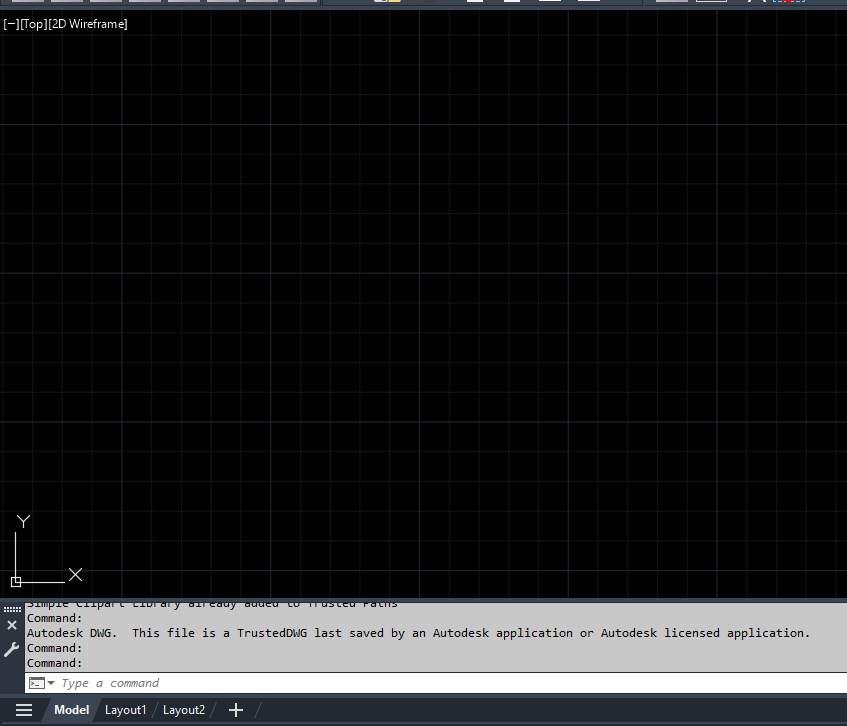
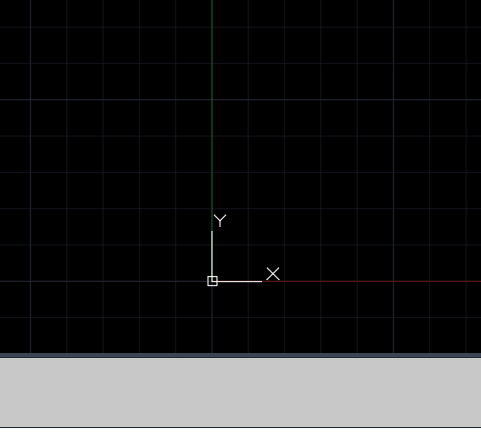
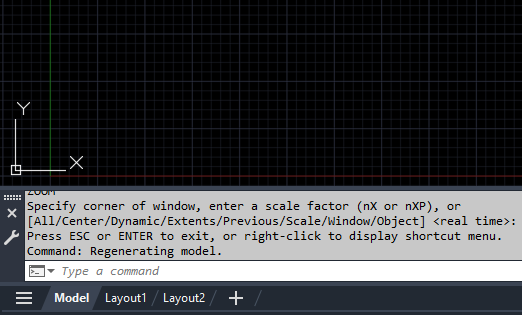
@LIU When I first open your dwt template dwg this is how it looks like with the UCSICON on the lower left corner but no red or green lines shown: Then I scroll the mouse to zoom outward then eventually the red & green lines show up with the UCSICON now positioned at the location where they cross: But once I use the scroll mouse to zoom in again to the point where the green and red lines are close to the lower left hand corner of the drawing window, the UCSICON is displayed no longer at the location where the two lines cross over: This is normal display behavior because AutoCAD is trying to display the UCSICON at the origin where X (red line) and Y (green line) crosses = 0,0. If you don't want to see the UCSICON constantly moving then enter the following at the command prompt: UCSICON NoOrigin Now when you zoom in and out, the UCSICON is no longer constantly moving to try and position itself at the corner of the green & red lines. But instead the UCSICON is now always positioned in the lower left corner of the drawing area: Hope this answers your question.
-
sorry, i had a problem with autocad, this is the drawing file , open the drawing and roll wheel to yourself. what is problem with red and green lines parallel to x-axis and y-axis My-Architectural-Templyte-1.dwt
-
 Muralidharan joined the community
 -
Beyond APPLOAD: A local script manager for those of us with too many LISPs
VicoWang replied to VicoWang's topic in AutoLISP, Visual LISP & DCL
@aridzv Thank you for the correction. This post indeed mainly discusses the management of individual users, and it was off-topic. The previous discussion was mainly about answering your question about why it developed into the cloud. At the level of individual user management, VedaCAD's Base mode (100% local, not actively connected to the internet) has a similar approach to your solution: In the Base mode, the same file migration is required to transfer to a new machine using VC. You just need to export the configuration file from the old computer's VC, copy the plugin folder (for example, the folder on the old computer is: E:/CADTools/), and then import the configuration file on the new computer, and copy the CADTools/ folder to the same location on the new computer (E:/CADTools/), and the migration is complete. (The exported configuration file is a small database, mainly mapping relationships and custom configurations, not specific plugin files) If it is the FREE tier, you can even use the self-use bundle method to achieve the ability to restore and synchronize the entire configuration with one click, Results like the PRO level (the VC system has opened up configuration cloud synchronization capabilities specifically for the PRO level, truly realizing the ability to sync the entire working environment configuration with one click) Most importantly, the VedaCAD client is just a VLX plugin, and it does not modify any registry, ignores any supported path issues, and achieves capabilities similar to your existing solution, such as on-demand loading. -

Beyond APPLOAD: A local script manager for those of us with too many LISPs
aridzv replied to VicoWang's topic in AutoLISP, Visual LISP & DCL
@VicoWang Hi. 1. the first post of this thread talked about controling the lisps and varaibles of a single user and that was my main focus. 2. in your comment above, section 1 (and @Paul Li also refered to it in this thread) you talk about development environment and app deployment, and that is a different topic. I'm a single user, so I can't talk that much about working in a big firm\company, and how big organizations should deal with the issues you raised. -
Beyond APPLOAD: A local script manager for those of us with too many LISPs
VicoWang replied to VicoWang's topic in AutoLISP, Visual LISP & DCL
@aridzv You have developed a plugin and distributed it to 1000 users. When you need to update this plugin, or you want to know exactly how many devices have genuinely downloaded your plugin. When you change devices (I know your method, but VedaCAD's method is to log in to VC, click sync, and the deployment of all configurations including custom shortcut keys is completed). You manage the computers of 100+ employees in the entire company (offices may be in different cities or even different countries), providing employee A with (construction group plugins and standard sets), and employee B with (structural group plugins and standard sets). When you formulate, manage, and update the drafting standards of subcontractors, and even need to retrieve the specific drafting standards version of a project from 3 years ago. When your OneDrive or shared drive is locked offline due to errors, such as network fluctuations, or when you need to work outside the office. It's just that your own usage scenario is sufficient without the need for the cloud. The real logic of VedaCAD is a local sandbox managed by the cloud: it has 99.99% of the availability of the cloud, as well as the I/O execution speed of local files. -
 BredlyGreen357 joined the community
 -
Xref hatches plot solid black and fonts change on my machine only
SLW210 replied to xurshid_viewport's topic in AutoCAD Beginners' Area
Maybe try XREFOVERRIDE and VISRETAIN. How does it look in the plot preview? How does it look when plotted to paper? You might go through THIS. -
Why can a 3D model fail during STL export even when it looks correct?
indiancad posted a topic in AutoCAD 3D Modelling & Rendering
A 3D model can look perfectly fine on screen, but problems may appear when exporting it for 3D printing. Open edges, overlapping faces, internal geometry, or non-manifold areas can make a mesh difficult for the next application to process. The tricky part is that these issues are not always obvious from the model's appearance. When this happens, I would rather identify the underlying geometry problem than keep repeating the export. What checks do you perform before exporting a 3D model to STL? Do you validate the solid in CAD first, or use a separate mesh-repair tool? -
Is the LIST command enough to troubleshoot CAD geometry?
indiancad replied to indiancad's topic in AutoCAD Drawing Management & Output
Thanks for mentioning DUMPIT.lsp! I haven’t explored that approach much. Getting more detailed entity information through Visual LISP sounds useful, especially when troubleshooting or checking results from custom routines. -
Is the LIST command enough to troubleshoot CAD geometry?
indiancad replied to indiancad's topic in AutoCAD Drawing Management & Output
Your point about checking the command history first makes sense, especially when an operation fails. I also like the idea of using LIST to copy and verify entity data when working with LISP. It seems the best tool really depends on what you're trying to diagnose.