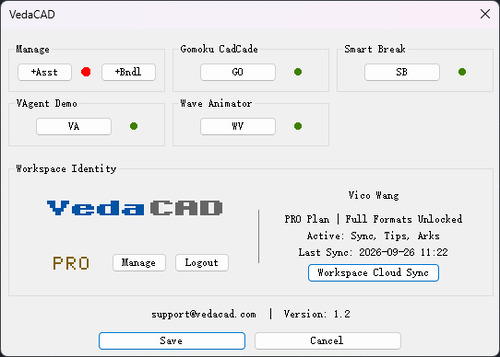
About This File
A deployment manager for plugins (.lsp, .fas, .vlx, .arx, .dll) and environment standards (.dwt, .ctb, .shx .etc).
Note: To install via VCID, you need to install VedaCAD in advance and log in to a free account (or PRO account).
Tips: Welcome developers to publish their plugins on VedaCAD and obtain their plugin's VCID for plugin sharing (even free accounts can publish).
The following methods can be used to test the installation and deployment of the VedaCAD plugin via the VCID test:
[Quick Annotator] VCID: 7JAU18 @ VedaCAD
[Codebase Packer] VCID: 0FBGZB @ VedaCAD
[VAgent Demo] VCID: PLG96B @ VedaCAD
[Gomoku CadCade] VCID: 1G8VY1 @ VedaCAD
[Omni Wheel] VCID: US87Y8 @ VedaCAD
[Side DIM] VCID: 5EDNWJ @ VedaCAD
[Smart Break] VCID: D86938 @ VedaCAD
[Wave Animator] VCID: 31E6TS @ VedaCAD
Edited by VicoWang
What's New in Version 1.2 See changelog
Released
- Special thanks to @Paul Li for the rigorous industrial-scale stress testing and invaluable feedback
- Upgraded the core execution engine with a new Pre-Execution Guardian for seamless dependency hot-injection and a completely refactored CUIX loader, ensuring rock-solid stability and lightning-fast performance across massive asset libraries
- Expanded Bundle capabilities to seamlessly package over 20 companion formats (e.g., .CUIX, .XML, .JSON, .PDF) alongside plugins, while reinforcing Enterprise Ark infrastructure with strict environment-only format whitelisting
- Transformed the Asset Manager workflow by introducing Multi-Select Deletion for swift bulk management, combined with smart alphabetical sorting to naturally group main applications with their companion files
- Redesigned UI rendering dynamics to better accommodate comprehensive app suites, featuring an expanded 12-character Custom Alias limit, enhanced viewport heights, and a robust truncation algorithm for flawless column alignment
- Strengthened Web Workspace portals with advanced ecological dependency protection, ensuring the safety of distributed public assets and improving global backend synchronization