All Activity
- Today
-
 CamDuy joined the community
 -
 Kamri joined the community
 -

Beyond APPLOAD: A local script manager for those of us with too many LISPs
VicoWang replied to VicoWang's topic in AutoLISP, Visual LISP & DCL
Hi BIGAL, First off—huge apologies for the double post! I originally stumbled across that 2007 thread, dropped a reply, and then realized it would be much better to create a dedicated thread so I could properly attach the .vlx file without hijacking the old discussion. Definitely a newbie mistake on my end, and I completely understand if the Admins merge or delete the old reply to keep the board clean. Thanks for the heads-up! I just went back and read your comment on that older post regarding your Install.lsp method. Extracting a ZIP natively via LISP COM objects, automatically creating directories, and injecting Support paths and CUIx menus is an incredibly resourceful and clever solution! It proves we've all been battling this exact same deployment nightmare for decades. Actually, your Install.lsp workflow is basically the spiritual predecessor to what I built with VedaCAD. The main difference is that instead of moving physical ZIP files, VedaCAD relies on pure mapping logic: At the atomic level, a 6-character VCID resolves a single asset. To migrate a whole PC, it simply compiles a list of those VCIDs into a lightweight config profile to batch-restore your entire setup. Scaled up for enterprises, it dynamically syncs environments based on user permissions. The engine handles all the file routing natively in the background. Since you clearly have a deep history with this community (20k+ posts is incredible), I actually have a question for you: Historically, the vast majority of AutoLISP routines and CAD tools have been strictly local. From your perspective, how far has the landscape evolved regarding web-connected or cloud-synced plugins? Are there many developers successfully exploring REST APIs or cloud-fetching inside AutoCAD nowadays, or is the community still heavily leaning toward local, air-gapped deployments? I'd genuinely love to hear your thoughts on where the ecosystem is heading. -

Dynamic blocks with Dynamic text and count
BIGAL replied to Shri95's topic in AutoCAD Drawing Management & Output
Yes need a much better realistic sample dwg with say a couple of different scenarios, array,non array and so on, even different lengths. There is a way of getting array info, you read the 1st object for properties, then the numbers in the row and column values. -
Beyond APPLOAD: A local script manager for those of us with too many LISPs
BIGAL replied to VicoWang's topic in AutoLISP, Visual LISP & DCL
You have posted twice about the same topic, as a newbie here there is no need to do that, Admin may decide to merge your two posts together. Made a comment in other post about installing new software. -
Migrate settings to new computer
BIGAL replied to hydrojock's topic in AutoCAD Drawing Management & Output
Did something similar but used lisp and wrote a Install.lsp it does just that makes directories, installs menu's, adds support paths. It uses a ZIP file which contains all your files etc lsp, fas, vlx mnu, cuix and so on, the unzip is does via lisp. So you just send two files to an end user drag the lsp onto CAD and your then asked where is the saved zip file. I did it that way as did not have access to a make install software. - Yesterday
-
When you make the rectangs for the color use SSADD (entlast) so you make a selection set of the rectangs in order then its easy to go through the selection and use the entity in a hatch command, using Solid and then use chprop to change the color of (entlast). If you post what you have done so far will allow others to make some changes etc. Our CTB was based on the ISO drafting ink pens, so colors 1-7 were all black but matched the thickness of the drafting pens.
-
 ilyosdesigner joined the community
 -
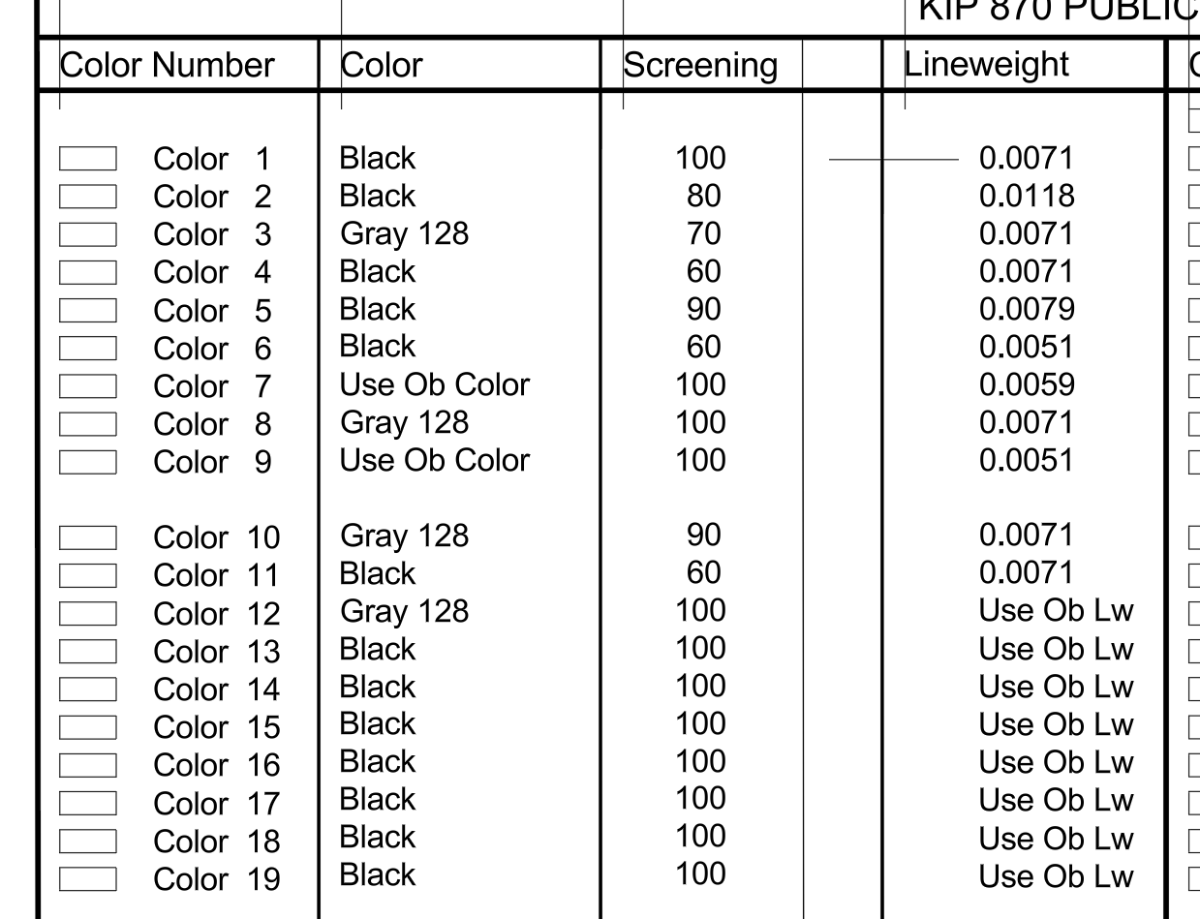
Thank you for your response! I have printed the color wheel, which has helped a bit. I did play with various .lsp code but could seem to find a set up I was looking for. The ones I found seemed cumbersome or difficult to read easily. I started on this chart below, as I have some free time. It will be easy to flip through once completed and printed. I will look for the hatch lisp, as it might help to speed the process below (perfect timing!). I prefer the line weights as numbers because they are easy to see and compare.

-
 jacobbethell joined the community
 -
 sanjayaalpha859 joined the community
 -

North direction in AutoCAD drawing does not match my real-world compass direction
CHICHA posted a topic in AutoCAD General
I have a few AutoCAD drawings where I am having trouble understanding the correct orientation. When I compare the drawing direction with the actual direction outside using an online compass, I notice that the north side of the drawing does not always seem to match the real direction. An online compass is a digital compass tool that uses a phone or device’s GPS location and sensors to show the current direction. I use it as a quick reference to check directions like north, south, east, and west when comparing a drawing with the real environment. In AutoCAD, I know that the UCS, view rotation, and drawing setup can affect how the plan appears on the screen. However, I am not always sure which setting should be considered the main reference for the actual geographic direction. For example, I opened a site plan where the drawing was rotated, and the north arrow was not very clear. When I checked my direction with an online compass, the orientation seemed different from what I expected from the CAD file. I tried changing the view and checking the UCS, but I am still unsure if the drawing itself is rotated or if I am just viewing it incorrectly. Is there a simple way in AutoCAD to verify that a drawing has the correct north orientation? Should the north arrow always be connected to the UCS direction, or can it be independent from the drawing coordinates? I also want to know how other users usually check the direction of imported DWG files from different sources. Sometimes drawings created by others do not have clear orientation information, and it takes time to understand whether the layout is aligned correctly. What settings or commands do you usually check first when a CAD drawing does not match the real-world direction? Any tips for avoiding orientation confusion when working with site plans would be appreciated. -

Dynamic blocks with Dynamic text and count
SLW210 replied to Shri95's topic in AutoCAD Drawing Management & Output
I have moved your thread to the AutoCAD Drawing Management & Output Forum. I didn't see any text in your posted .dwg, can you post a before and after example of what you need? -
Beyond APPLOAD: A local script manager for those of us with too many LISPs
VicoWang replied to VicoWang's topic in AutoLISP, Visual LISP & DCL
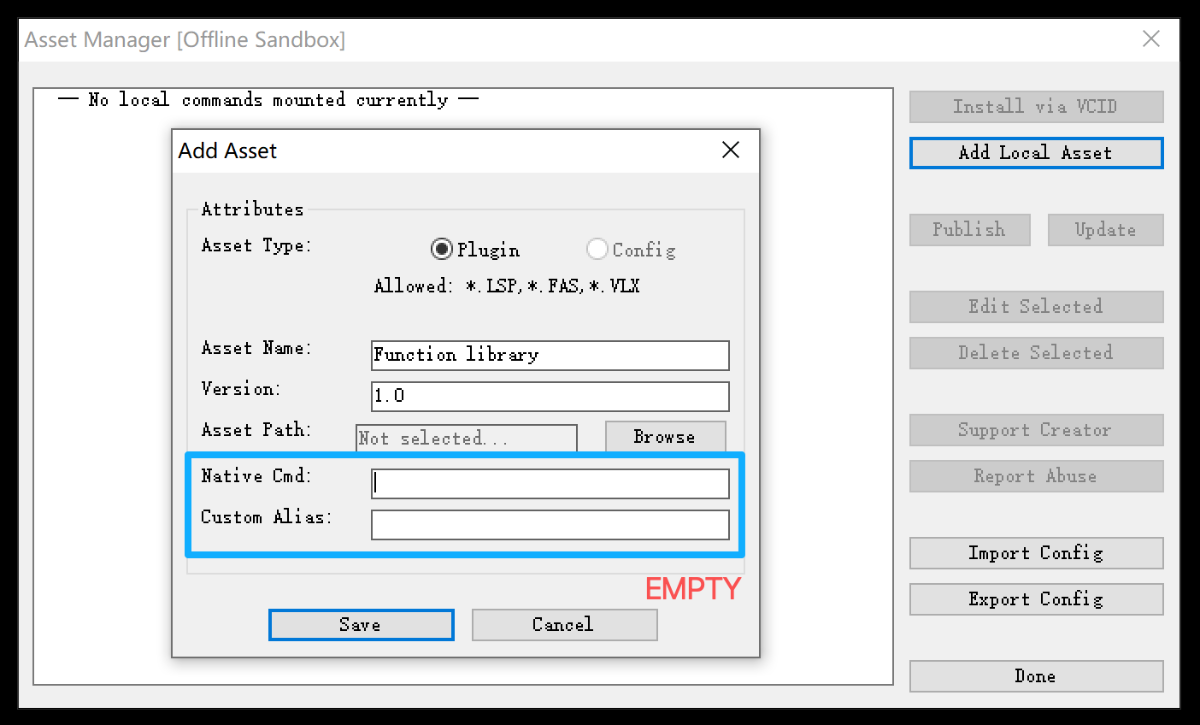
THX,By the way, I noticed RlxBatch in your screenshot. Assuming that's a subroutine library or a dependency file rather than a standard command, I thought I'd share a quick "hidden feature" built into the manager: If you are loading a core library that doesn't need a direct command alias to trigger it, you can leave BOTH the "Native Cmd" and "Custom Alias" fields completely blank when adding it. When you do this, VedaCAD flags it as a System Library: It hides it from the main DCL listbox, keeping your UI clean and focused only on actionable commands. It forces the file to load immediately upon AutoCAD startup. This actually ties into how VedaCAD handles performance. For standard commands (where you define an alias), the tool uses strict Demand Loading (similar to CAD's native autoload behavior, but managed internally). The actual LISP payload isn't evaluated into memory until the exact moment you type the alias. This means you can throw 100+ heavy routines into the manager without increasing your AutoCAD startup time or memory footprint. But for dependency files like RlxBatch, leaving the fields blank ensures those subroutines are pre-loaded into the namespace and ready for your other scripts to call.· Just thought that trick might be handy for your setup!
-
CHICHA joined the community
-

Beyond APPLOAD: A local script manager for those of us with too many LISPs
rlx replied to VicoWang's topic in AutoLISP, Visual LISP & DCL
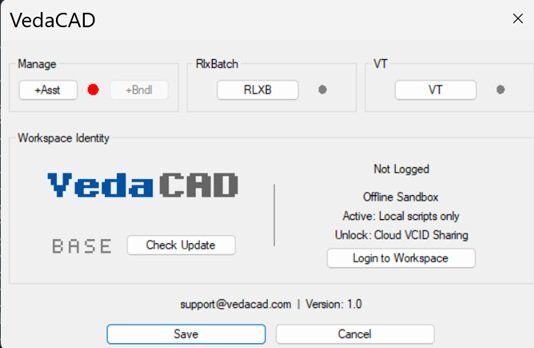
It looks great , you centainly know how to lisp like a pro, thanx! Not sure the image is getting through , ah , now it its , had to switch browser with a little less security...
-
 ACTCAD joined the community
 -
 Lazar Ilic joined the community
 -
 WAYNEK joined the community
 -
Beyond APPLOAD: A local script manager for those of us with too many LISPs
VicoWang posted a topic in AutoLISP, Visual LISP & DCL
Hi everyone, I'm Vico, an architectural designer. I've found this forum incredibly helpful over the years— so many of the LISP routines shared here have become the backbone of my daily workflow. But as my collection grew, one thing started driving me absolutely crazy: the APPLOAD dialog. The problem (I suspect I'm not alone) Managing dozens of .lsp, .fas, and .vlx files through that interface is clunky at best. You can't see what's loaded, what's conflicting, or even what half of them do without opening each file. And the Startup Suite? Let's just say it and I have a complicated relationship. Then there's the real nightmare: upgrading to a new PC. You spend half a day manually rebuilding your Startup Suite, redefining aliases in acad.pgp, and fixing broken Support paths — and you still forget something. My attempt at a solution Over the past few months I built a tool to solve this for myself, and I thought the community here might find it useful. It's part of a side-project I've been tinkering with called VedaCAD. The tool comes as a single compiled .vlx. By default it runs in Base mode — completely offline, no accounts, no network calls, nothing phoning home. It just sits quietly and manages your local scripts. What it does: Gives you a clean UI to see all your loaded scripts in one place — no more hunting through APPLOAD. Lets you assign custom command aliases directly from the interface, without manually editing acad.pgp or writing wrapper LISPs. Has a one-click "Export Config" that builds a lightweight JSON mapping of your entire environment. Take that file (plus your LISP folder) to a new machine, hit "Import Config", and everything comes back exactly as it was — script mappings, custom aliases, and paths, bypassing the native Startup Suite entirely. A couple of disclaimers It's written entirely in pure AutoLISP/Visual LISP and DCL, so it should be compatible all the way back to AutoCAD 2006 — none of that "requires .NET Framework X.x" nonsense. I've personally tested it on 2006, 2014, and 2024, and it runs smoothly right across that range. And again: fully air-gapped in Base mode. No telemetry, no registration nag, no "sign up to unlock." If you're paranoid about that sort of thing (I certainly am), you can verify with any network monitor like Wireshark. Why I'm posting I built this to scratch my own itch, and it's made my life genuinely easier. But I'm one person with one workflow — I'd be really curious to hear if this solves a real problem for anyone else, or if I've just been doing APPLOAD wrong all these years. If you'd like to give it a spin, the .vlx is attached. Happy to answer questions, and very open to feedback (including the critical kind). Cheers, Vico VedaCAD V1.0.VLX -
Migrate settings to new computer
VicoWang replied to hydrojock's topic in AutoCAD Drawing Management & Output
I know this is an older topic, but the pain is still incredibly real. It is absolutely crazy that in 2026, migrating CAD environments still feels like we are stuck in 1999. I actually got so fed up with manually exporting .arg profiles and copying over Support folders that I built a cloud package manager to end this exact nightmare. It's called VedaCAD. The workflow is exactly what you’d expect from a modern development tool. Once you configure your assets on your old PC—whether they are executables (.fas, .vlx, .dll) or environment standards (.ctb, .cuix, .dwt, .shx)—you simply hit Push. Your entire environment matrix is vaulted to the cloud. When you sit down at your new PC, you just log into your account, hit Pull, and within seconds, your exact drafting environment and aliases are flawlessly restored. It is arguably the most elegant solution available right now for CAD migrations. If you are managing an office rollout: We also built an Enterprise MDM layer for this. As an admin, you can create user groups (Squads) and assign specific toolsets to them from your company's central asset pool. When an employee logs in, their terminal instantly syncs the exact plugins and configs they are authorized for. Group A never even sees Group B's proprietary scripts. No more USB sticks, no more broken network drives. If anyone is currently battling an office rollout and wants to know how to set up this kind of pipeline, just look up VedaCAD or drop me a DM. Always happy to geek out over CAD architecture! Cheers, Vico -
I did not develop CSD. I have used it for many years, It is an Australian company with those behind it have been involved in the cad industry since 1980's. . I have a few CIV3D programs that were for daily use. Just very simple stuff like label a point RL etc, rotate cogo points, trees read Cogo point and using a dynamic block indicate trunk and spread. One thing I did do was I have a toolbar for surface display it has our contour intervals, 0.1, 0.25, 0.5 etc on/off, water drop, saves going to the toolspace. You just have to edit the code to your surface style names, it is metric but the toobar images can be remade for imperial. Supports multiple surface choice, let me know if interested. I need to redo the button images.
-
Welcome aboard. This is an easy task if your using color numbers, or much easier there is a CAD dwg Colorwheel which does what you want, I am trying to find it for you. It may be on your pc now. I could have name wrong. From a programming point of view just make an array of small squares a 16 x 16 then explode, select all 256 rectangs and via lisp hatch each one with a color number starting at 1.. Our company ctb had the first seven colors as black 1-7, the last few 250-256 as greys, the rest as color number. One thing similar as you mention linetypes etc is a legend.lsp so it displays all the layers, color linetype and name. As well as used blocks in current dwg. There are various versions around. colorwh.dwg
- Last week
-

Dynamic blocks with Dynamic text and count
Shri95 posted a topic in AutoCAD Drawing Management & Output
Hello everyone - I have attached block which I use as girt on project, I want to add text with length (Dynamic) and count if I do array of that block, would it be possible to use that text (length) and count to make the table with count and length Girt.dwg -
Thanks, That's great! Did you develop it yourself? I'm looking for a developer to handle specific custom requirements(with source), as I plan to offer the solution to my clients afterward. If you're interested, please review the details and let me know your pricing and estimated timeline.
-
Hi, I have just started a new job and I am trying to print ctb file (2026), so I can see color number (with color box) , color (black/object color) and line weights. I have gone down the google rabbit hole which included AutoLisp code and it's a never ending circle. I would appreciate your advice on what seems like it should be an easy task. My request for help here has fallen flat. Thank you!
-

Extracting Face and Edge Information from a 3D Solid Without Exploding It
Danielm103 replied to p7q's topic in AutoLISP, Visual LISP & DCL
AI + AutoCAD, Python is the way, connect to agents in AutoCAD’s process space, I connect to LM studio -

Extracting Face and Edge Information from a 3D Solid Without Exploding It
p7q replied to p7q's topic in AutoLISP, Visual LISP & DCL
Paid tools are fine as well. I currently use a custom GPT called AutoCAD Automator. I usually design the overall algorithm myself. I use AI mainly to write supporting functions, research specific AutoCAD or ACIS/SAT topics in depth, compare alternative approaches, and help improve individual parts of the code. If you know a tool that would be more effective for this kind of workflow, I would be interested in trying it or switching to it. -
Sharing a LISP (Codebase Packer) + Thoughts on modern CAD environment governance
VicoWang replied to VicoWang's topic in AutoLISP, Visual LISP & DCL
Thank you. I am very happy to join this community that keeps pace with the times. It is my honor. I have seen your discussion about AI. As long as you put the master and the slave, not blind, they are just tools to make things better and faster. -
I have moved your thread to the Civil 3D & LDD Forum. Please post in the most appropriate forum. What version are you using? Looks like new to 2025 Civil 3D. The help files from AutoCAD Civil 3D 2025 Autodesk Civil 3D Help | Modify the Level of Detail of Surfaces | Autodesk
-
Sharing a LISP (Codebase Packer) + Thoughts on modern CAD environment governance
SLW210 replied to VicoWang's topic in AutoLISP, Visual LISP & DCL
Welcome to CADTutor! -
Extracting Face and Edge Information from a 3D Solid Without Exploding It
Danielm103 replied to p7q's topic in AutoLISP, Visual LISP & DCL
One that’s free : ), Gemini, also GLM is pretty good a lisp. With AI, don’t try to one shot it, work though the ACIS/SAT patterns and ask questions -
hi all, Could you please let me know the difference between these two icons? Both represent Surface files, but some appear in blue while others are normally grey Thanks
-

AutoLISP: Safe alternative to (command "EXPLODE") inside a custom command
Lee Mac replied to p7q's topic in AutoLISP, Visual LISP & DCL
Set bit 1 of the QAFLAGS system variable (storing the original value and resetting after the command); with bit 1 enabled, the EXPLODE command will accept selection sets when invoked from the LISP API. Alternatively, ensure that this bit is not set and only pass a single entity with no double quotes. The key point is that by controlling the bit, you can ensure consistent behaviour.