Search the Community
Showing results for tags 'architecture'.
Found 12 results
-
 After launching VedaCAD and talking with several developers here, I noticed a universal architectural bottleneck we all face in the CAD industry: 99.9% of our custom plugins are strictly local and tightly coupled. Traditionally, if you build a tool that relies on specific external data—like a slide library (.SLB), a steel shape parameter table (.CSV), or a layer standard dictionary (.INI)—you hardcode that data into the .LSP or compile it directly into the .VLX. When a profile dimension changes or a new standard block is added, you have to modify the source code, recompile, and email a new ZIP file to everyone. This rigid "Logic + Data" coupling inevitably leads to a version fragmentation nightmare across an office. The obvious solution is to fetch data from a cloud API on the fly. But as we all know, writing WinHttp requests in AutoLISP is incredibly fragile. Because AutoLISP is single-threaded, waiting for a network response usually freezes the AutoCAD UI—a terrible user experience. The "Pseudo-Cloud" Architecture I realized that with VedaCAD acting as the underlying infrastructure, we can achieve true "Cloud-Native" behavior without writing any network code in LISP, simply by decoupling Logic from Data. Because VedaCAD handles the secure transmission and silent hot-swapping of physical files in the background, you can build tools like this: The Logic (Asset A): You publish your core .LSP plugin. The Data (Asset B): You publish your external data file (e.g., Shapes.csv, Blocks.slb, or Standards.ini). Instead of making risky network calls, your LISP simply reads the local data file from the isolated VedaCAD sandbox directory. To locate the data file dynamically, you can use these two lines of code (AutoCAD example): ;; Find the isolated VedaCAD Plugins and Assets sandbox paths dynamically (setq vc_plugins_path (strcat (getenv "APPDATA") "\\VedaCAD\\AutoCAD_R" (substr (getvar "ACADVER") 1 2) "\\Plugins\\")) (setq vc_assets_path (strcat (getenv "APPDATA") "\\VedaCAD\\AutoCAD_R" (substr (getvar "ACADVER") 1 2) "\\Assets\\")) How the Sync Loop Works (The Magic) Because AutoLISP releases the file handle as soon as you (close) the file, the data is never locked. When the data needs to change, the developer (requires a PRO account to unlock the push-update feature) simply updates the Shapes.csv or Blocks.slb file in their VedaCAD Client. Here is what happens on the users' end globally: For PRO Users: VedaCAD's background engine (24h heartbeat cycle) detects the version drift and silently hot-swaps the data file in the background. The next time the user runs your command, the LISP reads the new datasets instantly. For FREE Users: The engine (72h heartbeat cycle) receives the update beacon. It won't annoy them with popups, but an "Update" card will silently appear in their VedaCAD panel, allowing them to pull the latest data with one click. 5 Wild Possibilities with this Architecture: By relying on VedaCAD to handle the file delivery and background syncing, developers can breathe new life into traditional CAD formats: The "Live" Visual Block Library (.SLB / .DWG): You have a custom DCL with image tiles (slide_name) for inserting standard doors or mechanical parts. By separating the .SLB file, when the company introduces 5 new part models, the admin just pushes a new .SLB and .CSV index. Everyone's visual menu updates automatically the next time they open the dialog, without touching the core LISP. Dynamic Engineering Parameter Sets (.CSV / .XML): A structural plugin that draws H-beams or piping based on manufacturer catalogs. If the manufacturer updates their standard sizes, you just push a new .CSV. The plugin remains lightweight and eternally accurate. Auto-Updating Drafting Standards (.INI / .JSON): A "CAD Checker" routine that reads a dynamic .ini file mapping Layer Name -> Color -> Linetype. As the BIM Manager evolves the company standards, the ruleset updates silently across the fleet. The checker script always enforces the latest rules. Live Quoting / Pricing Engines: A cost-estimation LISP that reads a Prices.csv file to calculate the bill of materials (BOM). The CAD Manager updates the material costs quietly in the background each month. Remote Feature Toggles & Team Kanban: You publish a simple Config.ini. Change ENABLE_BETA=1 to unlock experimental features for your users, or add NOTICE="Server maintenance this weekend", which your LISP prints to the command line upon loading. You can even use a Tasks.txt that pops up a DCL dialog showing the team's drawing assignments for the day. We built VedaCAD to be an invisible infrastructure so that you guys can focus purely on solving engineering problems rather than fighting network protocols, UI freezes, and file locks. Has anyone else experimented with decoupling data from their LISP routines to mimic a cloud architecture? I’d love to hear your thoughts and see what else we could build with this!
 -

Chaos Adds Digital Replicas of Twinbru Textiles and Haworth Furniture to Chaos Cosmos’ 3D Library
liaisonpr posted a topic in Rhino
Over 450 New Photorealistic Fabric and Furniture Assets Can Now Be Added Into Any Architecture or Interior Design Project LOS ANGELES — March 31, 2022 — Today, Chaos announces a new partnership that gives architects and interior designers access to 480 digital replicas of Twinbru textiles and Haworth furniture models, making it easier to create photorealistic stills and animations with real-world components. For the first time, Chaos Cosmos, a free library of ready-to-render content, now offers materials and models direct from manufacturers. Twinbru and Haworth represent a growing trend that has seen manufacturers creating photorealistic copies of their designs to promote sustainability and enable customer-friendly sales tools like configurators. These strategies certainly help firms be more conscious, and digital assets have long lives, creating an opportunity for companies to support the growth of massive 3D worlds that require realistic content and environmental designers. “Bru Textiles and Haworth are known throughout the design world for their high-quality fabrics and office furniture, making them a constant reference for high-end visualizations,” said Kalina Maneva, product manager of Chaos Cosmos at Chaos. “By incorporating some of their top designs into Chaos Cosmos, designers can be confident that their visualizations are populated with exact replicas of the real thing.” “Digital fabrics are the glue that hold 3D spaces together; as virtual environments become more prevalent, the need for high-quality, on-demand fabrics will only continue to grow,” says Jason Neiman, CEO of Bru Textiles. “By partnering with Chaos, we are making the transition even easier for designers and 3D artists, giving them instant access to the biggest digital fabric library on the planet.” The new collection debuts with photorealistic fabrics and office staples (like chairs, armchairs and sofas) that designers can immediately drop into a 3D scene with the help of nearly every offline/real-time rendering tool in the Chaos ecosystem. 3ds Max, SketchUp, Rhino, Revit, Chaos Corona, Cinema 4D, Maya and Chaos Vantage are all supported. Along with the new Twinbru/Haworth collection, Chaos is announcing the additional release of over 200 new assets, including: CGAxis — kitchen appliances, musical instruments, toys, medical equipment and more Fisherman3D — sports cars, sedans, airplanes, watercraft, electric vehicles, etc. Globe Plants — plants, trees, bushes, etc. Chaos — 3D scanned rocks and food This brings the library to over 2,000 assets, comprising the most commonly used 3D model, HDRI and material types employed every day by professional designers. New features have also been added including a light/dark mode. To browse the library, please visit the Chaos Cosmos website. Pricing and Availability Chaos Cosmos is free to any V-Ray or Chaos Corona user. About Chaos Chaos develops visualization technologies that empower artists and designers to create photorealistic imagery and animation across all creative industries. The firm’s physically based renderer, V-Ray®, has been honored with both an Academy Award® and an Engineering Emmy® for its role in the widespread adoption of ray-traced rendering in motion pictures and television. In 2022, Chaos merged with Enscape, a developer of real-time rendering software for the AEC industry. Together, the newly combined company is creating an end-to-end ecosystem of 3D visualization tools accessible to everyone. For more information, visit chaos.com.
-
Chaos Group Launches Chaos Vantage, Brings 100% Ray Tracing to Real-Time 3D
liaisonpr posted a topic in Rhino
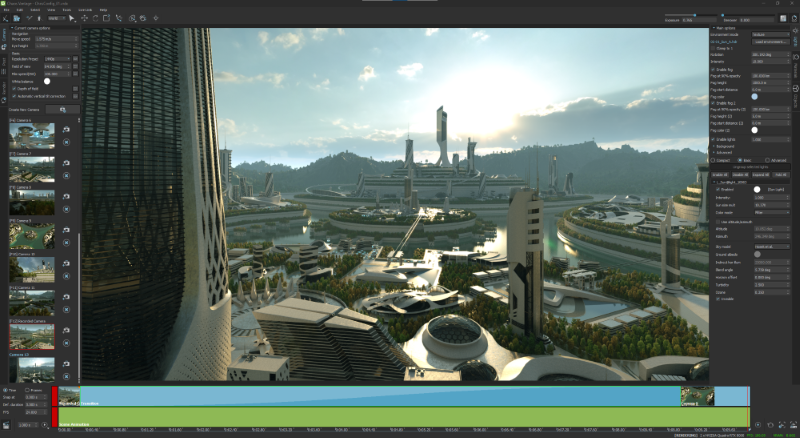
Fastest Path to Real-Time Helps Users Explore Massive Scenes in Seconds; Free for a Limited Time LOS ANGELES, Calif. – December 2, 2020 – Today, Chaos Group releases Chaos Vantage, a new application that allows users to instantly explore their 3D scenes in a fully ray traced, real-time environment. Unlike traditional real-time methods, the import process is simple – no geometry to optimize, UVs to unwrap or lighting to bake. Users simply drag-and-drop a V-Ray scene, or live link from Autodesk 3ds Max, to bring it into real-time. Architects and designers can now interact with their designs in the simplest and most realistic way possible. “Vantage removes the hurdles that used to hold people back, introducing a ‘real-time anytime’ workflow that lets designers and artists use real-time as freely as they use 3D,” said Phillip Miller, VP of product management at Chaos Group. “As real-time begins to live comfortably within every stage of the design process, it will make a huge impact on how people get their work done, from client meetings and over-the-shoulder reviews to the way they art direct various iterations. This will change everything.” Vantage, formerly known as Project Lavina, is designed for massive scenes and can handle billions of polygons without any loss in detail or significant decrease in speed. Vantage automatically reads V-Ray’s physically based lights and materials to produce photorealistic results with 100% ray tracing, even on complex scenes. Vantage is currently averaging 24-30fps on a consumer-grade NVIDIA RTX card at HD resolution, with additional speed boosts available using two GPUs. Vantage can open scene files from any recent V-Ray integration and also live links with V-Ray for 3ds Max, giving users the ability to see every camera, model and lighting adjustment in Vantage as they create. This turns Vantage into a fully ray-traced viewport that allows artists to make their creative decisions with higher fidelity than ever before. Vantage also includes an Animation Editor that can create, edit and render animated sequences for presentations or previsualization purposes, using a simple transition-based method. With cameras set in Vantage as markers, designers can direct the editor through the various milestones, manipulating transition times and moves at will. An onboard tool keeps track of all new cameras/poses during this process, ensuring scene consistency across a production. Other Features Include: Object Transforms and Controls – Move, rotate and scale objects in real-time. Controls to copy, hide and delete objects are also available. Lookup Tables (LUTs) – Apply a color filter to any camera for a more cinematic look. Collision Detection – Similar to playing a game, automatic collision detection allows users to walk up stairs and avoid walking through walls without any authoring. Layered Fog – Quickly add atmospheric depth to dramatize expansive scenes. Record Camera – Easily record a real-time session as an MP4 video for easy sharing. “For too long, the production process has been getting in the way of the design. With Vantage, you can manipulate scenes right in front of your clients. There’s no more waiting or ‘let me get back to you,’ which completely changes the dynamic of a meeting and the way you collaborate together,” said Carlos Cristerna, principal and RadLab director at Neoscape. “Our work is focused on large-scale developments and international competitions with some of the biggest architecture and development companies. When you are working at that level, anything that helps get people on the same page is extremely powerful. Vantage does that faster than anything I’ve ever seen. It’s truly the way of the future, there’s no going back.” “Building Utopia” Contest: To celebrate the release of Chaos Vantage, Chaos Group has partnered with Lenovo, NVIDIA, KitBash3D and CGarchitect to launch the “Building Utopia” real-time rendering challenge. Running until January 25, 2021, the contest will focus on real-time animation using Vantage and a free futuristic 3D city model provided by KitBash3D. Prizes include a Lenovo ThinkPad with an NVIDIA RTX 5000 professional GPU, an NVIDIA RTX 8000 professional GPU, and more. Registrations are now open on CGarchitect, with the winners to be revealed on March 26. Try Chaos Vantage now. Pricing and Availability Chaos Vantage is available now and is compatible with all V-Ray Next and V-Ray 5 integrations. A one-year license is free until June 2, 2021, after which it will cost $389 annually. Vantage is also included in V-Ray Collection, an annual plan that gives users full access to 15 Chaos Group products and services for $699/year. Vantage uses DXR ray tracing and currently requires an NVIDIA RTX series GPU. About Chaos Group Chaos Group is a worldwide leader in computer graphics technology, helping artists and designers create photorealistic imagery and animation for architecture, design, and visual effects. Chaos Group’s award-winning physically-based rendering and simulation software is used daily by top design studios, architectural firms, advertising agencies, and visual effects companies around the globe. Today, the company's research and development in ray-traced rendering, cloud computing and real-time ray tracing is shaping the future of creative storytelling and digital design. Founded in 1997, Chaos Group is privately owned with offices in Sofia, Los Angeles, Prague, Seoul, and Tokyo. For more information, visit: chaosgroup.com.
-
Hello everyone, I'm in a trouble, im making my thesis plans in autocad 2012 version and i need to rescale my plans from 1:1 to 1:100 and 1:300. Thanks for your respond and help.
-
This is related to command LayerOrder or AecLayerOrder in AutoCAD Architecture 2015. This command lets user specify the order in which layers are displayed in the drawing. I'm trying to modify the order by program, but can't find where this list is stored. It has something to do with a dictionary AECDACH_VARS_UTIL within dictionary AEC_VARS, because when it's deleted, the layers go back to their original order. Any advice would be greatly appreciated.
-

Upcoming Webinar - Create interactive 3D presentations from your SketchUp projects
LucaVido posted a topic in SketchUp
Next Wednesday 21st May the guys from **** have scheduled their first webinar where they will teach how to import s SketchUp model to *****, add interactivity and UI elements and connect them with steps. More info available at their page: ************* EDITED by LAZER -

Missing properties of objects in Autocad architecture
Basgielen posted a topic in AutoCAD 2D Drafting, Object Properties & Interface
I used architecture on my pc. I installed Autocad on another pc with the same Serial code. I can see on the top that my version suddenly is a Educational version. I'm telling you this because i don't know if this is the reason of my problem. The problem: i can't see the properties of an object when i use autocad architecture in the educational version. For example: I make a wall and i place a window in the wall. Now i want to change the width of my window, using the properties bar. SO i click on my window (right mousebutton) and click on PROPERTIES. It opens the properties bar BUT i can't see the window and his properties. At the top of the properties bar it says "No selection".. How can this be when i begin with the right mouseclick on my window?? When i do it in the other direction: Open properties (ctrl+1) first and then select for example my wall, still nothing changes in the properties bar! Can someone please help me?? -
Hi there, I am doing a dissertation on how 2D and 3D CAD can has influenced the architectural industry for my final year studying at university. I thought I would ask the opinions of people who are proficient in the area! Here is a link to a questionnaire I have made using Survey Monkey. If you have a minute it would be great if you could fill one in. I need as many responses as possible! http://www.surveymonkey.com/s/FGCS3MT Its 6 questions long so it won't take long In return I will obviously help if I can with threads you post. Thanks for your time
-

Help with figuring out how to model this structure
Arg777 posted a topic in AutoCAD 3D Modelling & Rendering
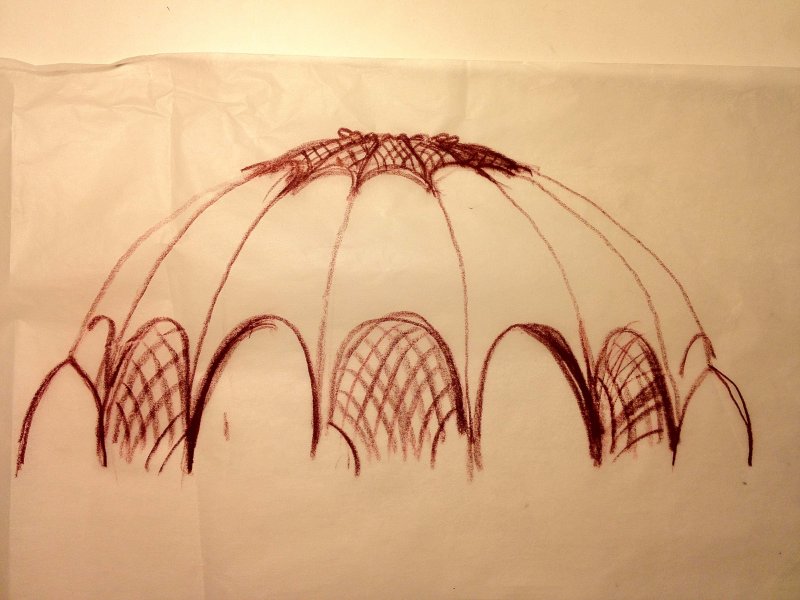
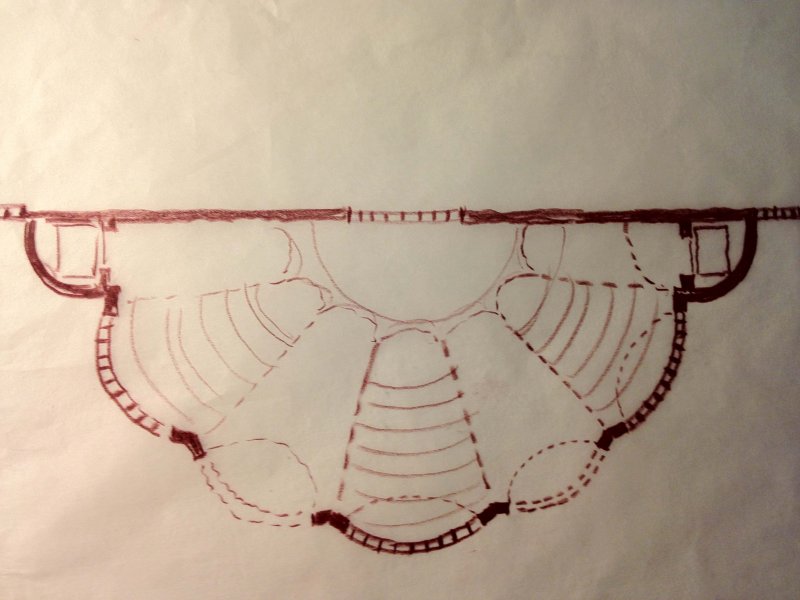
Hi everyone, Im an architecture student and have some experience with modeling in 3d AutoCad and very minimal experience with revit and 3ds max. I need to model this structure and I'm having a tough time trying to figure out how to go about doing that. It is supposed to be an outdoors performance space that is covered by this shell like structure. It's composed of concrete ribs meeting at a point but only in a semicircular shape. The webbing inbetween the ribs have catenary curved arched openings with some of those openings having a lattice structure inside. The top of this hemispheric dome is supposed to be a sort of skylight with mullion work and glass. Here are some sketches of what I had in mind: Now I started to model it in 3D Cad since that's what I know best but this is a very complicated curved structure where curves dont just happen on one axis but 2 or 3. I was able to somewhat create the ribs but i have no clue how to actually create the shell webbing in between and then cut out the catenary curved arches with lattice work or the skylight component for that matter. If anyone could help me out on this i'd really appreciate it! If it is easier to do in 3ds max, then I am able to do that too, but I just need some guidance. I've attatched my attempt of this model with the corresponding floorplan. Performance test 3d.dwg
-

How to create a 4-panel slider that stacks to one side when open.
Beckya posted a topic in Architecture & ADT
I'm trying to figure out how to create a 3D door or window that will show 4 panels that will stack to one side -- sort of like the existing 3-panel slider, but with 4 panels. Hopefully, it will be able to be resized to fit a variety of openings. The client wants to show them partially opened in the rendered model, and to show accurately how they will stack in the thick wall in plan view Any ideas? Using Architecture 2010. -
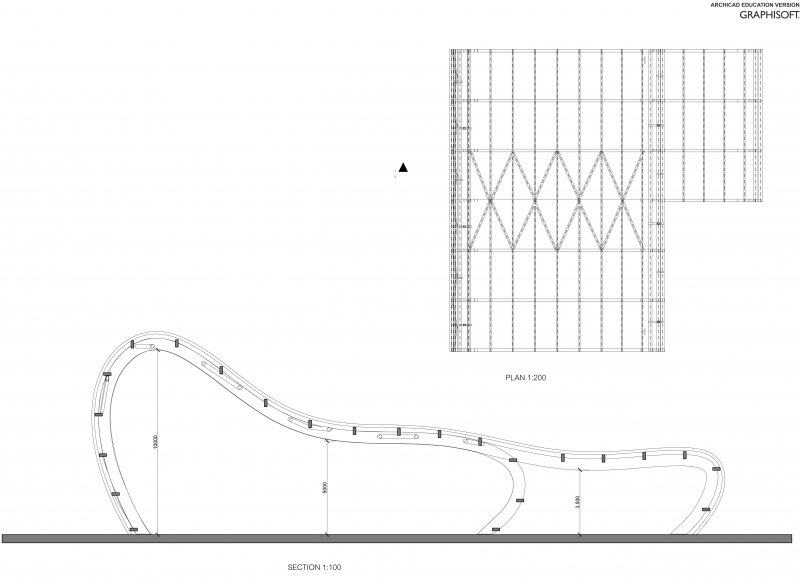
Hello, I am an architecture student. Would it be possible to draw curved frame like this in REVIT 2011 and how do I go about in drawing this? (Later on, i would need to apply cladding and other sorts of beam...) I tried to draw in elevation view using Wall or Column command (like i would in Rhino or Maya) but it wouldn't let me... Please help... Thankyou!~~*
-
Hi everyone. I'm escentially an absolute newbie on AutoCAD, and I've been assigned to edit a cad file about some buildings (changing all the lines, blocks, and stuff to color 8!) The issue is that the model itself is all about blocks. The first block is, well, everything; inside it are like 15+ more blocks, and so on and on. So the question is... how can I change de color of all the objects, like real quick, without having to edit every object on the Block Editor!! Thanks in advance, and sorry any mistake (being this my first post in this forum, and also, not being english my native tongue) Oh... btw, I'm working on AutoCAD 2011 LT