

 From: AutoCAD Productivity Articles #95
Originally published: November 2010
A2011 Ribbon Cycling Button
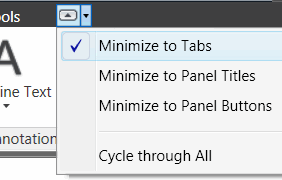 In AutoCAD 2011, at the end of the Ribbon tabs, there's a tiny Minimize button with an even tinier dropdown arrow containing a list of minimize options. Here's how these two tiny arrows work together…
From the option dropdown, select the desired Ribbon display.
Now click the Minimize arrow to toggle between the full Ribbon display and your selected option.
Very clever.
See all the articles published in November 2010
See this article in the November 2010 Corner
Donate to CADTutor
If you found this article useful, you might like to consider making a donation. All content on this site is provided free of charge and we hope to keep it that way. However, running a site like CADTutor does cost money and you can help to improve the service and to guarantee its future by donating a small amount. We guess that you probably wouldn't miss $5.00 but it would make all the difference to us.
Note from Michael: I want to thank all of my customers for continuing to retain my training services (some for over three decades!) and let you know your donations do not go to me personally, but to the ongoing maintenance of the CADTutor ship as a whole and to support the yeoman efforts of my friend and CADTutor captain, David Watson, to whom I am grateful for this monthly opportunity to share a few AutoCAD insights.


