

 From: AutoCAD Productivity Articles #99
Originally published: March 2011
Xref Layer Insights
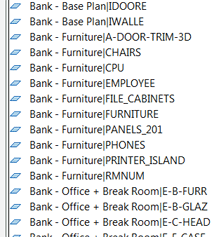 External references can, admittedly, be quite difficult to understand, but I wanted to present a few insights regarding layers that may clarify some issues.
Insights
The layer name of an Xref is preceded by the Xref drawing name. A vertical ‘pipe’ character separates the name of the Xref from the name of the layer in the Xref, as you see in the image.
If you change the visibility of an Xref layer - On/Off/Freeze/Thaw - to make sure it will show up that way the next time you open the ‘host’ drawing, go to Options
 Open and Save tab, then be sure the box is checked for Retain Changes to Xref Layers. This is the same as setting the variable VISRETAIN to <1>.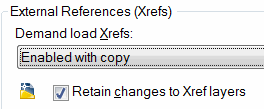
-
When you bind an Xref (right-click on the drawing in the External References Manager, then click Bind), you ‘sever’ the link between the host and the externally referenced drawing. After binding an Xref, that drawing now physically ‘lives’ in the host drawing as a block.
Quandary… Since the drawing/block is no longer external, the layer prefix of the drawing name - per item A, above - is no longer necessary. However, if you eliminate the drawing name prefix, and if there's a layer in the host called 'Dims' and a layer in the (former) Xref called 'Dims' how does AutoCAD resolve the layer naming conflict?
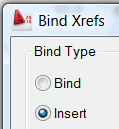 When you Bind the Xref you will see the Bind Xrefs dialog box. The default type named Bind will automatically replace the vertical 'pipe' with the characters $0$, regardless of any potential layer naming conflicts.
If, however, you opt for the Insert type, AutoCAD will check to see if there would be any layer naming conflicts and if not, it just strips off the prefix. If there are conflicts, it includes the $0$ character set; in other words, it's the smart mode of binding.
Hope that helps!
See all the articles published in March 2011
See this article in the March 2011 Corner
Donate to CADTutor
If you found this article useful, you might like to consider making a donation. All content on this site is provided free of charge and we hope to keep it that way. However, running a site like CADTutor does cost money and you can help to improve the service and to guarantee its future by donating a small amount. We guess that you probably wouldn't miss $5.00 but it would make all the difference to us.
Note from Michael: I want to thank all of my customers for continuing to retain my training services (some for over three decades!) and let you know your donations do not go to me personally, but to the ongoing maintenance of the CADTutor ship as a whole and to support the yeoman efforts of my friend and CADTutor captain, David Watson, to whom I am grateful for this monthly opportunity to share a few AutoCAD insights.


